

HostileMobSpawning
Show lighting levels in Minecraft for monsters to spawn
Автор: YggdrasziI8,6 тыс.4обновлён 29 дек. 2023 г.
entitiesenvironmentgui
Описание
To work this pack do need Optifine
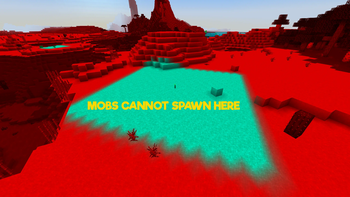
This Resource Pack will change Minecraft's lighting to show where monsters can and can't spawn. Don't forget to enable "Custom Color" in Video Settings > Quality > Custom Colors: ON (You may need to restart the game.)
In 1.18+ mobs only spawn at a light level of 0
| RED | BLUE |
|---|---|
| All monsters can spawn here | All mobs that rely on light levels cannot spawn here |
RED = Dangerous: All monsters can spawn here.
BLUE = Very Safe: All mobs that rely on light levels cannot spawn here.
With Optifine change the option "smooth lightning" to off for more precision
Галерея
Последние версии
Все версии →release
HMS 1.20.4 Optifine
V229 дек. 2023 г.6,4 тыс.Minecraft: 1.20.4minecraft
release
HMS 1.20.2 Optifine
V229 дек. 2023 г.134Minecraft: 1.20.2minecraft
release
HMS 1.20.0-1 Optifine
V215 дек. 2023 г.1,6 тыс.Minecraft: 1.20, 1.20.1minecraft
release
HMS 1.19.4 Optifine
V215 дек. 2023 г.105Minecraft: 1.19.4minecraft
release
HMS 1.19.3 Optifine
V215 дек. 2023 г.73Minecraft: 1.19.3minecraft
release
HMS 1.19.0-2 Optifine
V215 дек. 2023 г.153Minecraft: 1.19, 1.19.1, 1.19.2minecraft
release
HMS 1.18.0-2 Optifine
V215 дек. 2023 г.187Minecraft: 1.18, 1.18.1, 1.18.2minecraft