COWMODSКаталог модов

HDSkins

Wear a high resolution HD skin up to 2048x2048 instead of 64x64 and see the HD skins of other players on any server. Client side only, no server plugin needed.

Автор: Lvkas_12,9 тыс.41обновлён 15 окт. 2026 г.
ДекорОбщениеУтилиты

Описание

Minecraft skins with up to 2048x2048 pixels instead of 64x64. Upload your HD skin once, and everyone with HDSkins sees it on any server.
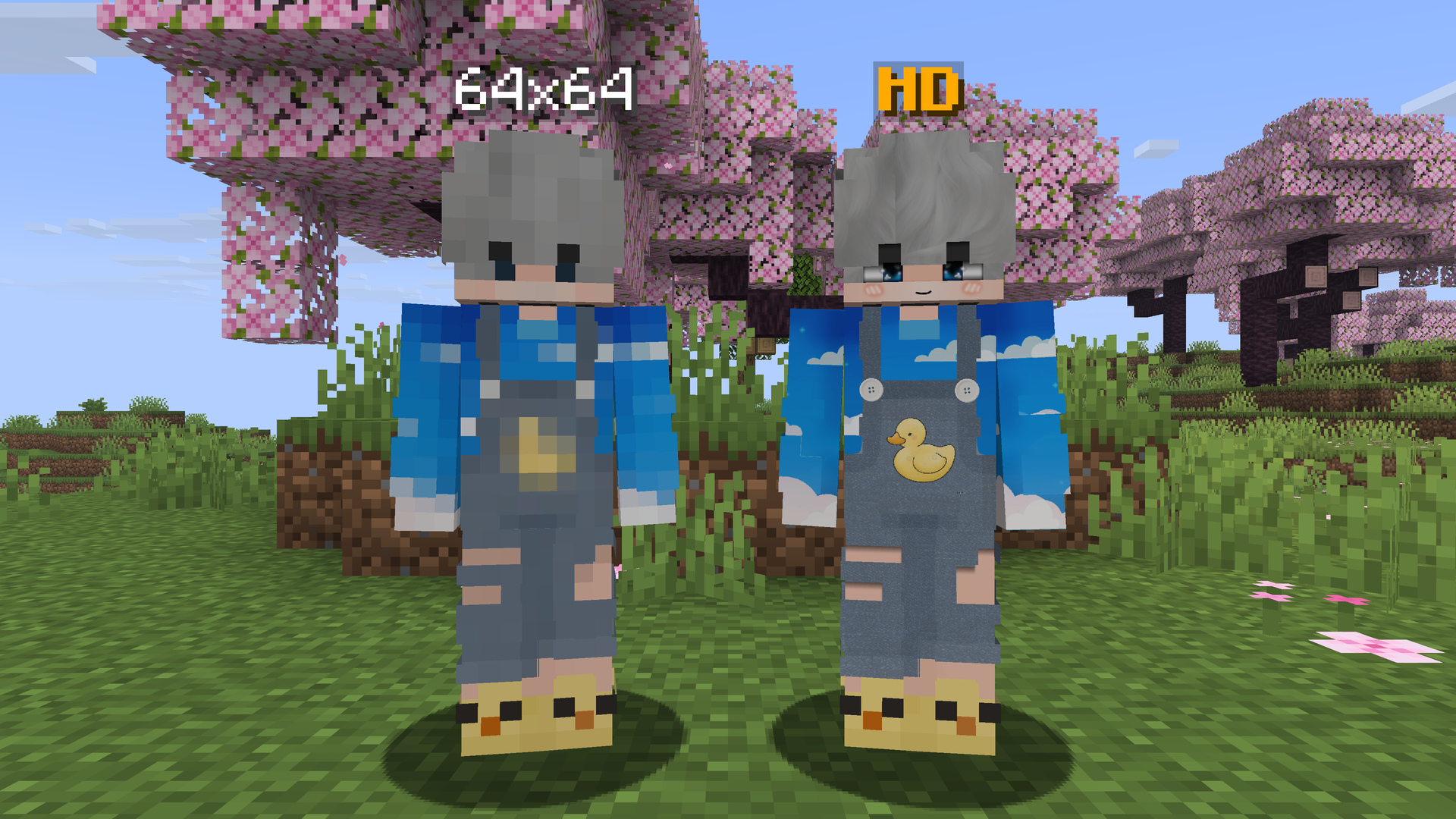
A normal 64x64 skin next to the same skin in HD

What is HDSkins?

A normal Minecraft skin has 64x64 pixels. With HDSkins your skin can have up to 2048x2048 pixels, 32 times the resolution on each side. Faces, hair, clothes and small details stay sharp instead of turning into big blocks.

You upload your skin on hdskins.de, and the mod shows it in game: on any multiplayer server and in singleplayer. Classic and slim arms are both supported.

You see theirs, they see yours

HDSkins is a shared network. This Fabric mod and the HDSkins addon for LabyMod use the same backend, so:

  • you see the HD skins of every player around you who uses HDSkins, on Fabric or on LabyMod,
  • they see your HD skin,
  • players without HDSkins see your normal Minecraft skin, so nothing breaks for them.

No server plugin is needed. Everything happens on the client, so HDSkins works on every server. More than 300,000 players have registered on HDSkins so far, and over 15,000 of them wear an HD skin.
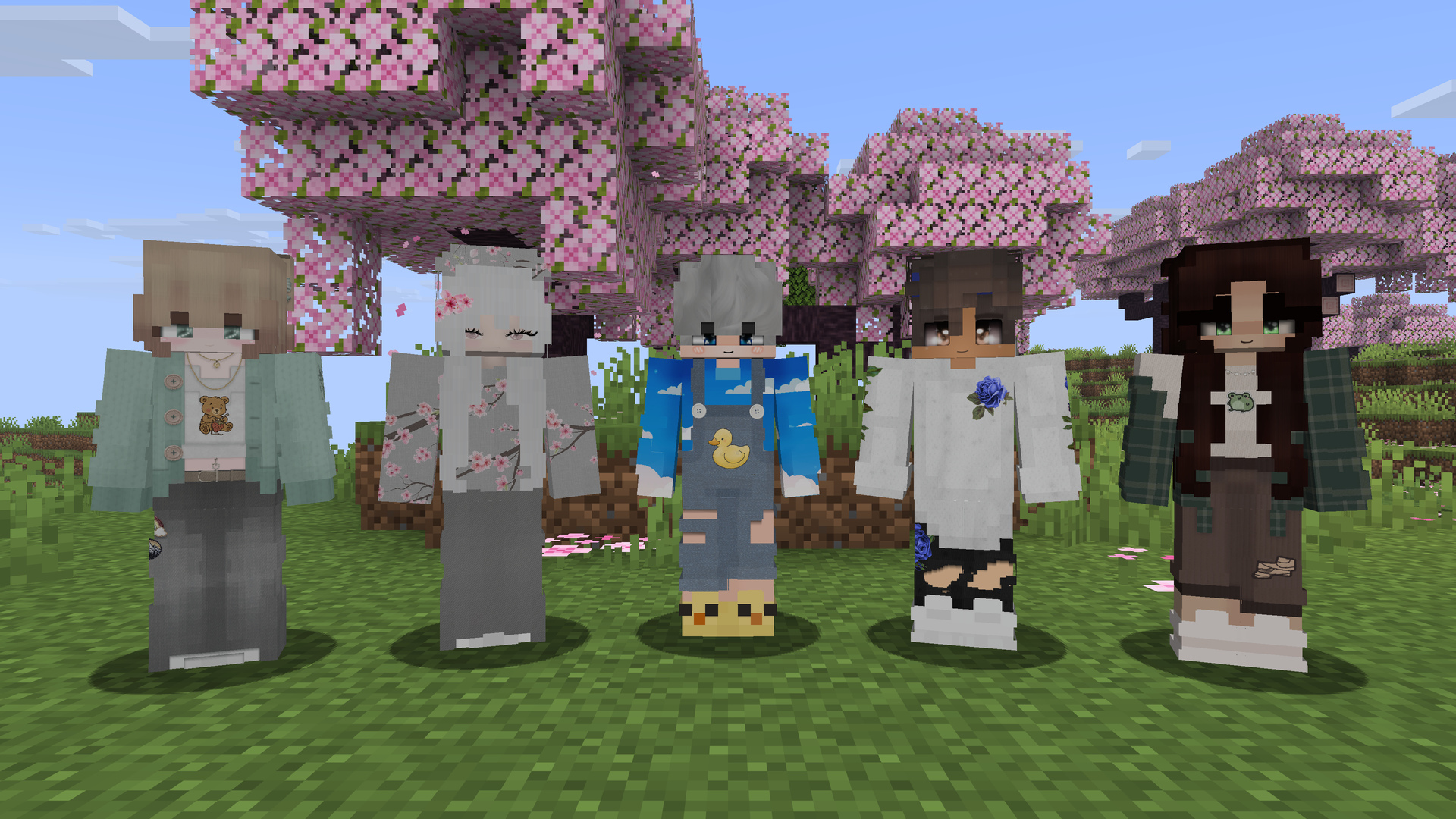
Players with HD skins in a Minecraft world

Getting started

  1. Install HDSkins and Fabric API, then start Minecraft. HDSkins logs in with your Minecraft account automatically, there is nothing to register.
  2. Open HDSkins with the HD icon in the title screen or the pause menu.

    Tip: If a mod or client replaces the vanilla menus with its own screens, the HD icon may be missing. Just type /hdskins in chat.

  3. Upload your skin: click Open dashboard (upload your skin). Your browser opens the HDSkins dashboard, already logged in. Upload your PNG, and it shows up in game.
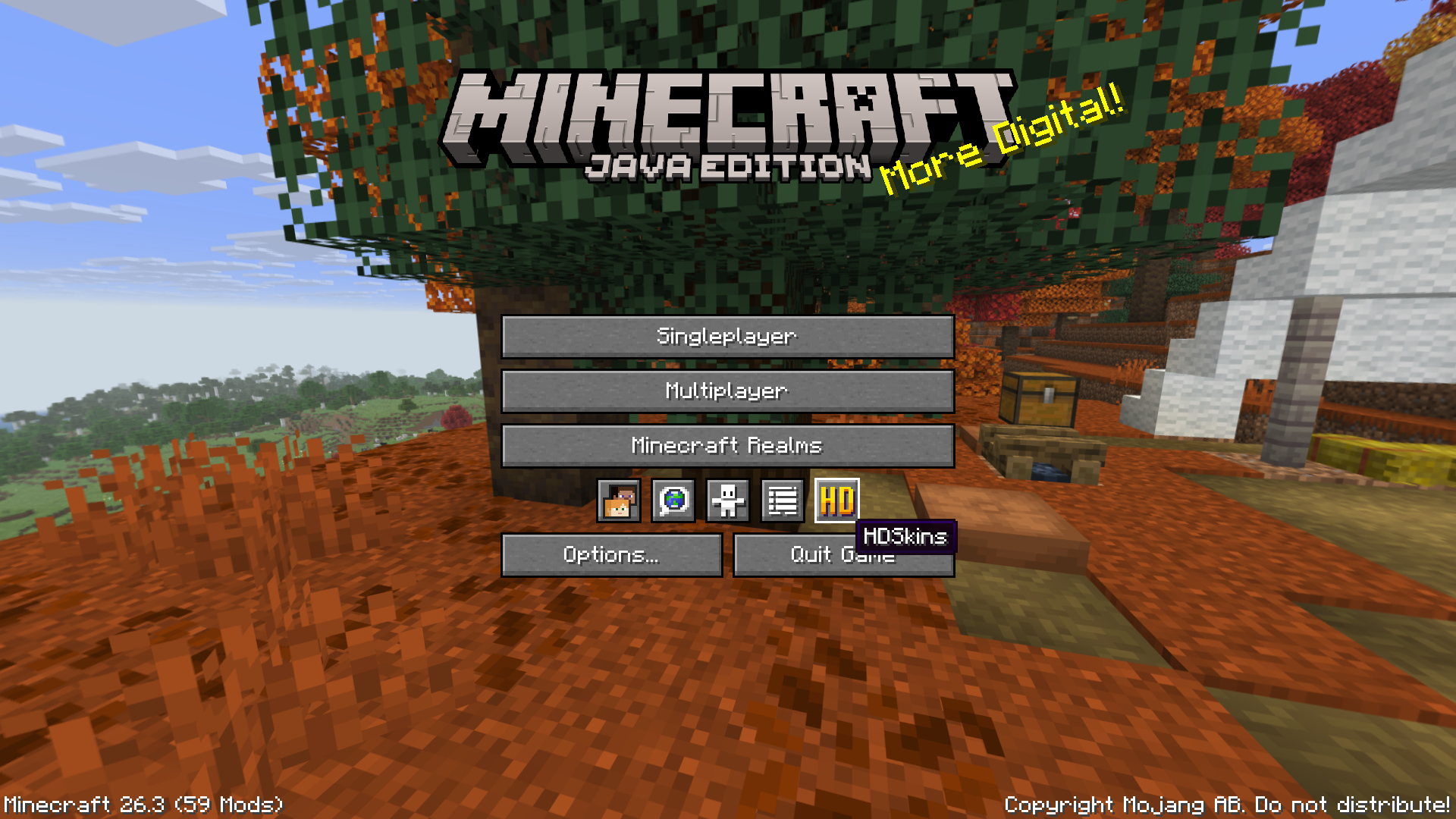
The HD icon in the title screen

No skin yet? Browse the skin gallery or ask the community on Discord.
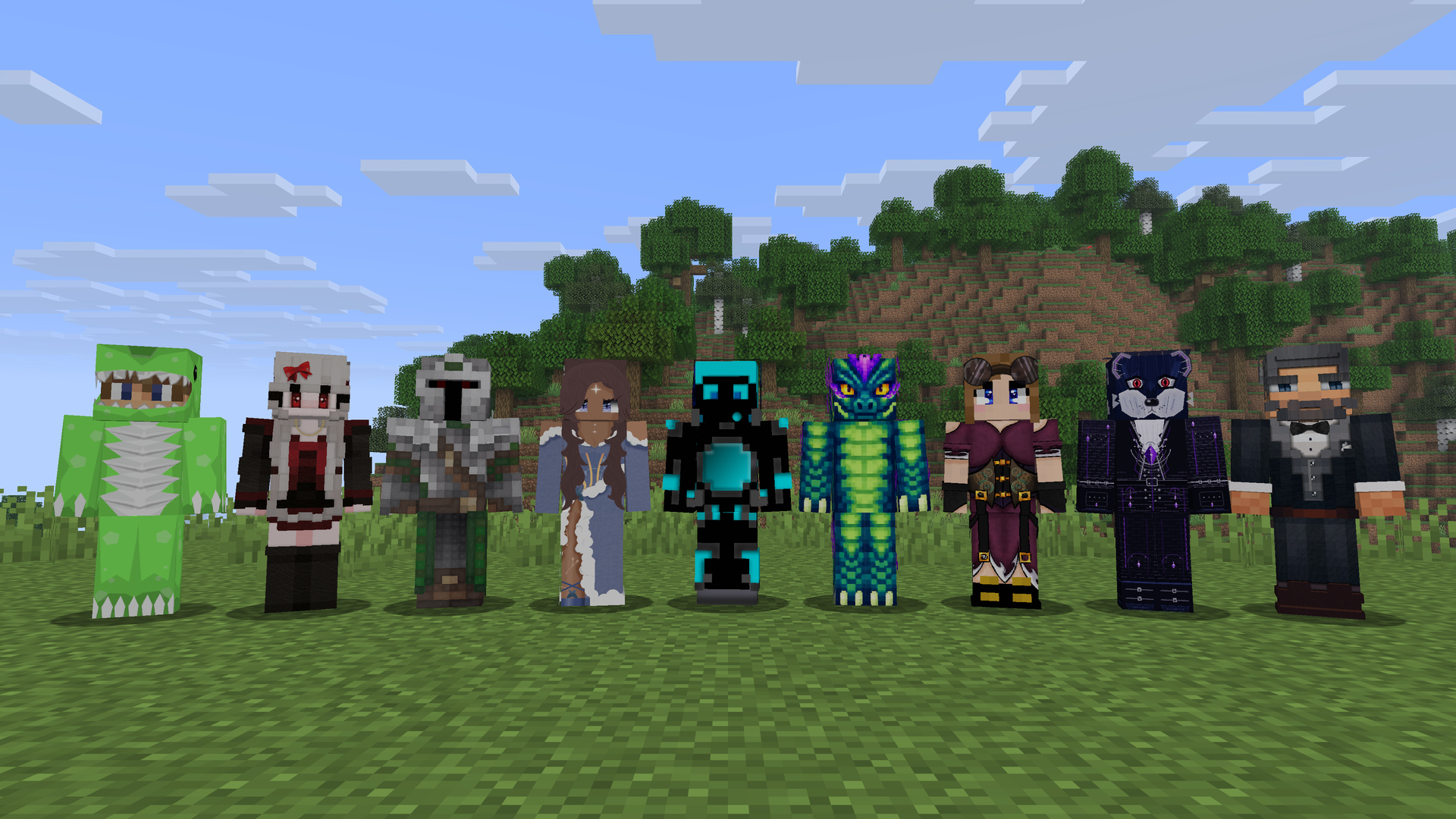
Nine very different HD skins side by side

Features

  • HD skins from 128x128 up to 2048x2048 pixels, with classic or slim arms
  • Skin changes show up live, without rejoining the server
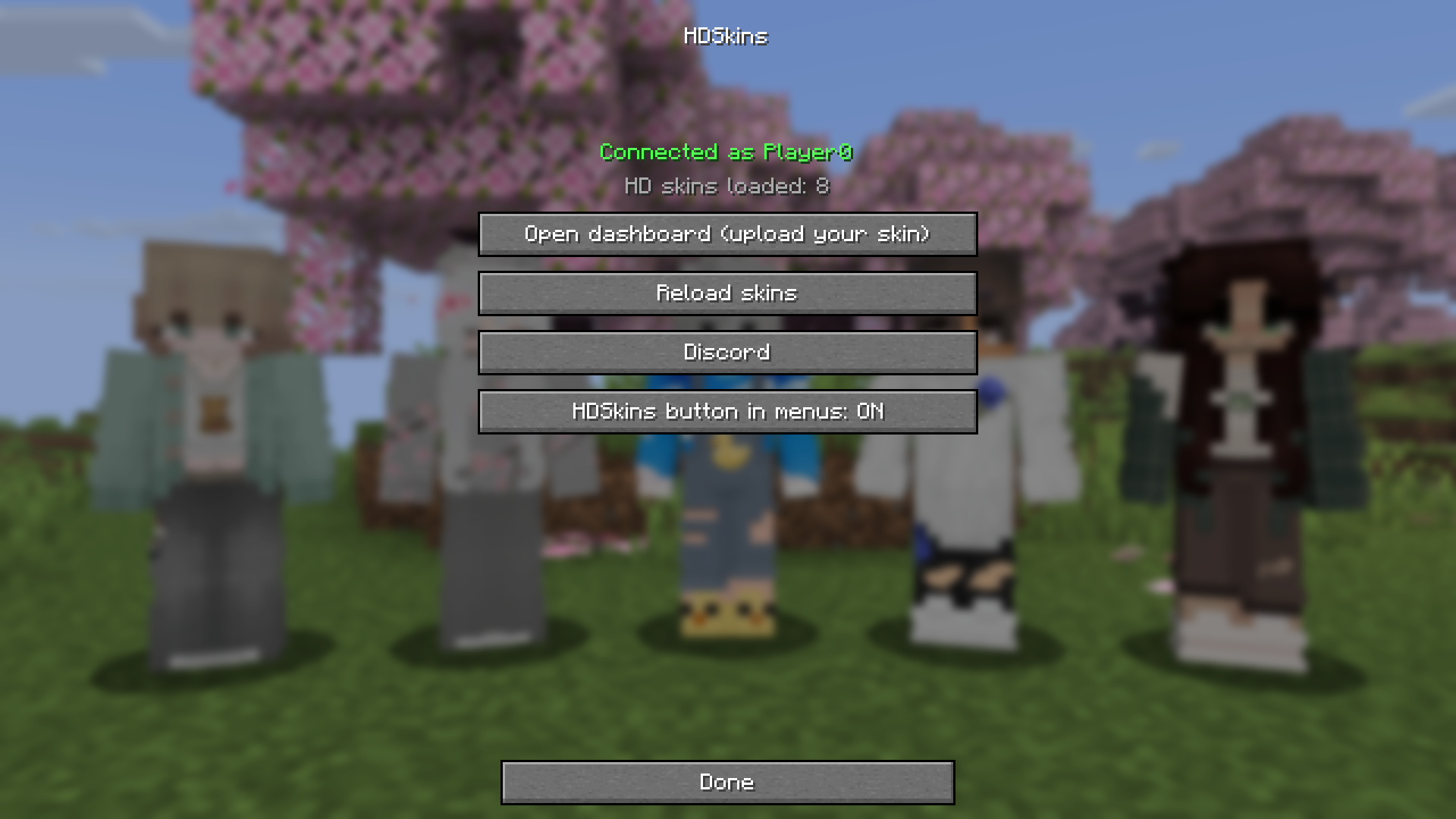
  • HDSkins screen with your connection status ("Connected as YourName"), the number of loaded HD skins, one-click login to the dashboard, Reload skins and a Discord button
  • Connects in the background, so the game never waits for HDSkins while starting
  • Reconnects on its own after a connection loss or when you switch Minecraft accounts
  • English and German translation
  • Client side only

The HDSkins screen

Compatibility

  • Minecraft: pick the file for your Minecraft version in the Versions tab. All files have the same features.
  • Loader: Fabric.
  • Required: Fabric API. No other mod is required.
  • Optional: Mod Menu. Its Configure button opens the HDSkins screen.
  • Servers: nothing to install, HDSkins runs only on the client.
  • Mods and clients that replace the menus (custom main menus, menu overhaul mods such as FancyMenu, or clients like Lunar Client): the HD icon may be missing there. Type /hdskins in chat, that always works.
  • 3D Skin Layers: according to its own FAQ, it does not support HD skins.

FAQ

Do other players need HDSkins to see my skin?
Yes. Players with HDSkins (this mod or the LabyMod addon) see your HD skin. Everyone else sees your normal Minecraft skin.

Does the server need a plugin?
No. HDSkins runs only on the client and works on every server and in singleplayer.

Which skin sizes can I upload?
PNG skins from 128x128 up to 2048x2048 pixels, with the side length a power of two (128, 256, 512, 1024 or 2048). 1024x1024 is the usual HD size, files can be up to 2 MB. Details are in the upload guidelines.

Is HDSkins free?
Yes. Uploading your HD skin and seeing other HD skins is free. The optional HDSkins Premium on the website adds extras, such as up to six skin profiles, private skins and larger files.

Which file do I need?
The one that matches your Minecraft version. The Modrinth App and most launchers pick it for you.

My Minecraft version is not listed.
Then there is no HDSkins file for it yet. Ask on Discord.

A mod or client replaces my menus and I can't find the HD icon. How do I open HDSkins?
Type /hdskins in chat, or /hdskins dashboard to go straight to the upload page.

I changed my skin, but I still see the old one.
Changes usually appear live. If not, open HDSkins and click Reload skins.

Does HDSkins work with account switchers?
Yes. When you switch accounts, HDSkins logs in again with the new account automatically.

Links

Последние версии

Все версии →
release

HDSkins 2.0.0 for Minecraft 1.15.2

2.0.0+1.15.2
15 окт. 2026 г.42Minecraft: 1.15.2fabric
Скачать
Что нового
- New HDSkins screen: see your connection status and how many HD skins are loaded, open the dashboard to upload your skin, reload all skins or join our Discord. - Open it with the HD icon in the title screen and pause menu, from Options > Skin Customization, from Mod Menu, with `/hdskins` or with a key binding you can set in the controls. `/hdskins dashboard` opens the dashboard right away. - The menu icon never covers other buttons and can be hidden in the HDSkins screen. - Switching your Minecraft account while the game is running now logs you in to HDSkins with the new account. - Lower memory use: HD skins that are no longer shown are freed when you reload skins or leave a server. - Fixed some skins not loading. - English and German translations. - Works without any other skin mod. Only Fabric API is required, Mod Menu is optional.
release

HDSkins 2.0.0 for Minecraft 1.16.5

2.0.0+1.16.5
15 окт. 2026 г.28Minecraft: 1.16.5fabric
Скачать
Что нового
- New HDSkins screen: see your connection status and how many HD skins are loaded, open the dashboard to upload your skin, reload all skins or join our Discord. - Open it with the HD icon in the title screen and pause menu, from Options > Skin Customization, from Mod Menu, with `/hdskins` or with a key binding you can set in the controls. `/hdskins dashboard` opens the dashboard right away. - The menu icon never covers other buttons and can be hidden in the HDSkins screen. - Switching your Minecraft account while the game is running now logs you in to HDSkins with the new account. - Lower memory use: HD skins that are no longer shown are freed when you reload skins or leave a server. - Fixed some skins not loading. - English and German translations. - Works without any other skin mod. Only Fabric API is required, Mod Menu is optional.
release

HDSkins 2.0.0 for Minecraft 1.17.1

2.0.0+1.17.1
15 окт. 2026 г.27Minecraft: 1.17.1fabric
Скачать
Что нового
- New HDSkins screen: see your connection status and how many HD skins are loaded, open the dashboard to upload your skin, reload all skins or join our Discord. - Open it with the HD icon in the title screen and pause menu, from Options > Skin Customization, from Mod Menu, with `/hdskins` or with a key binding you can set in the controls. `/hdskins dashboard` opens the dashboard right away. - The menu icon never covers other buttons and can be hidden in the HDSkins screen. - Switching your Minecraft account while the game is running now logs you in to HDSkins with the new account. - Lower memory use: HD skins that are no longer shown are freed when you reload skins or leave a server. - Fixed some skins not loading. - English and German translations. - Works without any other skin mod. Only Fabric API is required, Mod Menu is optional.
release

HDSkins 2.0.0 for Minecraft 1.18.2

2.0.0+1.18.2
15 окт. 2026 г.18Minecraft: 1.18.2fabric
Скачать
Что нового
- New HDSkins screen: see your connection status and how many HD skins are loaded, open the dashboard to upload your skin, reload all skins or join our Discord. - Open it with the HD icon in the title screen and pause menu, from Options > Skin Customization, from Mod Menu, with `/hdskins` or with a key binding you can set in the controls. `/hdskins dashboard` opens the dashboard right away. - The menu icon never covers other buttons and can be hidden in the HDSkins screen. - Switching your Minecraft account while the game is running now logs you in to HDSkins with the new account. - Lower memory use: HD skins that are no longer shown are freed when you reload skins or leave a server. - Fixed some skins not loading. - English and German translations. - Works without any other skin mod. Only Fabric API is required, Mod Menu is optional.
release

HDSkins 2.0.0 for Minecraft 1.19.2

2.0.0+1.19.2
15 окт. 2026 г.14Minecraft: 1.19.2fabric
Скачать
Что нового
- New HDSkins screen: see your connection status and how many HD skins are loaded, open the dashboard to upload your skin, reload all skins or join our Discord. - Open it with the HD icon in the title screen and pause menu, from Options > Skin Customization, from Mod Menu, with `/hdskins` or with a key binding you can set in the controls. `/hdskins dashboard` opens the dashboard right away. - The menu icon never covers other buttons and can be hidden in the HDSkins screen. - Switching your Minecraft account while the game is running now logs you in to HDSkins with the new account. - Lower memory use: HD skins that are no longer shown are freed when you reload skins or leave a server. - Fixed some skins not loading. - English and German translations. - Works without any other skin mod. Only Fabric API is required, Mod Menu is optional.
release

HDSkins 2.0.0 for Minecraft 1.19.4

2.0.0+1.19.4
15 окт. 2026 г.14Minecraft: 1.19.4fabric
Скачать
Что нового
- New HDSkins screen: see your connection status and how many HD skins are loaded, open the dashboard to upload your skin, reload all skins or join our Discord. - Open it with the HD icon in the title screen and pause menu, from Options > Skin Customization, from Mod Menu, with `/hdskins` or with a key binding you can set in the controls. `/hdskins dashboard` opens the dashboard right away. - The menu icon never covers other buttons and can be hidden in the HDSkins screen. - Switching your Minecraft account while the game is running now logs you in to HDSkins with the new account. - Lower memory use: HD skins that are no longer shown are freed when you reload skins or leave a server. - Fixed some skins not loading. - English and German translations. - Works without any other skin mod. Only Fabric API is required, Mod Menu is optional.
release

HDSkins 2.0.0 for Minecraft 1.20 to 1.20.1

2.0.0+1.20.1
15 окт. 2026 г.94Minecraft: 1.20, 1.20.1fabric
Скачать
Что нового
- New HDSkins screen: see your connection status and how many HD skins are loaded, open the dashboard to upload your skin, reload all skins or join our Discord. - Open it with the HD icon in the title screen and pause menu, from Options > Skin Customization, from Mod Menu, with `/hdskins` or with a key binding you can set in the controls. `/hdskins dashboard` opens the dashboard right away. - The menu icon never covers other buttons and can be hidden in the HDSkins screen. - Switching your Minecraft account while the game is running now logs you in to HDSkins with the new account. - Lower memory use: HD skins that are no longer shown are freed when you reload skins or leave a server. - Fixed some skins not loading. - English and German translations. - Works without any other skin mod. Only Fabric API is required, Mod Menu is optional.
release

HDSkins 2.0.0 for Minecraft 1.20.3 to 1.20.4

2.0.0+1.20.4
15 окт. 2026 г.36Minecraft: 1.20.3, 1.20.4fabric
Скачать
Что нового
- New HDSkins screen: see your connection status and how many HD skins are loaded, open the dashboard to upload your skin, reload all skins or join our Discord. - Open it with the HD icon in the title screen and pause menu, from Options > Skin Customization, from Mod Menu, with `/hdskins` or with a key binding you can set in the controls. `/hdskins dashboard` opens the dashboard right away. - The menu icon never covers other buttons and can be hidden in the HDSkins screen. - Switching your Minecraft account while the game is running now logs you in to HDSkins with the new account. - Lower memory use: HD skins that are no longer shown are freed when you reload skins or leave a server. - Fixed some skins not loading. - English and German translations. - Works without any other skin mod. Only Fabric API is required, Mod Menu is optional.
release

HDSkins 2.0.0 for Minecraft 1.20.5 to 1.20.6

2.0.0+1.20.6
15 окт. 2026 г.18Minecraft: 1.20.5, 1.20.6fabric
Скачать
Что нового
- New HDSkins screen: see your connection status and how many HD skins are loaded, open the dashboard to upload your skin, reload all skins or join our Discord. - Open it with the HD icon in the title screen and pause menu, from Options > Skin Customization, from Mod Menu, with `/hdskins` or with a key binding you can set in the controls. `/hdskins dashboard` opens the dashboard right away. - The menu icon never covers other buttons and can be hidden in the HDSkins screen. - Switching your Minecraft account while the game is running now logs you in to HDSkins with the new account. - Lower memory use: HD skins that are no longer shown are freed when you reload skins or leave a server. - Fixed some skins not loading. - English and German translations. - Works without any other skin mod. Only Fabric API is required, Mod Menu is optional.
release

HDSkins 2.0.0 for Minecraft 1.21 to 1.21.1

2.0.0+1.21.1
15 окт. 2026 г.145Minecraft: 1.21, 1.21.1fabric
Скачать
Что нового
- New HDSkins screen: see your connection status and how many HD skins are loaded, open the dashboard to upload your skin, reload all skins or join our Discord. - Open it with the HD icon in the title screen and pause menu, from Options > Skin Customization, from Mod Menu, with `/hdskins` or with a key binding you can set in the controls. `/hdskins dashboard` opens the dashboard right away. - The menu icon never covers other buttons and can be hidden in the HDSkins screen. - Switching your Minecraft account while the game is running now logs you in to HDSkins with the new account. - Lower memory use: HD skins that are no longer shown are freed when you reload skins or leave a server. - Fixed some skins not loading. - English and German translations. - Works without any other skin mod. Only Fabric API is required, Mod Menu is optional.