COWMODSКаталог модов

Harmonize – UI Overhaul

Transform your interfaces into a work of art! Harmonize unifies all container menus, introduces a universal offhand slot, and polishes HUD elements for a seamless, visually stunning Minecraft experience.

Автор: shamy.creativestudio2,6 тыс.39обновлён 13 окт. 2026 г.
ДекорУправлениеУтилиты

Описание

✨ Harmonize

"A mod that unifies and enhances all Minecraft interfaces, making them consistent, polished, and pleasant to use."

Harmonize transforms your Minecraft GUI experience with a sleek, unified visual design. Every container interface—from crafting tables to enchanting stations—now features a consistent layout that perfectly aligns with your hotbar. No more jarring visual jumps between different workstations!

🧩 The heart of the Harmonize Collection. Harmonize is the main mod of a family built to share one look. Explore the mods made to plug right into this interface: Bridle, Ghastlings and Bannerstone. Each of them is optional and works on its own.


🎯 What does this mod do?

Ever noticed that Minecraft's menus feel… inconsistent? Different spacing, misaligned elements, and behaviors that vary from one menu to another. Harmonize fixes all of that.

Simple. Clean. Harmonized.


✨ Key Features

IconFeature Description
✨Standardized GUIs: Premium container interfaces with pixel-perfect alignment.
🎯Unified Positioning: Consistent hotbar and inventory slot placement across ALL workstations.
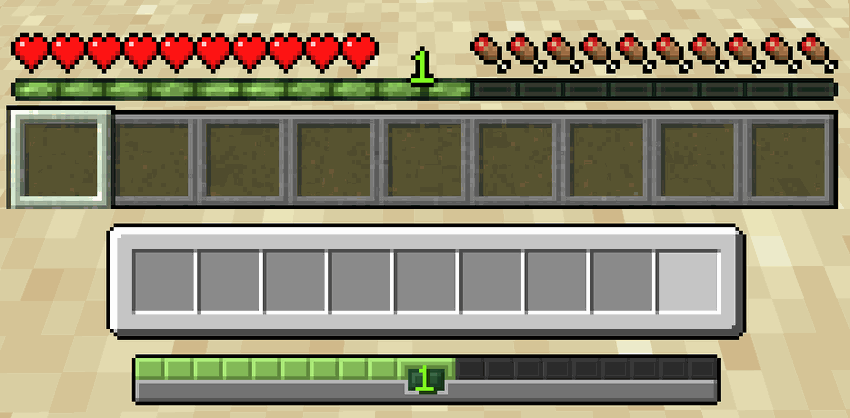
🎨Refined HUD: Custom hotbar sprites and XP bars with a modern, sleek aesthetic.
🖐️Universal Offhand & Trash: Offhand slot and convenient item trash bin accessible directly from every single container menu.
🎭Polished Interactions: Consistent hover feedback, tooltips, and button hitboxes.
💬Chat Inside Any Window: Type messages and commands without closing your inventory or container.
🧪Effect Bar: Active effects in a compact bar: white for helpful, red for harmful, blinking when about to end.
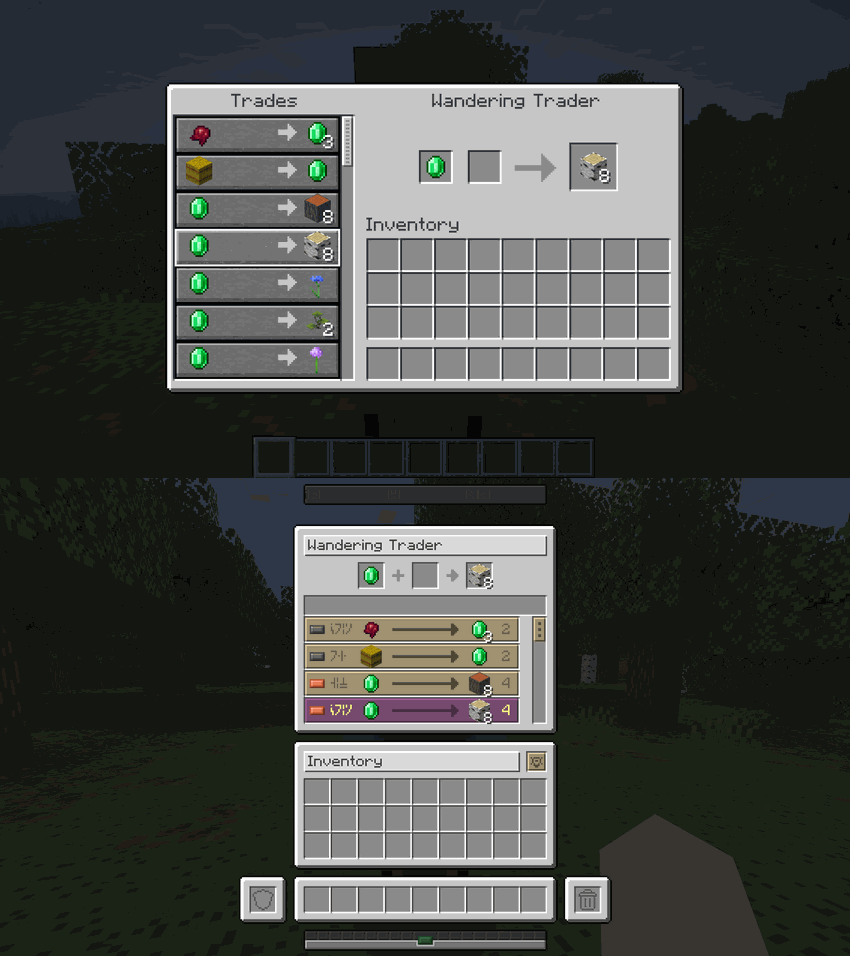
🔎Filters: Buy/Sell filters for villager trades and labeled filter buttons in the creative inventory.

🖐️ Core Elements & QoL Features

Experience the core quality-of-life additions, designed to streamline your gameplay and inventory actions:

Feature & Spacing DetailsComparison
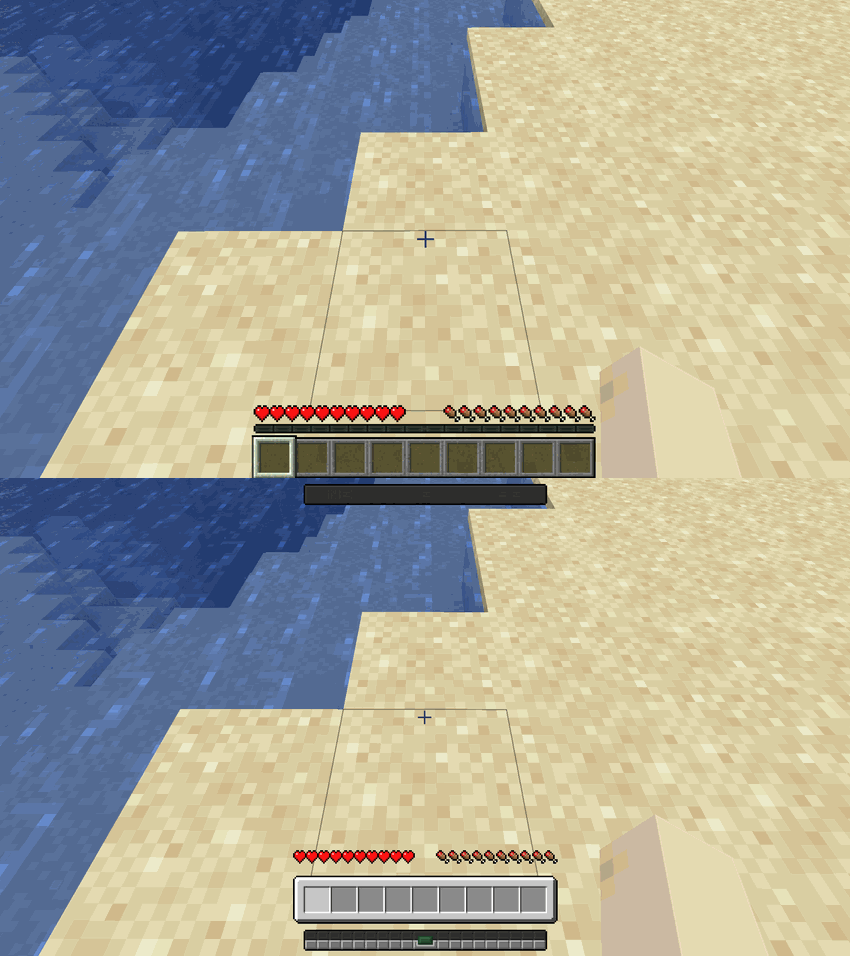
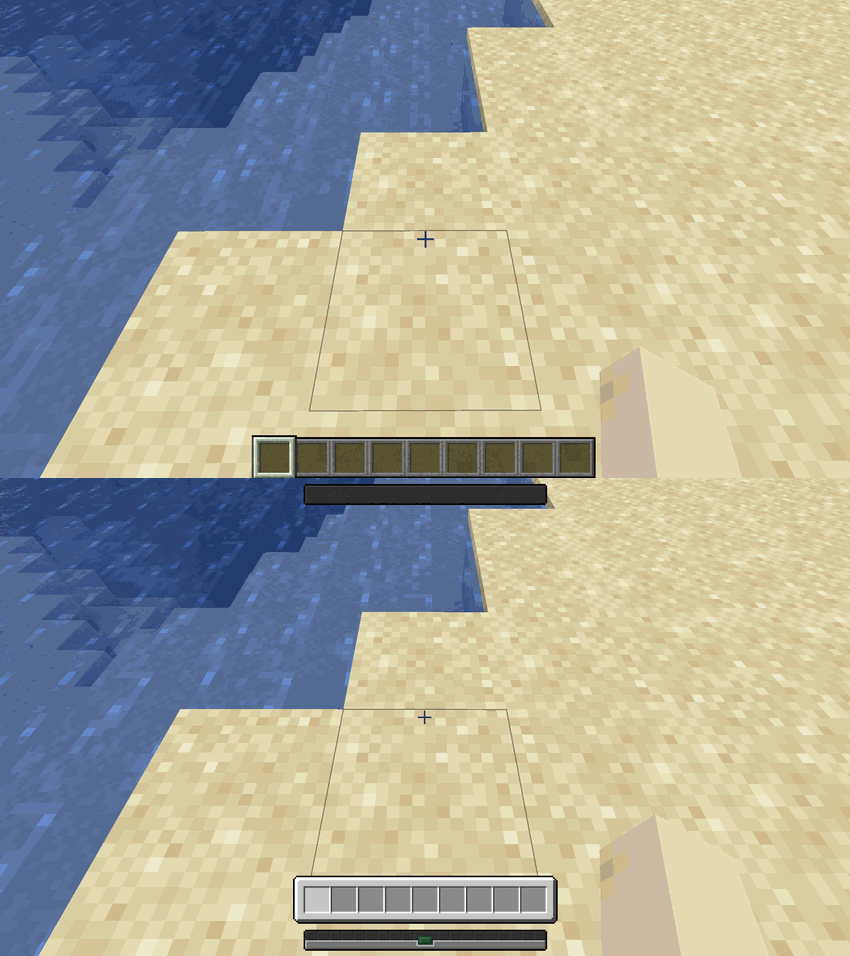
Hotbar & Trash Slot: Adds the universal offhand slot and the creative/survival trash slot directly to your active inventory interface.Hotbar and Trash Slot Comparison
XP & Exhaustion Bar: Custom-styled experience bar that integrates cleanly with the new visual layout.XP and Exhaustion Bar Comparison
Search & Locator Bar: Aligns and matches the styling of text boxes and search bars across all GUI menus.Search and Locator Bar Comparison
Chat Input Bar: Sleek, centered chat input bar matching the visual identity of the hotbar.Chat Input Bar Comparison

🎒 Player Inventory Overhaul

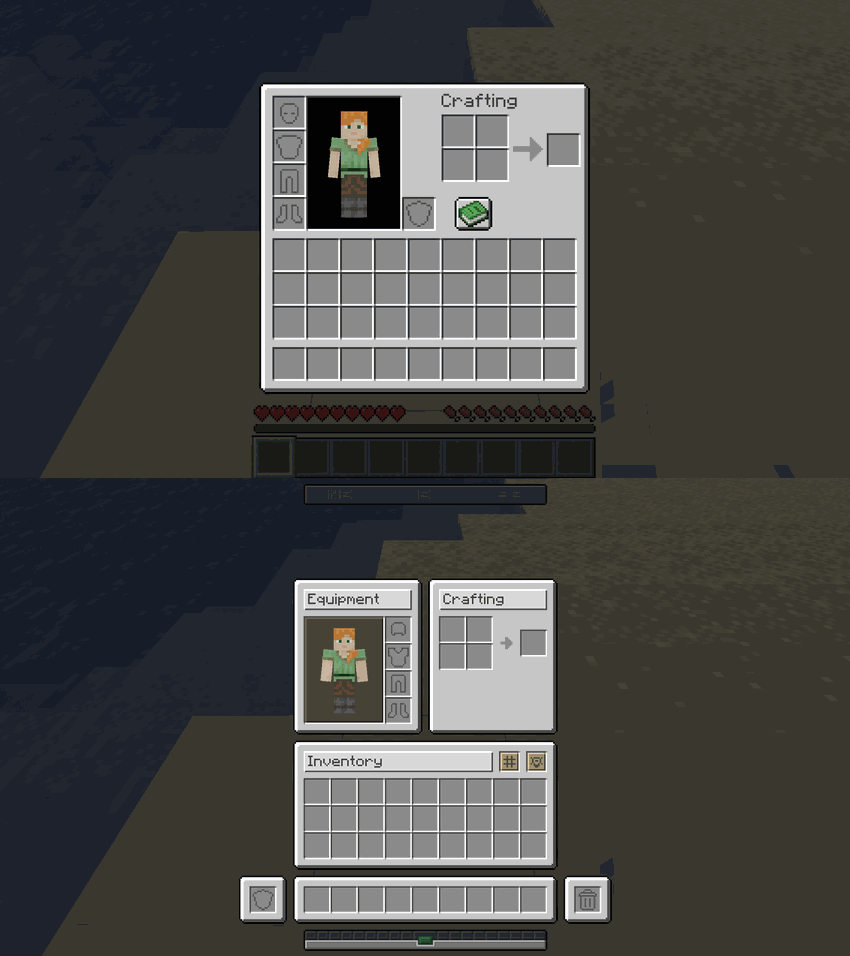
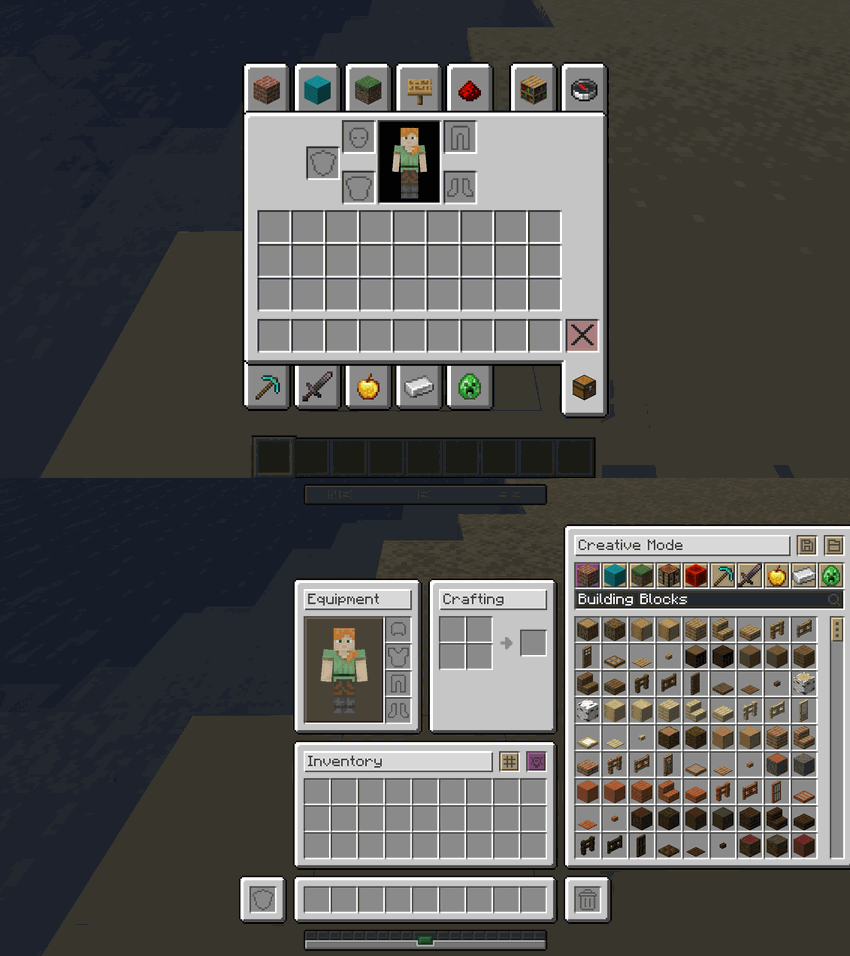
Harmonize unifies the survival inventory, recipe books, and creative mode into a seamless, single-screen experience. No more switching screens to navigate your creative blocks or recipes:

Survival InventoryCreative Inventory
Survival Inventory ComparisonCreative Inventory Comparison

🔄 Interactive Mod Interface States

Watch how the survival inventory, recipe books, and creative tabs adapt dynamically on the fly within the same window:
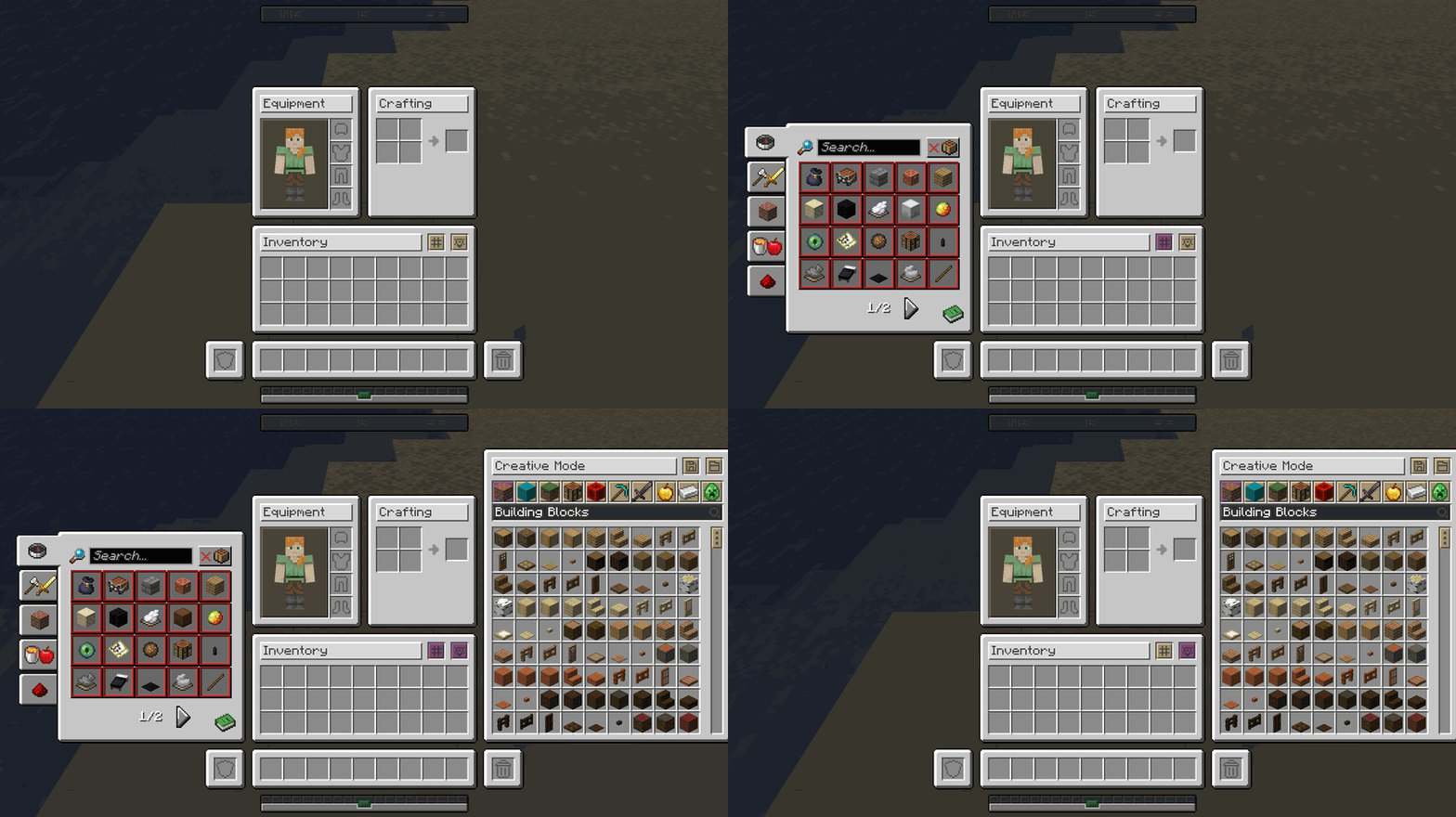
Interactive Mod Interface States Adaptive Demonstration


📦 Container & Workstation Overhauls

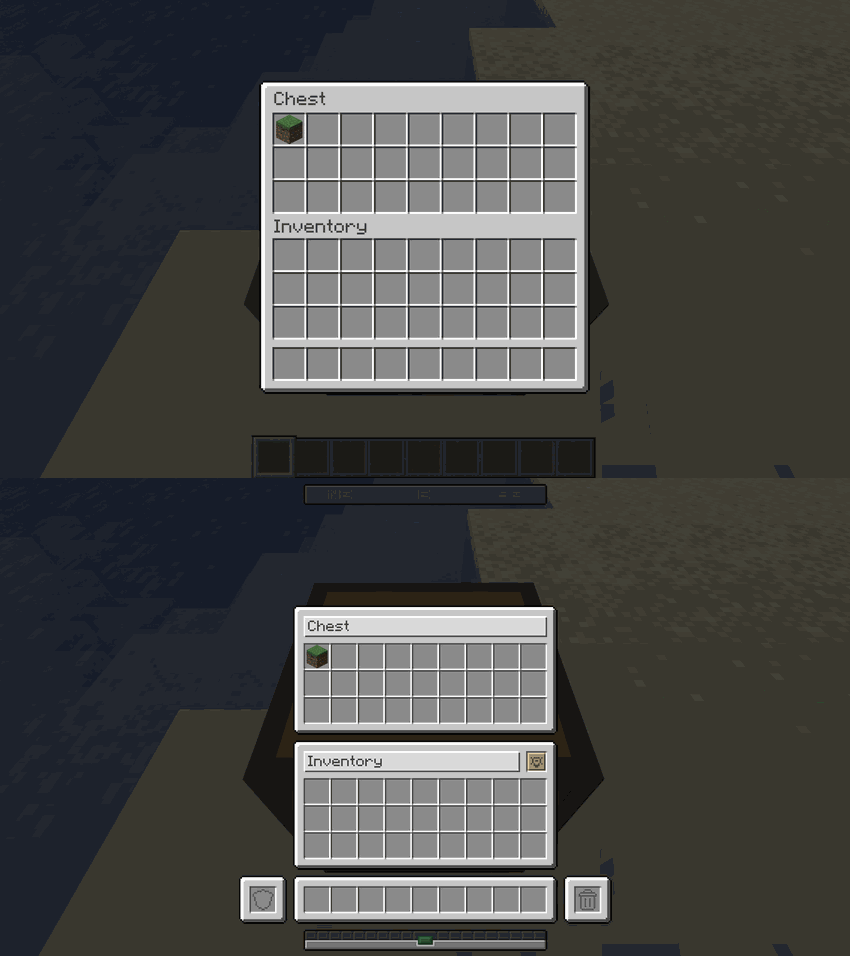
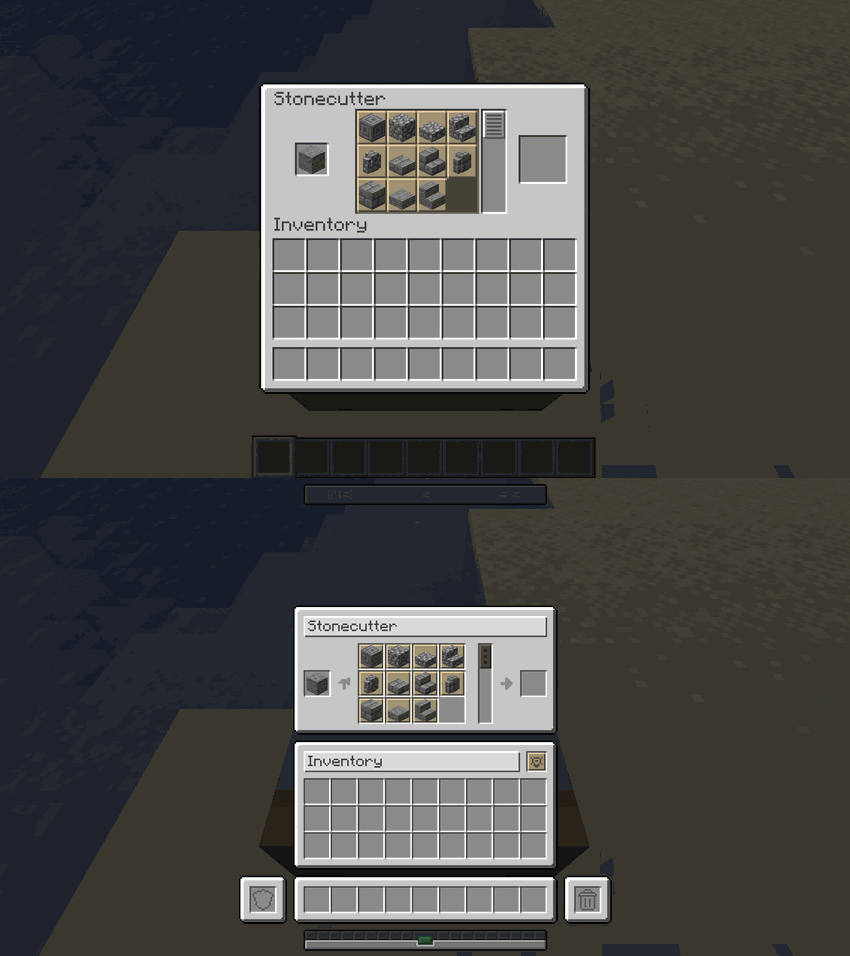
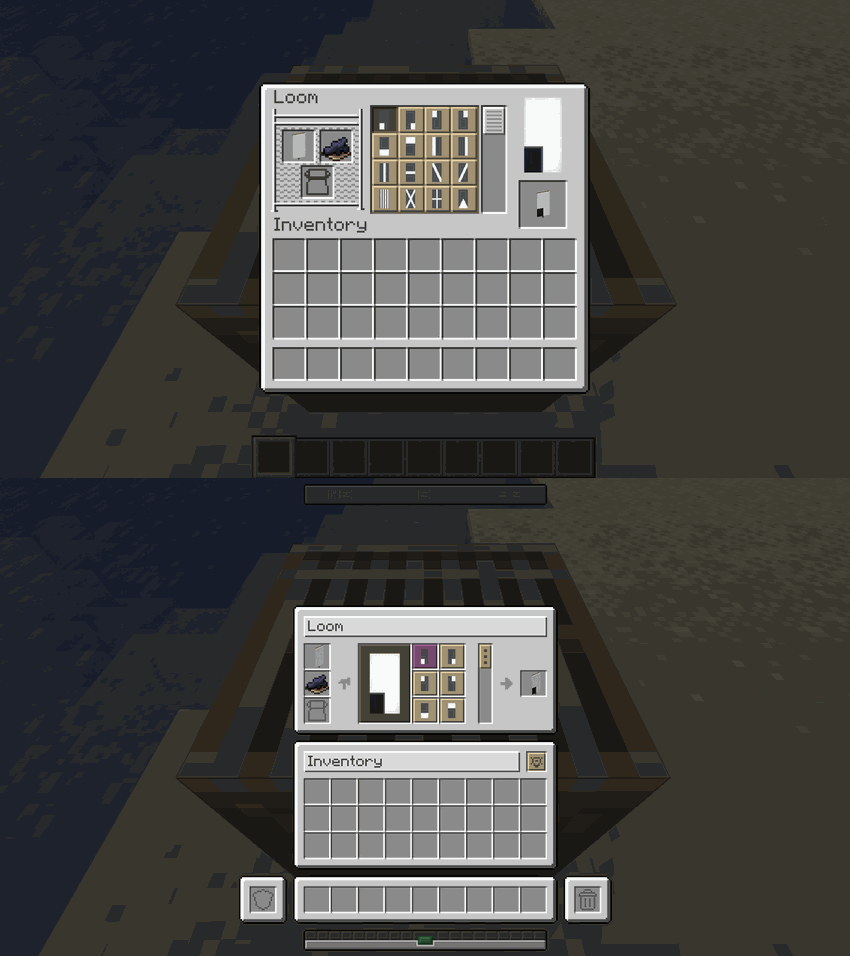
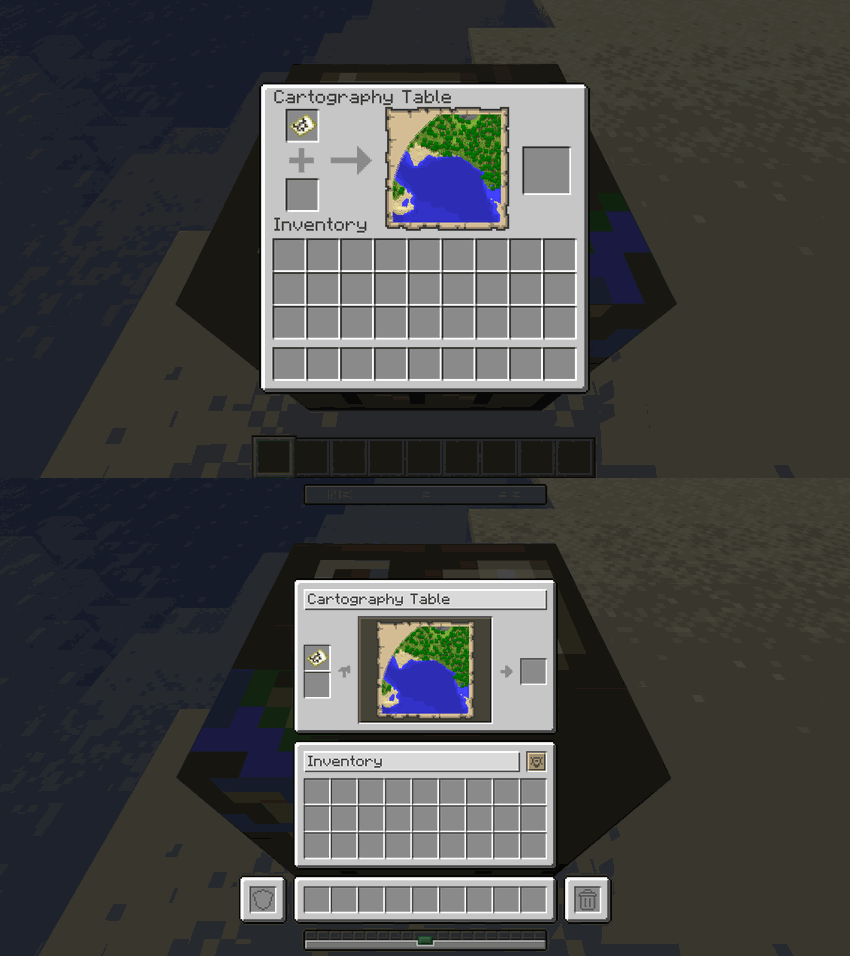
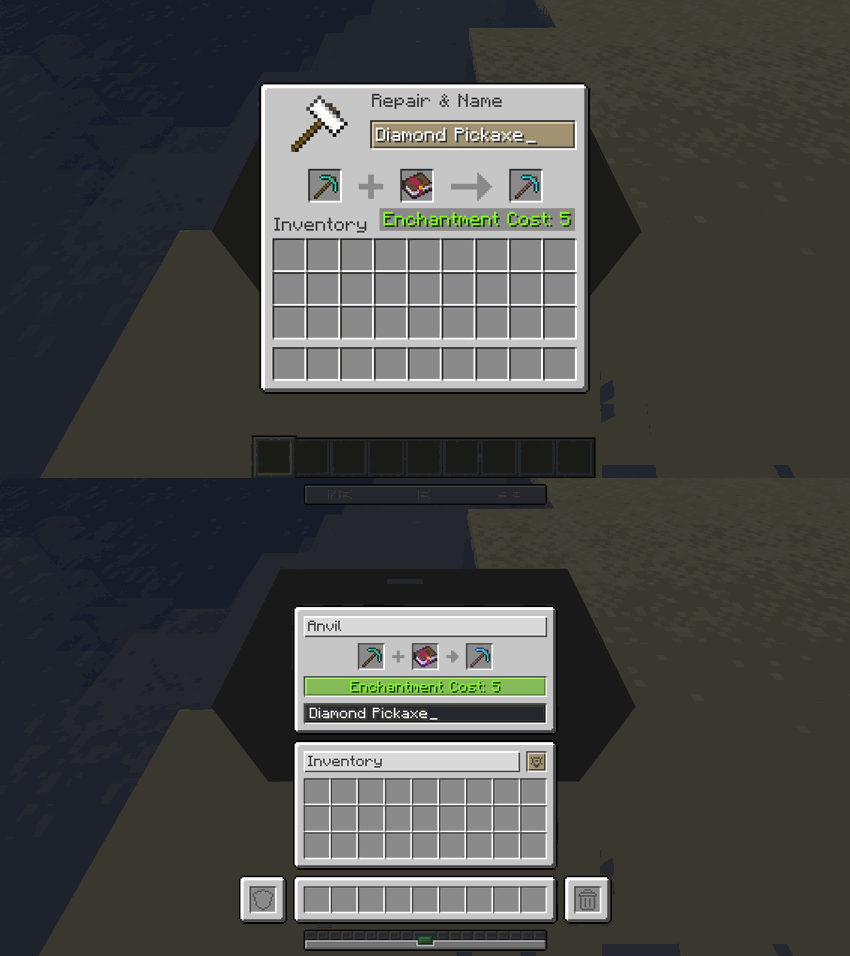
Below are the visual transitions showing exactly how every single container in the game has been updated to fit the new design:

📦 Storage Containers

ContainerComparison
ChestChest Interface Comparison
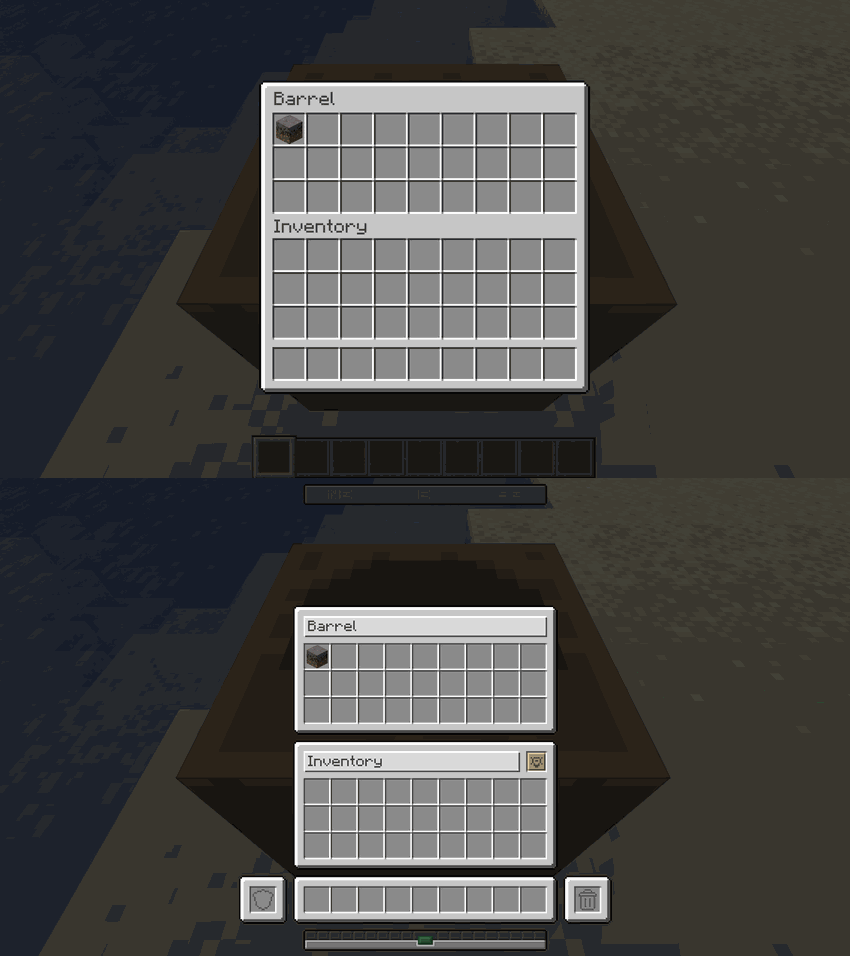
BarrelBarrel Interface Comparison
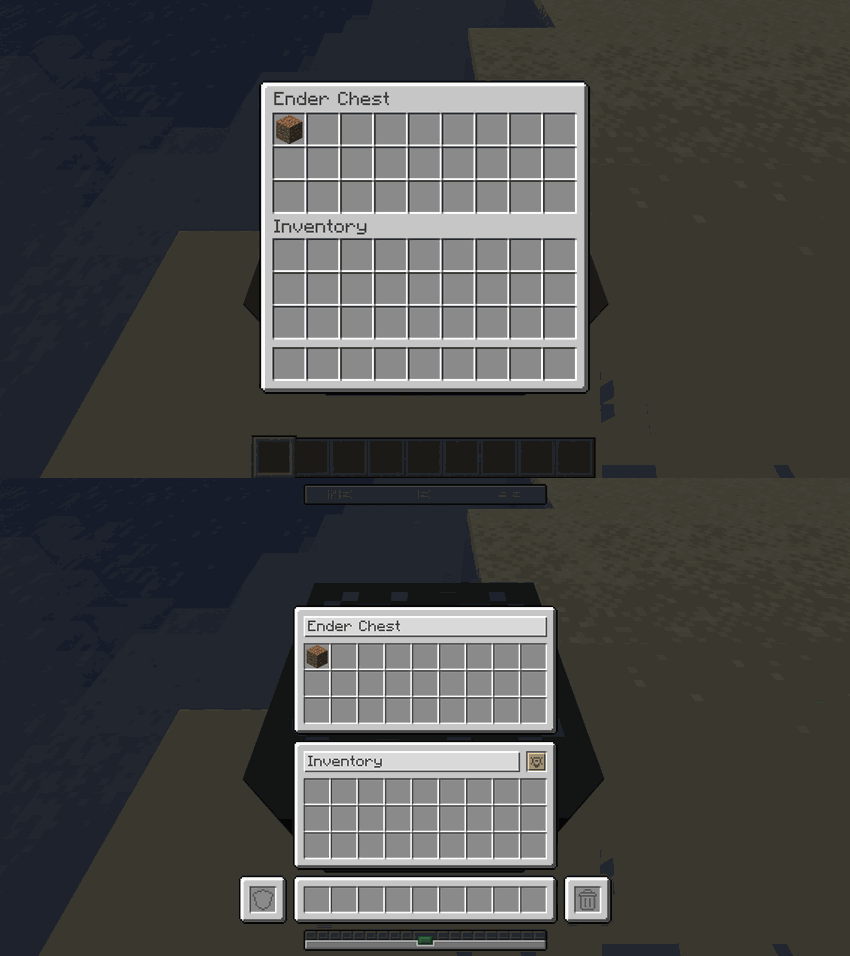
Ender ChestEnder Chest Interface Comparison
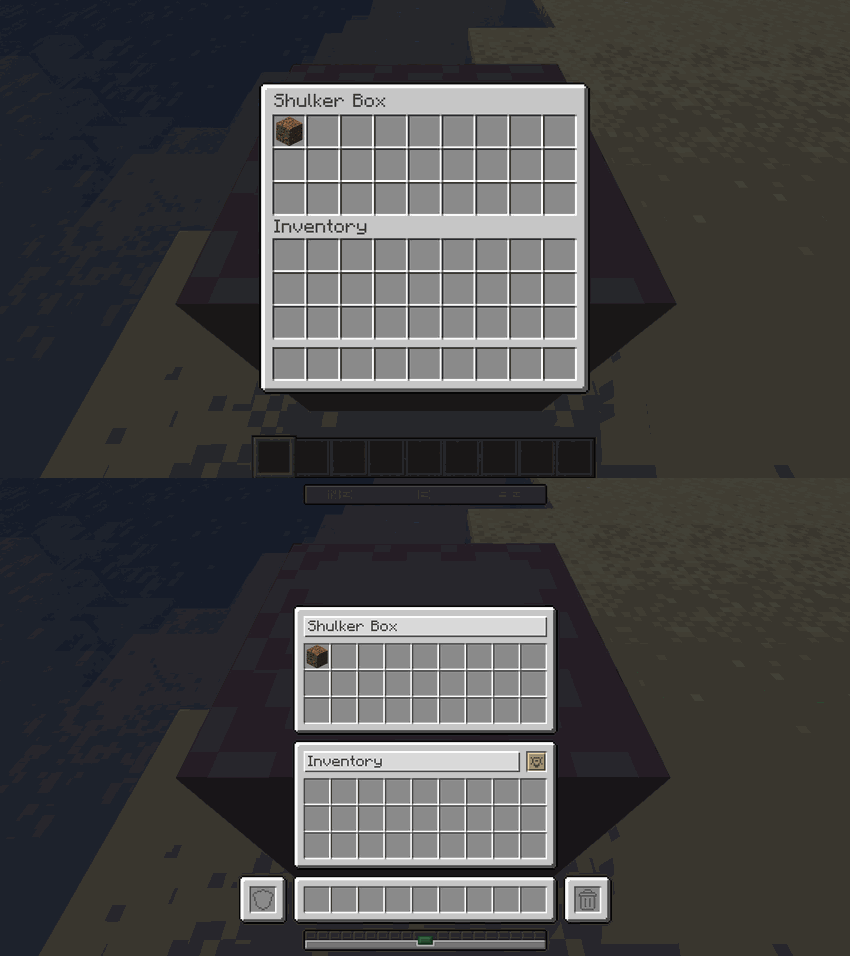
Shulker BoxShulker Box Interface Comparison
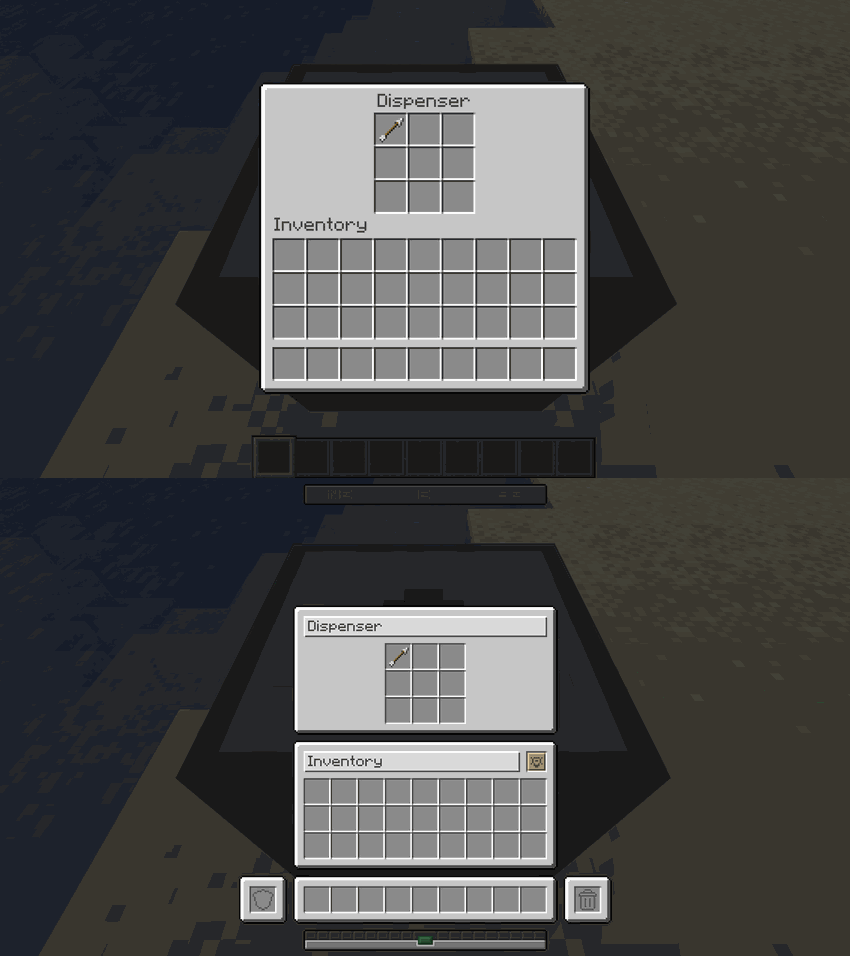
DispenserDispenser Interface Comparison
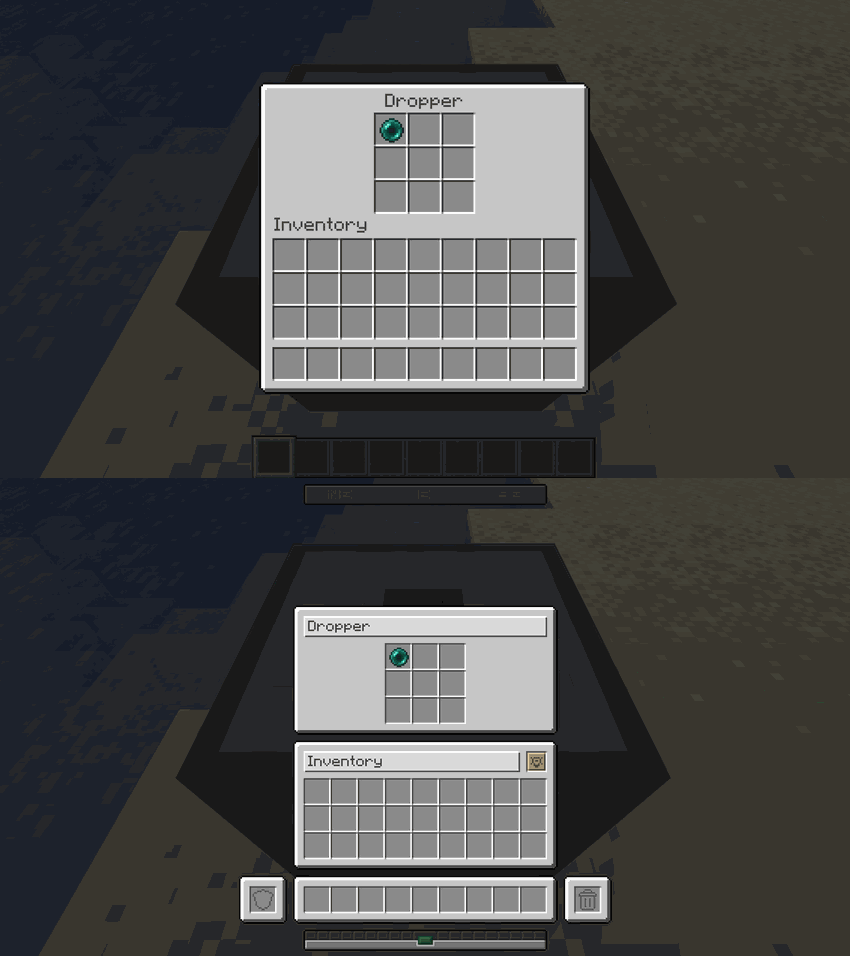
DropperDropper Interface Comparison
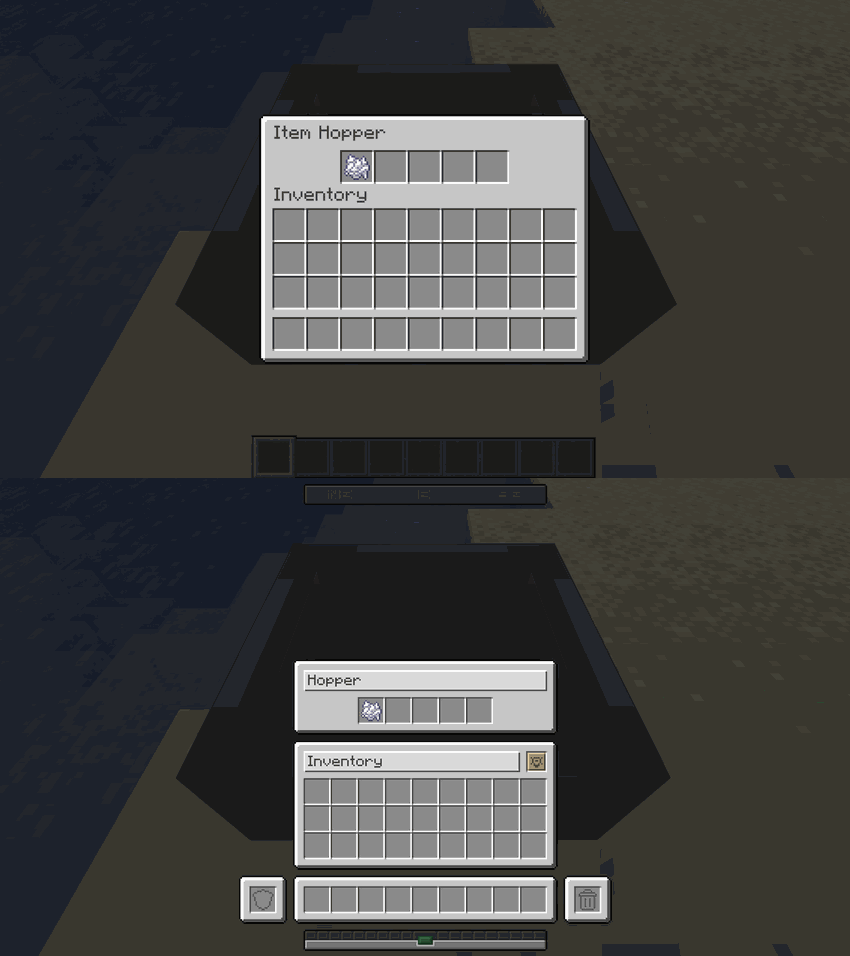
HopperHopper Interface Comparison

🛠️ Crafting & Decorative Workstations

WorkstationComparison
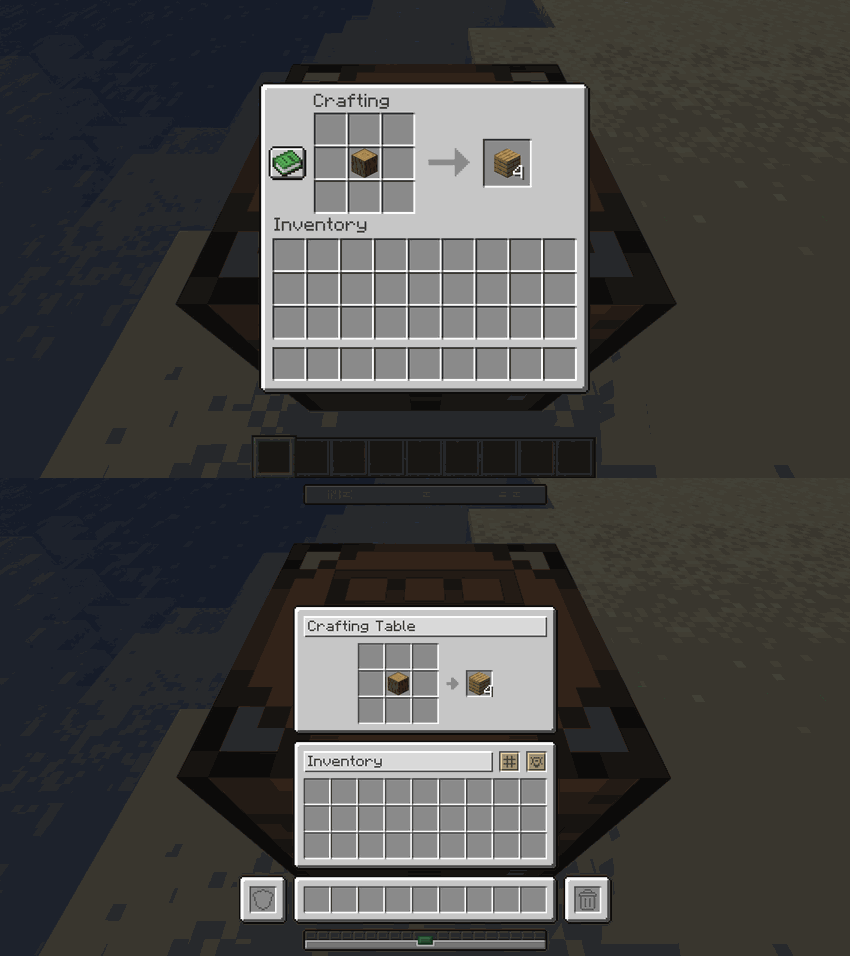
Crafting TableCrafting Table Interface Comparison
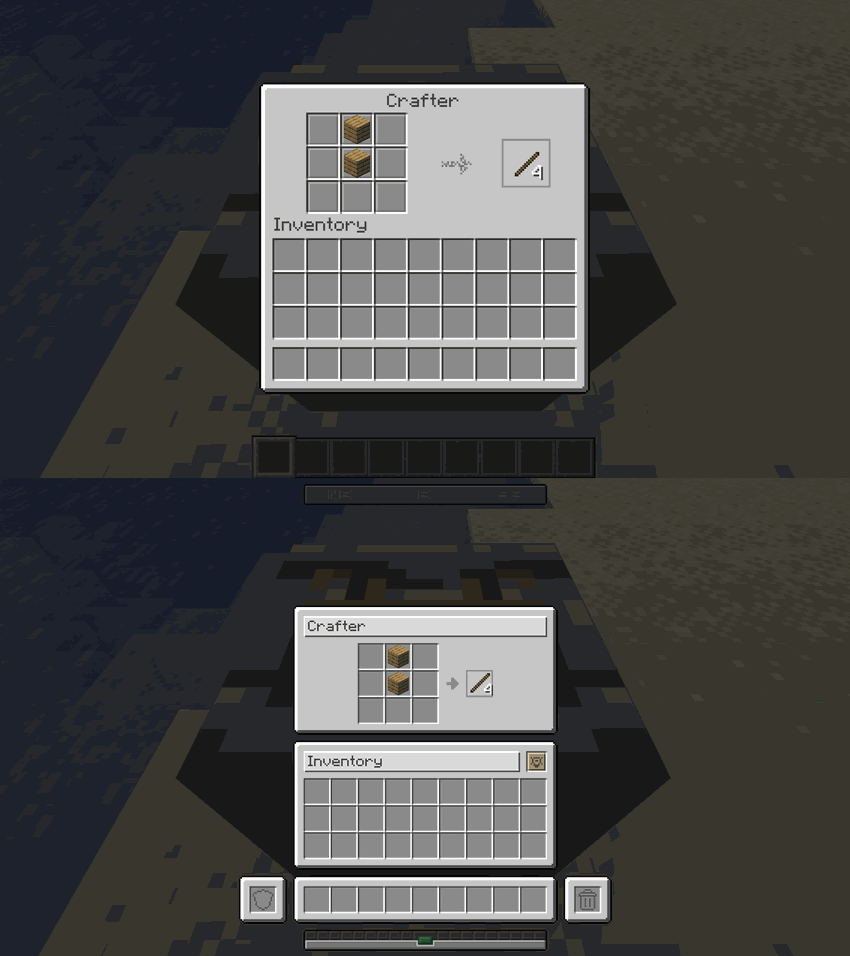
CrafterCrafter Interface Comparison
StonecutterStonecutter Interface Comparison
LoomLoom Interface Comparison
Cartography TableCartography Table Interface Comparison

⚔️ Equipment Upgrade Screens

ScreenComparison
AnvilAnvil Interface Comparison
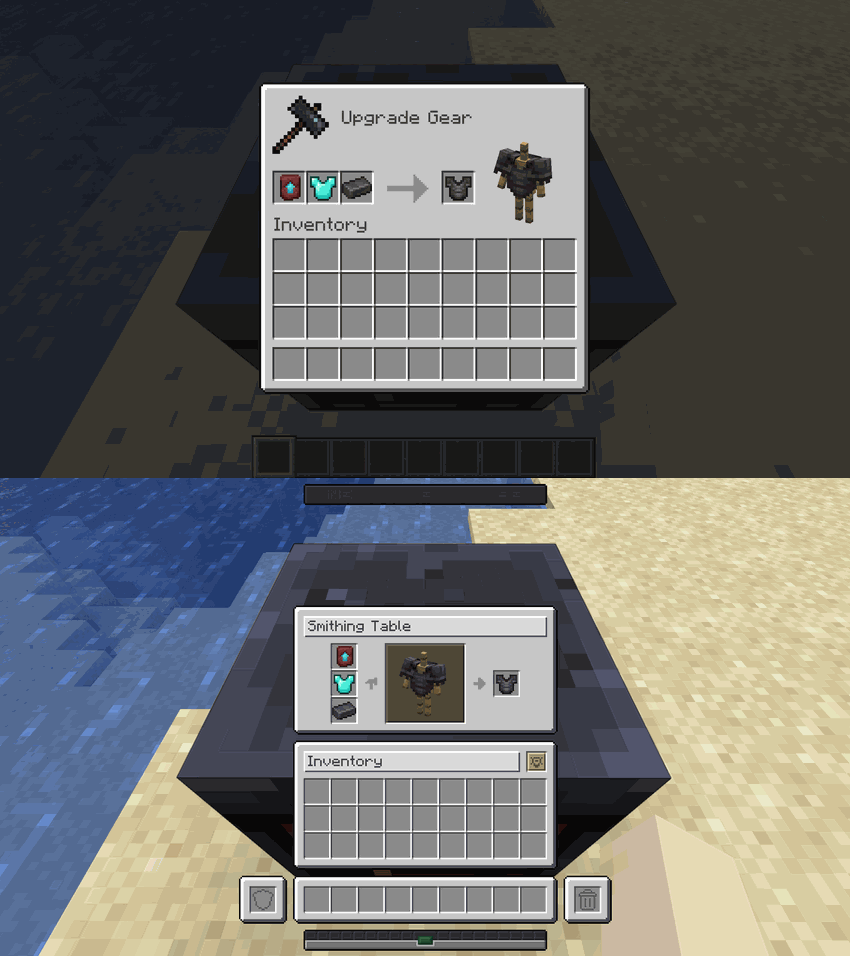
Smithing TableSmithing Table Interface Comparison
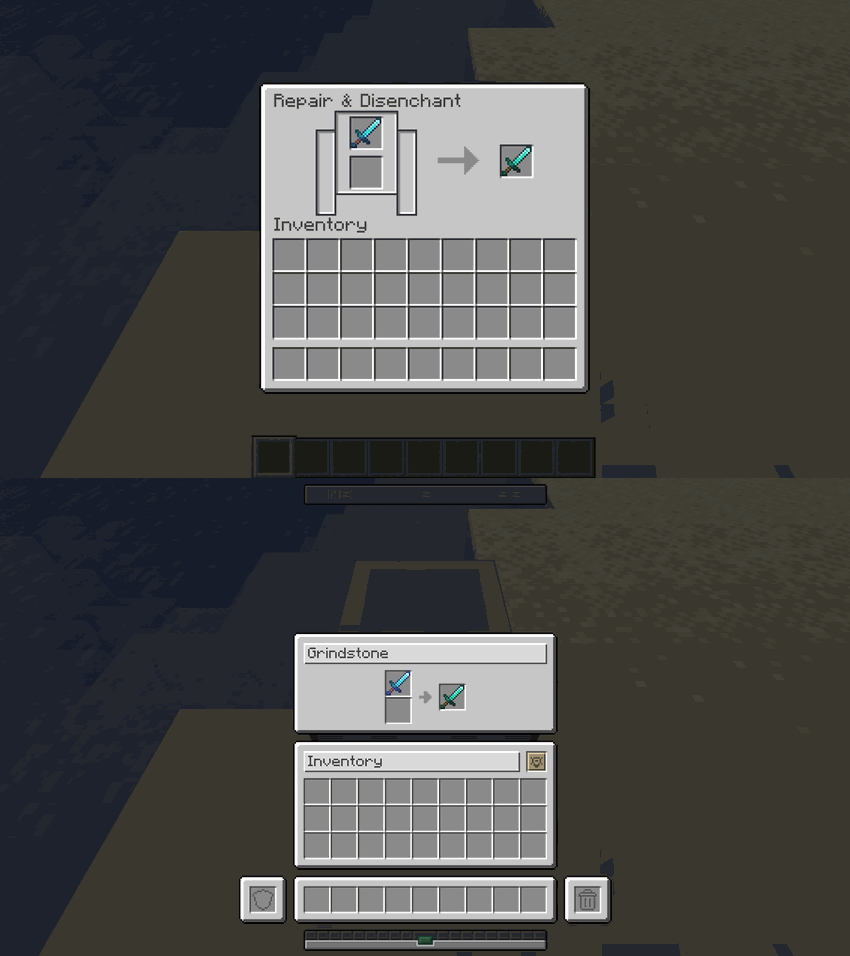
GrindstoneGrindstone Interface Comparison
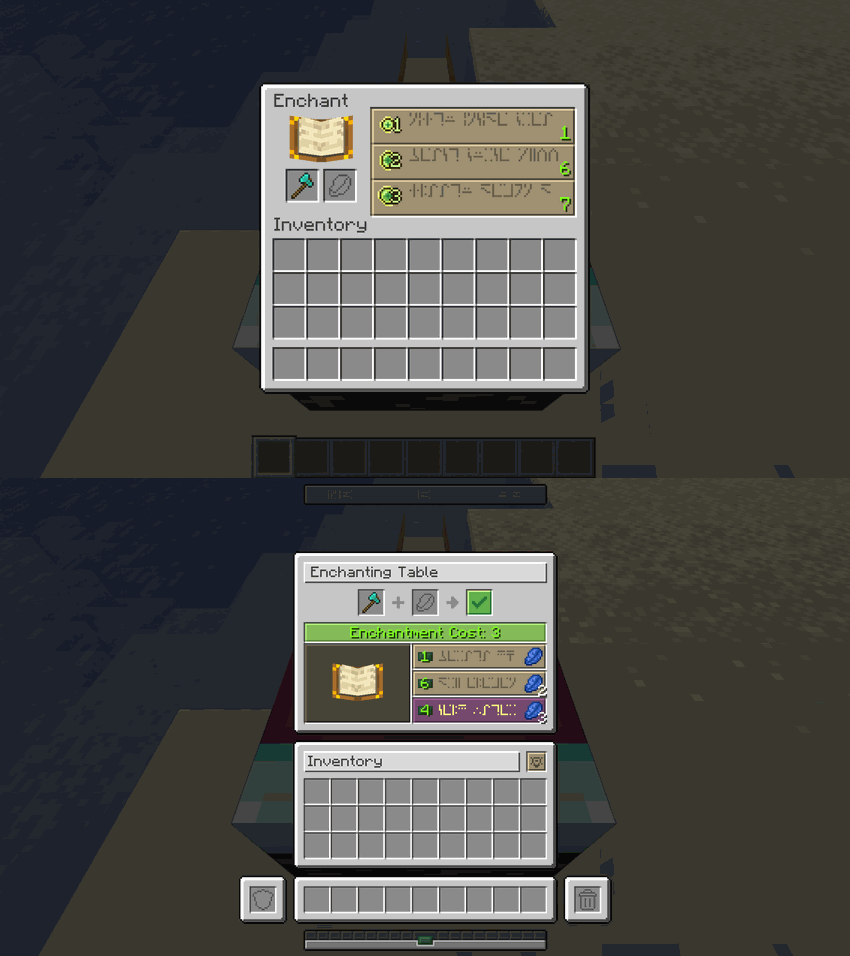
Enchanting TableEnchanting Table Interface Comparison
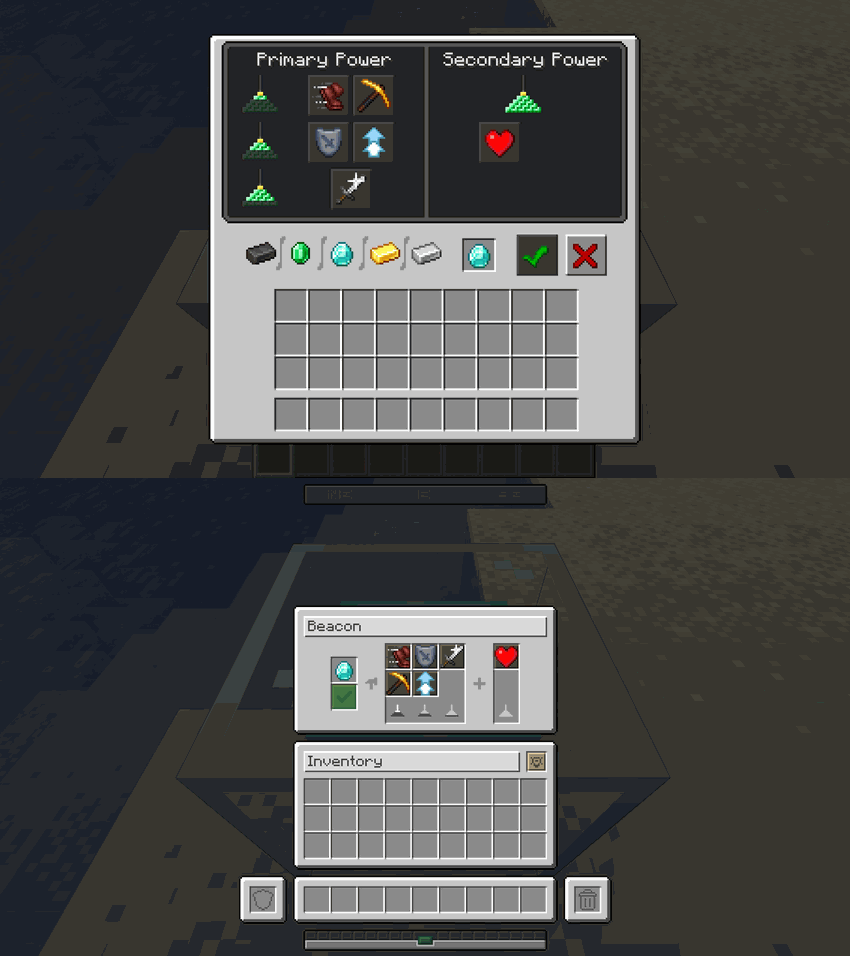
BeaconBeacon Interface Comparison
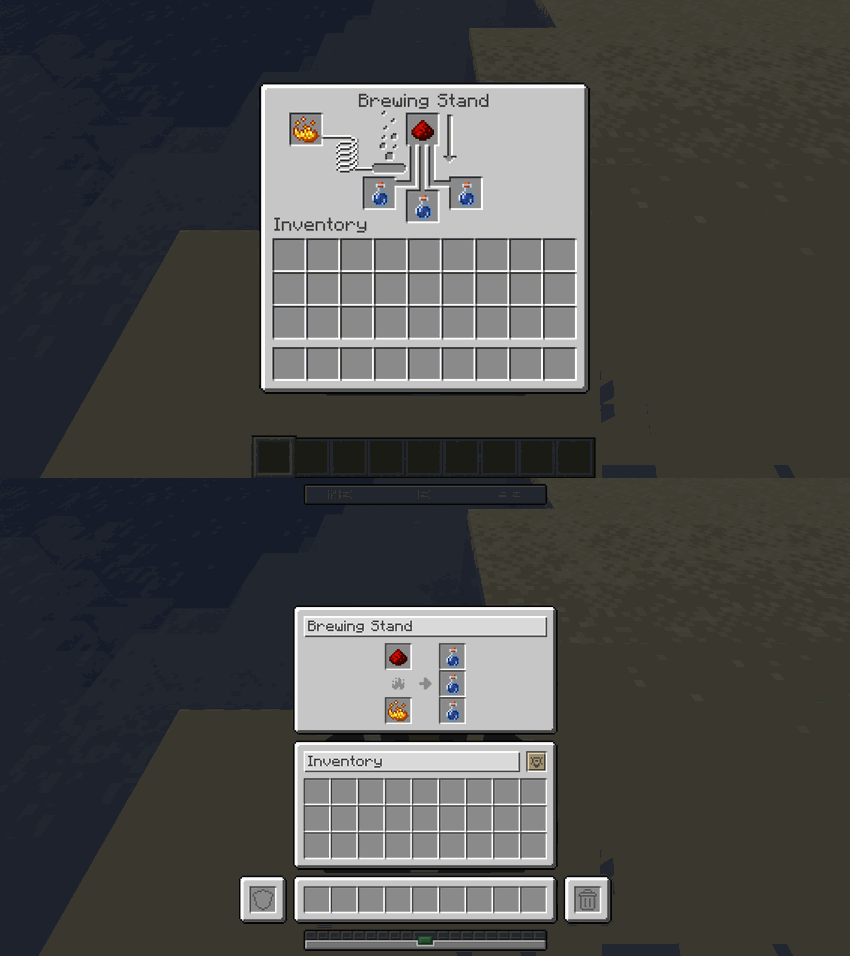
Brewing StandBrewing Stand Interface Comparison

Smelting, Trading & HUD

ScreenComparison
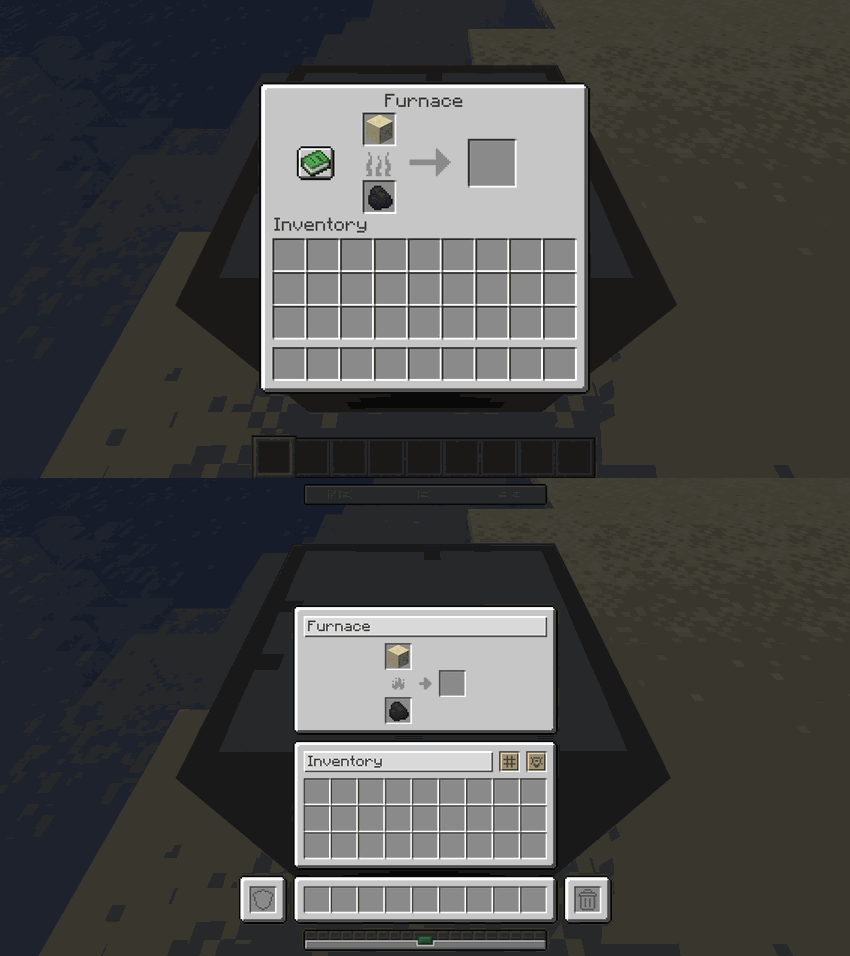
FurnaceFurnace Interface Comparison
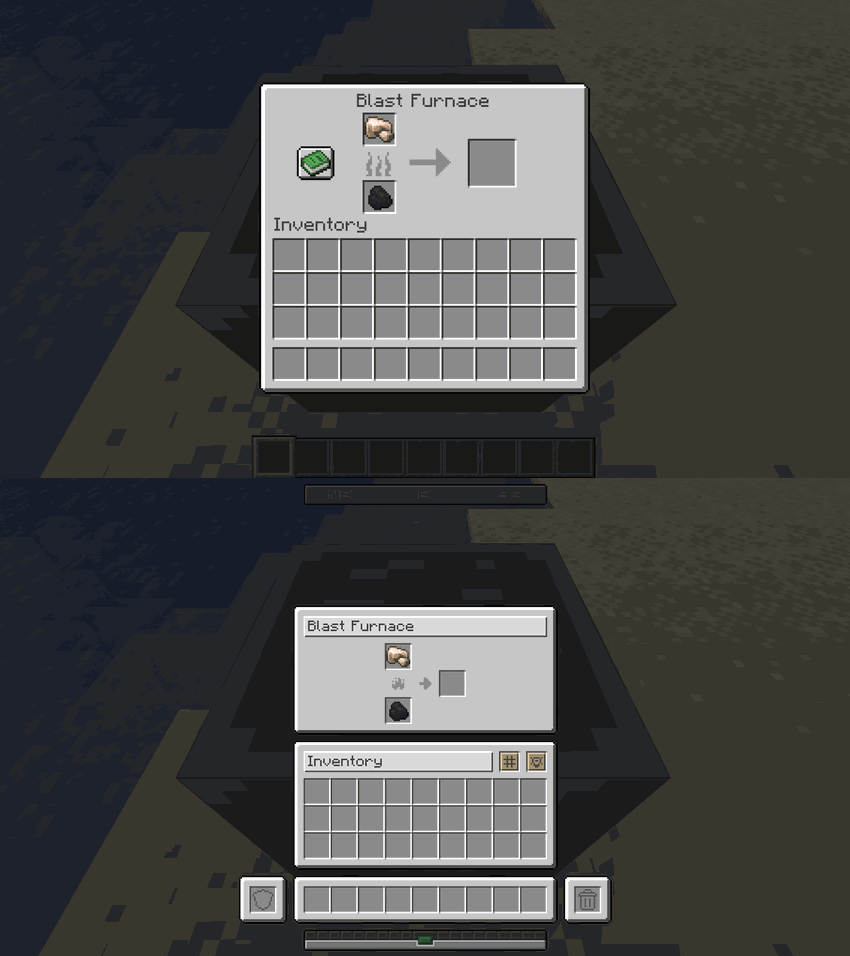
Blast FurnaceBlast Furnace Interface Comparison
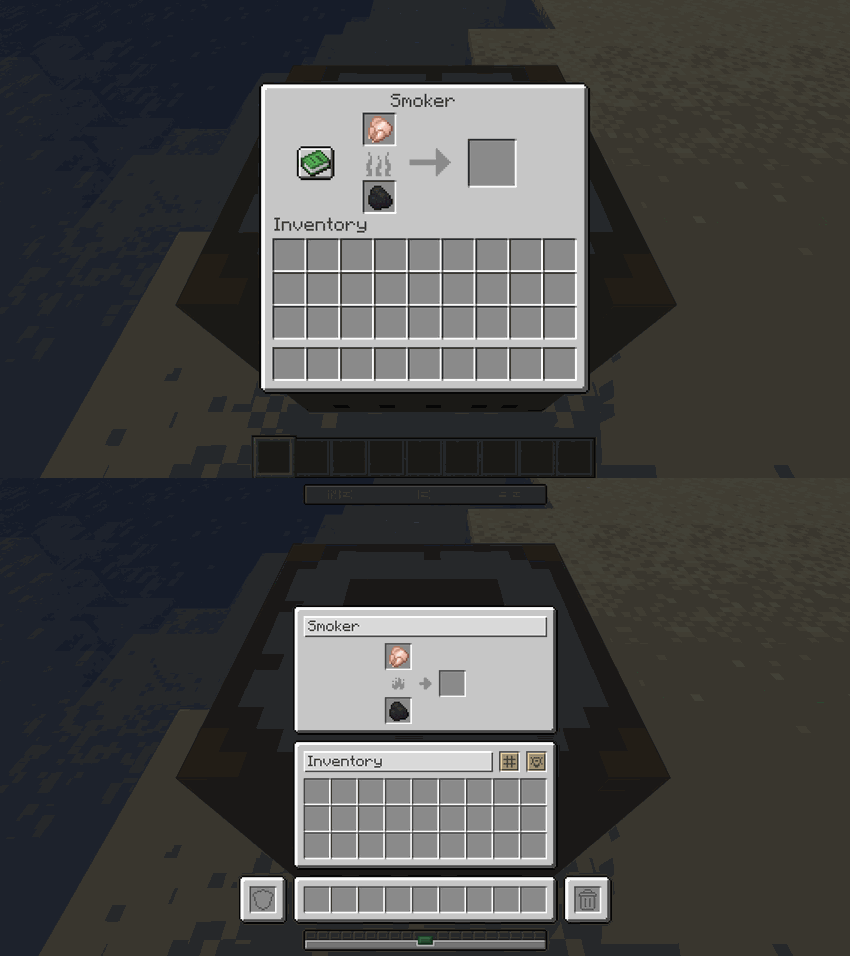
SmokerSmoker Interface Comparison
Villager TradingVillager Trading Interface Comparison
Survival HUDSurvival HUD Interface Comparison
Creative HUDCreative HUD Interface Comparison

🐴 Mounts & Rideable Entities

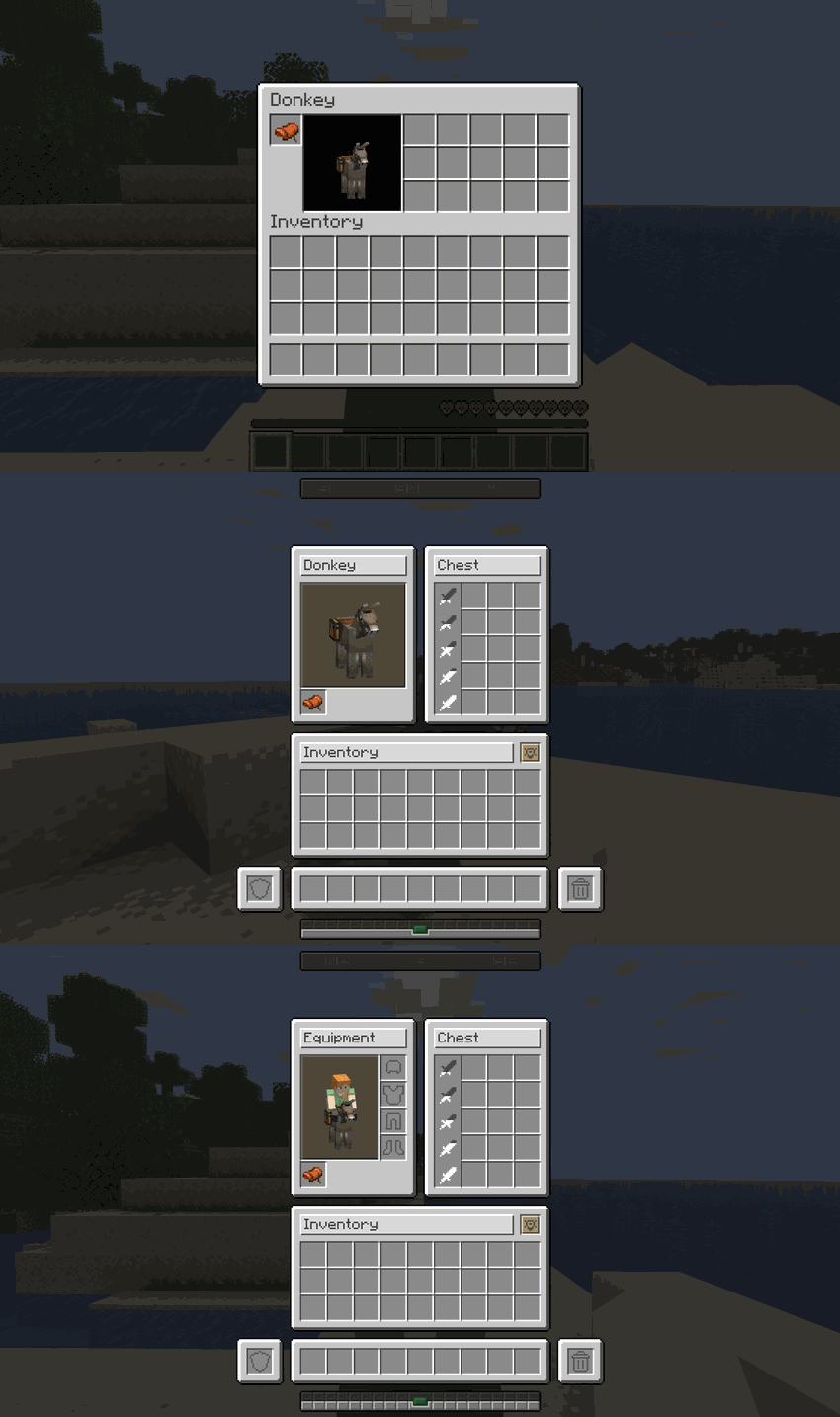
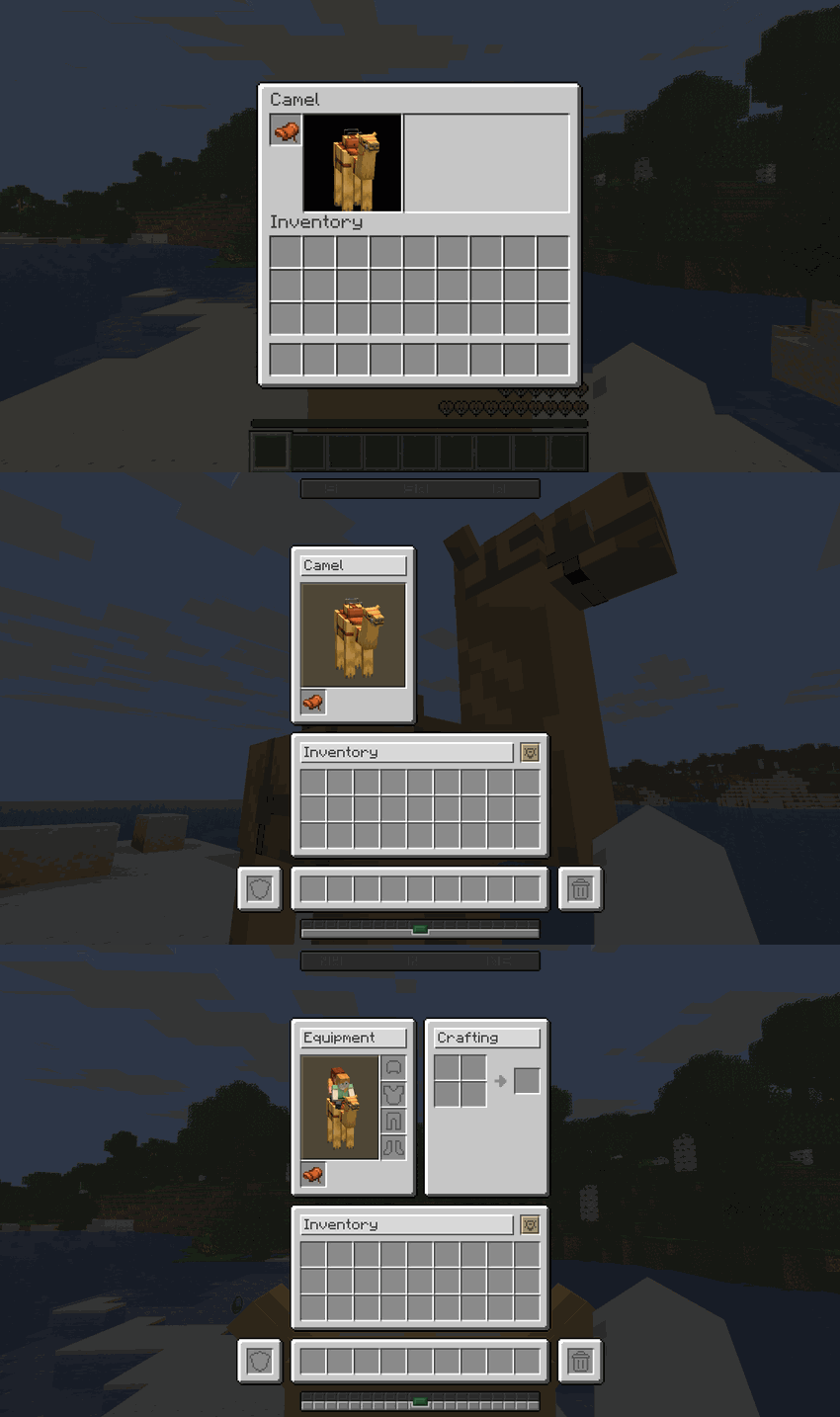
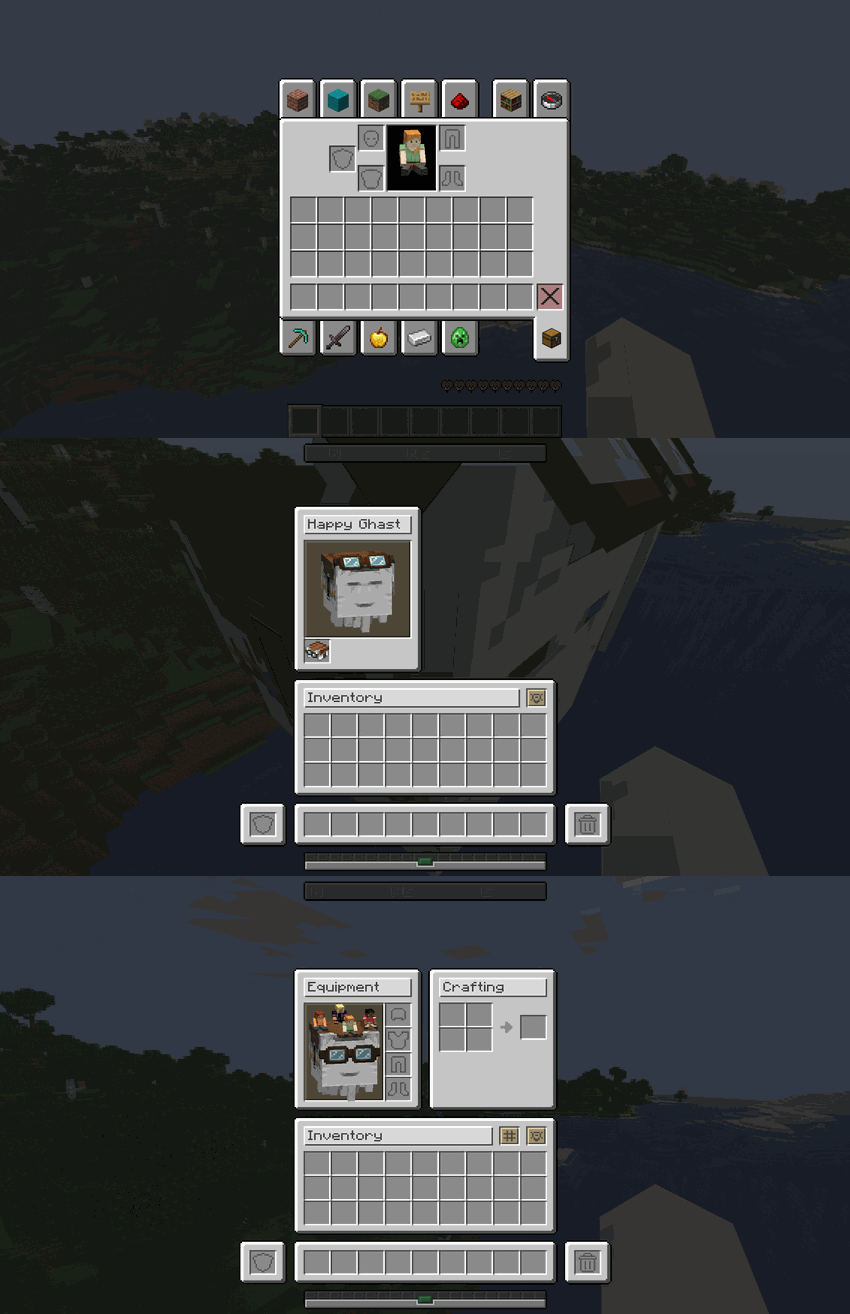
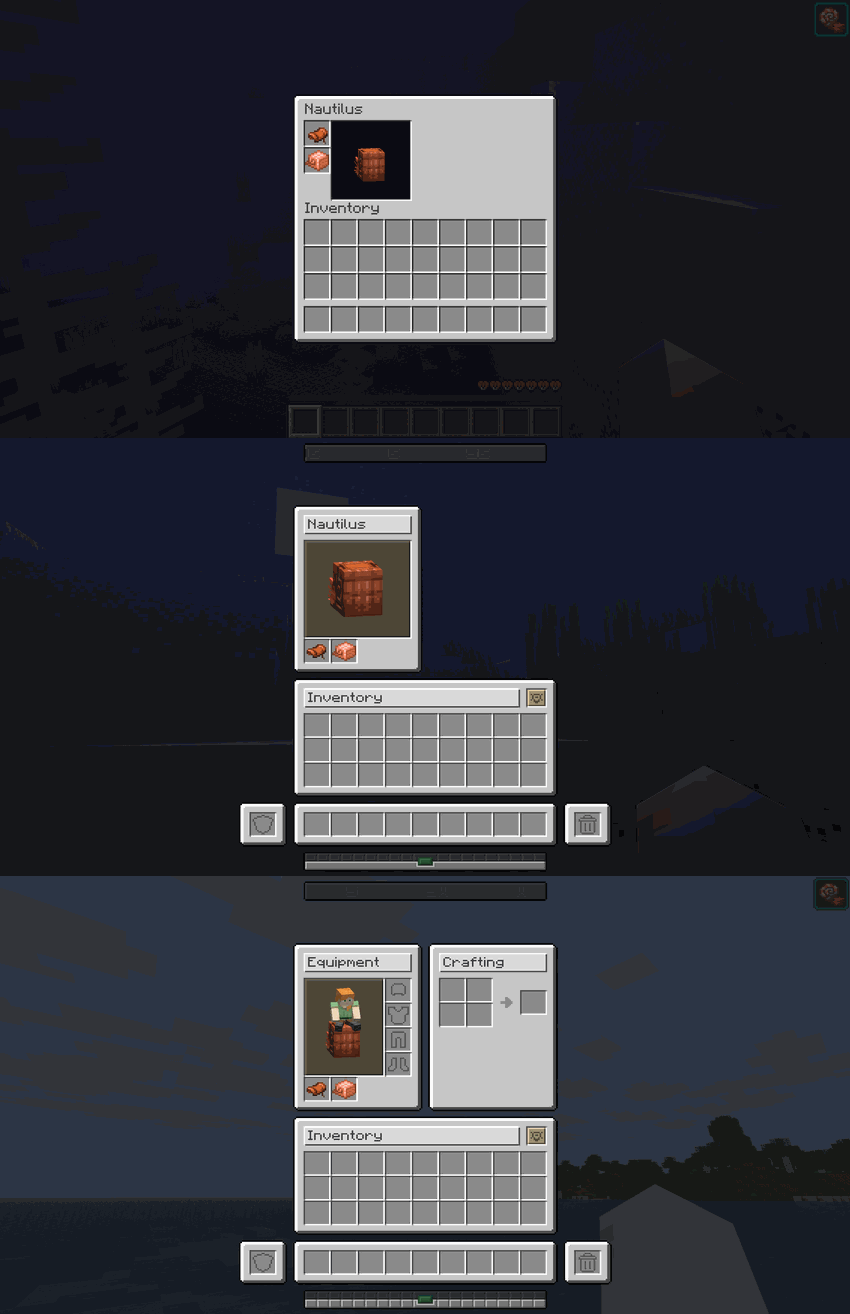
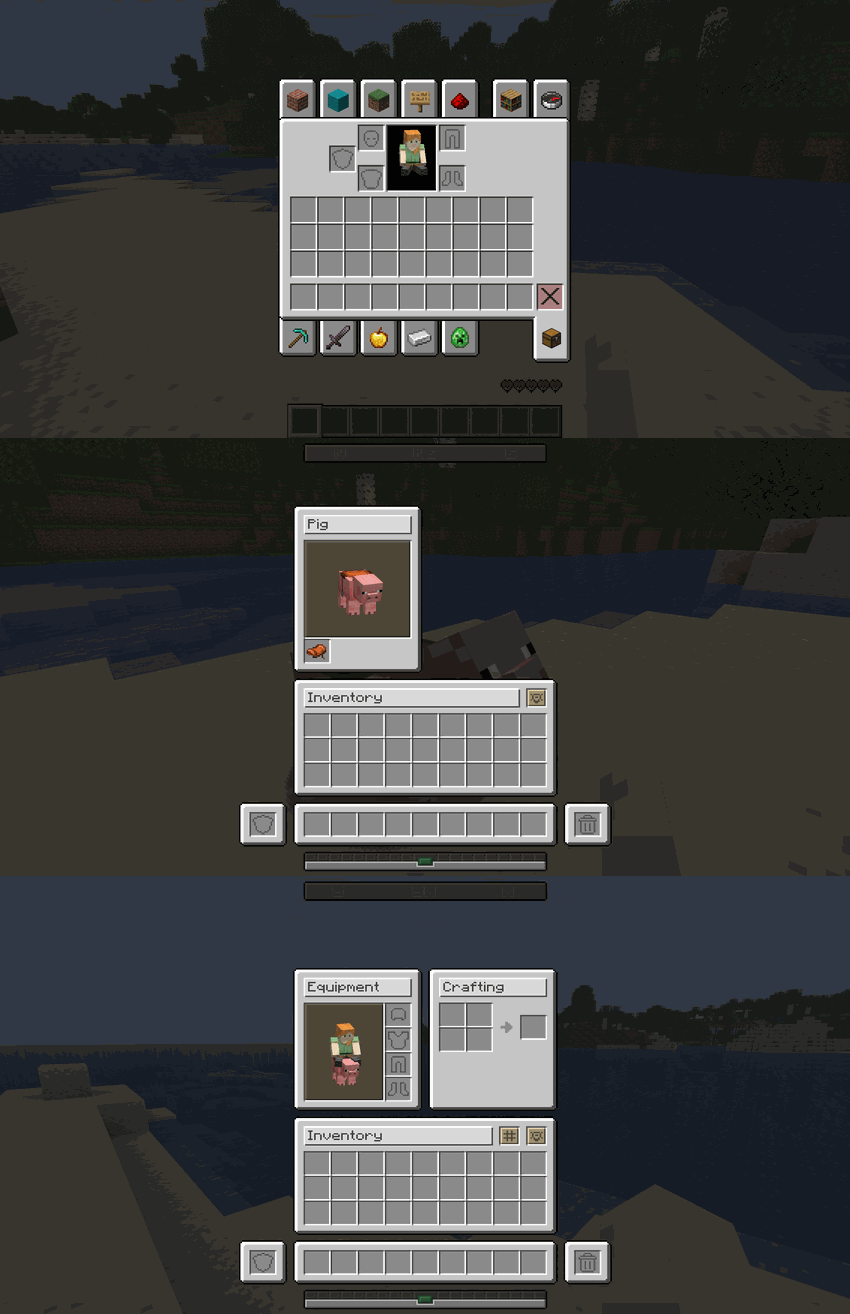
Harmonize unifies horse-style screens and mounts. Whether you are mounted or inspecting the entity from the ground, the GUI shifts into a clean, structured inventory tailored specifically for that rideable entity:

MountComparison
DonkeyDonkey Mount Inventory Comparison
CamelCamel Mount Inventory Comparison
Happy GhastHappy Ghast Mount Inventory Comparison
NautilusNautilus Mount Inventory Comparison
PigPig Mount Inventory Comparison

🤝 Native Mod Integrations

Harmonize is built to play nicely with others. It features out-of-the-box, native support for the following mods:

Mod NameIntegration Details
[Bannerstone – Lodestone Waypoints]Bannerstone markers and waypoints are fully supported and seamlessly displayed on Harmonize's custom Locator Bar HUD element.
[Bridle – Unified Riding]Full interface and mechanical compatibility. Harmonize completely overrides Bridle's custom mount inventories, integrating them flawlessly into our unified grid system with full support for player armor slots and dynamic shift-click functionality while riding.

🎮 Technical Requirements

SpecDetail
Minecraft Version26.1 · 26.2 · 26.3
Mod LoaderFabric
DependenciesRequires Fabric API

📥 Installation

  1. Download and install Fabric Loader.
  2. Download and install Fabric API.
  3. Download the latest release of Harmonize.
  4. Place the downloaded .jar file into your Minecraft mods folder.
  5. Launch the game and enjoy!

❓ Frequently Asked Questions

Q: Does Harmonize affect client performance or FPS?

A: No! It strictly modifies interface layout coordinates and texture rendering, introducing zero performance overhead.

Q: Is it compatible with other GUI or inventory mods?

A: Yes, in most cases. Minor visual overlaps may occur if another mod aggressively overrides core vanilla container screens.

Q: Does it work on multiplayer servers?

A: Yes! While it is primarily a client-side visual enhancement, installing it on the server ensures full container synchronization.


"Consistency is the foundation of trust, in relationships and in interface design."


🧩 The Harmonize Collection

Harmonize is the main mod of the collection. These mods are built to blend into its interface, and each one also works on its own:

Bridle🐴 Bridle
Mounts that make sense: a saddle to ride, the right gear to steer, blankets to dress them up.
Ghastlings👻 Ghastlings
Elemental Ghast Soul companions that float beside you, level up and fight for you.
Bannerstone🧭 Bannerstone
Craftable, color-coded lodestone waypoints for your locator bar and maps.

Developer: Shamy]® Creative Studio

License: LicenseRef-All-Rights-Reserved

Version: 0.5.1

Галерея

Survival HUDSurvival InventoryChest GUICrafting Table GUI

Последние версии

Все версии →
release

Harmonize 0.5.1

0.5.1
13 окт. 2026 г.271Minecraft: 26.3fabric
Скачать
Что нового
# ✨ **v0.5.1 - Effect Bar, In-Window Chat & Trade Filters** > _"The biggest polish pass yet: a new effect bar, chat that opens inside any window, filters for trades and creative items, tighter layouts everywhere, and the same Harmonize on three Minecraft versions."_ --- ## 🌍 **Three Minecraft Versions** - **26.1, 26.2 & 26.3:** This release is available for Minecraft 26.1, 26.2 and 26.3. Download the file that matches your game version; apart from the sign note below, all three have the same features. - **Signs on 26.1:** Minecraft 26.1 draws signs differently, so there Harmonize restyles standing and wall signs the way earlier 26.1 releases did, and hanging signs keep their vanilla look. On 26.2 and 26.3 every sign is restyled. ## ✨ **New Features** - **Effect Bar:** Your active effects now live in a compact bar in the top-right corner, in the same style as the locator and chat bars: white pictograms for helpful effects, red for harmful ones, blinking when about to run out. It looks the same in-game and with a window open, where hovering an icon shows its name, level and time left. The effect list beside the inventory is gone. - **Chat Without Closing Your Inventory:** Press your chat key (or click the new chat icon in the bottom-left corner) while any inventory or container is open to type a message or command without closing it. Enter sends it, Escape cancels. The chat icon also stays in its corner while you play, so the chat always opens from the same spot. It works like the regular chat: Up and Down arrows bring back what you sent before, and commands show their suggestions (Tab completes). If you are already typing in a search or name field, the key types there instead. - **Trade Filters:** The Villager screen has a new row of filters under the experience bar: All, Buy (trades that give you items) and Sell (trades that pay you emeralds), so long trade lists are quick to scan. - **Creative Filters as Buttons:** "All Items" and "Saved Hotbars" are now two wide labeled buttons under the tab row instead of two tiny icons, and the tab row always shows 10 tabs. When mods add more tabs than fit, the page arrows appear next to the search bar. - **Page Selector in the Tab Row:** When mods add more creative tabs than fit in the row, the last tab slot becomes a page selector split in two: previous page and next page. Each arrow turns off when there is nowhere left to go. Hover it to see which page you are on. Without extra tabs, the row looks exactly like before, with all ten tabs. - **See Your Gear Right Away:** The armor stand in the Smithing Table now wears the piece you place, even before you add a template or material: diamond armor shows as diamond, a sword is held in its hand. Once the recipe is complete it switches to the upgraded or trimmed result, as before. ## 👻 **Ghastlings Compatibility** Harmonize now works hand in hand with **Ghastlings** when both mods are installed. Each mod still works perfectly on its own. - **Companion Slot in Your Inventory:** The Ghast Soul companion slot now sits neatly under your boots, in Harmonize style, in a slightly taller inventory. It works in Survival and Creative. - **Companion Slot While Riding:** When you open your inventory on a mount, the companion slot is there too, right under your armor. - **Your Companion in the Preview:** Your equipped Ghast Soul shares the inventory preview with your character, at its real size, where it really is around you, and with its real animations. It even turns to look at you there. The preview smoothly zooms out a little to make room when you equip it, and back in when you remove it; the same smooth transition applies when you mount or dismount with the inventory open. - **Soul Smithing Table Restyled:** The Soul Smithing Table matches Harmonize's Smithing Table layout, includes your off-hand slot, and shows a live preview of the soul you are about to forge. ## 🎨 **Interface Redesign** - **Grindstone & Cartography Table Reworked:** The Grindstone is now a single tidy row (item + item → result), like the Anvil. The Cartography Table grew one row so its map preview is a perfect square with even margins. - **Bigger Map Preview:** The map in the Cartography Table now fills its preview frame instead of floating small in the middle. - **Centered Smithing Preview:** The armor stand in the Smithing Table is now exactly centered in its frame. - **One Button to Rule Them All:** Trade rows, enchantment options, page arrows, tab buttons and the small icon buttons (recipe book, creative mode, filters) are now all drawn from a single shared button texture that stretches to any size, instead of a separate image for each. They look the same as before, the mod ships fewer files, and it paves the way for interface themes. - **New Scrollbars:** The scrollbar handle is now a compact 12×6 grip on a slightly wider track, in the Creative inventory, Villager trades, Stonecutter and Loom. - **Creative Scrollbar:** The scrollbar handle of the Creative inventory now uses its proper Harmonize texture instead of a stretched vanilla one. - **Loom Scrollbar & Pattern Buttons:** The Loom now uses Harmonize's own scrollbar and pattern buttons instead of the vanilla ones, which were being stretched to the wrong size. - **Same Crafting Panel While Riding:** When you open your inventory on a mount without a chest, the 2x2 crafting panel is now the same compact panel as in your normal inventory instead of stretching down into an empty grey area. - **Tidier Colors:** Every button now highlights the same way when hovered, one-click buttons (page arrows and scrollbars) got their own neutral gray look, and a handful of nearly identical shades across the interface were merged into one. - **Consistent Mount Slot Icons:** With Bridle installed, the empty Saddle and Armor slot icons of mounts (most visibly on the Nautilus) now use the same Harmonize shade as the rest, instead of mixing lighter and darker icons. ## 🐛 **Bug Fixes** - **Mount Bar in Creative:** In Creative mode the lower half of the bar above the hotbar stayed greyed out even while riding. It now comes alive whenever you ride and control a tamed mount that uses it (horse jump, camel and nautilus dash), and stays disabled on foot, on mounts that cannot jump, and on mounts you are not steering yet. - **Honest Trash Tooltip:** In Survival, holding Shift or Ctrl over the trash slot no longer changes its tooltip to "Clear Inventory" or "Clear All". Those actions only exist in Creative, so the hint now only shows there. - **Trash Slot & Ghastlings:** Ctrl+Shift-clicking the trash slot in the creative inventory now also clears the Ghastlings companion slot (it used to come back). - **Clicks on 26.3:** Minecraft 26.3 renumbered mouse buttons and keys. Harmonize now follows the game on every version, so the chat icon, the creative search bar and the creative page arrows respond to clicks on 26.3 too. - **Chat Text Closer to Its Icon:** What you type in the chat bar now starts right next to the chat icon instead of a few pixels too far to the right. - **Command Suggestions Above the Chat Bar:** The command suggestion list now sits right on top of the chat bar instead of overlapping its top edge. - **Wandering Trader Bar:** The Wandering Trader now shows the experience bar too, full and at the top level, with the breeding bar permanently disabled, and all of its trades carry the top-level icon. Before, that space was simply empty. - **Scrolling Next to a Villager:** In Creative, the mouse wheel now scrolls the creative item list when the cursor is over it, and the villager's trades only when the cursor is over them. Before, the trades always took the wheel. ## 🔒 **Security & Under the Hood** - **Mount Inventory Security:** The server now checks that you are within interaction range of a Pig, Strider or Wolf before opening its inventory, matching vanilla rules on multiplayer servers. - **Stricter Internal Checks:** Harmonize now verifies all of its interface hooks when loading, so a future incompatibility shows a clear error instead of silently leaving a screen half-redesigned. - **Clean Game Logs:** Removed leftover debug messages that were written to the game log on every key press while using the Creative inventory search bar. Your logs stay quiet and readable again. - **Windows Built From Shared Pieces:** Every container window is now assembled from a small set of shared parts (one panel, one slot, a few boxes and icons) instead of a full picture per window. Nothing changes visually; it makes the interface far easier to restyle. - **A Tidy Component Library:** All interface textures now live in one place, sorted by what they are (panels, buttons, bars, icons, art) instead of by screen, with one consistent naming scheme. The chat bar now reuses the same frame and background as the other bars, the player and villager experience bars share one base, and full window pictures no longer ship with the mod. Nothing changes visually; the download is smaller and restyling the interface is much simpler. - **Internal Cleanup:** Removed unused leftover code (including several outdated hooks that no longer had any effect) and a duplicated internal registration of the Beacon beam renderer, making the mod lighter and more predictable. - **Lighter Download:** Removed 74 duplicated or unused interface textures. Shared elements such as buttons, scrollbars and progress indicators now come from a single source, which makes the mod smaller and keeps every screen visually consistent.
release

Harmonize 0.5.1

0.5.1
13 окт. 2026 г.111Minecraft: 26.2fabric
Скачать
Что нового
# ✨ **v0.5.1 - Effect Bar, In-Window Chat & Trade Filters** > _"The biggest polish pass yet: a new effect bar, chat that opens inside any window, filters for trades and creative items, tighter layouts everywhere, and the same Harmonize on three Minecraft versions."_ --- ## 🌍 **Three Minecraft Versions** - **26.1, 26.2 & 26.3:** This release is available for Minecraft 26.1, 26.2 and 26.3. Download the file that matches your game version; apart from the sign note below, all three have the same features. - **Signs on 26.1:** Minecraft 26.1 draws signs differently, so there Harmonize restyles standing and wall signs the way earlier 26.1 releases did, and hanging signs keep their vanilla look. On 26.2 and 26.3 every sign is restyled. ## ✨ **New Features** - **Effect Bar:** Your active effects now live in a compact bar in the top-right corner, in the same style as the locator and chat bars: white pictograms for helpful effects, red for harmful ones, blinking when about to run out. It looks the same in-game and with a window open, where hovering an icon shows its name, level and time left. The effect list beside the inventory is gone. - **Chat Without Closing Your Inventory:** Press your chat key (or click the new chat icon in the bottom-left corner) while any inventory or container is open to type a message or command without closing it. Enter sends it, Escape cancels. The chat icon also stays in its corner while you play, so the chat always opens from the same spot. It works like the regular chat: Up and Down arrows bring back what you sent before, and commands show their suggestions (Tab completes). If you are already typing in a search or name field, the key types there instead. - **Trade Filters:** The Villager screen has a new row of filters under the experience bar: All, Buy (trades that give you items) and Sell (trades that pay you emeralds), so long trade lists are quick to scan. - **Creative Filters as Buttons:** "All Items" and "Saved Hotbars" are now two wide labeled buttons under the tab row instead of two tiny icons, and the tab row always shows 10 tabs. When mods add more tabs than fit, the page arrows appear next to the search bar. - **Page Selector in the Tab Row:** When mods add more creative tabs than fit in the row, the last tab slot becomes a page selector split in two: previous page and next page. Each arrow turns off when there is nowhere left to go. Hover it to see which page you are on. Without extra tabs, the row looks exactly like before, with all ten tabs. - **See Your Gear Right Away:** The armor stand in the Smithing Table now wears the piece you place, even before you add a template or material: diamond armor shows as diamond, a sword is held in its hand. Once the recipe is complete it switches to the upgraded or trimmed result, as before. ## 👻 **Ghastlings Compatibility** Harmonize now works hand in hand with **Ghastlings** when both mods are installed. Each mod still works perfectly on its own. - **Companion Slot in Your Inventory:** The Ghast Soul companion slot now sits neatly under your boots, in Harmonize style, in a slightly taller inventory. It works in Survival and Creative. - **Companion Slot While Riding:** When you open your inventory on a mount, the companion slot is there too, right under your armor. - **Your Companion in the Preview:** Your equipped Ghast Soul shares the inventory preview with your character, at its real size, where it really is around you, and with its real animations. It even turns to look at you there. The preview smoothly zooms out a little to make room when you equip it, and back in when you remove it; the same smooth transition applies when you mount or dismount with the inventory open. - **Soul Smithing Table Restyled:** The Soul Smithing Table matches Harmonize's Smithing Table layout, includes your off-hand slot, and shows a live preview of the soul you are about to forge. ## 🎨 **Interface Redesign** - **Grindstone & Cartography Table Reworked:** The Grindstone is now a single tidy row (item + item → result), like the Anvil. The Cartography Table grew one row so its map preview is a perfect square with even margins. - **Bigger Map Preview:** The map in the Cartography Table now fills its preview frame instead of floating small in the middle. - **Centered Smithing Preview:** The armor stand in the Smithing Table is now exactly centered in its frame. - **One Button to Rule Them All:** Trade rows, enchantment options, page arrows, tab buttons and the small icon buttons (recipe book, creative mode, filters) are now all drawn from a single shared button texture that stretches to any size, instead of a separate image for each. They look the same as before, the mod ships fewer files, and it paves the way for interface themes. - **New Scrollbars:** The scrollbar handle is now a compact 12×6 grip on a slightly wider track, in the Creative inventory, Villager trades, Stonecutter and Loom. - **Creative Scrollbar:** The scrollbar handle of the Creative inventory now uses its proper Harmonize texture instead of a stretched vanilla one. - **Loom Scrollbar & Pattern Buttons:** The Loom now uses Harmonize's own scrollbar and pattern buttons instead of the vanilla ones, which were being stretched to the wrong size. - **Same Crafting Panel While Riding:** When you open your inventory on a mount without a chest, the 2x2 crafting panel is now the same compact panel as in your normal inventory instead of stretching down into an empty grey area. - **Tidier Colors:** Every button now highlights the same way when hovered, one-click buttons (page arrows and scrollbars) got their own neutral gray look, and a handful of nearly identical shades across the interface were merged into one. - **Consistent Mount Slot Icons:** With Bridle installed, the empty Saddle and Armor slot icons of mounts (most visibly on the Nautilus) now use the same Harmonize shade as the rest, instead of mixing lighter and darker icons. ## 🐛 **Bug Fixes** - **Mount Bar in Creative:** In Creative mode the lower half of the bar above the hotbar stayed greyed out even while riding. It now comes alive whenever you ride and control a tamed mount that uses it (horse jump, camel and nautilus dash), and stays disabled on foot, on mounts that cannot jump, and on mounts you are not steering yet. - **Honest Trash Tooltip:** In Survival, holding Shift or Ctrl over the trash slot no longer changes its tooltip to "Clear Inventory" or "Clear All". Those actions only exist in Creative, so the hint now only shows there. - **Trash Slot & Ghastlings:** Ctrl+Shift-clicking the trash slot in the creative inventory now also clears the Ghastlings companion slot (it used to come back). - **Clicks on 26.3:** Minecraft 26.3 renumbered mouse buttons and keys. Harmonize now follows the game on every version, so the chat icon, the creative search bar and the creative page arrows respond to clicks on 26.3 too. - **Chat Text Closer to Its Icon:** What you type in the chat bar now starts right next to the chat icon instead of a few pixels too far to the right. - **Command Suggestions Above the Chat Bar:** The command suggestion list now sits right on top of the chat bar instead of overlapping its top edge. - **Wandering Trader Bar:** The Wandering Trader now shows the experience bar too, full and at the top level, with the breeding bar permanently disabled, and all of its trades carry the top-level icon. Before, that space was simply empty. - **Scrolling Next to a Villager:** In Creative, the mouse wheel now scrolls the creative item list when the cursor is over it, and the villager's trades only when the cursor is over them. Before, the trades always took the wheel. ## 🔒 **Security & Under the Hood** - **Mount Inventory Security:** The server now checks that you are within interaction range of a Pig, Strider or Wolf before opening its inventory, matching vanilla rules on multiplayer servers. - **Stricter Internal Checks:** Harmonize now verifies all of its interface hooks when loading, so a future incompatibility shows a clear error instead of silently leaving a screen half-redesigned. - **Clean Game Logs:** Removed leftover debug messages that were written to the game log on every key press while using the Creative inventory search bar. Your logs stay quiet and readable again. - **Windows Built From Shared Pieces:** Every container window is now assembled from a small set of shared parts (one panel, one slot, a few boxes and icons) instead of a full picture per window. Nothing changes visually; it makes the interface far easier to restyle. - **A Tidy Component Library:** All interface textures now live in one place, sorted by what they are (panels, buttons, bars, icons, art) instead of by screen, with one consistent naming scheme. The chat bar now reuses the same frame and background as the other bars, the player and villager experience bars share one base, and full window pictures no longer ship with the mod. Nothing changes visually; the download is smaller and restyling the interface is much simpler. - **Internal Cleanup:** Removed unused leftover code (including several outdated hooks that no longer had any effect) and a duplicated internal registration of the Beacon beam renderer, making the mod lighter and more predictable. - **Lighter Download:** Removed 74 duplicated or unused interface textures. Shared elements such as buttons, scrollbars and progress indicators now come from a single source, which makes the mod smaller and keeps every screen visually consistent.
release

Harmonize 0.5.1

0.5.1
13 окт. 2026 г.28Minecraft: 26.1, 26.1.1, 26.1.2fabric
Скачать
Что нового
# ✨ **v0.5.1 - Effect Bar, In-Window Chat & Trade Filters** > _"The biggest polish pass yet: a new effect bar, chat that opens inside any window, filters for trades and creative items, tighter layouts everywhere, and the same Harmonize on three Minecraft versions."_ --- ## 🌍 **Three Minecraft Versions** - **26.1, 26.2 & 26.3:** This release is available for Minecraft 26.1, 26.2 and 26.3. Download the file that matches your game version; apart from the sign note below, all three have the same features. - **Signs on 26.1:** Minecraft 26.1 draws signs differently, so there Harmonize restyles standing and wall signs the way earlier 26.1 releases did, and hanging signs keep their vanilla look. On 26.2 and 26.3 every sign is restyled. ## ✨ **New Features** - **Effect Bar:** Your active effects now live in a compact bar in the top-right corner, in the same style as the locator and chat bars: white pictograms for helpful effects, red for harmful ones, blinking when about to run out. It looks the same in-game and with a window open, where hovering an icon shows its name, level and time left. The effect list beside the inventory is gone. - **Chat Without Closing Your Inventory:** Press your chat key (or click the new chat icon in the bottom-left corner) while any inventory or container is open to type a message or command without closing it. Enter sends it, Escape cancels. The chat icon also stays in its corner while you play, so the chat always opens from the same spot. It works like the regular chat: Up and Down arrows bring back what you sent before, and commands show their suggestions (Tab completes). If you are already typing in a search or name field, the key types there instead. - **Trade Filters:** The Villager screen has a new row of filters under the experience bar: All, Buy (trades that give you items) and Sell (trades that pay you emeralds), so long trade lists are quick to scan. - **Creative Filters as Buttons:** "All Items" and "Saved Hotbars" are now two wide labeled buttons under the tab row instead of two tiny icons, and the tab row always shows 10 tabs. When mods add more tabs than fit, the page arrows appear next to the search bar. - **Page Selector in the Tab Row:** When mods add more creative tabs than fit in the row, the last tab slot becomes a page selector split in two: previous page and next page. Each arrow turns off when there is nowhere left to go. Hover it to see which page you are on. Without extra tabs, the row looks exactly like before, with all ten tabs. - **See Your Gear Right Away:** The armor stand in the Smithing Table now wears the piece you place, even before you add a template or material: diamond armor shows as diamond, a sword is held in its hand. Once the recipe is complete it switches to the upgraded or trimmed result, as before. ## 👻 **Ghastlings Compatibility** Harmonize now works hand in hand with **Ghastlings** when both mods are installed. Each mod still works perfectly on its own. - **Companion Slot in Your Inventory:** The Ghast Soul companion slot now sits neatly under your boots, in Harmonize style, in a slightly taller inventory. It works in Survival and Creative. - **Companion Slot While Riding:** When you open your inventory on a mount, the companion slot is there too, right under your armor. - **Your Companion in the Preview:** Your equipped Ghast Soul shares the inventory preview with your character, at its real size, where it really is around you, and with its real animations. It even turns to look at you there. The preview smoothly zooms out a little to make room when you equip it, and back in when you remove it; the same smooth transition applies when you mount or dismount with the inventory open. - **Soul Smithing Table Restyled:** The Soul Smithing Table matches Harmonize's Smithing Table layout, includes your off-hand slot, and shows a live preview of the soul you are about to forge. ## 🎨 **Interface Redesign** - **Grindstone & Cartography Table Reworked:** The Grindstone is now a single tidy row (item + item → result), like the Anvil. The Cartography Table grew one row so its map preview is a perfect square with even margins. - **Bigger Map Preview:** The map in the Cartography Table now fills its preview frame instead of floating small in the middle. - **Centered Smithing Preview:** The armor stand in the Smithing Table is now exactly centered in its frame. - **One Button to Rule Them All:** Trade rows, enchantment options, page arrows, tab buttons and the small icon buttons (recipe book, creative mode, filters) are now all drawn from a single shared button texture that stretches to any size, instead of a separate image for each. They look the same as before, the mod ships fewer files, and it paves the way for interface themes. - **New Scrollbars:** The scrollbar handle is now a compact 12×6 grip on a slightly wider track, in the Creative inventory, Villager trades, Stonecutter and Loom. - **Creative Scrollbar:** The scrollbar handle of the Creative inventory now uses its proper Harmonize texture instead of a stretched vanilla one. - **Loom Scrollbar & Pattern Buttons:** The Loom now uses Harmonize's own scrollbar and pattern buttons instead of the vanilla ones, which were being stretched to the wrong size. - **Same Crafting Panel While Riding:** When you open your inventory on a mount without a chest, the 2x2 crafting panel is now the same compact panel as in your normal inventory instead of stretching down into an empty grey area. - **Tidier Colors:** Every button now highlights the same way when hovered, one-click buttons (page arrows and scrollbars) got their own neutral gray look, and a handful of nearly identical shades across the interface were merged into one. - **Consistent Mount Slot Icons:** With Bridle installed, the empty Saddle and Armor slot icons of mounts (most visibly on the Nautilus) now use the same Harmonize shade as the rest, instead of mixing lighter and darker icons. ## 🐛 **Bug Fixes** - **Mount Bar in Creative:** In Creative mode the lower half of the bar above the hotbar stayed greyed out even while riding. It now comes alive whenever you ride and control a tamed mount that uses it (horse jump, camel and nautilus dash), and stays disabled on foot, on mounts that cannot jump, and on mounts you are not steering yet. - **Honest Trash Tooltip:** In Survival, holding Shift or Ctrl over the trash slot no longer changes its tooltip to "Clear Inventory" or "Clear All". Those actions only exist in Creative, so the hint now only shows there. - **Trash Slot & Ghastlings:** Ctrl+Shift-clicking the trash slot in the creative inventory now also clears the Ghastlings companion slot (it used to come back). - **Clicks on 26.3:** Minecraft 26.3 renumbered mouse buttons and keys. Harmonize now follows the game on every version, so the chat icon, the creative search bar and the creative page arrows respond to clicks on 26.3 too. - **Chat Text Closer to Its Icon:** What you type in the chat bar now starts right next to the chat icon instead of a few pixels too far to the right. - **Command Suggestions Above the Chat Bar:** The command suggestion list now sits right on top of the chat bar instead of overlapping its top edge. - **Wandering Trader Bar:** The Wandering Trader now shows the experience bar too, full and at the top level, with the breeding bar permanently disabled, and all of its trades carry the top-level icon. Before, that space was simply empty. - **Scrolling Next to a Villager:** In Creative, the mouse wheel now scrolls the creative item list when the cursor is over it, and the villager's trades only when the cursor is over them. Before, the trades always took the wheel. ## 🔒 **Security & Under the Hood** - **Mount Inventory Security:** The server now checks that you are within interaction range of a Pig, Strider or Wolf before opening its inventory, matching vanilla rules on multiplayer servers. - **Stricter Internal Checks:** Harmonize now verifies all of its interface hooks when loading, so a future incompatibility shows a clear error instead of silently leaving a screen half-redesigned. - **Clean Game Logs:** Removed leftover debug messages that were written to the game log on every key press while using the Creative inventory search bar. Your logs stay quiet and readable again. - **Windows Built From Shared Pieces:** Every container window is now assembled from a small set of shared parts (one panel, one slot, a few boxes and icons) instead of a full picture per window. Nothing changes visually; it makes the interface far easier to restyle. - **A Tidy Component Library:** All interface textures now live in one place, sorted by what they are (panels, buttons, bars, icons, art) instead of by screen, with one consistent naming scheme. The chat bar now reuses the same frame and background as the other bars, the player and villager experience bars share one base, and full window pictures no longer ship with the mod. Nothing changes visually; the download is smaller and restyling the interface is much simpler. - **Internal Cleanup:** Removed unused leftover code (including several outdated hooks that no longer had any effect) and a duplicated internal registration of the Beacon beam renderer, making the mod lighter and more predictable. - **Lighter Download:** Removed 74 duplicated or unused interface textures. Shared elements such as buttons, scrollbars and progress indicators now come from a single source, which makes the mod smaller and keeps every screen visually consistent.
release

Harmonize 0.5

0.5
29 июл. 2026 г.767Minecraft: 26.2fabric
Скачать
Что нового
# 🛠️ **v0.5 - Major File Cleanup & Visual Refinement** > _"An update focused on polishing every detail, organizing the codebase, and keeping every interface pristine, perfectly aligned, and rock solid."_ --- ## 🎨 **Visual Adjustments & Organization** - **Deep Asset & File Cleanup:** Performed a thorough reorganization and cleanup of internal mod files and asset paths. This significantly increases compatibility with Resource Packs and prevents textures from breaking or glitching when playing with graphics mods or custom texture packs. - **Button Anchoring & Realignment:** Fixed stubborn interface buttons (such as Creative Mode tabs in the Beacon and Villager screens) that could shift or misalign when resizing the game window. They are now locked in place regardless of display size or aspect ratio! - **Pixel-Perfect Container Alignments:** Carefully adjusted the exact positioning of container slots (including the Anvil and Brewing Stand) to ensure seamless, pixel-perfect layouts. - **Texture Scaling & Clipping Fixes:** Resolved visual glitches where certain slot icons and background elements appeared stretched, cut off, or incorrectly scaled. ## 🐺 **Pet Improvements** - **Baby Wolf Interactions:** Fixed an issue when interacting with or attempting to open the inventory of baby wolves. The mod now properly recognizes their age, ensuring smooth interactions with young pets without awkward animations.
release

Harmonize 0.4.7

0.4.7
24 июл. 2026 г.70Minecraft: 26.2fabric
Скачать
Что нового
# 🐺 **v0.4.7 - Mount Interface Polish** > _"A small but sweet update ensuring that single-equipment mounts, like the new armored wolves, display their exact inventory beautifully without any awkward empty slots."_ --- ## 🛠️ **Bug Fixes & Polish** - **Wolf Armor Interface Fix:** Fixed a visual bug where opening the Wolf's inventory would incorrectly show a second, empty slot background. Now, the interface is perfectly sized to display just the single wolf armor slot! - **Smarter Mount Recognition:** We've fine-tuned how Harmonize looks at animals. The mod now flawlessly identifies whether an animal only wears a saddle (Pigs, Striders), only wears armor (Wolves), or wears both (Horses). This guarantees that you will always see the perfect, tailor-made inventory window for your favorite companions, regardless of what other mods you have installed.
release

Harmonize 0.4.6

0.4.6
24 июл. 2026 г.19Minecraft: 26.2fabric
Скачать
Что нового
# 🔧 **v0.4.6 - Bridle Compatibility & Mount GUI Overhaul** > _"A massive compatibility update bringing full, seamless support for the Bridle mod, along with gorgeous redesigns for all vanilla mount inventories."_ --- ## ✨ **New Features & Enhancements** ### 🐎 Bridle Mod Integration - **Out-of-the-box Compatibility:** Harmonize now fully supports the fantastic **Bridle** mod! If you have Bridle installed, Harmonize will automatically step in and beautifully upgrade all of Bridle's custom mount inventories to match our unified, sleek visual style. - **Smooth Inventory Management:** Moving items around while riding a mount is now flawless. You can shift-click your items back and forth between your mount's inventory and your own without a hitch, and your personal armor and offhand slots will be fully functional right from the horseback! - **Beautiful Chest & Crafting Grids:** We've carefully restyled Bridle's pack-animal chest grids (for Donkeys, Mules, and Llamas) and its unique on-the-go crafting grid. Everything now aligns perfectly with Harmonize's premium aesthetic standards. ### 🎒 Vanilla Mount Enhancements - **Dynamic Interface Resizing:** The mount inventory screens are now smarter! If an animal doesn't have a chest equipped, or has fewer equipment slots, the interface will dynamically shrink its height to remove any ugly empty space, keeping everything compact and polished. - **Smarter Backgrounds:** Added brand-new, customized background textures for mounts that don't naturally have equipment slots (like Pigs and Striders) when they don't have a saddle on. - **Flawless Item Syncing:** We’ve completely rebuilt how we handle your personal armor and crafting slots when you look into a mount's inventory from the ground. This behind-the-scenes magic ensures zero item-duplication bugs and a perfectly safe, smooth experience when organizing your items. - **Happy Ghast Fix:** Fixed a tiny hiccup where Harmonize was accidentally getting in the way of the Happy Ghast's custom interface.
release

Harmonize 0.4.5

0.4.5
21 июл. 2026 г.40Minecraft: 26.2fabric
Скачать
Что нового
# 🔧 **v0.4.5 - Interface Adjustments & Bug Fixes** > _"Visual correction patch fixing the duplicated Smithing Table background and refining Creative Mode toggle button positions."_ --- ## 🔧 **Bug Fixes** ### 🔨 Smithing Table Visual Fix - **Duplicate Background:** Resolved a visual glitch where the Smithing Table background texture was drawn twice (creating a duplicate overlapping background). The interface now renders cleanly as a single, perfectly aligned window. ### 💼 Creative Mode Button Alignments - **Beacon Interface:** Positioned the Creative Mode toggle button 13 pixels lower than its original position to align it cleanly. - **Villager Interface:** Positioned the Creative Mode toggle button 5 pixels lower than its original position to align it correctly with the player inventory. - **Window Resize Stability:** Fixed a bug where the Creative Mode button on the Villager interface shifted 50 pixels to the right after resizing, minimizing/restoring the game window, or losing window focus. The button now remains perfectly stable at its designated coordinate.
release

Harmonize 0.4.4

0.4.4
21 июл. 2026 г.15Minecraft: 26.2fabric
Скачать
Что нового
# 🔧 **v0.4.4 - Metadata & License Correction** > _"Correction patch resolving a metadata error to properly display the mod's actual proprietary license."_ --- ## ⚖️ **License Updates** ### 📄 License Label Fix - **Metadata Correction:** Corrected a metadata error where the wrong license was displayed in the mod menu. Just a quick reminder that all our mods have always been copyrighted (All Rights Reserved) to protect the studio's custom assets and visual identity.
release

Harmonize 0.4.3

0.4.3
21 июл. 2026 г.13Minecraft: 26.2fabric
Скачать
Что нового
# 🚀 **v0.4.3 - Security, Interface Harmonization & Brand Alignment** > _"Enforcing strict gear requirements for rideable entities, harmonizing the Nautilus screen layout, and updating our mod description and icon to align with the brand aesthetic."_ --- ## ✨ **New Features & Improvements** ### 🐪 Happy Ghast Harness Enforcements - **Harnesses Only:** Happy Ghasts can now only equip Harnesses in their gear slot—standard horse saddles are no longer accepted. - **Saddle Enforcements:** Pigs and Striders now only accept standard saddles in their inventory, preventing incorrect gear configurations. - **Riding Rules:** Right-clicking to mount now enforces active safety checks. You can only mount and guide a Happy Ghast if it is wearing a Harness, and Pigs or Striders if they are properly saddled. ### 🎨 Custom Inventory Icons & Sprites - **New Slot Sprites:** Created custom background sprites/icons for empty inventory slots that previously lacked them—specifically the **Wolf Armor** slot and the **Happy Ghast Harness** slot—clarifying what items can be equipped. - **Harness Slot Polish:** Refined the empty harness slot icon inside the Happy Ghast inventory interface to match the high-quality vanilla art style. ### 🐚 Nautilus Interface Harmonization - **Clean Layout:** Redesigned the Nautilus inventory screen to perfectly match the layout of standard horse menus. - **Adaptive Screens:** Slots for your inventory, armor, and offhand now dynamically adapt whether you are riding the Nautilus or accessing it from the ground. - **Centered Title:** Centered the title text on the Nautilus interface for a clean, consistent look. - **Perfect 3D Previews:** Corrected the vertical position of your player character in the inventory's 3D preview, so you sit perfectly on top of the Nautilus model. ### 🖼️ Brand Aesthetic Alignment - **Mod Description & Icon:** Updated the mod's internal description and icon to align perfectly with the visual style of our unified mod ecosystem, ensuring a consistent and premium look in the mod menu.
release

Harmonize 0.4.2

0.4.2
13 июл. 2026 г.43Minecraft: 26.2fabric
Скачать
Что нового
# 🚀 **v0.4.2 - Companion Security & Ongoing Polish** > _"Refining multiplayer interactions and security controls for tamed companions and mounted entities."_ --- ## ✨ **New Features & Enhancements** ### 🐺 Tamed Wolf Ownership Protection - **Exclusive Owner Access:** Access to a tamed wolf's external armor interface is now strictly locked to the wolf's rightful owner. Other players attempting to interact with or open another player's wolf menu will be completely prevented from doing so. ### 🐪 Multi-Passenger Mount Rendering - **Visualizing All Riders:** When opening the inventory interface while riding multi-passenger mounts such as Camels or Happy Ghasts, the 3D entity preview now accurately renders all players and passengers currently seated on the mount. - **Accurate Seating Positions:** Each rider is displayed in their exact seat position (front driver, rear seat on camels, and all four directional seats on Happy Ghasts) mirroring their real positions in the world. - **Clean UI Preview:** Floating name tags and labels above players and creatures are now hidden inside the inventory preview for a much cleaner look.