
GregTech Calculator Board
An in-game visual node graph recipe & ratio calculator for GregTech CEu Modern.
Автор: Amvermain1,4 тыс.3обновлён 18 окт. 2026 г.
ТехнологииУтилиты
Описание
GregTech Calculator Board (GT Calc Board)

Description
Tired of opening external spreadsheets just to plan your production lines in yet another GregTech modpack? Well, this mod is for you!
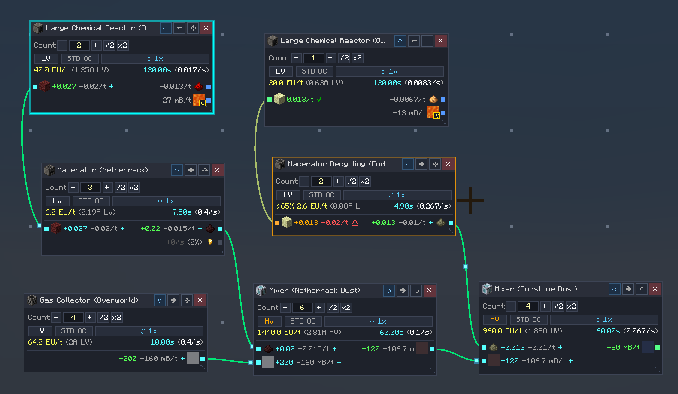
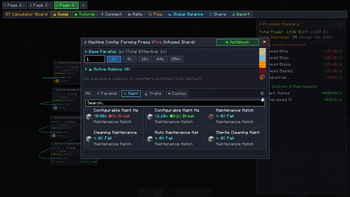
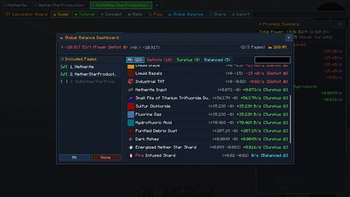
GregTech Calculator Board (GTCB) lets you build dynamic flowcharts directly inside Minecraft by pulling recipes from EMI or JEI.
Instead of making this:
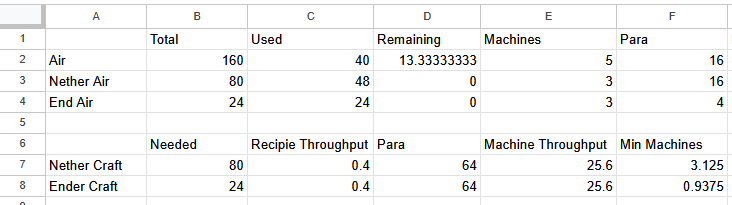
You can make this directly in-game:
Mod Main Features
- Effortless Live Flowcharts: Design dynamic flowcharts with machine inputs and outputs, linking them together to balance and simulate entire production lines.
- Intuitive GUI & Built-in Guide: Get started quickly with an interactive in-game tutorial and a comprehensive guidebook covering all features and shortcuts.
- Instant Bill Of Materials (BOM) Export: Automatically aggregate required machines and multiblock parts into a Bill of Materials, exportable directly to an EMI Recipe Tree, JEI++, or the clipboard.
- Live Multiplayer Collaboration: Work together with teammates using FTB Teams, Phoenix Guilds, or Vanilla Scoreboards in real-time shared workspaces.
Requirements & Mod Compatibility
- Minecraft:
1.20.1 - Mod Loader:
Minecraft Forge (47.2.0+) - Required Dependencies: None (Fully standalone, works client-side and server-side)
- Supported Recipe Viewers:
- EMI (Recommended)
- JEI (Just Enough Items) / JEI++ / JEI Unofficial
- Supported Tech & Automation Mods:
- GregTech CEu Modern (1.7.0+ or Star Technology forks)
- Applied Energistics 2 (AE2)
- Create, Create: New Age & Greate
- Thermal Series & Systeams
- Multiplayer Team Integration:
Community & Support
- Discord: Join our Discord Server - Discuss factory blueprints, ask questions, and chat with the community!
- Issue Tracker: GitHub Issues - Report confirmed bugs and submit suggestions.
- Source Code: GitHub Repository
Special Thanks
- The Reel One - For providing UX/UI feedback, design suggestions, and community testing.
- rafaelpnsm - For providing UX/UI feedback, design suggestions, and community testing.
- GenerusWeebius - For thorough testing, meticulous bug reporting, and mathematical verification.
Галерея
Последние версии
Все версии →release
GregTech Calculator Board 2.4.3
2.4.318 окт. 2026 г.175Minecraft: 1.20.1forge
Что нового
## [2.4.3] - 2026-10-18
### Added
- Added bacteria stat configuration (Production and Metabolism tiers 1-5) to Star Technology Bacterial Hydrocarbon Harvester nodes, allowing flow calculations based on actual breed levels for accurate sugar/biomass consumption and fluid production.
### Fixed
- Fixed an issue where an invalid fuel was displayed in the Modular Combustion Frame (MCF), and ensured Rocket Modules correctly offer dedicated rocket fuels (Rocket Fuel, RP-1, Monomethylhydrazine, and Sorbitol Hypergolic Fuel) instead of standard combustion fuels.
- Fixed an issue where auxiliary fluids (such as liquid tungsten disulfide or lubricants) in combustion generators and rocket modules could be duplicated as both core recipe inputs and hardware auxiliary inputs on the node card.
- Fixed an issue where heating coil speed bonuses were applied after overclocking instead of before overclocking, ensuring recipe durations round down after coil speed boosts first and then at each overclock step to match in-game processing times.
- Fixed an issue where running Auto-Ratio from an upstream anchor rounded downstream machines requiring more than 1 machine down instead of up, causing insufficient processing capacity.
release
GregTech Calculator Board 2.4.2
2.4.210 окт. 2026 г.132Minecraft: 1.20.1forge
Что нового
## [2.4.2] - 2026-10-10
### Added
- Added a Community & Support button to the left activity bar and Guide menu, offering direct links to report bugs on GitHub Issues and join the Discord community.
### Fixed
- Fixed an issue where clicking the search box in the Page Browser drawer failed to gain focus or accept text input, and restored search placeholder hint text and right-click to clear.
- Fixed an issue where Star Technology Boosted Plasma Turbines (Supreme and Nyinsane) calculated booster fluid consumption rates 1,000 times too low, and ensured booster fluid rates remain constant regardless of parallel factor or rotor efficiency.
release
GregTech Calculator Board 2.4.1
2.4.18 окт. 2026 г.52Minecraft: 1.20.1forge
Что нового
## [2.4.1] - 2026-10-08
### Added
- Added an 'Export to AE2' button to the Multiblock Bill of Materials (BOM) dialog when opened directly from an AE2 Pattern Encoding Terminal, transferring required construction materials directly into processing pattern slots.
- Added a 'Sync Recipe Demand' button to Shared Machine Pools, allowing players to automatically match each internal recipe's operating count to connected external demand in a single click.
- Added a machine/workstation search prefix (`m:`, `ws:`) to the recipe search dialog, allowing players to find all recipes compatible with a specific machine across different categories (such as Macerator, Ore Grinding, and Part Grinding).
### Fixed
- Fixed an issue where pressing the 'R' (Recipes) and 'U' (Uses) hotkeys while hovering over ingredients in the Process Summary panel did not open recipe lookups.
- Fixed an issue where the multi-selection Auto-Connect action (floating toolbar button, 'Shift+C' hotkey, and right-click menu) was unavailable or did not connect when selecting Shared Machine Pools alongside other nodes.
- Fixed an issue where clicking the search bar in the Switch Machine dialog did not focus or receive text input, and added a search placeholder hint.
- Fixed an issue where switching recipes on a machine node (such as a Macerator) restricted search results to only the current recipe's category, preventing recipes in other categories for the same machine from appearing.
- Fixed an issue where standard Auto-Ratio caused downstream machine counts to artificially explode when an upstream machine had low utilization, by calculating continuous material flow before quantizing into integers.
- Fixed an issue where hovering over input and output slots in the Shared Machine Pool recipe list displayed rates in per-second (/s) format instead of matching the board's active time unit (/min, /t, etc.).
- Fixed an issue where the horizontal flip direction (input/output reversal) feature was unavailable on Shared Machine Pools, adding full support for flipping via the header button, the 'F' hotkey, and the context menu across all pool view modes.
- Fixed an issue where Shared Machine Pools failed to display missing energy hatch and tier deficit warning badges when multiblock machines were inactive.
- Fixed an issue in Shared Machine Pools where clicking the bottom border or empty space of a recipe card mistakenly triggered the first output item port.
- Fixed an issue in multiplayer team workspaces where modifying page voltage tier or auto-hatch settings could fail to synchronize or be overwritten across different teams.
- Fixed an issue where multiblock machines with higher-amperage energy hatches (such as 2A) incorrectly accessed full amperage for parallel and overclocking calculations instead of adhering to the 1A tier limit, resulting in inflated overclocking and output rates.
release
GTCalcBoard 2.4.0
2.4.05 окт. 2026 г.69Minecraft: 1.20.1forge
Что нового
## [2.4.0] - 2026-10-05
### Fixed
- Fixed an issue where deleting a page inside the folder browser closed the browser panel, and resolved an issue where folder expanded/collapsed states reset upon closing and reopening the board.
- Fixed an issue where pages without an AE2 pattern binding were incorrectly displayed as linked in the AE2 autocrafting confirmation screen and bottleneck badges when producing matching items.
- Fixed an issue where switching tabs or adjusting machine values on boards with multiple pages caused UI freezes and frame drops, optimizing multi-page flow coordination to skip independent pages.
beta
GTCalcBoard 2.4.0-beta.4
2.4.0-beta.42 окт. 2026 г.195Minecraft: 1.20.1forge
Что нового
## [2.4.0-beta.4] - 2026-10-02
### Added
- Added support for Star Technology's 5-tier Bulk Processing modes (4:3.25, 8:6.5, 16:13, 32:26, 64:52) on compatible multiblock machines, allowing players to select the matching bulking ratio configured on their machine.
### Fixed
- Fixed an issue where folding nodes into a compound module while working on a shared team board incorrectly created the subpage in the player's personal board, ensuring module subpages are properly created and synchronized within the shared team workspace along with breadcrumb navigation and undo/redo support.
- Fixed an issue where the Bulk Processing trait was not detected on new Star Technology multiblock machines such as the Ultra Barrel.
- Fixed an issue where multiblock machines with high-ampere energy hatches did not fully overclock up to their total power capacity, ensuring accurate recipe duration, batching cycles, and throughput scaling matching in-game behavior.
- Fixed an issue where byproduct chances and output rates were not locked to 0% on electric macerators below HV tier for ore crushing and recycling recipes.
beta
GTCalcBoard 2.4.0-beta.3
2.4.0-beta.31 окт. 2026 г.22Minecraft: 1.20.1forge
Что нового
## [2.4.0-beta.3] - 2026-10-01
### Changed
- The default card display mode is now Expanded Card Mode instead of Slim Card Mode, allowing players to immediately adjust machine voltage tiers, overclocking, and configs directly from node cards upon initial setup.
### Added
- Added custom naming for junction nodes and a source search modal for cross-page links: players can now give junctions descriptive custom names in the junction dialog or via right-click, and search for upstream source pages or junctions by page name, junction label, or resource/fluid with real-time surplus rates in a dedicated search popup.
- Added Folder Browser and folder hierarchy support to Shared Team Workspaces: players can now organize shared team pages into folders and subfolders using the drawer browser (accessible via the `≡` button on the tab bar or the folder icon on the activity bar), add new team pages and folders, drag and drop pages into folders, rename pages/folders, and search team pages across folder trees in real time.
- Added Shared Team Workspace viewing and tab switching to the web dashboard: players can now switch between personal boards and shared team workspaces directly from the browser header, browse team pages and folders, and inspect shared boards in real time.
- Added Input/Output Bus and Hatch Tier Mode settings to the Multiblock Bill of Materials (BOM): players can now choose whether buses and hatches should match the machine's voltage tier, automatically scale down to the cheapest minimum tier required by recipe items and fluids, or force a specific tier (LV, MV, or HV) directly from the BOM dialog.
### Fixed
- Fixed an issue where junctions and connection wires displayed false deficit warnings even when surplus was available, which occurred because flow demands were calculated using nominal rates instead of the reduced effective consumption of downstream machines throttled by other bottlenecks.
- Fixed an issue where Shared Machine Pool frames rendered with overlapping sub-cards and missing summary headers in the web dashboard, now displaying the complete pool header, machine counts, duty cycle, power usage, and compact recipe cards just like in-game.
- Fixed an issue where multiblock machines with higher-tier item buses (such as MV buses on Rock Filtrator) calculated more buses than required by the recipe in the Bill of Materials (BOM), now dynamically calculating the exact number of buses required to satisfy the recipe items and automatically restoring extra slots to structure casings.
- Fixed an issue where the Threading configuration panel in machine settings was missing localized text for sub-tabs, helix stats, stat allocation badges, effect descriptions, and action buttons, as well as fixing a text clipping issue where multi-stat helix descriptions overflowed into the count adjustment buttons.
- Fixed an issue where cross-page linked junctions could not be configured or coordinated in shared team workspaces, and ensured strict isolation so personal boards and shared team workspaces only link within their own respective pages.
- Fixed an issue where regular items produced on a calculator board incorrectly displayed an AE2 linked page tooltip.
- Fixed an issue where cross-page linked junctions failed to combine with local producers when connected to intermediate relay junctions or terminal batch buffers, causing imported flow to be blocked at 0 mB/s.
- Fixed an issue where multiblock-exclusive recipes (such as Large Chemical Reactor recipes) were erroneously assigned singleblock machines as their default workstation and displayed singleblock machines in the switch machine dialog.
- Fixed an issue where canceling a node card resize with the Escape key did not properly restore the card's original height.
- Fixed an issue where the page settings panel repeatedly reopened whenever clicking or dragging on empty canvas areas.
- Fixed an issue where newline characters in certain tooltips (such as the frame auto-ratio button) rendered as broken [LF] glyph boxes, improving tooltip formatting and control character safety across all languages.
- Fixed an issue where Shared Machine Pool frames could not be resized while in Embedded Panel view mode, restoring resize handles, multi-edge dragging, and auto-fit.
- Fixed an issue where dragging an output port onto a Shared Machine Pool frame triggered generic wire drag cancellation instead of adding a recipe: now it automatically connects to matching existing recipes or automatically spawns the recipe into the pool just like multi-port dragging, falling back to the prefiltered recipe search dialog when multiple choices exist.
- Fixed an issue where the starting anchor of the connecting wire was misaligned with the sub-card port when dragging a wire from a port inside a Shared Machine Pool embedded panel.
- Fixed an issue where page names could not be renamed via double-click or right-click in shared team workspaces.
- Fixed an issue in Shared Team Workspaces where camera positions (pan coordinates) and zoom levels were not remembered when switching between team pages or toggling between personal and team workspace tabs.
- Fixed a network compatibility issue where clients connecting to dedicated servers running older mod versions would disconnect with an IndexOutOfBoundsException error upon login.
beta
GTCalcBoard 2.4.0-beta.2
2.4.0-beta.227 сент. 2026 г.36Minecraft: 1.20.1forge
Что нового
## [2.4.0-beta.2] - 2026-09-27
### Added
- Multi-selected machines now dynamically scope the Process Summary panel: selecting a group of machines dynamically filters the summary to show Average and Peak consumption, machine counts, and net raw materials specifically for the selection (and seamlessly returns to the full board summary when cleared), making branch cable sizing and sub-group power planning effortless.
- Added cross-page junction flow allocation: players can now link a junction on one page directly to an upstream junction on another page or export flows to remote pages with priority rules and flow caps. The Calculator Board automatically synchronizes inter-page resource supplies in real-time, displays link status and starvation indicators on junction cards, and allows 1-click jumping to the source page by clicking the linked badge.
- Added Peak Power readout in the Process Summary panel alongside Average Power: players can now clearly see both average throughput consumption (for fuel balance) and peak electrical load (for cable thickness and transformer sizing) simultaneously, preventing in-game wire burnouts caused by recipe bursts.
- Added contextual auto-connect for selected nodes: when multiple machines are selected, clicking the new '↔ Connect' button on the floating toolbar or pressing Shift+C automatically connects matching input/output ports only between the selected machines, preventing unwanted wiring to unrelated parts of large setups.
- Added a machine-centric embedded recipe panel for shared machine pools, allowing players to manage multiple time-shared recipes cleanly inside a single panel as vertical sub-cards and add recipes inline via an [+ Add Recipe] button. Supports seamless 3-tier view transitions between folded cards, embedded panels, and expanded frames, with direct wire routing to individual recipe pins.
- For recipes requiring a Programmed Circuit (such as GregTech chemical reactors), the configured circuit number is now clearly displayed as an icon next to the machine count buttons, with a tooltip indicating the required circuit configuration for in-game machine setup.
### Improved
- Cross-page sync junctions now automatically deduce and propagate their inter-page supply priority from outgoing wire priorities, ensuring high-priority downstream machines receive their required resource allocation first from upstream producer junctions.
- Linked consumer junctions now visualize the upstream source junction's total production, current usage, and available surplus in tooltips and supply dialogs, and starvation badges now display exact decimal flow rates.
- The Local Web Dashboard now visualizes cross-page linked junctions with color-coded status badges, upstream source metrics (production, usage, available surplus) in tooltips, and 1-click jumping to the source page upon clicking the badge.
- Eliminated redundant recipe re-indexing and catalog clearing when switching between singleplayer worlds and multiplayer servers, reducing memory allocation spikes (GC pressure) during world transitions while keeping the Calculator Board instantly responsive.
- Overhauled the side Inspector Panel to adapt to each node type: selecting a multiblock electric machine now provides a dedicated 'Energy Hatch' section displaying current hatch status and allowing 1-click installation or hot-swapping of default energy hatches directly from the voltage tier grid. This immediately resolves missing energy hatch warnings and updates overclocking and power consumption without opening the hardware dialog, while steam machines, boilers, and subpage modules now display streamlined controls tailored to their specific type.
- When opening the Calculator Board from an inventory, AE2 terminal, or other container screens, closing the board or pressing the open board hotkey again now returns directly to the previous screen.
### Fixed
- Fixed an issue in the AE2 Crafting Confirm screen where clicking the bottleneck button for an item not linked to the Calculator Board reopened an unrelated previously viewed page, and disabled the link arrow and click interaction when no linked page exists. Also improved auto-detection to link existing board pages that produce the requested item.
- Fixed an issue where reopening the Calculator Board or reconnecting to a world caused cross-page sync junctions to lose their linked resource item/fluid and reset to an empty arrow icon.
- Fixed an issue where adding recipes from the shared machine pool embedded panel used the machine ID instead of the recipe category for search prefill, causing no recipes to be displayed.
- Fixed an issue where remote consumer junctions did not register as downstream demand or consumption on the upstream producer page, causing the producer page summary and upstream ports to show no resource consumption.
- Fixed an issue in the Junction Supply Dialog where the source page and source junction selection labels overlapped with the arrow buttons, and the selected source junction's real-time flow status was not properly displayed.
- Fixed a major frame drop (render lag) caused by redundant port calculations when viewing shared machine pools in folded card mode with many connecting wires.
- Fixed an issue where switching between multiblock machines supporting different traits (such as Electric Ore Factory and Super Electric Ore Factory) or removing trait addons caused the machine's base parallel capacity to become corrupted and double-multiplied, resulting in abnormally inflated production rates.
- Fixed an issue where typing inside EMI or external recipe viewer search bars could accidentally trigger the Calculator Board hotkey.
- Fixed an issue where switching a Dynamo to Boiler mode and cycling through alternative fluids caused duplicate output ports to accumulate when reopening the board.
- Fixed an issue where singleblock electric machines with a steam multiblock equivalent (such as Forge Hammer) incorrectly displayed an "HP Steam" tier badge.
- Fixed an issue where Steam multiblock machines incorrectly requested an LV Energy Hatch instead of a Steam Input Hatch in the Multiblock BOM (Bill of Materials) list.
- Fixed an issue where switching a multiblock machine with specialized traits (such as combustion engines or throughput boosting machines) to a singleblock machine could leave traits unpurged or result in incorrect power calculations.
- Fixed an issue where clicking the machine count adjustment buttons ([+], [/2], [x2]) in the side Inspector Panel triggered the wrong count changes.
beta
GTCalcBoard 2.4.0-beta.1
2.4.0-beta.120 сент. 2026 г.104Minecraft: 1.20.1forge
Что нового
## [2.4.0-beta.1] - 2026-09-20
### Added
- Added a Batch Run Calculator dialog, allowing players to calculate the total processing time, required raw materials, projected output yields, and energy consumption based on a finite input batch or a target production goal. Accessible via the Optimize toolbar dropdown or by clicking any resource in the Process Summary panel.
- Added a Recipe Override tab in the machine settings dialog, allowing players to manually customize base processing time, power consumption/generation, and input/output ingredient amounts for unsupported generic machines or custom processes, with one-click restoration to default recipe values.
- Added a Local Web Dashboard, allowing players to view and monitor the active calculator board in real time on a secondary monitor or web browser while building in-world. Disabled by default to save system resources, it can be enabled via the in-game Settings dialog or client config, and accessed via the Share / I/O toolbar menu or the /gtcalcboard web command.
### Improved
- Improved the Local Web Dashboard icon rendering and caching pipeline with background prewarming, browser-level asset caching, and robust texture loading to eliminate in-game stutter when viewing large factory blueprints.
- Added a Page Browser to the Local Web Dashboard, allowing players to view all pages, search by name or folder, switch blueprints freely, and toggle in-game live page tracking.
- Improved Local Web Dashboard visual rendering with dedicated item/fluid slot plates, strict vertical icon alignment, two-column port layout to prevent text overlapping, dynamic card height scaling to cleanly enclose large recipe port lists, and authentic item/fluid/machine icon rendering while stripping raw color formatting codes.
- Aligned Local Web Dashboard node card dimensions, row height, and port wire connections with in-game layout specifications, ensuring consistent spacing between adjacent machines and preventing junction pins from being overlapped.
- Added comprehensive measurement unit formatting (mB, B, kB, MB, and compact EU/t) to the Local Web Dashboard, allowing players to read fluid and power rates clearly with an instant unit toggle (Auto / B / mB) in the top toolbar.
### Fixed
- Fixed an issue where steam multiblock machines such as the Steam Kiln and Steam Ore Factory incorrectly triggered missing energy hatch warnings and displayed electric/maintenance hatches in machine configuration dialogs, correctly restricting compatible addons to steam hatches.
- Fixed an issue where recipes added from viewers or switched on existing nodes could lose their input and output ports.
- Fixed an issue where recipes for low-tier machines like macerators omitted input ingredient ports when added to the board.
- Fixed an issue where parallel hatches on unpowered multiblock machines were capped to low voltage limits before energy hatches were installed, accurately preserving the hatch's rated parallel multiplier (including Star Technology Theta 2's 8x buff).
beta
GTCalcBoard 2.3.0-beta.1
2.3.0-beta.117 сент. 2026 г.146Minecraft: 1.21.1neoforge
Что нового
## [2.3.0-beta.1] - 2026-09-17
### Improved
- Added a self-healing background indexing recovery mechanism that safely triggers EMI recipe pre-caching after 40–50 seconds if recipe baking stalls or completion lifecycle events are dropped in large modpacks.
- Improved GTCEu compatibility to deductively recognize custom `GTRecipeType` definitions registered by modpacks and third-party addons (such as Cosmic Frontiers' `cosmiccore`, KubeJS, etc.) via runtime reflection, ensuring all GT-based recipes are natively mapped regardless of namespace.
- Promoted the welcome onboarding tutorial seen state to persistent client configurations (`CalcBoardClientConfig` and `client_preferences.json`), remembering user dismissal across multiple worlds and server logins.
### Fixed
- Fixed an overclock calculation issue where recipes requiring 2A or more (e.g. 4A, 8A) would calculate excessive or distorted amperage downscaling when processed in higher voltage tier machines.
- Fixed a critical data loss bug where duplicate `ClientPlayerNetworkEvent.LoggingOut` events upon exiting singleplayer worlds would overwrite valid board saves on disk with an initialized empty board.
- Fixed an issue where modpack-specific GTCEu recipes (such as `cosmiccore:mana_leaching_tub` and `cosmiccore:arcane_crucible`) were incorrectly assigned a `Generic Unsupported Process` badge despite having their EU/t and duration parameters extracted correctly.
- Fixed an issue where clicking 'Explore on My Own' in the welcome onboarding popup failed to persist the seen state, causing the modal to reappear on every game launch.
release
GTCalcBoard 2.3.0
2.3.016 сент. 2026 г.105Minecraft: 1.20.1forge
Что нового
## [2.3.0] - 2026-09-16
### Added
- Added an auto-ratio button to expanded group frames, allowing players to calculate and balance upstream and downstream machine counts against the entire group without needing to collapse it into a module.
- Added a full-flow PNG export feature under the Share / I/O menu, allowing players to copy the entire active canvas page to the system clipboard as a clear, high-resolution image regardless of the current viewport or zoom level (with automatic fallback to the screenshots folder if clipboard access is unavailable). (Contributed by @SirEdvin in #9, thanks!)
- Added a comprehensive 3-track interactive tutorial system, featuring a basic starter tutorial, 4 specialized academy chapters for ratio solving, wiring, module subpages, and workspace management, along with non-intrusive contextual tips for in-game factory design.
- Added TerraFirmaGreg (TFG) Large Boiler support, allowing players to calculate steam generation and fuel consumption for Large Bronze and Large Steel Boilers with 9 selectable booster fluids, standard or purified water quality, dynamic water penalty scaling, and dual-fuel Super Boiler mode.
### Improved
- Improved the interactive tutorial flow so completing an action pauses to highlight the results and changes on the canvas with clear feedback, allowing players to review the outcome and proceed at their own pace using the Next Step button or Space/Enter keys, while preserving already placed machines and connections across steps.
- Streamlined the toolbar help dropdown menu by restructuring it cleanly around the basic starter tutorial and academy chapters.
- Improved Chapter 1 of the interactive academy by adding an explicit Alt+R auto-ratio step after anchor setup, and replacing placeholder nodes with realistic multi-step processing lines: a copper wire and cable line for harmonized integer scaling, and a 3-node leaching circuit with external acid makeup for damped recirculation loop scaling.
- Improved recirculating loop steady-state balancing to be automatically optimized alongside standard [Alt+R] and [Alt+Shift+R] auto-ratio calculations, and added a clickable [🔄 Steady State] badge on loop machine cards for one-click right-sizing.
- Hardened multiplayer server memory protection against abnormal network upload streams when committing large team workspace pages.
- Optimized node and blueprint copying to eliminate screen stutter when duplicating or pasting large factory layouts and complex process groups.
### Fixed
- Fixed an issue where equipping parallel control hatches on multiblock machines could become stuck at 1x parallel after opening the machine configuration dialog.
- Fixed an issue where junction external supply, infinite supply, or raw inflow was not recognized by downstream machine inputs when viewing flow rates in 1x recipe batch mode.
- Fixed a game crash occurring when clicking empty canvas space while editing values on compound or module nodes.
- Prevented keyboard shortcuts (such as Delete, Backspace, or Ctrl+Z) from accidentally affecting background canvas nodes while a dialog or popup window is open.
- Fixed an issue where switching page tabs while dragging a connection wire could leave the wire hanging or connect across different pages.
- Fixed an issue in Academy Chapter 3 where pressing Escape inside a module subpage would quit the tutorial instead of returning to the parent canvas.
- Improved page management to automatically clean up child subpages whenever their parent page is deleted, ensuring orphaned subpages are never left behind on the board.
- Hardened canvas UI interactions and flow calculations against unexpected crashes when switching pages, navigating complex graphs, or loading world saves with corrupted values.