COWMODSКаталог модов

Gestorage

Improved storage for Minecraft

Автор: ImGontry3110обновлён 9 окт. 2026 г.
ХранениеТехнологииУтилиты

Описание

Gestorage

Mod Loader Minecraft License

Gestorage is a modular Fabric mod (Minecraft 1.21.1) that improves player storage and inventory management. It is an ecosystem of independent modules that can be enabled and disabled individually, so you only install the mechanics you actually want.

All modules ship disabled by default and are activated from the in-game config screen (/gestorage config), by keybind, or by editing config/gestorage/.


Features

ModuleWhat it does
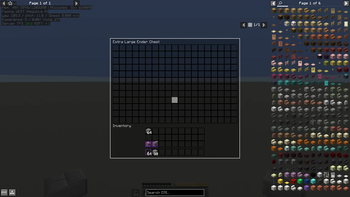
Expanded Ender ChestGrows the ender chest from 27 to 54 (Large) or 228 (Extra Large) slots, selectable server-wide via a game rule, with per-player overflow persistence and keybind access.
Shulker RestockAuto-refill for inventories: bind a hotbar/inventory slot to a shulker box and it is topped up automatically when it runs low.
Stackable ShulkersEmpty shulker boxes stack up to 64, in the player inventory and in every container context (hoppers, droppers, etc.). Server-authoritative, toggleable.
Storage OverlayInformational panel shown next to any open inventory: inventory name, item name, stack counts, item counts and free-slot count.
Inventory SortingSort button and keybind for containers, shulker boxes, ender chests and the player inventory, with configurable merge, name and direction options.
Careful BreakServer-authoritative mining suite: careful break to hand, careful drop to inventory, tree capitator, better harvesting (cactus/sugarcane/bamboo/kelp chains) and auto replant for trees and crops.
Tool WheelRadial tool selector bound to a key: a persistent 9-slot wheel that swaps real items between the wheel and your hand, with an optional server-side Auto Tool that instantly swaps the best tool while mining.

Module details

Expanded Ender Chest

  • Three storage tiers, chosen server-wide with the gestorage:enderChestSize game rule: Normal (27), Large (54) and Extra Large (228 slots).
  • Overflow items beyond the vanilla 27 slots are stored per player and persist across sessions (NBT state, versioned with backups).
  • A configurable keybind opens your ender chest from anywhere, without needing an item.
  • Also accessible with /gestorage endersize [normal|large|extra_large] (requires OP level 2).

Shulker Restock

  • Mark two slots (source shulker and target) with the configured marking key to create a persistent per-world link.
  • The target slot is refilled from the shulker up to default stack size whenever it falls below the configured threshold, with adaptive back-off.
  • Links are saved per world in config/gestorage/links.json and survive restarts; they are shared across players.

Stackable Shulkers

  • Empty shulker boxes behave like any other item (stack to 64) while non-empty ones keep their usual stack limit of 1.
  • Server-authoritative: the toggle in the config screen writes the server config and is disabled while connected to a remote server.

Storage Overlay

  • Renders a panel adjacent to the open inventory showing inventory name, hovered item name, icon, stack and item counts, and remaining free slots.
  • Every element can be shown or hidden individually, each with its own assignable toggle keybind.

Inventory Sorting

  • One-click sort for player inventory (main inventory only; hotbar and armor untouched), chests, ender chests and shulker boxes.
  • Options: merge stacks, sort by name, sort order (ascending/descending), and per-inventory-type blocking.
  • The server validates the sorted range, so this works consistently regardless of who is hosting.

Careful Break

Server-side flags, synced to all clients and toggleable with OP level 2 (or as the singleplayer host):

  • Careful Break — mined blocks go straight into your inventory (sneak to activate).
  • Careful Drop / Always Careful — block and entity drops (items, loot tables, worn equipment, minecart contents) are collected into your inventory instead of being scattered.
  • Tree Capitator — fell whole trees by breaking the base log (with tree/leaf caps).
  • Better Harvesting — break entire cactus, sugarcane, bamboo and kelp chains in one swing.
  • Auto Replant — automatically replant trees and crops after harvesting.

Tool Wheel

  • A radial HUD wheel (9 slots) opened with a keybind; click to swap a real item between the wheel and your main hand. The wheel contents are saved per player and follow you across sessions and dimensions.
  • Auto Tool (server-authoritative per player): on START_DESTROY_BLOCK the best tool in the wheel is instantly swapped into your hand, re-evaluated on every block you start mining, and reverted to your original tool one second after mining stops.
  • Per-player storage is persisted in the overworld (gestorage_tool_wheel_<uuid>) and synced to the owner on join and after every change.

Requirements

  • Minecraft 1.21.1
  • Fabric Loader >= 0.16.10
  • Fabric API
  • owo-lib is bundled with the mod (warns you if it is missing)

Installation

  1. Install Fabric Loader for Minecraft 1.21.1.
  2. Install the matching Fabric API version.
  3. Download the latest Gestorage release from the Releases page.
  4. Drop the .jar file into your .minecraft/mods directory.
  5. Launch the game. Modules are off by default — open the config screen with /gestorage config (or Mod Menu) to enable them.

Configuration

All configuration lives in config/gestorage/:

FilePurpose
ender_chest.jsonEnder chest access keybind and module enabled flag
shulker_refill.jsonRefill threshold, marking key and module enabled flag
shulker_stack.jsonServer-authoritative Stackable Shulkers toggle
storage_overlay.jsonOverlay element visibility and toggle keybinds
inventory_sorting.jsonSorting options and toggle keybinds
careful_break.jsonServer-authoritative Careful Break flags (written by the server only)
careful_break_keybinds.jsonClient-side Careful Break keybinds
tool_wheel.jsonTool Wheel keys and module enabled flag
links.jsonShulker link definitions

Commands and game rules

  • /gestorage config — opens the in-game config screen.
  • /gestorage endersize [normal|large|extra_large] — sets the gestorage:enderChestSize game rule (OP level 2).
  • Game rule gestorage:enderChestSize — accepts 0 (normal), 1 (large) or 2 (extra large); the game rule is the single authority for the ender chest size on the server.

Feedback & Contributions

Gestorage is actively developed. If you run into an issue, have a feature idea, or want to contribute to the code, open an Issue or submit a Pull Request.


License

Released under the MIT License.

Галерея
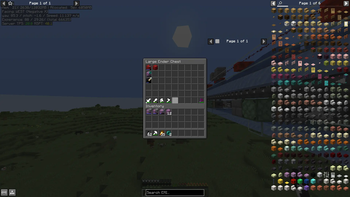
Large Ender ChestExtra Large Ender Chest

Последние версии

Все версии →
release

Gestorage 4.0.0

4.0.0
9 окт. 2026 г.71Minecraft: 1.21.1fabric
Скачать
Что нового
# Changelog All notable changes to Gestorage are documented in this file. ## Unreleased ### Added - **Shulker Restock: reversible refill order** — you can now choose whether items are pulled out of the shulker box from the first slot to the last (the default) or from the last slot to the first. Toggle it with the `Reverse Order` option in the module settings or its own assignable keybind; the server honours your choice in the `refill_request` packet. - **Config screen: real translucency, no extra mod required.** The settings menu's window, buttons and checkboxes have always shipped with semi-transparent artwork, but vanilla never enables alpha blending on the texture draw path, so an external mod (Translucency Fix) was needed to see through them. Gestorage now enables blending itself on those draws, so the menu blends with the world behind it out of the box. ### Before you update - Client and server must run the same version: the refill packet now carries the refill-order field. ## 4.0.0 Released 2026-10-09. ### Fixed - **Shulker Restock: the hotbar count no longer looks like it is being consumed when refilling blocks.** Placing a block is predicted on your client (the stack is decremented locally), so when a refill restored the count to the very number the server had already sent, the correction was never pushed and your client kept counting down while the server stayed full. The server now forces the corrected stack back to the client after a refill, so blocks behave like rockets and every other item. - **Tool Wheel: Auto Tool now always swaps into the pinned Default Slot.** Previously it only moved your hand when it had to change the tool, so when the tool already in your hand was the right one for the block it left your selection untouched and the Default Slot was ignored. Auto Tool now selects this slot on every mine start, whether or not an item swap is needed. ### Before you update - Client and server must run the same version.
release

Gestorage 3.0.0

3.0.0
5 окт. 2026 г.22Minecraft: 1.21.1fabric
Скачать
Что нового
# Changelog All notable changes to Gestorage are documented in this file. ## Unreleased Work in progress — this section is rewritten with the version number when the release is cut. ## 3.0.0 Released 2026-10-04. ### Stackable Shulkers - **Now a command, like the ender chest size** — turn it on with `/gestorage shulkerstack on` (or off with `/gestorage shulkerstack off`), and check the current state with `/gestorage shulkerstack`. Changing it requires OP level 2, it is per world and it takes effect immediately. `/gestorage shulkerstack` with no arguments only reports the state. - **Plain `/gamerule` works too** — `gestorage:stackableShulkers` is a real game rule now, so `/gamerule gestorage:stackableShulkers true` does the same thing and every client is told about the change right away, not only on join. - The stacking itself is unchanged: empty shulker boxes stack up to 64 everywhere, hoppers and droppers included, and a shulker box that holds items still stacks to 1. ### Tool Wheel - **Enchantment preference** — a new `Prefer: None / Fortune / Silk Touch` option in the Tool Wheel settings, with its own assignable keybind. A wheel tool carrying the preferred enchantment is used whenever it can break the block, even against a faster tool without it; when no preferred tool can break the block, Auto Tool falls back to the fastest tool. Stored per player, synced to your client, applied to the next block you start breaking. - **Auto Tool hands back exactly what it took** — one second after you stop mining, whatever was in the tool slot goes back into that slot and the auto tool goes back into the wheel slot it came from. A stack you used, repaired or re-enchanted while it sat in the wheel is still handed back, nothing is ever duplicated, destroyed or shuffled into another slot, and turning Auto Tool off while a tool is swapped in returns it immediately. - **Reconnecting no longer disables Auto Tool** — your wheel, the Auto Tool flag and the pinned slot are loaded from your save as you join, so Auto Tool works right away instead of only after you open the wheel once. Players who never used the module still get no save file created. - **Default Slot is command-only** — pin the hotbar slot Auto Tool swaps into with `/gestorage toolslot <1-9>`, or `/gestorage toolslot clear` to follow the selected slot again. The row and its keybind are no longer in the config screen. ### Fixed - Changing hotbar slots while Auto Tool works no longer makes your hand jump back to the tool slot: returning a tool never moves your selection, so you keep whatever slot you switched to. - Auto Tool no longer drags an item out of the slot that held it. Whatever the tool slot contained (a bow, a block, a second pickaxe) always goes back to that same slot, instead of being looked for elsewhere and swapped with a mining tool that stayed behind in its place. - Two Auto Tool swaps in a row no longer leave the two tools in each other's wheel slot: a pending swap is rolled back before the next decision, so mining stone → dirt → stone keeps the pickaxe and the shovel where they belong. - The Efficiency bonus now only applies to tools that actually break the block, so an Efficiency V helmet, a block or a stick can no longer out-score a pickaxe. - The one second revert no longer fires in the middle of a vein while the game keeps breaking a block on its own after the button was released. - Switching the Tool Wheel module off now also switches Auto Tool off on the server, instead of the server keeping to swap tools for a module you had turned off. The module state is reported to the server when you join and on every toggle. - Auto Tool ignores block positions the player could not actually reach instead of reacting to them. ### Before you update - Stackable Shulkers moved out of the config screen and into the `gestorage:stackableShulkers` game rule. If you had it enabled, the old `shulker_stack.json` is imported into the rule the first time you start your world, so nothing changes; both old files are then renamed with a `.migrated` suffix and are no longer read. If you had it off, just run `/gestorage shulkerstack on` when you want it. - The Stackable Shulkers toggle keybind is gone, along with the `shulker_stack_keybinds.json` file that stored it. Use the command instead. - `/gestorage tooldefault` no longer exists and the persistent `Default Tool` setting is gone. Auto Tool now remembers each swap it makes and returns the items themselves, so nothing has to be held when you turn it on. - The `Default Slot` keybind is gone from the config screen; use `/gestorage toolslot <1-9>` to re-pin the slot. - Client and server must run the same version. ## 3.0.0-beta.1 A modular storage and inventory overhaul for Fabric 1.21.1. This is a **pre-release**: every module still ships **disabled by default**, so you only activate the mechanics you actually want. ### New module: Tool Wheel A radial tool selector built on real item swaps — no virtual hand, no duplicated items. - **Persistent 9-slot wheel**, stored per player in the world. Open it as a vanilla 9x1 chest, or press a key to bring up a radial HUD wheel (9 sectors) and click the sector you want. - Every selection is a **real swap** between the wheel slot and your hand, so nothing is ever duplicated or lost. - While the wheel is open, attack/use/pick input is blocked, so a click can never fall through and accidentally mine or place a block. - **Auto Tool** (server-side, per player): on every block-break start it compares your hand against every wheel tool and instantly swaps in a strictly faster one — re-evaluated on every mine start, so mining stone then dirt does not get stuck on the pickaxe. One second after you stop mining, it puts your tool back. Guards make sure a manual change is never clobbered and a mid-vein revert can never fire. #### Auto Tool: choose your default tool and your tool slot - **Default Tool** — the tool Auto Tool always returns to. Set it with `/gestorage tooldefault set [<slot 1-9>]` (or the `Default Tool` row in the config screen, which takes the item in your hand) and remove it with `/gestorage tooldefault clear`. On revert it is looked for in the wheel first and then across your whole inventory, and swapped back, so a restocked or moved tool still matches. If it cannot be found at all, the previous session behaviour takes over, so the auto tool is never stranded in your hand. - **Default Slot** — pin the hotbar slot Auto Tool swaps into. When Auto Tool fires, your hand moves to that slot and the swap always happens there; the client is notified immediately, so what you see is what you click. Set it with `/gestorage toolslot <1-9>`, with the new assignable keybind, or by clicking the `Default Slot` row (cycles `Selected → 1..9 → Selected`). Both settings are server-authoritative, stored per player in the wheel state file and synced to your client. Existing wheel saves load untouched: the new fields are written additively, so no wheel data is wiped. ### Careful Break - **Auto Replant is now two separate options**: `Auto Replant Trees` (used by Tree Capitator) and `Auto Replant Crops` (used by Better Harvesting), each with its own toggle, its own assignable keybind and its own state flag. - Existing configs migrate automatically: an old `Auto Replant` value enables both new options, and your old keybind moves to the trees option. A backup is written before the config is read. - **Entity drops are now collected through a single funnel**, so mob loot (with Looting), worn armour and held items all land in your inventory instead of scattering on the ground. Item frames and vehicles (minecarts) are covered as well. - Toggle state is broadcast on join and after every change, so the config screen always shows the live server value. ### Fixes and technical changes - Auto Tool mining speed now accounts for Efficiency (`level² + 1`), matching vanilla. - Reading Tool Wheel data no longer creates a save file for players who never used the module, and unknown or corrupt state versions are handled instead of failing. - Shulker Restock: one slot map built per tick instead of per-link lookups, with precomputed item names in the sorter. - Inventory Sorting: the container is marked dirty after a sort so the result is saved immediately. - Ender chest overflow: session backups are reset on server stop. - Network payloads: bounded string reads/writes on the refill packet. - Every module config now defaults to disabled, applied consistently across the mod. ### Commands - `/gestorage config` — opens the config screen. - `/gestorage endersize [normal|large|extra_large]` — ender chest size (OP level 2 required to change it). - `/gestorage tooldefault [set [<slot 1-9>]]` / `/gestorage tooldefault clear` — Auto Tool default tool. - `/gestorage toolslot [<1-9>|clear]` — Auto Tool hotbar slot. `tooldefault` and `toolslot` are personal per-player state and require no OP level. ### Before you update - **Client and server must run the same version.** This release changes the Careful Break state payload, so a 2.0.1 client cannot join a 3.0.0 server (or the other way round). - Extra Large ender chest (228 slots) is still experimental and prints a warning when enabled. - Backup your world if you rely on the ender chest overflow data; it is versioned, but this is a pre-release. ### Requirements - Minecraft 1.21.1 - Fabric Loader 0.16.10+ - Fabric API - Java 21 - Mod Menu (optional, for the config screen entry)
beta

Gestorage 3.0.0-beta.1

3.0.0-beta.1
27 сент. 2026 г.20Minecraft: 1.21.1fabric
Скачать
Что нового
# Changelog All notable changes to Gestorage are documented in this file. ## Unreleased Work in progress — this section is rewritten with the version number when the release is cut. ### Tool Wheel - **Enchantment preference** — a new `Prefer: None / Fortune / Silk Touch` option in the Tool Wheel settings, with its own assignable keybind. A wheel tool carrying the preferred enchantment is used whenever it can break the block, even against a faster tool without it; when no preferred tool can break the block, Auto Tool falls back to the fastest tool. Stored per player, synced to your client, applied to the next block you start breaking. - **Auto Tool now returns to your session tool** — the tool you were holding in the tool slot when you enabled Auto Tool. It is looked for in the wheel first and then across your whole inventory, matching by exact stack, then by item and enchantments, then by item alone, so a tool you used, repaired or re-enchanted while it was parked still comes back. Reverting never destroys an item and never leaves you empty handed, and turning Auto Tool off while a tool is swapped in returns it immediately. - **Reconnecting no longer disables Auto Tool** — your wheel, the Auto Tool flag and the pinned slot are loaded from your save as you join, so Auto Tool works right away instead of only after you open the wheel once. Players who never used the module still get no save file created. - **Default Slot is command-only** — pin the hotbar slot Auto Tool swaps into with `/gestorage toolslot <1-9>`, or `/gestorage toolslot clear` to follow the selected slot again. The row and its keybind are no longer in the config screen. ### Fixed - Two Auto Tool swaps in a row no longer leave the two tools in each other's wheel slot: a pending swap is rolled back before the next decision, so mining stone → dirt → stone keeps the pickaxe and the shovel where they belong. - The Efficiency bonus now only applies to tools that actually break the block, so an Efficiency V helmet, a block or a stick can no longer out-score a pickaxe. - The one second revert no longer fires in the middle of a vein while the game keeps breaking a block on its own after the button was released. - Switching the Tool Wheel module off now also switches Auto Tool off on the server, instead of the server keeping to swap tools for a module you had turned off. The module state is reported to the server when you join and on every toggle. - Enabling Auto Tool with an empty tool slot no longer reports your tool as missing. - Auto Tool ignores block positions the player could not actually reach instead of reacting to them. ### Before you update - `/gestorage tooldefault` no longer exists and the persistent `Default Tool` setting is gone. To get the old behaviour back, hold the tool you want Auto Tool to return to and enable Auto Tool: the session tool is captured for you. - The `Default Slot` keybind is gone from the config screen; use `/gestorage toolslot <1-9>` to re-pin the slot. - Client and server must run the same version. ## 3.0.0-beta.1 A modular storage and inventory overhaul for Fabric 1.21.1. This is a **pre-release**: every module still ships **disabled by default**, so you only activate the mechanics you actually want. ### New module: Tool Wheel A radial tool selector built on real item swaps — no virtual hand, no duplicated items. - **Persistent 9-slot wheel**, stored per player in the world. Open it as a vanilla 9x1 chest, or press a key to bring up a radial HUD wheel (9 sectors) and click the sector you want. - Every selection is a **real swap** between the wheel slot and your hand, so nothing is ever duplicated or lost. - While the wheel is open, attack/use/pick input is blocked, so a click can never fall through and accidentally mine or place a block. - **Auto Tool** (server-side, per player): on every block-break start it compares your hand against every wheel tool and instantly swaps in a strictly faster one — re-evaluated on every mine start, so mining stone then dirt does not get stuck on the pickaxe. One second after you stop mining, it puts your tool back. Guards make sure a manual change is never clobbered and a mid-vein revert can never fire. #### Auto Tool: choose your default tool and your tool slot - **Default Tool** — the tool Auto Tool always returns to. Set it with `/gestorage tooldefault set [<slot 1-9>]` (or the `Default Tool` row in the config screen, which takes the item in your hand) and remove it with `/gestorage tooldefault clear`. On revert it is looked for in the wheel first and then across your whole inventory, and swapped back, so a restocked or moved tool still matches. If it cannot be found at all, the previous session behaviour takes over, so the auto tool is never stranded in your hand. - **Default Slot** — pin the hotbar slot Auto Tool swaps into. When Auto Tool fires, your hand moves to that slot and the swap always happens there; the client is notified immediately, so what you see is what you click. Set it with `/gestorage toolslot <1-9>`, with the new assignable keybind, or by clicking the `Default Slot` row (cycles `Selected → 1..9 → Selected`). Both settings are server-authoritative, stored per player in the wheel state file and synced to your client. Existing wheel saves load untouched: the new fields are written additively, so no wheel data is wiped. ### Careful Break - **Auto Replant is now two separate options**: `Auto Replant Trees` (used by Tree Capitator) and `Auto Replant Crops` (used by Better Harvesting), each with its own toggle, its own assignable keybind and its own state flag. - Existing configs migrate automatically: an old `Auto Replant` value enables both new options, and your old keybind moves to the trees option. A backup is written before the config is read. - **Entity drops are now collected through a single funnel**, so mob loot (with Looting), worn armour and held items all land in your inventory instead of scattering on the ground. Item frames and vehicles (minecarts) are covered as well. - Toggle state is broadcast on join and after every change, so the config screen always shows the live server value. ### Fixes and technical changes - Auto Tool mining speed now accounts for Efficiency (`level² + 1`), matching vanilla. - Reading Tool Wheel data no longer creates a save file for players who never used the module, and unknown or corrupt state versions are handled instead of failing. - Shulker Restock: one slot map built per tick instead of per-link lookups, with precomputed item names in the sorter. - Inventory Sorting: the container is marked dirty after a sort so the result is saved immediately. - Ender chest overflow: session backups are reset on server stop. - Network payloads: bounded string reads/writes on the refill packet. - Every module config now defaults to disabled, applied consistently across the mod. ### Commands - `/gestorage config` — opens the config screen. - `/gestorage endersize [normal|large|extra_large]` — ender chest size (OP level 2 required to change it). - `/gestorage tooldefault [set [<slot 1-9>]]` / `/gestorage tooldefault clear` — Auto Tool default tool. - `/gestorage toolslot [<1-9>|clear]` — Auto Tool hotbar slot. `tooldefault` and `toolslot` are personal per-player state and require no OP level. ### Before you update - **Client and server must run the same version.** This release changes the Careful Break state payload, so a 2.0.1 client cannot join a 3.0.0 server (or the other way round). - Extra Large ender chest (228 slots) is still experimental and prints a warning when enabled. - Backup your world if you rely on the ender chest overflow data; it is versioned, but this is a pre-release. ### Requirements - Minecraft 1.21.1 - Fabric Loader 0.16.10+ - Fabric API - Java 21 - Mod Menu (optional, for the config screen entry)
beta

Gestorage 3.0.0-beta

3.0.0-beta
26 сент. 2026 г.16Minecraft: 1.21.1fabric
Скачать
Что нового
# Changelog ## 3.0.0-beta.1 A modular storage and inventory overhaul for Fabric 1.21.1. This is a **pre-release**: every module still ships **disabled by default**, so you only activate the mechanics you actually want. ### New module: Tool Wheel A radial tool selector built on real item swaps — no virtual hand, no duplicated items. - **Persistent 9-slot wheel**, stored per player in the world. Open it as a vanilla 9x1 chest, or press a key to bring up a radial HUD wheel (9 sectors) and click the sector you want. - Every selection is a **real swap** between the wheel slot and your hand, so nothing is ever duplicated or lost. - While the wheel is open, attack/use/pick input is blocked, so a click can never fall through and accidentally mine or place a block. - **Auto Tool** (server-side, per player): on every block-break start it compares your hand against every wheel tool and instantly swaps in a strictly faster one — re-evaluated on every mine start, so mining stone then dirt does not get stuck on the pickaxe. One second after you stop mining, it puts your tool back. Guards make sure a manual change is never clobbered and a mid-vein revert can never fire. #### Auto Tool: choose your default tool and your tool slot - **Default Tool** — the tool Auto Tool always returns to. Set it with `/gestorage tooldefault set [<slot 1-9>]` (or the `Default Tool` row in the config screen, which takes the item in your hand) and remove it with `/gestorage tooldefault clear`. On revert it is looked for in the wheel first and then across your whole inventory, and swapped back, so a restocked or moved tool still matches. If it cannot be found at all, the previous session behaviour takes over, so the auto tool is never stranded in your hand. - **Default Slot** — pin the hotbar slot Auto Tool swaps into. When Auto Tool fires, your hand moves to that slot and the swap always happens there; the client is notified immediately, so what you see is what you click. Set it with `/gestorage toolslot <1-9>`, with the new assignable keybind, or by clicking the `Default Slot` row (cycles `Selected → 1..9 → Selected`). Both settings are server-authoritative, stored per player in the wheel state file and synced to your client. Existing wheel saves load untouched: the new fields are written additively, so no wheel data is wiped. ### Careful Break - **Auto Replant is now two separate options**: `Auto Replant Trees` (used by Tree Capitator) and `Auto Replant Crops` (used by Better Harvesting), each with its own toggle, its own assignable keybind and its own state flag. - Existing configs migrate automatically: an old `Auto Replant` value enables both new options, and your old keybind moves to the trees option. A backup is written before the config is read. - **Entity drops are now collected through a single funnel**, so mob loot (with Looting), worn armour and held items all land in your inventory instead of scattering on the ground. Item frames and vehicles (minecarts) are covered as well. - Toggle state is broadcast on join and after every change, so the config screen always shows the live server value. ### Fixes and technical changes - Auto Tool mining speed now accounts for Efficiency (`level² + 1`), matching vanilla. - Reading Tool Wheel data no longer creates a save file for players who never used the module, and unknown or corrupt state versions are handled instead of failing. - Shulker Restock: one slot map built per tick instead of per-link lookups, with precomputed item names in the sorter. - Inventory Sorting: the container is marked dirty after a sort so the result is saved immediately. - Ender chest overflow: session backups are reset on server stop. - Network payloads: bounded string reads/writes on the refill packet. - Every module config now defaults to disabled, applied consistently across the mod. ### Commands - `/gestorage config` — opens the config screen. - `/gestorage endersize [normal|large|extra_large]` — ender chest size (OP level 2 required to change it). - `/gestorage tooldefault [set [<slot 1-9>]]` / `/gestorage tooldefault clear` — Auto Tool default tool. - `/gestorage toolslot [<1-9>|clear]` — Auto Tool hotbar slot. `tooldefault` and `toolslot` are personal per-player state and require no OP level. ### Before you update - **Client and server must run the same version.** This release changes the Careful Break state payload, so a 2.0.1 client cannot join a 3.0.0 server (or the other way round). - Extra Large ender chest (228 slots) is still experimental and prints a warning when enabled. - Backup your world if you rely on the ender chest overflow data; it is versioned, but this is a pre-release. ### Requirements - Minecraft 1.21.1 - Fabric Loader 0.16.10+ - Fabric API - Java 21 - Mod Menu (optional, for the config screen entry)
release

Gestorage 2.0.1

2.0.1
8 сент. 2026 г.32Minecraft: 1.21.1fabric
Скачать
Что нового
[fix(careful): vanilla block updates + entity/item-frame careful drop (v2.0.1)](https://github.com/GGontry/Gestorage/commit/b5b780a368cbe2a274f526f74f0e21c0aed5d83d) - **BlockDropMixin:** replace updateNeighbors with onStacksDropped so breaking a block fires full neighbor updates (restores vanilla propagation feel) - **VehicleEntityMixin:** track killer during damage, route boat/minecart drops to the breaking player when careful drop is active - **ItemFrameEntityMixin:** careful-drop captures both the held item and the frame - **ItemScattererMixin:** chest/container contents loot into the killer's inventory - **CarefulBreakManager:** add ThreadLocal killer tracking for entity drops - bump mod_version to 2.0.1, update icon + fabric.mod.json metadata - docs: clarify ModConstants, ModNetworking, ClientState, KeybindHelper (tolerant mouse/key parsing), ModuleConfig, EnderChestFactory, refill tick
beta

Gestorage 2.0.1-beta

2.0.1-beta
29 авг. 2026 г.34Minecraft: 1.21.1fabric
Скачать
Что нового
### New Features - **Inventory Sorting:** Sort any open container (player inventory, Ender Chest, Shulker Box and any generic container) with a keybind or the clickable buttons on screen. Merge partial stacks, sort by item name, ascending or descending order — every option is configurable and can also be toggled with its own keybind, and you can block specific container types from being sorted. - **Careful Break:** Toggleable module that sends block and entity drops directly into your inventory instead of scattering them on the ground. Includes: - **Tree Capitator:** break a whole tree at once. - **Better Harvesting:** harvest crops(sugarcane, bamboo, kelp) and see for yourself :]. - **Auto Replant:** crops are replanted automatically after harvesting. - **Always Careful:** stay in careful mode without needing to sneak, and toggle each sub-option independently with its own keybind. - **Toggle keybinds everywhere:** every module option can now be enabled or disabled on the fly from configurable keybinds (Ender Chest, Shulker Stacking, Storage Overlay and more). ### Fixes - Storage Overlay: fixed rendering in several container screens. - Storage Overlay: fixed overlay drawing when the Recipe Book is open.
release

Gestorage 2.0.0

2.0.0
9 авг. 2026 г.40Minecraft: 1.21.1fabric
Скачать
Что нового
- **Config Menu:** Added a new configuration menu built with owo-lib. - **Storage Overlay:** Added an overlay showing total item counts when hovering over items. - **Stackable Shulkers:** Empty shulker boxes can now stack up to 64. - **Fixes:** Resolved a crash in Extra Large Ender Chests caused by heavy shulker data.
release

Gestorage 1.0.1

1.0.1
23 июл. 2026 г.53Minecraft: 1.21.1fabric
Скачать
Что нового
## centralize constants, cache shulker detection, unify inventory creation - Add ModConstants.java to replace all hardcoded size values (27/54/228) - Add EnderChestFactory to unify EnhancedEnderChestInventory creation - Add ClientState for cached client-side mode storage - Cache shulker box detection in ShulkerRefillManager (IdentityHashMap) - Add defensive clamping in ModGameRules.getEnderChestSize() - Protect ShulkerLinkManager against double load - Implement EnderSizeChangedS2CPacket handler - Document OpenEnderScreenS2CPacket as reserved placeholder - Remove dead BATCH_SIZE constant from ExtraLargeEnderMenu
release

Gestorage 1.0.0

1.0.0
21 июл. 2026 г.23Minecraft: 1.21.1fabric
Скачать
Что нового
**First Gestorage Release!!**