COWMODSКаталог модов

FTBChecker

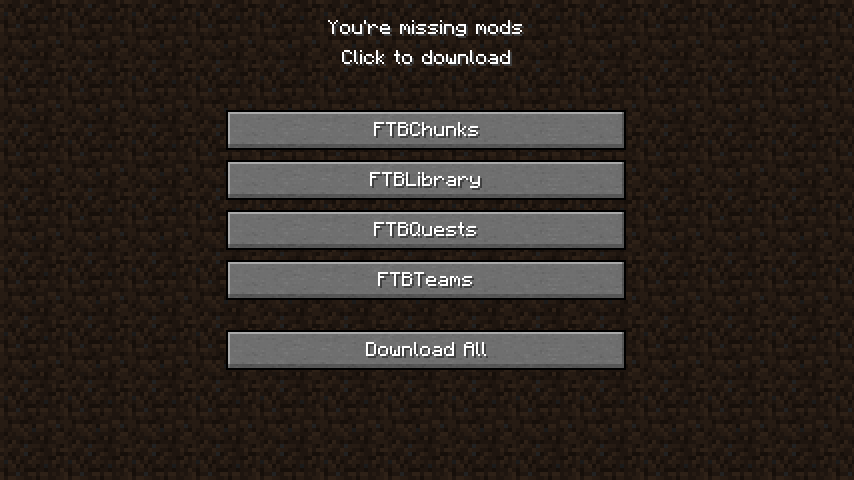
FTB Checker is a mod that ensures the presence of FTB mods in your modpack. If any of these mods are missing, a warning screen will be displayed before entering the main menu, providing download links for the missing mods.

Автор: SajmonOriginal12,8 тыс.19обновлён 24 янв. 2026 г.
Утилиты

Описание

FTB Checker

FTB Checker is a mod that ensures the presence of popular FTB mods in your modpack. It checks for FTB Chunks, FTB Library, FTB Quests, and FTB Teams. If any of these mods are missing, the mod displays a screen before entering the main menu, providing download links for the missing mods.

FTB Checker was originally created for my CreateCore Reforged modpack. The mod was developed to ensure the seamless integration of FTB mods within the modpack while adhering to the licensing requirements of the Modrinth platform.

Recognizing its potential utility for other modpack creators facing similar challenges I decided to release FTB Checker as a standalone mod. This allows other modpack creators to easily incorporate the essential FTB mods into their projects while maintaining compatibility with the Modrinth platform.

Features

  • Automatic FTB mod check: FTB Checker automatically detects if any of the essential FTB mods are missing from your modpack.
  • Download links: If any FTB mods are missing, the mod will display a screen with download links for the missing mods, making it easier for players to obtain them.
  • Modrinth compatibility: Designed for modpack creators who want to use FTB mods and host their modpacks on the Modrinth platform. Due to licensing restrictions, FTB mods cannot be used on Modrinth directly.

Mod showcase

Support

If you encounter any issues or have questions, please visit our GitHub repository to report issues, or join our Discord server for community support.

⚠️ Disclaimer ⚠️

FTBChecker is not affiliated with or endorsed by FTB (Feed The Beast) or Modrinth.

Галерея
Последние версии

Все версии →
release

FTBChecker 1.21.0-1.3.0

1.21.0-1.3.0
24 янв. 2026 г.197Minecraft: 1.21quilt
Скачать
Что нового
## What's New ✨ **Custom Mods Support** — Require any mod in your modpack, not just FTB mods! Add entries to config using format: `modId|Display Name|Download URL` 🚫 **Non-Dismissable Screen** — Missing mods screen can no longer be closed or ignored - players must download required mods to continue 🧵 **Fabric and Quilt Support** — Now available for NeoForge, Fabric, and Quilt mod loaders 🎨 **Mod Icon** — Now displays in mod menus ## Default Required Mods ### Quilt - Architectury API - FTB Chunks - FTB Library - FTB Quests - FTB Teams > All mods can be enabled/disabled individually in the config. ## Configuration Config file location: `config/ftbchecker.toml` ### Adding Custom Mods ```toml [customMods] mods = [ "jei|Just Enough Items|https://www.curseforge.com/minecraft/mc-mods/jei/download/5101366", "create|Create|https://www.curseforge.com/minecraft/mc-mods/create/download/5678901" ] ``` ## Dependencies ### Quilt - [Quilted Fabric API](https://modrinth.com/mod/qsl) - [Cloth Config](https://www.curseforge.com/minecraft/mc-mods/cloth-config) (bundled) - [Mod Menu](https://www.curseforge.com/minecraft/mc-mods/modmenu) (optional, for config GUI)
release

FTBChecker 1.19.2-1.3.0

1.19.2-1.3.0
24 янв. 2026 г.61Minecraft: 1.19.2fabric
Скачать
Что нового
## What's New ✨ **Custom Mods Support** — Require any mod in your modpack, not just FTB mods! Add entries to config using format: `modId|Display Name|Download URL` 🚫 **Non-Dismissable Screen** — Missing mods screen can no longer be closed or ignored - players must download required mods to continue 🧵 **Fabric and Quilt Support** — Now available for NeoForge, Fabric, and Quilt mod loaders 🎨 **Mod Icon** — Now displays in mod menus ## Default Required Mods ### Fabric - Architectury API - FTB Chunks - FTB Library - FTB Quests - FTB Teams > All mods can be enabled/disabled individually in the config. ## Configuration Config file location: `config/ftbchecker.toml` ### Adding Custom Mods ```toml [customMods] mods = [ "jei|Just Enough Items|https://www.curseforge.com/minecraft/mc-mods/jei/download/5101366", "create|Create|https://www.curseforge.com/minecraft/mc-mods/create/download/5678901" ] ``` ## Dependencies ### Fabric - [Fabric API](https://www.curseforge.com/minecraft/mc-mods/fabric-api) - [Cloth Config](https://www.curseforge.com/minecraft/mc-mods/cloth-config) (bundled) - [Mod Menu](https://www.curseforge.com/minecraft/mc-mods/modmenu) (optional, for config GUI)
release

FTBChecker 1.21.1-1.3.0

1.21.1-1.3.0
24 янв. 2026 г.2,6 тыс.Minecraft: 1.21.1fabric
Скачать
Что нового
## What's New ✨ **Custom Mods Support** — Require any mod in your modpack, not just FTB mods! Add entries to config using format: `modId|Display Name|Download URL` 🚫 **Non-Dismissable Screen** — Missing mods screen can no longer be closed or ignored - players must download required mods to continue 🧵 **Fabric and Quilt Support** — Now available for NeoForge, Fabric, and Quilt mod loaders 🎨 **Mod Icon** — Now displays in mod menus ## Default Required Mods ### Fabric - Architectury API - FTB Chunks - FTB Library - FTB Quests - FTB Teams > All mods can be enabled/disabled individually in the config. ## Configuration Config file location: `config/ftbchecker.toml` ### Adding Custom Mods ```toml [customMods] mods = [ "jei|Just Enough Items|https://www.curseforge.com/minecraft/mc-mods/jei/download/5101366", "create|Create|https://www.curseforge.com/minecraft/mc-mods/create/download/5678901" ] ``` ## Dependencies ### Fabric - [Fabric API](https://www.curseforge.com/minecraft/mc-mods/fabric-api) - [Cloth Config](https://www.curseforge.com/minecraft/mc-mods/cloth-config) (bundled) - [Mod Menu](https://www.curseforge.com/minecraft/mc-mods/modmenu) (optional, for config GUI)
release

FTBChecker 1.21.1-1.3.0

1.21.1-1.3.0
24 янв. 2026 г.4,4 тыс.Minecraft: 1.21, 1.21.1neoforge
Скачать
Что нового
## What's New ✨ **Custom Mods Support** — Require any mod in your modpack, not just FTB mods! Add entries to config using format: `modId|Display Name|Download URL` 🚫 **Non-Dismissable Screen** — Missing mods screen can no longer be closed or ignored - players must download required mods to continue 🧵 **Fabric and Quilt Support** — Now available for NeoForge, Fabric, and Quilt mod loaders 🎨 **Mod Icon** — Now displays in mod menus ## Default Required Mods ### NeoForge - FTB Chunks - FTB Library - FTB Quests - FTB Teams - FTB Essentials - FTB Ultimine - FTB Backups 2 - PolyLib > All mods can be enabled/disabled individually in the config. ## Configuration Config file location: `config/ftbchecker.toml` ### Adding Custom Mods ```toml [customMods] mods = [ "jei|Just Enough Items|https://www.curseforge.com/minecraft/mc-mods/jei/download/5101366", "create|Create|https://www.curseforge.com/minecraft/mc-mods/create/download/5678901" ] ``` ## Dependencies ### NeoForge - [Cloth Config](https://www.curseforge.com/minecraft/mc-mods/cloth-config) (bundled)
release

FTBChecker 1.2

1.2
11 июн. 2024 г.3,8 тыс.Minecraft: 1.20.1neoforge
Скачать
Что нового
Updated to NeoForge 1.20.1 Added config support Added FTB Ultimine Added FTBBackups 2 Added FTB Essentials Big thanks to @RedstoneWizard08 who created this version
release

FTBChecker 1.1

1.1
25 июн. 2023 г.1,7 тыс.Minecraft: 1.18.2forge
Скачать
Что нового
* Added Quest Additions mod
release

FTBChecker 1.0

1.0
13 мая 2023 г.137Minecraft: 1.18.2forge
Скачать
Что нового
Initial release.