COWMODSКаталог модов

FTB Quest Translator

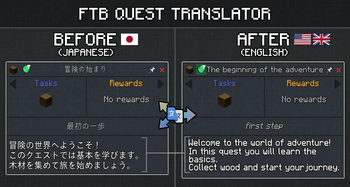
Client-side addon for FTB Quests that adds a translate button. Translates quest titles, subtitles and descriptions on-the-fly using free translation APIs (Google Translate, MyMemory).

Автор: anoubios32,8 тыс.5обновлён 14 окт. 2026 г.
Утилиты

Описание

🌐 FTB Quest Translator

A fully integrated client-side addon for FTB Quests that brings high-quality, real-time quest translations right into your game. Say goodbye to external translators—enjoy modpacks in your native language seamlessly!

⚠️ Important Notice from the Author This mod is developed and maintained by a single developer in their free time. While I strive to ensure the best possible experience, updates might take a little time.

If you encounter any bugs, have feature requests, or just want to chat about the mod, I'd love to hear from you!

Please join the official Discord Server (discord.gg/XsZ5czhpJ8) to report issues or share your feedback.

🎥 Showcase

✨ Key Features:

  • One-Click Translation — A seamlessly integrated toggle button right inside the quest view panel. No bulky external menus.
  • Advanced Translation Providers — Supports DeepL (highly recommended, preserves context and formatting) and Google Translate.
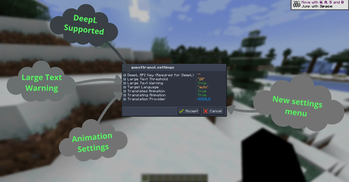
  • Native UI Configuration — Forget about editing config files manually. Configure API keys, translation providers, and animations directly in-game using the gorgeous UI via FTB Library.
  • Smart Language Detection — Automatically detects your Minecraft language settings and translates quests accordingly.
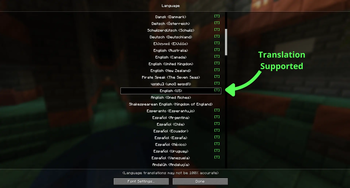
  • Language Support Indicator — Look for the handy green [T] in the Minecraft Language Options screen to instantly know if your language is supported!
  • Live Connection Diagnostics — Cool immersive animations around the translate button that warn you if the translation server is unreachable or if your API key is invalid.
  • In-Memory Caching — Intelligent caching ensures instant translations with zero repeated API calls, saving your network and API usage.
  • Client-Side Only — Zero server setup required. You can safely use it while playing on any multiplayer server!
  • Text-to-Speech Voiceover — A speaker icon next to the translate button reads quest text aloud using Google TTS. Dynamically reads either the original or translated text depending on your current view.
  • Glossary (Translation Memory) — Configure words to stay untranslated via config/tfq_glossary.json. Perfect for keeping mod names like "Redstone", "Create", or "Mekanism" in their original form.
  • Batch Translation — Two new buttons in the FTB Quests sidebar let you translate the entire questbook in the background. Uses a smart rate-limiting queue (1.5s delay) to avoid API bans. Progress is saved automatically — close the game and resume later anytime.

🎮 How to Use:

  • Open any quest in your FTB Quests book.
  • Click the Translate Button to translate the quest instantly.
  • Click again to switch back to the original text.
  • Use the Batch buttons in the sidebar to translate the whole questbook at once.

⚙️ Configuration:

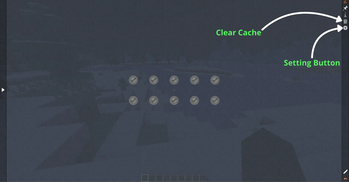
Simply open your FTB Quests book and click the Settings Gear at the top right of the main panel to open the intuitive in-game configuration menu. Here you can tweak:

  • Target Language overrides
  • Your DeepL API Key
  • Network connection and transition animations
  • Cache management and clearing
  • Glossary management (config/tfq_glossary.json)

🌍 Target Language

The Target Language setting uses standard ISO language codes.

  • auto is the default value for this setting, so in most cases you do not need to change anything manually. The mod will automatically adapt to your current Minecraft language.
  • Use a manual language code if you want to force a specific translation language.
  • A full list of ISO language codes can be found on the Wikipedia ISO 639-1 page.
  • Keep in mind that not every existing language code may be supported by Minecraft or by the selected translation provider.

📋 Requirements:

FTB Quests(Forge/NeoForge/Fabric) (Required)

FTB Library(Forge/NeoForge/Fabric) (Required)

Галерея
FTB QUEST TRANSLATORNew ButtonsNew featuresTranslation Supported

Последние версии

Все версии →
release

FTB Quest Translator 1.5.0-1.20.1

1.5.0-1.20.1
14 окт. 2026 г.516Minecraft: 1.20.1fabric
Скачать
Что нового
FTB Quests Translator 1.5.0 (2026-10-14) ADDED • New Quest Translation menu: Everything about batch translation now lives in one window that uses your quest book's FTB Quests theme (custom quest pack themes apply too). – Show translated quests: one switch at the top turns translated quests on or off. – Translate tab: pick a language and a chapter (or All chapters), press Translate. Live progress with Pause, Resume, Stop and Retry failed. – Saved tab: all saved chapter translations with search and a language filter. Tick a chapter to read it translated, untick it for the original, delete with confirmation. – Settings tab: the most used options as simple ON/OFF rows, plus a shortcut to all TFQ settings. • Translations per world: batch translations, progress and the chapter selection are stored separately for every world, server and quest pack, so different packs never mix. • Show translation when finished: newly translated chapters can switch the quest book to the translation automatically. • Auto-pause on service errors: if the translation service keeps failing (no internet, rate limit), the batch waits longer between attempts and then pauses instead of marking the rest of the queue as failed. Resume continues where it stopped. • Read aloud follows what you see: the voice reads the translation that is currently shown (batch or single quest) in its language. CHANGED • Batch translation is several times faster: small quests are packed into one request (up to 10 quests), chapter titles share that request, quests without text are skipped instantly and identical lines are sent once. The 1.5 s pause between requests is unchanged, so the translation service receives fewer requests than before. Example: 8 short quests now take about 3 s instead of 15–20 s. • DeepL: a whole quest (up to 50 lines) is sent in one request instead of one request per line. • Quest view buttons: Translate and Read aloud now sit next to FTB's pin and close buttons in the title bar. A slim extra row is used only when the quest title is very long. The quest icon is no longer hidden. • Read aloud starts playing while the audio is still loading and stops reliably when you switch quests. • Missing or outdated FTB Quests / FTB Library: Fabric shows its standard incompatible-mods screen instead of crashing. Forge and NeoForge show a window with the installed and required versions and update instructions. FIXED • Translations turned into "????" after restarting the game (Minecraft 1.20.1 and 1.20.4 on Windows): saved translations and the glossary were written in the system code page, which loses Cyrillic, Chinese, Japanese and most other scripts. All files are now saved as UTF-8, and translations that were already damaged are removed automatically so they get translated again. • "Invalid formatting! Can't nest multiple substitutes!" after translating: translators sometimes damage the mod's internal text markers (a lost brace, a Cyrillic letter, extra spaces). Markers are now repaired, and leftover braces can no longer break a quest line. • DeepL errors saved as translations: when the quota was used up, the key was wrong or DeepL was busy, the original text was stored as a finished translation and never retried. These are now reported as failures. • Unreadable Google responses saved as translations: such a response is now retried through the next connection route instead of being stored. • Batch results lost on a crash: during a long batch the cache was only written to disk after the batch ended. It is now saved at least every 5 seconds, and a crash in the middle of saving can no longer leave a broken file. • Wrong quest translated: when switching quests quickly, a late result could appear on another quest. • Corrupted config files no longer crash the game; default settings are used instead. • DeepL language codes for Chinese (Simplified and Traditional) and Norwegian. REMOVED • Old 1.4.0 batch files (ftbqt-batch-cache.json, ftbqt-batch-metadata.json, tfq_batch_progress.json, tfq_batch_selection.json) are no longer loaded because they had no world or pack identity. They stay on disk, and the Saved tab points them out. Please translate your chapters again once. • Unused code and textures from earlier versions, which makes the mod file smaller. REQUIREMENTS • 1.20.1 Fabric: FTB Quests 2001.4.2+, FTB Library 2001.2.1+ • 1.20.1 Forge: FTB Quests 2001.4.0+, FTB Library 2001.2.0+ • 1.20.4 Fabric: FTB Quests 2004.2.0+, FTB Library 2004.2.0+ • 1.20.4 NeoForge: FTB Quests 2004.2.0+, FTB Library 2004.2.1+ • 1.21.1 Fabric / NeoForge: FTB Quests 2101.1.0+, FTB Library 2101.1.1+
release

FTB Quest Translator 1.5.0-1.20.1

1.5.0-1.20.1
14 окт. 2026 г.584Minecraft: 1.20.1forge
Скачать
Что нового
FTB Quests Translator 1.5.0 (2026-10-14) ADDED • New Quest Translation menu: Everything about batch translation now lives in one window that uses your quest book's FTB Quests theme (custom quest pack themes apply too). – Show translated quests: one switch at the top turns translated quests on or off. – Translate tab: pick a language and a chapter (or All chapters), press Translate. Live progress with Pause, Resume, Stop and Retry failed. – Saved tab: all saved chapter translations with search and a language filter. Tick a chapter to read it translated, untick it for the original, delete with confirmation. – Settings tab: the most used options as simple ON/OFF rows, plus a shortcut to all TFQ settings. • Translations per world: batch translations, progress and the chapter selection are stored separately for every world, server and quest pack, so different packs never mix. • Show translation when finished: newly translated chapters can switch the quest book to the translation automatically. • Auto-pause on service errors: if the translation service keeps failing (no internet, rate limit), the batch waits longer between attempts and then pauses instead of marking the rest of the queue as failed. Resume continues where it stopped. • Read aloud follows what you see: the voice reads the translation that is currently shown (batch or single quest) in its language. CHANGED • Batch translation is several times faster: small quests are packed into one request (up to 10 quests), chapter titles share that request, quests without text are skipped instantly and identical lines are sent once. The 1.5 s pause between requests is unchanged, so the translation service receives fewer requests than before. Example: 8 short quests now take about 3 s instead of 15–20 s. • DeepL: a whole quest (up to 50 lines) is sent in one request instead of one request per line. • Quest view buttons: Translate and Read aloud now sit next to FTB's pin and close buttons in the title bar. A slim extra row is used only when the quest title is very long. The quest icon is no longer hidden. • Read aloud starts playing while the audio is still loading and stops reliably when you switch quests. • Missing or outdated FTB Quests / FTB Library: Fabric shows its standard incompatible-mods screen instead of crashing. Forge and NeoForge show a window with the installed and required versions and update instructions. FIXED • Translations turned into "????" after restarting the game (Minecraft 1.20.1 and 1.20.4 on Windows): saved translations and the glossary were written in the system code page, which loses Cyrillic, Chinese, Japanese and most other scripts. All files are now saved as UTF-8, and translations that were already damaged are removed automatically so they get translated again. • "Invalid formatting! Can't nest multiple substitutes!" after translating: translators sometimes damage the mod's internal text markers (a lost brace, a Cyrillic letter, extra spaces). Markers are now repaired, and leftover braces can no longer break a quest line. • DeepL errors saved as translations: when the quota was used up, the key was wrong or DeepL was busy, the original text was stored as a finished translation and never retried. These are now reported as failures. • Unreadable Google responses saved as translations: such a response is now retried through the next connection route instead of being stored. • Batch results lost on a crash: during a long batch the cache was only written to disk after the batch ended. It is now saved at least every 5 seconds, and a crash in the middle of saving can no longer leave a broken file. • Wrong quest translated: when switching quests quickly, a late result could appear on another quest. • Corrupted config files no longer crash the game; default settings are used instead. • DeepL language codes for Chinese (Simplified and Traditional) and Norwegian. REMOVED • Old 1.4.0 batch files (ftbqt-batch-cache.json, ftbqt-batch-metadata.json, tfq_batch_progress.json, tfq_batch_selection.json) are no longer loaded because they had no world or pack identity. They stay on disk, and the Saved tab points them out. Please translate your chapters again once. • Unused code and textures from earlier versions, which makes the mod file smaller. REQUIREMENTS • 1.20.1 Fabric: FTB Quests 2001.4.2+, FTB Library 2001.2.1+ • 1.20.1 Forge: FTB Quests 2001.4.0+, FTB Library 2001.2.0+ • 1.20.4 Fabric: FTB Quests 2004.2.0+, FTB Library 2004.2.0+ • 1.20.4 NeoForge: FTB Quests 2004.2.0+, FTB Library 2004.2.1+ • 1.21.1 Fabric / NeoForge: FTB Quests 2101.1.0+, FTB Library 2101.1.1+
release

FTB Quest Translator 1.5.0-1.20.4

1.5.0-1.20.4
14 окт. 2026 г.18Minecraft: 1.20.4fabric
Скачать
Что нового
FTB Quests Translator 1.5.0 (2026-10-14) ADDED • New Quest Translation menu: Everything about batch translation now lives in one window that uses your quest book's FTB Quests theme (custom quest pack themes apply too). – Show translated quests: one switch at the top turns translated quests on or off. – Translate tab: pick a language and a chapter (or All chapters), press Translate. Live progress with Pause, Resume, Stop and Retry failed. – Saved tab: all saved chapter translations with search and a language filter. Tick a chapter to read it translated, untick it for the original, delete with confirmation. – Settings tab: the most used options as simple ON/OFF rows, plus a shortcut to all TFQ settings. • Translations per world: batch translations, progress and the chapter selection are stored separately for every world, server and quest pack, so different packs never mix. • Show translation when finished: newly translated chapters can switch the quest book to the translation automatically. • Auto-pause on service errors: if the translation service keeps failing (no internet, rate limit), the batch waits longer between attempts and then pauses instead of marking the rest of the queue as failed. Resume continues where it stopped. • Read aloud follows what you see: the voice reads the translation that is currently shown (batch or single quest) in its language. CHANGED • Batch translation is several times faster: small quests are packed into one request (up to 10 quests), chapter titles share that request, quests without text are skipped instantly and identical lines are sent once. The 1.5 s pause between requests is unchanged, so the translation service receives fewer requests than before. Example: 8 short quests now take about 3 s instead of 15–20 s. • DeepL: a whole quest (up to 50 lines) is sent in one request instead of one request per line. • Quest view buttons: Translate and Read aloud now sit next to FTB's pin and close buttons in the title bar. A slim extra row is used only when the quest title is very long. The quest icon is no longer hidden. • Read aloud starts playing while the audio is still loading and stops reliably when you switch quests. • Missing or outdated FTB Quests / FTB Library: Fabric shows its standard incompatible-mods screen instead of crashing. Forge and NeoForge show a window with the installed and required versions and update instructions. FIXED • Translations turned into "????" after restarting the game (Minecraft 1.20.1 and 1.20.4 on Windows): saved translations and the glossary were written in the system code page, which loses Cyrillic, Chinese, Japanese and most other scripts. All files are now saved as UTF-8, and translations that were already damaged are removed automatically so they get translated again. • "Invalid formatting! Can't nest multiple substitutes!" after translating: translators sometimes damage the mod's internal text markers (a lost brace, a Cyrillic letter, extra spaces). Markers are now repaired, and leftover braces can no longer break a quest line. • DeepL errors saved as translations: when the quota was used up, the key was wrong or DeepL was busy, the original text was stored as a finished translation and never retried. These are now reported as failures. • Unreadable Google responses saved as translations: such a response is now retried through the next connection route instead of being stored. • Batch results lost on a crash: during a long batch the cache was only written to disk after the batch ended. It is now saved at least every 5 seconds, and a crash in the middle of saving can no longer leave a broken file. • Wrong quest translated: when switching quests quickly, a late result could appear on another quest. • Corrupted config files no longer crash the game; default settings are used instead. • DeepL language codes for Chinese (Simplified and Traditional) and Norwegian. REMOVED • Old 1.4.0 batch files (ftbqt-batch-cache.json, ftbqt-batch-metadata.json, tfq_batch_progress.json, tfq_batch_selection.json) are no longer loaded because they had no world or pack identity. They stay on disk, and the Saved tab points them out. Please translate your chapters again once. • Unused code and textures from earlier versions, which makes the mod file smaller. REQUIREMENTS • 1.20.1 Fabric: FTB Quests 2001.4.2+, FTB Library 2001.2.1+ • 1.20.1 Forge: FTB Quests 2001.4.0+, FTB Library 2001.2.0+ • 1.20.4 Fabric: FTB Quests 2004.2.0+, FTB Library 2004.2.0+ • 1.20.4 NeoForge: FTB Quests 2004.2.0+, FTB Library 2004.2.1+ • 1.21.1 Fabric / NeoForge: FTB Quests 2101.1.0+, FTB Library 2101.1.1+
release

FTB Quest Translator 1.5.0-1.20.4

1.5.0-1.20.4
14 окт. 2026 г.18Minecraft: 1.20.4forge, neoforge
Скачать
Что нового
FTB Quests Translator 1.5.0 (2026-10-14) ADDED • New Quest Translation menu: Everything about batch translation now lives in one window that uses your quest book's FTB Quests theme (custom quest pack themes apply too). – Show translated quests: one switch at the top turns translated quests on or off. – Translate tab: pick a language and a chapter (or All chapters), press Translate. Live progress with Pause, Resume, Stop and Retry failed. – Saved tab: all saved chapter translations with search and a language filter. Tick a chapter to read it translated, untick it for the original, delete with confirmation. – Settings tab: the most used options as simple ON/OFF rows, plus a shortcut to all TFQ settings. • Translations per world: batch translations, progress and the chapter selection are stored separately for every world, server and quest pack, so different packs never mix. • Show translation when finished: newly translated chapters can switch the quest book to the translation automatically. • Auto-pause on service errors: if the translation service keeps failing (no internet, rate limit), the batch waits longer between attempts and then pauses instead of marking the rest of the queue as failed. Resume continues where it stopped. • Read aloud follows what you see: the voice reads the translation that is currently shown (batch or single quest) in its language. CHANGED • Batch translation is several times faster: small quests are packed into one request (up to 10 quests), chapter titles share that request, quests without text are skipped instantly and identical lines are sent once. The 1.5 s pause between requests is unchanged, so the translation service receives fewer requests than before. Example: 8 short quests now take about 3 s instead of 15–20 s. • DeepL: a whole quest (up to 50 lines) is sent in one request instead of one request per line. • Quest view buttons: Translate and Read aloud now sit next to FTB's pin and close buttons in the title bar. A slim extra row is used only when the quest title is very long. The quest icon is no longer hidden. • Read aloud starts playing while the audio is still loading and stops reliably when you switch quests. • Missing or outdated FTB Quests / FTB Library: Fabric shows its standard incompatible-mods screen instead of crashing. Forge and NeoForge show a window with the installed and required versions and update instructions. FIXED • Translations turned into "????" after restarting the game (Minecraft 1.20.1 and 1.20.4 on Windows): saved translations and the glossary were written in the system code page, which loses Cyrillic, Chinese, Japanese and most other scripts. All files are now saved as UTF-8, and translations that were already damaged are removed automatically so they get translated again. • "Invalid formatting! Can't nest multiple substitutes!" after translating: translators sometimes damage the mod's internal text markers (a lost brace, a Cyrillic letter, extra spaces). Markers are now repaired, and leftover braces can no longer break a quest line. • DeepL errors saved as translations: when the quota was used up, the key was wrong or DeepL was busy, the original text was stored as a finished translation and never retried. These are now reported as failures. • Unreadable Google responses saved as translations: such a response is now retried through the next connection route instead of being stored. • Batch results lost on a crash: during a long batch the cache was only written to disk after the batch ended. It is now saved at least every 5 seconds, and a crash in the middle of saving can no longer leave a broken file. • Wrong quest translated: when switching quests quickly, a late result could appear on another quest. • Corrupted config files no longer crash the game; default settings are used instead. • DeepL language codes for Chinese (Simplified and Traditional) and Norwegian. REMOVED • Old 1.4.0 batch files (ftbqt-batch-cache.json, ftbqt-batch-metadata.json, tfq_batch_progress.json, tfq_batch_selection.json) are no longer loaded because they had no world or pack identity. They stay on disk, and the Saved tab points them out. Please translate your chapters again once. • Unused code and textures from earlier versions, which makes the mod file smaller. REQUIREMENTS • 1.20.1 Fabric: FTB Quests 2001.4.2+, FTB Library 2001.2.1+ • 1.20.1 Forge: FTB Quests 2001.4.0+, FTB Library 2001.2.0+ • 1.20.4 Fabric: FTB Quests 2004.2.0+, FTB Library 2004.2.0+ • 1.20.4 NeoForge: FTB Quests 2004.2.0+, FTB Library 2004.2.1+ • 1.21.1 Fabric / NeoForge: FTB Quests 2101.1.0+, FTB Library 2101.1.1+
release

FTB Quest Translator 1.5.0

1.5.0
14 окт. 2026 г.130Minecraft: 1.21.1fabric
Скачать
Что нового
FTB Quests Translator 1.5.0 (2026-10-14) ADDED • New Quest Translation menu: Everything about batch translation now lives in one window that uses your quest book's FTB Quests theme (custom quest pack themes apply too). – Show translated quests: one switch at the top turns translated quests on or off. – Translate tab: pick a language and a chapter (or All chapters), press Translate. Live progress with Pause, Resume, Stop and Retry failed. – Saved tab: all saved chapter translations with search and a language filter. Tick a chapter to read it translated, untick it for the original, delete with confirmation. – Settings tab: the most used options as simple ON/OFF rows, plus a shortcut to all TFQ settings. • Translations per world: batch translations, progress and the chapter selection are stored separately for every world, server and quest pack, so different packs never mix. • Show translation when finished: newly translated chapters can switch the quest book to the translation automatically. • Auto-pause on service errors: if the translation service keeps failing (no internet, rate limit), the batch waits longer between attempts and then pauses instead of marking the rest of the queue as failed. Resume continues where it stopped. • Read aloud follows what you see: the voice reads the translation that is currently shown (batch or single quest) in its language. CHANGED • Batch translation is several times faster: small quests are packed into one request (up to 10 quests), chapter titles share that request, quests without text are skipped instantly and identical lines are sent once. The 1.5 s pause between requests is unchanged, so the translation service receives fewer requests than before. Example: 8 short quests now take about 3 s instead of 15–20 s. • DeepL: a whole quest (up to 50 lines) is sent in one request instead of one request per line. • Quest view buttons: Translate and Read aloud now sit next to FTB's pin and close buttons in the title bar. A slim extra row is used only when the quest title is very long. The quest icon is no longer hidden. • Read aloud starts playing while the audio is still loading and stops reliably when you switch quests. • Missing or outdated FTB Quests / FTB Library: Fabric shows its standard incompatible-mods screen instead of crashing. Forge and NeoForge show a window with the installed and required versions and update instructions. FIXED • Translations turned into "????" after restarting the game (Minecraft 1.20.1 and 1.20.4 on Windows): saved translations and the glossary were written in the system code page, which loses Cyrillic, Chinese, Japanese and most other scripts. All files are now saved as UTF-8, and translations that were already damaged are removed automatically so they get translated again. • "Invalid formatting! Can't nest multiple substitutes!" after translating: translators sometimes damage the mod's internal text markers (a lost brace, a Cyrillic letter, extra spaces). Markers are now repaired, and leftover braces can no longer break a quest line. • DeepL errors saved as translations: when the quota was used up, the key was wrong or DeepL was busy, the original text was stored as a finished translation and never retried. These are now reported as failures. • Unreadable Google responses saved as translations: such a response is now retried through the next connection route instead of being stored. • Batch results lost on a crash: during a long batch the cache was only written to disk after the batch ended. It is now saved at least every 5 seconds, and a crash in the middle of saving can no longer leave a broken file. • Wrong quest translated: when switching quests quickly, a late result could appear on another quest. • Corrupted config files no longer crash the game; default settings are used instead. • DeepL language codes for Chinese (Simplified and Traditional) and Norwegian. REMOVED • Old 1.4.0 batch files (ftbqt-batch-cache.json, ftbqt-batch-metadata.json, tfq_batch_progress.json, tfq_batch_selection.json) are no longer loaded because they had no world or pack identity. They stay on disk, and the Saved tab points them out. Please translate your chapters again once. • Unused code and textures from earlier versions, which makes the mod file smaller. REQUIREMENTS • 1.20.1 Fabric: FTB Quests 2001.4.2+, FTB Library 2001.2.1+ • 1.20.1 Forge: FTB Quests 2001.4.0+, FTB Library 2001.2.0+ • 1.20.4 Fabric: FTB Quests 2004.2.0+, FTB Library 2004.2.0+ • 1.20.4 NeoForge: FTB Quests 2004.2.0+, FTB Library 2004.2.1+ • 1.21.1 Fabric / NeoForge: FTB Quests 2101.1.0+, FTB Library 2101.1.1+
release

FTB Quest Translator 1.5.0

1.5.0
14 окт. 2026 г.358Minecraft: 1.21.1neoforge
Скачать
Что нового
FTB Quests Translator 1.5.0 (2026-10-14) ADDED • New Quest Translation menu: Everything about batch translation now lives in one window that uses your quest book's FTB Quests theme (custom quest pack themes apply too). – Show translated quests: one switch at the top turns translated quests on or off. – Translate tab: pick a language and a chapter (or All chapters), press Translate. Live progress with Pause, Resume, Stop and Retry failed. – Saved tab: all saved chapter translations with search and a language filter. Tick a chapter to read it translated, untick it for the original, delete with confirmation. – Settings tab: the most used options as simple ON/OFF rows, plus a shortcut to all TFQ settings. • Translations per world: batch translations, progress and the chapter selection are stored separately for every world, server and quest pack, so different packs never mix. • Show translation when finished: newly translated chapters can switch the quest book to the translation automatically. • Auto-pause on service errors: if the translation service keeps failing (no internet, rate limit), the batch waits longer between attempts and then pauses instead of marking the rest of the queue as failed. Resume continues where it stopped. • Read aloud follows what you see: the voice reads the translation that is currently shown (batch or single quest) in its language. CHANGED • Batch translation is several times faster: small quests are packed into one request (up to 10 quests), chapter titles share that request, quests without text are skipped instantly and identical lines are sent once. The 1.5 s pause between requests is unchanged, so the translation service receives fewer requests than before. Example: 8 short quests now take about 3 s instead of 15–20 s. • DeepL: a whole quest (up to 50 lines) is sent in one request instead of one request per line. • Quest view buttons: Translate and Read aloud now sit next to FTB's pin and close buttons in the title bar. A slim extra row is used only when the quest title is very long. The quest icon is no longer hidden. • Read aloud starts playing while the audio is still loading and stops reliably when you switch quests. • Missing or outdated FTB Quests / FTB Library: Fabric shows its standard incompatible-mods screen instead of crashing. Forge and NeoForge show a window with the installed and required versions and update instructions. FIXED • Translations turned into "????" after restarting the game (Minecraft 1.20.1 and 1.20.4 on Windows): saved translations and the glossary were written in the system code page, which loses Cyrillic, Chinese, Japanese and most other scripts. All files are now saved as UTF-8, and translations that were already damaged are removed automatically so they get translated again. • "Invalid formatting! Can't nest multiple substitutes!" after translating: translators sometimes damage the mod's internal text markers (a lost brace, a Cyrillic letter, extra spaces). Markers are now repaired, and leftover braces can no longer break a quest line. • DeepL errors saved as translations: when the quota was used up, the key was wrong or DeepL was busy, the original text was stored as a finished translation and never retried. These are now reported as failures. • Unreadable Google responses saved as translations: such a response is now retried through the next connection route instead of being stored. • Batch results lost on a crash: during a long batch the cache was only written to disk after the batch ended. It is now saved at least every 5 seconds, and a crash in the middle of saving can no longer leave a broken file. • Wrong quest translated: when switching quests quickly, a late result could appear on another quest. • Corrupted config files no longer crash the game; default settings are used instead. • DeepL language codes for Chinese (Simplified and Traditional) and Norwegian. REMOVED • Old 1.4.0 batch files (ftbqt-batch-cache.json, ftbqt-batch-metadata.json, tfq_batch_progress.json, tfq_batch_selection.json) are no longer loaded because they had no world or pack identity. They stay on disk, and the Saved tab points them out. Please translate your chapters again once. • Unused code and textures from earlier versions, which makes the mod file smaller. REQUIREMENTS • 1.20.1 Fabric: FTB Quests 2001.4.2+, FTB Library 2001.2.1+ • 1.20.1 Forge: FTB Quests 2001.4.0+, FTB Library 2001.2.0+ • 1.20.4 Fabric: FTB Quests 2004.2.0+, FTB Library 2004.2.0+ • 1.20.4 NeoForge: FTB Quests 2004.2.0+, FTB Library 2004.2.1+ • 1.21.1 Fabric / NeoForge: FTB Quests 2101.1.0+, FTB Library 2101.1.1+
release

FTB Quest Translator 1.4.0

1.4.0
24 апр. 2026 г.4 тыс.Minecraft: 1.21.1neoforge
Скачать
Что нового
### Added - **Glossary (Translation Memory)**: You can now configure words to remain untranslated using `config/tfq_glossary.json`. Perfect for keeping mod names like "Redstone", "Create", or "Mekanism" in their original form. The system securely masks these words as `{{gX}}` tokens before sending them to the API, ensuring they don't break the grammatical context of the translated sentence. - **Batch Translation**: Added two new buttons to the FTB Quests sidebar. You can now translate the entire questbook in the background. The mod uses a smart rate-limiting queue (1.5s delay) to avoid IP bans from free APIs. Progress is saved to `config/tfq_batch_progress.json`, allowing you to safely close the game and resume translation later. - **Text-to-Speech (TTS) Voiceover**: Added a speaker icon next to the quest translation button. Clicking it reads the quest text aloud using Google TTS. It dynamically reads either the original English or the translated text, depending on your current view state. (Note: The icon will flash red if the language isn't supported for voiceover). - **Regional Language Mapping**: The mod now correctly maps Minecraft's regional variants (like `es_mx` or `es_ar`) to their root API languages (`es`). For Chinese, it correctly splits between Simplified (`zh-CN`) and Traditional (`zh-TW`). The `[T]` tooltip in the language menu now informs users if they are using a mapped regional variant. ### Fixed - **AUTO Provider Fallback Bug**: Fixed a critical issue where falling back from Google to MyMemory could cache garbage (`???`) if the target language wasn't actually supported by MyMemory (e.g., Kyrgyz `ky`). Added strict `supportsLanguage()` checks before fallback. - **Config UI Title**: Fixed the raw translation key `ftbquesttransl.settings` showing up as the title in the FTB Quests configuration menu. It now properly displays "FTB Quests Translator Settings" (or localized equivalents).
release

FTB Quest Translator 1.4.0

1.4.0
24 апр. 2026 г.656Minecraft: 1.21.1fabric
Скачать
Что нового
### Added - **Glossary (Translation Memory)**: You can now configure words to remain untranslated using `config/tfq_glossary.json`. Perfect for keeping mod names like "Redstone", "Create", or "Mekanism" in their original form. The system securely masks these words as `{{gX}}` tokens before sending them to the API, ensuring they don't break the grammatical context of the translated sentence. - **Batch Translation**: Added two new buttons to the FTB Quests sidebar. You can now translate the entire questbook in the background. The mod uses a smart rate-limiting queue (1.5s delay) to avoid IP bans from free APIs. Progress is saved to `config/tfq_batch_progress.json`, allowing you to safely close the game and resume translation later. - **Text-to-Speech (TTS) Voiceover**: Added a speaker icon next to the quest translation button. Clicking it reads the quest text aloud using Google TTS. It dynamically reads either the original English or the translated text, depending on your current view state. (Note: The icon will flash red if the language isn't supported for voiceover). - **Regional Language Mapping**: The mod now correctly maps Minecraft's regional variants (like `es_mx` or `es_ar`) to their root API languages (`es`). For Chinese, it correctly splits between Simplified (`zh-CN`) and Traditional (`zh-TW`). The `[T]` tooltip in the language menu now informs users if they are using a mapped regional variant. ### Fixed - **AUTO Provider Fallback Bug**: Fixed a critical issue where falling back from Google to MyMemory could cache garbage (`???`) if the target language wasn't actually supported by MyMemory (e.g., Kyrgyz `ky`). Added strict `supportsLanguage()` checks before fallback. - **Config UI Title**: Fixed the raw translation key `ftbquesttransl.settings` showing up as the title in the FTB Quests configuration menu. It now properly displays "FTB Quests Translator Settings" (or localized equivalents).
release

FTB Quest Translator 1.4.0-1.20.4

1.4.0-1.20.4
24 апр. 2026 г.48Minecraft: 1.20.4neoforge
Скачать
Что нового
### Added - **Glossary (Translation Memory)**: You can now configure words to remain untranslated using `config/tfq_glossary.json`. Perfect for keeping mod names like "Redstone", "Create", or "Mekanism" in their original form. The system securely masks these words as `{{gX}}` tokens before sending them to the API, ensuring they don't break the grammatical context of the translated sentence. - **Batch Translation**: Added two new buttons to the FTB Quests sidebar. You can now translate the entire questbook in the background. The mod uses a smart rate-limiting queue (1.5s delay) to avoid IP bans from free APIs. Progress is saved to `config/tfq_batch_progress.json`, allowing you to safely close the game and resume translation later. - **Text-to-Speech (TTS) Voiceover**: Added a speaker icon next to the quest translation button. Clicking it reads the quest text aloud using Google TTS. It dynamically reads either the original English or the translated text, depending on your current view state. (Note: The icon will flash red if the language isn't supported for voiceover). - **Regional Language Mapping**: The mod now correctly maps Minecraft's regional variants (like `es_mx` or `es_ar`) to their root API languages (`es`). For Chinese, it correctly splits between Simplified (`zh-CN`) and Traditional (`zh-TW`). The `[T]` tooltip in the language menu now informs users if they are using a mapped regional variant. ### Fixed - **AUTO Provider Fallback Bug**: Fixed a critical issue where falling back from Google to MyMemory could cache garbage (`???`) if the target language wasn't actually supported by MyMemory (e.g., Kyrgyz `ky`). Added strict `supportsLanguage()` checks before fallback. - **Config UI Title**: Fixed the raw translation key `ftbquesttransl.settings` showing up as the title in the FTB Quests configuration menu. It now properly displays "FTB Quests Translator Settings" (or localized equivalents).
release

FTB Quest Translator 1.4.0-1.20.4

1.4.0-1.20.4
24 апр. 2026 г.37Minecraft: 1.20.4fabric
Скачать
Что нового
### Added - **Glossary (Translation Memory)**: You can now configure words to remain untranslated using `config/tfq_glossary.json`. Perfect for keeping mod names like "Redstone", "Create", or "Mekanism" in their original form. The system securely masks these words as `{{gX}}` tokens before sending them to the API, ensuring they don't break the grammatical context of the translated sentence. - **Batch Translation**: Added two new buttons to the FTB Quests sidebar. You can now translate the entire questbook in the background. The mod uses a smart rate-limiting queue (1.5s delay) to avoid IP bans from free APIs. Progress is saved to `config/tfq_batch_progress.json`, allowing you to safely close the game and resume translation later. - **Text-to-Speech (TTS) Voiceover**: Added a speaker icon next to the quest translation button. Clicking it reads the quest text aloud using Google TTS. It dynamically reads either the original English or the translated text, depending on your current view state. (Note: The icon will flash red if the language isn't supported for voiceover). - **Regional Language Mapping**: The mod now correctly maps Minecraft's regional variants (like `es_mx` or `es_ar`) to their root API languages (`es`). For Chinese, it correctly splits between Simplified (`zh-CN`) and Traditional (`zh-TW`). The `[T]` tooltip in the language menu now informs users if they are using a mapped regional variant. ### Fixed - **AUTO Provider Fallback Bug**: Fixed a critical issue where falling back from Google to MyMemory could cache garbage (`???`) if the target language wasn't actually supported by MyMemory (e.g., Kyrgyz `ky`). Added strict `supportsLanguage()` checks before fallback. - **Config UI Title**: Fixed the raw translation key `ftbquesttransl.settings` showing up as the title in the FTB Quests configuration menu. It now properly displays "FTB Quests Translator Settings" (or localized equivalents).