COWMODSКаталог модов

FoDiscordBot

A highly customizable discord bot plugin that adds a bunch of cool features.

Автор: Carrotio4863обновлён 30 окт. 2026 г.
ОбщениеТехнологии

Описание

FoDiscordBot cover image

FoDiscordBot connects Minecraft and Discord with account linking, configurable rewards, profile embeds, leaderboards, chat relay, booster rewards, rank role sync, and network-mode MySQL storage for multi-gamemode servers.

Features

  • Link Minecraft and Discord accounts with secure in-game codes.
  • Run one Discord bot across multiple gamemode servers through shared MySQL/MariaDB storage.
  • Reward linked players per gamemode, with claim tracking to prevent unlink abuse.
  • Show configurable Discord /profile embeds using PlaceholderAPI values.
  • Show Discord /leaderboard embeds from configurable PlaceholderAPI lines.
  • Relay Minecraft chat into Discord with player names, gamemode labels, and skin avatars.
  • Manage common setup from the in-game config editor instead of editing every value by hand.
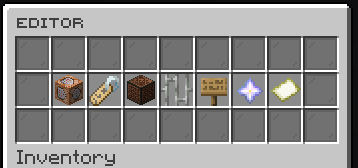
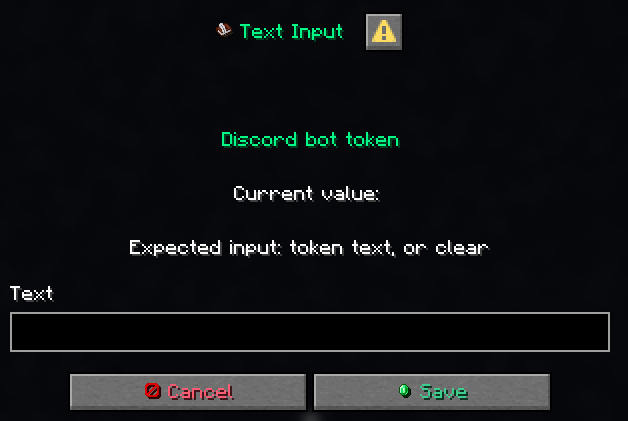
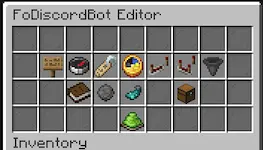
FoDiscordBot config editor GUI

Easy editing with the help of dialog menus

Discord Profiles And Chat

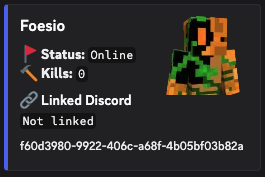
Use /profile in Discord to show a linked Minecraft player, online status, and any configured PlaceholderAPI-backed fields.

Profile command on Discord

Minecraft chat can also be relayed to Discord with the player's in-game name and skin avatar.

Minecraft and Discord chat bridge

Network Mode

  • Share linked accounts across every gamemode.
  • Keep one Minecraft account and one Discord account linked only once across the network.
  • Sync profile, leaderboard, FoAdvancements, booster, and reward state through MySQL/MariaDB.
  • Use one primary Discord node while secondary servers keep publishing data.
  • Queue cross-server Minecraft chat relay messages through the shared database.

Commands

  • /discord - Shows the configured Discord invite.
  • /link - Generates a Minecraft account link code.
  • /unlink - Unlinks the player's Discord account.
  • /fodiscordbotadmin version - Checks the installed version against Modrinth.
  • /fodiscordbotadmin editor - Opens the in-game config editor.
  • /fodiscordbotadmin reload - Reloads the plugin config.
  • /fodiscordbotadmin resetrewards <linked|booster> <player|all> [gamemode] - Resets link or booster reward claims.

Aliases: /discordbotadmin, /fodiscord, and /fodiscordbot.

Discord Commands

  • /link <code> - Links a Discord account to a Minecraft account.
  • /unlink - Unlinks the Discord account.
  • /profile <target> <gamemode> - Shows a configurable Minecraft profile embed.
  • /leaderboard <gamemode> <board> - Shows a configured leaderboard embed.
  • /advancements <gamemode> <player> - Shows FoAdvancements progress when the hook is enabled.
  • /ip - Shows the configured server IP when enabled.

Permissions

  • fodiscord.use - Allows normal players to use /link, /unlink, and /discord.
  • fodiscordbot.admin - Allows admins to use the FoDiscordBot admin command.
  • fodiscord.admin - Legacy admin permission kept for older setups.

FoAdvancements Hook

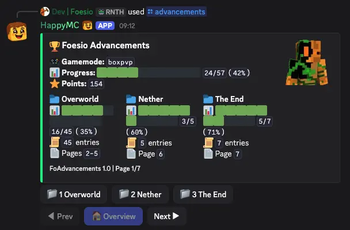
FoDiscordBot can show FoAdvancements progress directly in Discord with /advancements <gamemode> <player>. The embed includes total progress, points, tab summaries, per-tab pages, and buttons for switching between overview and advancement pages.

In network mode, gamemode servers can publish FoAdvancements snapshots to MySQL so the primary Discord node can answer lookups from shared data.
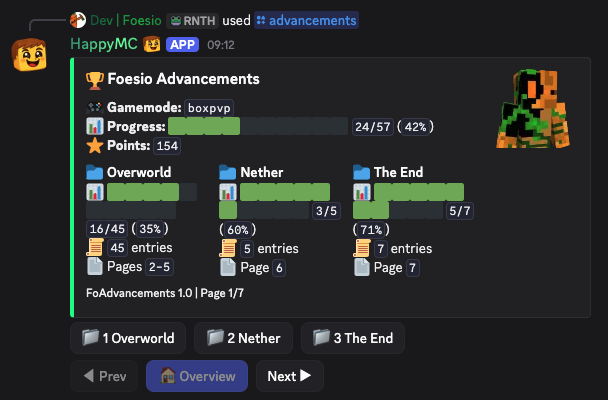
FoAdvancements progress shown in Discord

Dependencies

  • PlaceholderAPI is optional, but needed for PlaceholderAPI-backed profile fields and leaderboard lines.
  • FoAdvancements is optional, but needed on gamemode servers that should publish advancement progress.
  • MySQL/MariaDB is required only when network mode is enabled.

Галерея
EditorProfile Command in DiscordFoAdvancements Hook

Последние версии

Все версии →
release

FoDiscordBot 5.2

5.2
30 окт. 2026 г.10Minecraft: 1.21, 1.21.1, 1.21.2, 1.21.3, 1.21.4, 1.21.5, 1.21.6, 1.21.7, 1.21.8, 1.21.9, 1.21.10, 1.21.11, 26.1, 26.1.1, 26.1.2, 26.2, 26.3bukkit, paper, purpur, spigot
Скачать
Что нового
Added APIs & Events for other Plugin Devs to hook into!
release

FoDiscordBot 5.1

5.1
12 сент. 2026 г.65Minecraft: 1.21, 1.21.1, 1.21.2, 1.21.3, 1.21.4, 1.21.5, 1.21.6, 1.21.7, 1.21.8, 1.21.9, 1.21.10, 1.21.11, 26.1, 26.1.1, 26.1.2, 26.2, 26.3bukkit, paper, purpur, spigot
Скачать
Что нового
- Added configurable linked-account rewards, unlink commands, and leaderboard reset controls. - Improved profile syncing with cached lookups and offline-mode skin/avatar fallback support. - Improved the admin editor, reload handling, and in-game feedback.
release

FoDiscordBot 5.0

5.0
8 сент. 2026 г.17Minecraft: 1.21, 1.21.1, 1.21.2, 1.21.3, 1.21.4, 1.21.5, 1.21.6, 1.21.7, 1.21.8, 1.21.9, 1.21.10, 1.21.11, 26.1, 26.1.1, 26.1.2, 26.2bukkit, paper, purpur, spigot
Скачать
Что нового
- Improved public GUI presentation configuration and reload handling where applicable. - Fixed viewer-aware sprite and native-dialog compatibility fallbacks for unsupported clients. - Preserved existing server-owner GUI values during configuration updates.
release

FoDiscordBot 4.8

4.8
28 авг. 2026 г.15Minecraft: 1.21, 1.21.1, 1.21.2, 1.21.3, 1.21.4, 1.21.5, 1.21.6, 1.21.7, 1.21.8, 1.21.9, 1.21.10, 1.21.11, 26.1, 26.1.1, 26.1.2, 26.2bukkit, paper, purpur, spigot
Скачать
Что нового
- Added configurable sound feedback in `sounds.yml`.
release

FoDiscordBot 4.6

4.6
15 авг. 2026 г.34Minecraft: 1.21, 1.21.1, 1.21.2, 1.21.3, 1.21.4, 1.21.5, 1.21.6, 1.21.7, 1.21.8, 1.21.9, 1.21.10, 1.21.11, 26.1, 26.1.1, 26.1.2, 26.2bukkit, paper, purpur, spigot
Скачать
Что нового
- Improved editor intuitiveness with clearer, more consistent controls. - Refined editor visuals and navigation for a smoother configuration workflow.
release

FoDiscordBot 4.5

4.5
6 авг. 2026 г.39Minecraft: 1.21, 1.21.1, 1.21.2, 1.21.3, 1.21.4, 1.21.5, 1.21.6, 1.21.7, 1.21.8, 1.21.9, 1.21.10, 1.21.11, 26.1, 26.1.1, 26.1.2, 26.2bukkit, paper, purpur, spigot
Скачать
Что нового
- Improved editor visuals and layout consistency across configuration screens. - Made board, rank, leaderboard, profile, reward, and command editing more intuitive. - Fixed editor buttons not responding in some inventory setups.
release

FoDiscordBot 4.2

4.2
19 июн. 2026 г.46Minecraft: 1.21, 1.21.1, 1.21.2, 1.21.3, 1.21.4, 1.21.5, 1.21.6, 1.21.7, 1.21.8, 1.21.9, 1.21.10, 1.21.11, 26.1, 26.1.1, 26.1.2, 26.2bukkit, paper, purpur, spigot
Скачать
Что нового
- Added 26.2.x support.
release

FoDiscordBot 4.0

4.0
14 июн. 2026 г.15Minecraft: 1.21, 1.21.1, 1.21.2, 1.21.3, 1.21.4, 1.21.5, 1.21.6, 1.21.7, 1.21.8, 1.21.9, 1.21.10, 1.21.11bukkit, paper, purpur, spigot
Скачать
Что нового
## FoDiscordBot 4.0 - Added Discord `/advancements` for FoAdvancements progress, including gamemode/player autocomplete, tab buttons, page navigation, points, and progress summaries. - Added network-mode FoAdvancements snapshots so the primary Discord node can read advancement progress from shared MySQL data. - Added Modrinth update checking through `/fodiscordbotadmin version` and admin join notices. - Expanded the in-game editor for network, profile, leaderboard, rank-sync, FoAdvancements, and reward configuration. - Improved network database settings with configurable MySQL pool size and connection timeout.
release

FoDiscordBot 3.9

3.9
25 мая 2026 г.29Minecraft: 1.21, 1.21.1, 1.21.2, 1.21.3, 1.21.4, 1.21.5, 1.21.6, 1.21.7, 1.21.8, 1.21.9, 1.21.10, 1.21.11bukkit, paper, purpur, spigot
Скачать
Что нового
- Added /unlink in discord. - Added /fodiscordbot resetrewards <linked|booster> <player|all> [<gamemode>].
release

FoDiscordBot 3.8

3.8
21 мая 2026 г.31Minecraft: 1.21, 1.21.1, 1.21.2, 1.21.3, 1.21.4, 1.21.5, 1.21.6, 1.21.7, 1.21.8, 1.21.9, 1.21.10, 1.21.11paper, purpur, spigot
Скачать
Что нового
- Changed Colour Usage (Looks way better now). - Added messages.yml so you can edit messages. - Made it so it instantly claims link rewards (or if the player is not online it gives them the rewards when they join back).