

F3 ADVANCE
A cleaner, organized, color-coded F3 debug HUD for Minecraft Fabric with per-line toggles, performance metrics, and clean visuals.
Автор: antarip1,8 тыс.6обновлён 5 окт. 2026 г.
УправлениеОптимизацияУтилиты
Описание
F3 Advanced
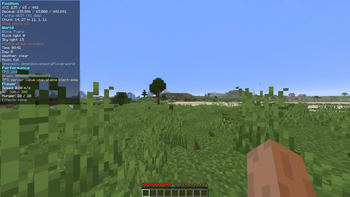
F3 Advanced replaces Minecraft's vanilla F3 debug overlay with a cleaner, organized, color-coded HUD for Fabric.
Features

- Replaces the actual F3 screen instead of drawing a second overlay on top.
- Organized sections for position, world, performance, player status, target info, and system info.
- Per-line toggles for every HUD value, plus whole-section toggles.
- Runtime registry lookups for biomes, blocks, entities, effects, and dimensions, so modded content displays correctly.
- Respects reduced debug info and avoids exposing restricted debug details.
- Mod Menu integration with Cloth Config when installed.
- JSON config fallback at
config/f3advanced.json. - Adjustable colors, position, padding, and background transparency.
- F3+M opens the config screen directly.
Compatibility
This is a client-side Fabric mod. It does not require the server to install F3 Advanced.
Recommended optional mods:
- Mod Menu
- Cloth Config
Галерея
Последние версии
Все версии →release
F3 ADVANCE 0.1.1 for 1.20 - 1.21.1
0.1.1+mc1.21.15 окт. 2026 г.60Minecraft: 1.20, 1.20.1, 1.20.2, 1.20.3, 1.20.4, 1.20.5, 1.20.6, 1.21, 1.21.1fabric
Что нового
### Changes in v0.1.1:
- **Fix Overlay Display**: Fixed issue where the F3 HUD was permanently rendered on screen. The HUD now cleanly appears only when F3 is toggled on (or when `alwaysOn = true` is explicitly configured).
- **Client Commands**: Added in-game commands `/f3`, `/f3 config`, `/f3 toggle <setting>`, `/f3 set <setting> <bool>`, `/f3 get <setting>`, and `/f3 reset` so players without Mod Menu can fully configure and toggle features directly in-game.
- **Keybinding Fix**: Fixed `IllegalArgumentException` duplicate Category crash on MC 1.21.11+.
release
F3 ADVANCE 0.1.1 for 1.21.2 - 1.21.4
0.1.1+mc1.21.45 окт. 2026 г.9Minecraft: 1.21.2, 1.21.3, 1.21.4fabric
Что нового
### Changes in v0.1.1:
- **Fix Overlay Display**: Fixed issue where the F3 HUD was permanently rendered on screen. The HUD now cleanly appears only when F3 is toggled on (or when `alwaysOn = true` is explicitly configured).
- **Client Commands**: Added in-game commands `/f3`, `/f3 config`, `/f3 toggle <setting>`, `/f3 set <setting> <bool>`, `/f3 get <setting>`, and `/f3 reset` so players without Mod Menu can fully configure and toggle features directly in-game.
- **Keybinding Fix**: Fixed `IllegalArgumentException` duplicate Category crash on MC 1.21.11+.
release
F3 ADVANCE 0.1.1 for 1.21.5
0.1.1+mc1.21.55 окт. 2026 г.7Minecraft: 1.21.5fabric
Что нового
### Changes in v0.1.1:
- **Fix Overlay Display**: Fixed issue where the F3 HUD was permanently rendered on screen. The HUD now cleanly appears only when F3 is toggled on (or when `alwaysOn = true` is explicitly configured).
- **Client Commands**: Added in-game commands `/f3`, `/f3 config`, `/f3 toggle <setting>`, `/f3 set <setting> <bool>`, `/f3 get <setting>`, and `/f3 reset` so players without Mod Menu can fully configure and toggle features directly in-game.
- **Keybinding Fix**: Fixed `IllegalArgumentException` duplicate Category crash on MC 1.21.11+.
release
F3 ADVANCE 0.1.1 for 1.21.6 - 1.21.8
0.1.1+mc1.21.85 окт. 2026 г.12Minecraft: 1.21.6, 1.21.7, 1.21.8fabric
Что нового
### Changes in v0.1.1:
- **Fix Overlay Display**: Fixed issue where the F3 HUD was permanently rendered on screen. The HUD now cleanly appears only when F3 is toggled on (or when `alwaysOn = true` is explicitly configured).
- **Client Commands**: Added in-game commands `/f3`, `/f3 config`, `/f3 toggle <setting>`, `/f3 set <setting> <bool>`, `/f3 get <setting>`, and `/f3 reset` so players without Mod Menu can fully configure and toggle features directly in-game.
- **Keybinding Fix**: Fixed `IllegalArgumentException` duplicate Category crash on MC 1.21.11+.
release
F3 ADVANCE 0.1.1 for 1.21.9 - 1.21.11
0.1.1+mc1.21.115 окт. 2026 г.84Minecraft: 1.21.9, 1.21.10, 1.21.11fabric
Что нового
### Changes in v0.1.1:
- **Fix Overlay Display**: Fixed issue where the F3 HUD was permanently rendered on screen. The HUD now cleanly appears only when F3 is toggled on (or when `alwaysOn = true` is explicitly configured).
- **Client Commands**: Added in-game commands `/f3`, `/f3 config`, `/f3 toggle <setting>`, `/f3 set <setting> <bool>`, `/f3 get <setting>`, and `/f3 reset` so players without Mod Menu can fully configure and toggle features directly in-game.
- **Keybinding Fix**: Fixed `IllegalArgumentException` duplicate Category crash on MC 1.21.11+.
release
F3 ADVANCE 0.1.1 for 26.1 - 26.1.1
0.1.1+mc26.1.15 окт. 2026 г.19Minecraft: 26.1, 26.1.1fabric
Что нового
### Changes in v0.1.1:
- **Fix Overlay Display**: Fixed issue where the F3 HUD was permanently rendered on screen. The HUD now cleanly appears only when F3 is toggled on (or when `alwaysOn = true` is explicitly configured).
- **Client Commands**: Added in-game commands `/f3`, `/f3 config`, `/f3 toggle <setting>`, `/f3 set <setting> <bool>`, `/f3 get <setting>`, and `/f3 reset` so players without Mod Menu can fully configure and toggle features directly in-game.
- **Keybinding Fix**: Fixed `IllegalArgumentException` duplicate Category crash on MC 1.21.11+.
release
F3 ADVANCE 0.1.1 for 26.1.2
0.1.1+mc26.1.25 окт. 2026 г.18Minecraft: 26.1.2fabric
Что нового
### Changes in v0.1.1:
- **Fix Overlay Display**: Fixed issue where the F3 HUD was permanently rendered on screen. The HUD now cleanly appears only when F3 is toggled on (or when `alwaysOn = true` is explicitly configured).
- **Client Commands**: Added in-game commands `/f3`, `/f3 config`, `/f3 toggle <setting>`, `/f3 set <setting> <bool>`, `/f3 get <setting>`, and `/f3 reset` so players without Mod Menu can fully configure and toggle features directly in-game.
- **Keybinding Fix**: Fixed `IllegalArgumentException` duplicate Category crash on MC 1.21.11+.
release
F3 ADVANCE 0.1.1 for 26.2
0.1.1+mc26.25 окт. 2026 г.78Minecraft: 26.2fabric
Что нового
### Changes in v0.1.1:
- **Fix Overlay Display**: Fixed issue where the F3 HUD was permanently rendered on screen. The HUD now cleanly appears only when F3 is toggled on (or when `alwaysOn = true` is explicitly configured).
- **Client Commands**: Added in-game commands `/f3`, `/f3 config`, `/f3 toggle <setting>`, `/f3 set <setting> <bool>`, `/f3 get <setting>`, and `/f3 reset` so players without Mod Menu can fully configure and toggle features directly in-game.
- **Keybinding Fix**: Fixed `IllegalArgumentException` duplicate Category crash on MC 1.21.11+.
release
F3 ADVANCE 0.1.1 for 26.3
0.1.1+mc26.35 окт. 2026 г.662Minecraft: 26.3fabric
Что нового
### Changes in v0.1.1:
- **Fix Overlay Display**: Fixed issue where the F3 HUD was permanently rendered on screen. The HUD now cleanly appears only when F3 is toggled on (or when `alwaysOn = true` is explicitly configured).
- **Client Commands**: Added in-game commands `/f3`, `/f3 config`, `/f3 toggle <setting>`, `/f3 set <setting> <bool>`, `/f3 get <setting>`, and `/f3 reset` so players without Mod Menu can fully configure and toggle features directly in-game.
- **Keybinding Fix**: Fixed `IllegalArgumentException` duplicate Category crash on MC 1.21.11+.