Enhanced Sound Control
Precise control over every sound in the game — per-sound volume slider from 0–200%, adjustable play frequency, all from one searchable menu.
Описание





Enhanced Sound Control
Precise control over every sound in the game — per-sound volume slider from 0–200%, adjustable play frequency, and a silent mode that mutes everything except the sounds you allow, all from one searchable menu. Press N or do /soundcontrol in chat to open the menu
Features
Per-Sound Volume
Set any sound's volume between 0% and 200%. Quiet sounds you keep missing can finally be heard, and loud ones can be tamed.
Per-Sound Frequency
Thin out repetitive sounds without silencing them completely. At 70% frequency a sound only plays 70% of the time; at 0% it's muted entirely. Perfect for sounds that are fine in small doses but annoying when spammed.
Recent Sounds Tab
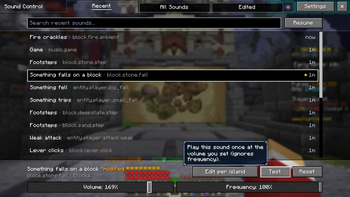
A live feed of every sound event as it plays, newest first, with play counts and how long ago it fired. Hear something annoying? Open the menu with N or /soundcontrol and it's right at the top, ready to edit.
All Sounds Tab
Browse and search every registered sound event in the game, with a category filter — Blocks, Entities, Items, Music, UI, Ambient, and Other. Sounds are shown with their vanilla subtitle names ("Creeper hisses") so you don't have to decode raw ids.
Edited Tab
Everything you've tweaked in one place, with a summary of each change ("Vol 70% · Freq 10%"). Reset sounds individually, or clear them all at once.
Edit Panel
Select any sound to get Volume and Frequency sliders, a Test button that previews the sound with your volume tweak applied, and a Reset button. The menu is styled after modern vanilla screens and changes save automatically.
Silent Mode
Flip the mod around: instead of muting the sounds you don't want, everything starts muted and you turn up only the ones you want to hear. Switch between Normal and Silent with the mode button in the top-left of the menu.
- Each mode keeps its own separate list. Switching back and forth never loses your work — your Normal mode tweaks stay exactly as they were while you build up your allowed sounds, and the other way round.
- Muted sounds still show up in the Recent tab, so you can find the one you want and click Allow to let it through. Allow and Mute are single buttons — no need to drag a slider to an exact value.
- Labels follow the mode: the Edited tab becomes Allowed, and Reset all becomes Clear list.
Great for building a minimal soundscape, recording, or cutting out everything but the few cues you actually care about.
Per-Island Overrides (Hypixel SkyBlock)
On Hypixel SkyBlock, any sound can additionally have different values on specific islands — for example, mute block-breaking sounds in the Garden while keeping them normal everywhere else.
How it works:
- The sliders in the edit panel always change a sound's normal, "Everywhere" values — the same on and off SkyBlock.
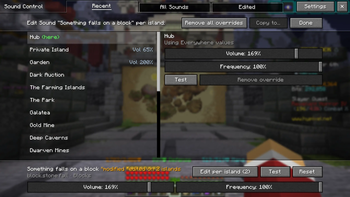
- On SkyBlock the edit panel gains an "Edit per island" button. It opens an island editor in place of the sound list: pick an island on the left, and set that island's own Volume/Frequency sliders on the right. An island starts out Using Everywhere values; the moment you move a slider it gets its own override, and Remove override takes it back.
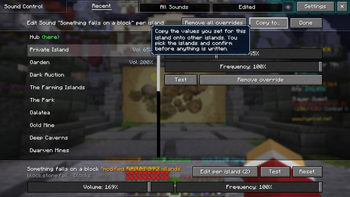
- A "Copy to..." button lets you copy the values you're looking at to any number of other islands in one go — nothing is written until you confirm.
While you're on an island, its overrides apply; everywhere else (and outside SkyBlock) the Everywhere values apply. This works in Silent Mode too, where the island editor's button becomes Allow here / Mute here — so a sound can be allowed on one island and stay muted on the rest.
Configuration
Open the sound menu with /soundcontrol or N. Settings are available via the Settings button in the menu or Mod Menu → Enhanced Sound Control → Config. Enhanced Sound Control uses MidnightLib, so all options are editable in-game with live saving.
| Option | Description |
|---|---|
| Mod Enabled | Master toggle for all sound tweaks. |
| Silent Mode | Off: every sound plays, except the ones you change. On: every sound is muted, except the ones you allow. Each mode keeps its own list. |
| Live-Update Recent List | Refresh the Recent tab as new sounds play. |
| Strip "minecraft:" Namespace | Show entity.creeper.hurt instead of minecraft:entity.creeper.hurt. |
| Re-Roll Looping Sounds | Re-roll the frequency check on every loop instead of once per sound. |
| Require Modifier Key | Only open the menu while an extra key is held, so N stays free for other uses. |
| Recent List Size | How many recent sounds to remember (10–50). |
Keybinds
Both keys are rebindable in Options → Controls → Key Binds.
| Keybind | Default | Description |
|---|---|---|
| Open menu | N | Opens the sound control menu. |
| Modifier key | Left Alt | The extra key to hold, when Require Modifier Key is enabled. |
Per-sound tweaks (including island overrides) are stored separately in config/enhancedsoundcontrol.tweaks.json.
Installation
- Install Minecraft with Fabric Loader for 26.1+.
- Download the latest
.jarfrom Modrinth. - Place Fabric API and UI Lib in your
modsfolder together with the Enhanced Sound Control jar. MidnightLib and HM-API are bundled inside the Enhanced Sound Control jar — no separate downloads needed. - Launch the game and run
/soundcontrolor press N to open the edit menu.
Support & Community
Found a bug, have a feature request, or just want to say hi.
Support the Project
If you'd like to support continued development, you can do so on Ko-fi — every contribution is appreciated.
Acknowledgements
Runtime dependencies
- UI Lib by Daqem — the menu framework
- MidnightLib by MidnightDust — configuration
- HM API by AzureAaron — Hypixel Mod API client used for SkyBlock island detection
Feature and design inspiration
- Sound Controller by BVengo — the individual per-sound volume workflow, the distinctive 0–200% volume range and amplification marker, searchable and modified-sound management, preview/reset controls, and the general approach of applying per-sound playback-volume adjustments
- SoundsBeGone by Meza — the recently played sound workflow and configurable playback frequency for repetitive sounds
These projects influenced feature and interaction design. Enhanced Sound Control has its own implementation, UI, storage format, and SkyBlock-specific functionality.
AI tools were extensively used during the creation of this project.
Галерея