COWMODSКаталог модов

Emoji Type

Type Minecraft emojis and symbols with simple shortcodes.

Автор: Norbiros3,9 млн860обновлён 25 июн. 2026 г.
ОбщениеУтилиты

Описание

🙂 Emoji Type

Type Minecraft emojis and symbols with simple shortcodes.

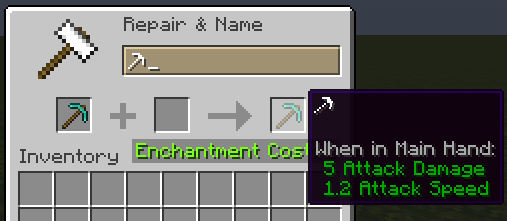
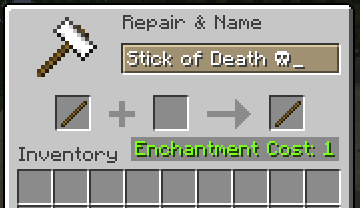
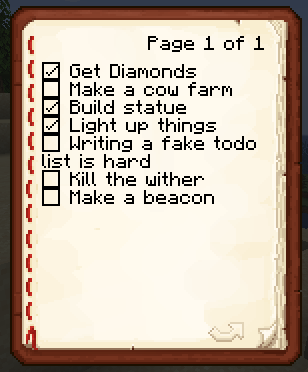
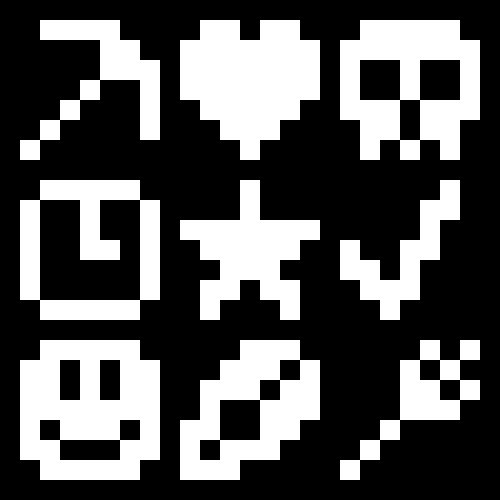
Emoji Type allows you to instantly insert 200+ emojis into your game using intuitive keywords. Type :skull: and get ☠️ instantly. Works in chat, signs, books, anvils - everywhere text appears. No resource packs or texture changes needed.


🚀 Key Features

  • Seamless Integration: Works in chat, signs, books, and even anvils.
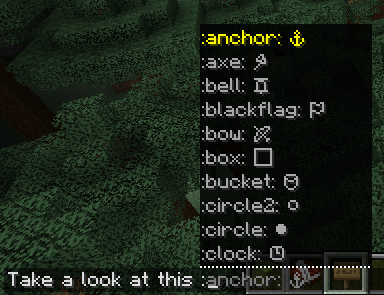
  • Smart Autocomplete: Type a colon (:) in chat to see a real-time list of suggestions.
  • Vanilla Compatible: Emojis are standard Unicode. Other players can see your emojis even if they don't have the mod installed!
  • Emoji Pack: Create, edit your own emoji packs via a built-in visual editor.

Bundled Emoji Packs

PackDescriptionExamples
Minecraft EssentialsTools, weapons, and status icons.⚔️ ⛏️ 🏹 ☀️ ❄️
Text Art (Kaomoji)Classic ASCII and Japanese emoticons.¯\_(ツ)_/¯ (╯°□°)╯
Letter EmojisStylized circled alphabets.ⓐ Ⓑ ⓒ Ⓓ

🛠️ How to Use

  1. Install: Drop the mod into your mods folder (Client-side only!).
  2. Trigger: Press : in any text field.
  3. Search: Start typing (e.g., :sw...) and use your arrow keys or mouse to select.
  4. Anywhere Else: On signs or anvils, simply type the full code (e.g., :heart:) and watch it transform.

Customizing: Access the config via Mod Menu (Fabric) or the Mods setting (NeoForge) to enable/disable emoji packs or build your own from scratch!


❓ Frequently Asked Questions

Do I need this on my server?
Nope! It’s 100% client-side. It won’t do anything if installed on a server.

Can my friends see the emojis?
Yes! Since these are native Unicode characters, anyone on a modern Minecraft client can see them perfectly.

How do I share my custom packs?
Just send the .yaml file found in config/emojitype/emoji_packs/. Your friends can just drop it in their folder and they're good to go.

Why no autocomplete on signs?
Minecraft’s sign and anvil interfaces are a bit more restrictive than chat. For now, just type the full keyword (like :check:) and it will convert automatically.

🖼️ Gallery

Chat SuggestionsConfig ScreenEmoji Packs

View more images in the Modrinth's gallery...

Галерея

In chatIn anvilIn anvilIn book

Последние версии

Все версии →
release

EmojiType 3.1.0 26.1-26.2

3.1.0-26.2-fabric
25 июн. 2026 г.78,7 тыс.Minecraft: 26.1, 26.1.1, 26.1.2, 26.2fabric, quilt
Скачать
Что нового
This is a beta release. Updated to Minecraft 26.2. The same version should also work on 26.1, but some features, such as the config screen, may have issues. If you experience any issues, please report them. **Full Changelog**: https://github.com/Norbiros/emojitype/compare/v3.0.0...v3.1.0
release

EmojiType 3.1.0 26.1-26.2

3.1.0-26.2-neoforge
25 июн. 2026 г.1,9 тыс.Minecraft: 26.1, 26.1.1, 26.1.2, 26.2neoforge
Скачать
Что нового
This is a beta release. Updated to Minecraft 26.2. The same version should also work on 26.1, but some features, such as the config screen, may have issues. If you experience any issues, please report them. **Full Changelog**: https://github.com/Norbiros/emojitype/compare/v3.0.0...v3.1.0
release

Emoji Type 3.0.0 1.21.9-1.21.11

3.0.0-1.21.10-neoforge
5 февр. 2026 г.1,2 тыс.Minecraft: 1.21.9, 1.21.10, 1.21.11neoforge
Скачать
Что нового
# 🎉 Emoji Type 3.0.0 - Emoji Packs System This is a **major breaking release** that introduces a comprehensive emoji packs system, giving you full control over your emoji collections! ## 🆕 What's New: Emoji Packs Instead of one big emoji list, you now have **organized packs** that you can enable, disable, and customize: ### Built-in Packs (200+ emojis) - **Minecraft Emojis** (119) – tools, weapons, symbols, weather - **Text Art Faces** (33) – ASCII emoticons and kaomoji - **Letter Emojis** (52) – circled alphabet ### How to Use 1. Open the mod config (Mod Menu on Fabric, mods list on NeoForge) 2. Click **"Manage Packs"** to see all available packs 3. **Enable/disable** packs with checkboxes – only active packs will show in autocomplete 4. Click **"Edit"** on any pack to customize its emojis 5. Click **"Create New Pack"** to make your own custom collection ### Pack Features - ✅ Enable/disable packs individually - 🎨 Create unlimited custom packs with the visual editor - ✏️ Add, remove, or edit emojis in any pack - 📁 Share packs as simple YAML files (stored in `config/emojitype/emoji_packs/`) - 🛡️ Restore bundled packs to defaults if you modify them - 🔄 Hot reload – changes apply instantly without restarting ## 📦 Migration Your old emoji configuration will be **automatically migrated** to the new pack system on first launch. No manual action needed! **Full Changelog**: https://github.com/Norbiros/emojitype/compare/v2.3.4...v3.0.0
release

Emoji Type 3.0.0 1.21.9-11

3.0.0-1.21.10-fabric
5 февр. 2026 г.706,5 тыс.Minecraft: 1.21.9, 1.21.10, 1.21.11fabric, quilt
Скачать
Что нового
# 🎉 Emoji Type 3.0.0 - Emoji Packs System This is a **major breaking release** that introduces a comprehensive emoji packs system, giving you full control over your emoji collections! ## 🆕 What's New: Emoji Packs Instead of one big emoji list, you now have **organized packs** that you can enable, disable, and customize: ### Built-in Packs (200+ emojis) - **Minecraft Emojis** (119) – tools, weapons, symbols, weather - **Text Art Faces** (33) – ASCII emoticons and kaomoji - **Letter Emojis** (52) – circled alphabet ### How to Use 1. Open the mod config (Mod Menu on Fabric, mods list on NeoForge) 2. Click **"Manage Packs"** to see all available packs 3. **Enable/disable** packs with checkboxes – only active packs will show in autocomplete 4. Click **"Edit"** on any pack to customize its emojis 5. Click **"Create New Pack"** to make your own custom collection ### Pack Features - ✅ Enable/disable packs individually - 🎨 Create unlimited custom packs with the visual editor - ✏️ Add, remove, or edit emojis in any pack - 📁 Share packs as simple YAML files (stored in `config/emojitype/emoji_packs/`) - 🛡️ Restore bundled packs to defaults if you modify them - 🔄 Hot reload – changes apply instantly without restarting ## 📦 Migration Your old emoji configuration will be **automatically migrated** to the new pack system on first launch. No manual action needed! **Full Changelog**: https://github.com/Norbiros/emojitype/compare/v2.3.4...v3.0.0
release

Emoji Type 2.3.4 1.21.9-11

2.3.4-1.21.10-neoforge
18 дек. 2025 г.490Minecraft: 1.21.9, 1.21.10, 1.21.11neoforge
Скачать
release

Emoji Type 2.3.4 1.21.9-11

2.3.4-1.21.10-fabric
18 дек. 2025 г.119,2 тыс.Minecraft: 1.21.9, 1.21.10, 1.21.11fabric, quilt
Скачать
Что нового
## What's Changed * fix: add include `snakeyaml` dependency to build by @qhouz in https://github.com/Norbiros/emojitype/pull/27 ## New Contributors * @qhouz made their first contribution in https://github.com/Norbiros/emojitype/pull/27 **Full Changelog**: https://github.com/Norbiros/emojitype/compare/v2.3.3...v2.3.4
release

Emoji Type 2.3.3 1.21.9-10

2.3.3-1.21.10-neoforge
25 нояб. 2025 г.166Minecraft: 1.21.9, 1.21.10neoforge
Скачать
release

Emoji Type 2.3.3 1.21.9-10

2.3.3-1.21.10-fabric
25 нояб. 2025 г.9,2 тыс.Minecraft: 1.21.9, 1.21.10fabric, quilt
Скачать
release

Emoji Type 2.3.2 1.21.6-1.21.7

2.3.2-1.21.6-neoforge
10 июл. 2025 г.1,1 тыс.Minecraft: 1.21.6, 1.21.7, 1.21.8neoforge
Скачать
release

Emoji Type 2.3.2 1.21.6-1.21.7

2.3.2-1.21.6-fabric
10 июл. 2025 г.286 тыс.Minecraft: 1.21.6, 1.21.7, 1.21.8fabric, quilt
Скачать