COWMODSКаталог модов

Elite Holograms

Elite Holograms is a lightweight, server-side or single-player Minecraft mod for creating, managing, and customizing floating text (holograms). Perfect for server info, leaderboards, waypoints, dynamic stats, instructions, and decorative text.

Автор: EliteScouter7,9 тыс.7обновлён 29 сент. 2026 г.
ДекорУтилиты

Описание

Elite Holograms

Elite Holograms is a lightweight Minecraft mod for creating, managing, and customizing floating text (holograms) right from in-game commands. Perfect for server info, leaderboards, waypoints, shops, live stats, rules, and decorative text.

Works in single-player worlds, modpacks, and on multiplayer servers. It runs server-side, so on a server your players join with a vanilla client and still see everything. No external placeholder API, no fuss. Just drop it in and start building.

Inspired by Advanced Holograms. Supports Forge (1.19.2, 1.20.1), Fabric (1.20.1) and NeoForge (1.21.1, 26.1, 26.2). The Fabric edition requires Fabric API.

For full setup and command details, see the Wiki.
Elite Holograms

Why Elite Holograms?

  • Plays everywhere: single-player worlds, modpacks, and multiplayer servers all supported.
  • Server-side only: on a server, players join with a vanilla client and still see everything.
  • Modpack-friendly: drop it into any Forge, Fabric, or NeoForge pack with no client-side setup.
  • Almost no dependencies: the placeholder system is built in, no PlaceholderAPI needed. Only the Fabric edition needs anything alongside it, and that is just Fabric API.
  • Persistent: holograms survive restarts with safe, synchronous saves on shutdown.
  • Beautiful out of the box: MiniMessage gradients, hex colors, and rainbows on every line.
  • Built for servers: runs on its own manager thread with graceful shutdown and minimal overhead.

What's New in 1.3.0

  • Clickable holograms: /eh click <id> set <command...> makes a hologram run a command when a player right-clicks it, and console <command...> runs it elevated for warps and kits players cannot run themselves. %player% is replaced with the clicker's name. Anything that used to be a sign and a pressure plate can now be a hologram. It works on fixed and player-facing holograms and needs no client mod, and console is gated on the admin permission so it cannot be used to hand out operator commands. Not available on Forge 1.19.2.
  • /eh display <id> scale <0.1-10>: resize a fixed hologram's text. Line spacing grows with the scale, so a scaled-up hologram never overlaps its own lines.
  • /eh display <id> brightness <0-15|auto>: light the text regardless of the surrounding light level. 15 makes a hologram readable at night without placing a single block in the world, which for most people is what backlights were for.
  • /eh display <id> billboard <fixed|vertical|horizontal|center>: control how a fixed hologram turns. vertical is the one to know: the text follows the player horizontally but never tilts, so it stays readable from any direction without lying on its back when someone flies overhead.
  • Fixed: scoreboard holograms lost their styling on restart: leaderboards are stored in their own file, and the Forge 1.20.1 and Fabric editions never wrote background settings there, so a restyled board reverted to the default on restart. Boards now keep their background, scale, brightness, billboard and click command like any other hologram.
  • Crash-safe saves: every save writes a complete file and swaps it in atomically, keeping the previous version as a backup. A crash or power cut can no longer leave a missing or half-written hologram file, and a damaged one is restored from its backup automatically
  • Nothing is deleted behind your back: a hologram or scoreboard in a dimension that isn't loaded (say, after removing the mod that adds it) is kept in the file untouched and comes back when the dimension does. It used to be erased by the next save
  • /eh reload loads your hand edits: it used to save what was in memory first, overwriting the very edit it was meant to load
  • Deleting your last scoreboard now sticks: it used to come back on the next restart
  • Console and command blocks: /eh addline, setline, insertline, removeline, delete and info now work from the console and command blocks on Forge and Fabric, as documented

What's New in 1.2.1

  • /eh background <id> ...: restyle the panel behind a fixed hologram's text. Vanilla draws it as 25% opaque black; now colour <name or #RRGGBB> recolours it, opacity <0-100> sets how solid it is, none removes it entirely for floating text with no box, and reset restores the vanilla look.
  • Forge 1.19.2 command parity: /eh backlight, /eh settheme, /eh list and /eh movevertical were being registered twice on that edition, and whichever registration ran last won, so several commands reported "Unknown command" despite shipping. All 23 subcommands now resolve against a single registry.
  • Fixed: fixed and facing were swallowed into hologram text: /eh create shop fixed Welcome produced a hologram reading "fixed Welcome". Both keywords are now recognised on every create command.

What's New in 1.2.0

  • New Fabric 1.20.1 edition: Elite Holograms now runs on Fabric with the same feature set as the Forge 1.20.1 edition: holograms, fixed holograms, item holograms, animated lines, scoreboard leaderboards, themes, backlights, placeholders, and every command. It requires Fabric API, is server-side only, and reads the same hologram config format, so a world can move between the Forge and Fabric editions without converting anything. Permissions work through LuckPerms or FTB Ranks, falling back to OP level 2.
  • New NeoForge 26.2 edition: full feature parity on Minecraft 26.2, built against NeoForge 26.2.0.57 and Java 25.
  • Fixed Holograms: holograms can now be anchored to a rotation instead of always turning to face the viewer. A fixed hologram reads like a sign hung on a wall and looks the same to everyone, which is what you want for anything mounted flat against a build. Add fixed to any create command (/eh create fixed <id> <text>), aim it with /eh setrotation <id> <yaw> [pitch], or switch an existing hologram over with /eh convert <id> fixed. Player-facing stays the default and nothing you already built changes. Requires Minecraft 1.20.1 or newer, so it is not available on the Forge 1.19.2 edition.
  • Centred backlights: a hologram sitting near a block edge used to be lit noticeably off to one side, because light blocks can only occupy whole block cells. The light column now widens onto the neighbouring cell when needed, keeping the glow centred on the text.
  • Fixed: hologram lines could show each other's text: different hologram entity types were handing out overlapping network IDs, which made the client apply one line's text to another.

What's New in 1.1.0

  • Backlights: /eh backlight <id> <on|off|toggle> [height 1-10] raises a column of full-bright minecraft:light blocks behind a hologram so it stays readable at night. Backlights follow the hologram when it moves, persist across restarts, and never overwrite player builds (only air and water cells are lit).
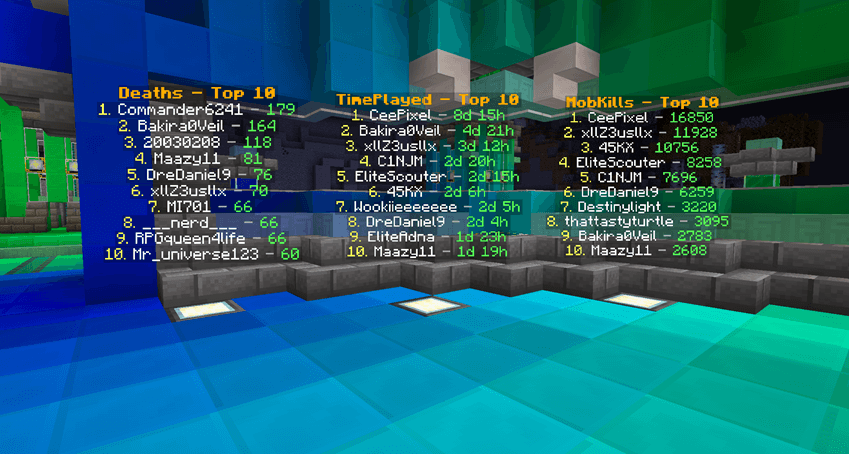
  • Scoreboard Themes: restyle leaderboards with named themes. Ships with default, ocean, blood, mono, gold, and rainbow, all editable in config/eliteholograms/scoreboard_themes.json. Add your own to match your server brand.
  • /eh settheme <id> <theme>: re-skin an existing scoreboard instantly, no need to recreate it. Both arguments tab-complete.
  • Smarter tab completion: the <objective> argument now suggests every objective registered on the server, and [theme] suggests available theme names.
  • Live reload: /eh reload refreshes scoreboard themes from disk without a server restart.
  • NeoForge 26.1 edition: full feature parity on Minecraft 26.1, built on Java 25.

Key Features

  • MiniMessage & Gradients: full Kyori MiniMessage support for gradients, hex colors, rainbows, and rich formatting on every line (legacy & codes work too).
  • Persistent Holograms: survive restarts with synchronous saves on shutdown.
  • Multi-Line Management: add, insert, set, and remove individual lines.
  • Item Holograms: /eh createitem spawns a floating item above the caption, ideal for shops and showcases.
  • Scoreboard Leaderboards: display the top players from any objective with custom row counts, refresh intervals, and themes. Online and offline players included; time and number objectives are auto-formatted.
  • Animated Lines: rotate text on a timer for countdowns, tips, and announcements.
  • Backlights: light up holograms at night without touching the surrounding build.
  • Fixed Holograms: anchor a hologram to a rotation so it reads like a wall sign (1.20.1+).
  • Clickable Holograms: run a command when a player right-clicks a hologram, as the player or elevated as the console (1.20.1+).
  • Display Control: scale a fixed hologram's text, light it to any brightness with no blocks placed, recolour the panel behind it, and choose how it turns towards the viewer.
  • Position Control: create at your location, teleport to any hologram, and nudge vertically with /eh movevertical.
  • Built-in Placeholders: real-time server and player stats with no external API.
  • Advanced Permissions: integrates with LuckPerms and FTB Ranks, with OP level 2 fallback and granular nodes.
  • Tab Completion Everywhere: Brigadier suggestions for IDs, objectives, themes, and more.
  • Nearby Discovery: /eh near lists holograms around you.
  • Cross-Platform: Forge 1.19.2, Forge 1.20.1, Fabric 1.20.1 (needs Fabric API), NeoForge 1.21.1, NeoForge 26.1, and NeoForge 26.2, in single-player, modpacks, or servers.

Command Reference

Every create command takes an optional fixed or facing keyword immediately after the subcommand. Leave it out and you get a player-facing hologram, which is the default.

Creating

  • /eh create <id> <text...>: create a hologram at your location
  • /eh createat <id> <x> <y> <z> [text...]: create one at explicit coordinates
  • /eh createitem <id> <item> <text|line|line>: create one with a floating item on top
  • /eh createscoreboard <id> <objective> [topCount] [interval] [theme]: create a leaderboard from a scoreboard objective

Lines

  • /eh addline, /eh setline, /eh insertline, /eh removeline: manage individual lines
  • /eh animateline <id> <line#> <interval> <frame1|frame2|...>: animate a line on a timer

Appearance

  • /eh settheme <id> <theme>: restyle an existing scoreboard hologram
  • /eh backlight <id> <on|off|toggle> [height 1-10]: toggle a light column behind a hologram
  • /eh convert <id> fixed|face: switch a hologram between fixed and player-facing
  • /eh setrotation <id> <yaw> [pitch]: aim a fixed hologram (yaw 0 south, 90 west, 180 north, 270 east)
  • /eh background <id> <colour|opacity|none|reset>: restyle the panel behind a fixed hologram's text
  • /eh display <id> <scale|brightness|billboard|reset>: resize, light, or change how a fixed hologram turns

Interaction

  • /eh click <id> set <command...>: run a command as the clicking player
  • /eh click <id> console <command...>: run it elevated (needs the admin permission)
  • /eh click <id> none: stop the hologram being clickable

Position

  • /eh movehere <id>: move a hologram to you
  • /eh movevertical <id> <up|down> <amount>: nudge it up or down, e.g. up 1.5
  • /eh teleport <id>: teleport to a hologram

Browsing and admin

  • /eh list, /eh near [page], /eh info <id>: browse and inspect holograms
  • /eh delete <id>: remove a hologram
  • /eh reload: reload holograms and themes from storage

Placeholders

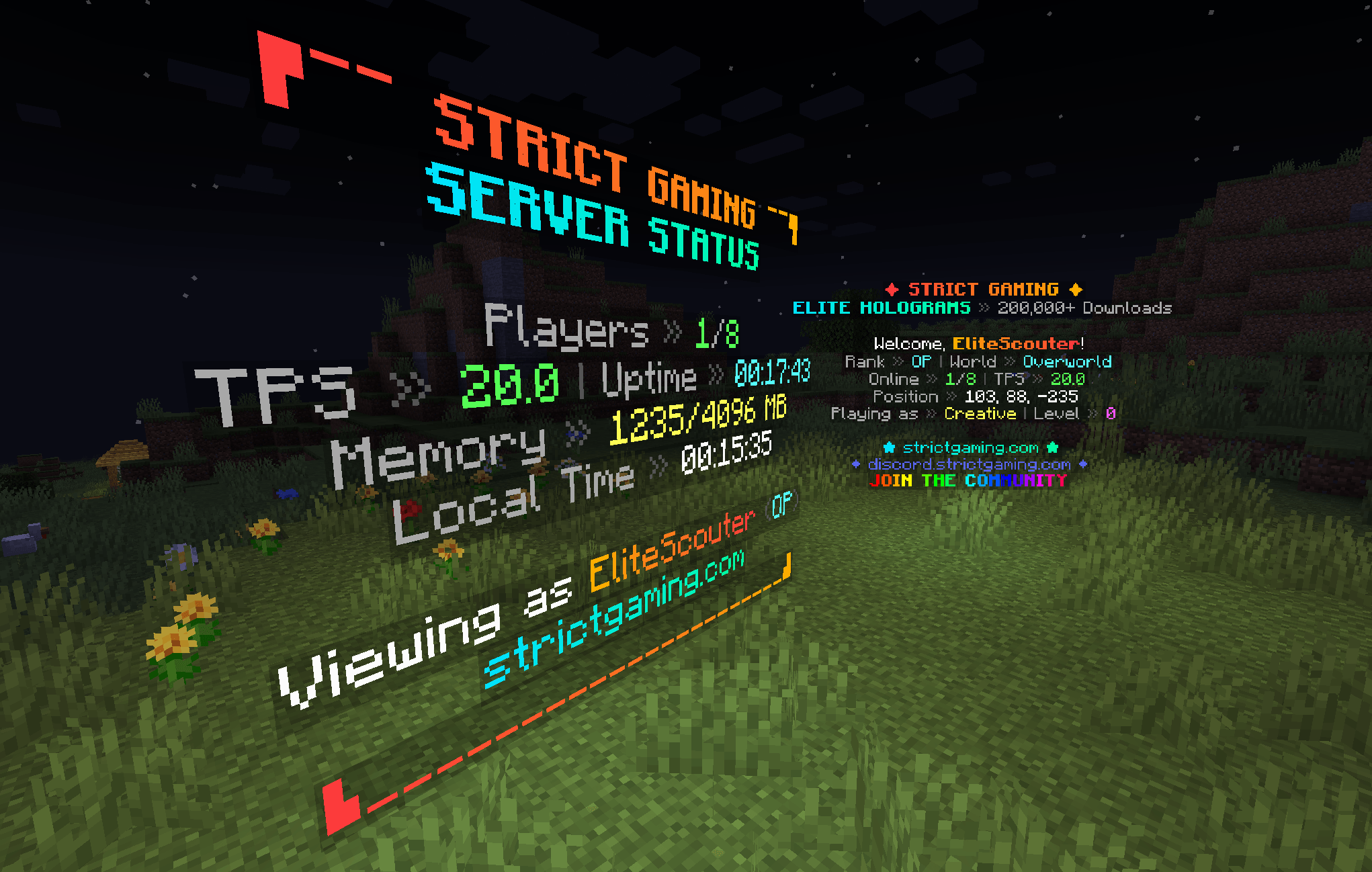
No external API needed. Placeholders update in real time, including per-viewer player values.

Server-wide: %players%, %maxplayers%, %tps%, %uptime%, %memory%, %server_time%

Player-specific: %player%, %player_rank%, %player_health%, %player_level%, %player_world%, %player_coords%, %player_gamemode%

Example:

/eh create welcome <gradient:#00FFA3:#00B7FF>Welcome %player%!</gradient>
/eh addline welcome &7Your rank: &e%player_rank%
/eh addline welcome &7Online: &a%players%&7/&a%maxplayers%  TPS: &a%tps%

Permissions

Elite Holograms auto-detects LuckPerms and FTB Ranks, and falls back to OP level 2 when neither is present. Console and command blocks always have full access.

Granular nodes let you hand out exactly what you want without making anyone an operator:

eliteholograms.create, eliteholograms.delete, eliteholograms.edit, eliteholograms.list, eliteholograms.info, eliteholograms.near, eliteholograms.teleport, eliteholograms.backlight, eliteholograms.admin

See the Permissions Guide for group setups and examples.

Installation

  1. Download the build matching your loader and Minecraft version (Forge 1.19.2 / 1.20.1, Fabric 1.20.1, NeoForge 1.21.1 / 26.1 / 26.2).
  2. Drop the JAR into your mods folder. Your single-player instance, modpack, or server all work the same way.
  3. Fabric only: also install Fabric API. The Fabric edition will not load without it. The Forge and NeoForge editions need nothing extra.
  4. (Optional) Install LuckPerms or FTB Ranks for granular permissions on a server.
  5. Launch the game or restart the server, then run /eh create to get started.

Elite Holograms in action

Built for Forge 1.19.2 / 1.20.1, Fabric 1.20.1, and NeoForge 1.21.1 / 26.1 / 26.2.

Галерея
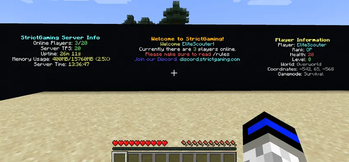
HologramsScoreboardsStatic Boards

Последние версии

Все версии →
release

Elite Holograms 26.2-1.3.0

26.2-1.3.0
29 сент. 2026 г.70Minecraft: 26.2neoforge
Скачать
Что нового
## All Editions 1.3.0: Clickable holograms, scale, brightness and billboards (2026-09-29) ### Added * **Clickable holograms.** `/eh click <id> set <command...>` makes a hologram run a command when a player right-clicks it, `console <command...>` runs it elevated, and `none` turns it off. `%player%` in the command is replaced with the clicking player's name. Use it for warp signs, shop buttons, quest turn-ins, or anything that was previously a sign and a pressure plate. Clicking is backed by a real, invisible `minecraft:interaction` hitbox placed over the text, which is why it works on every loader without a client mod * **`/eh display <id> scale <0.1-10>`** resizes a fixed hologram's text. Line spacing widens with the scale, so a scaled-up hologram does not overlap its own lines, and the top line stays anchored where the hologram is * **`/eh display <id> brightness <0-15|auto>`** lights the text regardless of the surrounding light level. `15` makes a hologram readable at night **without placing a single block in the world**, which for most people is what `/eh backlight` was being used for. `auto` restores world lighting * **`/eh display <id> billboard <fixed|vertical|horizontal|center>`** controls how a fixed hologram turns towards the viewer. `vertical` is worth knowing about: the text turns to follow the player horizontally but never tilts, so it stays readable from any direction without lying on its back when someone flies overhead. `fixed` remains the default * **`/eh display <id> reset`** restores all three at once ### Changed * The three display settings are grouped under one `/eh display` command rather than three top-level ones, to keep the `/eh` tab-completion list readable * **Each save now keeps the previous version** of the file alongside it as `holograms.json.bak` / `scoreboard_holograms.json.bak`, which is restored automatically if the main file is ever found damaged. An unreadable file is kept as `.corrupt-<timestamp>` rather than overwritten, so nothing in it is lost ### Fixed * **Scoreboard holograms did not keep their background settings.** Boards persist to their own `scoreboard_holograms.json` rather than to `holograms.json`, and the Forge 1.20.1 and Fabric editions never wrote the background colour and opacity there, so a restyled board reverted to 25% black on restart. All editions now persist the full set (background, scale, brightness, billboard and click command) for scoreboard holograms as well as regular ones * **`/eh movevertical` could be run by any player on Forge 1.20.1 and Fabric.** Every other subcommand declares the permission node it needs when its brigadier literal is built, but `movevertical` was registered and given arguments without ever being added to that chain, and its handler class carried no check of its own. The only gate left was the one on the base `/eh` literal, which is `eliteholograms.list`. Every user of the mod needs that node, so anyone who could run `/eh` at all could move any hologram vertically. It now requires `eliteholograms.edit` like the rest of the editing commands, which is what the documentation already described. The Forge 1.19.2 and all three NeoForge editions build their commands differently and were never affected * **A hologram or scoreboard in a world that was not loaded was deleted from disk.** On Forge 1.19.2, Forge 1.20.1 and Fabric, a hologram whose world could not be found at startup (a modded dimension whose mod was removed, or one that registers late) was skipped, and the next save, written from memory, erased it from the file for good. It is now kept in the file exactly as it was, written back on every save, and loads again once its world is available. The log names each one and why * **A hologram in a world that was not loaded placed real blocks and entities in the overworld** (NeoForge). Its world fell back to the overworld, so its backlight's light blocks and its click hitbox were created there at its coordinates. They were invisible but real, and the hitbox was clickable. It is now left unspawned until its world is back, and its world is saved unchanged * **One hologram that failed to load took every hologram after it with it** (NeoForge). A single bad entry aborted the whole load, so everything later in the file was skipped and then erased by the next save. Each hologram now loads on its own, and one that cannot be read is kept in the file untouched * **A half-built hologram or board could overwrite the good copy on disk.** Holograms register themselves as they are constructed, so one that failed part way through loading was left in memory with default settings and saved over the original. It is now removed and the original kept * **Saves were not crash-safe.** `holograms.json` was deleted before its replacement was moved into place, and `scoreboard_holograms.json` (and `holograms.json` on NeoForge) was truncated and rewritten in place, so a crash, kill or power cut at the wrong moment left a missing or half-written file. Every save now writes a complete temporary file, flushes it to disk, and swaps it in with a single atomic move, so an interrupted save leaves either the old version or the new one. The previous version is kept as a backup either way * **A damaged file was loaded as empty and then overwritten.** If either file could not be parsed, the mod started with no holograms and the next save wrote that emptiness over the recoverable file. A damaged file is now copied aside as `.corrupt-<timestamp>` and the previous good version is restored from `.bak`, which every save now keeps * **A typo in `scoreboard_themes.json` wiped out every custom theme.** A themes file that existed but could not be parsed was treated the same as a missing one, so the next startup replaced it with the starter themes. It is now left untouched: the built-in themes are used until it is fixed, and `/eh reload` picks up the repaired file * **Deleting the last scoreboard hologram did not stick.** An empty list of boards was never written, so the last board deleted came back on the next restart * **A second edit to a scoreboard within five seconds was not saved** (Forge 1.19.2, Forge 1.20.1, Fabric). A cooldown on scoreboard saves dropped it until shutdown, so a crash lost it. The cooldown only existed to absorb the next bug, and is gone * **Every score change saved every hologram, once per line** (Forge 1.19.2, Forge 1.20.1, Fabric). A board re-rendering its rows queued a full save for each one, so a top-10 board wrote the file eleven times whenever a score moved. Rendering a board no longer saves at all; its settings are saved when they change * **`/eh reload` overwrote hand edits instead of loading them.** It saved what was in memory before reading the files, so an edit made to either JSON file was replaced by the command meant to load it. It now loads the edited file, and only saves first when nothing was edited outside the game * **`/eh reload` left the old holograms on screen** (Forge 1.19.2, Forge 1.20.1, Fabric). Reading the file replaced each hologram before the old one was despawned, so the old copies stayed drawn for players, kept their backlight blocks, and kept their click hitboxes in the world. The holograms actually on screen are now the ones despawned * **Holograms loaded twice on every startup** (NeoForge), the first time without the protection that stops saves running mid-load. Each hologram it built queued a save that could capture a half-loaded registry. They now load once * **The console and command blocks could not run most editing commands** (Forge 1.19.2, Forge 1.20.1, Fabric). `/eh addline`, `setline`, `insertline`, `removeline`, `delete` and `info` (and `animateline` on 1.19.2) required a player, even though they only used one to reply. They now reply to whoever ran them, so they work from the console, command blocks and RCON as documented * **Hologram IDs were case-sensitive on NeoForge**, unlike every other edition and unlike the documentation, so `/eh delete Shop` missed a hologram created as `shop` and both could exist side by side. Lookups now ignore case. Two IDs that an older build saved differing only in case both stay reachable * **Forge 1.19.2: the second world opened in a single-player session showed no holograms.** The background thread that shows holograms to players kept the previous world's shutdown flag and exited immediately * Hologram line lists and viewer lists were plain lists shared between the server thread, the visibility thread and the saver (Forge 1.20.1, Fabric), so an edit at the wrong moment could abort a save or a visibility pass. They are now safe to read while being edited * The player listener was registered again every time a single-player world was opened (Forge 1.19.2, Forge 1.20.1), and the click cooldown kept an entry for every player who ever clicked ### Notes * Scale, brightness and billboard do not apply to a player-facing hologram, although clicking does. Its text is an armor stand nameplate, which the client sizes, turns and lights itself, so the server has no say in any of it. The values are stored either way and take effect the moment the hologram is converted with `/eh convert <id> fixed` * **`/eh click <id> console ...` requires the admin permission**, not the edit permission that covers the rest of the command. Running a click command elevated would otherwise let anyone who can edit holograms hand themselves operator commands through a sign * Click hitboxes are real entities, but they are never saved with the chunk. Each one is rebuilt when its hologram comes into range, so they cannot accumulate in the world. A stray one left by an earlier build is removed the first time it is clicked * Forge 1.19.2 has none of the display or click features because it has no text displays, so there is nothing to scale, light, turn or click. It does receive every storage, reload and console fix above * For contributors: `runServer` now works in development on Forge 1.19.2, Forge 1.20.1 and all three NeoForge editions. Their dev runs could not see the bundled Adventure and api libraries and failed at startup; release jars were never affected * The Forge 1.20.1 and Fabric command builders now **fail closed**: a subcommand that reaches the end of the permission chain without naming a node defaults to requiring `eliteholograms.admin` rather than inheriting only the base `/eh` check. That is the bug class `movevertical` fell into, and this makes it impossible to reintroduce by omission
release

Elite Holograms 26.1.2-1.3.0

26.1.2-1.3.0
29 сент. 2026 г.36Minecraft: 26.1.2neoforge
Скачать
Что нового
## All Editions 1.3.0: Clickable holograms, scale, brightness and billboards (2026-09-29) ### Added * **Clickable holograms.** `/eh click <id> set <command...>` makes a hologram run a command when a player right-clicks it, `console <command...>` runs it elevated, and `none` turns it off. `%player%` in the command is replaced with the clicking player's name. Use it for warp signs, shop buttons, quest turn-ins, or anything that was previously a sign and a pressure plate. Clicking is backed by a real, invisible `minecraft:interaction` hitbox placed over the text, which is why it works on every loader without a client mod * **`/eh display <id> scale <0.1-10>`** resizes a fixed hologram's text. Line spacing widens with the scale, so a scaled-up hologram does not overlap its own lines, and the top line stays anchored where the hologram is * **`/eh display <id> brightness <0-15|auto>`** lights the text regardless of the surrounding light level. `15` makes a hologram readable at night **without placing a single block in the world**, which for most people is what `/eh backlight` was being used for. `auto` restores world lighting * **`/eh display <id> billboard <fixed|vertical|horizontal|center>`** controls how a fixed hologram turns towards the viewer. `vertical` is worth knowing about: the text turns to follow the player horizontally but never tilts, so it stays readable from any direction without lying on its back when someone flies overhead. `fixed` remains the default * **`/eh display <id> reset`** restores all three at once ### Changed * The three display settings are grouped under one `/eh display` command rather than three top-level ones, to keep the `/eh` tab-completion list readable * **Each save now keeps the previous version** of the file alongside it as `holograms.json.bak` / `scoreboard_holograms.json.bak`, which is restored automatically if the main file is ever found damaged. An unreadable file is kept as `.corrupt-<timestamp>` rather than overwritten, so nothing in it is lost ### Fixed * **Scoreboard holograms did not keep their background settings.** Boards persist to their own `scoreboard_holograms.json` rather than to `holograms.json`, and the Forge 1.20.1 and Fabric editions never wrote the background colour and opacity there, so a restyled board reverted to 25% black on restart. All editions now persist the full set (background, scale, brightness, billboard and click command) for scoreboard holograms as well as regular ones * **`/eh movevertical` could be run by any player on Forge 1.20.1 and Fabric.** Every other subcommand declares the permission node it needs when its brigadier literal is built, but `movevertical` was registered and given arguments without ever being added to that chain, and its handler class carried no check of its own. The only gate left was the one on the base `/eh` literal, which is `eliteholograms.list`. Every user of the mod needs that node, so anyone who could run `/eh` at all could move any hologram vertically. It now requires `eliteholograms.edit` like the rest of the editing commands, which is what the documentation already described. The Forge 1.19.2 and all three NeoForge editions build their commands differently and were never affected * **A hologram or scoreboard in a world that was not loaded was deleted from disk.** On Forge 1.19.2, Forge 1.20.1 and Fabric, a hologram whose world could not be found at startup (a modded dimension whose mod was removed, or one that registers late) was skipped, and the next save, written from memory, erased it from the file for good. It is now kept in the file exactly as it was, written back on every save, and loads again once its world is available. The log names each one and why * **A hologram in a world that was not loaded placed real blocks and entities in the overworld** (NeoForge). Its world fell back to the overworld, so its backlight's light blocks and its click hitbox were created there at its coordinates. They were invisible but real, and the hitbox was clickable. It is now left unspawned until its world is back, and its world is saved unchanged * **One hologram that failed to load took every hologram after it with it** (NeoForge). A single bad entry aborted the whole load, so everything later in the file was skipped and then erased by the next save. Each hologram now loads on its own, and one that cannot be read is kept in the file untouched * **A half-built hologram or board could overwrite the good copy on disk.** Holograms register themselves as they are constructed, so one that failed part way through loading was left in memory with default settings and saved over the original. It is now removed and the original kept * **Saves were not crash-safe.** `holograms.json` was deleted before its replacement was moved into place, and `scoreboard_holograms.json` (and `holograms.json` on NeoForge) was truncated and rewritten in place, so a crash, kill or power cut at the wrong moment left a missing or half-written file. Every save now writes a complete temporary file, flushes it to disk, and swaps it in with a single atomic move, so an interrupted save leaves either the old version or the new one. The previous version is kept as a backup either way * **A damaged file was loaded as empty and then overwritten.** If either file could not be parsed, the mod started with no holograms and the next save wrote that emptiness over the recoverable file. A damaged file is now copied aside as `.corrupt-<timestamp>` and the previous good version is restored from `.bak`, which every save now keeps * **A typo in `scoreboard_themes.json` wiped out every custom theme.** A themes file that existed but could not be parsed was treated the same as a missing one, so the next startup replaced it with the starter themes. It is now left untouched: the built-in themes are used until it is fixed, and `/eh reload` picks up the repaired file * **Deleting the last scoreboard hologram did not stick.** An empty list of boards was never written, so the last board deleted came back on the next restart * **A second edit to a scoreboard within five seconds was not saved** (Forge 1.19.2, Forge 1.20.1, Fabric). A cooldown on scoreboard saves dropped it until shutdown, so a crash lost it. The cooldown only existed to absorb the next bug, and is gone * **Every score change saved every hologram, once per line** (Forge 1.19.2, Forge 1.20.1, Fabric). A board re-rendering its rows queued a full save for each one, so a top-10 board wrote the file eleven times whenever a score moved. Rendering a board no longer saves at all; its settings are saved when they change * **`/eh reload` overwrote hand edits instead of loading them.** It saved what was in memory before reading the files, so an edit made to either JSON file was replaced by the command meant to load it. It now loads the edited file, and only saves first when nothing was edited outside the game * **`/eh reload` left the old holograms on screen** (Forge 1.19.2, Forge 1.20.1, Fabric). Reading the file replaced each hologram before the old one was despawned, so the old copies stayed drawn for players, kept their backlight blocks, and kept their click hitboxes in the world. The holograms actually on screen are now the ones despawned * **Holograms loaded twice on every startup** (NeoForge), the first time without the protection that stops saves running mid-load. Each hologram it built queued a save that could capture a half-loaded registry. They now load once * **The console and command blocks could not run most editing commands** (Forge 1.19.2, Forge 1.20.1, Fabric). `/eh addline`, `setline`, `insertline`, `removeline`, `delete` and `info` (and `animateline` on 1.19.2) required a player, even though they only used one to reply. They now reply to whoever ran them, so they work from the console, command blocks and RCON as documented * **Hologram IDs were case-sensitive on NeoForge**, unlike every other edition and unlike the documentation, so `/eh delete Shop` missed a hologram created as `shop` and both could exist side by side. Lookups now ignore case. Two IDs that an older build saved differing only in case both stay reachable * **Forge 1.19.2: the second world opened in a single-player session showed no holograms.** The background thread that shows holograms to players kept the previous world's shutdown flag and exited immediately * Hologram line lists and viewer lists were plain lists shared between the server thread, the visibility thread and the saver (Forge 1.20.1, Fabric), so an edit at the wrong moment could abort a save or a visibility pass. They are now safe to read while being edited * The player listener was registered again every time a single-player world was opened (Forge 1.19.2, Forge 1.20.1), and the click cooldown kept an entry for every player who ever clicked ### Notes * Scale, brightness and billboard do not apply to a player-facing hologram, although clicking does. Its text is an armor stand nameplate, which the client sizes, turns and lights itself, so the server has no say in any of it. The values are stored either way and take effect the moment the hologram is converted with `/eh convert <id> fixed` * **`/eh click <id> console ...` requires the admin permission**, not the edit permission that covers the rest of the command. Running a click command elevated would otherwise let anyone who can edit holograms hand themselves operator commands through a sign * Click hitboxes are real entities, but they are never saved with the chunk. Each one is rebuilt when its hologram comes into range, so they cannot accumulate in the world. A stray one left by an earlier build is removed the first time it is clicked * Forge 1.19.2 has none of the display or click features because it has no text displays, so there is nothing to scale, light, turn or click. It does receive every storage, reload and console fix above * For contributors: `runServer` now works in development on Forge 1.19.2, Forge 1.20.1 and all three NeoForge editions. Their dev runs could not see the bundled Adventure and api libraries and failed at startup; release jars were never affected * The Forge 1.20.1 and Fabric command builders now **fail closed**: a subcommand that reaches the end of the permission chain without naming a node defaults to requiring `eliteholograms.admin` rather than inheriting only the base `/eh` check. That is the bug class `movevertical` fell into, and this makes it impossible to reintroduce by omission
release

Elite Holograms 1.21.1-1.3.0

1.21.1-1.3.0
29 сент. 2026 г.465Minecraft: 1.21.1, 1.21.2, 1.21.3, 1.21.4, 1.21.5, 1.21.6, 1.21.7, 1.21.8, 1.21.9, 1.21.10, 1.21.11neoforge
Скачать
Что нового
## All Editions 1.3.0: Clickable holograms, scale, brightness and billboards (2026-09-29) ### Added * **Clickable holograms.** `/eh click <id> set <command...>` makes a hologram run a command when a player right-clicks it, `console <command...>` runs it elevated, and `none` turns it off. `%player%` in the command is replaced with the clicking player's name. Use it for warp signs, shop buttons, quest turn-ins, or anything that was previously a sign and a pressure plate. Clicking is backed by a real, invisible `minecraft:interaction` hitbox placed over the text, which is why it works on every loader without a client mod * **`/eh display <id> scale <0.1-10>`** resizes a fixed hologram's text. Line spacing widens with the scale, so a scaled-up hologram does not overlap its own lines, and the top line stays anchored where the hologram is * **`/eh display <id> brightness <0-15|auto>`** lights the text regardless of the surrounding light level. `15` makes a hologram readable at night **without placing a single block in the world**, which for most people is what `/eh backlight` was being used for. `auto` restores world lighting * **`/eh display <id> billboard <fixed|vertical|horizontal|center>`** controls how a fixed hologram turns towards the viewer. `vertical` is worth knowing about: the text turns to follow the player horizontally but never tilts, so it stays readable from any direction without lying on its back when someone flies overhead. `fixed` remains the default * **`/eh display <id> reset`** restores all three at once ### Changed * The three display settings are grouped under one `/eh display` command rather than three top-level ones, to keep the `/eh` tab-completion list readable * **Each save now keeps the previous version** of the file alongside it as `holograms.json.bak` / `scoreboard_holograms.json.bak`, which is restored automatically if the main file is ever found damaged. An unreadable file is kept as `.corrupt-<timestamp>` rather than overwritten, so nothing in it is lost ### Fixed * **Scoreboard holograms did not keep their background settings.** Boards persist to their own `scoreboard_holograms.json` rather than to `holograms.json`, and the Forge 1.20.1 and Fabric editions never wrote the background colour and opacity there, so a restyled board reverted to 25% black on restart. All editions now persist the full set (background, scale, brightness, billboard and click command) for scoreboard holograms as well as regular ones * **`/eh movevertical` could be run by any player on Forge 1.20.1 and Fabric.** Every other subcommand declares the permission node it needs when its brigadier literal is built, but `movevertical` was registered and given arguments without ever being added to that chain, and its handler class carried no check of its own. The only gate left was the one on the base `/eh` literal, which is `eliteholograms.list`. Every user of the mod needs that node, so anyone who could run `/eh` at all could move any hologram vertically. It now requires `eliteholograms.edit` like the rest of the editing commands, which is what the documentation already described. The Forge 1.19.2 and all three NeoForge editions build their commands differently and were never affected * **A hologram or scoreboard in a world that was not loaded was deleted from disk.** On Forge 1.19.2, Forge 1.20.1 and Fabric, a hologram whose world could not be found at startup (a modded dimension whose mod was removed, or one that registers late) was skipped, and the next save, written from memory, erased it from the file for good. It is now kept in the file exactly as it was, written back on every save, and loads again once its world is available. The log names each one and why * **A hologram in a world that was not loaded placed real blocks and entities in the overworld** (NeoForge). Its world fell back to the overworld, so its backlight's light blocks and its click hitbox were created there at its coordinates. They were invisible but real, and the hitbox was clickable. It is now left unspawned until its world is back, and its world is saved unchanged * **One hologram that failed to load took every hologram after it with it** (NeoForge). A single bad entry aborted the whole load, so everything later in the file was skipped and then erased by the next save. Each hologram now loads on its own, and one that cannot be read is kept in the file untouched * **A half-built hologram or board could overwrite the good copy on disk.** Holograms register themselves as they are constructed, so one that failed part way through loading was left in memory with default settings and saved over the original. It is now removed and the original kept * **Saves were not crash-safe.** `holograms.json` was deleted before its replacement was moved into place, and `scoreboard_holograms.json` (and `holograms.json` on NeoForge) was truncated and rewritten in place, so a crash, kill or power cut at the wrong moment left a missing or half-written file. Every save now writes a complete temporary file, flushes it to disk, and swaps it in with a single atomic move, so an interrupted save leaves either the old version or the new one. The previous version is kept as a backup either way * **A damaged file was loaded as empty and then overwritten.** If either file could not be parsed, the mod started with no holograms and the next save wrote that emptiness over the recoverable file. A damaged file is now copied aside as `.corrupt-<timestamp>` and the previous good version is restored from `.bak`, which every save now keeps * **A typo in `scoreboard_themes.json` wiped out every custom theme.** A themes file that existed but could not be parsed was treated the same as a missing one, so the next startup replaced it with the starter themes. It is now left untouched: the built-in themes are used until it is fixed, and `/eh reload` picks up the repaired file * **Deleting the last scoreboard hologram did not stick.** An empty list of boards was never written, so the last board deleted came back on the next restart * **A second edit to a scoreboard within five seconds was not saved** (Forge 1.19.2, Forge 1.20.1, Fabric). A cooldown on scoreboard saves dropped it until shutdown, so a crash lost it. The cooldown only existed to absorb the next bug, and is gone * **Every score change saved every hologram, once per line** (Forge 1.19.2, Forge 1.20.1, Fabric). A board re-rendering its rows queued a full save for each one, so a top-10 board wrote the file eleven times whenever a score moved. Rendering a board no longer saves at all; its settings are saved when they change * **`/eh reload` overwrote hand edits instead of loading them.** It saved what was in memory before reading the files, so an edit made to either JSON file was replaced by the command meant to load it. It now loads the edited file, and only saves first when nothing was edited outside the game * **`/eh reload` left the old holograms on screen** (Forge 1.19.2, Forge 1.20.1, Fabric). Reading the file replaced each hologram before the old one was despawned, so the old copies stayed drawn for players, kept their backlight blocks, and kept their click hitboxes in the world. The holograms actually on screen are now the ones despawned * **Holograms loaded twice on every startup** (NeoForge), the first time without the protection that stops saves running mid-load. Each hologram it built queued a save that could capture a half-loaded registry. They now load once * **The console and command blocks could not run most editing commands** (Forge 1.19.2, Forge 1.20.1, Fabric). `/eh addline`, `setline`, `insertline`, `removeline`, `delete` and `info` (and `animateline` on 1.19.2) required a player, even though they only used one to reply. They now reply to whoever ran them, so they work from the console, command blocks and RCON as documented * **Hologram IDs were case-sensitive on NeoForge**, unlike every other edition and unlike the documentation, so `/eh delete Shop` missed a hologram created as `shop` and both could exist side by side. Lookups now ignore case. Two IDs that an older build saved differing only in case both stay reachable * **Forge 1.19.2: the second world opened in a single-player session showed no holograms.** The background thread that shows holograms to players kept the previous world's shutdown flag and exited immediately * Hologram line lists and viewer lists were plain lists shared between the server thread, the visibility thread and the saver (Forge 1.20.1, Fabric), so an edit at the wrong moment could abort a save or a visibility pass. They are now safe to read while being edited * The player listener was registered again every time a single-player world was opened (Forge 1.19.2, Forge 1.20.1), and the click cooldown kept an entry for every player who ever clicked ### Notes * Scale, brightness and billboard do not apply to a player-facing hologram, although clicking does. Its text is an armor stand nameplate, which the client sizes, turns and lights itself, so the server has no say in any of it. The values are stored either way and take effect the moment the hologram is converted with `/eh convert <id> fixed` * **`/eh click <id> console ...` requires the admin permission**, not the edit permission that covers the rest of the command. Running a click command elevated would otherwise let anyone who can edit holograms hand themselves operator commands through a sign * Click hitboxes are real entities, but they are never saved with the chunk. Each one is rebuilt when its hologram comes into range, so they cannot accumulate in the world. A stray one left by an earlier build is removed the first time it is clicked * Forge 1.19.2 has none of the display or click features because it has no text displays, so there is nothing to scale, light, turn or click. It does receive every storage, reload and console fix above * For contributors: `runServer` now works in development on Forge 1.19.2, Forge 1.20.1 and all three NeoForge editions. Their dev runs could not see the bundled Adventure and api libraries and failed at startup; release jars were never affected * The Forge 1.20.1 and Fabric command builders now **fail closed**: a subcommand that reaches the end of the permission chain without naming a node defaults to requiring `eliteholograms.admin` rather than inheriting only the base `/eh` check. That is the bug class `movevertical` fell into, and this makes it impossible to reintroduce by omission
release

Elite Holograms 1.20.1-1.3.0

1.20.1-1.3.0
29 сент. 2026 г.80Minecraft: 1.20.1, 1.20.2, 1.20.3, 1.20.4, 1.20.5, 1.20.6fabric
Скачать
Что нового
## All Editions 1.3.0: Clickable holograms, scale, brightness and billboards (2026-09-29) ### Added * **Clickable holograms.** `/eh click <id> set <command...>` makes a hologram run a command when a player right-clicks it, `console <command...>` runs it elevated, and `none` turns it off. `%player%` in the command is replaced with the clicking player's name. Use it for warp signs, shop buttons, quest turn-ins, or anything that was previously a sign and a pressure plate. Clicking is backed by a real, invisible `minecraft:interaction` hitbox placed over the text, which is why it works on every loader without a client mod * **`/eh display <id> scale <0.1-10>`** resizes a fixed hologram's text. Line spacing widens with the scale, so a scaled-up hologram does not overlap its own lines, and the top line stays anchored where the hologram is * **`/eh display <id> brightness <0-15|auto>`** lights the text regardless of the surrounding light level. `15` makes a hologram readable at night **without placing a single block in the world**, which for most people is what `/eh backlight` was being used for. `auto` restores world lighting * **`/eh display <id> billboard <fixed|vertical|horizontal|center>`** controls how a fixed hologram turns towards the viewer. `vertical` is worth knowing about: the text turns to follow the player horizontally but never tilts, so it stays readable from any direction without lying on its back when someone flies overhead. `fixed` remains the default * **`/eh display <id> reset`** restores all three at once ### Changed * The three display settings are grouped under one `/eh display` command rather than three top-level ones, to keep the `/eh` tab-completion list readable * **Each save now keeps the previous version** of the file alongside it as `holograms.json.bak` / `scoreboard_holograms.json.bak`, which is restored automatically if the main file is ever found damaged. An unreadable file is kept as `.corrupt-<timestamp>` rather than overwritten, so nothing in it is lost ### Fixed * **Scoreboard holograms did not keep their background settings.** Boards persist to their own `scoreboard_holograms.json` rather than to `holograms.json`, and the Forge 1.20.1 and Fabric editions never wrote the background colour and opacity there, so a restyled board reverted to 25% black on restart. All editions now persist the full set (background, scale, brightness, billboard and click command) for scoreboard holograms as well as regular ones * **`/eh movevertical` could be run by any player on Forge 1.20.1 and Fabric.** Every other subcommand declares the permission node it needs when its brigadier literal is built, but `movevertical` was registered and given arguments without ever being added to that chain, and its handler class carried no check of its own. The only gate left was the one on the base `/eh` literal, which is `eliteholograms.list`. Every user of the mod needs that node, so anyone who could run `/eh` at all could move any hologram vertically. It now requires `eliteholograms.edit` like the rest of the editing commands, which is what the documentation already described. The Forge 1.19.2 and all three NeoForge editions build their commands differently and were never affected * **A hologram or scoreboard in a world that was not loaded was deleted from disk.** On Forge 1.19.2, Forge 1.20.1 and Fabric, a hologram whose world could not be found at startup (a modded dimension whose mod was removed, or one that registers late) was skipped, and the next save, written from memory, erased it from the file for good. It is now kept in the file exactly as it was, written back on every save, and loads again once its world is available. The log names each one and why * **A hologram in a world that was not loaded placed real blocks and entities in the overworld** (NeoForge). Its world fell back to the overworld, so its backlight's light blocks and its click hitbox were created there at its coordinates. They were invisible but real, and the hitbox was clickable. It is now left unspawned until its world is back, and its world is saved unchanged * **One hologram that failed to load took every hologram after it with it** (NeoForge). A single bad entry aborted the whole load, so everything later in the file was skipped and then erased by the next save. Each hologram now loads on its own, and one that cannot be read is kept in the file untouched * **A half-built hologram or board could overwrite the good copy on disk.** Holograms register themselves as they are constructed, so one that failed part way through loading was left in memory with default settings and saved over the original. It is now removed and the original kept * **Saves were not crash-safe.** `holograms.json` was deleted before its replacement was moved into place, and `scoreboard_holograms.json` (and `holograms.json` on NeoForge) was truncated and rewritten in place, so a crash, kill or power cut at the wrong moment left a missing or half-written file. Every save now writes a complete temporary file, flushes it to disk, and swaps it in with a single atomic move, so an interrupted save leaves either the old version or the new one. The previous version is kept as a backup either way * **A damaged file was loaded as empty and then overwritten.** If either file could not be parsed, the mod started with no holograms and the next save wrote that emptiness over the recoverable file. A damaged file is now copied aside as `.corrupt-<timestamp>` and the previous good version is restored from `.bak`, which every save now keeps * **A typo in `scoreboard_themes.json` wiped out every custom theme.** A themes file that existed but could not be parsed was treated the same as a missing one, so the next startup replaced it with the starter themes. It is now left untouched: the built-in themes are used until it is fixed, and `/eh reload` picks up the repaired file * **Deleting the last scoreboard hologram did not stick.** An empty list of boards was never written, so the last board deleted came back on the next restart * **A second edit to a scoreboard within five seconds was not saved** (Forge 1.19.2, Forge 1.20.1, Fabric). A cooldown on scoreboard saves dropped it until shutdown, so a crash lost it. The cooldown only existed to absorb the next bug, and is gone * **Every score change saved every hologram, once per line** (Forge 1.19.2, Forge 1.20.1, Fabric). A board re-rendering its rows queued a full save for each one, so a top-10 board wrote the file eleven times whenever a score moved. Rendering a board no longer saves at all; its settings are saved when they change * **`/eh reload` overwrote hand edits instead of loading them.** It saved what was in memory before reading the files, so an edit made to either JSON file was replaced by the command meant to load it. It now loads the edited file, and only saves first when nothing was edited outside the game * **`/eh reload` left the old holograms on screen** (Forge 1.19.2, Forge 1.20.1, Fabric). Reading the file replaced each hologram before the old one was despawned, so the old copies stayed drawn for players, kept their backlight blocks, and kept their click hitboxes in the world. The holograms actually on screen are now the ones despawned * **Holograms loaded twice on every startup** (NeoForge), the first time without the protection that stops saves running mid-load. Each hologram it built queued a save that could capture a half-loaded registry. They now load once * **The console and command blocks could not run most editing commands** (Forge 1.19.2, Forge 1.20.1, Fabric). `/eh addline`, `setline`, `insertline`, `removeline`, `delete` and `info` (and `animateline` on 1.19.2) required a player, even though they only used one to reply. They now reply to whoever ran them, so they work from the console, command blocks and RCON as documented * **Hologram IDs were case-sensitive on NeoForge**, unlike every other edition and unlike the documentation, so `/eh delete Shop` missed a hologram created as `shop` and both could exist side by side. Lookups now ignore case. Two IDs that an older build saved differing only in case both stay reachable * **Forge 1.19.2: the second world opened in a single-player session showed no holograms.** The background thread that shows holograms to players kept the previous world's shutdown flag and exited immediately * Hologram line lists and viewer lists were plain lists shared between the server thread, the visibility thread and the saver (Forge 1.20.1, Fabric), so an edit at the wrong moment could abort a save or a visibility pass. They are now safe to read while being edited * The player listener was registered again every time a single-player world was opened (Forge 1.19.2, Forge 1.20.1), and the click cooldown kept an entry for every player who ever clicked ### Notes * Scale, brightness and billboard do not apply to a player-facing hologram, although clicking does. Its text is an armor stand nameplate, which the client sizes, turns and lights itself, so the server has no say in any of it. The values are stored either way and take effect the moment the hologram is converted with `/eh convert <id> fixed` * **`/eh click <id> console ...` requires the admin permission**, not the edit permission that covers the rest of the command. Running a click command elevated would otherwise let anyone who can edit holograms hand themselves operator commands through a sign * Click hitboxes are real entities, but they are never saved with the chunk. Each one is rebuilt when its hologram comes into range, so they cannot accumulate in the world. A stray one left by an earlier build is removed the first time it is clicked * Forge 1.19.2 has none of the display or click features because it has no text displays, so there is nothing to scale, light, turn or click. It does receive every storage, reload and console fix above * For contributors: `runServer` now works in development on Forge 1.19.2, Forge 1.20.1 and all three NeoForge editions. Their dev runs could not see the bundled Adventure and api libraries and failed at startup; release jars were never affected * The Forge 1.20.1 and Fabric command builders now **fail closed**: a subcommand that reaches the end of the permission chain without naming a node defaults to requiring `eliteholograms.admin` rather than inheriting only the base `/eh` check. That is the bug class `movevertical` fell into, and this makes it impossible to reintroduce by omission
release

Elite Holograms 1.20.1-1.3.0

1.20.1-1.3.0
29 сент. 2026 г.153Minecraft: 1.20.1, 1.20.2, 1.20.3, 1.20.4, 1.20.5, 1.20.6forge
Скачать
Что нового
## All Editions 1.3.0: Clickable holograms, scale, brightness and billboards (2026-09-29) ### Added * **Clickable holograms.** `/eh click <id> set <command...>` makes a hologram run a command when a player right-clicks it, `console <command...>` runs it elevated, and `none` turns it off. `%player%` in the command is replaced with the clicking player's name. Use it for warp signs, shop buttons, quest turn-ins, or anything that was previously a sign and a pressure plate. Clicking is backed by a real, invisible `minecraft:interaction` hitbox placed over the text, which is why it works on every loader without a client mod * **`/eh display <id> scale <0.1-10>`** resizes a fixed hologram's text. Line spacing widens with the scale, so a scaled-up hologram does not overlap its own lines, and the top line stays anchored where the hologram is * **`/eh display <id> brightness <0-15|auto>`** lights the text regardless of the surrounding light level. `15` makes a hologram readable at night **without placing a single block in the world**, which for most people is what `/eh backlight` was being used for. `auto` restores world lighting * **`/eh display <id> billboard <fixed|vertical|horizontal|center>`** controls how a fixed hologram turns towards the viewer. `vertical` is worth knowing about: the text turns to follow the player horizontally but never tilts, so it stays readable from any direction without lying on its back when someone flies overhead. `fixed` remains the default * **`/eh display <id> reset`** restores all three at once ### Changed * The three display settings are grouped under one `/eh display` command rather than three top-level ones, to keep the `/eh` tab-completion list readable * **Each save now keeps the previous version** of the file alongside it as `holograms.json.bak` / `scoreboard_holograms.json.bak`, which is restored automatically if the main file is ever found damaged. An unreadable file is kept as `.corrupt-<timestamp>` rather than overwritten, so nothing in it is lost ### Fixed * **Scoreboard holograms did not keep their background settings.** Boards persist to their own `scoreboard_holograms.json` rather than to `holograms.json`, and the Forge 1.20.1 and Fabric editions never wrote the background colour and opacity there, so a restyled board reverted to 25% black on restart. All editions now persist the full set (background, scale, brightness, billboard and click command) for scoreboard holograms as well as regular ones * **`/eh movevertical` could be run by any player on Forge 1.20.1 and Fabric.** Every other subcommand declares the permission node it needs when its brigadier literal is built, but `movevertical` was registered and given arguments without ever being added to that chain, and its handler class carried no check of its own. The only gate left was the one on the base `/eh` literal, which is `eliteholograms.list`. Every user of the mod needs that node, so anyone who could run `/eh` at all could move any hologram vertically. It now requires `eliteholograms.edit` like the rest of the editing commands, which is what the documentation already described. The Forge 1.19.2 and all three NeoForge editions build their commands differently and were never affected * **A hologram or scoreboard in a world that was not loaded was deleted from disk.** On Forge 1.19.2, Forge 1.20.1 and Fabric, a hologram whose world could not be found at startup (a modded dimension whose mod was removed, or one that registers late) was skipped, and the next save, written from memory, erased it from the file for good. It is now kept in the file exactly as it was, written back on every save, and loads again once its world is available. The log names each one and why * **A hologram in a world that was not loaded placed real blocks and entities in the overworld** (NeoForge). Its world fell back to the overworld, so its backlight's light blocks and its click hitbox were created there at its coordinates. They were invisible but real, and the hitbox was clickable. It is now left unspawned until its world is back, and its world is saved unchanged * **One hologram that failed to load took every hologram after it with it** (NeoForge). A single bad entry aborted the whole load, so everything later in the file was skipped and then erased by the next save. Each hologram now loads on its own, and one that cannot be read is kept in the file untouched * **A half-built hologram or board could overwrite the good copy on disk.** Holograms register themselves as they are constructed, so one that failed part way through loading was left in memory with default settings and saved over the original. It is now removed and the original kept * **Saves were not crash-safe.** `holograms.json` was deleted before its replacement was moved into place, and `scoreboard_holograms.json` (and `holograms.json` on NeoForge) was truncated and rewritten in place, so a crash, kill or power cut at the wrong moment left a missing or half-written file. Every save now writes a complete temporary file, flushes it to disk, and swaps it in with a single atomic move, so an interrupted save leaves either the old version or the new one. The previous version is kept as a backup either way * **A damaged file was loaded as empty and then overwritten.** If either file could not be parsed, the mod started with no holograms and the next save wrote that emptiness over the recoverable file. A damaged file is now copied aside as `.corrupt-<timestamp>` and the previous good version is restored from `.bak`, which every save now keeps * **A typo in `scoreboard_themes.json` wiped out every custom theme.** A themes file that existed but could not be parsed was treated the same as a missing one, so the next startup replaced it with the starter themes. It is now left untouched: the built-in themes are used until it is fixed, and `/eh reload` picks up the repaired file * **Deleting the last scoreboard hologram did not stick.** An empty list of boards was never written, so the last board deleted came back on the next restart * **A second edit to a scoreboard within five seconds was not saved** (Forge 1.19.2, Forge 1.20.1, Fabric). A cooldown on scoreboard saves dropped it until shutdown, so a crash lost it. The cooldown only existed to absorb the next bug, and is gone * **Every score change saved every hologram, once per line** (Forge 1.19.2, Forge 1.20.1, Fabric). A board re-rendering its rows queued a full save for each one, so a top-10 board wrote the file eleven times whenever a score moved. Rendering a board no longer saves at all; its settings are saved when they change * **`/eh reload` overwrote hand edits instead of loading them.** It saved what was in memory before reading the files, so an edit made to either JSON file was replaced by the command meant to load it. It now loads the edited file, and only saves first when nothing was edited outside the game * **`/eh reload` left the old holograms on screen** (Forge 1.19.2, Forge 1.20.1, Fabric). Reading the file replaced each hologram before the old one was despawned, so the old copies stayed drawn for players, kept their backlight blocks, and kept their click hitboxes in the world. The holograms actually on screen are now the ones despawned * **Holograms loaded twice on every startup** (NeoForge), the first time without the protection that stops saves running mid-load. Each hologram it built queued a save that could capture a half-loaded registry. They now load once * **The console and command blocks could not run most editing commands** (Forge 1.19.2, Forge 1.20.1, Fabric). `/eh addline`, `setline`, `insertline`, `removeline`, `delete` and `info` (and `animateline` on 1.19.2) required a player, even though they only used one to reply. They now reply to whoever ran them, so they work from the console, command blocks and RCON as documented * **Hologram IDs were case-sensitive on NeoForge**, unlike every other edition and unlike the documentation, so `/eh delete Shop` missed a hologram created as `shop` and both could exist side by side. Lookups now ignore case. Two IDs that an older build saved differing only in case both stay reachable * **Forge 1.19.2: the second world opened in a single-player session showed no holograms.** The background thread that shows holograms to players kept the previous world's shutdown flag and exited immediately * Hologram line lists and viewer lists were plain lists shared between the server thread, the visibility thread and the saver (Forge 1.20.1, Fabric), so an edit at the wrong moment could abort a save or a visibility pass. They are now safe to read while being edited * The player listener was registered again every time a single-player world was opened (Forge 1.19.2, Forge 1.20.1), and the click cooldown kept an entry for every player who ever clicked ### Notes * Scale, brightness and billboard do not apply to a player-facing hologram, although clicking does. Its text is an armor stand nameplate, which the client sizes, turns and lights itself, so the server has no say in any of it. The values are stored either way and take effect the moment the hologram is converted with `/eh convert <id> fixed` * **`/eh click <id> console ...` requires the admin permission**, not the edit permission that covers the rest of the command. Running a click command elevated would otherwise let anyone who can edit holograms hand themselves operator commands through a sign * Click hitboxes are real entities, but they are never saved with the chunk. Each one is rebuilt when its hologram comes into range, so they cannot accumulate in the world. A stray one left by an earlier build is removed the first time it is clicked * Forge 1.19.2 has none of the display or click features because it has no text displays, so there is nothing to scale, light, turn or click. It does receive every storage, reload and console fix above * For contributors: `runServer` now works in development on Forge 1.19.2, Forge 1.20.1 and all three NeoForge editions. Their dev runs could not see the bundled Adventure and api libraries and failed at startup; release jars were never affected * The Forge 1.20.1 and Fabric command builders now **fail closed**: a subcommand that reaches the end of the permission chain without naming a node defaults to requiring `eliteholograms.admin` rather than inheriting only the base `/eh` check. That is the bug class `movevertical` fell into, and this makes it impossible to reintroduce by omission
release

Elite Holograms 1.19.2-1.3.0

1.19.2-1.3.0
29 сент. 2026 г.26Minecraft: 1.19.2, 1.19.3, 1.19.4forge
Скачать
Что нового
## All Editions 1.3.0: Clickable holograms, scale, brightness and billboards (2026-09-29) ### Added * **Clickable holograms.** `/eh click <id> set <command...>` makes a hologram run a command when a player right-clicks it, `console <command...>` runs it elevated, and `none` turns it off. `%player%` in the command is replaced with the clicking player's name. Use it for warp signs, shop buttons, quest turn-ins, or anything that was previously a sign and a pressure plate. Clicking is backed by a real, invisible `minecraft:interaction` hitbox placed over the text, which is why it works on every loader without a client mod * **`/eh display <id> scale <0.1-10>`** resizes a fixed hologram's text. Line spacing widens with the scale, so a scaled-up hologram does not overlap its own lines, and the top line stays anchored where the hologram is * **`/eh display <id> brightness <0-15|auto>`** lights the text regardless of the surrounding light level. `15` makes a hologram readable at night **without placing a single block in the world**, which for most people is what `/eh backlight` was being used for. `auto` restores world lighting * **`/eh display <id> billboard <fixed|vertical|horizontal|center>`** controls how a fixed hologram turns towards the viewer. `vertical` is worth knowing about: the text turns to follow the player horizontally but never tilts, so it stays readable from any direction without lying on its back when someone flies overhead. `fixed` remains the default * **`/eh display <id> reset`** restores all three at once ### Changed * The three display settings are grouped under one `/eh display` command rather than three top-level ones, to keep the `/eh` tab-completion list readable * **Each save now keeps the previous version** of the file alongside it as `holograms.json.bak` / `scoreboard_holograms.json.bak`, which is restored automatically if the main file is ever found damaged. An unreadable file is kept as `.corrupt-<timestamp>` rather than overwritten, so nothing in it is lost ### Fixed * **Scoreboard holograms did not keep their background settings.** Boards persist to their own `scoreboard_holograms.json` rather than to `holograms.json`, and the Forge 1.20.1 and Fabric editions never wrote the background colour and opacity there, so a restyled board reverted to 25% black on restart. All editions now persist the full set (background, scale, brightness, billboard and click command) for scoreboard holograms as well as regular ones * **`/eh movevertical` could be run by any player on Forge 1.20.1 and Fabric.** Every other subcommand declares the permission node it needs when its brigadier literal is built, but `movevertical` was registered and given arguments without ever being added to that chain, and its handler class carried no check of its own. The only gate left was the one on the base `/eh` literal, which is `eliteholograms.list`. Every user of the mod needs that node, so anyone who could run `/eh` at all could move any hologram vertically. It now requires `eliteholograms.edit` like the rest of the editing commands, which is what the documentation already described. The Forge 1.19.2 and all three NeoForge editions build their commands differently and were never affected * **A hologram or scoreboard in a world that was not loaded was deleted from disk.** On Forge 1.19.2, Forge 1.20.1 and Fabric, a hologram whose world could not be found at startup (a modded dimension whose mod was removed, or one that registers late) was skipped, and the next save, written from memory, erased it from the file for good. It is now kept in the file exactly as it was, written back on every save, and loads again once its world is available. The log names each one and why * **A hologram in a world that was not loaded placed real blocks and entities in the overworld** (NeoForge). Its world fell back to the overworld, so its backlight's light blocks and its click hitbox were created there at its coordinates. They were invisible but real, and the hitbox was clickable. It is now left unspawned until its world is back, and its world is saved unchanged * **One hologram that failed to load took every hologram after it with it** (NeoForge). A single bad entry aborted the whole load, so everything later in the file was skipped and then erased by the next save. Each hologram now loads on its own, and one that cannot be read is kept in the file untouched * **A half-built hologram or board could overwrite the good copy on disk.** Holograms register themselves as they are constructed, so one that failed part way through loading was left in memory with default settings and saved over the original. It is now removed and the original kept * **Saves were not crash-safe.** `holograms.json` was deleted before its replacement was moved into place, and `scoreboard_holograms.json` (and `holograms.json` on NeoForge) was truncated and rewritten in place, so a crash, kill or power cut at the wrong moment left a missing or half-written file. Every save now writes a complete temporary file, flushes it to disk, and swaps it in with a single atomic move, so an interrupted save leaves either the old version or the new one. The previous version is kept as a backup either way * **A damaged file was loaded as empty and then overwritten.** If either file could not be parsed, the mod started with no holograms and the next save wrote that emptiness over the recoverable file. A damaged file is now copied aside as `.corrupt-<timestamp>` and the previous good version is restored from `.bak`, which every save now keeps * **A typo in `scoreboard_themes.json` wiped out every custom theme.** A themes file that existed but could not be parsed was treated the same as a missing one, so the next startup replaced it with the starter themes. It is now left untouched: the built-in themes are used until it is fixed, and `/eh reload` picks up the repaired file * **Deleting the last scoreboard hologram did not stick.** An empty list of boards was never written, so the last board deleted came back on the next restart * **A second edit to a scoreboard within five seconds was not saved** (Forge 1.19.2, Forge 1.20.1, Fabric). A cooldown on scoreboard saves dropped it until shutdown, so a crash lost it. The cooldown only existed to absorb the next bug, and is gone * **Every score change saved every hologram, once per line** (Forge 1.19.2, Forge 1.20.1, Fabric). A board re-rendering its rows queued a full save for each one, so a top-10 board wrote the file eleven times whenever a score moved. Rendering a board no longer saves at all; its settings are saved when they change * **`/eh reload` overwrote hand edits instead of loading them.** It saved what was in memory before reading the files, so an edit made to either JSON file was replaced by the command meant to load it. It now loads the edited file, and only saves first when nothing was edited outside the game * **`/eh reload` left the old holograms on screen** (Forge 1.19.2, Forge 1.20.1, Fabric). Reading the file replaced each hologram before the old one was despawned, so the old copies stayed drawn for players, kept their backlight blocks, and kept their click hitboxes in the world. The holograms actually on screen are now the ones despawned * **Holograms loaded twice on every startup** (NeoForge), the first time without the protection that stops saves running mid-load. Each hologram it built queued a save that could capture a half-loaded registry. They now load once * **The console and command blocks could not run most editing commands** (Forge 1.19.2, Forge 1.20.1, Fabric). `/eh addline`, `setline`, `insertline`, `removeline`, `delete` and `info` (and `animateline` on 1.19.2) required a player, even though they only used one to reply. They now reply to whoever ran them, so they work from the console, command blocks and RCON as documented * **Hologram IDs were case-sensitive on NeoForge**, unlike every other edition and unlike the documentation, so `/eh delete Shop` missed a hologram created as `shop` and both could exist side by side. Lookups now ignore case. Two IDs that an older build saved differing only in case both stay reachable * **Forge 1.19.2: the second world opened in a single-player session showed no holograms.** The background thread that shows holograms to players kept the previous world's shutdown flag and exited immediately * Hologram line lists and viewer lists were plain lists shared between the server thread, the visibility thread and the saver (Forge 1.20.1, Fabric), so an edit at the wrong moment could abort a save or a visibility pass. They are now safe to read while being edited * The player listener was registered again every time a single-player world was opened (Forge 1.19.2, Forge 1.20.1), and the click cooldown kept an entry for every player who ever clicked ### Notes * Scale, brightness and billboard do not apply to a player-facing hologram, although clicking does. Its text is an armor stand nameplate, which the client sizes, turns and lights itself, so the server has no say in any of it. The values are stored either way and take effect the moment the hologram is converted with `/eh convert <id> fixed` * **`/eh click <id> console ...` requires the admin permission**, not the edit permission that covers the rest of the command. Running a click command elevated would otherwise let anyone who can edit holograms hand themselves operator commands through a sign * Click hitboxes are real entities, but they are never saved with the chunk. Each one is rebuilt when its hologram comes into range, so they cannot accumulate in the world. A stray one left by an earlier build is removed the first time it is clicked * Forge 1.19.2 has none of the display or click features because it has no text displays, so there is nothing to scale, light, turn or click. It does receive every storage, reload and console fix above * For contributors: `runServer` now works in development on Forge 1.19.2, Forge 1.20.1 and all three NeoForge editions. Their dev runs could not see the bundled Adventure and api libraries and failed at startup; release jars were never affected * The Forge 1.20.1 and Fabric command builders now **fail closed**: a subcommand that reaches the end of the permission chain without naming a node defaults to requiring `eliteholograms.admin` rather than inheriting only the base `/eh` check. That is the bug class `movevertical` fell into, and this makes it impossible to reintroduce by omission
release

Elite Holograms 1.20.1-1.2.0

1.20.1-1.2.0
29 авг. 2026 г.87Minecraft: 1.20.1, 1.20.2, 1.20.3, 1.20.4, 1.20.5, 1.20.6fabric
Скачать
Что нового
## All Editions - 1.2.0 - Fixed holograms - 2026-08-29 ### Added * **New Fabric 1.20.1 edition.** Elite Holograms now runs on Fabric, with the same feature set as the Forge 1.20.1 edition - holograms, fixed holograms, item holograms, animated lines, scoreboard leaderboards, themes, backlights, placeholders and every command. It requires Fabric API, is server-side only (players join with a vanilla client), and reads the same `config/elite-holograms/holograms.json` format, so a world can be moved between the Forge and Fabric editions without converting anything. Permissions work through LuckPerms, falling back to operator level 2 * **Fixed holograms** - holograms can now be anchored to a rotation instead of always turning to face the viewer. A *facing* hologram is the classic armor stand nameplate that spins to follow each player; a *fixed* hologram is a `text_display` entity locked to a yaw and pitch, so it reads like a sign hung on a wall and looks the same to everyone. Facing remains the default, and every hologram created before this update stays facing * **`fixed|facing` on every create command** - `/eh create fixed <id> <text>`, `/eh createat fixed <id> <x> <y> <z> [text]`, `/eh createitem fixed <id> <item> [text]` and `/eh createscoreboard fixed <id> <objective> [top] [interval] [theme]`. The keyword is optional and goes immediately after the subcommand; leaving it out creates a facing hologram exactly as before. A new fixed hologram is automatically oriented to face whoever created it * **`/eh convert <id> fixed|face`** - switches an existing hologram between the two display types in place, keeping its lines, animations, item, backlight and position. Converting to fixed points the hologram at whoever ran the command, unless a rotation was already set with `/eh setrotation` * **`/eh setrotation <id> <yaw> [pitch]`** - sets the orientation of a fixed hologram. Yaw follows the in-game convention (0 south, 90 west, 180 north, 270 east) and pitch tilts it between -90 and 90. The rotation is stored even on facing holograms, so it applies the moment you convert one to fixed * **`/eh info <id>` now reports the display type**, and the rotation when the hologram is fixed * Both new commands use the existing **`eliteholograms.edit`** permission, and tab-complete hologram IDs and display types ### Changed * **Backlights now stay centred on the hologram.** Light blocks can only sit on whole block cells, so a hologram near a block edge used to be lit noticeably off to one side. The column is now widened onto the neighbouring cell on any axis where the hologram sits within a quarter block of an edge, which caps the offset at a quarter block instead of half. A backlight therefore places up to four columns instead of one, and each column finds its own ground level so widened backlights still sit correctly on uneven terrain * `/eh create <id> <text>` treats a first argument of `fixed` or `facing` as the display type keyword. If you have a hologram whose ID is literally `fixed` or `facing`, or command blocks that create one, use `/eh create facing fixed <text>` to get the old behaviour ### Fixed * **Hologram lines could show each other's text.** Armor stand lines, item stands and text display lines each allocated network entity IDs from their own counter, and those counters were seeded with the same starting value, so different entities could be handed the same ID. The client then applied one line's data to another, showing duplicated or wrong text. All hologram entities now draw from a single shared counter * **Animated holograms could throw a `ConcurrentModificationException`** (NeoForge editions) when a player walked into range during the same tick that an animated line advanced a frame * **`/eh convert` and `/eh setrotation` ignored `eliteholograms.edit`** on the NeoForge editions, requiring operator level 2 regardless of the permission node ### Notes * **Forge 1.19.2 does not support fixed holograms.** The feature is built on `text_display` entities, which Minecraft did not add until 1.19.4, so there is no way to provide it on 1.19.2. The 1.19.2 edition still receives the entity ID and backlight fixes above, and its `/eh create` syntax is unchanged
release

Elite Holograms 26.2-1.2.0

26.2-1.2.0
29 авг. 2026 г.47Minecraft: 26.2neoforge
Скачать
Что нового
## All Editions - 1.2.0 - Fixed holograms - 2026-08-29 ### Added * **New Fabric 1.20.1 edition.** Elite Holograms now runs on Fabric, with the same feature set as the Forge 1.20.1 edition - holograms, fixed holograms, item holograms, animated lines, scoreboard leaderboards, themes, backlights, placeholders and every command. It requires Fabric API, is server-side only (players join with a vanilla client), and reads the same `config/elite-holograms/holograms.json` format, so a world can be moved between the Forge and Fabric editions without converting anything. Permissions work through LuckPerms, falling back to operator level 2 * **Fixed holograms** - holograms can now be anchored to a rotation instead of always turning to face the viewer. A *facing* hologram is the classic armor stand nameplate that spins to follow each player; a *fixed* hologram is a `text_display` entity locked to a yaw and pitch, so it reads like a sign hung on a wall and looks the same to everyone. Facing remains the default, and every hologram created before this update stays facing * **`fixed|facing` on every create command** - `/eh create fixed <id> <text>`, `/eh createat fixed <id> <x> <y> <z> [text]`, `/eh createitem fixed <id> <item> [text]` and `/eh createscoreboard fixed <id> <objective> [top] [interval] [theme]`. The keyword is optional and goes immediately after the subcommand; leaving it out creates a facing hologram exactly as before. A new fixed hologram is automatically oriented to face whoever created it * **`/eh convert <id> fixed|face`** - switches an existing hologram between the two display types in place, keeping its lines, animations, item, backlight and position. Converting to fixed points the hologram at whoever ran the command, unless a rotation was already set with `/eh setrotation` * **`/eh setrotation <id> <yaw> [pitch]`** - sets the orientation of a fixed hologram. Yaw follows the in-game convention (0 south, 90 west, 180 north, 270 east) and pitch tilts it between -90 and 90. The rotation is stored even on facing holograms, so it applies the moment you convert one to fixed * **`/eh info <id>` now reports the display type**, and the rotation when the hologram is fixed * Both new commands use the existing **`eliteholograms.edit`** permission, and tab-complete hologram IDs and display types ### Changed * **Backlights now stay centred on the hologram.** Light blocks can only sit on whole block cells, so a hologram near a block edge used to be lit noticeably off to one side. The column is now widened onto the neighbouring cell on any axis where the hologram sits within a quarter block of an edge, which caps the offset at a quarter block instead of half. A backlight therefore places up to four columns instead of one, and each column finds its own ground level so widened backlights still sit correctly on uneven terrain * `/eh create <id> <text>` treats a first argument of `fixed` or `facing` as the display type keyword. If you have a hologram whose ID is literally `fixed` or `facing`, or command blocks that create one, use `/eh create facing fixed <text>` to get the old behaviour ### Fixed * **Hologram lines could show each other's text.** Armor stand lines, item stands and text display lines each allocated network entity IDs from their own counter, and those counters were seeded with the same starting value, so different entities could be handed the same ID. The client then applied one line's data to another, showing duplicated or wrong text. All hologram entities now draw from a single shared counter * **Animated holograms could throw a `ConcurrentModificationException`** (NeoForge editions) when a player walked into range during the same tick that an animated line advanced a frame * **`/eh convert` and `/eh setrotation` ignored `eliteholograms.edit`** on the NeoForge editions, requiring operator level 2 regardless of the permission node ### Notes * **Forge 1.19.2 does not support fixed holograms.** The feature is built on `text_display` entities, which Minecraft did not add until 1.19.4, so there is no way to provide it on 1.19.2. The 1.19.2 edition still receives the entity ID and backlight fixes above, and its `/eh create` syntax is unchanged
release

Elite Holograms 26.1.2-1.2.0

26.1.2-1.2.0
29 авг. 2026 г.37Minecraft: 26.1.2neoforge
Скачать
Что нового
## All Editions - 1.2.0 - Fixed holograms - 2026-08-29 ### Added * **New Fabric 1.20.1 edition.** Elite Holograms now runs on Fabric, with the same feature set as the Forge 1.20.1 edition - holograms, fixed holograms, item holograms, animated lines, scoreboard leaderboards, themes, backlights, placeholders and every command. It requires Fabric API, is server-side only (players join with a vanilla client), and reads the same `config/elite-holograms/holograms.json` format, so a world can be moved between the Forge and Fabric editions without converting anything. Permissions work through LuckPerms, falling back to operator level 2 * **Fixed holograms** - holograms can now be anchored to a rotation instead of always turning to face the viewer. A *facing* hologram is the classic armor stand nameplate that spins to follow each player; a *fixed* hologram is a `text_display` entity locked to a yaw and pitch, so it reads like a sign hung on a wall and looks the same to everyone. Facing remains the default, and every hologram created before this update stays facing * **`fixed|facing` on every create command** - `/eh create fixed <id> <text>`, `/eh createat fixed <id> <x> <y> <z> [text]`, `/eh createitem fixed <id> <item> [text]` and `/eh createscoreboard fixed <id> <objective> [top] [interval] [theme]`. The keyword is optional and goes immediately after the subcommand; leaving it out creates a facing hologram exactly as before. A new fixed hologram is automatically oriented to face whoever created it * **`/eh convert <id> fixed|face`** - switches an existing hologram between the two display types in place, keeping its lines, animations, item, backlight and position. Converting to fixed points the hologram at whoever ran the command, unless a rotation was already set with `/eh setrotation` * **`/eh setrotation <id> <yaw> [pitch]`** - sets the orientation of a fixed hologram. Yaw follows the in-game convention (0 south, 90 west, 180 north, 270 east) and pitch tilts it between -90 and 90. The rotation is stored even on facing holograms, so it applies the moment you convert one to fixed * **`/eh info <id>` now reports the display type**, and the rotation when the hologram is fixed * Both new commands use the existing **`eliteholograms.edit`** permission, and tab-complete hologram IDs and display types ### Changed * **Backlights now stay centred on the hologram.** Light blocks can only sit on whole block cells, so a hologram near a block edge used to be lit noticeably off to one side. The column is now widened onto the neighbouring cell on any axis where the hologram sits within a quarter block of an edge, which caps the offset at a quarter block instead of half. A backlight therefore places up to four columns instead of one, and each column finds its own ground level so widened backlights still sit correctly on uneven terrain * `/eh create <id> <text>` treats a first argument of `fixed` or `facing` as the display type keyword. If you have a hologram whose ID is literally `fixed` or `facing`, or command blocks that create one, use `/eh create facing fixed <text>` to get the old behaviour ### Fixed * **Hologram lines could show each other's text.** Armor stand lines, item stands and text display lines each allocated network entity IDs from their own counter, and those counters were seeded with the same starting value, so different entities could be handed the same ID. The client then applied one line's data to another, showing duplicated or wrong text. All hologram entities now draw from a single shared counter * **Animated holograms could throw a `ConcurrentModificationException`** (NeoForge editions) when a player walked into range during the same tick that an animated line advanced a frame * **`/eh convert` and `/eh setrotation` ignored `eliteholograms.edit`** on the NeoForge editions, requiring operator level 2 regardless of the permission node ### Notes * **Forge 1.19.2 does not support fixed holograms.** The feature is built on `text_display` entities, which Minecraft did not add until 1.19.4, so there is no way to provide it on 1.19.2. The 1.19.2 edition still receives the entity ID and backlight fixes above, and its `/eh create` syntax is unchanged
release

Elite Holograms 1.21.1-1.2.0

1.21.1-1.2.0
29 авг. 2026 г.494Minecraft: 1.21.1, 1.21.2, 1.21.3, 1.21.4, 1.21.5, 1.21.6, 1.21.7, 1.21.8, 1.21.9, 1.21.10, 1.21.11neoforge
Скачать
Что нового
## All Editions - 1.2.0 - Fixed holograms - 2026-08-29 ### Added * **New Fabric 1.20.1 edition.** Elite Holograms now runs on Fabric, with the same feature set as the Forge 1.20.1 edition - holograms, fixed holograms, item holograms, animated lines, scoreboard leaderboards, themes, backlights, placeholders and every command. It requires Fabric API, is server-side only (players join with a vanilla client), and reads the same `config/elite-holograms/holograms.json` format, so a world can be moved between the Forge and Fabric editions without converting anything. Permissions work through LuckPerms, falling back to operator level 2 * **Fixed holograms** - holograms can now be anchored to a rotation instead of always turning to face the viewer. A *facing* hologram is the classic armor stand nameplate that spins to follow each player; a *fixed* hologram is a `text_display` entity locked to a yaw and pitch, so it reads like a sign hung on a wall and looks the same to everyone. Facing remains the default, and every hologram created before this update stays facing * **`fixed|facing` on every create command** - `/eh create fixed <id> <text>`, `/eh createat fixed <id> <x> <y> <z> [text]`, `/eh createitem fixed <id> <item> [text]` and `/eh createscoreboard fixed <id> <objective> [top] [interval] [theme]`. The keyword is optional and goes immediately after the subcommand; leaving it out creates a facing hologram exactly as before. A new fixed hologram is automatically oriented to face whoever created it * **`/eh convert <id> fixed|face`** - switches an existing hologram between the two display types in place, keeping its lines, animations, item, backlight and position. Converting to fixed points the hologram at whoever ran the command, unless a rotation was already set with `/eh setrotation` * **`/eh setrotation <id> <yaw> [pitch]`** - sets the orientation of a fixed hologram. Yaw follows the in-game convention (0 south, 90 west, 180 north, 270 east) and pitch tilts it between -90 and 90. The rotation is stored even on facing holograms, so it applies the moment you convert one to fixed * **`/eh info <id>` now reports the display type**, and the rotation when the hologram is fixed * Both new commands use the existing **`eliteholograms.edit`** permission, and tab-complete hologram IDs and display types ### Changed * **Backlights now stay centred on the hologram.** Light blocks can only sit on whole block cells, so a hologram near a block edge used to be lit noticeably off to one side. The column is now widened onto the neighbouring cell on any axis where the hologram sits within a quarter block of an edge, which caps the offset at a quarter block instead of half. A backlight therefore places up to four columns instead of one, and each column finds its own ground level so widened backlights still sit correctly on uneven terrain * `/eh create <id> <text>` treats a first argument of `fixed` or `facing` as the display type keyword. If you have a hologram whose ID is literally `fixed` or `facing`, or command blocks that create one, use `/eh create facing fixed <text>` to get the old behaviour ### Fixed * **Hologram lines could show each other's text.** Armor stand lines, item stands and text display lines each allocated network entity IDs from their own counter, and those counters were seeded with the same starting value, so different entities could be handed the same ID. The client then applied one line's data to another, showing duplicated or wrong text. All hologram entities now draw from a single shared counter * **Animated holograms could throw a `ConcurrentModificationException`** (NeoForge editions) when a player walked into range during the same tick that an animated line advanced a frame * **`/eh convert` and `/eh setrotation` ignored `eliteholograms.edit`** on the NeoForge editions, requiring operator level 2 regardless of the permission node ### Notes * **Forge 1.19.2 does not support fixed holograms.** The feature is built on `text_display` entities, which Minecraft did not add until 1.19.4, so there is no way to provide it on 1.19.2. The 1.19.2 edition still receives the entity ID and backlight fixes above, and its `/eh create` syntax is unchanged