Plush Studio
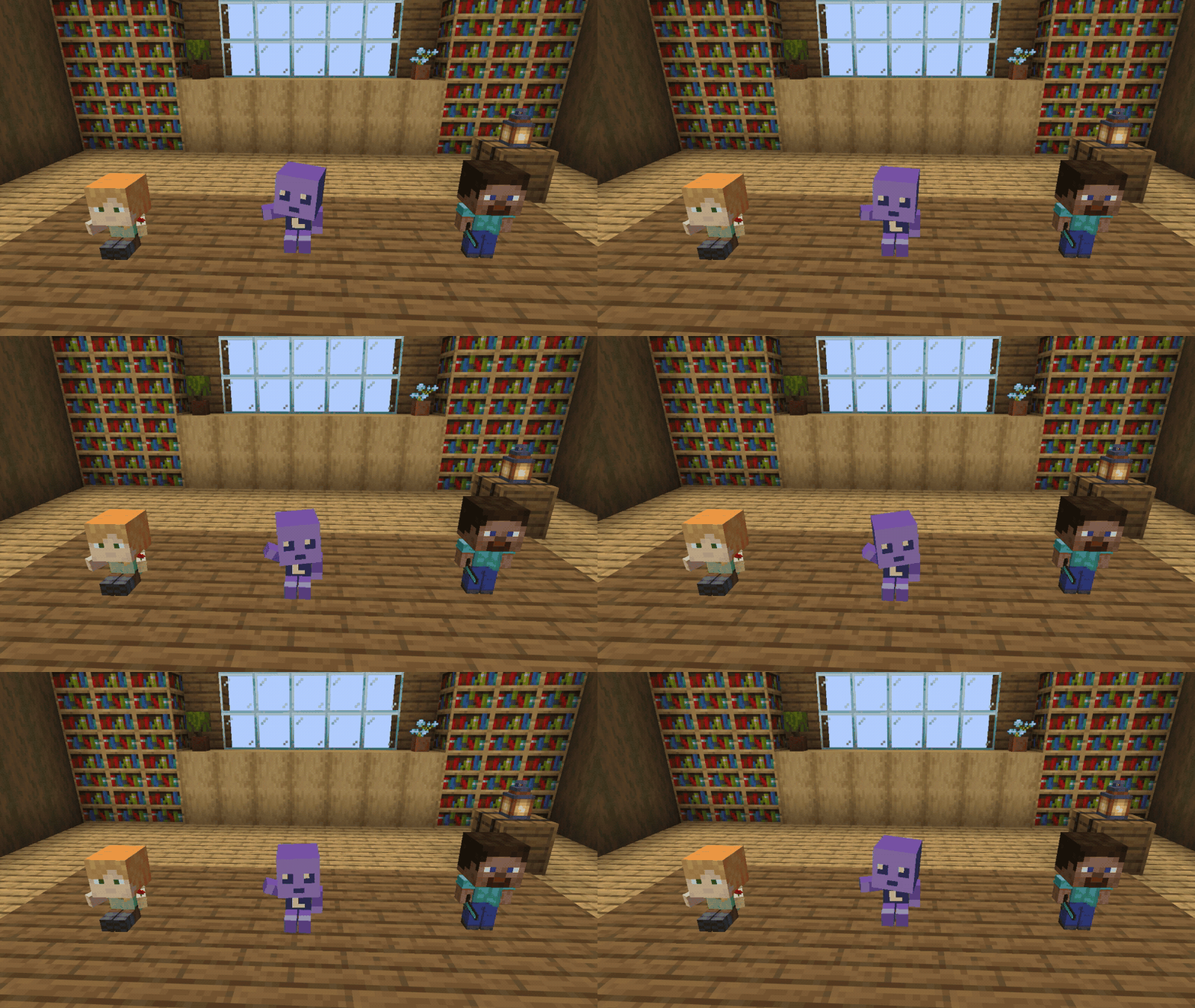
Turn player skins into customizable plushies! Pose every bone, hold miniature items, and create keyframe animations, with saving and multiplayer support.
Описание
Remake Beta Out Now



 One skin. One plush. One very small version of you.
Eciipse Plushies is now Plush Studio, rebuilt from scratch for Minecraft 26.2 on Fabric.
Put yourself, your friends, or your favorite Minecraft skin on a shelf. Start with the new purple mascot, load a player skin, or paint one yourself. Pose every part of the plush, give it real items to hold, or bring it to life with keyframe animation made directly inside Minecraft.
Keep it simple and leave one sitting on a shelf, or spend way too long making it move.
This mod is in beta. It can break, change, or behave in ways it probably should not. Back up anything you care about before installing. Bugs, ideas, and cursed plush animations are welcome in our Discord.
Credits
Plush Studio is created and maintained by Eciipse Studios™, an independent development team focused on building polished mods, and interactive experiences.
The project is developed collaboratively by:
Sketch494 | Owner, Lead Developer
ImpactGamin | Co-Owner, Lead Developer
Eciipse Studios™ is responsible for the design, development, testing, and continued maintenance of Plush Studio.
What the mod adds
- A fully customizable Skin Plush with its own purple mascot, Minecraft player skins, and direct skin PNG URLs
- A full Plush Studio with separate Skin, Paint, Pose, Items, and Animate pages
- A built-in skin painter with brushes, fill, an eyedropper, outer-layer erasing, and PNG export
- A visible paint cursor on the model and an unfolded 64×64 texture canvas
- A 3D ground grid for judging height and placement
- Support for both classic and slim-arm Minecraft skins
- Custom proportions for individual body parts
- Held items that can be placed in either hand and follow the plush's arms
- A full keyframe animation system with a built-in timeline
- Autokey, keyframe copying, pasting, moving, and deletion
- Linear, smooth, and step interpolation
- Adjustable animation length, playback speed, and looping
- An Animation: On/Off toggle directly on the Animate page; new animations start On
- Blender-style G, R, S, X, Y and Z shortcuts
- An outliner, XYZ transform controls, precise number fields, camera controls, undo and redo
- Persistent saves for skins, poses, transforms, held items, offsets, and animations
- Offline-safe skin snapshots
- Multiplayer synchronization
- A dedicated Plush Studio creative tab with example plushies, poses, and animations
Getting started
- Craft a Skin Plush. You can also grab one from the Plush Studio creative tab.
- Place the plush wherever you want it.
- Shift + right-click the plush to open Plush Studio.
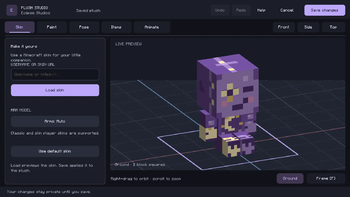
- Keep the default purple skin, or enter a Minecraft Java Edition username or direct skin PNG URL in Skin and select Load skin.
- Open Paint if you want to draw your own skin or customize the one you loaded.
- Pose the plush, adjust its proportions, and give it something to hold in Items.
- Switch to Animate if you want to create an animation.
- Select Save changes when you are finished.
The Animation: On/Off toggle is on the main Animate page. New animations start On. Turn one Off to keep the placed plush still without deleting its keys, then save.

Loading player skins
Every Skin Plush can use a Minecraft player skin.
Enter a Minecraft Java Edition username to load that player's current skin, or use a direct HTTPS player-skin PNG URL.
Both classic and slim-arm skins are supported.
The skin can be previewed on the plush before saving.
Imported skins are stored directly with the plush, so they remain available even if the original image URL later becomes unavailable.
If someone changes their Minecraft skin, use Load skin again and then Save changes to update the plush.
Paint your own skin
The new purple mascot is a starting point. You can make it your own.
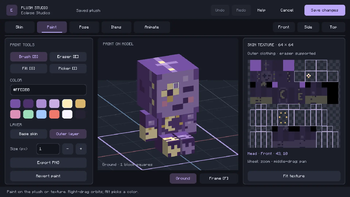
Open Paint to draw directly on the 3D plush or on its unfolded 64×64 skin texture. Both views update as you work.
The paint tools include:
- A 1–8 pixel brush, palette swatches, and hex colors
- Fill within a skin face
- A color picker, with Alt-click for quick sampling
- Separate base skin and outer layer editing
- An eraser for the outer layer
- A brush outline that follows the model's surface and shows the pixels you are about to paint
- Undo, redo, revert, and PNG export
Brushes and fills stop at texture seams. Right-drag orbits the model, middle-drag pans, and the wheel zooms. The texture canvas can also be zoomed and panned.
Select Save changes to apply your painting. The skin saves with the world and syncs to other players. Reopen the plush to keep painting without needing an image URL.
Unsaved painting stays private. Cancel leaves the placed plush as it was.
Plush Studio
Shift + right-click a Skin Plush to open Plush Studio.
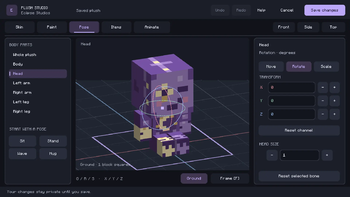
The editor is split into Skin, Paint, Pose, Items, and Animate, so the tools you need have their own space. Your draft and camera carry across the pages.
Select individual parts directly from the model or through the outliner, then change their position, rotation, or scale.
The studio includes:
- A 3D editing viewport with a ground grid
- Shaded 3D move arrows and scale handles, plus rotation rings
- Rounded controls with matching focus outlines
- Precise numerical transform fields
- An outliner for selecting model parts
- Camera controls
- Undo and redo
You can select the:
- Head
- Body
- Left arm
- Right arm
- Left leg
- Right leg
- Entire plush
Blender-style shortcuts are also supported:
- G - Move
- R - Rotate
- S - Scale
- X, Y, Z - Lock transforms to an axis
You can pose the plush entirely inside Minecraft without opening another program.
Custom proportions and placement
The plush does not have to keep normal Minecraft player proportions.
Resize the head, reposition individual limbs, adjust the overall pose, or offset the entire plush from the block where it was placed.
You can:
- Resize individual body parts
- Reposition limbs
- Adjust proportions
- Change the overall pose
- Offset the plush visually from its placed block
Make yourself. Make your friends. Make something that should probably not be displayed in public.
The Ground grid gives you a reference for height and placement. Large squares represent one block, smaller lines mark quarter blocks, and the purple outline marks the placed block. The grid stays put while you move the plush.
The visual offset only changes where the plush appears. Its interaction and collision anchor remain at the original placed block.
Held items
Give your plush something to hold.
Choose an item from your inventory and place it in either hand.
The plush stores the real item and renders a miniature version that follows the movement of the arm. Items transfer when you select Save changes; trying them in the editor does not take them from your inventory.
You can:
- Put an item in either hand
- Give both hands different items
- Replace an existing item
- Remove an item and return it to your inventory
Held items also follow the plush while it is animated. Replaced or removed items return to you. Cancel keeps your inventory intact.
Keyframe animation
Bring your plush to life with the built-in animation editor.
Switch to Animate mode and create position, rotation, and scale tracks for individual parts of the plush.
The timeline allows you to:
- Add keyframes
- Move keyframes
- Use autokey while posing
- Copy and paste keys
- Delete keys
- Choose interpolation modes
- Adjust animation length
- Change playback speed
- Enable or disable looping
Supported interpolation modes include:
- Linear
- Smooth
- Step
Play / Stop control the editor preview. The Animation: On/Off toggle on the main Animate page controls whether the saved plush plays its clip. New clips start On, and turning a clip off keeps all of its keyframes.
Open Clip settings for the name, duration, speed, and looping.
Select Save changes to apply the animation to the placed plush.
Animation is completely optional.
A plush can stay perfectly still, use a custom pose, or play the same animation forever.
Persistent saves
Everything important about your plush is saved with it.
The following information persists through world reloads:
- Imported or painted skin
- Classic or slim-arm skin type
- Bone positions
- Bone rotations
- Bone scale
- Custom proportions
- Visual placement offset
- Held items
- Animation data
- Playback settings
These properties also sync in multiplayer.
Your plush remembers what you did to it.
Crafting
Craft a Skin Plush using:
5 Wool + 1 String
Any wool colors can be used, including mixed colors.
· W ·
W S W
W · W
W = Wool
S = String
· = Empty slot
Creative mode
The dedicated Plush Studio creative tab includes:
- Skin Plush
- Example plushies
- Example poses
- Example animations
Use the examples as a starting point or open them in Plush Studio and make them your own.
Multiplayer and servers
- Server compatible. Install Plush Studio on the server and every player's client
- Skins, poses, transforms, held items, and animations sync between players
- Imported and painted skins are saved with the world; saved snapshots do not depend on the original URL
- Everyone should use the same version of the mod
- Singleplayer is fully supported
Your plush exists in the world for everyone to see, not just the person who created it.
Requirements and installation
- Minecraft Java Edition 26.2
- Fabric Loader 0.19.5 or newer
- Fabric API 0.160.0+26.2, or a compatible newer build for Minecraft 26.2
- Java 25
Drop plush-studio-0.5.1.jar and Fabric API into your mods folder and launch. Replace the previous Plush Studio or Eciipse Plushies JAR when updating. Existing plushies keep their saved data.
For multiplayer, install Plush Studio and Fabric API on the server and every player's client.
Singleplayer is also supported.
For modpack makers and developers
Modpacks are welcome. You may include Plush Studio in a modpack as long as the pack is free, the mod is unmodified, and you link back to this Modrinth page.
You may not reupload the mod anywhere else, reuse the code or assets without permission, or sell the mod.
Plush Studio is All Rights Reserved by Eciipse Studios™, with the free-modpack permission above. Full terms are in LICENSE and license.txt inside the JAR.
Known issues
- Plush Studio is currently in beta and features may change
- Painting uses the standard 64×64 Minecraft skin layout
- URL imports must use a standard Minecraft player-skin PNG layout
- Moving the entire plush changes its visual position, but interaction and collision remain anchored to the original placed block
- Each plush currently supports one animation clip
- Plush Studio currently supports the included humanoid rig
- Blockbench project importing is not currently supported
- Custom mesh editing is not currently supported
- Broader compatibility with other mods and modpacks has not yet been extensively tested
It is beta. Back up your world before installing major updates.

Галерея