
EaseGUIСкачатьСкачатьСкачатьСкачатьСкачатьСкачатьСкачатьСкачатьСкачатьСкачатьСкачатьСкачатьСкачатьСкачатьСкачатьСкачатьСкачатьСкачатьСкачатьСкачатьСкачатьСкачатьСкачатьСкачатьСкачатьСкачатьСкачатьСкачатьСкачатьСкачатьСкачатьСкачатьСкачатьСкачатьСкачатьСкачатьСкачатьСкачатьСкачатьСкачать
ВЕРСИИ (40)
release
EaseGUI 1.0.0+1.21.1
1.0.0+1.21.118 сент. 2026 г.4,4 тыс.Minecraft: 1.21.1neoforge
Что нового
# Version 1.0.0+1.21.1
### Improvements
- Added a dedicated preview when configuring animations for container screens
- Added a "Animation disabled globally" warning in the animation profile editor, which is displayed if all EaseGUI animations have been disabled globally
- Added text truncation for text that does not fit on a single line (with a high GUI Scale) on the main configuration screen
- Added tooltips to the profile settings screen
- Screen titles on the main configuration screen are now shorter and more appropriate
- Improved the animation system for more stable operation
### Changes
- [Fabric] Added a warning about incompatibility with Vulkan Mod in `fabric.mod.json`
### Fixes
- Copyright text on the main menu screen no longer animates
- Container animations no longer repeat when switching from one container screen to another. This fix may not work on some servers that implement their interfaces through container screens using complex technical methods
release
EaseGUI 1.0.0+1.21.1
1.0.0+1.21.118 сент. 2026 г.1,7 тыс.Minecraft: 1.21.1fabric
Что нового
# Version 1.0.0+1.21.1
### Improvements
- Added a dedicated preview when configuring animations for container screens
- Added a "Animation disabled globally" warning in the animation profile editor, which is displayed if all EaseGUI animations have been disabled globally
- Added text truncation for text that does not fit on a single line (with a high GUI Scale) on the main configuration screen
- Added tooltips to the profile settings screen
- Screen titles on the main configuration screen are now shorter and more appropriate
- Improved the animation system for more stable operation
### Changes
- [Fabric] Added a warning about incompatibility with Vulkan Mod in `fabric.mod.json`
### Fixes
- Copyright text on the main menu screen no longer animates
- Container animations no longer repeat when switching from one container screen to another. This fix may not work on some servers that implement their interfaces through container screens using complex technical methods
release
EaseGUI 1.0.0+26.3
1.0.0+26.316 сент. 2026 г.349Minecraft: 26.3neoforge
Что нового
# Version 1.0.0+26.3
- Updated to Minecraft 26.3!
release
EaseGUI 1.0.0+26.3
1.0.0+26.316 сент. 2026 г.10,5 тыс.Minecraft: 26.3fabric
Что нового
# Version 1.0.0+26.3
- Updated to Minecraft 26.3!
release
EaseGUI 1.0.0+26.1
1.0.0+26.124 авг. 2026 г.234Minecraft: 26.1, 26.1.1, 26.1.2neoforge
Что нового
# Version 1.0.0+26.1
**A full backport of the release version 1.0.0 from 26.2!**
release
EaseGUI 1.0.0+26.1
1.0.0+26.124 авг. 2026 г.2 тыс.Minecraft: 26.1, 26.1.1, 26.1.2fabric
Что нового
# Version 1.0.0+26.1
**A full backport of the release version 1.0.0 from 26.2!**
release
EaseGUI 1.0.0+26.2
1.0.0+26.224 авг. 2026 г.315Minecraft: 26.2neoforge
Что нового
# Version 1.0.0+26.2
**Release Version!**
### Improvements
- Added a dedicated preview when configuring animations for container screens
- Added a "Animation disabled globally" warning in the animation profile editor, which is displayed if all EaseGUI animations have been disabled globally
- Added text truncation for text that does not fit on a single line (with a high GUI Scale) on the main configuration screen
- Added tooltips to the profile settings screen
- Screen titles on the main configuration screen are now shorter and more appropriate
- Improved the animation system for more stable operation
### Fixes
- Buttons inside book screens (`PageButton`) no longer animate. The book title input field on the book signing screen no longer animates either
- Copyright text on the main menu screen no longer animates
- Container animations no longer repeat when switching from one container screen to another. This fix may not work on some servers that implement their interfaces through container screens using complex technical methods
release
EaseGUI 1.0.0+26.2
1.0.0+26.224 авг. 2026 г.9,4 тыс.Minecraft: 26.2fabric
Что нового
# Version 1.0.0+26.2
**Release Version!**
### Improvements
- Added a dedicated preview when configuring animations for container screens
- Added a "Animation disabled globally" warning in the animation profile editor, which is displayed if all EaseGUI animations have been disabled globally
- Added text truncation for text that does not fit on a single line (with a high GUI Scale) on the main configuration screen
- Added tooltips to the profile settings screen
- Screen titles on the main configuration screen are now shorter and more appropriate
- Improved the animation system for more stable operation
### Fixes
- Buttons inside book screens (`PageButton`) no longer animate. The book title input field on the book signing screen no longer animates either
- Copyright text on the main menu screen no longer animates
- Container animations no longer repeat when switching from one container screen to another. This fix may not work on some servers that implement their interfaces through container screens using complex technical methods
beta
EaseGUI 0.6.1+26.2
0.6.1+26.212 авг. 2026 г.44Minecraft: 26.2neoforge
Что нового
# Hotfix 0.6.1
- Fixed a "Can only blur once per frame" crash that occurred when EaseGUI attempted to apply background blur to an already blurred background (specifically, to screens of other mods that also use vanilla background blur) - [#7](https://github.com/Weyne1/EaseGUI/issues/7)
beta
EaseGUI 0.6.1+26.2
0.6.1+26.212 авг. 2026 г.997Minecraft: 26.2fabric
Что нового
# Hotfix 0.6.1
- Fixed a "Can only blur once per frame" crash that occurred when EaseGUI attempted to apply background blur to an already blurred background (specifically, to screens of other mods that also use vanilla background blur) - [#7](https://github.com/Weyne1/EaseGUI/issues/7)
beta
EaseGUI 0.6.1+1.21.11
0.6.1+1.21.1112 авг. 2026 г.308Minecraft: 1.21.11neoforge
Что нового
# Hotfix 0.6.1
- Fixed a "Can only blur once per frame" crash that occurred when EaseGUI attempted to apply background blur to an already blurred background (specifically, to screens of other mods that also use vanilla background blur) - [#7](https://github.com/Weyne1/EaseGUI/issues/7)
beta
EaseGUI 0.6.1+1.21.11
0.6.1+1.21.1112 авг. 2026 г.10,3 тыс.Minecraft: 1.21.11fabric
Что нового
# Hotfix 0.6.1
- Fixed a "Can only blur once per frame" crash that occurred when EaseGUI attempted to apply background blur to an already blurred background (specifically, to screens of other mods that also use vanilla background blur) - [#7](https://github.com/Weyne1/EaseGUI/issues/7)
beta
EaseGUI 0.6.0+1.21.1
0.6.0+1.21.111 авг. 2026 г.3,2 тыс.Minecraft: 1.21.1neoforge
Что нового
# Version 0.6.0+1.21.1
**Major Quality-of-Life Update**
### Revamped Configuration Screen
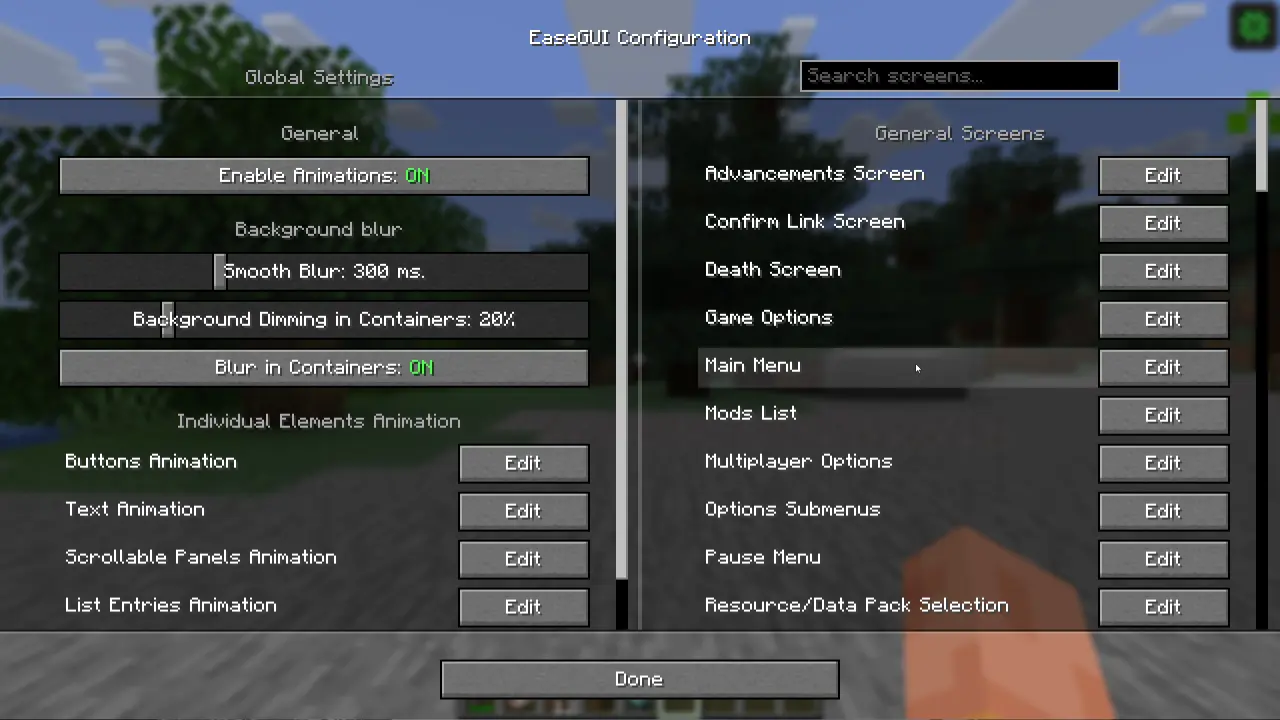
- Added a "Blur Duration" slider for easily fine-tuning smooth blur
- Added a "Background Dimming in Containers" slider (default value: 20%; vanilla value: 75%)
- Replaced wide individual screen settings buttons with new rows that are easier to navigate and feature a subtle hover animation
- Added a quick search bar for screens! Furthermore, the screen list now remembers and restores both your scroll position and search query when returning from sub-config menus
### Updated Data Storage Format
Schema version has been updated to 3. Key changes:
- All keys and their values are now written in `snake_case`
- Animation profile properties have been renamed for consistency:
- `offset` -> `initial_offset`
- `startScale` -> `initial_scale`
- `startAlpha` -> `initial_alpha`
> ⚠️ **Important note on config migration**
>
> Config files will migrate to the new schema version automatically upon launch, preserving your existing settings. However, **backward compatibility is not supported** (older mod versions cannot read the new schema). It is highly recommended to back up your config file if you plan to downgrade and wish to keep your custom settings.
### Improved Background Blur & Dimming
- Fixed missing smooth background animation in the Creative Inventory screen
- Fixed redundant background dim animations when switching to a screen (which was unlisted or disabled in the config) if the previous screen was already blurred and dimmed
- Background animation now applies to all in-game screens
### Added New Screen Animated by Default
- Open Link confirmation screen
### Other Fixes & Improvements
- The Creeper face is back on the letter 'A' in the logo! ~~*Don't ask where it went...*~~
beta
EaseGUI 0.6.0+1.21.1
0.6.0+1.21.111 авг. 2026 г.9,5 тыс.Minecraft: 1.21.1fabric
Что нового
# Version 0.6.0+1.21.1
**Major Quality-of-Life Update**
### Revamped Configuration Screen

- Added a "Blur Duration" slider for easily fine-tuning smooth blur
- Added a "Background Dimming in Containers" slider (default value: 20%; vanilla value: 75%)
- Replaced wide individual screen settings buttons with new rows that are easier to navigate and feature a subtle hover animation
- Added a quick search bar for screens! Furthermore, the screen list now remembers and restores both your scroll position and search query when returning from sub-config menus
### Updated Data Storage Format
Schema version has been updated to 3. Key changes:
- All keys and their values are now written in `snake_case`
- Animation profile properties have been renamed for consistency:
- `offset` -> `initial_offset`
- `startScale` -> `initial_scale`
- `startAlpha` -> `initial_alpha`
> ⚠️ **Important note on config migration**
>
> Config files will migrate to the new schema version automatically upon launch, preserving your existing settings. However, **backward compatibility is not supported** (older mod versions cannot read the new schema). It is highly recommended to back up your config file if you plan to downgrade and wish to keep your custom settings.
### Improved Background Blur & Dimming
- Fixed missing smooth background animation in the Creative Inventory screen
- Fixed redundant background dim animations when switching to a screen (which was unlisted or disabled in the config) if the previous screen was already blurred and dimmed
- Background animation now applies to all in-game screens
### Added New Screen Animated by Default
- Open Link confirmation screen
### Other Fixes & Improvements
- The Creeper face is back on the letter 'A' in the logo! ~~*Don't ask where it went...*~~
beta
EaseGUI 0.6.0+1.21.11
0.6.0+1.21.1110 авг. 2026 г.12Minecraft: 1.21.11neoforge
Что нового
# Version 0.6.0+1.21.11
**Major Quality-of-Life Update**
### Revamped Configuration Screen

- Added a "Blur Duration" slider for easily fine-tuning smooth blur
- Added a "Background Dimming in Containers" slider (default value: 20%; vanilla value: 75%)
- Replaced wide individual screen settings buttons with new rows that are easier to navigate and feature a subtle hover animation
- Added a quick search bar for screens! Furthermore, the screen list now remembers and restores both your scroll position and search query when returning from sub-config menus
### Updated Data Storage Format
Schema version has been updated to 3. Key changes:
- All keys and their values are now written in `snake_case`
- Animation profile properties have been renamed for consistency:
- `offset` -> `initial_offset`
- `startScale` -> `initial_scale`
- `startAlpha` -> `initial_alpha`
> ⚠️ **Important note on config migration**
>
> Config files will migrate to the new schema version automatically upon launch, preserving your existing settings. However, **backward compatibility is not supported** (older mod versions cannot read the new schema). It is highly recommended to back up your config file if you plan to downgrade and wish to keep your custom settings.
### Improved Background Blur & Dimming
- Fixed missing smooth background animation in the Creative Inventory screen
- Fixed redundant background dim animations when switching to a screen (which was unlisted or disabled in the config) if the previous screen was already blurred and dimmed
- Background animation now applies to all in-game screens
### Added New Screens Animated by Default
- Open Link confirmation screen
- Book signing screen
### Other Fixes & Improvements
- The Creeper face is back on the letter 'A' in the logo! ~~*Don't ask where it went...*~~
beta
EaseGUI 0.6.0+1.21.11
0.6.0+1.21.1110 авг. 2026 г.164Minecraft: 1.21.11fabric
Что нового
# Version 0.6.0+1.21.11
**Major Quality-of-Life Update**
### Revamped Configuration Screen

- Added a "Blur Duration" slider for easily fine-tuning smooth blur
- Added a "Background Dimming in Containers" slider (default value: 20%; vanilla value: 75%)
- Replaced wide individual screen settings buttons with new rows that are easier to navigate and feature a subtle hover animation
- Added a quick search bar for screens! Furthermore, the screen list now remembers and restores both your scroll position and search query when returning from sub-config menus
### Updated Data Storage Format
Schema version has been updated to 3. Key changes:
- All keys and their values are now written in `snake_case`
- Animation profile properties have been renamed for consistency:
- `offset` -> `initial_offset`
- `startScale` -> `initial_scale`
- `startAlpha` -> `initial_alpha`
> ⚠️ **Important note on config migration**
>
> Config files will migrate to the new schema version automatically upon launch, preserving your existing settings. However, **backward compatibility is not supported** (older mod versions cannot read the new schema). It is highly recommended to back up your config file if you plan to downgrade and wish to keep your custom settings.
### Improved Background Blur & Dimming
- Fixed missing smooth background animation in the Creative Inventory screen
- Fixed redundant background dim animations when switching to a screen (which was unlisted or disabled in the config) if the previous screen was already blurred and dimmed
- Background animation now applies to all in-game screens
### Added New Screens Animated by Default
- Open Link confirmation screen
- Book signing screen
### Other Fixes & Improvements
- The Creeper face is back on the letter 'A' in the logo! ~~*Don't ask where it went...*~~
beta
EaseGUI 0.6.0+26.2
0.6.0+26.29 авг. 2026 г.19Minecraft: 26.2neoforge
Что нового
# Version 0.6.0+26.2
**Major Quality-of-Life Update**
### Revamped Configuration Screen

- Added a "Blur Duration" slider for easily fine-tuning smooth blur
- Added a "Background Dimming in Containers" slider (default value: 20%; vanilla value: 75%)
- Replaced wide individual screen settings buttons with new rows that are easier to navigate and feature a subtle hover animation
- Added a quick search bar for screens! Furthermore, the screen list now remembers and restores both your scroll position and search query when returning from sub-config menus
### Updated Data Storage Format
Schema version has been updated to 3. Key changes:
- All keys and their values are now written in `snake_case`
- Animation profile properties have been renamed for consistency:
- `offset` -> `initial_offset`
- `startScale` -> `initial_scale`
- `startAlpha` -> `initial_alpha`
> ⚠️ **Important note on config migration**
>
> Config files will migrate to the new schema version automatically upon launch, preserving your existing settings. However, **backward compatibility is not supported** (older mod versions cannot read the new schema). It is highly recommended to back up your config file if you plan to downgrade and wish to keep your custom settings.
### Improved Background Blur & Dimming
- Fixed missing smooth background animation in the Creative Inventory screen
- Fixed redundant background dim animations when switching to a screen (which was unlisted or disabled in the config) if the previous screen was already blurred and dimmed
- Background animation now applies to all in-game screens
### Added New Screens Animated by Default
- World Options screen
- Open Link confirmation screen
- Book signing screen
### Other Fixes & Improvements
- Fixed redundant alpha modifications during animations, which previously caused some element textures (particularly buttons) to render with uneven opacity across different areas
- The Creeper face is back on the letter 'A' in the logo! ~~*Don't ask where it went...*~~
beta
EaseGUI 0.6.0+26.2
0.6.0+26.29 авг. 2026 г.265Minecraft: 26.2fabric
Что нового
# Version 0.6.0+26.2
**Major Quality-of-Life Update**
### Revamped Configuration Screen

- Added a "Blur Duration" slider for easily fine-tuning smooth blur
- Added a "Background Dimming in Containers" slider (default value: 20%; vanilla value: 75%)
- Replaced wide individual screen settings buttons with new rows that are easier to navigate and feature a subtle hover animation
- Added a quick search bar for screens! Furthermore, the screen list now remembers and restores both your scroll position and search query when returning from sub-config menus
### Updated Data Storage Format
Schema version has been updated to 3. Key changes:
- All keys and their values are now written in `snake_case`
- Animation profile properties have been renamed for consistency:
- `offset` -> `initial_offset`
- `startScale` -> `initial_scale`
- `startAlpha` -> `initial_alpha`
> ⚠️ **Important note on config migration**
>
> Config files will migrate to the new schema version automatically upon launch, preserving your existing settings. However, **backward compatibility is not supported** (older mod versions cannot read the new schema). It is highly recommended to back up your config file if you plan to downgrade and wish to keep your custom settings.
### Improved Background Blur & Dimming
- Fixed missing smooth background animation in the Creative Inventory screen
- Fixed redundant background dim animations when switching to a screen (which was unlisted or disabled in the config) if the previous screen was already blurred and dimmed
- Background animation now applies to all in-game screens
### Added New Screens Animated by Default
- World Options screen
- Open Link confirmation screen
- Book signing screen
### Other Fixes & Improvements
- Fixed redundant alpha modifications during animations, which previously caused some element textures (particularly buttons) to render with uneven opacity across different areas
- The Creeper face is back on the letter 'A' in the logo! ~~*Don't ask where it went...*~~
beta
EaseGUI 0.3.2+1.20.1
0.3.2+1.20.12 авг. 2026 г.141,6 тыс.Minecraft: 1.20.1forge
Что нового
# Beta 0.3.2+1.20.1
**Backport for version 1.20.1!**
### Features
- Implemented a custom smooth background blur effect (since the game itself only added blur in 1.21)
beta
EaseGUI 0.3.2+1.20.1
0.3.2+1.20.12 авг. 2026 г.1,1 тыс.Minecraft: 1.20.1fabric
Что нового
# Beta 0.3.2+1.20.1
**Backport for version 1.20.1!**
### Features
- Implemented a custom smooth background blur effect (since the game itself only added blur in 1.21)
beta
EaseGUI 0.4.3
0.4.31 авг. 2026 г.22Minecraft: 1.21.11neoforge
Что нового
# Version 0.4.3
### What's new
- Added the ability to disable all EaseGUI animations with a single button in the UI config
### Fixes & Improvements:
- Fixed an issue where container animation overrides couldn't be disabled in the config UI
- Fixed alpha flickering when using complex animation curves (EASE_OUT_ELASTIC, EASE_OUT_BACK)
- Improved scale animation handling for complex animation curves
- Fixed missing alpha animation for 3D GUI elements (player skins, armor stands, etc.)
- Fixed missing alpha animation for text widget backgrounds
beta
EaseGUI 0.4.3
0.4.31 авг. 2026 г.546Minecraft: 1.21.11fabric
Что нового
# Version 0.4.3
### What's new
- Added the ability to disable all EaseGUI animations with a single button in the UI config
### Fixes & Improvements:
- Fixed an issue where container animation overrides couldn't be disabled in the config UI
- Fixed alpha flickering when using complex animation curves (EASE_OUT_ELASTIC, EASE_OUT_BACK)
- Improved scale animation handling for complex animation curves
- Fixed missing alpha animation for 3D GUI elements (player skins, armor stands, etc.)
- Fixed missing alpha animation for text widget backgrounds
beta
EaseGUI 0.3.2
0.3.21 авг. 2026 г.821Minecraft: 1.21.1neoforge
Что нового
# Version 0.3.2
Technical update to align with new versions with minor improvements
### What's new
- Added the ability to disable all EaseGUI animations with a single button in the UI config
### Compatibility
- Implemented compatibility with the What Are They Up To (WATUT) mod
- Fixed incorrect rendering of the creative inventory with the EMI mod if the EMI overlay is disabled in its config
### UI Config Improvements
- The "Other Containers" button in the screen menu has been moved to the end of the category, regardless of the language setting
- Selecting any container screen from the list now immediately opens the animation profile editor for that container
- The button for overriding container animations for non-container screens has been removed as unnecessary
### Fixes
- Fixed alpha flickering when using complex animation curves (EASE_OUT_ELASTIC, EASE_OUT_BACK)
beta
EaseGUI 0.3.2
0.3.21 авг. 2026 г.223Minecraft: 1.21.1fabric
Что нового
# Version 0.3.2
Technical update to align with new versions with minor improvements
### What's new
- Added the ability to disable all EaseGUI animations with a single button in the UI config
### Compatibility
- Implemented compatibility with the What Are They Up To (WATUT) mod
- Fixed incorrect rendering of the creative inventory with the EMI mod if the EMI overlay is disabled in its config
### UI Config Improvements
- The "Other Containers" button in the screen menu has been moved to the end of the category, regardless of the language setting
- Selecting any container screen from the list now immediately opens the animation profile editor for that container
- The button for overriding container animations for non-container screens has been removed as unnecessary
### Fixes
- Fixed alpha flickering when using complex animation curves (EASE_OUT_ELASTIC, EASE_OUT_BACK)
beta
EaseGUI 0.5.0
0.5.028 июл. 2026 г.32Minecraft: 26.2neoforge
Что нового
# Beta 0.5.0
**Mod updated for Minecraft 26.2!**\
Verified to work with the experimental Vulkan API.
### Fixes & Improvements:
- Fixed an issue where container animation overrides couldn't be disabled in the config UI
- Fixed alpha flickering when using complex animation curves (EASE_OUT_ELASTIC, EASE_OUT_BACK)
- Improved scale animation handling for complex animation curves
- Fixed missing alpha animation for 3D GUI elements (player skins, armor stands, etc.)
- Fixed missing alpha animation for text widget backgrounds
beta
EaseGUI 0.5.0
0.5.028 июл. 2026 г.530Minecraft: 26.2fabric
Что нового
# Beta 0.5.0
**Mod updated for Minecraft 26.2!**\
Verified to work with the experimental Vulkan API.
### Fixes & Improvements:
- Fixed an issue where container animation overrides couldn't be disabled in the config UI
- Fixed alpha flickering when using complex animation curves (EASE_OUT_ELASTIC, EASE_OUT_BACK)
- Improved scale animation handling for complex animation curves
- Fixed missing alpha animation for 3D GUI elements (player skins, armor stands, etc.)
- Fixed missing alpha animation for text widget backgrounds
beta
EaseGUI 0.4.2
0.4.219 июл. 2026 г.28Minecraft: 1.21.11neoforge
Что нового
# Version 0.4.2
### UI Config Improvements
- The "Other Containers" button in the screen menu has been moved to the end of the category, regardless of the language setting.
- Selecting any container screen from the list now immediately opens the animation profile editor for that container.
- The button for overriding container animations for non-container screens has been removed as unnecessary.
### Compatibility
- Added compatibility with the Simple Menu mod. It is now possible to change the logo and edition textures using Simple Menu.
### Fixes
- Fixed a bug involving background blur in containers that broke UI element layering when switching to certain other screens (e.g., when opening the Ponder menu from the Create mod).
beta
EaseGUI 0.4.2
0.4.219 июл. 2026 г.539Minecraft: 1.21.11fabric
Что нового
# Version 0.4.2
### UI Config Improvements
- The "Other Containers" button in the screen menu has been moved to the end of the category, regardless of the language setting.
- Selecting any container screen from the list now immediately opens the animation profile editor for that container.
- The button for overriding container animations for non-container screens has been removed as unnecessary.
### Compatibility
- Added compatibility with the Simple Menu mod. It is now possible to change the logo and edition textures using Simple Menu.
### Fixes
- Fixed a bug involving background blur in containers that broke UI element layering when switching to certain other screens (e.g., when opening the Ponder menu from the Create mod).
beta
EaseGUI 0.3.1
0.3.119 июл. 2026 г.793Minecraft: 1.21.1neoforge
Что нового
# Version 0.3.1
### Compatibility
- Added compatibility with the Simple Menu mod. It is now possible to change the logo and edition textures using Simple Menu.
### Fixes
- Fixed a bug involving background blur in containers that broke UI element layering when switching to certain other screens (e.g., when opening the Ponder menu from the Create mod).
beta
EaseGUI 0.3.1
0.3.119 июл. 2026 г.247Minecraft: 1.21.1fabric
Что нового
# Version 0.3.1
### Compatibility
- Added compatibility with the Simple Menu mod. It is now possible to change the logo and edition textures using Simple Menu.
### Fixes
- Fixed a bug involving background blur in containers that broke UI element layering when switching to certain other screens (e.g., when opening the Ponder menu from the Create mod).
beta
EaseGUI 0.4.1
0.4.116 июл. 2026 г.16Minecraft: 1.21.11neoforge
Что нового
# Hotfix 0.4.1
### What's fixed:
- Clicking the "Reset" button when editing an animation profile now correctly reverts to the default profile specific to that element, rather than resetting to a empty global animation profile.
beta
EaseGUI 0.4.1
0.4.116 июл. 2026 г.117Minecraft: 1.21.11fabric
Что нового
# Hotfix 0.4.1
### What's fixed:
- Clicking the "Reset" button when editing an animation profile now correctly reverts to the default profile specific to that element, rather than resetting to a empty global animation profile.
beta
EaseGUI 0.4.0
0.4.014 июл. 2026 г.22Minecraft: 1.21.11neoforge
Что нового
# Beta 0.4.0
### Changes:
- Implemented full compatibility with the new deferred rendering pipeline for recent Minecraft versions.
- Updated and extracted a dedicated API package for developers. Other mod authors can now easily register their custom screens/GUI elements and assign default animation profiles to them.
beta
EaseGUI 0.4.0
0.4.014 июл. 2026 г.153Minecraft: 1.21.11fabric
Что нового
# Beta 0.4.0
### Changes:
- Implemented full compatibility with the new deferred rendering pipeline for recent Minecraft versions.
- Updated and extracted a dedicated API package for developers. Other mod authors can now easily register their custom screens/GUI elements and assign default animation profiles to them.
beta
EaseGUI 0.3.0
0.3.04 июл. 2026 г.1 тыс.Minecraft: 1.21.1neoforge
Что нового
# Beta 0.3.0
### What's New:
* **Container Screen Blur!** The mod now features smooth background blurring when opening containers (enabled by default). This behavior can be disabled in the config if needed. The blur intensity scales dynamically based on your vanilla Minecraft settings.
### Changes:
* Renamed "Background Dimming" settings back to **"Background Blur"**.
* **Splash Text Animation:** The main menu splash text now scales smoothly instead of moving by position.
* **Config File Schema Update (v1 -> v2):** Position and scale data structures have been reworked.
* `offsetY` and `offsetX` fields are now unified into `"offset": { "x": ..., "y": ... }`.
* `startScaleX` and `startScaleY` fields are now unified into `"startScale": { "x": ..., "y": ... }`.
> ⚠️ **Important note on config migration**
>
> Config files will migrate to the new schema version automatically upon launch, preserving your existing settings. However, **backward compatibility is not supported** (older mod versions cannot read the new schema and will reset modified values). It is highly recommended to back up your config file if you plan to downgrade and wish to keep your custom settings.
### Fixes & Improvements:
* Fixed a minor visual glitch where elements had a non-zero alpha at the very beginning of the transition, making them slightly visible instantly.
* Fixed incorrect transparency calculations for the main menu logo during its entry animation.
* Fixed background blur desync: the blur effect now fades in strict synchronization with the background dimming gradient.
* Fixed a bug where smooth transitions were skipped entirely when moving away from the `TitleScreen` (e.g., opening Options from the Main Menu).
* Under-the-hood adjustments to enhance overall performance, compatibility, and stability.
beta
EaseGUI 0.3.0
0.3.04 июл. 2026 г.14,1 тыс.Minecraft: 1.21.1fabric
Что нового
# Beta 0.3.0
### What's New:
* **Container Screen Blur!** The mod now features smooth background blurring when opening containers (enabled by default). This behavior can be disabled in the config if needed. The blur intensity scales dynamically based on your vanilla Minecraft settings.
### Changes:
* Renamed "Background Dimming" settings back to **"Background Blur"**.
* **Splash Text Animation:** The main menu splash text now scales smoothly instead of moving by position.
* **Config File Schema Update (v1 -> v2):** Position and scale data structures have been reworked.
* `offsetY` and `offsetX` fields are now unified into `"offset": { "x": ..., "y": ... }`.
* `startScaleX` and `startScaleY` fields are now unified into `"startScale": { "x": ..., "y": ... }`.
> ⚠️ **Important note on config migration**
>
> Config files will migrate to the new schema version automatically upon launch, preserving your existing settings. However, **backward compatibility is not supported** (older mod versions cannot read the new schema and will reset modified values). It is highly recommended to back up your config file if you plan to downgrade and wish to keep your custom settings.
### Fixes & Improvements:
* Fixed a minor visual glitch where elements had a non-zero alpha at the very beginning of the transition, making them slightly visible instantly.
* Fixed incorrect transparency calculations for the main menu logo during its entry animation.
* Fixed background blur desync: the blur effect now fades in strict synchronization with the background dimming gradient.
* Fixed a bug where smooth transitions were skipped entirely when moving away from the `TitleScreen` (e.g., opening Options from the Main Menu).
* Under-the-hood adjustments to enhance overall performance, compatibility, and stability.
beta
EaseGUI 0.2.0
0.2.02 июл. 2026 г.109Minecraft: 1.21.1neoforge
Что нового
# Beta 0.2.0
### What's New:
* **Complete Animation System Overhaul:** Fixed numerous bugs, improved overall stability, and significantly enhanced compatibility with other mods.
* **EMI Compatibility:** Added full integration and compatibility support for the EMI mod.
* **Profile Reset Button:** Added a "Reset" button to the animation profile editor, allowing you to instantly revert a selected element's parameters to their default values.
* **Horizontal Cascade Directions:** Added "Left to Right" and "Right to Left" cascade directions to animation profiles. The "Left to Right" profile is now selected by default for the logo animation.
* **Expanded Screen Support:** Added configuration support for more screens, including the Enchantment Table, basic containers (Chests, Barrels, etc.), the Open to LAN screen, and more.
### Changes:
* **Other Screens Optimization:** The "Other Screens" category is no longer animated by default. Forcing animations on all screens—especially custom screens from other mods—proved to be problematic. The mod now focuses primarily on animating core vanilla screens.
* **Chat Screen Adjustments:** The Chat Screen has been removed from the individual screen list (it is now part of the "Other Screens" category) and is no longer animated by default. Its previous animation felt out of place; it may return in a redesigned format in the future.
### Fixes:
* **Precise Alpha Rendering:** The mod now handles GUI transparency more granularly, drastically reducing rendering issues and mod conflicts.
* **Container Animations:** Fixed container transitions to properly cover all rendering layers.
* **Anvil UI Texture:** Fixed the Anvil interface texture by removing the red rectangle behind the text field that became visible during animations.
* **Enchantment Table UI Texture:** Adjusted the Enchantment Table interface texture for a smoother alpha-blending animation.
* **Scissor-Based Screens:** Fixed the Advancements window (and other screens utilizing `OpenGL Scissor`) to ensure backgrounds animate correctly across all animation profiles.
* **Window Resizing:** Screen animations no longer restart unexpectedly when changing the game's window size.
* **Container Widgets:** Inner widgets inside containers no longer animate independently (they now transform strictly alongside the container itself).
* **Screen Transition Timings:** Fixed missing animations during specific screen transitions (e.g., returning from any Options Subscreen back to the main Options Screen).
* **GUI Scale Independence:** Fixed element animation start timings so they no longer vary depending on the current GUI scale.
* **EaseGUI Config Clean-up:** Fixed a bug causing double background rendering in EaseGUI configuration screens.
beta
EaseGUI 0.2.0
0.2.02 июл. 2026 г.50Minecraft: 1.21.1fabric
Что нового
# Beta 0.2.0
### What's New:
* **Complete Animation System Overhaul:** Fixed numerous bugs, improved overall stability, and significantly enhanced compatibility with other mods.
* **EMI Compatibility:** Added full integration and compatibility support for the EMI mod.
* **Profile Reset Button:** Added a "Reset" button to the animation profile editor, allowing you to instantly revert a selected element's parameters to their default values.
* **Horizontal Cascade Directions:** Added "Left to Right" and "Right to Left" cascade directions to animation profiles. The "Left to Right" profile is now selected by default for the logo animation.
* **Expanded Screen Support:** Added configuration support for more screens, including the Enchantment Table, basic containers (Chests, Barrels, etc.), the Open to LAN screen, and more.
### Changes:
* **Other Screens Optimization:** The "Other Screens" category is no longer animated by default. Forcing animations on all screens—especially custom screens from other mods—proved to be problematic. The mod now focuses primarily on animating core vanilla screens.
* **Chat Screen Adjustments:** The Chat Screen has been removed from the individual screen list (it is now part of the "Other Screens" category) and is no longer animated by default. Its previous animation felt out of place; it may return in a redesigned format in the future.
### Fixes:
* **Precise Alpha Rendering:** The mod now handles GUI transparency more granularly, drastically reducing rendering issues and mod conflicts.
* **Container Animations:** Fixed container transitions to properly cover all rendering layers.
* **Anvil UI Texture:** Fixed the Anvil interface texture by removing the red rectangle behind the text field that became visible during animations.
* **Enchantment Table UI Texture:** Adjusted the Enchantment Table interface texture for a smoother alpha-blending animation.
* **Scissor-Based Screens:** Fixed the Advancements window (and other screens utilizing `OpenGL Scissor`) to ensure backgrounds animate correctly across all animation profiles.
* **Window Resizing:** Screen animations no longer restart unexpectedly when changing the game's window size.
* **Container Widgets:** Inner widgets inside containers no longer animate independently (they now transform strictly alongside the container itself).
* **Screen Transition Timings:** Fixed missing animations during specific screen transitions (e.g., returning from any Options Subscreen back to the main Options Screen).
* **GUI Scale Independence:** Fixed element animation start timings so they no longer vary depending on the current GUI scale.
* **EaseGUI Config Clean-up:** Fixed a bug causing double background rendering in EaseGUI configuration screens.
beta
EaseGUI 0.1.0
0.1.021 июн. 2026 г.441Minecraft: 1.21.1neoforge
Что нового
## Initial Beta 0.1.0 Release!
- Introduced smooth, dynamic entry animations for Minecraft screens and interfaces (Main menu, containers, buttons, lists, and labels).
- Added extensive in-game customization options (duration, easing curves, offsets, cascade delays, and more).
beta
EaseGUI 0.1.0
0.1.021 июн. 2026 г.216Minecraft: 1.21.1fabric
Что нового
## Initial Beta 0.1.0 Release!
- Introduced smooth, dynamic entry animations for Minecraft screens and interfaces (Main menu, containers, buttons, lists, and labels).
- Added extensive in-game customization options (duration, easing curves, offsets, cascade delays, and more).