COWMODSКаталог модов

DynamicSkins

Server-synchronized custom player skins with high-resolution 64-4096px + open/close mouth.

Автор: PPekKunGz3,2 тыс.6обновлён 18 окт. 2026 г.
ДекорОбщениеУтилиты

Описание

DynamicSkins logo

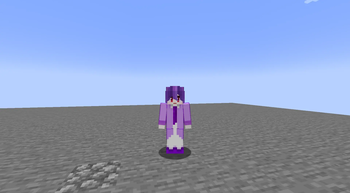
Custom player skins with normal and talking textures.
NeoForge 1.21.1 · Forge 1.20.1 · Fabric 1.20.1-1.21.1

DynamicSkins lets you change your Minecraft skin in-game and sync it with other players on your server. It supports high-resolution PNGs and optional talking textures through Plasmo Voice. No resource pack or external skin service is required.

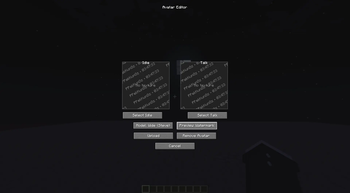
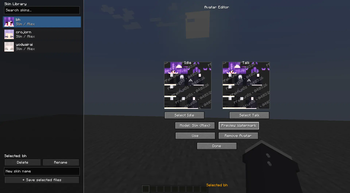
DynamicSkins Avatar Editor interface

Features

Normal & Talking skins
Switch textures while speaking with Plasmo Voice.
In-game editor
Import PNGs, preview textures, and choose Slim or Wide arms.
Skin library
Save, search, rename, and switch your saved skins.
Server synchronization
Share your custom skin with other players using the mod.

Textures: Minecraft skin-layout PNGs, up to 4096 × 4096 and 2 MB per file.

Setup

  1. Install the matching DynamicSkins build on your client and server. For singleplayer, install it in your game instance.
  2. Open the Avatar Editor with the configured keybind.
  3. Drop in your Normal and Talking PNGs, choose your arm model, and apply your skin.

Install Plasmo Voice on both sides for talking textures. Normal skins work without it.

Compatibility & texture sizes
MinecraftLoaderJava
1.21.1NeoForge21
1.21.1Fabric + Fabric API21
1.20.1Forge17
1.20.1Fabric + Fabric API17

Choose the file for your Minecraft version and loader. Check the release's dependencies before installing.

Supported square PNG sizes: 64, 128, 256, 512, 1024, 2048, and 4096 pixels per side. Each texture must be 2 MB or smaller.

Where are skins stored?

Uploaded skins are stored locally by your Minecraft server. Other players' skins stay in memory for the current connection and are cleared when you disconnect.

Skins you save yourself remain in your game instance's dynamicskins/library/ folder. Downloaded skins are not saved to your library or a disk cache.

Галерея
SuccessStreamer modev1.1.5 Upload SystemICON

Последние версии

Все версии →
release

DynamicSkins 1.3.8

1.3.8-1024px
18 окт. 2026 г.632Minecraft: 1.20.1forge
Скачать
Что нового
# DynamicSkins 1.3.8 — Forge ## Fixed - Fixed a brief ping spike for some nearby players right after someone changed skin. The fast lane for nearby players (about 480 KB/s) could send faster than a viewer's connection could carry, and the queued skin data delayed that viewer's keep-alives (measured on the live server: 26 ms → 370 ms for about 1 s). The fast lane checked only the keep-alive ping, which updates every 15 seconds and cannot see a queue that builds within a second. - The server now reads each player's live TCP round-trip time and compares it with the lowest seen on that connection. The fast lane is used only while that connection shows no queue (40 ms or less above normal). - When a player's connection is already queued by more than 150 ms (for example while loading chunks), the server stops sending skin data to that player until it drains, for up to 1 second, then continues at the normal rate (about 160 KB/s). - Players with clear connections still get skins as fast as in 1.3.7. The uploader is not affected (the measurements showed no ping change for uploaders). - Works on Linux servers using the native (epoll) network transport, the default. On other servers delivery behaves as in 1.3.7. ## Compatibility - Server-side change only; network protocol unchanged (version 2). 1.3.2 and newer clients can connect.
release

DynamicSkins 1.3.7

1.3.7-1024px
18 окт. 2026 г.116Minecraft: 1.20.1forge
Скачать
Что нового
# DynamicSkins 1.3.7 — Forge (changes since 1.3.4) ## Faster skin changes - Uploads go up at about 640 KB/s (was about 240 KB/s), so a typical 130 KB skin reaches the server in about 0.2 s. Still paced, so the uploader's own ping stays steady. - Priority lane: players within 32 blocks of the uploader receive the new skin at about 480 KB/s (was about 160 KB/s), so a typical skin appears for them in about 0.3 s after the server accepts it. It applies only when the viewer's ping is 150 ms or lower and the skin is 512 KiB or smaller; everyone else stays at about 160 KB/s so slow connections are not flooded. - Server-wide limit of about 4 MB/s for all skin traffic together. When it is reached, the closest viewers are served first. - Each player's queue holds at most 64 pending skins. Beyond that, the farthest one that has not started sending is dropped and sent again when that player next comes into range. A skin that has not started sending is also dropped when its owner leaves the viewer's tracking range. - Your own skin is still applied only after the server accepts it. ## Added - Upload toast on the uploader's own screen: one toast, updated in place, from "Uploading skin…" to "Waiting for server…" to the server's result ("✓ Skin applied" or "✗" with the reason). A progress bar appears only for skins larger than 320 KB. It works with the editor closed, other players never see it, and no toast appears when other players' skins arrive. - The toast widens to fit its message (up to 300 px), so reasons such as "Please wait before uploading again" are no longer cut off. Anything longer ends with "…". - An upload with no server answer within 30 seconds now shows "No response from server" instead of waiting silently. - New config file `config/dynamicskins-common.toml` with two debug options, both off by default and applied without a restart: - `debug.f3Overlay`: DynamicSkins lines on the F3 screen (upload state and progress, last result, skins being received, loaded textures, GPU queue). - `debug.logging`: one log line per upload or delivery event, never per chunk (upload start, receive, validation and save time, every result sent, delivery to nearby players, per-player delivery time and lane, dropped transfers; on the client: upload timing, skins received, textures uploaded). ## Compatibility - Network protocol unchanged (version 2); 1.3.2 and newer clients and servers can connect to each other.
release

DynamicSkins 1.3.4

1.3.4-1024px
18 окт. 2026 г.455Minecraft: 1.20.1forge
Скачать
Что нового
# DynamicSkins 1.3.4 — Forge ## Fixed - Fixed uploads getting stuck on "Another upload is already in progress" (reported on 1.3.2). Starting a new upload cleared the previous upload's unsent chunks while the server still held its session, so the server refused every retry until that session sat idle for 30 seconds. - The server now replaces a player's unfinished upload when a new one starts at its first chunk, and drops leftover chunks of the abandoned upload silently. This also fixes 1.3.2 clients. - The client's "upload in progress" guard moved from the editor screen into the avatar manager, so closing and reopening the editor no longer lets a second upload abandon the first. - The client ignores upload results for older uploads, and a reopened editor shows the result of an upload already in flight. Also includes everything from 1.3.3 below. # DynamicSkins 1.3.3 — Forge ## Performance - Upload completion no longer stalls the server tick: PNG validation, the file write and the metadata read run on a dedicated storage thread, and the result is applied back on the server thread. - Online players' skins are kept in memory, so delivering skins to players who come into range (including late joiners) no longer reads files on the server thread. Each player's stored skin is loaded once, off-thread, when they join. - Skin packets are built once per skin version and shared by every recipient, instead of re-splitting and copying the PNGs per recipient. Packets are also written straight into Forge's network buffer. - Skin delivery uses smaller chunks (about 8 KB for typical skins, up from 28 KB) at about 160 KB/s per player, and the closest players' skins are sent first. - PNG validation decodes from memory instead of letting ImageIO buffer through temp files on disk. - Saving a skin on the server renames the previous files aside instead of copying them, while keeping the same rollback on failure. - The skin library loads on a background thread once per editor session instead of on the render thread at every open and window resize. Rename, delete and import update the list in place. - Importing a skin into the library no longer decodes it twice, and rename no longer re-reads and re-decodes it. - Library thumbnails are small face-only images (at most 32x32, with the hat layer) instead of full-size skin textures. - Avatar, preview and thumbnail textures free their CPU pixel copy after upload, which halves memory per skin. - GPU uploads of received skins are budgeted by pixel count, so many small skins can appear in the same tick. - The preview widget uploads each image once instead of twice. - The editor watermark is drawn in one batch and skips copies that are fully clipped. ## Fixed - The local talking state no longer flickers: Plasmo Voice activation and the loudness filter are combined in one place instead of overwriting each other. - Decoded skin images still waiting for GPU upload are now freed on disconnect. - Server-wide limit of 64 MB for uploads in progress, and expired upload sessions are cleaned up every tick. ## Compatibility - Network protocol stays at version 2; 1.3.2 and 1.3.3 clients and servers can connect to each other.
release

DynamicSkins 1.3.2

1.3.2-1024px
18 окт. 2026 г.128Minecraft: 1.20.1forge
Скачать
Что нового
# DynamicSkins 1.3.2 — Forge ## Fixed - Fixed 300-3000 ms ping spikes after a skin upload. The server now paces avatar transfers per player (about 240 KB/s) instead of writing the whole skin to every nearby player in one tick, so keep-alives and game packets are no longer stuck behind it. - The client paces its own upload chunks the same way, so uploading no longer saturates the uploader's connection. - The server no longer sends a freshly uploaded skin back to the player who uploaded it; the client applies its own textures locally once the server confirms the upload. - A newer skin version replaces any older transfer still queued for a player, and queued transfers are dropped when the skin is deleted or its owner leaves. ## Changed - Raised the upload cooldown from 1.5 to 10 seconds. - Network protocol version is now 2. Clients and servers must both run 1.3.2 or newer to connect.
beta

DynamicSkins 1.3.1

1.3.1-1024px
18 окт. 2026 г.178Minecraft: 1.20.1forge
Скачать
Что нового
# DynamicSkins 1.3.1 — Forge ## Fixed - Released superseded avatar textures (GPU texture and NativeImage) when a player uploads a new skin or leaves, instead of keeping every version until disconnect. - Removed full ImageIO decodes from the client thread when receiving avatars; the client checks PNG headers and the texture decoder thread performs the only full decode. - Prevented an older in-flight decode from overriding a newer avatar. - Stopped orphaned server upload sessions: a session can only start at the first chunk, so a rejected transaction can no longer block uploads for 30 seconds. - Dropped the remaining chunks of a rejected upload quietly instead of logging and replying once per chunk. - Disabled the upload button while an upload is waiting for its result, so repeated clicks no longer resend the full skin. - "Save & Use Skin" no longer reloads and re-decodes the entire local library on the render thread before uploading.
release

DynamicSkins 1.3.4

1.3.4
17 окт. 2026 г.38Minecraft: 1.21, 1.21.1fabric
Скачать
Что нового
# DynamicSkins 1.3.4 — Fabric 1.21–1.21.1 ## Changes - Ported the Fabric version to support Minecraft 1.21 and 1.21.1 with Fabric API 0.102.0 and Fabric Loader 0.19.5. - Migrated avatar synchronization to Minecraft's typed custom payload networking API. - Updated custom skin rendering for player models, the player list, and player skulls. - Reused identical avatar textures by hash to reduce repeat PNG decoding and GPU uploads. - Prevented unchanged avatar data from being resent when players reconnect or start tracking each other. - Applied upload cooldowns per upload session and improved avatar removal synchronization. - Improved Plasmo Voice activation detection so talking skins respond to push-to-talk and voice activation. ## Fixes - Fixed the Avatar Editor background being drawn over its panels and text. - Kept the responsive editor, skin library, PNG validation, large-texture handling, and slim/wide model selection. ## Requirements - Minecraft: `1.21–1.21.1` - Fabric Loader: `0.19.5` - Fabric API: `0.102.0+1.21` for Minecraft `1.21`, or `0.102.1+1.21.1` for Minecraft `1.21.1` - Java: `21` - Plasmo Voice is optional; > it is needed for talking-skin voice detection.
release

DynamicSkins 1.3.4

1.3.4
12 окт. 2026 г.128Minecraft: 1.21, 1.21.1neoforge
Скачать
Что нового
# DynamicSkins 1.3.4 — NeoForge 1.21–1.21.1 ## NeoForge Port - Ported DynamicSkins from Fabric 1.20.1 to NeoForge 1.21–1.21.1. - Updated networking, lifecycle events, keybindings and skin rendering for Minecraft 1.21–1.21.1. - Retained separate Normal and Talking textures, slim/wide arms, high-resolution PNG support and optional Plasmo Voice integration. - Retained the responsive Avatar Editor, texture previews, watermark and local skin library with search, rename, delete and save/use actions. ## Skin Synchronization - Uploaded skins are stored by the server and synchronized to the owner and players tracking them. - Unchanged skin versions are not resent when a player re-enters tracking range. - Downloaded player skins stay in memory and are cleared on disconnect. - The local skin library remains in the active instance's `dynamicskins/library/` directory. - Background PNG decoding and shared texture reuse are retained. ## Fixes - Expanded compatibility to Minecraft 1.21–1.21.1 and NeoForge 21.0.167 / 21.1.x, including 21.1.218. - Removed the unnecessary NeoForge 21.1.259 minimum requirement. - Fixed the Avatar Editor background being rendered twice, which blurred panels, labels and library thumbnails. - Updated PNG drag-and-drop handling and texture cleanup when closing or resizing the editor. - Updated player, first-person, TAB and player-head skin overrides for Minecraft 1.21–1.21.1. - Fixed missing launch argument files when running the development client from IntelliJ after a clean build. ## Requirements - Minecraft 1.21–1.21.1 - NeoForge 21.0.167 for Minecraft 1.21, or 21.1.x for Minecraft 1.21.1 - Java 21 - Install DynamicSkins on both the client and server for synchronized skins. - Plasmo Voice for NeoForge 1.21–1.21.1 is optional and required only for voice-based Talking textures.
release

DynamicSkins 1.3.3

1.3.3
12 окт. 2026 г.18Minecraft: 1.21.1neoforge
Скачать
Что нового
# DynamicSkins 1.3.3 — NeoForge 1.21.1 ## NeoForge Port - Ported DynamicSkins from Fabric 1.20.1 to NeoForge 1.21.1. - Updated networking, lifecycle events, keybindings and skin rendering for Minecraft 1.21.1. - Retained separate Normal and Talking textures, slim/wide arms, high-resolution PNG support and optional Plasmo Voice integration. - Retained the responsive Avatar Editor, texture previews, watermark and local skin library with search, rename, delete and save/use actions. ## Skin Synchronization - Uploaded skins are stored by the server and synchronized to the owner and players tracking them. - Unchanged skin versions are not resent when a player re-enters tracking range. - Downloaded player skins stay in memory and are cleared on disconnect. - The local skin library remains in the active instance's `dynamicskins/library/` directory. - Background PNG decoding and shared texture reuse are retained. ## Fixes - Fixed the Avatar Editor background being rendered twice, which blurred panels, labels and library thumbnails. - Updated PNG drag-and-drop handling and texture cleanup when closing or resizing the editor. - Updated player, first-person, TAB and player-head skin overrides for Minecraft 1.21.1. - Fixed missing launch argument files when running the development client from IntelliJ after a clean build. ## Requirements - Minecraft 1.21.1 - NeoForge 21.1.259 or newer in the 21.1 series - Java 21 - Install DynamicSkins on both the client and server for synchronized skins. - Plasmo Voice for NeoForge 1.21.1 is optional and required only for voice-based Talking textures.
release

DynamicSkins 1.3.3

1.3.3
9 окт. 2026 г.257Minecraft: 1.20.1fabric
Скачать
Что нового
# DynamicSkins 1.3.3 ## Ported fixes - Ported Forge's duplicate avatar-transfer suppression to Fabric while preserving the existing Fabric packet protocol. - Added per-player delivered-version tracking on the Fabric server to avoid resending unchanged avatar data after tracking updates or reconnects. - Avatar removal now clears server delivery state and notifies all connected Fabric clients. - Upload cooldowns now apply when a new upload session starts, so chunks from an active valid upload are not rejected mid-transfer. - Added shared hash-based texture reuse on the Fabric client to avoid decoding and registering identical Normal/Talking textures repeatedly. - Preserved Fabric's bounded background PNG decode pipeline and stale-result protection while adding hash-based GPU texture reuse. - Added local-player activation-state detection to the Fabric Plasmo Voice integration so the speaking skin updates for push-to-talk and voice activation. ## Compatibility - Minecraft 1.20.1 and the existing Fabric packet payloads remain unchanged. - Existing responsive Editor, 2D preview, watermark, library, fallback rendering, and large-PNG crash fix are retained.
release

DynamicSkins 1.2.9

1.2.9-1024px
2 окт. 2026 г.457Minecraft: 1.20.1forge
Скачать
Что нового
# DynamicSkins 1.2.9 — Forge ## Fixed - Moved PNG decoding off the Minecraft client thread onto dedicated background workers. - Added in-flight deduplication so identical texture hashes are decoded and uploaded only once. - Spread GPU texture registration across client ticks instead of uploading every newly tracked player's textures in one frame. - Kept hash-based GPU textures cached when players leave and re-enter tracking range. - Prevented stale background decode work from restoring textures after disconnecting. ## Changed - Limited GPU registration to one avatar texture per client tick to reduce tracking-range frame spikes. - Continued using local memory and the existing server storage; no Redis or external cache service is required.