

Duplication
A simple datapack that adds a useful way to duplicate blocks in Minecraft.
Автор: cobl7035451обновлён 14 дек. 2025 г.
ЭкономикаМеханики игрыТранспорт
Описание
Usage
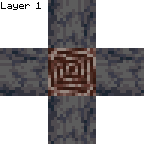
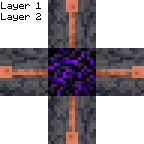
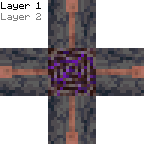
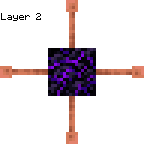
This datapack allows you to duplicate items. To duplicate items, first build a structure with 1 ancient debris, 4 basalt, 1 crying obsidian and 4 lightning rods:

Next, light the top of the crying obsidian with a flint and steel enchanted with summoning. The flint and steel will break instantly. This will create a duplicator. To use the duplicator, place the block you want to duplicate 2 blocks underneath it, then place basalt under the duplicator. It will duplicate the block.
Installation
Datapack
On Create World
- Click the More tab
- Click Data Packs
- Click Open Pack Folder
- Paste in the downloaded datapack
- Move the datapack to Selected
- Click Done
Add to existing world
- Select the world
- Click Edit
- Click Open World Folder
- Open the
datapacksfolder - Paste in the downloaded datapack
Required Resource Pack
Singleplayer
- Open the resource pack list
- Click Open Pack Folder
- Paste in the downloaded resource pack
- Move the resource pack to Selected
Server
- Add the downloaded resource pack as a server resource pack
- Make server resource packs required
Compatibility
This datapack is not currently intentionally compatible with other datapacks or mods.
However, it should be compatible with most mods or datapacks that don't change how flint and steel works.
Галерея
Последние версии
Все версии →release
Datapack 1.4.0
1.4.014 дек. 2025 г.262Minecraft: 1.21.11datapack
Что нового
e
release
Datapack 1.3.0
1.3.08 окт. 2025 г.68Minecraft: 1.21.9, 1.21.10datapack
Что нового
Updat3
release
Datapack 1.2.0
1.2.04 июл. 2025 г.61Minecraft: 1.21.7, 1.21.8datapack
Что нового
Update
release
Datapack 1.1.1
1.1.122 июн. 2025 г.43Minecraft: 1.21.6datapack
Что нового
Add better credit
release
Datapack 1.1.0
1.1.019 июн. 2025 г.25Minecraft: 1.21.6datapack
Что нового
Updated
release
Datapack 1.0.0
1.0.028 мая 2025 г.86Minecraft: 1.21.5datapack
Что нового
Create project