COWMODSКаталог модов

Drone Logistics

Automate item hauling with flying drones. Place terminals, link a storage and a drone, then order items from another storage; the drone flies over, grabs the cargo and delivers it with a live map and ETA.

Автор: aKyBeFf7454обновлён 3 авг. 2026 г.
УправлениеХранениеТехнологии

Описание

Drone Logistics

Automated item delivery between your storages using flying delivery drones. Built for Minecraft Forge 1.20.1.

Overview

Drone Logistics turns hauling resources between bases into an automated task. Instead of running chests back and forth, you build a network of terminals, attach storages and a drone to them, and order the items you need. A drone then flies to the other storage, picks up the cargo and brings it back to you.

Core parts

  • Logistics Terminal. A control block where you browse your storages, place orders and collect deliveries.
  • Linking Tool. Used to select a storage area (any chests and containers inside it) and to attach the storage and the drone to a terminal.
  • Delivery Drone. A flying entity that physically travels from your terminal to the target storage and back.

How to play

  1. Craft and place terminals where you need them.
  2. With the Linking Tool, middle-click two blocks to mark the storage area, then Shift plus right-click a terminal to create and attach the storage.
  3. Right-click a drone with the Linking Tool to select it, then right-click your terminal to attach the drone.
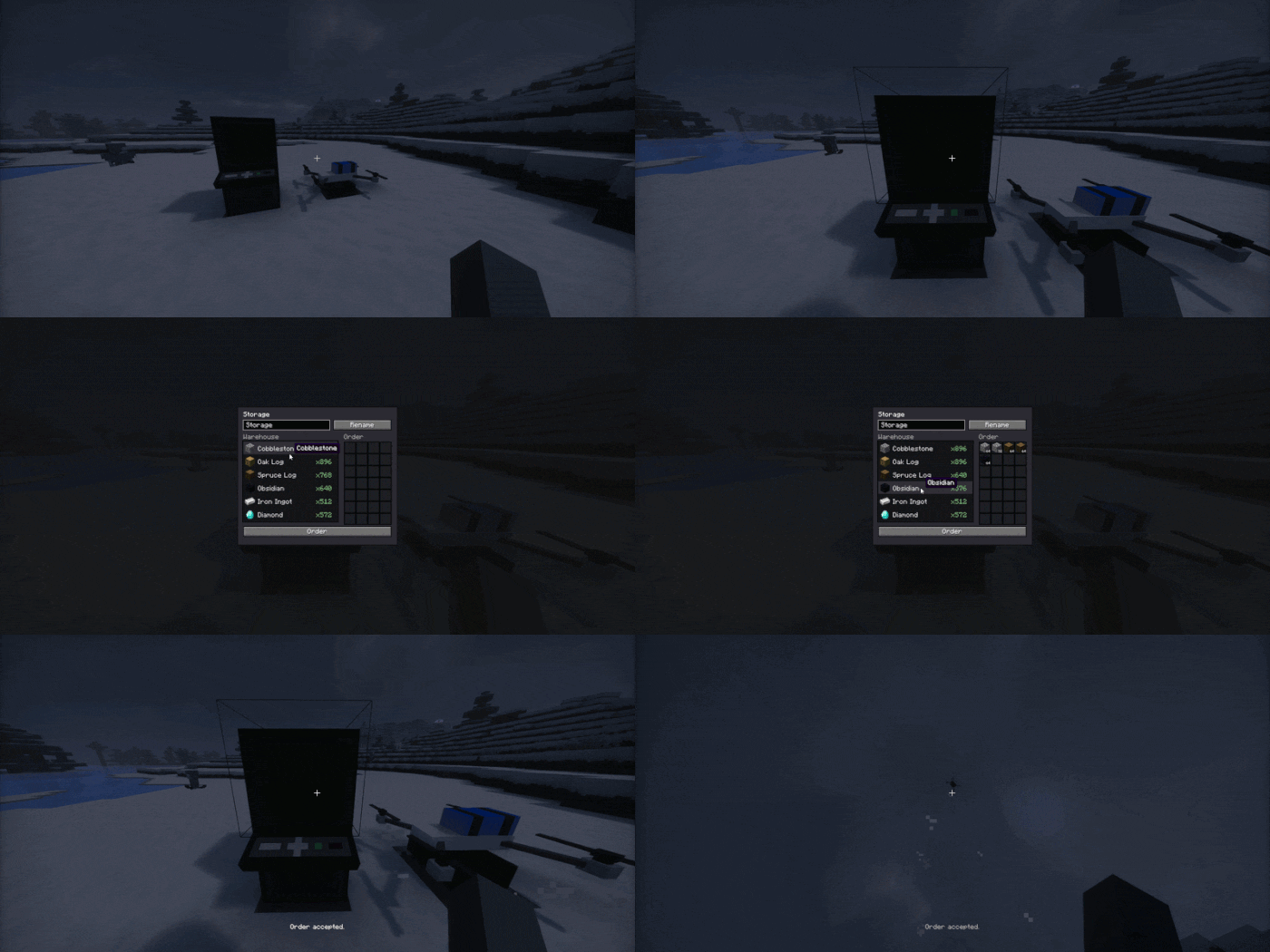
  4. Open the terminal, pick another of your storages, add the items you want to the order and press Order.
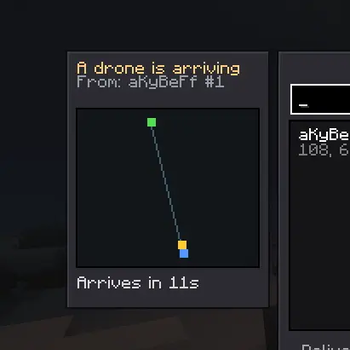
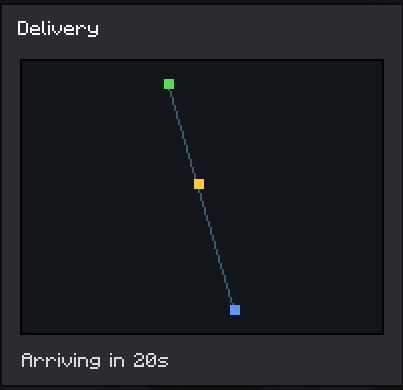
  5. The drone flies out, collects the cargo and brings it to your terminal buffer. You can watch the route and the arrival time on the map, and the receiving storage shows an incoming drone panel. Guide for order
Anti dupe and reservation

When you place an order, the items are immediately taken out of the target storage and held by the order, so they cannot be stolen while the drone is in transit. A terminal that has an active delivery cannot be broken until the delivery finishes.

Crafting

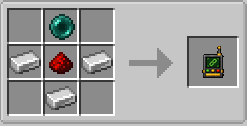
Logistics Terminal:
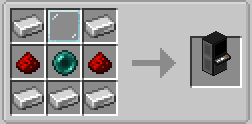
Craft Terminal

Linking Tool:

Craft link tool

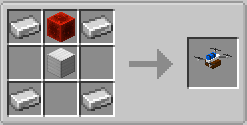
Delivery Drone:

Craft Drone

Languages

English and Russian are included.

Галерея
Последние версии

Все версии →
release

Drone Logistics 1.0.0

1.0.0
3 авг. 2026 г.88Minecraft: 1.21.4neoforge
Скачать
Что нового
## [1.0.0] ### Multi-drone support - A terminal can now bind up to 4 drones with the linking tool. - When 2 or more drones are bound, a drone panel appears on the right side of the terminal screen. - Single-click a drone in the panel to choose which drone handles the next delivery. - Double-click a drone to rename it directly in the terminal. Drone names are saved with the terminal. - Dispatch picks the selected drone first, or any free drone if the selected one is busy. - Opening a terminal with no bound drone shows a "Bind a drone first" screen instead of the terminal list. ### Parallel deliveries and live tracking - Ordering no longer takes over the whole terminal. The terminal list stays fully usable while deliveries are in flight. - You can dispatch a second free drone while the first one is still delivering. When every drone is busy, opening a warehouse reports that no drone is available. - The left side of the terminal screen now shows a stacked mini-map card for every drone currently flying for this terminal. - Each card shows the drone name, a mini-map with the terminal, the warehouse and the live drone position, plus a direction and ETA readout ("To warehouse" while heading out, "Returning" while carrying cargo). - Orders now remember which drone is carrying them, persisted to disk. ### Delivery flight and economy - Drone speed now depends on cargo. A drone flies fast when empty on the way out and slower on the way back, scaled by how many stacks it carries. - Added a cooldown after a delivery before a drone becomes available again. ### Terminal interaction - Renaming a terminal is now done directly on that terminal instead of through another one. - Taking half a stack from the delivery buffer is now done with a middle-click instead of the scroll wheel. ### Rendering and map - New terminal block model with two textures: an idle texture and an "On" texture shown while the terminal screen is open. - Map icons replace the plain colored squares on the delivery tracking screen. - Added a persistent Xaero-style minimap: explored chunks stay visible permanently.
release

Drone Logistics 1.0.0

1.0.0
3 авг. 2026 г.201Minecraft: 1.21.1neoforge
Скачать
Что нового
## [1.0.0] ### Multi-drone support - A terminal can now bind up to 4 drones with the linking tool. - When 2 or more drones are bound, a drone panel appears on the right side of the terminal screen. - Single-click a drone in the panel to choose which drone handles the next delivery. - Double-click a drone to rename it directly in the terminal. Drone names are saved with the terminal. - Dispatch picks the selected drone first, or any free drone if the selected one is busy. - Opening a terminal with no bound drone shows a "Bind a drone first" screen instead of the terminal list. ### Parallel deliveries and live tracking - Ordering no longer takes over the whole terminal. The terminal list stays fully usable while deliveries are in flight. - You can dispatch a second free drone while the first one is still delivering. When every drone is busy, opening a warehouse reports that no drone is available. - The left side of the terminal screen now shows a stacked mini-map card for every drone currently flying for this terminal. - Each card shows the drone name, a mini-map with the terminal, the warehouse and the live drone position, plus a direction and ETA readout ("To warehouse" while heading out, "Returning" while carrying cargo). - Orders now remember which drone is carrying them, persisted to disk. ### Delivery flight and economy - Drone speed now depends on cargo. A drone flies fast when empty on the way out and slower on the way back, scaled by how many stacks it carries. - Added a cooldown after a delivery before a drone becomes available again. ### Terminal interaction - Renaming a terminal is now done directly on that terminal instead of through another one. - Taking half a stack from the delivery buffer is now done with a middle-click instead of the scroll wheel. ### Rendering and map - New terminal block model with two textures: an idle texture and an "On" texture shown while the terminal screen is open. - Map icons replace the plain colored squares on the delivery tracking screen. - Added a persistent Xaero-style minimap: explored chunks stay visible permanently.
release

Drone Logistics 1.0.0

1.0.0
3 авг. 2026 г.267Minecraft: 1.20.1forge
Скачать
Что нового
## [1.0.0] ### Multi-drone support - A terminal can now bind up to 4 drones with the linking tool. - When 2 or more drones are bound, a drone panel appears on the right side of the terminal screen. - Single-click a drone in the panel to choose which drone handles the next delivery. - Double-click a drone to rename it directly in the terminal. Drone names are saved with the terminal. - Dispatch picks the selected drone first, or any free drone if the selected one is busy. - Opening a terminal with no bound drone shows a "Bind a drone first" screen instead of the terminal list. ### Parallel deliveries and live tracking - Ordering no longer takes over the whole terminal. The terminal list stays fully usable while deliveries are in flight. - You can dispatch a second free drone while the first one is still delivering. When every drone is busy, opening a warehouse reports that no drone is available. - The left side of the terminal screen now shows a stacked mini-map card for every drone currently flying for this terminal. - Each card shows the drone name, a mini-map with the terminal, the warehouse and the live drone position, plus a direction and ETA readout ("To warehouse" while heading out, "Returning" while carrying cargo). - Orders now remember which drone is carrying them, persisted to disk. ### Delivery flight and economy - Drone speed now depends on cargo. A drone flies fast when empty on the way out and slower on the way back, scaled by how many stacks it carries. - Added a cooldown after a delivery before a drone becomes available again. ### Terminal interaction - Renaming a terminal is now done directly on that terminal instead of through another one. - Taking half a stack from the delivery buffer is now done with a middle-click instead of the scroll wheel. ### Rendering and map - New terminal block model with two textures: an idle texture and an "On" texture shown while the terminal screen is open. - Map icons replace the plain colored squares on the delivery tracking screen. - Added a persistent Xaero-style minimap: explored chunks stay visible permanently.
beta

Drone Logistics 0.1.0

0.1.0
17 июл. 2026 г.91Minecraft: 1.21.1neoforge
Скачать
Что нового
Early version for NeoForge 1.21.1
beta

Drone Logistics 0.1.0

0.1.0
12 июл. 2026 г.98Minecraft: 1.20.1forge
Скачать