COWMODSКаталог модов

Don's Building Stuff

A collection of tools that makes building insanely enjoyable

Автор: silentudono5745обновлён 11 авг. 2026 г.
ДекорСнаряжениеОптимизация

Описание

GUI UPDATE!

Title

Hey! I'm Donnie, an enthusiast developer.
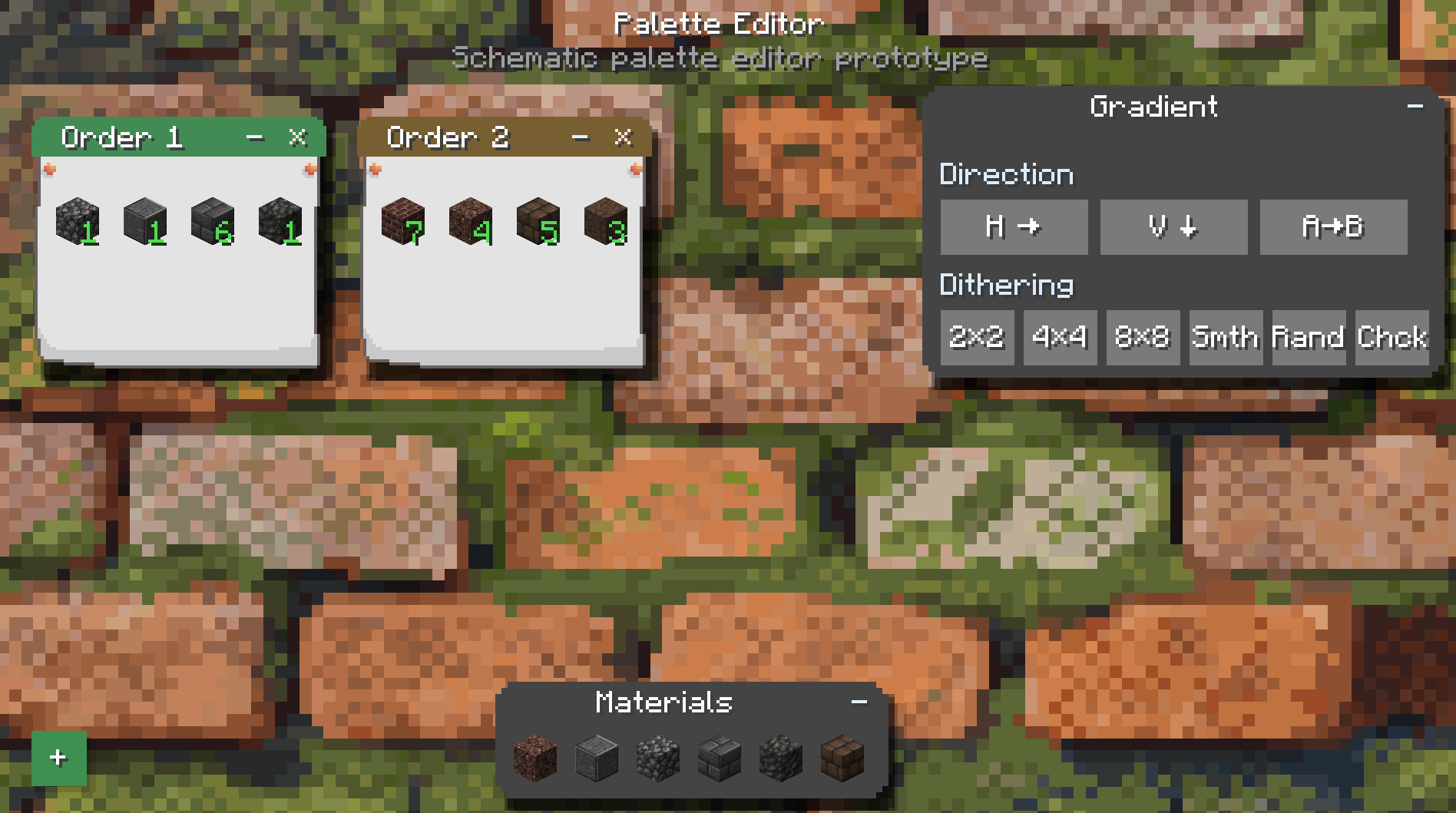
UI UPDATEE

I love building machines, making weird contraptions, automating random stuff, you name it.

There's just one problem:

I can't build.

Like, at all.

So I made myself a tool to help even the most hopeless builders out there.

Turns out the thing is actually pretty damn useful.

So yeah. I'm publishing it.


🔨 The Trowels

The main point of this mod is the tools it adds.

Specifically:

4 types of Trowels and 1 Roller. Trowels
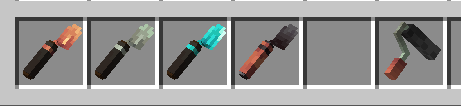
🟠 Copper Trowel

Randomizes blocks from your hotbar, starting from the slot to the right of the trowel's selected slot.

Basically:

"I don't know what I'm doing, just make the wall look good."

⚙️ Iron Trowel

Gives you more control.

You can select which blocks you want to use and pull them directly from your inventory.

No more filling your hotbar with 17 different blocks just to make one wall.

💎 Diamond Trowel

Now we're cooking.

You can choose the ratio of different blocks and control the order in which they're placed.

It also unlocks Quick Place.

This is where you can start making actual patterns instead of just praying to RNGesus.

🔥 Netherite Trowel

The big boy.

The Netherite Trowel saves blocks during replacement and puts the recovered blocks straight into your inventory.

Because wasting half your building materials while remodeling your own house is kinda cringe.


🎨 Gradient Roller

The Roller uses dyes to recolor blocks that can actually be dyed.
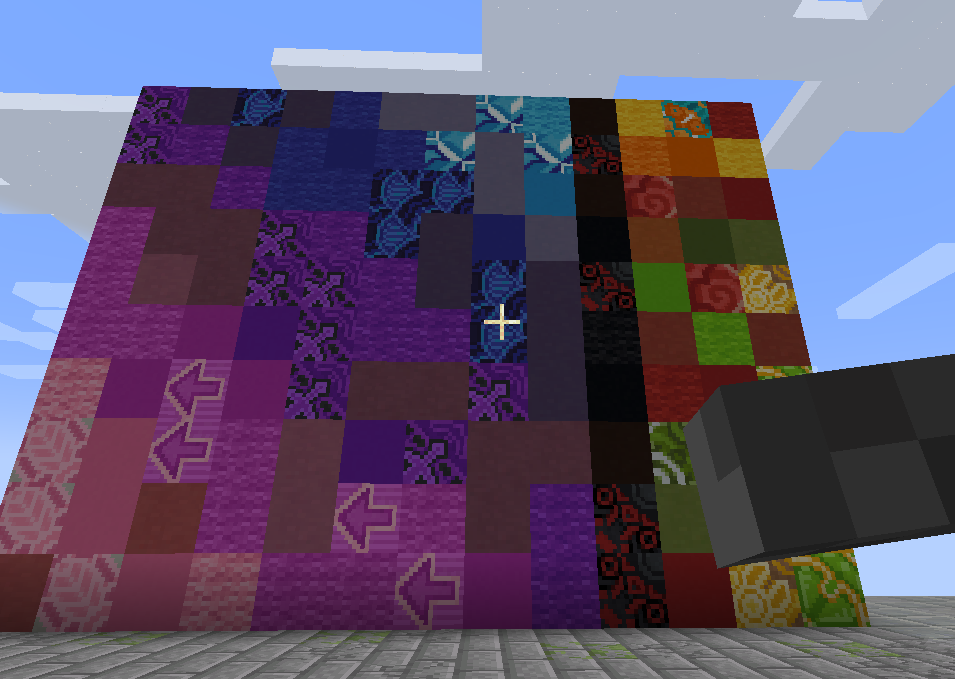
Roller

Wool, glass, concrete, and other dyeable blocks.

Basically, if Minecraft lets you change the color of it, there's a good chance the Roller can help you do it without manually replacing every single block.


🔁 Replacement Mode

Starting with the Iron Trowel, you can put a pickaxe in your offhand to enable Replacement Mode.
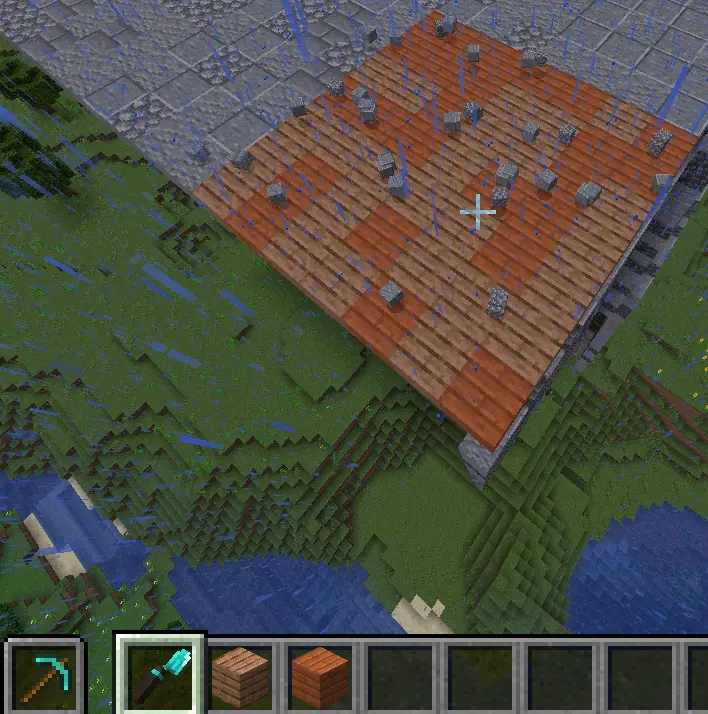
Replacement Mode

You can replace existing blocks directly instead of breaking them first.

It's basically like Terraria.

Yes, I know that's an amazing explanation.

Especially for people who have never played Terraria.

HAHAHAHAHAHA


🚀 Quick Place

Starting with the Diamond Trowel, you also get Quick Place.
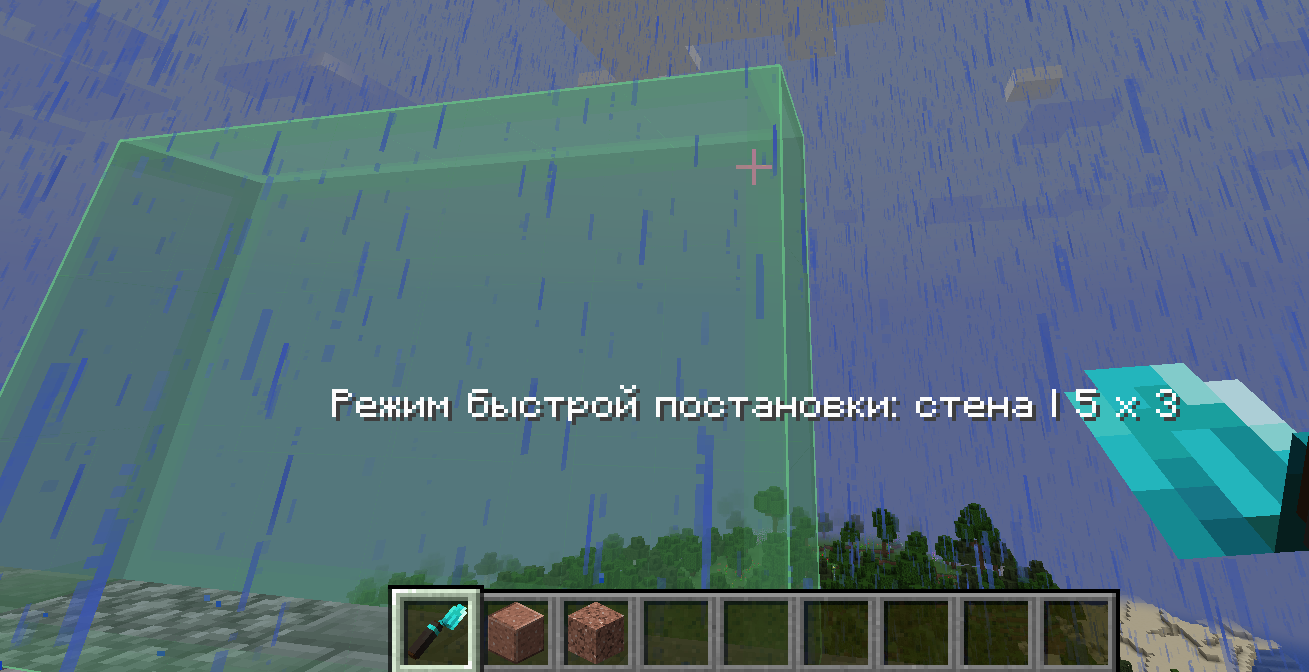
Quick Place

Hold Alt, select an area, and quickly build a wall out of your chosen materials.

It also supports smart replacement and ordered patterns, including things like checkerboards.

So you can go from:

"I need to replace this wall."

to:

"Actually, let's redesign the entire thing."

in approximately three seconds.


📖 The Items Actually Explain Themselves

If you want more detailed information about how everything works, just hover over an item and hold Left Shift.

The tooltip will tell you pretty much everything you need to know.

Because apparently making a 40-page wiki for my silly little trowel was too much work.


🏗️ Sable Compatibility
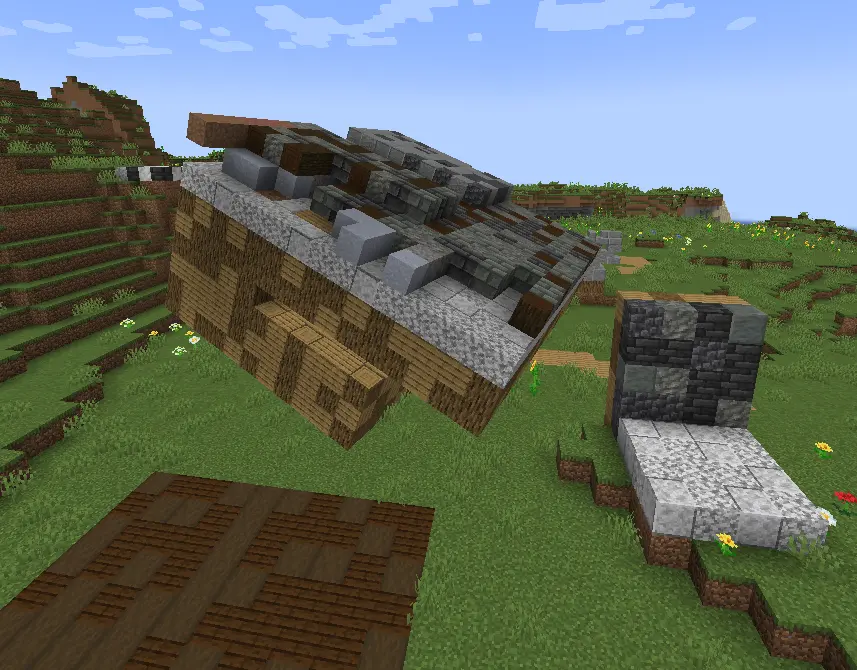
Sable

And YES.

We're compatible with Sable.

No crashes.

No broken rendering.

And yes, everything should actually look right.

And yes, I spent 9 hours of my life making this work.

Just so I could write these three lines.

Worth it.

Последние версии

Все версии →
release

Don's Building Stuff 4.1.0

4.1.0
11 авг. 2026 г.201Minecraft: 1.21.1neoforge
Скачать
Что нового
# Don's Building Stuff 4.1.0 — Trowel Modes and Roller Date: 2026-08-11 Minecraft: 1.21.1 NeoForge: 21.1.228 ## Trowel Control Modes A standard common config file, `config/donsbuildingstuff-common.toml`, now provides one setting: ```toml [trowels] TrowelMode = "new" ``` Three modes are available: - `"new"` — the 4.0 Palette Editor only. - `"old"` — the pre-4.0 inventory controls; the Palette Editor is disabled. - `"hybrid"` — both methods at once: the Palette Editor with Ctrl + Right Click and the legacy inventory actions. The selected mode takes effect after restarting the game. Tooltips and material indicators change with the active control scheme. ## Gradient Roller - Fixed opening the Palette Editor with Ctrl + Right Click while holding the Gradient Roller. - Fixed swapped axes for horizontal and vertical gradient directions on the selected plane. - Large areas are recoloured faster: the processing queue increased from 2 to 12 blocks per tick. - Fixed a configuration-creation error that could prevent the game from loading on NeoForge 21.1.228.
release

Don's Building Stuff 4.0

4.0
11 авг. 2026 г.18Minecraft: 1.21.1neoforge
Скачать
Что нового
# Modrinth: Don's Building Stuff 4.0 — Palette Editor ## Release title **4.0 — Palette Editor** ## Short description A major update for building tools: Diamond and Netherite Trowels, along with the Gradient Roller, now share a hands-on workspace for configuring materials, orders, gradients, and dithering. ## Release post > **Don's Building Stuff 4.0 is here.** > > Building tools no longer rely on a set of hidden inventory actions. Your palette is now laid out in front of you on a worktable: order notes can be moved, collapsed, named, and filled with materials. > > **Ctrl + Right Click** with a Diamond or Netherite Trowel opens the full Palette Editor. Every note is a separate order with its own materials and weights. The same block can be used differently across multiple notes. > > The Gradient Roller uses the same workspace for dyes. Its transition direction and dither mode are configured there too: Bayer 2×2, 4×4, 8×8, smooth, randomized, or checkerboard. > > The Iron Trowel also receives a clearer mode: one note, selected blocks without numbers, and no unnecessary controls. The Copper Trowel stays simple — it still chooses randomly from blocks to its right in the hotbar. > > This is a major interface update, but it does not erase the character of the tools: copper remains fast and rough, iron remains simple and precise, while diamond and netherite offer complete freedom to arrange a palette. ## Key changes - A new Palette Editor for Diamond and Netherite Trowels. - A shared editor for the Gradient Roller. - Order notes can be moved, collapsed, removed, and renamed. - Independent materials and weights in every order. - The same material can appear in multiple orders with different weights. - Window layouts are saved on the tool itself. - A gradient-direction panel and six dithering modes. - A simplified editor for the Iron Trowel. - New paper and material sounds. - Automatic migration of older palette data.
release

Don's Building Stuff 3.0

3.0
9 авг. 2026 г.33Minecraft: 1.21.1neoforge
Скачать
Что нового
# Don's Building Stuff 3.0 Date: 2026-08-09 ## Summary Major update: the Gradient Roller is now a palette-driven recolouring tool. The update also makes matching replacement safe for full blocks and Create pillars. ## Changelog ### Gradient Roller - Added a shaped crafting recipe for the Gradient Roller: 4 Create zinc nuggets, 2 copper ingots, dried kelp, and black dye. - Reworked the roller from a block-replacement tool into a recolouring tool; it does not break blocks or create replacement drops. - The roller stores a dye palette directly on the item. - While carrying the roller with the cursor in an inventory, right-click a dye to add or increase its weight; left-click to reduce or remove it. - Ctrl-click dyes to assign their gradient order. Dyes with the same order are selected by their configured weights. - Palette weights and order numbers render on dye stacks; the roller tooltip lists its configured palette. - Recolouring follows the direction from the first selected point to the second selected point. - Each colour is consumed separately from the main inventory at one dye per four successfully recoloured blocks, rounded up. A one-block operation still costs one dye. - Added coloured dust particles on every successfully recoloured block and placement sound feedback after the operation. - The standalone selection limit is 7 x 7. Compatible trowels in the inventory can extend the range. ### Recolouring Compatibility - Added recolouring support for vanilla colour families including wool, carpets, concrete, glass, and terracotta. - Blocks that expose colour through a `DyeColor` block-state property can now be recoloured directly without replacing the block. - Added namespace-local discovery and caching of colour families using `red_block`, `block_red`, `dyed_red_block`, and `block_dyed_red` naming schemes. - Verified support for Create's standard coloured toolboxes, seats, sails, and postboxes. - The generic resolver also supports compatible coloured families from Quark, Amendments, and Create Deco without making those mods required dependencies. ### Matching Replacement - Fixed matching replacement: full blocks can now only be replaced by full blocks. - Matching replacement cancels safely when no compatible selected material exists instead of falling back to unrelated block shapes. - Added Create pillar priority: selected Create pillars are used first when replacing a Create pillar; full blocks are only considered when no selected pillar is available. ### Previous Quick-Place Fixes Retained - Large quick-place selections no longer hit an invisible limit before their actual range. - Small quick-place selections place instantly instead of animating block-by-block.
release

Don's Building Stuff 2.2.2

2.2.2
18 мая 2026 г.152Minecraft: 1.21.1neoforge
Скачать
Что нового
# Changelog ## 2.2.2 Minor Fixes - Fixed large quick-place selections hitting an invisible limit before the real trowel range - Small quick-place selections now place instantly instead of animating block-by-block - Minor bug fixes and animation behavior adjustments
release

Don's Building Stuff 2.2.1

2.2.1
17 мая 2026 г.32Minecraft: 1.21.1neoforge
Скачать
Что нового
# Changelog ## 🧱 2.2.1 Smart Replacement Update A.k.a. "the trowel now understands what it's looking at." ![1](https://cdn.modrinth.com/data/cached_images/a8f7a8a3ad9fac4dc6c861b9bb3db032b35e0bd3.png) ![2](https://cdn.modrinth.com/data/cached_images/52e8f3779dd06a1962a799c6943ba0744cf52cc5.png) ![3](https://cdn.modrinth.com/data/cached_images/3822e552ae0ba0fc0c17579b9090a9e282b0900e.png) ## ✨ Improvements - Replacement mode now prefers matching block formats - Stairs replace stairs, slabs replace slabs, and full blocks replace full blocks - Matching replacements now preserve orientation and placement state where possible - Mass replacement now has a toggle for matching formats vs replace-all ## 🛠️ Fixed - Fixed replacement mode choosing the wrong block type from mixed selections - Fixed replacement flow for mixed palettes with stairs, slabs, and normal blocks ### - Fixed a bunch of awkward building cases where replacement looked wrong
release

Don's Building Stuff 2.1.0

2.1.0
14 мая 2026 г.51Minecraft: 1.21.1neoforge
Скачать
Что нового
# Changelog ## 🛠️ 2.1.0 Major Update Not a tiny patch anymore. A.k.a. "the trowel got serious". ## ✨ New Stuff - Added the Netherite Trowel - Added the Attraction enchantment - Added new upgrade recipes for the Netherite Trowel - Added Create sequenced assembly support for the upgrade - Added Attraction enchanted book trades for Librarians and Wandering Traders ## 🔧 Improvements - Improved quick-place for large builds - Better replacement mode behavior - Silk Touch now enables careful replacement - Netherite Trowel now uses careful replacement by default - Better tooltip styling and general polish ## 🐛 Fixes - Fixed the big quick-place issues on very large areas - Fixed drop auto-collection filling the hotbar - Fixed several placement, preview, and compatibility issues - Fixed more weird survival-building edge cases than I expected ## 🧪 Testing Tested by: me QA team: still me Confidence level: release-worthy, somehow ## 🌍 Languages 🇷🇺 Russian 🇬🇧 English ## ⚠️ Notes This update adds a lot and fixes a lot. So if something still explodes in a very specific and creative way: please tell me. ## 💬 Feedback Discord: https://discord.gg/JTvZySpD2V Bug reports, ideas, weird screenshots, cursed builds: all welcome.
release

Don's Building Stuff 1.0.0

1.0.0
5 мая 2026 г.85Minecraft: 1.21.1neoforge
Скачать
Что нового
# 🚀 Initial Release The very first version. A.k.a. *"let's see what breaks"*. ## 🧪 Testing - Tested by: **me** - QA team: also **me** - Confidence level: *surprisingly decent* ## 🌍 Languages - 🇷🇺 Russian (native) - 🇬🇧 English ## ⚠️ Notes This is a launch version, so expect: - bugs - weird behavior - "huh, that wasn't supposed to happen" moments If something feels off — feel free to report it. Seriously. I want to fix things. ## 💬 Feedback