COWMODSКаталог модов

DeathLog

Keeps track of the many embarrassing times you died

Автор: glisco723,9 тыс.680обновлён 8 нояб. 2024 г.
ПриключенияУтилиты

Описание

DeathLog

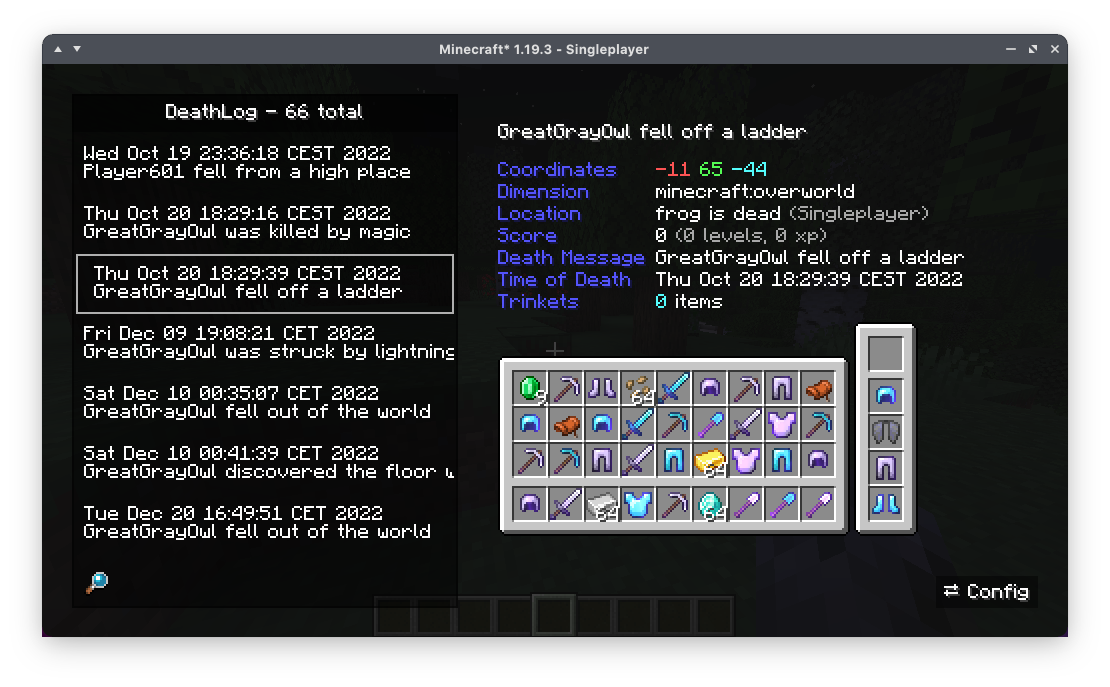
deathlog window

DeathLog tracks your deaths in all worlds and servers. It does this completely client-side and records important metadata like coordinates, dimension and even your entire inventory. Since version 0.2.0 onward, DeathLog can also operate server-side and track all deaths of all players on that server, with native functionality for restoring a death snapshot. DeathLog can be used on both sides without being required on the other, however managing the server's database is significantly easier with a DeathLog-enabled client. ​


You can access your log from the vanilla Statistics screen. The search bar accounts for

  • Item Names
  • Coordinates
  • World or Server Names
  • Death Messages
  • ...

You can get your lost items back while in creative mode by simply clicking on them with your mouse wheel. Should you not have access to creative mode, it will copy an appropriate /give command

Последние версии

Все версии →
beta

[1.21.2+] DeathLog - 0.4.1

0.4.1+1.21.2
8 нояб. 2024 г.6,3 тыс.Minecraft: 1.21.2, 1.21.3fabric, quilt
Скачать
Что нового
This release is primarily a port to 1.21.2 - support for older versions will be dropped. For the time being, Trinkets integration is disabled while we wait for a port
release

[1.21] DeathLog - 0.4.1

0.4.1+1.21
24 авг. 2024 г.47,4 тыс.Minecraft: 1.21fabric, quilt
Скачать
Что нового
## Fixes - Logging and restoring of Trinkets inventories should work properly again - `/deathlog view` no longer disconnects the client when trying to send an instance of the missing property (#44)
beta

[1.21] DeathLog - 0.4.0

0.4.0+1.21
30 июн. 2024 г.36,6 тыс.Minecraft: 1.21fabric, quilt
Скачать
Что нового
This release primarily constitutes a port to 1.21. However, due to the large changes necessitated by the game, DeathLog now uses a different database format and **old databases no longer work**. Further, because some content (like enchantments) is now stored per-world, DeathLog on the client now also **stores an individual database** for each world/server you play on. As a consequence of these sweeping changes, there are no guarantees of this build being especially stable - if you encounter any problems, please [report them](https://github.com/gliscowo/deathlog/issues).
release

[1.20.3+] DeathLog - 0.3.2

0.3.2+1.20.3
11 янв. 2024 г.23,5 тыс.Minecraft: 1.20.3, 1.20.4fabric, quilt
Скачать
Что нового
This is a straightforward port to 1.20.3/4 - support for older versions will be dropped
release

[1.20.2] DeathLog - 0.3.2

0.3.2+1.20.2
10 окт. 2023 г.7,9 тыс.Minecraft: 1.20.2fabric, quilt
Скачать
Что нового
This is a straightforward port to 1.20.2 - support for older versions will be dropped
release

[1.20+] DeathLog - 0.3.2

0.3.2+1.20
9 июн. 2023 г.506,5 тыс.Minecraft: 1.20, 1.20.1fabric, quilt
Скачать
Что нового
This is a straightforward port to 1.20 - support for older versions will be dropped
beta

[1.19.4] DeathLog - 0.3.2

0.3.2+1.19.4
23 мар. 2023 г.11,8 тыс.Minecraft: 1.19.4fabric, quilt
Скачать
Что нового
This is a straightforward port to 1.19.4 - support for older versions will be dropped
release

[1.19.3] DeathLog - 0.3.2

0.3.2+1.19.3
22 мар. 2023 г.3,1 тыс.Minecraft: 1.19.3fabric
Скачать
Что нового
This update re-introduces the /give and item spawning functionality of the Death Log screen, previously removed during the port to owo-ui (#22)
release

[1.19.3] DeathLog - 0.3.1

0.3.1+1.19.3
13 янв. 2023 г.2,5 тыс.Minecraft: 1.19.3fabric, quilt
Скачать
Что нового
### Fixes - The mod works now ### Changes - Hey, did you now that the mod works now ### Features - Made the mod work
beta

[1.19.3] DeathLog - 0.3.0

0.3.0+1.19.3
12 янв. 2023 г.273Minecraft: 1.19.3fabric
Скачать
Что нового
This release brings the mod to 1.19.3 and also ships a whole new user interface and config solution built on top of owo-ui and owo-config. As such, [owo-lib](https://modrinth.com/mod/owo-lib) is now a required dependency. ### UI and Config Changes Along with a general tidying of the screen, everything has also been made slightly more compact in order to better fit on smaller displays. This means that the config, restore and delete buttons had to move. Config can now be found on the right side of the screen, restore and delete are found in a context menu opened by right-clicking any entry in the death list. Configuration is now done with owo-config, meaning that the config button takes you to a separate screen instead of having the options integrated