COWMODSКаталог модов

XenDrops (Formerly CustomDrops)

An advanced region-based CustomDrops plugin!

Автор: VanixMcDevelopment13,4 тыс.31обновлён 10 окт. 2026 г.
ЭкономикаМеханики игрыУтилиты

Описание

Description

XenDrops (formerly CustomDrops) is an advanced, region-based drop customization plugin — and it's completely free.

As a server owner, I wanted full control over what blocks and mobs drop, without breaking vanilla building blocks or affecting drops server-wide. I searched for a plugin that did this well... and couldn't find one. So I built it myself.

The core idea: XenDrops lets you customize block and mob drops and control where those drops apply — set them to a specific region, or make them global. You can even configure the same block or mob to drop different loot in different regions, blacklist specific worlds, and fine-tune everything through an extensive settings system — all from an in-game GUI.


🆕 XenDrops Conditions & Actions

XenDrops now supports conditions and actions through the optional Xenith library — add requirements before a drop triggers (e.g. item-in-hand checks) and run follow-up effects (messages, commands, chance/mine-speed modifiers, and more).

This is completely optional. If you don't need conditions or actions, you don't need to install anything extra — XenDrops runs perfectly fine on its own.

Actions support is currently awaiting Spigot approval. If you'd like early access while that's pending, join the Discord and we'll get you set up.


Features

  • Active development for the next year
  • Block, Mob, and Fishing Drops
  • Reward Damagers — reward every player who damages a mob, not just the killer
  • Custom Block Breaking Speeds — configure custom mining speeds for specific drops and regions
  • Custom Particles — display particles on blocks and mobs with custom drops only to players who can receive the drop
  • Conditions & Actions (optional, via Xenith)
  • Per-region or global drops — make the same block/mob drop different loot depending on location
  • Fully GUI-based — never touch a config file
  • Doesn't cancel break/kill events — stays compatible with other plugins
  • Per-drop/loot/action/condition permissions — restrict individual content
  • Per-drop/loot/action/condition chances — fine-tune from 0.1% to 100%
  • Searchable GUIs — search blocks, mobs, particles, and more
  • Per-drop actions:
    • Player message
    • Console command (supports %player%)
    • Player command
  • Per-drop item conditions:
    • Player item stack
    • Player item type
    • Player item name
    • ...and more
  • Per-drop settings:
    • Vanilla drops
    • Auto inventory
    • Silk touch
    • XP amount
    • Placed-block drops
    • World blacklist
    • Fortune/Looting
    • ...and much more
  • Configurable Auto-Save — automatically save changes at your chosen interval
  • Easy to set up, fast to load
  • So many more features — try it out in-game!

Leave a review if XenDrops works well for your server — it really helps! ⭐

CommandPermissionDescription
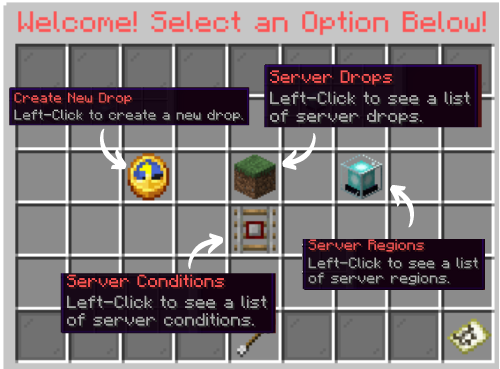
/cddrops.cdOpen the main menu
/cd reloaddrops.reloadReload the plugin
/cd debug itemdrops.debug.itemDebug the item in your hand
/cd report <title> <description>drop.reportSend a report
/cd create <id> [dropType] [material]drops.createCreate a drop
/cd edit <id>drops.editEdit a drop
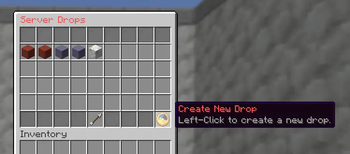
/cd listdrops.listList all drops
/cd loot createloot.createCreate loot
/cd loot edit <id>loot.editEdit loot
/cd loot listloot.listList all loot
/cd region wanddrops.region.wandGet the region selection wand
/cd region create <id> [material]drops.region.createCreate a region from your selection
/cd region delete <id>drops.region.deleteDelete a region
/cd region edit <id>drops.region.editEdit a region
/cd region listdrops.region.listList all regions
/cd region teleport <id>drops.region.teleportTeleport to a region
/cd region outline <id>drops.region.outlineToggle a region's outline
/cd condition create <id>drops.condition.createCreate a condition (needs Xenith)
/cd condition listdrops.condition.listList conditions (needs Xenith)
/cd action create <id>drops.action.createCreate an action (needs Xenith)
/cd action listdrops.action.listList actions (needs Xenith)

<> = required, [] = optional.

Information and Support

                                                                        DISCORD                 WIKI

                                                                  Discord Link Wiki Link

Галерея

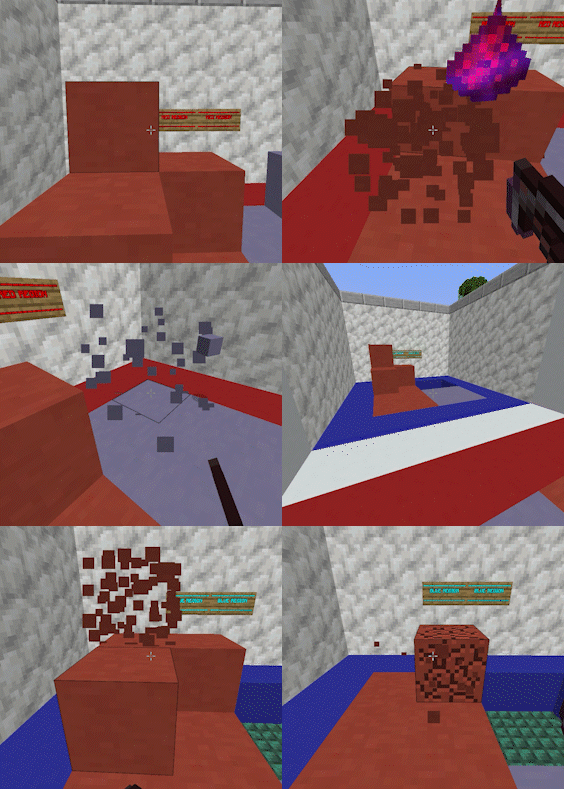
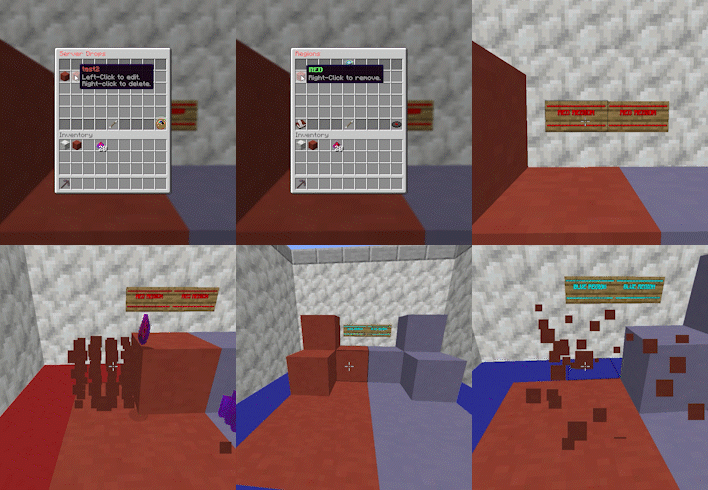
Main MenuDrop List MenuRegion ShowcaseRegion Showcase

Последние версии

Все версии →
alpha

Full Inventory Control (Fabric)

1.0.8-a
10 окт. 2026 г.70Minecraft: 26.3fabric
Скачать
Что нового
## What's new - **Choose what happens when your inventory is full.** Each drop has a new "Full Inventory" setting in its settings menu. Click it to switch between: - **Drop on the ground**: anything that doesn't fit lands at your feet, the same as before. - **Stop drops**: only what fits in your inventory drops. This includes normal Minecraft drops. - Server owners can set the default for all drops in the config. ## Improvements - **Smarter inventory checks.** A full inventory still picks up an item if you already have a stack of it with room. For example, you can keep collecting wool while your wool stack isn't full. - **Auto-inventory works better when your inventory is nearly full.** It fills every stack it can, and only the extra goes to the drop's Full Inventory setting. - **Shared mob kills are fairer.** When several players damage a mob, its normal drops are checked against the killer's inventory.
alpha

Full Inv Control & Addon Manager

1.0.8-a
10 окт. 2026 г.254Minecraft: 1.21, 1.21.1, 1.21.2, 1.21.3, 1.21.4, 1.21.5, 1.21.6, 1.21.7, 1.21.8, 1.21.9, 1.21.10, 1.21.11, 26.1, 26.1.1, 26.1.2, 26.2, 26.3bukkit, paper, purpur, spigot
Скачать
Что нового
What's new - Choose what happens when your inventory is full. Each drop has a new "Full Inventory" setting in its settings menu. Click it to switch between: - Drop on the ground: anything that doesn't fit lands at your feet, the same as before. - Stop drops: only what fits in your inventory drops. This includes normal Minecraft drops. - Server owners can set the default for all drops in the config. - Addon Manager. Install and update CustomDrops addons without leaving the game. Open it with /cd addons or the new Addons button in the main menu. - Xenith adds conditions and actions for drops and loot. - BlockHardness adds custom mining speeds for blocks. It needs ProtocolLib, and the menu warns you if that's missing. - Each addon shows whether it's installed and if an update is available. Click to install or update, then restart the server to finish. - Requires the drops.addons permission. Improvements - Smarter inventory checks. A full inventory still picks up an item if you already have a stack of it with room. For example, you can keep collecting wool while your wool stack isn't full. - Auto-inventory works better when your inventory is nearly full. It fills every stack it can, and only the extra goes to the drop's Full Inventory setting. - Shared mob kills are fairer. When several players damage a mob, its normal drops are checked against the killer's inventory. Fixes - Fixed an error that some unusually named loot entries could cause.
alpha

XenDrops (Formerly CustomDrops) 1.0.7-a

1.0.7-a
23 сент. 2026 г.273Minecraft: 1.21.3, 1.21.4, 1.21.5, 1.21.6, 1.21.7, 1.21.8, 1.21.9, 1.21.10, 1.21.11, 26.1, 26.1.1, 26.1.2, 26.2, 26.3bukkit, paper, purpur, spigot
Скачать
Что нового
Nice GUI modernizations and QOL.
alpha

XenDrops (Formerly CustomDrops) 1.0.7-a

1.0.7-a
23 сент. 2026 г.41Minecraft: 26.3fabric
Скачать
Что нового
FIRST FABRIC VERSION! Missing some features soon to come
alpha

XenDrops 1.0.6-a

1.0.6-a
20 сент. 2026 г.34Minecraft: 1.21.3, 1.21.4, 1.21.5, 1.21.6, 1.21.7, 1.21.8, 1.21.9, 1.21.10, 1.21.11, 26.1, 26.1.1, 26.1.2, 26.2, 26.3bukkit, paper, purpur, spigot
Скачать
Что нового
**Drop & Loot Boosts** * Start drop/loot boosts with `/cd boost create`: boost the chance of loot dropping, or how many items drop * Boost everyone, a single player, or attach a boost to a permission, for 30 minutes, a week, or forever * Boost all drops, one drop, or one loot item **Mining** * Blocks with a custom mine speed can be mined faster with better tools (customizable materials), Efficiency, and Haste. *Requires* [*newest version of BlockHardness*](https://modrinth.com/plugin/blockhardness-library) * Tool speeds are configurable, so any tool/item will work. *Requires* [*newest version of BlockHardness*](https://modrinth.com/plugin/blockhardness-library) **Menus** * The drop list now shows each drop's type, what it triggers on, its loot count, regions, and permission at a glance * Tidier Block Drop settings layout * Tab completion for loot IDs when editing loot * The drop list always opens now, even when a drop is missing its blocks or mobs * When you duplicate drops, they no longer share loot, regions, or settings with the original, and no longer show the wrong name **Drops** * Bag drop mode could fail to drop anything when there was no player involved, such as a mob dying naturally * Loot chance boosts are now counted properly when picking loot in bag mode **Older Servers** * Opening the drop list no longer errors on versions without colored bundles **New `config.yml` Format** ```yaml Auto-Save: # How often (in minutes) changed drops, loot and regions are saved to file. # Data is always saved on a normal shutdown, but a crash or killed server skips that. # 0 = save immediately whenever something changes # -1 = never auto-save (only on shutdown or with the save button) interval-minutes: 5 Particles: # Shows each drop's particle (set in the drop's settings menu) on nearby blocks/mobs, # only to players who could get that drop there (permissions, regions, world blacklist, # placed blocks, spawn reason blacklist). enabled: true # Default for how often particles are shown, in whole ticks (20 ticks = 1 second). # Each drop can override this with its own interval (Particle button, Shift-Right-Click). interval-ticks: 20 # How far from each player (in blocks) to look for drop blocks block-radius: 6 # Max blocks per player that show particles each interval max-blocks-per-player: 30 # How far from each player (in blocks) to look for drop mobs mob-radius: 16 Global-Drop-Defaults: permission: "empty" xp: -1 vanilla-drops: false auto-inventory: false bag-drop-mode: false ignore-chances: false # Syntax: ["global", "test", "test1"] auto-add-regions-by-id: ["global"] BlockDrop-Defaults: placed-drops: true silktouch: false fortune: true break-speed: -1.0 # When a drop with a custom break-speed applies, vanilla mining is frozen in that area. # Whether blocks without a custom break-speed can still be mined there (used for global drops; # regions have their own setting) allow-normal-mining: true MobDrop-Defaults: natural-death-drops: true looting: true breeding-drops: false # Syntax: ["CUSTOM", "SPAWN_EGG", "BREEDING"] # Use: https://hub.spigotmc.org/javadocs/spigot/org/bukkit/event/entity/CreatureSpawnEvent.SpawnReason.html spawn-reason-blacklist: [] reward-all-damagers: false Loot-Defaults: permission: "empty" chance: 100.0 Region-Defaults: permission: "empty" # List of valid material names: # https://hub.spigotmc.org/javadocs/bukkit/org/bukkit/Material.html display-material: "BEACON" ignore-blacklist: false # Default for new regions: whether blocks without a custom break-speed can still be mined allow-normal-mining: true ```
alpha

Particles, Search, Auto-Save, and More!

1.0.5-a
17 сент. 2026 г.43Minecraft: 1.21.11, 26.1.2, 26.2bukkit, paper, spigot
Скачать
Что нового
![banner all important info in below text](https://cdn.modrinth.com/data/cached_images/d1b8454acd3efeac47a4b30bdd70f655c50481ea.png) **CustomDrops Update** **Drop Particles** * Drops can show particles on their blocks and mobs, only to players who can get the drop there * Custom colour dust particles, including dust that fades into a second colour * Set particle, amount, speed, and spread per drop * New particle options in config.yml, light on performance **Search** * Search in the block, mob, particle and spawn reason menus **Mine Speed** * Per-region Allow Normal Mining setting for custom mine speed areas * Players without a drop's permission can't mine its custom speed blocks * Mine speed no longer overrides other plugins' break speed changes * Mining was frozen in any region, not just custom mine speed ones * Players stuck with 0 break speed after a crash are fixed on join **Saving** * Configurable auto-save * Loot added to or removed from drops wasn't saved * Loot edits weren't saved until shutdown * Deleted loot stayed in loot.json **Mob Drops** * Player-kill-only drops no longer drop when mobs die naturally
alpha

Fix error when not using Xenith Jar

1.0.4-ALPHA
15 июн. 2026 г.650Minecraft: 1.21.11bukkit, paper, spigot
Скачать
Что нового
Not using the Xenith jar was previously causing an error.
alpha

Add better support for break speed drops

1.0.3-ALPHA
15 июн. 2026 г.41Minecraft: 1.21.11bukkit, paper, spigot
Скачать
Что нового
The plugin will now go through the drops to find the best speed to apply.
alpha

Hotfix #2 (LOOT CHANCES)

1.0.2-ALPHA
14 июн. 2026 г.48Minecraft: 1.21.11bukkit, paper, spigot
Скачать
Что нового
Look at the previous versions' changelog!
alpha

Hotfix

1.0.1-ALPHA
14 июн. 2026 г.34Minecraft: 1.21.11bukkit, paper, spigot
Скачать
Что нового
SEE PREVIOUS VERSION CHANGE LOG!!