COWMODSКаталог модов

Custom Hit Color

Customize your entity hit color to sharpen visibility and gain an edge in PvP. A tighter alternative if you want it even more compact: Change your hit color, improve your PvP.

Автор: Flixis1,7 тыс.0обновлён 27 сент. 2026 г.
ДекорМеханики игрыУтилиты

Описание

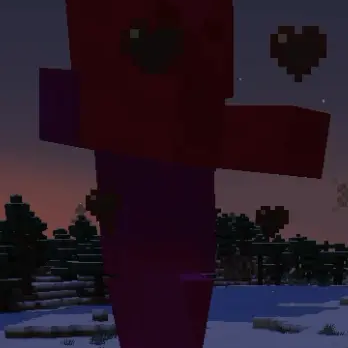
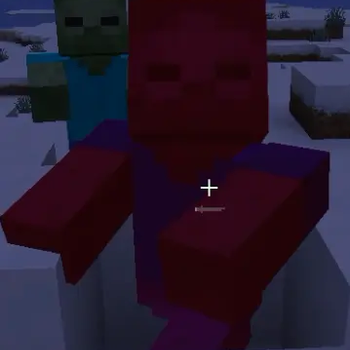
Custom Hit Color lets you take full control of your PvP experience by changing Minecraft's default hit color to any color you want.

Tired of the same red hit flash? Whether you prefer a clean white, a sharp cyan, or something fully custom, this mod gives you the flexibility to match your setup and make hits easier to track in the heat of combat.

🎨 Fully customizable — pick any color with an intuitive color picker

⚙️ Easy setup — configure everything directly in ModMenu, no config files needed

⚔️ Built for PvP — designed to improve hit visibility and combat clarity

🧩 Lightweight — client-side only, no impact on performance or server compatibility

Perfect for PvP players, content creators, and anyone who wants a more personalized combat experience.

Галерея
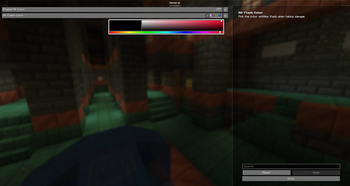
Mod Menu settingsDemonstrating of the Hit ColorHitColor 2

Последние версии

Все версии →
release

Custom Hit Color 1.1.0

1.1.0
27 сент. 2026 г.306Minecraft: 1.21, 1.21.1fabric
Скачать
Что нового
# HitColor Change the color entities flash when they take damage. Client-side only, works on any server. ## Features - **Any hit color**, with an intensity slider - **Rainbow mode** with adjustable speed - **Health-based color**: green → yellow → red as the target loses HP - **Separate colors** for yourself and for other players (great for PvP) - Optional tint during the death animation - The vanilla red flash is fully replaced, so custom colors look clean - Name tags are not tinted - Translated: English, Русский, Українська, Deutsch ## Installation 1. Install [Fabric Loader](https://fabricmc.net/use/). 2. Drop `hitcolor-x.x.x.jar` into your `mods` folder. 3. *(Optional)* Install [Mod Menu](https://modrinth.com/mod/modmenu) and [YetAnotherConfigLib](https://modrinth.com/mod/yacl) to configure the mod in-game. Without them the mod still works; edit `config/hitcolor.json` instead. ## Config (`config/hitcolor.json`) | Key | Default | Description | |---|---|---| | `enabled` | `true` | Master switch | | `hitColor` | red | Main hit color (ARGB int) | | `intensity` | `1.0` | 0.0 = no tint, 1.0 = full color | | `tintOnDeath` | `true` | Keep the color during the death animation | | `rainbowMode` / `rainbowSpeed` | `false` / `1.0` | Rainbow cycling, cycles per second | | `healthBasedColor` | `false` | Color depends on remaining HP | | `usePlayerColor` / `playerHitColor` | `false` / blue | Color for your own character | | `useOtherPlayersColor` / `otherPlayersHitColor` | `false` / orange | Color for other players | ## License CC0-1.0
release

Custom Hit Color 1.0.2

1.0.2
10 сент. 2026 г.130Minecraft: 1.20, 1.20.1, 1.20.2, 1.20.3, 1.20.4, 1.20.5, 1.20.6fabric
Скачать
Что нового
# HitColor 1.0.2 A major visual overhaul — hit flashes have never felt this good. ## ✨ Added - **Smooth fade-out** — hit flashes now gradually fade instead of cutting off abruptly - **Rainbow mode** — cycles the entire color spectrum while entities flash, with adjustable speed - **Damage type colors** — entities flash with special colors depending on damage source: fire (orange), explosions, magic (purple), lightning (yellow), freezing (cyan), fall (gray) - **Per-entity colors** — assign custom flash colors to specific mobs via a config list (e.g. `minecraft:creeper|#00FF00`) - **Custom death color** — dying entities now flash a separate configurable color - **Death pulse effect** — optional "heartbeat" pulsing while an entity is dying - **Blend modes** — choose how colors are applied: Blend (mix), Replace (full repaint), Multiply (saturated dark tint) - **Entity filters** — toggle hit colors separately for players, hostile mobs, and passive mobs - **Hit particles** — optional burst of colored dust matching the flash color, with adjustable size - **Toggle hotkey** — press H (rebindable) to quickly enable/disable the mod, with on-screen feedback - **New config screen** — fully reworked with categories: General, Colors, Effects, Entities - **Localization** — added English and Russian language files ## 🔧 Changed - **Performance** — flash color and strength are now computed once per frame instead of on every vertex write - **Reworked config format** — cleaner JSON structure; old configs are automatically replaced - Name tags are no longer affected by the flash tint - Rainbow mode now takes priority over damage type colors ## 🐛 Fixed - Fixed missing `intensity` and `getCurrentColor()` references that prevented compilation - Fixed `fixedColor()` ignoring the configured intensity - Fixed config values being read on every vertex write instead of being passed directly
release

Custom Hit Color 1.0.1

1.0.1
3 сент. 2026 г.976Minecraft: 1.21.1, 1.21.2, 1.21.3, 1.21.4, 1.21.5, 1.21.6, 1.21.7, 1.21.8, 1.21.9, 1.21.10, 1.21.11fabric
Скачать
Что нового
# HitColor Changelog ## [1.1.0] — 2025 (Minecraft 1.21.1) ### Added - **Health-Based Color mode** — the hit flash now dynamically shifts from green (full HP) → yellow (half HP) → red (near death), giving you instant visual feedback on an entity's health. Overrides the main hit color when enabled. - **Flash Intensity slider** — control how opaque the hit flash is, from 0% (invisible) to 100% (full). Useful if the default flash feels too aggressive. - **Custom Player Color** — assign a separate hit flash color specifically for your own character, so you can instantly tell apart your own damage from a mob's. - **Dedicated "Player" category in the config screen** — player-specific settings are now grouped separately in the ModMenu GUI for clarity. ### Changed - `RedTintVertexConsumer` now accepts a pre-resolved ARGB color and an alpha multiplier, instead of reading config values per-vertex. This is cleaner and makes future color modes easier to add. - `LivingEntityRendererMixin` now detects whether the entity being rendered is the local player (`MinecraftClient.getInstance().player`) and passes that context to color resolution. - `HitColorConfig` now uses a clean inner `Data` class for JSON serialisation instead of mixing static and instance fields. Existing config files are not compatible and will be regenerated on first launch. - Config GUI split into two categories: **General** and **Player**. ### Fixed - Alpha multiplier is now clamped to `[0.0, 1.0]` on load, preventing invalid values from a hand-edited config file causing visual glitches.
release

Custom Hit Color 1.0.0

1.0.0
26 авг. 2026 г.63Minecraft: 1.20, 1.20.1, 1.20.2, 1.20.3, 1.20.4, 1.20.5, 1.20.6fabric
Скачать
release

Custom Hit Color 1.0.0

1.0.0
7 авг. 2026 г.248Minecraft: 1.21.1, 1.21.2, 1.21.3, 1.21.4, 1.21.5, 1.21.6, 1.21.7, 1.21.8, 1.21.9, 1.21.10, 1.21.11fabric
Скачать
Что нового
- You can select the Hit Color from the Mod Menu with a beautiful color picker - You can enable and disable the Hit Color