Custom Fishing Loot
Plugin for changing the fishing lure
Описание
🎣 MosheFishing | Custom Fishing Regions & GUI Loot Manager MosheFishing is an advanced, high-performance fishing management plugin that allows server administrators to create custom 3D zones (regions) and completely customize what players can catch inside them using a fully interactive GUI menu.
Perfect for RPG, Skyblock, Survival, and Factions servers looking to add unique fishing areas, customized loot tiers, and area-specific rewards!
✨ Key Features 🗺️ 3D Cuboid Regions: Define unlimited custom fishing areas anywhere in your worlds using coordinate points.
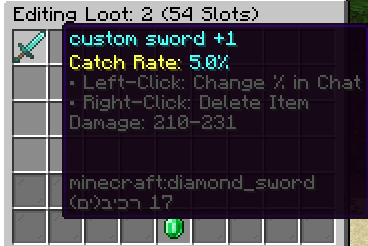
📦 4-Row GUI Loot Editor: Drag and drop items directly into a 36-slot GUI to design the drop table for each specific region.
✍️ Precise Chat-Based Chance Setting: Left-click any item in the GUI to type its exact catch rate percentage in chat (supports high precision like 0.1%, 50.5%, or 100%).
❌ Instant Item Deletion: Easily remove items from the loot table with a simple right-click inside the manager.
📘 Global Loot Table: Set up a universal fallback drop table for players fishing outside your custom zones.
⚡ Optimized Performance: Fast, lightweight, and completely database-free (saves everything directly into a clean config.yml).
🛠️ Admin Commands & Permissions 🔑 Admin Permission Node: fishing.admin (Required for all commands below)
You can use either /moshef or /moshefishing interchangeably.
Command Description /moshef Opens the main interactive GUI Admin Menu to select and edit regions or the global loot table. /moshef pos1 (or fpos1) Sets the first coordinate point of your fishing region at your current feet location. /moshef pos2 (or fpos2) Sets the second coordinate point of your fishing region at your current feet location. /moshef create (or fcreate) Creates a new fishing region between your selected pos1 and pos2 with the specified name. /moshef reload Reloads the configuration file, updates active regions, and syncs data safely. 📖 Quick Setup Guide Mark the Area: Go to the first corner of your water/lava pool and type /moshef pos1.
Mark the Opposite Corner: Go to the opposite diagonal corner (make sure it covers the depth of the water) and type /moshef pos2.
Save the Region: Type /moshef create swamp_pool (replace swamp_pool with any name you want).
Manage Loot: Type /moshef to open the main menu. Click on your newly created region.
Add Items & Set Rates: * Drag items from your inventory into the top 4 rows.
Left-click an item, then type a number in chat (e.g., 2.5 for 2.5% ) to adjust its chance.
Right-click an item to delete it if you make a mistake.
Save Changes: Click the Emerald block at the bottom to lock in your custom drop settings!
📝 Default Configuration (config.yml) YAML menus: main-title: "&0Fishing Regions Admin" loot-title: "&0Editing Loot: %region% (54 Slots)"
messages: no-permission: "&cYou do not have permission to use this command." player-only: "&cOnly players can execute this command." pos1-set: "&aPosition 1 set to your current location!" pos2-set: "&aPosition 2 set to your current location!" missing-positions: "&cYou must set both pos1 and pos2 first!" region-created: "&aRegion '%name%' has been successfully created!" region-exists: "&cA region with that name already exists!" reload-success: "&e[Fishing] &aConfiguration reloaded successfully!" loot-saved: "&e[Fishing] &aLoot table for %region% saved successfully!" item-caught: "&e[Fishing] &7You caught an item!"
regions: {} global-loot: []
No responsibility is taken for any malfunction that may occur.
Галерея