Create: Building Dimension
A dedicated creative-mode dimension for testing Sable/Create Aeronautics contraptions in survival — build, light a portal, test freely, and come back with nothing lost.
Описание
What this does
Testing a Create: Aeronautics contraption normally means risking your ship, the builds around it or just the scenic views you've worked so hard to preserve. This mod adds a dedicated testing dimension where creative is the default gamemode, fully compatible with Sable. Inventories are saved, wiped and restored upon entering and leaving. Including full Curio support (no re-equipping your create goggles every rejoin, rejoice!)
Every player gets their own private testing area, reached through a portal they build themselves. Space is handled with an inverted nether travel logic, 1 block in the overworld is 8 blocks in the creative dimension meaning even portals built close together allow for breathing room between players building and testing space.
This also adds a new curio, the 'Creative Toolbox'. Wearing this while in the creative dimension gives you 9 palettes, each with 9 slots, that can be preloaded with different groups of items/tools/blocks. There are 2 dedicated keybinds that ship unbound by default. Press the config key and it will open the toolbox palette corresponding to the hotbar slot you have selected for item loading and unloading, this is where you setup your palettes. Press the Hot Swap key and your items appear on screen until you click the desired block, at which point it returns your item in hand to its palette and instantly puts your chosen block in hand. This mechanic was directly inspired from Create mod's toolbox just with expanded limits and the freedom of creative taken into account.
How it works
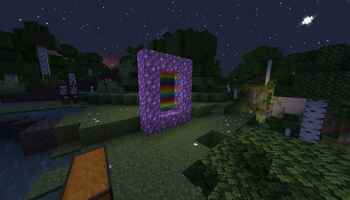
How do we build a portal? Make a hollow rectangle of Amethyst Block (minimum 2 wide × 3 tall, same size rules as a Nether portal) anywhere in the overworld, then light it with Flint and Steel. This automatically builds a matching portal for you inside the creative dimension.
Step through. Walking into the portal works like a real Nether portal, a few seconds standing inside it (instant if you're already in creative mode), with a rainbow screen effect while it charges. Then you teleport to the creative dimension. Your survival inventory is safely stored and your curios along with it.
And once you're in? Anything you build while inside stays inside. Walking back out wipes your inventory by design, so nothing crosses back into survival. What does carry over automatically to the next creative session is your palette: whatever tools, blocks, and Curios accessories you had set up last time reappear when you come back, so you're not re-gathering a setup every visit.
Walk back out. Same portal, and you're returned to the exact spot you left, with your original inventory, gamemode, and position fully restored. Enter through a different portal and you will pop up at the analogous position in the overworld.
Commands
/creativedim leave-- leave and restore your survival state (works from anywhere, anytime you're inside)/creativedim enter-- operator-only shortcut to a fixed testing anchor, for quick admin access without needing a portal/creativedim restore <player>-- operator safety net to force-restore someone's inventory if they get stuck or disconnect mid-visit/creativedim debug-- operator-only, dumps the portal link registry for troubleshooting/creativedim resetlinks-- operator-only, clears portal link data if it ever looks stale/corrupted
Requirements
Needs Create, Sable, Create Aeronautics, and Curios API installed alongside it (all required, all linked as dependencies on this page). Built and tested against these exact versions:
- Create 6.0.10
- Sable 2.0.3
- Create Aeronautics (Simulated Project) 1.3.0
- Curios API 9.5.1+1.21.1
Minecraft 1.21.1, NeoForge. Other versions of these mods haven't been tested and may not work.
Notes and known limitations
- Ender Chests are blocked inside the creative dimension. Their contents are tied to the player rather than the location, so leaving them accessible would defeat the whole point of the inventory separation.
- Portal frame detection uses a flood-fill approach rather than an exact port of vanilla's algorithm. Works reliably for a normal rectangular frame though unusual amethyst clusters sitting near a real frame could theoretically confuse it.
- Every overworld portal builds a fixed 2×3 analogous copy on the creative side, regardless of how large the original frame is.
A note on how this was built
This mod was built with Claude, through an extended back-and-forth of implementation, testing, and real bug fixes on a live server. I'm sharing that rather than passing it off as hand-written. The code has been through genuine, involved debugging, including two confirmed real exploits (Curios accessory slots and Ender Chests bypassing the inventory separation) that were found through actual use and fixed, not just theorized about. Full development history is in the repo's CHANGELOG if you're curious.
Support
Source is fully open -- see the GitHub repo. I use this on my own server, so I'll fix real bugs when I run into them or when they're reported with enough detail to reproduce. I'm not taking requests for new features beyond what's here. If you want to extend it yourself, pull requests are welcome (see CONTRIBUTING.md).
Галерея