COWMODSКаталог модов

Create Big Cannons:Simple Scope

Precision scope addon for Create Big Cannons with mouse-driven head aiming, actual muzzle reticle, remote fire, and Compact Mount support.

Автор: Elice5,1 тыс.9обновлён 13 сент. 2026 г.
СнаряжениеТехнологииУтилиты

Описание

Create Big Cannons: Simple Scope

A precision scope addon for Create Big Cannons.

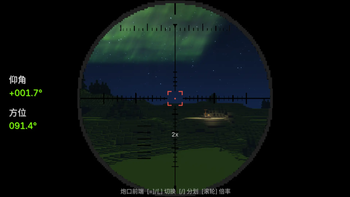
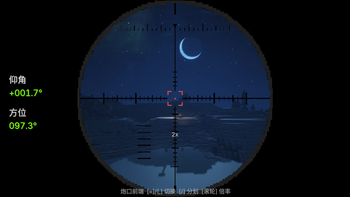
Simple Scope lets you operate assembled cannons through a clear and responsive aiming interface. Use mouse-driven remote head aiming to move the cannon toward your camera direction, while the green actual-muzzle reticle shows the cannon’s real firing direction.

The mod supports Create Big Cannons original mounts, fixed mounts, cannon carts, and CBC Compact Mount assemblies. It also includes compatibility handling for Sable physicalized contraptions.

Features

  • Mouse-driven remote head aiming
  • Green actual muzzle reticle
  • Linked lower-left range indicators
  • Remote firing with a rebindable mouse key
  • CBC redstone firing logic compatibility
  • Gear-driven turret takeover detection
  • Head aiming pauses when gears are controlling the turret
  • Two switchable scope views
  • 2x, 4x, and 8x magnification
  • Smooth client-side reticle movement with subpixel rendering
  • Automatic handling for Sable physicalized coordinates
  • Prevents movement keys from interfering while scoped
  • All controls can be changed in the Minecraft keybind menu

Compatibility

  • Minecraft 1.21.1
  • NeoForge
  • Create Big Cannons 5.11.7–5.11.x
  • CBC Compact Mount — optional
  • Sable — optional compatibility
  • Create: Aeronautics — optional compatibility

Install the mod on both the client and server.

Controls

  • = — Scope View A
  • , — Scope View B
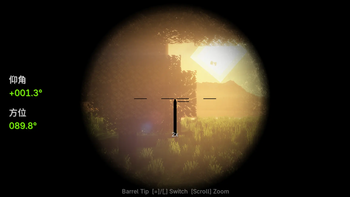
  • Numpad / — Switch reticle style
  • H — Toggle remote head aiming
  • Left Mouse Button — Remote fire
  • Mouse Wheel — Change magnification

All controls are rebindable under:

Options → Controls → CBC Scope

How to Use

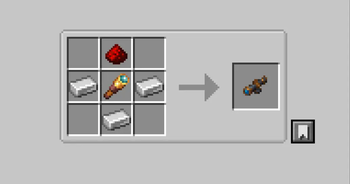
  1. Right-click a cannon block or assembled cannon with the scope connector.
  2. Put the connector in your backpack or inventory.
  3. Enter the scope view.
  4. Enable head aiming with H.
  5. Move the mouse to guide the cannon.
  6. Use the green reticle to observe the actual muzzle direction.
  7. Press the fire key to trigger the cannon through CBC firing logic.

For assembled cannons, bind the connector after the cannon assembly is complete for the most accurate tracking.

Important Notes

When a turret is being driven by gears, mechanical control takes priority and remote head aiming is temporarily disabled. This prevents the scope from fighting against Create’s mechanical rotation.

The actual cannon firing result is still determined by CBC’s normal loading, ammunition, cooldown, and redstone rules.


这是一个为 Create Big Cannons 制作的精确瞄准镜附属模组。

Simple Scope 允许你通过开镜视角操作已经组装完成的火炮。开启鼠标头瞄后,炮台会跟随镜头方向移动;绿色“实际炮口准星”会显示炮管真实的射击方向,帮助你判断炮口是否已经追上镜头中心。

模组支持 CBC 原版炮台底座、固定炮台、炮车以及 CBC Compact Mount 紧凑炮台底座,并针对 Sable 物理化结构提供坐标兼容处理。

主要功能

  • 鼠标远程头瞄
  • 绿色实际炮口准星
  • 左下角联动距离刻度
  • 可重绑定的远程开火键
  • 兼容 CBC 原版红石开火逻辑
  • 检测齿轮驱动接管
  • 齿轮控制炮台时自动暂停头瞄
  • 两种可切换开镜视角
  • 2 倍、4 倍、8 倍放大倍率
  • 约 100ms 的平滑准星移动
  • 浮点坐标绘制,减少逐像素跳动
  • 自动处理 Sable 物理化结构坐标
  • 开镜时屏蔽移动键干扰
  • 所有按键均可在设置中修改

兼容性

  • Minecraft 1.21.1
  • NeoForge
  • Create Big Cannons 5.11.7–5.11.x
  • CBC Compact Mount(可选)
  • Sable(可选兼容)
  • Create: Aeronautics(可选兼容)

请在客户端和服务器端都安装本模组。

默认按键

  • =:开镜视角 A
  • ,:开镜视角 B
  • 小键盘 /:切换瞄准镜素材
  • H:开启或关闭远程头瞄
  • 鼠标左键:远程开火
  • 鼠标滚轮:切换放大倍率

所有按键都可以在以下菜单中重新绑定:

选项 → 按键控制 → CBC Scope

使用方法

  1. 手持瞄准镜连接器右键点击炮管或已组装火炮。
  2. 将连接器放入背包或物品栏。
  3. 进入开镜视角。
  4. 按 H 开启头瞄。
  5. 移动鼠标控制炮台方向。
  6. 观察绿色准星确认真实炮口方向。
  7. 按下开火键,通过 CBC 的正常开火逻辑发射炮弹。

对于组装炮台,建议在炮台组装完成后再进行绑定,以获得更准确的炮口追踪效果。

注意事项

当炮台正在被齿轮驱动时,机械控制会优先接管炮台,远程头瞄会自动暂停,避免瞄准系统与 Create 的机械旋转互相冲突。

实际能否开火仍由 CBC 的装填状态、弹药、冷却时间和红石输入规则决定。

Галерея
Последние версии

Все версии →
beta

Create Big Cannons:Simple Scope 2.2.1

2.2.1
13 сент. 2026 г.2,1 тыс.Minecraft: 1.21.1neoforge
Скачать
Что нового
Turret adapted for the HeadTrack—turret assembled from two turret bases in CBC-CompactMount Fixed the issue where the barrel direction didn't match the center of the view when aiming down sights (how it works now: when you aim down sights, the barrel moves toward the center of the view, and a green outline shows the actual aiming direction of the turret) 为头瞄适配了—CBC-CompactMount-中的两个炮台底座组装的炮台。 修复了头瞄启用时炮管实际方向与镜头中心不重合问题。(解决逻辑:开启头瞄时,炮口方向会向镜头中心靠拢,同时添加了绿色框线标识炮台实际瞄准方向)
alpha

Create Big Cannons:Simple Scope 2.2.0

Patch.1
12 сент. 2026 г.99Minecraft: 1.21.1neoforge
Скачать
Что нового
Added a head-aiming feature to the turret assembled on the original turret base (no need to connect to stress, use as needed).Also, you can fire directly with the left click, no extra redstone signal required. 为原版的炮台底座组装的炮台添加了头瞄功能(无需接入应力,按需使用)。并且左键可直接开炮,无需额外红石信号.
release

Create Big Cannons:Simple Scope 2.0.0

2.0.0
11 сент. 2026 г.396Minecraft: 1.21.1neoforge
Скачать
Что нового
Main Changes - In short, it’s just better - In short, it’s just better - In short, it’s just better - Completed core scope refactor: Target binding now uses cannon UUID and local coordinates instead of guessing based on nearby cannons. - Rewrote barrel geometry positioning: Directly reads cannon structure and orientation from Create Big Cannons, supports both positive and negative axes, and calculates scope position based on actual barrel end. - Fixed coordinate issues after Sable physicalization: Uses a consistent frame for coordinate projection to avoid scope drift or misalignment. - Added target caching and safe exit: When cannon, connector, dimension, or camera coordinates are abnormal, the view automatically restores, no more black screens or wrong camera states. - Improved zooming experience: Supports 2×/4×/8× zoom, automatically stays in first-person when zooming, hides first-person hand model and irrelevant HUD layers. - Optimized compatibility: Particle suppression now only affects areas near the current barrel, no longer globally blocks Create Big Cannons projectile particles; mouse firing is not blocked. ## Scope Assets and Keybinds - Classic scope textures are retained, with added Minecraft pixel-style artillery scope textures. - Numpad `/` switches between the two types of scope textures; this key can be rebound in Minecraft key settings. - Scope item icon changed to the mod's own 16×16 texture, no longer referencing the vanilla spyglass texture. - Default keys: `=` attaches to barrel top, `,` attaches to barrel muzzle; mouse wheel changes zoom level. ## Compatibility - Minecraft 1.21.1 - NeoForge 21.1.x - Create Big Cannons 5.11.7 mc.1.21.1 - Sable is optional; static cannon aiming works fine even if Sable is not installed. - Old static connector data can still be read; after upgrading, no need to remake existing connectors. - In short, it’s just better - In short, it’s just better - In short, it’s just better
beta

Create Big Cannons:Simple Scope 1.2.0

1.2.0
22 июл. 2026 г.2,2 тыс.Minecraft: 1.21.1neoforge
Скачать
Что нового
Compatible with CBC: Compact Mount 兼容CBC: Compact Mount
release

Create Big Cannons:Simple Scope 1.1.5

1.1.5
22 июл. 2026 г.245Minecraft: 1.21.1neoforge
Скачать
Что нового
Fixed: muzzle-tip view (, key) blocked by cannon barrel after CBC 5.11.7 + Sable 2.0.3 update — forward camera offset increased by 1 block. Env: MC 1.21.1 · CBC 5.11.3~ 5.11.7 · Sable 1.2.2 ~ 2.0.3 · Aeronautics 1.3.0 修复:CBC 5.11.7 + Sable 2.0.3 更新后,炮口前方视角(, 键)被炮管遮挡——相机前向偏移 +1 格。 环境:MC 1.21.1 · CBC 5.11.3~5.11.7 · Sable 1.2.2 ~ 2.0.3 · Aeronautics 1.3.0
beta

Create Big Cannons:Simple Scope 1.1.4

1.1.4
18 июл. 2026 г.62Minecraft: 1.21.1neoforge
Скачать
Что нового
Fixed the conflict with sable: any rotation passed in by the caller was being multiplied by the chassis attitude quaternion once, causing camera issues (camera offset) Runtime environment: CBC 5.11.3, Sable 1.2.2; Create:Aeronautics 1.2.1 修复了与sable:任何调用者传入的旋转都会被叠乘一次底盘姿态四元数 的镜头冲突(镜头偏移) 运行环境:CBC 5.11.3 Sable 1.2.2 机械动力:航空学 1.2.1
beta

Create Big Cannons:Simple Scope 1.1.2

1.1.2
18 июл. 2026 г.36Minecraft: 1.21.1neoforge
Скачать