Craftpilot
AI based Minecraft building assistant.
Описание
Craftpilot





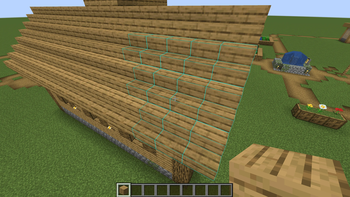
Craftpilot is your personal building assistant in Minecraft. As you build, it provides relevant suggestions through an easy-to-use overlay. Whether you're seeking inspiration for new structures or struggling with complex details, Craftpilot helps bring your creative vision to life. The assistant supports a wide variety of building styles and block palettes, making it a versatile tool for any Minecraft builder.
Setup
Craftpilot requires a companion program that runs the ML model. Here's how to get started:
Quick Start (Recommended)
- Download the latest release from the releases page
- Run the companion program
⚠️ Note: The ML model requires a modern GPU (NVIDIA recommended) for optimal performance. Without one, generation times may be significantly slower.
- Start Minecraft - Craftpilot will automatically connect to the local instance
Alternative Setup Options
- For Developers: You can run the companion program directly from source code. Clone the repo, install Python dependencies, and run it locally. This is useful for customization or troubleshooting.
- Advanced Configuration: The companion program can run on a remote server. Configure the connection URL in the mod settings to point to your desired server address.
Usage
-
Triggering Suggestions
- Place any block to begin a new build or continue an existing one. Suggestions will automatically appear.
- You can also manually trigger the suggestions without placing any block by pressing the trigger key (default R).
- Craftpilot will display suggested blocks as a transparent overlay.
-
Working with Suggestions
- Accept suggestions by placing blocks where they're shown.
- With easy place mode (enabled by default) you can place blocks exactly as they appear in the suggestions, without needing to worry about orientation or adjacent blocks. Simply right-click on the suggested block to place it in the correct orientation and state. In creative mode, you can even place blocks with an empty hand.
- As you build, new suggestions will automatically appear.
- Use the pick block function (middle mouse) on suggestions to quickly select blocks.
- Press the clear key (default Z) to clear all current suggestions.
- Remove individual suggestions by left-clicking (punching) them.
- Accept all of the suggested blocks at once by pressing the accept key (default V).
-
Building Flexibility
- Feel free to deviate from suggestions - the system will adapt.
- A grace period allows for placing a few different blocks before regenerating suggestions.
- This helps accommodate support blocks and minor adjustments.
-
Selecting Alternatives
- In addition to the main suggestions, several alternatives can also be generated. These can be seen as boxes next to the Craftpilot logo on the top right of the screen.
- Hold the select alternative key (default left alt) and use the scroll wheel or the hotbar keys to choose an option.
Performance Tuning
Running the ML model is very performance intensive and hardware dependent. There are thus several options / tradeoffs for performance. If the suggestions generate very slow, try reducing these. If the generation speed is okay, you can try increasing them. There are 3 main options that affect performance:
- Model Type - There are currently 2 different size models, Iron and Diamond. Iron is significantly smaller and faster than Diamond, but will provide lesser quality suggestions. If running on CPU, Diamond is almost impossible to run. With this setting on default it uses the model that the companion program has automatically chosen for your hardware.
- Suggestion Range - This changes the size of the structure sent to the model and thus directly affects the amount of computation it needs to do. Larger ranges exponentially increase the computation and memory requirements. Reducing this value will speed things up, but the suggestions will take into account less of the surrounding area.
- Max Alternatives - Each alternative the model calculates takes extra computation and memory. It will be fastest to set this to 1.
Customization
Settings can be edited in the config file "craftpilot.json" or on the configuration screen accessed through Mod Menu. Available settings include visual options (like overlay appearance), building behavior, and ML model parameters.
Галерея