COWMODSКаталог модов

Structure Block Tools

Useful Commands for Structure Block Management

Автор: Conure5121,6 тыс.14обновлён 16 сент. 2026 г.
УправлениеОптимизацияУтилиты

Описание

Structure Block Tools

This datapack gives the player several ways to edit the contents of a Structure Block bounding box, designed to be used when creating custom structure datapacks!

How to Use

  • Right-click any Structure Block (in Save mode) using a Blaze Rod to select that block. This works up to a range of 10 blocks (so if you've used attributes to boost your interaction range, you may need to get closer)
  • With the block selected, type any of the commands below to apply changes to the selected Structure Block's bounding box. No need to calculate the numbers for /fill commands and stuff like that.
  • Commands will update accordingly if you use the Structure Block UI to move/rescale the bounding box
  • When you're done editing, deselect the Structure Block with the command listed below

A full video explaining how to use the datapack can be found HERE

COMMANDS

Recommended command to run when you first install the datapack:

/gamerule commandModificationBlockLimit 110592

(this is the max possible volume of a structure bounding box)

Select Structure Block - Run this command while standing on top of the structure block

/function sbtools:select_structure_block

(this can also be accomplished by just right-clicking the block with a Blaze Rod)

Deselect Current Structure Block

/function sbtools:deselect_structure_block

All "Fill" commands will apply to the selected structure block's entire bounding box without the need for numerical input

Dynamic Fill - Acts a bit like the "Paint Bucket" in pixel art programs. The function's origin (usually the location where the player is standing) will be the starting point. dynamic_fill_voids and dynamic_fill_water replace only air by default.

/function sbtools:dynamic_fill_voids
/function sbtools:dynamic_fill_water
/function sbtools:dynamic_fill {fill:"[block to fill]",replace:"[block to replace]"}

Replace Fill - Replaces all instances of one block with another inside the bounding box

/function sbtools:replace_fill_voids
/function sbtools:replace_fill_water
/function sbtools:replace_fill {fill:"[block to fill]",replace:"[block to replace]"}

Total Fill - Completely fills the bounding box with the specified block

/function sbtools:total_fill_air
/function sbtools:total_fill_voids
/function sbtools:total_fill_water
/function sbtools:total_fill {fill:"[block to fill]"}

Note that for the fill and replace parameters in macros, block states {fill:"minecraft:oak_log[​axis=y]"} do work, and for replace, block tags {replace:"#minecraft:logs"} also work!

DO NOT run any of the commands that begin with sbtools:util/..., as these are "under-the-hood" functions and may break things if executed by a player.

Read more on the PlanetMinecraft Page

Галерея
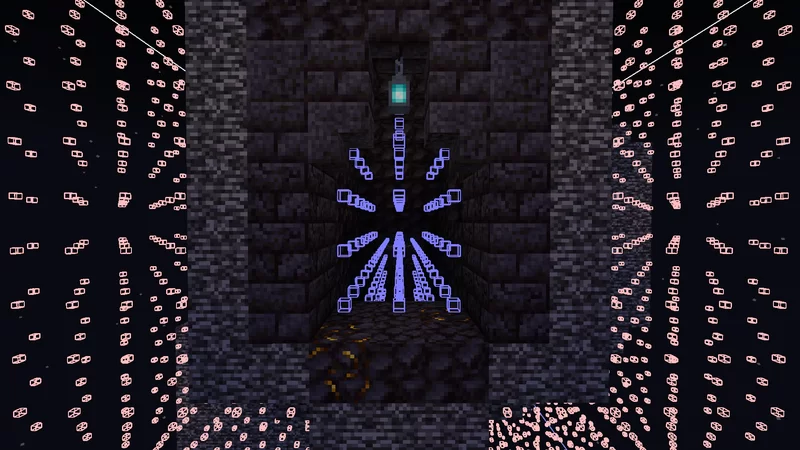
Fill Structure Voids only where you need them, with 1 command

Последние версии

Все версии →
release

26.3 Patch

2.1.2
16 сент. 2026 г.48Minecraft: 26.3datapack
Скачать
release

26.2 Patch

2.1.1
18 июн. 2026 г.271Minecraft: 1.21, 1.21.1, 1.21.2, 1.21.3, 1.21.4, 1.21.5, 1.21.6, 1.21.7, 1.21.8, 1.21.9, 1.21.10, 1.21.11, 26.1, 26.1.1, 26.1.2, 26.2datapack
Скачать
release

[Outdated] Squeeze-The-Box Update

2.1.0
10 апр. 2026 г.95Minecraft: 1.21, 1.21.1, 1.21.2, 1.21.3, 1.21.4, 1.21.5, 1.21.6, 1.21.7, 1.21.8, 1.21.9, 1.21.10, 1.21.11, 26.1, 26.1.1, 26.1.2datapack
Скачать
Что нового
Added function `sbtools:shrink_box_to_fit`: Decreases the size of the selected Structure Block's Bounding Box until the contained structure is perfectly fitted. - The box will stop shrinking when it encounters any block NOT listed in `#sbtools:ignore_when_shrinking`, which by default contains air, water, lava, and structure voids. - For very large bounding boxes, you may need to increase the value of the `max_command_sequence_length` gamerule in order for this function to work properly. (There are a ton of commands running, but each one is very lightweight, so overall this function is still less laggy than Dynamic Fill) - This function will **not** _increase_ the size of the bounding box, and I currently have no plans to implement such functionality. Added version compatibility going back to Minecraft 1.21, via the use of an Overlay. (There was only 1 function preventing this compatibility, making the overlay trivial to implement.)
release

[Outdated] A Long-Overdue Improvement

2.0.2
31 мар. 2026 г.39Minecraft: 1.21.5, 1.21.6, 1.21.7, 1.21.8, 1.21.9, 1.21.10, 1.21.11, 26.1, 26.1.1, 26.1.2datapack
Скачать
release

[Outdated] A Long-Overdue Improvement

2.0.1
31 мар. 2026 г.27Minecraft: 1.21, 1.21.1, 1.21.2, 1.21.3, 1.21.4datapack
Скачать
release

A Long-Overdue Improvement

2.0.0
31 мар. 2026 г.99Minecraft: 1.20.5, 1.20.6datapack
Скачать
Что нового
- All commands will now properly obey Structure Block Bounding Boxes that have been mirrored or rotated using the buttons in Load Mode. This issue affected all versions of the pack going back to its initial release, so I've made new versions of the pack for ALL supported Minecraft versions. - Older versions are now coherent and up to date with the newest one: newer pack features ("remove_all_entities" function, datapack info, uninstallability, and any optimization updates) have been backported to those versions
release

[Oudated] 26.1 Patch

1.3.1
25 мар. 2026 г.29Minecraft: 1.21.5, 1.21.6, 1.21.7, 1.21.8, 1.21.9, 1.21.10, 1.21.11, 26.1datapack
Скачать
release

[Oudated] Boxed Entities Update

1.3.0
9 дек. 2025 г.127Minecraft: 1.21.5, 1.21.6, 1.21.7, 1.21.8, 1.21.9, 1.21.10, 1.21.11datapack
Скачать
Что нового
Added function `sbtools:remove_all_entities` - clears all entities from the bounding box of the currently-selected Structure Block.
release

[Oudated] 1.21.9 Patch

1.2.2
30 сент. 2025 г.126Minecraft: 1.21.5, 1.21.6, 1.21.7, 1.21.8, 1.21.9, 1.21.10datapack
Скачать
Что нового
Removed Datapack Info advancements (they're very much going out of favor right now) Added new function `sbtools:datapack_info` that displays links to this Modrinth page and the discord server
release

[Oudated] 1.21.6 Patch

1.2.1
17 июн. 2025 г.191Minecraft: 1.21.5, 1.21.6datapack
Скачать