COWMODSКаталог модов

Control Blocks

Control Blocks are command blocks, but even better. Do more with less by coding with ControlScript, the mod exclusive Text-Based Coding Language

Автор: WebDemon3212обновлён 8 мая 2026 г.
ТехнологииУтилиты

Описание

Control Blocks Command Blocks You Script

Command blocks are great, and it unlocks so many options, and allows you to make incredible creations, but sometimes, for big projects it either gets much more complicated or too long! That is where this mod comes in, it allows you to code scripts in game that can be triggered in multiple ways such as:

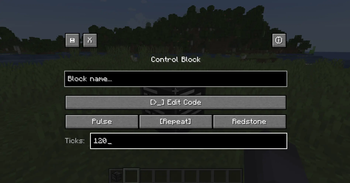
  • Power with redstone;
  • Powers each said tick;
  • Power each said tick on powered with redstone;

You can make minigames, tools, and way more with only one block! With an easy language made just for this mod, with full documentation called Control Script.

Check out our GitBook documentation to learn more in detail about ControlScript at this link.


What version is the mod compatible with?

I'm working to bring this mod to more and more versions/modloaders.

**Modloader:** Forge **Minecraft Version:** 1.20.1 to 1.20.6 **Platforms:** Curseforge & Modrinth


How to get one?

Control Blocks are like Command Blocks, you can only get them via commands.

/give @p controlblocks:control_block

Check the documentation for full info!


How to support this mod?

I do not yet accept donations, tho, you can share this mod and help it getting known if you want! Also, you can support it by creating a BisectHosting server with my affiliate link or even join my Discord server here.


DOCUMENTATION

This is not the full documentation, check the GitBook for the complete docs at this link.

Execution Modes

ModeDescription
PulseRuns once when it gets a redstone pulse
RepeatRuns every X ticks on its own
RedstoneRuns every X ticks, but only while powered
 

ControlScript

ControlScript is a small scripting language written from scratch for this mod — no external libraries, no Lua runtime. Just a clean language that talks directly to Minecraft.

What the language supports

  • Variables (var x = 10)
  • Math (+, -, *, /)
  • String concatenation (..)
  • Conditionals (if / elseif / else / end)
  • Comments (-- and --[[ ]])

Built-in Functions

FunctionDescription
log(message)Sends a message to all players in chat
run(command)Runs a Minecraft command (op level 4)
randint(min, max)Random integer between min and max
round(number)Rounds to nearest integer
abs(number)Absolute value
outpower(level)Sets redstone output of the block (0–15)
outpower(level, ticks)Pulses redstone output for X ticks then drops to 0
inpower()Reads the incoming redstone signal level (0–15)

Quick Example

var player = "@p"
var roll = randint(1, 6)

log("You rolled a " .. roll)
run(give player minecraft:diamond roll)

run() works with any mod's items and commands — not just vanilla.


See more like Custom Function, get() and more in our documentation at this link.


Made by Web Demon

Галерея
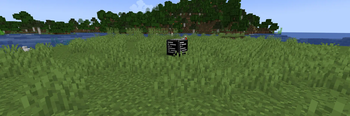
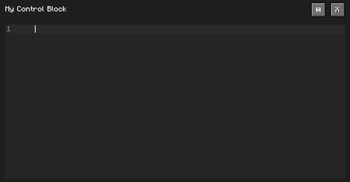
Control BlockControl Block ScreenScript Editor

Последние версии

Все версии →
release

Control Blocks 1.1.1

1.1.1
8 мая 2026 г.163Minecraft: 1.20, 1.20.1, 1.20.2, 1.20.3, 1.20.4, 1.20.5, 1.20.6forge
Скачать
Что нового
# [CHANGELOG] Control Blocks V1.1.1 ## Description Small Update **** ## New Features No highlighted new features. **** ## Other Changes - Made new updated texture;
release

Control Blocks 1.1.0

1.1.0
3 мая 2026 г.29Minecraft: 1.20, 1.20.1, 1.20.2, 1.20.3, 1.20.4, 1.20.5, 1.20.6forge
Скачать
Что нового
# [CHANGELOG] Control Blocks V1.1.0 ## Description No Description **** ## New Features ### Max Script Length Command You can now modify the max script length (in characters) per block with OP Level 4 via the command: <br/> `/controlblocks maxScriptLength <value>` <br/> The value must be within 1000 (1,000) and 50000 (50,000). > **Warning!** <br/> > Max Script Length is a Safety Guardrail to prevent NBT chunk ban. Be careful. <br/> ### Copy Before Crash Command You can now set true or false if your script will copy to clipboard in case it is bigger than the char limit and the editor closes without saving. Command: <br/> `/controlblocks copyBeforeCrash <true/false>` <br/> ### Help Command You can now get information on each command with the command:<br/> `/controlblocks help <command>` **** ## Other Changes - Added emoji's to success and error messages; - Added CHANGELOG.md; - Added ADDONS_README.md; - Added README.md; - Added Guardrail to prevent crashes when saving script longer than the limit; - Added `enabled` command to help command; - Added `maxIterations` command to help command; - Added `maxScriptLength` command to help command; - Added `copyBeforeCrash` command to help command; - Other bug fixes and improvements.
release

Control Blocks 1.0.0

1.0.0
2 мая 2026 г.30Minecraft: 1.20, 1.20.1, 1.20.2, 1.20.3, 1.20.4, 1.20.5, 1.20.6forge
Скачать
Что нового
## **Control Blocks 1.0.0 is now released!!** I'm glad to announce that the 1.0.0 version has now been released. This updates marks the start of the journey that is waiting for us. **** ### Changes While this update might not seem huge, it has been a big work to complete what I consider essential features to the mod. * **New `wait()` function!** You can now add pauses to your script in ticks with the wait() function. * **New maxIterations command!** You can now with OP level 4 change the maxIterations of loops. Try it now with the `/controlblocks maxIterations ` command. > **Warning** > Be careful when setting it higher than default; this is a safety guardrail feature to prevent crashes and damage to your world. Use care and only give OP level 4 to people you trust. * **Internal Script & Other Modifications** This update also revamped a part of the code for efficiency. * **Other bug fixes and improvements** **** ### For other Minecraft Versions (1.20.2 to 1.20.6) The mod has been barely tested on these versions. Feel free to contact me if you find any bugs! **** ### Other Join us on Discord https://discord.gg/4fsZsJXStw to share your creations and get support. Check out the official Documentation on GitBook: https://control-blocks-mod.gitbook.io/control-blocks-mod-docs
release

Control Blocks 0.9.0

0.9.0
8 мар. 2026 г.65Minecraft: 1.20.1forge
Скачать
Что нового
# Changelog ## [0.9.0] - 2026-03-05 ### Language - Added `while` loops — repeat while a condition is true - Added `for` loops — count from a start to an end value with an optional step - Added `function` — define reusable blocks of code with parameters - Added `return` — exit a function and optionally return a value - Added loop safety limit of 10,000 iterations to prevent server freezes ### get() Function - `get(time)` — current game time (0–24000) - `get(weather)` — returns `clear`, `rain`, or `thunder` - `get(players)` — number of players online - `get(light)` — block light level at the Control Block (0–15) - `get(biome)` — biome at the Control Block position - `get(biome, x, y, z)` — biome at specific coordinates - `get(block, x, y, z)` — block ID at specific coordinates - `get(player.health, target)` — player health (0–20) - `get(player.food, target)` — hunger level (0–20) - `get(player.air, target)` — air supply (0–300) - `get(player.level, target)` — XP level - `get(player.x/y/z, target)` — player coordinates - `get(player.name, target)` — player name - `get(player.gamemode, target)` — returns `survival`, `creative`, `adventure`, or `spectator` - Player targets: `@p`, `@r`, `@s`, or a player name/variable ### Editor - Syntax highlighting for keywords, functions, strings, numbers, comments and operators - Click to place cursor - Text selection via mouse drag or Shift+Arrow keys - Ctrl+C / Ctrl+X / Ctrl+V — copy, cut, paste - Ctrl+A — select all - Delete key support - Mouse scroll - Block name now shown in the editor header
release

Control Blocks 0.1.0

0.1.0
3 мар. 2026 г.34Minecraft: 1.20.1forge
Скачать
Что нового
First Testing Version of the Mod. Most early stage.