

Command Block Staff
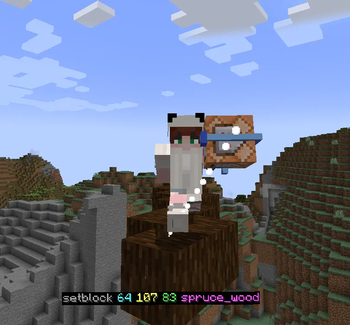
An add-on for AvM Staff Mod that turns the Command Block into a god-tier staff.
Автор: Pandzio213,2 тыс.15обновлён 16 окт. 2026 г.
СнаряжениеМеханики игрыМагия
Описание










An add-on for AvM Staff Mod that lets you slot a Command Block into your staff and wield command-powered abilities.
🚧 Dev Builds Test the newest features before the official release! ⚠️ Dev Builds may contain bugs, unfinished features, and other issues.
📥 Available exclusively on our Discord server. And now here!
Links


Requirements




Fabric additional mods



NeoForge additional mods

Closed-source · All-Rights-Reserved · by Pandzio21.
Галерея
Последние версии
Все версии →beta
Command Block Staff 0.4.5-dev2 Fabric
0.4.5-dev216 окт. 2026 г.190Minecraft: 1.21, 1.21.1fabric
Что нового
## 0.4.5-dev2 — dev build
**Multi-grab beam, Attack Master guard, Place Shield**
**Warning:** Not tested in game yet. Back up your world before trying it.
Changes since **0.4.5-dev1**.
### Added
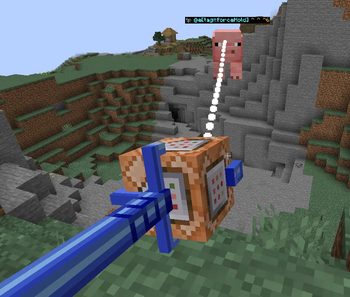
- **Beam multi-grab.** In Hold mode, hold sneak to pick up to 5 mobs or dropped items near you. Each one
gets a box, then a wireframe of its body. Right-click grabs them all. The beam splits into one branch
per target.
- **Shields on the beam.** A shield you grab, on its own or with other things, is held up at full size
facing where you aim. Arrows hit it instead of you, and it wears out and breaks.
- **Revive command** (Commands ability, next to Kill): brings back a mob the staff killed, with Kill or a
custom command, where it died. Pick it from the list of your kills.
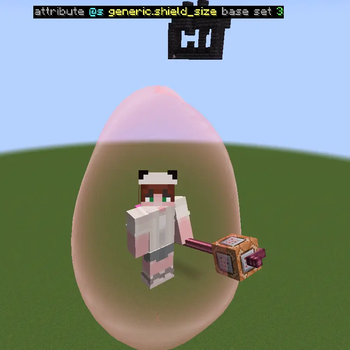
- **Place Shield** command. Puts a shield dome where you aim, or at coordinates you type in. You can
set how long it lasts; leave it empty and it stays until you take it down. Sneak + right-click your
shield with the Commands ability to open its menu: let players in, change its size or take it down.
- **Floor Maker: Platform.** Tab + right-click switches between a path and a 5x5 platform.
- **Riding:** the rise / boost / land keys are shown at the top of the screen, and the beam goes around
you instead of through you.
- **Colour settings:** a colour picker next to the button and a box for hex codes like `#3A7BFF`.
- **Block selection:** a list of mods on the right - pick Minecraft or one mod to see only its blocks.
- **Mod Menu** opens the add-on's own menu.
- **More hints** at the top of the screen for every mode.
### Changed
- **Attack Master is a Unique enchantment** - a new kind: it glints orange instead of purple, and a
book holding it has an orange name. It is not made at the enchanting table or sold by librarians any more: it is
found in bastion chests, and rarely. When you come near the chest that holds it, at least three Piglin
Brutes are already waiting there. Its own key (G, also a quickbind) turns it on and off, and a client
setting decides whether it starts off.
- **The Attack Master hammer.** Anything that keeps hitting you - a Warden, say - is thrown back hard,
and the wall is lifted over it and brought down on it again and again until it dies, unless it gets
back to you first. A Warden is noticed from much further off, its sonic boom is blocked - shove
included - and it goes straight to the hammer.
- **Attack Master** now protects you, while Placement is the selected ability. When something is about to attack you, it turns you towards it and
puts a Defense Wall in between. If the attacker gets close, the wall pushes them back. One level only,
and it has its own book texture. It raises the wall by itself; with no block selected the wall is
cobblestone. While it guards you, the staff points at the wall, the beam
runs to it and you hear it start and stop. It fights back too: hits from in front are blocked and
answered with a counter-blow, and when the attacker comes close the wall is slammed into them and
throws them back.
- **Build Modifier** is now called **Staff Modifier**. Same key (Tab).
- **TNT** and **Advanced projectile mode** are held like everything else on the beam: same movement,
same bending beam, same throw.
- Right-click keeps the staff pointed instead of swinging it.
- The Defense Wall beam bends behind the wall when you swing it, like the grab beam.
- Menu background icons use the colours of their textures, and can be turned off.
- The settings widget can be closed and moved further.
- The projectile launcher has its own check and cross icons, more room around the selected projectile,
and lists the keys for each mode.
- **Shield Menu** (was Shield Whitelist): your shields are listed on the left - your own dome, then
Shield (1), Shield (2)... for the ones you placed. Click one to open its menu.
- While your Shield is up, your staff arm is held out with the staff raised.
- Control projectiles: hold Tab + right-click to keep loading projectiles.
- Packs use a gift icon.
### Fixed
- Defense Wall lag, and wall blocks that stayed in the world. It also no longer removes the ground
it passed through a moment later.
- Electrify:
- no weapon-raise animation when moving to a new block;
- blocks get electrified while you hold right-click;
- the billboard goes away;
- electrified blocks can be broken in Creative;
- hitting one shocks you without sneaking.
- TNT in Advanced projectile mode explodes again.
- Advanced projectile mode no longer drops what it holds right away; scroll moves it in and out.
- The pause and title screen button sits in the right place on Fabric.
- The staff in the riding HUD lies flat.
- The block filter button no longer covers the Packs view.
- The first-person beam starts at the staff tip again.
beta
Command Block Staff 0.4.5-dev2 NeoForge
0.4.5-dev216 окт. 2026 г.151Minecraft: 1.21, 1.21.1neoforge
Что нового
## 0.4.5-dev2 — dev build
**Multi-grab beam, Attack Master guard, Place Shield**
**Warning:** Not tested in game yet. Back up your world before trying it.
Changes since **0.4.5-dev1**.
### Added
- **Beam multi-grab.** In Hold mode, hold sneak to pick up to 5 mobs or dropped items near you. Each one
gets a box, then a wireframe of its body. Right-click grabs them all. The beam splits into one branch
per target.
- **Shields on the beam.** A shield you grab, on its own or with other things, is held up at full size
facing where you aim. Arrows hit it instead of you, and it wears out and breaks.
- **Revive command** (Commands ability, next to Kill): brings back a mob the staff killed, with Kill or a
custom command, where it died. Pick it from the list of your kills.
- **Place Shield** command. Puts a shield dome where you aim, or at coordinates you type in. You can
set how long it lasts; leave it empty and it stays until you take it down. Sneak + right-click your
shield with the Commands ability to open its menu: let players in, change its size or take it down.
- **Floor Maker: Platform.** Tab + right-click switches between a path and a 5x5 platform.
- **Riding:** the rise / boost / land keys are shown at the top of the screen, and the beam goes around
you instead of through you.
- **Colour settings:** a colour picker next to the button and a box for hex codes like `#3A7BFF`.
- **Block selection:** a list of mods on the right - pick Minecraft or one mod to see only its blocks.
- **Mod Menu** opens the add-on's own menu.
- **More hints** at the top of the screen for every mode.
### Changed
- **Attack Master is a Unique enchantment** - a new kind: it glints orange instead of purple, and a
book holding it has an orange name. It is not made at the enchanting table or sold by librarians any more: it is
found in bastion chests, and rarely. When you come near the chest that holds it, at least three Piglin
Brutes are already waiting there. Its own key (G, also a quickbind) turns it on and off, and a client
setting decides whether it starts off.
- **The Attack Master hammer.** Anything that keeps hitting you - a Warden, say - is thrown back hard,
and the wall is lifted over it and brought down on it again and again until it dies, unless it gets
back to you first. A Warden is noticed from much further off, its sonic boom is blocked - shove
included - and it goes straight to the hammer.
- **Attack Master** now protects you, while Placement is the selected ability. When something is about to attack you, it turns you towards it and
puts a Defense Wall in between. If the attacker gets close, the wall pushes them back. One level only,
and it has its own book texture. It raises the wall by itself; with no block selected the wall is
cobblestone. While it guards you, the staff points at the wall, the beam
runs to it and you hear it start and stop. It fights back too: hits from in front are blocked and
answered with a counter-blow, and when the attacker comes close the wall is slammed into them and
throws them back.
- **Build Modifier** is now called **Staff Modifier**. Same key (Tab).
- **TNT** and **Advanced projectile mode** are held like everything else on the beam: same movement,
same bending beam, same throw.
- Right-click keeps the staff pointed instead of swinging it.
- The Defense Wall beam bends behind the wall when you swing it, like the grab beam.
- Menu background icons use the colours of their textures, and can be turned off.
- The settings widget can be closed and moved further.
- The projectile launcher has its own check and cross icons, more room around the selected projectile,
and lists the keys for each mode.
- **Shield Menu** (was Shield Whitelist): your shields are listed on the left - your own dome, then
Shield (1), Shield (2)... for the ones you placed. Click one to open its menu.
- While your Shield is up, your staff arm is held out with the staff raised.
- Control projectiles: hold Tab + right-click to keep loading projectiles.
- Packs use a gift icon.
### Fixed
- Defense Wall lag, and wall blocks that stayed in the world. It also no longer removes the ground
it passed through a moment later.
- Electrify:
- no weapon-raise animation when moving to a new block;
- blocks get electrified while you hold right-click;
- the billboard goes away;
- electrified blocks can be broken in Creative;
- hitting one shocks you without sneaking.
- TNT in Advanced projectile mode explodes again.
- Advanced projectile mode no longer drops what it holds right away; scroll moves it in and out.
- The pause and title screen button sits in the right place on Fabric.
- The staff in the riding HUD lies flat.
- The block filter button no longer covers the Packs view.
- The first-person beam starts at the staff tip again.
beta
Command Block Staff 0.4.5-dev1 Fabric
0.4.5-dev116 окт. 2026 г.6Minecraft: 1.21, 1.21.1fabric
Что нового
## 0.4.5-dev1 — dev build
**Everything since 0.4.0, first build out the door**
**Warning:** Nothing here has been played outside a compiler. Electrify, the Defense Wall and the first-person beam all changed this week - test on a copy of your world, not your main one.
Everything since **0.4.0**. The largest release so far: Create: Aeronautics support, the staff usable
in your off hand, a menu of our own, `execute raycast`, a settings screen that can be navigated, an
ability lock that actually locks, and the handler cut from 8481 lines to 1418.
### Added
#### Other mods
**Create: Aeronautics support.** Grab one of its physics contraptions with the Beam and steer it by
look, freeze it in place with Electrify plus right-click, thaw it with the un-electrify key, and
rotate or lock what you are carrying.
All of it through reflection, deliberately. The `simulated` mod that owns those contraptions is
NeoForge and 1.21.1 only, while this add-on builds against 1.21 and ships for Fabric as well, and its
classes are not published to any public Maven — so a compile-time dependency would tie the build to a
jar that cannot exist on half the targets and does not exist as anything but a file path anywhere
else. Nothing is bundled, and with the mod absent every call is a no-op. Methods are found by name and
by handing them the real objects to see which overload accepts them, never by naming Minecraft classes:
the one we want is spelled one way under NeoForge's production mappings, another under Fabric's, and a
third in dev.
**The staff aims at what it is holding.** In first person the model tilts toward whatever it currently
controls — a beamed mob, a beamed player, a held surface, a carried contraption. Create: Aeronautics
does this with its physics staff and it reads well: the staff visibly *aims* at the thing rather than
sitting in a fixed pose while something floats around. The angles are relative to where the camera
points and clamped, because a small lead reads as aiming and a large one reads as the staff having
come loose.
#### The staff itself
**The staff works in your off hand.** It used to be read out of the main hand in about eighty places,
and off-hand use was blocked outright because half-supporting it was worse than not supporting it —
the shield and the beam fired from the off hand while every keybind, packet and tick still looked at
the main hand, so adjusting, releasing and the staff light all quietly did nothing. One helper now
answers "which hand is it in", and every existing check reads the same as before while starting to
work when the staff is in the other hand.
**A tooltip on the staff** — one line idle, the whole control list on Shift, only for a staff with a
command block in it. Keys are read back from your actual bindings, so rebinding cannot make it lie.
Contraption controls are listed only when the mod that provides them is installed.
**Quickbinds.** The bindable-action system reworked and renamed, with its own screen and its own key
(`Open Quickbinds`). Each action mirrors what the built-in key already does rather than
reimplementing it, so there is one copy of the behaviour and the two cannot drift apart.
**Ride HUD** — a flat greyscale image of your actual staff above the hotbar while you ride it. It is
the real model, rod, head and whatever is socketed in it, rendered once into an offscreen buffer and
kept as a sprite. Creative and survival keep separate positions, because survival stacks health and
hunger above the hotbar and creative does not. A white rider figure built from your own skin pixels
ships with it but is off by default (`rideHudShowRider`).
#### Commands
**`execute raycast <block|entity|item|all> run <command>`** — a staff-only addition to the custom
command language. It answers the thing that is genuinely awkward in vanilla: acting on *what you are
looking at*. Vanilla can select by area, by tag, by score, but "that one, under my crosshair" needs a
marker entity or a chain of `positioned`/`facing` gymnastics. The staff already knows where you aim,
so the line just says so — `execute raycast entity run kill`.
**Command beams** — short-lived beams fired at everything a command hit, drawn by the same renderer
as the Beam ability, so a kill looks like the staff striking rather than like a separate effect that
happens to point the same way.
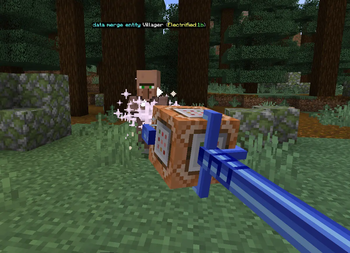
**Effect billboards** — vanilla's own status-effect widgets floating over whoever the staff just
affected.
**A kill confirmation prompt**, with a per-player preference to skip it. The prompt is decided on the
server, where the kill happens; the preference is yours, so the client reports it on join and whenever
it changes.
**A server-side blacklist** — blocked blocks and blocked command words. The word list applies the
instant you type it rather than on Save: the rest of that screen is values you are still adjusting,
but a blocked word is a rule, and bundling the two is how a rule ends up looking like it did not save.
#### Abilities
**Fill: Replace** — a third fill mode beside Solid and Air. It changes only the blocks that are
already there and leaves the air alone, which is what lets you re-skin a building without filling in
the rooms inside it. Separately switchable in the ability tree, so a server can disable that one mode
without disabling Fill.
**Tab + right-click changes the current mode's sub-mode** — Place / Replace / Air inside Single Block,
solid / air inside Fill, Move / Resize inside Move Surface, and the shape inside Shaper. The hint
appears only where a sub-mode exists, and the click is only swallowed when there was something to
change.
**A projectile bar for Normal and Advanced modes** — the same row of buttons Control mode has, in the
same corner of the screen, stepped through with Tab + scroll. It holds no selection of its own: every
frame it asks what is actually selected, so the bar, the launcher and the V menu cannot disagree.
**Food joins the control-projectile pool.** It is the one projectile you can catch and throw back
without hurting anybody, and it was the one you could not keep.
**Beam: "No need to hold"** — client setting, off by default. Grab something, let go of right-click,
and it stays on the beam until you click again.
**Electrify reveal range** — client setting, 4 to 30 blocks, 10 by default. Electrification is
permanent until cleared, so a world played in for a while accumulates plenty, and drawing all of it at
once is both unreadable and expensive.
**The advanced electrify outline** — the game's own glow traced around every part of the model rather
than a bounding box. It follows the model exactly, which a box can never do.
**Three Electrify server switches** — show particles (on), deals damage (off), reacts to copper (off).
The last two are switches over behaviour that already existed: electrified copper and water have
always shocked everything within five blocks. Off by default because they change the game.
#### Interface
**A mod menu of our own**, on the title screen and the pause screen. Configure (Server settings /
Client settings), Modrinth, CurseForge, Report an issue. The button is placed the way Create places
its own — anchored by a widget's *label* rather than by geometry, so it stays put across window
resizes and GUI-scale changes, and it drops one row when Create's own button is in that spot. Server
settings is greyed with a reason on hover instead of failing after you click it, and the two reasons
differ: from the title screen there is no server to ask; in a world without permission there is one
that will refuse.
**Settings grouped by ability.** Three tabs — General, Abilities, HUD — with Abilities carrying a
second row: Beam, Electrify, Placement, Projectile, Shield, Commands, Mixed. It replaces a "Custom"
tab of eighteen unrelated sliders in which nothing told you which ability a setting belonged to.
**Search and Show all**, on the client screen and the server screen alike. Sub-tabs answer "where does
this live", which is the right question once you know the answer; search is for "I know it is called
something like wobble". The server screen gains the ability row the client one already had.
**A floating panel of an ability's own settings**, over the Projectile, Placement, Shield and Commands
screens. Change arrow speed without leaving the launcher, opening settings, finding the tab and coming
back. Drag it by its header bar, stretch it by the left, right and bottom edges, and the edge under
your pointer lights up so you can tell they are grabbable. Client settings only — a
server-authoritative value is not a client's to change. Switch for the whole thing in Mixed.
**A drifting watermark behind the ability screens** — an even sheet of white marks leaning 30 degrees,
sliding forever towards the bottom right, under a dark wash.
**Hue sliders for the ability boxes**, selected and unselected, 0 to 360. A hue turn rather than a
tint, so the frame and the highlights survive instead of going dark with the colour.
**The HUD hides with F1.** F1 is the screenshot key — it hides the hotbar, the crosshair, chat,
everything — and an overlay that keeps drawing through it is the one thing ruining the shot, which is
exactly the situation for a mod whose HUD is the interesting part of the frame.
#### Cosmetic
**The Crown of King Orange shows on four-legged mobs.** Vanilla draws head equipment through a
renderer bound to `ModelWithHead`, and a pig's model does not implement it — so the crown really was
on the pig and nothing ever put it on screen. Vanilla's own head-item pipeline, pointed at the head
part instead of at the interface, so the crown's authored display entry applies exactly as it already
did on a player.
### Changed
- The bottom ability row moves aside for the off-hand slot when the staff is in your off hand — by 29
pixels, the width of the vanilla texture rather than a number that looked about right. Left-handed
players get the mirror of it for free.
- A switched-off ability goes dark in the HUD — frame, title, icon and number together — and the
ability scroll steps straight over it to the next one that works. An ability with modes counts as
gone only when every mode under it has gone.
- With every ability switched off, nothing is drawn as selected. Highlighting a box that cannot do
anything says the wrong thing.
- The veil over a disabled box is drawn in three bands, leaving the four corner pixels clear, so it
does not square off corners the art deliberately rounds.
- `/commandstaff settings` no longer vanishes for non-operators. A gated command does not exist for
anyone else, so typing it returned "Unknown command" — which reads as a broken mod rather than as a
permission you lack. The check moved inside where it can say so; the screen still re-checks
server-side before applying anything.
- Electrified sparks stop after under a second instead of streaming from every electrified entity
every tick, forever, in every dimension. Sparks announce that something *became* electrified; the
reveal outline is what says it still is.
- Custom projectiles are not on the quick bar. They stay in the launcher, where they can be named and
edited; on a bar you scroll past mid-fight they would mean scrolling through however many you have
defined to reach the four that are always there.
- Settings screens flow into up to four columns as the list needs them, centred as a block, with rows
per column taken from the window height instead of a fixed eight.
- The quickbind screen stops typing when you are plainly done: clicking empty space or a key slot
drops the caret, so the next key you press becomes the binding instead of landing in the search box.
- The settings background follows where you are — it dims the world in-game and stays opaque in the
main menu, where there is nothing worth showing through.
- The scroll hints disappear entirely when "Adjust needs its key" is off, rather than just dropping
the key name. With the setting off there is no gesture left to teach.
### Removed
- **Shift + right-click no longer cycles Single Block or Fill modes.** Tab + right-click already did
both, so this removes a duplicate rather than a capability — and the shift version meant that
sneaking near a ledge quietly changed what your next click would do.
- The `now: {mode}` tail on the Single Block hint, and the per-mode hints that taught a different key
for each sub-mode. Four ways to do one thing was the problem the gesture was meant to solve.
- The control-pool bitmask — a packet, a client object and a registration for a feature that had lost
its reader and, it turned out, never had a writer either.
- The menu-layout and ride-HUD gizmos. A debug tool left in a release is a debug tool somebody
eventually opens by accident.
### Fixed
- **The ability lock actually locks.** Disabling an ability only stopped it if it went through `use()`
— which is why Beam looked like the only one that respected the lock, Beam being the one `use()`
ability. Everything else has at least one action driven by a packet instead: Commands casts through
one, Electrify has its own click packet, the defence wall is pushed, released and re-grabbed by
packets, and none of them asked whether the ability was switched off. Twenty-two more packets now
check. Config, sync and request packets are left alone on purpose: reading a structure list is not
doing the thing.
- **Show all on the server settings screen left the ability row up.** It hides now, under the same two
conditions as the client's — Show all on, or a search typed — and the strip it leaves says why it is
empty.
- **The settings panel moved sliders you never touched.** It forwarded every drag to every row, and a
slider takes its value straight from the pointer's x without asking whether the pointer is near it,
so the smallest movement while a button was down sent every slider to the cursor. It now remembers
which row took the click and forwards to that one alone.
- The mod-menu button **never appeared on the pause screen** in a real game. It was matched with
`javaClass.simpleName`, which works in the development runtime and matches nothing once the class is
remapped — the same trap as a mixin without a refmap.
- The mod-menu button **walked down the screen on every resize.** A screen re-runs `init` on resize,
the search for "Create's button" looked for a 20×20 square in the left gutter, and *our* button is a
20×20 square in the left gutter — so each resize found the previous one and placed a new one under it.
- **A crash when a frame had nothing to draw.** Holding shift out of electrify range took the game
down: the buffer throws when it is empty rather than drawing nothing. Having nothing to draw is a
normal outcome, not an error. Guarded in seven renderers.
- The advanced electrify outline had been tried once before and appeared to do nothing. The hook was
never the problem: entities were being dropped from the electrified set every tick by the other
dimensions' ticks, so there was never anything to outline.
- The mod-menu logo was drawn with the overload that *crops* at 1:1 rather than scaling, so it was
showing the top-left corner of a 1024-wide image.
- Pressing the Change Ability Mode key inside Shaper scrolled through shapes instead of cycling
placement modes.
- The scrollbar on the Blocks tab was drawn but never grabbable.
- The search box says `Search`, with a capital S, on both settings screens.
beta
Command Block Staff 0.4.5-dev1 NeoForge
0.4.5-dev116 окт. 2026 г.8Minecraft: 1.21, 1.21.1neoforge
Что нового
## 0.4.5-dev1 — dev build
**Everything since 0.4.0, first build out the door**
**Warning:** Nothing here has been played outside a compiler. Electrify, the Defense Wall and the first-person beam all changed this week - test on a copy of your world, not your main one.
Everything since **0.4.0**. The largest release so far: Create: Aeronautics support, the staff usable
in your off hand, a menu of our own, `execute raycast`, a settings screen that can be navigated, an
ability lock that actually locks, and the handler cut from 8481 lines to 1418.
### Added
#### Other mods
**Create: Aeronautics support.** Grab one of its physics contraptions with the Beam and steer it by
look, freeze it in place with Electrify plus right-click, thaw it with the un-electrify key, and
rotate or lock what you are carrying.
All of it through reflection, deliberately. The `simulated` mod that owns those contraptions is
NeoForge and 1.21.1 only, while this add-on builds against 1.21 and ships for Fabric as well, and its
classes are not published to any public Maven — so a compile-time dependency would tie the build to a
jar that cannot exist on half the targets and does not exist as anything but a file path anywhere
else. Nothing is bundled, and with the mod absent every call is a no-op. Methods are found by name and
by handing them the real objects to see which overload accepts them, never by naming Minecraft classes:
the one we want is spelled one way under NeoForge's production mappings, another under Fabric's, and a
third in dev.
**The staff aims at what it is holding.** In first person the model tilts toward whatever it currently
controls — a beamed mob, a beamed player, a held surface, a carried contraption. Create: Aeronautics
does this with its physics staff and it reads well: the staff visibly *aims* at the thing rather than
sitting in a fixed pose while something floats around. The angles are relative to where the camera
points and clamped, because a small lead reads as aiming and a large one reads as the staff having
come loose.
#### The staff itself
**The staff works in your off hand.** It used to be read out of the main hand in about eighty places,
and off-hand use was blocked outright because half-supporting it was worse than not supporting it —
the shield and the beam fired from the off hand while every keybind, packet and tick still looked at
the main hand, so adjusting, releasing and the staff light all quietly did nothing. One helper now
answers "which hand is it in", and every existing check reads the same as before while starting to
work when the staff is in the other hand.
**A tooltip on the staff** — one line idle, the whole control list on Shift, only for a staff with a
command block in it. Keys are read back from your actual bindings, so rebinding cannot make it lie.
Contraption controls are listed only when the mod that provides them is installed.
**Quickbinds.** The bindable-action system reworked and renamed, with its own screen and its own key
(`Open Quickbinds`). Each action mirrors what the built-in key already does rather than
reimplementing it, so there is one copy of the behaviour and the two cannot drift apart.
**Ride HUD** — a flat greyscale image of your actual staff above the hotbar while you ride it. It is
the real model, rod, head and whatever is socketed in it, rendered once into an offscreen buffer and
kept as a sprite. Creative and survival keep separate positions, because survival stacks health and
hunger above the hotbar and creative does not. A white rider figure built from your own skin pixels
ships with it but is off by default (`rideHudShowRider`).
#### Commands
**`execute raycast <block|entity|item|all> run <command>`** — a staff-only addition to the custom
command language. It answers the thing that is genuinely awkward in vanilla: acting on *what you are
looking at*. Vanilla can select by area, by tag, by score, but "that one, under my crosshair" needs a
marker entity or a chain of `positioned`/`facing` gymnastics. The staff already knows where you aim,
so the line just says so — `execute raycast entity run kill`.
**Command beams** — short-lived beams fired at everything a command hit, drawn by the same renderer
as the Beam ability, so a kill looks like the staff striking rather than like a separate effect that
happens to point the same way.
**Effect billboards** — vanilla's own status-effect widgets floating over whoever the staff just
affected.
**A kill confirmation prompt**, with a per-player preference to skip it. The prompt is decided on the
server, where the kill happens; the preference is yours, so the client reports it on join and whenever
it changes.
**A server-side blacklist** — blocked blocks and blocked command words. The word list applies the
instant you type it rather than on Save: the rest of that screen is values you are still adjusting,
but a blocked word is a rule, and bundling the two is how a rule ends up looking like it did not save.
#### Abilities
**Fill: Replace** — a third fill mode beside Solid and Air. It changes only the blocks that are
already there and leaves the air alone, which is what lets you re-skin a building without filling in
the rooms inside it. Separately switchable in the ability tree, so a server can disable that one mode
without disabling Fill.
**Tab + right-click changes the current mode's sub-mode** — Place / Replace / Air inside Single Block,
solid / air inside Fill, Move / Resize inside Move Surface, and the shape inside Shaper. The hint
appears only where a sub-mode exists, and the click is only swallowed when there was something to
change.
**A projectile bar for Normal and Advanced modes** — the same row of buttons Control mode has, in the
same corner of the screen, stepped through with Tab + scroll. It holds no selection of its own: every
frame it asks what is actually selected, so the bar, the launcher and the V menu cannot disagree.
**Food joins the control-projectile pool.** It is the one projectile you can catch and throw back
without hurting anybody, and it was the one you could not keep.
**Beam: "No need to hold"** — client setting, off by default. Grab something, let go of right-click,
and it stays on the beam until you click again.
**Electrify reveal range** — client setting, 4 to 30 blocks, 10 by default. Electrification is
permanent until cleared, so a world played in for a while accumulates plenty, and drawing all of it at
once is both unreadable and expensive.
**The advanced electrify outline** — the game's own glow traced around every part of the model rather
than a bounding box. It follows the model exactly, which a box can never do.
**Three Electrify server switches** — show particles (on), deals damage (off), reacts to copper (off).
The last two are switches over behaviour that already existed: electrified copper and water have
always shocked everything within five blocks. Off by default because they change the game.
#### Interface
**A mod menu of our own**, on the title screen and the pause screen. Configure (Server settings /
Client settings), Modrinth, CurseForge, Report an issue. The button is placed the way Create places
its own — anchored by a widget's *label* rather than by geometry, so it stays put across window
resizes and GUI-scale changes, and it drops one row when Create's own button is in that spot. Server
settings is greyed with a reason on hover instead of failing after you click it, and the two reasons
differ: from the title screen there is no server to ask; in a world without permission there is one
that will refuse.
**Settings grouped by ability.** Three tabs — General, Abilities, HUD — with Abilities carrying a
second row: Beam, Electrify, Placement, Projectile, Shield, Commands, Mixed. It replaces a "Custom"
tab of eighteen unrelated sliders in which nothing told you which ability a setting belonged to.
**Search and Show all**, on the client screen and the server screen alike. Sub-tabs answer "where does
this live", which is the right question once you know the answer; search is for "I know it is called
something like wobble". The server screen gains the ability row the client one already had.
**A floating panel of an ability's own settings**, over the Projectile, Placement, Shield and Commands
screens. Change arrow speed without leaving the launcher, opening settings, finding the tab and coming
back. Drag it by its header bar, stretch it by the left, right and bottom edges, and the edge under
your pointer lights up so you can tell they are grabbable. Client settings only — a
server-authoritative value is not a client's to change. Switch for the whole thing in Mixed.
**A drifting watermark behind the ability screens** — an even sheet of white marks leaning 30 degrees,
sliding forever towards the bottom right, under a dark wash.
**Hue sliders for the ability boxes**, selected and unselected, 0 to 360. A hue turn rather than a
tint, so the frame and the highlights survive instead of going dark with the colour.
**The HUD hides with F1.** F1 is the screenshot key — it hides the hotbar, the crosshair, chat,
everything — and an overlay that keeps drawing through it is the one thing ruining the shot, which is
exactly the situation for a mod whose HUD is the interesting part of the frame.
#### Cosmetic
**The Crown of King Orange shows on four-legged mobs.** Vanilla draws head equipment through a
renderer bound to `ModelWithHead`, and a pig's model does not implement it — so the crown really was
on the pig and nothing ever put it on screen. Vanilla's own head-item pipeline, pointed at the head
part instead of at the interface, so the crown's authored display entry applies exactly as it already
did on a player.
### Changed
- The bottom ability row moves aside for the off-hand slot when the staff is in your off hand — by 29
pixels, the width of the vanilla texture rather than a number that looked about right. Left-handed
players get the mirror of it for free.
- A switched-off ability goes dark in the HUD — frame, title, icon and number together — and the
ability scroll steps straight over it to the next one that works. An ability with modes counts as
gone only when every mode under it has gone.
- With every ability switched off, nothing is drawn as selected. Highlighting a box that cannot do
anything says the wrong thing.
- The veil over a disabled box is drawn in three bands, leaving the four corner pixels clear, so it
does not square off corners the art deliberately rounds.
- `/commandstaff settings` no longer vanishes for non-operators. A gated command does not exist for
anyone else, so typing it returned "Unknown command" — which reads as a broken mod rather than as a
permission you lack. The check moved inside where it can say so; the screen still re-checks
server-side before applying anything.
- Electrified sparks stop after under a second instead of streaming from every electrified entity
every tick, forever, in every dimension. Sparks announce that something *became* electrified; the
reveal outline is what says it still is.
- Custom projectiles are not on the quick bar. They stay in the launcher, where they can be named and
edited; on a bar you scroll past mid-fight they would mean scrolling through however many you have
defined to reach the four that are always there.
- Settings screens flow into up to four columns as the list needs them, centred as a block, with rows
per column taken from the window height instead of a fixed eight.
- The quickbind screen stops typing when you are plainly done: clicking empty space or a key slot
drops the caret, so the next key you press becomes the binding instead of landing in the search box.
- The settings background follows where you are — it dims the world in-game and stays opaque in the
main menu, where there is nothing worth showing through.
- The scroll hints disappear entirely when "Adjust needs its key" is off, rather than just dropping
the key name. With the setting off there is no gesture left to teach.
### Removed
- **Shift + right-click no longer cycles Single Block or Fill modes.** Tab + right-click already did
both, so this removes a duplicate rather than a capability — and the shift version meant that
sneaking near a ledge quietly changed what your next click would do.
- The `now: {mode}` tail on the Single Block hint, and the per-mode hints that taught a different key
for each sub-mode. Four ways to do one thing was the problem the gesture was meant to solve.
- The control-pool bitmask — a packet, a client object and a registration for a feature that had lost
its reader and, it turned out, never had a writer either.
- The menu-layout and ride-HUD gizmos. A debug tool left in a release is a debug tool somebody
eventually opens by accident.
### Fixed
- **The ability lock actually locks.** Disabling an ability only stopped it if it went through `use()`
— which is why Beam looked like the only one that respected the lock, Beam being the one `use()`
ability. Everything else has at least one action driven by a packet instead: Commands casts through
one, Electrify has its own click packet, the defence wall is pushed, released and re-grabbed by
packets, and none of them asked whether the ability was switched off. Twenty-two more packets now
check. Config, sync and request packets are left alone on purpose: reading a structure list is not
doing the thing.
- **Show all on the server settings screen left the ability row up.** It hides now, under the same two
conditions as the client's — Show all on, or a search typed — and the strip it leaves says why it is
empty.
- **The settings panel moved sliders you never touched.** It forwarded every drag to every row, and a
slider takes its value straight from the pointer's x without asking whether the pointer is near it,
so the smallest movement while a button was down sent every slider to the cursor. It now remembers
which row took the click and forwards to that one alone.
- The mod-menu button **never appeared on the pause screen** in a real game. It was matched with
`javaClass.simpleName`, which works in the development runtime and matches nothing once the class is
remapped — the same trap as a mixin without a refmap.
- The mod-menu button **walked down the screen on every resize.** A screen re-runs `init` on resize,
the search for "Create's button" looked for a 20×20 square in the left gutter, and *our* button is a
20×20 square in the left gutter — so each resize found the previous one and placed a new one under it.
- **A crash when a frame had nothing to draw.** Holding shift out of electrify range took the game
down: the buffer throws when it is empty rather than drawing nothing. Having nothing to draw is a
normal outcome, not an error. Guarded in seven renderers.
- The advanced electrify outline had been tried once before and appeared to do nothing. The hook was
never the problem: entities were being dropped from the electrified set every tick by the other
dimensions' ticks, so there was never anything to outline.
- The mod-menu logo was drawn with the overload that *crops* at 1:1 rather than scaling, so it was
showing the top-left corner of a 1024-wide image.
- Pressing the Change Ability Mode key inside Shaper scrolled through shapes instead of cycling
placement modes.
- The scrollbar on the Blocks tab was drawn but never grabbable.
- The search box says `Search`, with a capital S, on both settings screens.
beta
Command Block Staff 0.4.0 For NeoForge
0.4.02 авг. 2026 г.817Minecraft: 1.21, 1.21.1neoforge
Что нового
# Command Block Staff 0.4.0
Everything since 0.3.0. Works on Fabric and NeoForge, MC 1.21 and 1.21.1.
## Compatibility
- Runs on **1.21.1** now, not just 1.21.
- **GeckoLib is optional.** Only the ride animation needs it. Without it the mod still loads and
everything else works, it just skips the animated model.
Heads up: GeckoLib's 1.21 build crashes on 1.21.1 all by itself, so on 1.21.1 either leave it out or
grab a 1.21.1 build of it.
## Placement
- **New mode: Move Surface.** Grab a whole wall/floor/ceiling and move it around while it's selected.
- Move slides it, Resize thickens/thins it (submode is on the Build Modifier).
- Works off any face — walls go sideways, floors sink into the ground, ceilings go up or down.
- Move it with `` ` ``+scroll. Build modifier switches Move/Resize, right click releases.
- **Direction is worked out from where you're looking**, and it keeps updating as you turn — no
re-picking it by hand, and no getting stuck on the axis you started with. Vertical needs a deliberate
steep look, so glancing down at a wall won't quietly turn a sideways push into a downward one.
Scroll up always pushes away from you, whichever way you face.
- Grabs the blocks **behind** the face too, so a thick wall moves as a whole instead of shaving off its
front layer. Capped so aiming at a hillside doesn't drag half the terrain with it.
- The label always sits above the selection instead of sinking into it. `U` undoes the move, and it
tells you if someone else already has that wall.
- Keeps itself honest: if part of the selection gets destroyed while you hold it (sand falls, creeper,
someone mines it), those blocks drop out of the selection instead of reappearing when you move it.
- **Single Block** got sub-modes on Shift+right-click: **Place → Replace → Air/Remove**. Replace
overwrites whatever you're aiming at instead of needing an empty spot; Air just deletes it.
- **Block Picker** — Ctrl+right-click a block to pick it.
- **Build Modifier** is a real rebindable key now (default Tab) instead of Shift, so building doesn't
make you crouch. Easy stairs use the same key.
- **Shaper**
- Shape cycles on Build Modifier + right-click.
- **Sneak while shaping destroys** instead of building — carves a 3×3 out of whatever you point at.
- Stairs are sized by looking up/down (straight up = full flight), plus `` ` ``+scroll to fine-tune.
They play a break sound when you shrink them, and they can run at **any angle**, not just N/S/E/W.
- **Floor Maker** no longer stutters or stops while you walk. It was tripping movement anti-cheats;
rebuilt so it doesn't, and the beam still comes off the staff tip in your colour and sticks to the
block being laid.
- **Defense Wall**
- **Follows your cursor in 3D** at any angle — sweep it from ground level up over your head and it
tracks the whole way, no dead zone.
- Distance is on `` ` ``+scroll (the old Shift+left-click push is gone).
- **Letting go leaves the wall standing for good** — it survives switching items and dying, like blocks
you placed by hand. Shift+right-click re-grabs it; plain right-click starts a fresh one.
- The beam sticks to the wall's actual centre block, and the label is now an attack-tracker
`tp @e[tag=<block>_attack_tracker] ^ ^ ^<distance>` with the same colours as the beam's. It tracks the
wall every tick — distance included — even when the wall is sliding through terrain and can't
actually place anything.
- While you're changing its distance it shoves and hurts anything it slides into.
- Re-grabbing a wall picks up the one that's already standing instead of stacking a second one on top
of it, and it no longer refuses to re-activate.
- Fixed it glitching on jumps and uneven ground.
- **Packs**: click empty space to deselect.
- If you haven't picked a block yet, placement says so instead of doing nothing quietly, and the beam
stays off rather than promising a block that isn't coming. (Air/Remove is exempt — it needs no block.)
## Shield
- **Whitelist menu** (V on the Shield ability) — pick who can stand inside without getting pushed out or
taking damage. Offline players stay in the list so you can still manage them.
Remove works instantly now, nametags show up, duplicate names get numbered (1), (2)…, and mobs drop
off the list when they die.
- Shape is an egg at small sizes and rounds into a proper dome at size 2+.
- Size changes in 0.1 steps and eases instead of snapping. Max size went 4 → 8.
- Scales with your `generic.scale`, so a giant player gets a giant dome instead of one at their feet.
The grow-in animation is hidden in first person (it looked wrong from inside), and the size billboard
sits lower.
- **Whatever you're riding is whitelisted automatically** while Shield is selected — horse, donkey, pig,
anything — and stays locked there until you dismount, so the barrier can't shove your own mount out from
under you. The whitelist shows it as **⚓ Riding** instead of Remove.
- Colour changes apply immediately.
## Electrify
- **Un-electrify** is on its own key now (default X) and is undoable.
- Electrified players are actually frozen, not just slowed.
- **Sneak to reveal** what you've electrified: blocks get a white wireframe box (sized to the actual
block, visible through walls), entities spark with particles. Both halves read your sneak state
directly on your own machine, so it appears the instant you crouch and can't get out of step.
- **Electrification no longer wears off.** Blocks used to quietly go dead after 30 seconds while entities
stayed electrified forever; now neither expires until you un-electrify it.
- The electric beam leaves the actual staff tip, like the grab beam and projectiles.
- **Electrified copper and water conduct** — anything within 5 blocks takes ½♥ every half second.
## Beam
- Everyone gets their own beam colour, configurable and synced.
- Bends and whips on fast turns, straightens when steady, and stays locked to the staff tip.
- **In third person the beam now comes off the real animated staff** — it follows the arm swing and body
sway exactly, because the origin is read from the staff's actual render position instead of a fixed
point. Works per player, so everyone's beam tracks their own staff, not just yours.
- First-person origin is a tuned offset (the held item is glued to the camera there), with separate
1st/3rd person values and a flip if your main hand is left.
- **Everything now emits from that same point** — beams, projectiles, electrify, command casts — so what
you see and what the server fires from agree, in both perspectives and standing still or moving.
- **Choke** — hold the Choke key (default C) while gripping a mob, 1♥/sec. It's its own key so sneaking
stays free for everything else.
- Quick grab-and-release doesn't launch mobs into orbit anymore. Only an actual swing throws them.
## Projectiles
- Fire-rate setting.
- **Control Projectiles rebuilt** to work like the AvM scene — build up a swarm, then send it all at once:
- **Build Modifier + right-click** summons a projectile. Hold to paint a whole cloud. They spawn aimed
the way you're facing and are non-solid while floating, so they can't bump or bounce off you.
- **Right-click** locks a target — entity or block. **Right-click again fires everything at it.**
A locked entity is tracked, so it still gets hit if it moves.
- **Left-click** fires one at a time, out of the staff tip — hold it to keep firing.
- Scroll picks the type. Staff holds the cast pose the whole time.
- Auto-catch is gone — the swarm is yours to build, it doesn't vacuum up spent arrows anymore.
## Commands
- **Custom command editor** rebuilt: multi-line (stack them like an mcfunction), drag-resizable, live
chat-style validity hints, colourised preview, and a cooldown warning for big ones. Auto-cooldown is
an op setting.
- **Custom commands live on the staff.** Each staff carries its own set — make commands on one staff and
they're not on another. They survive restarts and travel with the item if you hand it over.
- Server caps for effect duration, potion level (also per-effect), and give/xp amounts.
- **Custom command blacklist** — keywords that get refused inside custom commands (`gamemode creative`,
`op `, whatever). Lets you allow custom commands without allowing everything.
You build it from `/commandstaff settings` → **Commands** tab, which lists **every custom command made
on this server** (with its own search box) — click one to blacklist it, click again to un-blacklist.
- Fixed: turning particles off no longer locks and zeroes the duration field.
## Ride
- Head tracks like normal F5 third-person instead of being stuck to the flight pose (and it's not
inverted anymore).
- Toggle to turn off crash-landing, and no more huge fall damage after flying.
- **Crashing now stops everything the staff was doing** — billboards, beam grip, the hold animation.
They used to linger and leave the staff flickering.
- Ride particles trail behind you in first person instead of filling the screen.
## UI
- Command and Block pickers are resizable — drag the corner handle. Draggable scrollbars.
- Packs tab rebuilt with proper panels and no overlap.
- `/commandstaff settings`: scrollbar is draggable, the Abilities/Commands search bar is back, and the
panels don't overlap each other anymore.
- Commands "Recent" tab moved to client settings.
## Settings
- Optional **staff durability on use** — abilities and commands chip the staff.
- New server settings: **max blocks per pack** (1–20) and the **custom command blacklist**.
- Staff-tip offsets and picker sizes persist.
---
Wiki: https://pandzio21.github.io/command-block-staff/
beta
Command Block Staff 0.4.0 For Fabric
0.4.02 авг. 2026 г.896Minecraft: 1.21, 1.21.1fabric
Что нового
# Command Block Staff 0.4.0
Everything since 0.3.0. Works on Fabric and NeoForge, MC 1.21 and 1.21.1.
## Compatibility
- Runs on **1.21.1** now, not just 1.21.
- **GeckoLib is optional.** Only the ride animation needs it. Without it the mod still loads and
everything else works, it just skips the animated model.
Heads up: GeckoLib's 1.21 build crashes on 1.21.1 all by itself, so on 1.21.1 either leave it out or
grab a 1.21.1 build of it.
## Placement
- **New mode: Move Surface.** Grab a whole wall/floor/ceiling and move it around while it's selected.
- Move slides it, Resize thickens/thins it (submode is on the Build Modifier).
- Works off any face — walls go sideways, floors sink into the ground, ceilings go up or down.
- Move it with `` ` ``+scroll. Build modifier switches Move/Resize, right click releases.
- **Direction is worked out from where you're looking**, and it keeps updating as you turn — no
re-picking it by hand, and no getting stuck on the axis you started with. Vertical needs a deliberate
steep look, so glancing down at a wall won't quietly turn a sideways push into a downward one.
Scroll up always pushes away from you, whichever way you face.
- Grabs the blocks **behind** the face too, so a thick wall moves as a whole instead of shaving off its
front layer. Capped so aiming at a hillside doesn't drag half the terrain with it.
- The label always sits above the selection instead of sinking into it. `U` undoes the move, and it
tells you if someone else already has that wall.
- Keeps itself honest: if part of the selection gets destroyed while you hold it (sand falls, creeper,
someone mines it), those blocks drop out of the selection instead of reappearing when you move it.
- **Single Block** got sub-modes on Shift+right-click: **Place → Replace → Air/Remove**. Replace
overwrites whatever you're aiming at instead of needing an empty spot; Air just deletes it.
- **Block Picker** — Ctrl+right-click a block to pick it.
- **Build Modifier** is a real rebindable key now (default Tab) instead of Shift, so building doesn't
make you crouch. Easy stairs use the same key.
- **Shaper**
- Shape cycles on Build Modifier + right-click.
- **Sneak while shaping destroys** instead of building — carves a 3×3 out of whatever you point at.
- Stairs are sized by looking up/down (straight up = full flight), plus `` ` ``+scroll to fine-tune.
They play a break sound when you shrink them, and they can run at **any angle**, not just N/S/E/W.
- **Floor Maker** no longer stutters or stops while you walk. It was tripping movement anti-cheats;
rebuilt so it doesn't, and the beam still comes off the staff tip in your colour and sticks to the
block being laid.
- **Defense Wall**
- **Follows your cursor in 3D** at any angle — sweep it from ground level up over your head and it
tracks the whole way, no dead zone.
- Distance is on `` ` ``+scroll (the old Shift+left-click push is gone).
- **Letting go leaves the wall standing for good** — it survives switching items and dying, like blocks
you placed by hand. Shift+right-click re-grabs it; plain right-click starts a fresh one.
- The beam sticks to the wall's actual centre block, and the label is now an attack-tracker
`tp @e[tag=<block>_attack_tracker] ^ ^ ^<distance>` with the same colours as the beam's. It tracks the
wall every tick — distance included — even when the wall is sliding through terrain and can't
actually place anything.
- While you're changing its distance it shoves and hurts anything it slides into.
- Re-grabbing a wall picks up the one that's already standing instead of stacking a second one on top
of it, and it no longer refuses to re-activate.
- Fixed it glitching on jumps and uneven ground.
- **Packs**: click empty space to deselect.
- If you haven't picked a block yet, placement says so instead of doing nothing quietly, and the beam
stays off rather than promising a block that isn't coming. (Air/Remove is exempt — it needs no block.)
## Shield
- **Whitelist menu** (V on the Shield ability) — pick who can stand inside without getting pushed out or
taking damage. Offline players stay in the list so you can still manage them.
Remove works instantly now, nametags show up, duplicate names get numbered (1), (2)…, and mobs drop
off the list when they die.
- Shape is an egg at small sizes and rounds into a proper dome at size 2+.
- Size changes in 0.1 steps and eases instead of snapping. Max size went 4 → 8.
- Scales with your `generic.scale`, so a giant player gets a giant dome instead of one at their feet.
The grow-in animation is hidden in first person (it looked wrong from inside), and the size billboard
sits lower.
- **Whatever you're riding is whitelisted automatically** while Shield is selected — horse, donkey, pig,
anything — and stays locked there until you dismount, so the barrier can't shove your own mount out from
under you. The whitelist shows it as **⚓ Riding** instead of Remove.
- Colour changes apply immediately.
## Electrify
- **Un-electrify** is on its own key now (default X) and is undoable.
- Electrified players are actually frozen, not just slowed.
- **Sneak to reveal** what you've electrified: blocks get a white wireframe box (sized to the actual
block, visible through walls), entities spark with particles. Both halves read your sneak state
directly on your own machine, so it appears the instant you crouch and can't get out of step.
- **Electrification no longer wears off.** Blocks used to quietly go dead after 30 seconds while entities
stayed electrified forever; now neither expires until you un-electrify it.
- The electric beam leaves the actual staff tip, like the grab beam and projectiles.
- **Electrified copper and water conduct** — anything within 5 blocks takes ½♥ every half second.
## Beam
- Everyone gets their own beam colour, configurable and synced.
- Bends and whips on fast turns, straightens when steady, and stays locked to the staff tip.
- **In third person the beam now comes off the real animated staff** — it follows the arm swing and body
sway exactly, because the origin is read from the staff's actual render position instead of a fixed
point. Works per player, so everyone's beam tracks their own staff, not just yours.
- First-person origin is a tuned offset (the held item is glued to the camera there), with separate
1st/3rd person values and a flip if your main hand is left.
- **Everything now emits from that same point** — beams, projectiles, electrify, command casts — so what
you see and what the server fires from agree, in both perspectives and standing still or moving.
- **Choke** — hold the Choke key (default C) while gripping a mob, 1♥/sec. It's its own key so sneaking
stays free for everything else.
- Quick grab-and-release doesn't launch mobs into orbit anymore. Only an actual swing throws them.
## Projectiles
- Fire-rate setting.
- **Control Projectiles rebuilt** to work like the AvM scene — build up a swarm, then send it all at once:
- **Build Modifier + right-click** summons a projectile. Hold to paint a whole cloud. They spawn aimed
the way you're facing and are non-solid while floating, so they can't bump or bounce off you.
- **Right-click** locks a target — entity or block. **Right-click again fires everything at it.**
A locked entity is tracked, so it still gets hit if it moves.
- **Left-click** fires one at a time, out of the staff tip — hold it to keep firing.
- Scroll picks the type. Staff holds the cast pose the whole time.
- Auto-catch is gone — the swarm is yours to build, it doesn't vacuum up spent arrows anymore.
## Commands
- **Custom command editor** rebuilt: multi-line (stack them like an mcfunction), drag-resizable, live
chat-style validity hints, colourised preview, and a cooldown warning for big ones. Auto-cooldown is
an op setting.
- **Custom commands live on the staff.** Each staff carries its own set — make commands on one staff and
they're not on another. They survive restarts and travel with the item if you hand it over.
- Server caps for effect duration, potion level (also per-effect), and give/xp amounts.
- **Custom command blacklist** — keywords that get refused inside custom commands (`gamemode creative`,
`op `, whatever). Lets you allow custom commands without allowing everything.
You build it from `/commandstaff settings` → **Commands** tab, which lists **every custom command made
on this server** (with its own search box) — click one to blacklist it, click again to un-blacklist.
- Fixed: turning particles off no longer locks and zeroes the duration field.
## Ride
- Head tracks like normal F5 third-person instead of being stuck to the flight pose (and it's not
inverted anymore).
- Toggle to turn off crash-landing, and no more huge fall damage after flying.
- **Crashing now stops everything the staff was doing** — billboards, beam grip, the hold animation.
They used to linger and leave the staff flickering.
- Ride particles trail behind you in first person instead of filling the screen.
## UI
- Command and Block pickers are resizable — drag the corner handle. Draggable scrollbars.
- Packs tab rebuilt with proper panels and no overlap.
- `/commandstaff settings`: scrollbar is draggable, the Abilities/Commands search bar is back, and the
panels don't overlap each other anymore.
- Commands "Recent" tab moved to client settings.
## Settings
- Optional **staff durability on use** — abilities and commands chip the staff.
- New server settings: **max blocks per pack** (1–20) and the **custom command blacklist**.
- Staff-tip offsets and picker sizes persist.
---
Wiki: https://pandzio21.github.io/command-block-staff/
beta
The Command Block Staff 0.3.0 For Fabric
0.3.09 июл. 2026 г.792Minecraft: 1.21, 1.21.1fabric
Что нового
# What's New in 0.3.0
## 🛠️ NeoForge
- Added **full NeoForge support** with feature parity to Fabric.
## ⚡ Beam
- **Left-click** now launches the held entity in the direction you're looking.
- Release throw now matches your **camera speed and direction**.
- Added a **Beam launch power** setting.
## ⚡ Electrify
- No longer zaps air.
- More sensible interaction reach.
- Entities can now be frozen via a **command tag**.
- Cleaner colored name label.
- **Shift + Right-click** to remove Electrify.
## 🎯 Projectiles
- Custom projectiles now appear in a **left sidebar**.
- All projectiles now spawn from the **staff tip**.
- Renamed projectile tools to **"{Type} Cannon"**.
- Fixed advanced-control custom name & particle issues.
- Duplicate projectiles are now automatically numbered.
- Fixed a crash that could occur when launching projectiles.
## ↩️ Undo
- Added **3-level undo history**.
- After using all 3 undos, a **5-second cooldown** is applied.
- Undo now respects Chat feedback.
## 🧱 Placement
- Single-block placement now plays **both placement sounds**.
- Added a **Fill toggle** zap.
## 🛡️ Shield
- Added a **10-second cooldown** after a shield shatters.
## 🎨 UI
- Merged Settings and Disable screens into a **3-tab interface**.
- Added **drag-select** in the tree view.
- Blocks can now be sorted by **ID**.
- Added **expandable columns (C−/C+)** in the Block and Command pickers.
beta
The Command Block Staff 0.3.0 For Neoforge
0.3.09 июл. 2026 г.225Minecraft: 1.21, 1.21.1neoforge
Что нового
# What's New in 0.3.0
## 🛠️ NeoForge
- Added **full NeoForge support** with feature parity to Fabric.
## ⚡ Beam
- **Left-click** now launches the held entity in the direction you're looking.
- Release throw now matches your **camera speed and direction**.
- Added a **Beam launch power** setting.
## ⚡ Electrify
- No longer zaps air.
- More sensible interaction reach.
- Entities can now be frozen via a **command tag**.
- Cleaner colored name label.
- **Shift + Right-click** to remove Electrify.
## 🎯 Projectiles
- Custom projectiles now appear in a **left sidebar**.
- All projectiles now spawn from the **staff tip**.
- Renamed projectile tools to **"{Type} Cannon"**.
- Fixed advanced-control custom name & particle issues.
- Duplicate projectiles are now automatically numbered.
- Fixed a crash that could occur when launching projectiles.
## ↩️ Undo
- Added **3-level undo history**.
- After using all 3 undos, a **5-second cooldown** is applied.
- Undo now respects Chat feedback.
## 🧱 Placement
- Single-block placement now plays **both placement sounds**.
- Added a **Fill toggle** zap.
## 🛡️ Shield
- Added a **10-second cooldown** after a shield shatters.
## 🎨 UI
- Merged Settings and Disable screens into a **3-tab interface**.
- Added **drag-select** in the tree view.
- Blocks can now be sorted by **ID**.
- Added **expandable columns (C−/C+)** in the Block and Command pickers.
alpha
The Command Block Staff 0.2.0
0.2.026 июн. 2026 г.33Minecraft: 1.21, 1.21.1neoforge
Что нового
Bug fixes and some new features for **Neoforge**
alpha
The Command Block Staff 0.2.0
0.2.026 июн. 2026 г.25Minecraft: 1.21, 1.21.1fabric
Что нового
Bug fixes and some new features for **Fabric**