COWMODSКаталог модов

Command GUI Buttons

A fabric mod can create custom command buttons on players' clients.

Автор: MSDNicrosoft31,9 тыс.129обновлён 3 мая 2026 г.
Утилиты

Описание

Command GUI Buttons

Remade from https://github.com/joseph-garcia/command-gui-buttons

Last build Github Release

Description

Command GUI Buttons is a fabric mod for Minecraft that allows users to create buttons on their clients for preset chat messages, commands such as /warp home, or anything in the chat box. Users can bring up this menu in-game with the key G, type in the button's Name and Command they want to create, and press the button + to create. Then, the button will appear on users' screen for use whenever they want.

Dependencies

Dependencies

DependencyTypeLink
Fabric APIRequiredCurseForge | Modrinth
LibGuiRequiredGitHub | Maven(Not recommend)

For your convenience, download links are listed below:

Minecraft VersionFabric APILibGui (Please use the given version)
1.16.5CurseForge | Modrinth3.4.0 GitHub
1.17.1CurseForge | Modrinth4.2.3 GitHub
1.18.2CurseForge | Modrinth5.4.2 GitHub
1.19.2CurseForge | Modrinth6.4.0 GitHub
1.19.3CurseForge | Modrinth6.5.3 GitHub
1.19.4CurseForge | Modrinth7.1.1 GitHub
1.20.6CurseForge | Modrinth10.0.0 GitHub
1.21.1CurseForge | Modrinth11.1.0+1.21 GitHub
1.21.5CurseForge | Modrinth13.1.0+1.21.5 GitHub
1.21.8CurseForge | Modrinth14.0.0+1.21.6 GitHub
1.21.10CurseForge | Modrinth15.0.0 GitHub
1.21.11CurseForge | Modrinth15.0.0 GitHub

Features

  • Unlimited number of buttons
  • Multiple commands or chat messages in one button
  • Custom order execute commands or send messages
  • Search for buttons (Case sensitive)

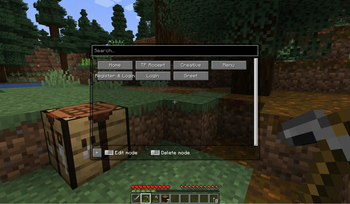
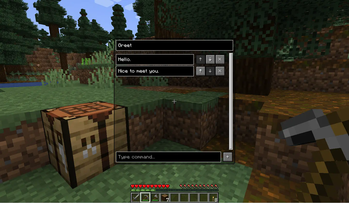
Main Page Command Edit Message Edit

How to Use

  • Bring up the menu in-game with the G key
  • Type in the Name and Command you want to save into a button
  • Press the + button

How It Works

The list of commands are serialized into a JSON format and stored locally on the users’ systems. The mod writes any new commands into the JSON as new buttons are created, and loads the JSON at the next start of the game.

Development

Support

Current main development for Minecraft version: 1.21.11

And use preprocess to be compatible with the following versions.

Note: We only accept the following versions of issues.

Please note that this information is time-sensitive and any version of the issue not listed here will be closed.

  • Minecraft 1.16.5
  • Minecraft 1.17.1
  • Minecraft 1.18.2
  • Minecraft 1.19.2
  • Minecraft 1.19.3
  • Minecraft 1.19.4
  • Minecraft 1.20.6
  • Minecraft 1.21.1
  • Minecraft 1.21.5
  • Minecraft 1.21.8
  • Minecraft 1.21.10
  • Minecraft 1.21.11

Mappings

We are using the Mojang official mappings to de-obfuscate Minecraft and insert patches.

Галерея
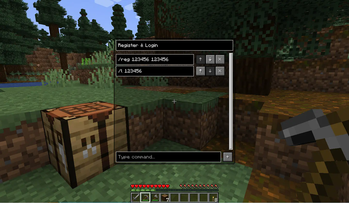
Command EditMain PageSend message(s)

Последние версии

Все версии →
release

Command GUI Buttons 2.5.0

2.5.0
3 мая 2026 г.2,1 тыс.Minecraft: 1.16, 1.16.1, 1.16.2, 1.16.3, 1.16.4, 1.16.5, 1.17, 1.17.1, 1.18, 1.18.1, 1.18.2, 1.19.1, 1.19.2, 1.19.3, 1.19.4, 1.20.6, 1.21.1, 1.21.10, 1.21.11, 1.21.2, 1.21.3, 1.21.4, 1.21.5, 1.21.6, 1.21.7, 1.21.8, 1.21.9fabric
Скачать
Что нового
### New features * Support MC 1.21.1, 1.21.9-1.21.10 * Support MC 1.21.11 ### Bug fixes * Fix preprocess * Fix missing alpha channel in font color ### Development * Update `fabric-loom` to `1.16-SNAPSHOT` * Update `fabric-loader` to `0.19.2` * Update `lombok` to `1.18.46` * Update `Gradle` to `9.5.0` * Update `gradle/actions` action to `v6` * Update `actions/upload-artifact` action to `v7` * Update `actions/checkout` action to `v6` * Update `magiclib-core-fabric` to `v0.8.160` * Update `magiclib-better-dev` to `v0.3.68-beta` * Update `replace-token` to `v1.2.0` * Update `preprocessor` to `d452ef7` * Update `org.ajoberstar.grgit` to `5.3.3` --- **Full Changelog**: [`2.4.0...2.5.0`](https://github.com/MSDNicrosoft/Command-GUI-Buttons/compare/2.4.0...2.5.0)
release

Command GUI Buttons 2.4.0

2.4.0
29 авг. 2025 г.2,9 тыс.Minecraft: 1.16, 1.16.1, 1.16.2, 1.16.3, 1.16.4, 1.16.5, 1.17, 1.17.1, 1.18, 1.18.1, 1.18.2, 1.19.1, 1.19.2, 1.19.3, 1.19.4, 1.20.6, 1.21.2, 1.21.3, 1.21.4, 1.21.5, 1.21.6, 1.21.7, 1.21.8fabric
Скачать
Что нового
### New features - Support MC 1.21.5-1.21.8 - Drop support for MC 1.21 ### Bug fixes - Do not render the dirt background in game (MC < 1.19.6) - Render the panorama if not in game (MC >= 1.19.6) ### Development - Update a lot of dependencies --- **Full Changelog**: [`2.3.0...2.4.0`](https://github.com/MSDNicrosoft/Command-GUI-Buttons/compare/2.3.0...2.4.0)
release

Command GUI Buttons 2.3.0

2.3.0
3 июл. 2024 г.6,2 тыс.Minecraft: 1.16, 1.16.1, 1.16.2, 1.16.3, 1.16.4, 1.16.5, 1.17, 1.17.1, 1.18, 1.18.1, 1.18.2, 1.19.1, 1.19.2, 1.19.3, 1.19.4, 1.20.6, 1.21fabric
Скачать
Что нового
### New features - Support MC 1.20.6 & 1.21 - Drop support for MC 1.20.2 & 1.20.4 - Reload commands frequently ### Fix - Fix LibGui 13996a0 ### Development - Update `Gradle` to `8.8` - Update Gradle plguin `fabric-loom` to `1.7-SNAPSHOT` - Update Gradle plguin `org.ajoberstar.grgit` to `5.2.2` - Update dependency `fabric-loader` to `0.15.11` - Update dependency `Fabric API` - Update dependency `org.projectlombok:lombok` to `V1.18.34` - Update actions dependency `gradle/wrapper-validation-action` to `v3` --- **Full Changelog**: [`2.2.2...2.3.0`](https://github.com/MSDNicrosoft/Command-GUI-Buttons/compare/2.2.2...2.3.0)
release

Command GUI Buttons 2.2.2

2.2.2
1 февр. 2024 г.3,1 тыс.Minecraft: 1.16.5, 1.17.1, 1.18.2, 1.19.1, 1.19.2, 1.19.3, 1.19.4, 1.20.2, 1.20.4fabric, quilt
Скачать
Что нового
### New features - Support MC 1.20.2 - Drop support for MC 1.20.1 - Reload commands frequently (PR: #59) ### Development - Update `Gradle` to `8.5` (PR: #54) - Update Gradle plguin `fabric-loom` to `1.5-SNAPSHOT` - Update dependency `fabric-loader` to `0.15.6` - Update dependency `Fabric API` - Update dependency `LibGui` to `9.2.2` --- **Full Changelog**: [`2.2.1...2.2.2`](https://github.com/MSDNicrosoft/Command-GUI-Buttons/compare/2.2.1...2.2.2)
release

Command GUI Buttons 2.2.1

2.2.1
29 окт. 2023 г.5,6 тыс.Minecraft: 1.16.5, 1.17.1, 1.18.2, 1.19.2, 1.19.3, 1.19.4, 1.20.1, 1.20.2fabric
Скачать
Что нового
### Fix - [Incorrect subjar names in wrapper metadata](https://github.com/MSDNicrosoft/Command-GUI-Buttons/commit/cd48985fae4fa334ff1f3e343fb76f2fa2580acb) --- **Full Changelog**: [`2.2.0...2.2.1`](https://github.com/MSDNicrosoft/Command-GUI-Buttons/compare/2.2.0...2.2.1)
release

Command GUI Buttons 2.2.0

2.2.0
28 окт. 2023 г.364Minecraft: 1.16.5, 1.17.1, 1.18.2, 1.19.2, 1.19.3, 1.19.4, 1.20.1, 1.20.2fabric
Скачать
Что нового
### New features - Support MC `1.20.2` (PR: #51) ### Development - Update `Gradle` to `8.4` (PR: #48) - Update Gradle plguin `fabric-loom` to `1.4-SNAPSHOT` (PR: #51) - Update Gradle plguin `org.ajoberstar.grgit` to `5.2.1` (PR: #49) --- **Full Changelog**: [`2.1.0...2.2.0`](https://github.com/MSDNicrosoft/Command-GUI-Buttons/compare/2.1.0...2.2.0)
release

Command GUI Buttons 2.1.0

2.1.0
3 июл. 2023 г.8,2 тыс.Minecraft: 1.16.5, 1.17.1, 1.18.2, 1.19.2, 1.19.3, 1.19.4, 1.20.1fabric
Скачать
Что нового
**Last Warning: This mod no longer has built-in dependencies** To download dependencies,See [here](https://github.com/MSDNicrosoft/Command-GUI-Buttons#dependencies) ## Changes ### New features - Support MC `1.20.1` ### Development - Update `Gradle` to `8.2` - Update Gradle plguin `fabric-loom` to `1.2-SNAPSHOT` - Update Gradle plguin `org.projectlombok:lombok` to `1.18.28` --- **Full Changelog**: [`1.2.0...2.0.0`](https://github.com/MSDNicrosoft/Command-GUI-Buttons/compare/1.2.0...2.0.0)
release

Command GUI Buttons 2.0.0

2.0.0
30 апр. 2023 г.430Minecraft: 1.16.5, 1.17.1, 1.18.2, 1.19.2, 1.19.3, 1.19.4fabric
Скачать
Что нового
## Changes ### Hightlight - **Warning: This mod no longer has built-in dependencies** To download dependencies,See [here](https://github.com/MSDNicrosoft/Command-GUI-Buttons#dependencies) ### New features - Support MC `1.16.5` `1.17.1` `1.18.2` `1.19.2` `1.19.3` `1.19.4` ### Development - Update Gradle plugin `org.ajoberstar.grgit` to `5.2.0` - Update `Gradle` to `8.1` - Update Gradle plguin `fabric-loom` to `1.1-SNAPSHOT` - Add Gradle plugins `com.replaymod.preprocess` `net.kyori.blossom` `org.projectlombok:lombok` ### Credit - @Hendrix-Shen --- **Full Changelog**: [`1.1.0...1.2.0`](https://github.com/MSDNicrosoft/Command-GUI-Buttons/compare/1.2.0...2.0.0)
release

Command GUI Buttons 1.2.0

1.2.0
26 дек. 2022 г.775Minecraft: 1.19.3fabric
Скачать
Что нового
## Highlights Versions after this date **will not be compatible with previous versions of the configuration file**, please follow the steps below to complete the configuration file migration manually: - Update the mod - Launch Minecraft, join a world or a server - Open the `Resource Packs` screen - Press the `Open Pack Folder` button - Go to the previous level of the current directory (e.g. `.minecraft\1.19.3\resourcepacks\` -> `.minecraft\1.19.3\` ) - Open `commands.json` with system Notepad or other plain text editor - Press `G` ( or other hotkey you have configured ) - Add them one by one according to the `commands.json` file (The context inside the double quotes after `"name"` is the button's name, and the context inside the double quotes after `"command"` is the button's command. A pair of bracketed related content is one button.) ## Changes ### New features - Support 1.19.3 - Unlimited number of buttons - Add entry for ModMenu - Search for buttons - Edit mode - Support for returning to previous screen ![Main Page](https://cdn.modrinth.com/data/1E3oheF7/images/1ad7dd4ffb00aa1b67445fd867f80f2c664f059d.png) ![Command Edit](https://cdn.modrinth.com/data/1E3oheF7/images/9223ec186827b883c31400692821b3bc894fee65.png) ### Development - refactor: Remove the dependencies `json_simple` and `json_io` ## Credit - @Hendrix-Shen --- **Full Changelog**: [`1.1.0...1.2.0`](https://github.com/MSDNicrosoft/Command-GUI-Buttons/compare/1.1.0...1.2.0)
release

Command GUI Buttons 1.1.0

1.1.0
28 авг. 2022 г.499Minecraft: 1.19.2fabric
Скачать
Что нового
## Change - feat Add multi-command (#7 ) >I uses ` && ` as the delimiter for multiple commands. >**Notice**: There is **a space around** `&&` >e.g. `/help && /gamemode creative && hello`