Color Filters
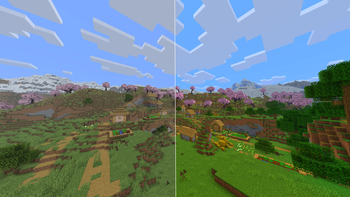
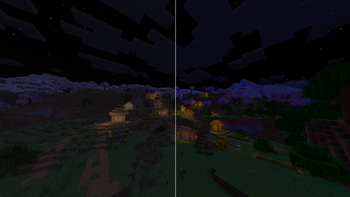
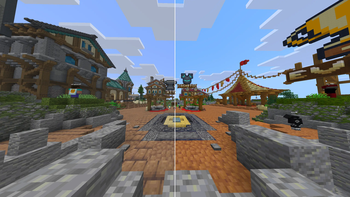
NVIDIA-style color filters inside Minecraft, with presets. Control vibrance, saturation, contrast, sharpness and more, works with all shaderpacks and resource packs!
Описание
Kairo's Color Filters
Bring NVIDIA-style color filters directly into Minecraft.
Adjust vibrance, saturation, contrast, brightness, sharpening, and more, all from an in-game menu. No external software or shader pack required.
Works with resource packs and is designed to be compatible with shader packs whenever possible.
Presets
One click and you're done:
- Vibrant — strong colors everywhere, the classic streamer look.
- PvP — punchy colors with clear visibility, made for fights.
- Crisp — sharper textures and cleaner edges.
- Warm / Cool — shifts the whole game warmer or cooler.
- Cinematic — slightly darker, moodier tone.
- Vanilla — one click back to Minecraft's normal look.
Every preset just sets the sliders, so you can fine tune anything afterward.
Filters
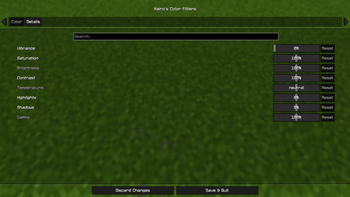
Full color-grading control:
- Vibrance — the main effect. Boosts dull colors more than already-vivid ones, so everything pops without looking radioactive.
- Saturation
- Brightness
- Contrast
- Temperature (warm/cool)
- Highlights
- Shadows
- Gamma
- Sharpness — adaptive sharpening for crisper textures.
Every slider shows its value, has a tooltip, and can be reset individually.
Instant Toggle
Bind the Toggle Color Filters key in Options → Controls and flip the entire effect on and off instantly, perfect for comparing against vanilla mid game. Your settings are kept either way.
Settings
Open the configuration through Mod Menu, or bind the Open Color Filter Settings key in Options → Controls.
Choose between two modes: World Only (default — your HUD stays vanilla) or Whole Screen (filters everything, closest to NVIDIA filters).
The effect is applied on the GPU in a single pass, so the performance cost is basically zero.
Requirements
- Fabric Loader
- Fabric API
- Cloth Config
Галерея