COWMODSКаталог модов

ClubClient

Zoom, fullbright, freelook and a HUD you can drag, in one calm menu on Right Shift. Client-side, server-safe — not a cheat client.

Автор: ClubStudio1,9 тыс.6обновлён 25 июл. 2026 г.
СнаряжениеОптимизацияУтилиты

Описание

Club

A first-person utility client for Fabric — 1.21.1, 1.21.6, 1.21.8 and 1.21.11. Zoom, Fullbright, Freelook, a movable HUD, hand and animation controls — in one menu, without fighting the game underneath it.

Same mod on every version. Same menu, same modules, same keybinds, same config.

🎛️ The menu

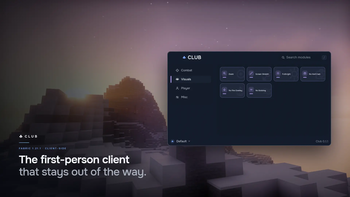
Right Shift. Flat, calm, dark. No glow, no glass, no cheat-client neon. Every module is a card; right-click a card for its own settings. The whole menu is keyboard-navigable, and every module can take its own hotkey.

👁️ See more

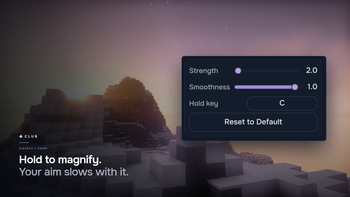
  • 🔍 Zoom — hold C to magnify, with an eased FOV rather than a snap. Scroll while holding to dial it from 2× to 8×. Your look sensitivity slows with the zoom, so the world crosses the screen at one speed at any magnification — a zoom you can actually aim with.
  • 💡 Fullbright — full brightness in caves and at night. It only touches the world lightmap, so your real Brightness slider and your options.txt are never overwritten.
  • 🎥 Freelook — hold Left Alt to swing the camera around yourself without turning. Your aim and your movement don't change. It's a camera, not an aim tool.
  • 🖼️ Screen Stretch, No Hurt Cam, No Fire Overlay, No Bobbing — a calmer view, your way.

🏃 Move better

  • ⚡ Toggle Sprint — sprint without holding the key, with a quiet chip on screen so you always know it's on.
  • ✋ Hands — reposition and scale the first-person hands, each hand independently.
  • ⚔️ Custom attack animations — pick a style, then tune its speed and swing.

⚔️ In a fight

  • 🛡️ Low Shield — a raised, blocking shield drops out of your face instead of covering half the screen.
  • ✝️ Small Totem — the totem-of-undying pop is smaller and lifted out of the centre, so the pop that just saved you doesn't blind you to the fight it saved you from.

Both are always on, drawing-only, and the block and the totem work exactly as the game intends underneath.

  • 📦 Hitboxes — restyle Minecraft's own F3+B hitbox overlay: one clean outline instead of the white box and two debug lines, coloured from the menu's palette, line width 1.0–4.0, and the entity under your crosshair picked out from the rest. It paints the game's own boxes — it never enlarges one, never draws through a wall, and adds no reach.
  • 🎯 Hit Distance — a HUD readout of how far away your last hit landed, in blocks, held for ten seconds and then gone. It reports the hit you already threw, not the range to a target you have not — the line the Target chip won't cross either. Its on/off card lives in Combat.

📦 See inside a shulker

Shulker Tooltip — hover a shulker box (or any container item) and its contents appear as a chest-slot grid, the real items with their counts, without placing and opening it. Prefer Minecraft's plain text list? Turn it off in Misc.

🍗 Read the hunger bar in full

Saturation — an AppleSkin-style read on food and hunger, off until you turn it on in Misc. Your hidden saturation is drawn as a thin overlay on the hunger bar, and hovering a piece of food previews the hunger, saturation and hearts it would restore before you eat it.

It reads only values the client already holds, so it never asks the server for anything and behaves the same on a public server as in single-player. There is no exhaustion line: a vanilla server never sends that number to the client, so drawing it anywhere but single-player would be a guess dressed as a fact — and everything Saturation shows is a value the client genuinely has.

✨ Particles — choose what you see

Every particle the game has, sorted into groups you can reason about: Combat, Blocks, Ambient, Fire & Light, Water, Explosions and Status.

Pick a group on the left, flip particles one by one on the right — or use the group's own switch to turn all of it off at once. The search finds a particle across every group at the same time.

Everything is on by default. Club does not quietly take particles out of your game; the point is that the switches exist. Nothing is protected, either — the potion swirls sitting in your face in a fight are yours to turn off, like the rest of them.

A hidden particle is never created at all: not ticked, not drawn. This is a visual choice, not a performance feature. Turning types off does less work, but there is no number here, because the honest one depends entirely on what is on your screen at the time.

🖱️ Item Scrolling

Move items with the mouse instead of clicking them one at a time.

  • Scroll over a slot to move one item · Shift for the whole stack · Ctrl for every stack of that type · Ctrl+Shift for everything · Shift+drag across slots to move each one you cross.
  • Every gesture is rebindable — pick the modifier and the button for each action, on its own screen. Two actions can never share a gesture, and if one of yours overrides something vanilla already does with it, the row says so instead of quietly eating the click.

🤝 It turns itself off where servers forbid it

Some servers ban item scrolling by rule. Club respects the rule instead of leaving it to you to remember.

Join one of those servers and the feature is simply not there — no card in the menu, no hotkey, nothing to toggle. Leave, and it comes back on its own.

It is one jar. There is no "clean version" to install and no switch to flip, because a switch a player can flip is a bypass we shipped ourselves. The list of addresses is compiled into the mod, not stored in your config, for exactly the same reason.

📊 The HUD

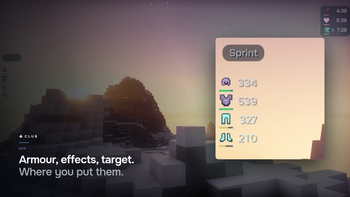
Status effects, your target's health, worn armour, an FPS readout and the sprint chip, all drawn in one consistent "chips" language.

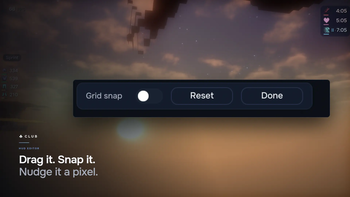
Behind it there is a real editor: drag elements, snap to the grid, nudge with the arrow keys, right-click any element for its own settings. The HUD is the size you set it — Minecraft's GUI Scale doesn't touch it.

⚡ It stops drawing what you cannot see

Minecraft renders particles behind your head and block entities that sit off-screen inside a section the frustum kept. Club skips those. Nothing you can see changes.

There is no tab for it and no switch, because neither was ever a choice worth making: they change no pixel. They are simply on.

Measured on 1.21.1, interleaved in one session, on a fixed-seed scene: −5.3% frame time on a normal machine, −8.1% on a CPU-bound one. Where the GPU is your bottleneck, our own benchmark refuses to claim a win — and prints that it refuses. We publish what we measured, in the scene we measured it, on the version we measured it.

From 1.21.11 Minecraft culls particles itself, and better than we did — so Club stops doing it there. When the game does the work, we get out of the way. On 1.21.1, 1.21.6 and 1.21.8 the particle cull is still Club's: vanilla only took that job over at 1.21.11.

What we did not build: an entity culler. It existed, it measured −22%, and it was deleted — vanilla's visible-section list only holds sections that contain blocks, so a phantom in open sky belongs to none of them and would have vanished while you watched it. Want that? Run Sodium and EntityCulling. We do not duplicate them, and we will not pretend we could do it better.

🧩 Compatibility

Sodium, Iris (shaderpacks included) and Freecam — the gallery images on this page were shot with all three loaded at once.

Client-side only: Club works on any server and installs on none of them. Java 21, requires Fabric API.

One jar per Minecraft version. The file says which one it is (club-0.1.6+mc1.21.8.jar), and each jar refuses to load on anything else rather than half-working — a client that starts and then behaves strangely is worse than one that tells you it is the wrong download.

1.21.7, 1.21.9 and 1.21.10 are not covered, and that is a decision, not a gap. Their mappings and Fabric API coordinates have never been measured here, and Club does not declare a version range it has never built against. If one of them matters to you, say so — measuring it is the work, and we would rather do the work than widen a range and hope.

⌨️ Controls

ActionDefault
Open the Club menuRight Shift
Zoom (hold)C
Freelook (hold)Left Alt

All rebindable, along with a hotkey for every module.


🛡️ Club is a clean client

  • It never acts for you. No killaura, no autoclicker, no auto-totem, no combat automation of any kind.
  • It never shows you what a wall hides. No X-ray, no ESP, no chest or spawner finders, no minimap. The Target HUD will not name an entity through a block, and never names one you cannot see at all.
  • It never reaches further than your arm. No reach — and the Hitboxes module only restyles the game's own F3+B boxes, never enlarging one and never drawing one through a wall.
  • It says nothing to the server your own hand doesn't.

What Club does change is what your own eyes get from what the game already draws: brightness, magnification, where the camera sits, how your HUD is laid out. Those are conveniences, not secrets — and some servers regulate them anyway. Where a server's rules forbid something Club does, Club turns it off there itself, on that server, with no switch for you to flip.

Every module, and what it sends

You asked for this table, so here it is — the whole mod, nothing left out. The right-hand column is the answer to "is this a cheat", and it says the same word — Nothing — for every module but the two it names. The source is public: check any row of it.

Visuals

ModuleWhat it doesWhat goes to the server
ZoomHold a key to magnify the world, 2×–8×, on a smooth eased FOV. Your look sensitivity slows with the zoom, so the world crosses the screen at one speed at any magnification.Nothing
FullbrightRaises the world lightmap to maximum so you can see in the dark. Your real brightness slider and options.txt are never touched.Nothing
Screen StretchRender at an aspect ratio your monitor doesn't have, with optional letterbox bars.Nothing
No Hurt CamRemoves the red damage screen tilt.Nothing
No Fire OverlayHides the first-person flames while you burn.Nothing
No BobbingStops the view bobbing as you walk.Nothing

Player

ModuleWhat it doesWhat goes to the server
HandsReposition and scale the first-person hands, each hand on its own.Nothing
Toggle SprintHolds your sprint key down for you, so you don't have to.Nothing of its own. The game sends the sprint state it always sends while that key is held — Club only holds the key.
FreelookHold a key to swing the camera around yourself. Your aim, your movement and every packet stay exactly where they were: it is a camera, not an aim tool.Nothing

Combat

ModuleWhat it doesWhat goes to the server
AnimationsReplaces the vanilla first-person swing with one of your own, with speed and amplitude. Drawing only — the swing the server sees is vanilla's, at vanilla's timing.Nothing
Small TotemShrinks the totem-of-undying pop and lifts it out of the centre of the screen. Always on, no card. Drawing only — the totem still works exactly as the game intends.Nothing
Low ShieldDrops a raised (blocking) shield low so it stops covering your view. Always on, no card. A first-person camera offset only — the block itself is vanilla's.Nothing
HitboxesRestyles Minecraft's own F3+B hitbox overlay — one clean outline in your palette colour, at your chosen line width, with the entity under your crosshair highlighted. Drawing only: it never enlarges a box, reaches nothing, and draws nothing through a wall.Nothing
Hit DistanceA HUD readout of how far away your last hit landed, in blocks — shown for ten seconds after a hit, then hidden. Its on/off card is in Combat. A readout of a hit you already threw, never a live range to a target you have not.Nothing

Particles

ModuleWhat it doesWhat goes to the server
ParticlesEvery particle the game has, in seven groups, each one switchable. All on by default; nothing is protected. A hidden particle is never created at all — not ticked, not drawn.Nothing

Inventory

ModuleWhat it doesWhat goes to the server
Item ScrollMove items by scrolling instead of clicking them one at a time. Scroll for one item, Shift for the stack, Ctrl for every stack of that type, Shift+drag across the slots you cross. Every gesture is rebindable.Slot clicks — the same ones your own hand sends, just faster. This is the only module in Club that talks to the server at all. The protocol has no batch move, so a strict anti-cheat may rate-limit a large transfer the way it would rate-limit fast clicking, and roll some of it back.

HUD

ElementWhat it doesWhat goes to the server
TargetName and health of the living thing under your crosshair, within 4 blocks — a step past vanilla's own attack reach. Never through a block, never one you cannot see, never an armour stand. The range is fixed and is deliberately not a setting.Nothing
ArmorYour own armour and its durability.Nothing
EffectsYour own potion effects.Nothing
InfoYour FPS.Nothing
SprintWhether Toggle Sprint is currently on.Nothing
HUD EditorDrag, snap, scale and configure every element.Nothing

Misc

ModuleWhat it doesWhat goes to the server
Background FPSCaps the frame rate while the game sits behind another window. 1.21.1 only — Minecraft has done this itself since 1.21.2, so it is absent from the 1.21.6, 1.21.8 and 1.21.11 builds.Nothing
Shulker TooltipHover a shulker box (or any container item) to see its contents as a chest-slot grid, without placing and opening it. Reads what is already in the item; no packet.Nothing
SaturationAppleSkin-style food and hunger info: your saturation over the hunger bar, and the hunger, saturation and hearts a food would restore, previewed on hover. Off by default. Reads client-side values only; no packet.Nothing

💬 Where to find us

  • Source: github.com/ClubClient/clubclient — MIT. Every claim on this page can be checked against it, including the benchmark that produced the numbers above.
  • Bugs: GitHub Issues. Bring your mod list and latest.log — a conflict with the mods you already run is the usual answer.
  • Discord: discord.gg/kq2DYuTQnW — for getting it set up.

MIT licensed. The interface is set in Onest, used under the SIL Open Font License 1.1.

Галерея
Последние версии

Все версии →
release

ClubClient 0.1.6+mc1.21.11

0.1.6+mc1.21.11
25 июл. 2026 г.1,2 тыс.Minecraft: 1.21.11fabric
Скачать
Что нового
**Saturation — the hunger bar, read in full.** A new module in Misc, off until you turn it on. It draws what AppleSkin draws: the saturation you already have sits as a thin overlay on the hunger bar, and hovering a piece of food previews how much hunger and saturation eating it would restore — and the hearts that hunger would later heal — before you take the bite. It reads values the client already holds and asks the server for nothing, so it behaves the same on a public server as in single-player. - **No exhaustion line.** AppleSkin can show the invisible exhaustion counter creeping toward your next lost hunger point, and the first cut of this module did too — but a vanilla server never sends that number to the client, so anywhere but single-player it was drawing a guess dressed as a fact. A readout that is honest in only one place is not honest, so it is gone. Everything Saturation shows is a value the client genuinely has. - Flat, in the HUD's own language — not a bar grafted in from another mod's screenshot. **Hitboxes — vanilla's F3+B, cleaned up.** A new Combat module that restyles the game's own hitbox overlay rather than drawing one of its own. Vanilla's F3+B throws a white box, a red eye-line and a blue look-vector over every entity at once; Hitboxes drops that to a single clean outline, colours it from the menu's palette, and lets you set the line width from 1.0 to 4.0. - **It shows what the game already shows, and no more.** Only entities you could see anyway, never through a wall, and it does not enlarge a single box — the shape it outlines is the exact one the game already uses for your hits. This is a paint job on a vanilla debug view, not a reach and not an ESP. Turning it on does not turn the boxes on; it styles them when the game is drawing them. - The entity under your crosshair is picked out from the rest, so in a crowd you can tell which box belongs to the thing your next hit will land on. **Hit Distance — how far away your last hit landed.** A new HUD readout, its card in Combat. The moment you land a hit on something it shows the distance to it, in blocks, and holds that number for ten seconds before it fades. No hit, nothing on screen: it reports what you just did, not what you might do. In the HUD editor it moves and scales like any other element. - An earlier version measured the live distance to whatever your crosshair sat on — green inside reach, red beyond it. But a number that names an opponent's range before you have touched them is the same soft cheat the Target chip refuses, so it was cut back to reporting only the hit you already threw. **The menu's settings live on their own panel now.** Right-click a module and its settings no longer unfold under the card and shove the grid down — they open in a slim panel down the right-hand side of the menu, the card lit on the left while you work. **Left-click a card toggles the module on or off; right-click opens its settings.** The cards are square now, the icon above the name. - A module with a colour to choose — Hitboxes, and the hitbox palette — gets a grid of swatches, not a slider you cannot read a colour off. - **Reset touches only what a module configures, and leaves it enabled or disabled exactly as you had it.** The old reset quietly switched ten of the thirteen modules back on. It is a plain left-click that swaps its own label to confirm instead of arming a second click, and it never reaches the enabled switch. **Crisp edges, and a HUD editor that stays out of its own way.** The menu and HUD render a touch sharper: the anti-aliasing ramp on every shape is exactly one device-pixel wide now, and thin lines snap to the pixel grid instead of smearing across two. In the editor, an element clamps to the screen edge instead of sliding half-off it, the toolbar sits along the bottom, the settings popover is slimmer and titleless, an element you are configuring holds still instead of dragging out from under you, and its background matches the chip the HUD draws in play. **A fourth Minecraft version: 1.21.6.** Club builds 1.21.1, 1.21.6, 1.21.8 and 1.21.11 from one source — four jars, one per version. Same modules, same keybinds, same HUD, same menu, same config. - The 1.21.6 jar declares `>=1.21.6 <1.21.7` and nothing wider. **1.21.7, 1.21.9 and 1.21.10 stay uncovered on purpose**: their mappings and Fabric API coordinates have never been measured here, and we do not claim a range we have not built against. - **Background FPS is not in the 1.21.6 build either**, for the same reason it is missing from 1.21.8 and 1.21.11 — Minecraft caps its own frame rate behind another window from 1.21.2 on. It remains a 1.21.1-only card. - **On 1.21.6 the particle cull is still ours.** Vanilla only took that job over at 1.21.11, so 1.21.6 sits on the near side of the line, alongside 1.21.1 and 1.21.8. - Everything else — Shulker Tooltip, Small Totem, Low Shield, hitbox styling, Item Scroll — is present on 1.21.6 exactly as it is on 1.21.8. **Two version boundaries were found mis-cut while adding the node.** Entity hitboxes and the shulker tooltip both read `<1.21.8`, which was true but untested: no version node had ever existed between 1.21.1 and 1.21.8, so the branch was never compiled anywhere inside that interval. Measured against 1.21.6, the real boundaries are **1.21.5** and **1.21.2**. Left alone, the 1.21.6 build would have quietly taken the 1.21.1 body.
release

ClubClient 0.1.6+mc1.21.8

0.1.6+mc1.21.8
25 июл. 2026 г.96Minecraft: 1.21.8fabric
Скачать
Что нового
**Saturation — the hunger bar, read in full.** A new module in Misc, off until you turn it on. It draws what AppleSkin draws: the saturation you already have sits as a thin overlay on the hunger bar, and hovering a piece of food previews how much hunger and saturation eating it would restore — and the hearts that hunger would later heal — before you take the bite. It reads values the client already holds and asks the server for nothing, so it behaves the same on a public server as in single-player. - **No exhaustion line.** AppleSkin can show the invisible exhaustion counter creeping toward your next lost hunger point, and the first cut of this module did too — but a vanilla server never sends that number to the client, so anywhere but single-player it was drawing a guess dressed as a fact. A readout that is honest in only one place is not honest, so it is gone. Everything Saturation shows is a value the client genuinely has. - Flat, in the HUD's own language — not a bar grafted in from another mod's screenshot. **Hitboxes — vanilla's F3+B, cleaned up.** A new Combat module that restyles the game's own hitbox overlay rather than drawing one of its own. Vanilla's F3+B throws a white box, a red eye-line and a blue look-vector over every entity at once; Hitboxes drops that to a single clean outline, colours it from the menu's palette, and lets you set the line width from 1.0 to 4.0. - **It shows what the game already shows, and no more.** Only entities you could see anyway, never through a wall, and it does not enlarge a single box — the shape it outlines is the exact one the game already uses for your hits. This is a paint job on a vanilla debug view, not a reach and not an ESP. Turning it on does not turn the boxes on; it styles them when the game is drawing them. - The entity under your crosshair is picked out from the rest, so in a crowd you can tell which box belongs to the thing your next hit will land on. **Hit Distance — how far away your last hit landed.** A new HUD readout, its card in Combat. The moment you land a hit on something it shows the distance to it, in blocks, and holds that number for ten seconds before it fades. No hit, nothing on screen: it reports what you just did, not what you might do. In the HUD editor it moves and scales like any other element. - An earlier version measured the live distance to whatever your crosshair sat on — green inside reach, red beyond it. But a number that names an opponent's range before you have touched them is the same soft cheat the Target chip refuses, so it was cut back to reporting only the hit you already threw. **The menu's settings live on their own panel now.** Right-click a module and its settings no longer unfold under the card and shove the grid down — they open in a slim panel down the right-hand side of the menu, the card lit on the left while you work. **Left-click a card toggles the module on or off; right-click opens its settings.** The cards are square now, the icon above the name. - A module with a colour to choose — Hitboxes, and the hitbox palette — gets a grid of swatches, not a slider you cannot read a colour off. - **Reset touches only what a module configures, and leaves it enabled or disabled exactly as you had it.** The old reset quietly switched ten of the thirteen modules back on. It is a plain left-click that swaps its own label to confirm instead of arming a second click, and it never reaches the enabled switch. **Crisp edges, and a HUD editor that stays out of its own way.** The menu and HUD render a touch sharper: the anti-aliasing ramp on every shape is exactly one device-pixel wide now, and thin lines snap to the pixel grid instead of smearing across two. In the editor, an element clamps to the screen edge instead of sliding half-off it, the toolbar sits along the bottom, the settings popover is slimmer and titleless, an element you are configuring holds still instead of dragging out from under you, and its background matches the chip the HUD draws in play. **A fourth Minecraft version: 1.21.6.** Club builds 1.21.1, 1.21.6, 1.21.8 and 1.21.11 from one source — four jars, one per version. Same modules, same keybinds, same HUD, same menu, same config. - The 1.21.6 jar declares `>=1.21.6 <1.21.7` and nothing wider. **1.21.7, 1.21.9 and 1.21.10 stay uncovered on purpose**: their mappings and Fabric API coordinates have never been measured here, and we do not claim a range we have not built against. - **Background FPS is not in the 1.21.6 build either**, for the same reason it is missing from 1.21.8 and 1.21.11 — Minecraft caps its own frame rate behind another window from 1.21.2 on. It remains a 1.21.1-only card. - **On 1.21.6 the particle cull is still ours.** Vanilla only took that job over at 1.21.11, so 1.21.6 sits on the near side of the line, alongside 1.21.1 and 1.21.8. - Everything else — Shulker Tooltip, Small Totem, Low Shield, hitbox styling, Item Scroll — is present on 1.21.6 exactly as it is on 1.21.8. **Two version boundaries were found mis-cut while adding the node.** Entity hitboxes and the shulker tooltip both read `<1.21.8`, which was true but untested: no version node had ever existed between 1.21.1 and 1.21.8, so the branch was never compiled anywhere inside that interval. Measured against 1.21.6, the real boundaries are **1.21.5** and **1.21.2**. Left alone, the 1.21.6 build would have quietly taken the 1.21.1 body.
release

ClubClient 0.1.6+mc1.21.6

0.1.6+mc1.21.6
25 июл. 2026 г.51Minecraft: 1.21.6fabric
Скачать
Что нового
**Saturation — the hunger bar, read in full.** A new module in Misc, off until you turn it on. It draws what AppleSkin draws: the saturation you already have sits as a thin overlay on the hunger bar, and hovering a piece of food previews how much hunger and saturation eating it would restore — and the hearts that hunger would later heal — before you take the bite. It reads values the client already holds and asks the server for nothing, so it behaves the same on a public server as in single-player. - **No exhaustion line.** AppleSkin can show the invisible exhaustion counter creeping toward your next lost hunger point, and the first cut of this module did too — but a vanilla server never sends that number to the client, so anywhere but single-player it was drawing a guess dressed as a fact. A readout that is honest in only one place is not honest, so it is gone. Everything Saturation shows is a value the client genuinely has. - Flat, in the HUD's own language — not a bar grafted in from another mod's screenshot. **Hitboxes — vanilla's F3+B, cleaned up.** A new Combat module that restyles the game's own hitbox overlay rather than drawing one of its own. Vanilla's F3+B throws a white box, a red eye-line and a blue look-vector over every entity at once; Hitboxes drops that to a single clean outline, colours it from the menu's palette, and lets you set the line width from 1.0 to 4.0. - **It shows what the game already shows, and no more.** Only entities you could see anyway, never through a wall, and it does not enlarge a single box — the shape it outlines is the exact one the game already uses for your hits. This is a paint job on a vanilla debug view, not a reach and not an ESP. Turning it on does not turn the boxes on; it styles them when the game is drawing them. - The entity under your crosshair is picked out from the rest, so in a crowd you can tell which box belongs to the thing your next hit will land on. **Hit Distance — how far away your last hit landed.** A new HUD readout, its card in Combat. The moment you land a hit on something it shows the distance to it, in blocks, and holds that number for ten seconds before it fades. No hit, nothing on screen: it reports what you just did, not what you might do. In the HUD editor it moves and scales like any other element. - An earlier version measured the live distance to whatever your crosshair sat on — green inside reach, red beyond it. But a number that names an opponent's range before you have touched them is the same soft cheat the Target chip refuses, so it was cut back to reporting only the hit you already threw. **The menu's settings live on their own panel now.** Right-click a module and its settings no longer unfold under the card and shove the grid down — they open in a slim panel down the right-hand side of the menu, the card lit on the left while you work. **Left-click a card toggles the module on or off; right-click opens its settings.** The cards are square now, the icon above the name. - A module with a colour to choose — Hitboxes, and the hitbox palette — gets a grid of swatches, not a slider you cannot read a colour off. - **Reset touches only what a module configures, and leaves it enabled or disabled exactly as you had it.** The old reset quietly switched ten of the thirteen modules back on. It is a plain left-click that swaps its own label to confirm instead of arming a second click, and it never reaches the enabled switch. **Crisp edges, and a HUD editor that stays out of its own way.** The menu and HUD render a touch sharper: the anti-aliasing ramp on every shape is exactly one device-pixel wide now, and thin lines snap to the pixel grid instead of smearing across two. In the editor, an element clamps to the screen edge instead of sliding half-off it, the toolbar sits along the bottom, the settings popover is slimmer and titleless, an element you are configuring holds still instead of dragging out from under you, and its background matches the chip the HUD draws in play. **A fourth Minecraft version: 1.21.6.** Club builds 1.21.1, 1.21.6, 1.21.8 and 1.21.11 from one source — four jars, one per version. Same modules, same keybinds, same HUD, same menu, same config. - The 1.21.6 jar declares `>=1.21.6 <1.21.7` and nothing wider. **1.21.7, 1.21.9 and 1.21.10 stay uncovered on purpose**: their mappings and Fabric API coordinates have never been measured here, and we do not claim a range we have not built against. - **Background FPS is not in the 1.21.6 build either**, for the same reason it is missing from 1.21.8 and 1.21.11 — Minecraft caps its own frame rate behind another window from 1.21.2 on. It remains a 1.21.1-only card. - **On 1.21.6 the particle cull is still ours.** Vanilla only took that job over at 1.21.11, so 1.21.6 sits on the near side of the line, alongside 1.21.1 and 1.21.8. - Everything else — Shulker Tooltip, Small Totem, Low Shield, hitbox styling, Item Scroll — is present on 1.21.6 exactly as it is on 1.21.8. **Two version boundaries were found mis-cut while adding the node.** Entity hitboxes and the shulker tooltip both read `<1.21.8`, which was true but untested: no version node had ever existed between 1.21.1 and 1.21.8, so the branch was never compiled anywhere inside that interval. Measured against 1.21.6, the real boundaries are **1.21.5** and **1.21.2**. Left alone, the 1.21.6 build would have quietly taken the 1.21.1 body.
release

ClubClient 0.1.6+mc1.21.1

0.1.6+mc1.21.1
25 июл. 2026 г.243Minecraft: 1.21.1fabric
Скачать
Что нового
**Saturation — the hunger bar, read in full.** A new module in Misc, off until you turn it on. It draws what AppleSkin draws: the saturation you already have sits as a thin overlay on the hunger bar, and hovering a piece of food previews how much hunger and saturation eating it would restore — and the hearts that hunger would later heal — before you take the bite. It reads values the client already holds and asks the server for nothing, so it behaves the same on a public server as in single-player. - **No exhaustion line.** AppleSkin can show the invisible exhaustion counter creeping toward your next lost hunger point, and the first cut of this module did too — but a vanilla server never sends that number to the client, so anywhere but single-player it was drawing a guess dressed as a fact. A readout that is honest in only one place is not honest, so it is gone. Everything Saturation shows is a value the client genuinely has. - Flat, in the HUD's own language — not a bar grafted in from another mod's screenshot. **Hitboxes — vanilla's F3+B, cleaned up.** A new Combat module that restyles the game's own hitbox overlay rather than drawing one of its own. Vanilla's F3+B throws a white box, a red eye-line and a blue look-vector over every entity at once; Hitboxes drops that to a single clean outline, colours it from the menu's palette, and lets you set the line width from 1.0 to 4.0. - **It shows what the game already shows, and no more.** Only entities you could see anyway, never through a wall, and it does not enlarge a single box — the shape it outlines is the exact one the game already uses for your hits. This is a paint job on a vanilla debug view, not a reach and not an ESP. Turning it on does not turn the boxes on; it styles them when the game is drawing them. - The entity under your crosshair is picked out from the rest, so in a crowd you can tell which box belongs to the thing your next hit will land on. **Hit Distance — how far away your last hit landed.** A new HUD readout, its card in Combat. The moment you land a hit on something it shows the distance to it, in blocks, and holds that number for ten seconds before it fades. No hit, nothing on screen: it reports what you just did, not what you might do. In the HUD editor it moves and scales like any other element. - An earlier version measured the live distance to whatever your crosshair sat on — green inside reach, red beyond it. But a number that names an opponent's range before you have touched them is the same soft cheat the Target chip refuses, so it was cut back to reporting only the hit you already threw. **The menu's settings live on their own panel now.** Right-click a module and its settings no longer unfold under the card and shove the grid down — they open in a slim panel down the right-hand side of the menu, the card lit on the left while you work. **Left-click a card toggles the module on or off; right-click opens its settings.** The cards are square now, the icon above the name. - A module with a colour to choose — Hitboxes, and the hitbox palette — gets a grid of swatches, not a slider you cannot read a colour off. - **Reset touches only what a module configures, and leaves it enabled or disabled exactly as you had it.** The old reset quietly switched ten of the thirteen modules back on. It is a plain left-click that swaps its own label to confirm instead of arming a second click, and it never reaches the enabled switch. **Crisp edges, and a HUD editor that stays out of its own way.** The menu and HUD render a touch sharper: the anti-aliasing ramp on every shape is exactly one device-pixel wide now, and thin lines snap to the pixel grid instead of smearing across two. In the editor, an element clamps to the screen edge instead of sliding half-off it, the toolbar sits along the bottom, the settings popover is slimmer and titleless, an element you are configuring holds still instead of dragging out from under you, and its background matches the chip the HUD draws in play. **A fourth Minecraft version: 1.21.6.** Club builds 1.21.1, 1.21.6, 1.21.8 and 1.21.11 from one source — four jars, one per version. Same modules, same keybinds, same HUD, same menu, same config. - The 1.21.6 jar declares `>=1.21.6 <1.21.7` and nothing wider. **1.21.7, 1.21.9 and 1.21.10 stay uncovered on purpose**: their mappings and Fabric API coordinates have never been measured here, and we do not claim a range we have not built against. - **Background FPS is not in the 1.21.6 build either**, for the same reason it is missing from 1.21.8 and 1.21.11 — Minecraft caps its own frame rate behind another window from 1.21.2 on. It remains a 1.21.1-only card. - **On 1.21.6 the particle cull is still ours.** Vanilla only took that job over at 1.21.11, so 1.21.6 sits on the near side of the line, alongside 1.21.1 and 1.21.8. - Everything else — Shulker Tooltip, Small Totem, Low Shield, hitbox styling, Item Scroll — is present on 1.21.6 exactly as it is on 1.21.8. **Two version boundaries were found mis-cut while adding the node.** Entity hitboxes and the shulker tooltip both read `<1.21.8`, which was true but untested: no version node had ever existed between 1.21.1 and 1.21.8, so the branch was never compiled anywhere inside that interval. Measured against 1.21.6, the real boundaries are **1.21.5** and **1.21.2**. Left alone, the 1.21.6 build would have quietly taken the 1.21.1 body.
release

ClubClient 0.1.5+mc1.21.11

0.1.5+mc1.21.11
18 июл. 2026 г.92Minecraft: 1.21.11fabric
Скачать
Что нового
# Club v0.1.5 — changelog **See inside a shulker box without opening it.** Hover one and its contents show as a little chest-slot grid — the real items, with their counts, sitting in real inventory slots. Just what's in the box: no name, no text list, no clutter. Prefer Minecraft's plain version? Turn Shulker Tooltip off in Misc. (Asked for on Reddit.) **Small Totem.** The totem-of-undying pop stops filling the middle of the screen — it is smaller now and lifted up out of the way, so the pop that just saved you no longer blocks the fight it saved you from. Baked in, always on, no card. **Low Shield.** Raise a shield to block and it drops low instead of covering half your view. Baked in, always on, no card. **A slimmer, quieter HUD.** The Target chip is about a sixth smaller — the same HP, name and health bar, just less bulk in your face. The sprint pill is a touch more transparent, the FPS readout a touch brighter. And hiding Minecraft's own potion icons behind Club's Effects chip is automatic now: no toggle to find, it just happens while the Club chip is on, and the game's icons come back if you turn the chip off. **Freelook turns itself off on Astrum.** Astrum's rules ban Perspective Mod — the mod whose whole job is letting you look around while your aim and your movement keep pointing where they were. That is exactly what Club's Freelook does, so the name it ships under changes nothing: on Astrum it is a banned mod, and Club stops handing it to you there. - Join Astrum and Freelook is simply not there — no card in the menu, and the key does nothing. Leave, and it comes back on its own. - **On Aormio it stays.** Their rules ban automation and forged packets — Killaura, AutoTotem, AimAssist — and Freelook is none of that. A rule belongs to the server that wrote it, and we are not going to invent Aormio's rules for them. - Same shape as Item Scroll, for the same reason: one jar, no switch. A switch a player can flip is a bypass we shipped ourselves. **This should have been caught a long time ago.** Freelook has been in Club since v0.1, and Astrum's list has named Perspective Mod the whole time. The mistake was in how the list was read: we looked for our own name, and our name is never going to be on it. A ban list names *functions*, and the only question that matters is what a moderator sees when they watch you play. **Every module, and what it sends — in one table.** Asked for on Reddit, and now on the Modrinth page and in the README: every module, what each one does, and what each one sends to the server. The right-hand column says **Nothing** for all but two rows, and names those two — Item Scroll sends slot clicks (the same ones your own hand sends), and Toggle Sprint holds a vanilla key down so the game sends what it always would. **The promise above that table is new, because the old one was not true.** It said "nothing in Club gives you information the game doesn't". Fullbright hands you brightness 15.0 where the game's own slider stops at 1.0 — a dark cave shows you its contents, and that is information the game does not give. The sentence had been on the page since the first release, and it was the same sentence we used to rule out building a minimap. One standard or none. What stands there now is narrower, and every line can be checked against the source you already have: Club never acts for you, never shows you what a wall hides, never reaches further than your arm, and never says anything to the server your own hand doesn't. What it *does* change is what your own eyes get from what the game already draws — and where a server forbids even that, Club turns it off there itself.
release

ClubClient 0.1.5+mc1.21.8

0.1.5+mc1.21.8
18 июл. 2026 г.15Minecraft: 1.21.8fabric
Скачать
Что нового
# Club v0.1.5 — changelog **See inside a shulker box without opening it.** Hover one and its contents show as a little chest-slot grid — the real items, with their counts, sitting in real inventory slots. Just what's in the box: no name, no text list, no clutter. Prefer Minecraft's plain version? Turn Shulker Tooltip off in Misc. (Asked for on Reddit.) **Small Totem.** The totem-of-undying pop stops filling the middle of the screen — it is smaller now and lifted up out of the way, so the pop that just saved you no longer blocks the fight it saved you from. Baked in, always on, no card. **Low Shield.** Raise a shield to block and it drops low instead of covering half your view. Baked in, always on, no card. **A slimmer, quieter HUD.** The Target chip is about a sixth smaller — the same HP, name and health bar, just less bulk in your face. The sprint pill is a touch more transparent, the FPS readout a touch brighter. And hiding Minecraft's own potion icons behind Club's Effects chip is automatic now: no toggle to find, it just happens while the Club chip is on, and the game's icons come back if you turn the chip off. **Freelook turns itself off on Astrum.** Astrum's rules ban Perspective Mod — the mod whose whole job is letting you look around while your aim and your movement keep pointing where they were. That is exactly what Club's Freelook does, so the name it ships under changes nothing: on Astrum it is a banned mod, and Club stops handing it to you there. - Join Astrum and Freelook is simply not there — no card in the menu, and the key does nothing. Leave, and it comes back on its own. - **On Aormio it stays.** Their rules ban automation and forged packets — Killaura, AutoTotem, AimAssist — and Freelook is none of that. A rule belongs to the server that wrote it, and we are not going to invent Aormio's rules for them. - Same shape as Item Scroll, for the same reason: one jar, no switch. A switch a player can flip is a bypass we shipped ourselves. **This should have been caught a long time ago.** Freelook has been in Club since v0.1, and Astrum's list has named Perspective Mod the whole time. The mistake was in how the list was read: we looked for our own name, and our name is never going to be on it. A ban list names *functions*, and the only question that matters is what a moderator sees when they watch you play. **Every module, and what it sends — in one table.** Asked for on Reddit, and now on the Modrinth page and in the README: every module, what each one does, and what each one sends to the server. The right-hand column says **Nothing** for all but two rows, and names those two — Item Scroll sends slot clicks (the same ones your own hand sends), and Toggle Sprint holds a vanilla key down so the game sends what it always would. **The promise above that table is new, because the old one was not true.** It said "nothing in Club gives you information the game doesn't". Fullbright hands you brightness 15.0 where the game's own slider stops at 1.0 — a dark cave shows you its contents, and that is information the game does not give. The sentence had been on the page since the first release, and it was the same sentence we used to rule out building a minimap. One standard or none. What stands there now is narrower, and every line can be checked against the source you already have: Club never acts for you, never shows you what a wall hides, never reaches further than your arm, and never says anything to the server your own hand doesn't. What it *does* change is what your own eyes get from what the game already draws — and where a server forbids even that, Club turns it off there itself.
release

ClubClient 0.1.5+mc1.21.1

0.1.5+mc1.21.1
18 июл. 2026 г.41Minecraft: 1.21.1fabric
Скачать
Что нового
# Club v0.1.5 — changelog **See inside a shulker box without opening it.** Hover one and its contents show as a little chest-slot grid - the real items, with their counts, sitting in real inventory slots. Just what's in the box: no name, no text list, no clutter. Prefer Minecraft's plain version? Turn Shulker Tooltip off in Misc. (Asked for on Reddit.) **Small Totem.** The totem-of-undying pop stops filling the middle of the screen — it is smaller now and lifted up out of the way, so the pop that just saved you no longer blocks the fight it saved you from. Baked in, always on, no card. **Low Shield.** Raise a shield to block and it drops low instead of covering half your view. Baked in, always on, no card. **A slimmer, quieter HUD.** The Target chip is about a sixth smaller — the same HP, name and health bar, just less bulk in your face. The sprint pill is a touch more transparent, the FPS readout a touch brighter. And hiding Minecraft's own potion icons behind Club's Effects chip is automatic now: no toggle to find, it just happens while the Club chip is on, and the game's icons come back if you turn the chip off. **Freelook turns itself off on Astrum.** Astrum's rules ban Perspective Mod — the mod whose whole job is letting you look around while your aim and your movement keep pointing where they were. That is exactly what Club's Freelook does, so the name it ships under changes nothing: on Astrum it is a banned mod, and Club stops handing it to you there. - Join Astrum and Freelook is simply not there — no card in the menu, and the key does nothing. Leave, and it comes back on its own. - **On Aormio it stays.** Their rules ban automation and forged packets — Killaura, AutoTotem, AimAssist — and Freelook is none of that. A rule belongs to the server that wrote it, and we are not going to invent Aormio's rules for them. - Same shape as Item Scroll, for the same reason: one jar, no switch. A switch a player can flip is a bypass we shipped ourselves. **This should have been caught a long time ago.** Freelook has been in Club since v0.1, and Astrum's list has named Perspective Mod the whole time. The mistake was in how the list was read: we looked for our own name, and our name is never going to be on it. A ban list names *functions*, and the only question that matters is what a moderator sees when they watch you play. **Every module, and what it sends — in one table.** Asked for on Reddit, and now on the Modrinth page and in the README: every module, what each one does, and what each one sends to the server. The right-hand column says **Nothing** for all but two rows, and names those two — Item Scroll sends slot clicks (the same ones your own hand sends), and Toggle Sprint holds a vanilla key down so the game sends what it always would. **The promise above that table is new, because the old one was not true.** It said "nothing in Club gives you information the game doesn't". Fullbright hands you brightness 15.0 where the game's own slider stops at 1.0 — a dark cave shows you its contents, and that is information the game does not give. The sentence had been on the page since the first release, and it was the same sentence we used to rule out building a minimap. One standard or none. What stands there now is narrower, and every line can be checked against the source you already have: Club never acts for you, never shows you what a wall hides, never reaches further than your arm, and never says anything to the server your own hand doesn't. What it *does* change is what your own eyes get from what the game already draws — and where a server forbids even that, Club turns it off there itself.
release

ClubClient 0.1.4+mc1.21.11

0.1.4+mc1.21.11
17 июл. 2026 г.21Minecraft: 1.21.11fabric
Скачать
Что нового
**Club runs on 1.21.8 and 1.21.11 now, as well as 1.21.1.** Three jars, one for each — pick the one that matches your game. Same modules, same keybinds, same HUD, same menu, same config. The Minecraft version is in the file name and in the mod's own version string (`club-0.1.4+mc1.21.8.jar`), and each jar refuses to load on anything else rather than half-working: a client that starts and then behaves strangely is worse than one that tells you it is the wrong download. **Item Scroll turns itself off on servers that forbid it.** Astrum and Aormio ban item scrolling by rule, and Club respects the rule instead of leaving it to you to remember. - Join one of those servers and the feature is simply not there — no card in the menu, no hotkey, nothing to toggle. Leave, and it comes back on its own. - It is one jar. There is no "clean version" to install and no switch to flip, because a switch a player can flip is a bypass we shipped ourselves. - The list of addresses is compiled into the mod, not stored in your config, for the same reason. Both of that server's doors are covered, including the ones we found rather than were given. **Particles — choose what you see.** A new category holding every particle the game has, sorted into groups you can reason about: Combat, Blocks, Ambient, Fire & Light, Water, Explosions and Status. - Pick a group on the left, flip particles one by one on the right — or use the group's own switch to turn all of it off at once. The search finds a particle across every group at the same time. - **Everything is on by default.** Club does not quietly take particles out of your game; the point is that the switches exist. Nothing is protected, either — the potion swirls sitting in your face in a fight are yours to turn off, like the rest of them. - A hidden particle is never created at all: not ticked, not drawn. This is a **visual** choice, not a performance feature — it is about what you want to look at. Turning types off does less work, but there is no number here, because the honest one depends entirely on what is on your screen at the time. **The Performance tab is gone, and the work it did simply happens.** The two culls it held — particles behind the camera, block entities off-screen inside a visible section — never changed a pixel, so they were never dials worth tuning: they are baked in and always on. **Background FPS** was the one setting there that is a real choice (it caps the frame rate only while the game sits behind another window — your battery and your fans, zero in-game FPS), so it kept its cap and moved to Misc. If you ever need to rule Club out of a suspected rendering bug, those culls still have an off switch — it lives in `config/club_settings.json` (`perf.cullParticles`, `perf.cullBlockEntities`), instead of a menu toggle pretending to be a quality setting. **Two things Minecraft now does itself, so Club stopped doing them.** Where the game does the work, we get out of the way rather than doing it twice: - **Background FPS is not in the 1.21.8 and 1.21.11 builds.** Minecraft caps its own frame rate behind another window from 1.21.2 on. Your setting is Minecraft's now, not ours. - **From 1.21.11 the game culls particles behind you**, and by a better test than ours — we only ever skipped what sat behind the camera, and it drops everything outside your view. So Club's particle cull is not in that build. Nothing changes for you; the work still doesn't happen.
release

ClubClient 0.1.4+mc1.21.8

0.1.4+mc1.21.8
17 июл. 2026 г.20Minecraft: 1.21.8fabric
Скачать
Что нового
**Club runs on 1.21.8 and 1.21.11 now, as well as 1.21.1.** Three jars, one for each — pick the one that matches your game. Same modules, same keybinds, same HUD, same menu, same config. The Minecraft version is in the file name and in the mod's own version string (`club-0.1.4+mc1.21.8.jar`), and each jar refuses to load on anything else rather than half-working: a client that starts and then behaves strangely is worse than one that tells you it is the wrong download. **Item Scroll turns itself off on servers that forbid it.** Astrum and Aormio ban item scrolling by rule, and Club respects the rule instead of leaving it to you to remember. - Join one of those servers and the feature is simply not there — no card in the menu, no hotkey, nothing to toggle. Leave, and it comes back on its own. - It is one jar. There is no "clean version" to install and no switch to flip, because a switch a player can flip is a bypass we shipped ourselves. - The list of addresses is compiled into the mod, not stored in your config, for the same reason. Both of that server's doors are covered, including the ones we found rather than were given. **Particles — choose what you see.** A new category holding every particle the game has, sorted into groups you can reason about: Combat, Blocks, Ambient, Fire & Light, Water, Explosions and Status. - Pick a group on the left, flip particles one by one on the right — or use the group's own switch to turn all of it off at once. The search finds a particle across every group at the same time. - **Everything is on by default.** Club does not quietly take particles out of your game; the point is that the switches exist. Nothing is protected, either — the potion swirls sitting in your face in a fight are yours to turn off, like the rest of them. - A hidden particle is never created at all: not ticked, not drawn. This is a **visual** choice, not a performance feature — it is about what you want to look at. Turning types off does less work, but there is no number here, because the honest one depends entirely on what is on your screen at the time. **The Performance tab is gone, and the work it did simply happens.** The two culls it held — particles behind the camera, block entities off-screen inside a visible section — never changed a pixel, so they were never dials worth tuning: they are baked in and always on. **Background FPS** was the one setting there that is a real choice (it caps the frame rate only while the game sits behind another window — your battery and your fans, zero in-game FPS), so it kept its cap and moved to Misc. If you ever need to rule Club out of a suspected rendering bug, those culls still have an off switch — it lives in `config/club_settings.json` (`perf.cullParticles`, `perf.cullBlockEntities`), instead of a menu toggle pretending to be a quality setting. **Two things Minecraft now does itself, so Club stopped doing them.** Where the game does the work, we get out of the way rather than doing it twice: - **Background FPS is not in the 1.21.8 and 1.21.11 builds.** Minecraft caps its own frame rate behind another window from 1.21.2 on. Your setting is Minecraft's now, not ours. - **From 1.21.11 the game culls particles behind you**, and by a better test than ours — we only ever skipped what sat behind the camera, and it drops everything outside your view. So Club's particle cull is not in that build. Nothing changes for you; the work still doesn't happen.
release

ClubClient 0.1.4+mc1.21.1

0.1.4+mc1.21.1
17 июл. 2026 г.21Minecraft: 1.21.1fabric
Скачать
Что нового
**Club runs on 1.21.8 and 1.21.11 now, as well as 1.21.1.** Three jars, one for each — pick the one that matches your game. Same modules, same keybinds, same HUD, same menu, same config. The Minecraft version is in the file name and in the mod's own version string (`club-0.1.4+mc1.21.8.jar`), and each jar refuses to load on anything else rather than half-working: a client that starts and then behaves strangely is worse than one that tells you it is the wrong download. **Item Scroll turns itself off on servers that forbid it.** Astrum and Aormio ban item scrolling by rule, and Club respects the rule instead of leaving it to you to remember. - Join one of those servers and the feature is simply not there — no card in the menu, no hotkey, nothing to toggle. Leave, and it comes back on its own. - It is one jar. There is no "clean version" to install and no switch to flip, because a switch a player can flip is a bypass we shipped ourselves. - The list of addresses is compiled into the mod, not stored in your config, for the same reason. Both of that server's doors are covered, including the ones we found rather than were given. **Particles — choose what you see.** A new category holding every particle the game has, sorted into groups you can reason about: Combat, Blocks, Ambient, Fire & Light, Water, Explosions and Status. - Pick a group on the left, flip particles one by one on the right — or use the group's own switch to turn all of it off at once. The search finds a particle across every group at the same time. - **Everything is on by default.** Club does not quietly take particles out of your game; the point is that the switches exist. Nothing is protected, either — the potion swirls sitting in your face in a fight are yours to turn off, like the rest of them. - A hidden particle is never created at all: not ticked, not drawn. This is a **visual** choice, not a performance feature — it is about what you want to look at. Turning types off does less work, but there is no number here, because the honest one depends entirely on what is on your screen at the time. **The Performance tab is gone, and the work it did simply happens.** The two culls it held — particles behind the camera, block entities off-screen inside a visible section — never changed a pixel, so they were never dials worth tuning: they are baked in and always on. **Background FPS** was the one setting there that is a real choice (it caps the frame rate only while the game sits behind another window — your battery and your fans, zero in-game FPS), so it kept its cap and moved to Misc. If you ever need to rule Club out of a suspected rendering bug, those culls still have an off switch — it lives in `config/club_settings.json` (`perf.cullParticles`, `perf.cullBlockEntities`), instead of a menu toggle pretending to be a quality setting. **Two things Minecraft now does itself, so Club stopped doing them.** Where the game does the work, we get out of the way rather than doing it twice: - **Background FPS is not in the 1.21.8 and 1.21.11 builds.** Minecraft caps its own frame rate behind another window from 1.21.2 on. Your setting is Minecraft's now, not ours. - **From 1.21.11 the game culls particles behind you**, and by a better test than ours — we only ever skipped what sat behind the camera, and it drops everything outside your view. So Club's particle cull is not in that build. Nothing changes for you; the work still doesn't happen.