Chunck Protector
Chunk Protector is a high-performance, Server-Side ONLY administrative protection matrix. It provides granular flag-based territory control with an intuitive chest GUI—no client mods required.
Описание
Chunck Protector
Chunck Protector is a server-side only Fabric mod that protects chunk-based territories with per-area flags. It runs entirely on the server, so players join with a vanilla client and need no mods installed. There are no dependencies besides Fabric Loader (no Fabric API required).
How it works: an administrator selects chunks with an in-game tool, creates a named protected area from the selection, and then toggles protection flags either from an in-game chest GUI or with commands. Every flag is enforced on the server the moment the matching event touches a protected chunk: block edits, PvP hits, explosions, projectiles, ender pearls, liquid flow, fire spread, flight, mob spawning, and more.
Supported versions
Download the file whose name matches your Minecraft version.
| File | Minecraft | Java | Fabric Loader |
|---|---|---|---|
| chunck-protector-1.0.0+1.21.11.jar | 1.21.11 | 21 | 0.19.3 |
| chunck-protector-1.0.0+26.1.jar | 26.1 - 26.1.2 | 25 | 0.19.3 |
| chunck-protector-1.0.0+26.2.jar | 26.2 | 25 | 0.19.3 |
| chunck-protector-1.0.0+26.3.jar | 26.3 | 25 | 0.19.5 |
Installation
- Install Fabric Loader for your Minecraft version on the server.
- Put the matching
.jarfile into the servermodsfolder. - Start the server. A default config file is created at
config/chunk_protector.json. - Give yourself operator status. All management commands require the configured permission level (default: operator level 4).
- Nothing needs to be installed on clients.
Commands
All commands start with /chunkprotector and require operator permission (configurable, default level 4).
| Command | Description |
|---|---|
/chunkprotector info | Show command help in chat |
/chunkprotector reload | Reload the config file from disk |
/chunkprotector list | List all protected areas with chunk counts |
/chunkprotector check | Show whether your current chunk is protected and list its flags |
/chunkprotector menu | Open the flag GUI for the area you are standing in |
/chunkprotector tool stick | Give yourself the Admin Protection Tool (stick) for selecting chunks |
/chunkprotector tool shovel | Give yourself the Claim Tool (netherite shovel) |
/chunkprotector selection | List your currently selected chunks |
/chunkprotector selection clear | Clear your current chunk selection |
/chunkprotector area create <id> | Create a protected area from your selected chunks |
/chunkprotector area <id> menu | Open the flag GUI for a specific area |
/chunkprotector area <id> toggle <flag> <true|false> | Set one flag of an area from the command line |
Area ids and flag names support tab completion.
Typical setup flow: /chunkprotector tool stick, right-click blocks to select chunks, /chunkprotector area create spawn, then /chunkprotector area spawn menu to configure flags.
Configuration
Main file: config/chunk_protector.json.
| Field | Default | Description |
|---|---|---|
admin_tool_item | minecraft:stick | Item handed out by the tool stick command |
claim_tool_item | minecraft:netherite_shovel | Item handed out by the tool shovel command |
required_permission_level | 4 | Operator level required to run management commands |
safety_border_buffer_blocks | 16 | Buffer distance around protected areas used by liquid-flow protection |
protected_areas | [] | Array of protected area definitions |
Each entry in protected_areas has the following shape:
| Field | Default | Description |
|---|---|---|
area_id | (required) | Unique name of the area, used by commands and the GUI title |
chunks | (required) | Array of chunk coordinates, each as {"x": <int>, "z": <int>} |
auto_merge | true | Fill gaps between the listed chunks so the area behaves as one region |
flags | (see below) | Per-area protection flags |
Flags
Every area has its own copy of these flags. Flags can be toggled in the GUI or with /chunkprotector area <id> toggle <flag> <true|false>.
| Flag | Default | Description |
|---|---|---|
pvp_enabled | false | When false, player attacks on other players are cancelled in the area |
block_edit_admin_only | true | When true, only operators can place or break blocks in the area |
ender_pearls_allowed | false | When false, ender pearl teleports into or inside the area are blocked |
tnt_explosions_allowed | false | When false, TNT explosions are suppressed in the area |
liquid_flow_allowed | false | When false, lava and water cannot flow into the area |
griefing_protection_active | true | Master switch for general griefing checks |
projectiles_disabled | true | When true, projectiles such as arrows are stopped in the area |
no_flight_zone | true | When true, flight is disabled for non-operator players in the area |
no_fight_zone | true | When true, all combat and entity damage is blocked in the area |
mob_spawning_allowed | false | When false, natural mob spawning is blocked in the area |
wither_creeper_grief_allowed | false | When false, wither and creeper explosions do not break blocks |
hostile_despawn_proximity_radius | 8 | Hostile mobs within this many chunks of a player are despawned; set to 0 to disable |
sulfur_cube_damage_disabled | true | When true, sulfur cubes cannot explode in the area (26.2 and newer) |
fire_spread_disabled | true | When true, fire cannot spread inside the area |
crop_trample_disabled | true | When true, farmland and crops cannot be trampled in the area |
item_drop_disabled | false | When true, non-operator players cannot drop items in the area |
vehicle_entry_disabled | false | When true, players cannot enter boats, minecarts and other vehicles in the area |
animal_breeding_disabled | false | When true, animal breeding is blocked in the area |
Flag GUI
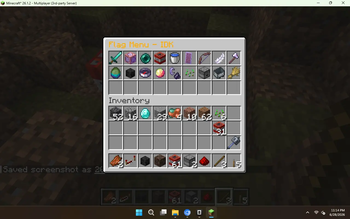
The /chunkprotector menu and /chunkprotector area <id> menu commands open a 54-slot chest menu. The top row shows the area name, chunk count and auto-merge state. Flags are grouped by category (Combat, Building, Movement, World, Entities) and each item shows its current ON/OFF state, what the flag does, what ON and OFF mean, and a click hint. Enabled flags glow. Left-click a flag to toggle it; the change saves immediately. Empty slots are filler panes and cannot be taken.
Notes for server owners
- The mod is server-side only. Do not put it on clients; vanilla clients work as-is.
- Reload the config with
/chunkprotector reloadafter editing the JSON by hand. - Overlapping chunk selections resolve through an internal cache that is rebuilt on load and reload.
- License: MIT.
Галерея