COWMODSКаталог модов

chain craft

Adds a Smart Workbench that automatically crafts all necessary intermediate items on the fly using raw materials in your inventory, delivering your final item in a single click.

Автор: khd3431540обновлён 18 окт. 2026 г.
Механики игрыТехнологииУтилиты

Описание

ChainCraft — Chain Crafting Table

Craft anything through its entire recipe tree in one click.

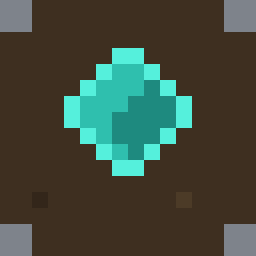
ChainCraft adds a single new block: the Chain Crafting Table. Instead of crafting planks, then sticks, then a pickaxe, you open the Chain Crafting Table and just click the pickaxe — the mod works out the whole chain of intermediate crafts for you and performs them all at once, using only what is in your inventory.

How it works

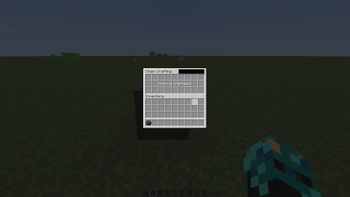
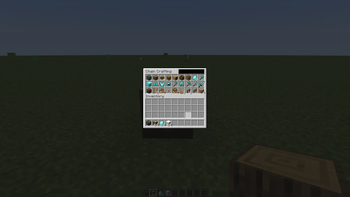
Right-click the Chain Crafting Table to open its UI. The grid at the top shows every item you can currently craft, directly or indirectly, from the materials you are carrying:

  • Left-click an item to craft it once.
  • Shift-click to craft up to a full stack.
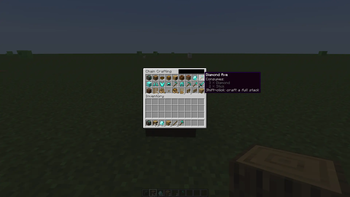
  • Hover over an item to see exactly what will be consumed, what leftovers you will get back, and how many crafting steps are involved — before you commit.
  • Use the search box to filter the grid, and the mouse wheel to scroll.
  • Category tabs down the left edge group the grid the same way the creative inventory does — Building Blocks, Redstone, Tools, Food… — and items from other mods appear under their own mod's tab automatically. Type @create (any mod name) in the search box to show only that mod's items; tabs and search combine.
  • Chest contents view: the chest tab on the right edge switches the grid to everything stored in chests within 10 blocks, with totals. Left-click takes a stack, shift-click takes all that fits, and hovering an item marks the chests holding it with particles.
  • Quick deposit: the hopper button moves items from your inventory (hotbar excluded) into nearby chests that already hold the same item.
  • Favorites: right-click any item to pin it. Pinned items get a star, their own tab, and sort first.
  • Protected chests: name a chest with "!" in an anvil, or put a sign on top of it, and the table leaves it alone.
  • Particle trails: materials visibly fly from chests to the table; pulls and deposits show the same trail.

The resolver is smart about your materials:

  • Intermediates you already own are used first — if you carry sticks, it won't waste logs making new ones.
  • Surplus intermediates are returned (make 1 stick and the 2 spare planks from the log go back to you).
  • Container items are handled properly — recipes that use a water bucket give you the empty bucket back.
  • Recipe loops (like gold blocks ↔ gold ingots) are detected and never cause problems.

Crafting the table

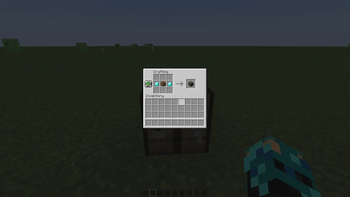
Diamond + Crafting Table + Diamond in a row:

◆ ⬜ ◆

Honest notes & limitations

  • Multiplayer-safe by design: all crafting logic runs on the server. The client only ever asks "craft this recipe"; the server independently verifies every material before anything is consumed, so item duplication through lag or modified clients is not possible.
  • Works only with regular crafting-table recipes (including those added by other mods and datapacks). Smelting, smithing, stonecutting, and "special" recipes such as firework or dyeing recipes are not chained.
  • Enchanted, renamed, or otherwise customized items are never consumed as materials — your enchanted diamond pickaxe cannot be eaten by a recipe that wants a plain one.
  • The craftable list refreshes automatically when your inventory changes; the recipe index is cached per world load, so there is no ongoing performance cost.

Versions & requirements

ChainCraft is available in four versions — pick the file matching your mod loader and game version.

Since 1.3.0 all four builds have the same features: chest support (materials from chests within 10 blocks of the table), category tabs, the chest contents view, quick deposit, favorites, protected chests and particle trails. The old 1.0.0 files of the Forge 26.2 and Fabric builds craft from your inventory only.

FileLoaderMinecraftAlso needs
chaincraft-1.20.1-x.x.x.jarForge1.20.1nothing
chaincraft-26.2-x.x.x.jarForge26.2nothing
chaincraft-fabric-1.20.1-x.x.x.jarFabric1.20.1Fabric API
chaincraft-fabric-26.2-x.x.x.jarFabric26.2Fabric API
  • Forge versions need Forge 47.3.0+ (for 1.20.1) or Forge 65+ (for 26.2), and have no dependencies.
  • Fabric versions need Fabric Loader and the Fabric API library mod (required — the mod will not start without it).

For servers: install the mod on both the server and all clients (Fabric servers also need Fabric API on both sides).

Compatibility

ChainCraft adds no world generation and stores no data in your world — the block is a normal block, and removing the mod later simply removes the block. Recipes from other mods appear in the chain crafting grid automatically as long as they are standard crafting recipes.

Галерея
1234

Последние версии

Все версии →
release

ChainCraft 1.3.0 (Fabric 26.2)

fabric-26.2-1.3.0
18 окт. 2026 г.33Minecraft: 26.2fabric
Скачать
Что нового
Fabric 26.2. First feature update for this build; it now matches Forge 1.20.1 1.3.0: - **Chest support**: crafting also uses materials from chests within 10 blocks of the table. Your own items are used first; results and leftovers always go to you. - **Category tabs** down the left edge, taken from the creative inventory tabs; items from other mods appear under their own mod's tab. `@mod` search (e.g. `@create`) limits the grid to one mod. Grid is 6 rows of 9, sorted by name; the selected tab and search are remembered until the game closes. - **Chest contents view**: a second tab on the right edge shows everything stored in nearby chests with total counts. Left-click takes a stack, shift-click takes all that fits. Hovering an item marks the chests holding it with particles. - **Quick deposit**: the hopper button moves items from your main inventory (hotbar excluded) into nearby chests that already hold the same item. - **Favorites**: right-click any item to pin it. Pinned items show a star, sort first, and get their own tab. Saved in `config/chaincraft-favorites.json`. - **Protected chests**: a chest named with `!` (in an anvil) or with a sign on top is ignored for crafting, pulling and depositing. Either half of a double chest protects both. - **Particle trails**: materials fly from chests to the table as enchantment glyphs; pulls and deposits show the same trail. - Server and all clients must run 1.3.0.
release

ChainCraft 1.3.0 (Forge 26.2)

26.2-1.3.0
18 окт. 2026 г.11Minecraft: 26.2forge
Скачать
Что нового
Forge 26.2. First feature update for this build; it now matches Forge 1.20.1 1.3.0: - **Chest support**: crafting also uses materials from chests within 10 blocks of the table. Your own items are used first; results and leftovers always go to you. - **Category tabs** down the left edge, taken from the creative inventory tabs; items from other mods appear under their own mod's tab. `@mod` search (e.g. `@create`) limits the grid to one mod. Grid is 6 rows of 9, sorted by name; the selected tab and search are remembered until the game closes. - **Chest contents view**: a second tab on the right edge shows everything stored in nearby chests with total counts. Left-click takes a stack, shift-click takes all that fits. Hovering an item marks the chests holding it with particles. - **Quick deposit**: the hopper button moves items from your main inventory (hotbar excluded) into nearby chests that already hold the same item. - **Favorites**: right-click any item to pin it. Pinned items show a star, sort first, and get their own tab. Saved in `config/chaincraft-favorites.json`. - **Protected chests**: a chest named with `!` (in an anvil) or with a sign on top is ignored for crafting, pulling and depositing. Either half of a double chest protects both. - **Particle trails**: materials fly from chests to the table as enchantment glyphs; pulls and deposits show the same trail. - Server and all clients must run 1.3.0.
release

ChainCraft 1.3.0 (Fabric 1.20.1)

fabric-1.20.1-1.3.0
18 окт. 2026 г.15Minecraft: 1.20.1fabric
Скачать
Что нового
Fabric 1.20.1. First feature update for this build; it now matches Forge 1.20.1 1.3.0: - **Chest support**: crafting also uses materials from chests within 10 blocks of the table. Your own items are used first; results and leftovers always go to you. - **Category tabs** down the left edge, taken from the creative inventory tabs; items from other mods appear under their own mod's tab. `@mod` search (e.g. `@create`) limits the grid to one mod. Grid is 6 rows of 9, sorted by name; the selected tab and search are remembered until the game closes. - **Chest contents view**: a second tab on the right edge shows everything stored in nearby chests with total counts. Left-click takes a stack, shift-click takes all that fits. Hovering an item marks the chests holding it with particles. - **Quick deposit**: the hopper button moves items from your main inventory (hotbar excluded) into nearby chests that already hold the same item. - **Favorites**: right-click any item to pin it. Pinned items show a star, sort first, and get their own tab. Saved in `config/chaincraft-favorites.json`. - **Protected chests**: a chest named with `!` (in an anvil) or with a sign on top is ignored for crafting, pulling and depositing. Either half of a double chest protects both. - **Particle trails**: materials fly from chests to the table as enchantment glyphs; pulls and deposits show the same trail. - Server and all clients must run 1.3.0.
release

ChainCraft 1.3.0 (Forge 1.20.1)

1.20.1-1.3.0
9 окт. 2026 г.33Minecraft: 1.20.1forge
Скачать
Что нового
## 1.3.0 (Forge 1.20.1) - **Chest contents view**: a second tab on the right edge shows everything stored in chests within 10 blocks of the table, with total counts. Left-click takes a stack, shift-click takes all that fits. Hovering an item marks the chests holding it with particles. - **Quick deposit**: the hopper button moves items from your main inventory (hotbar excluded) into nearby chests that already hold the same item. - **Favorites**: right-click any item to pin it. Pinned items show a star, sort first, and get their own tab. Saved in `config/chaincraft-favorites.json`. - **Protected chests**: a chest named with `!` (in an anvil) or with a sign on top is ignored for crafting, pulling and depositing. Either half of a double chest protects both. - **Particle trails**: materials fly from chests to the table as enchantment glyphs; pulls and deposits show the same trail. - Network protocol changed: server and all clients must run 1.3.0. ## 1.2.0 (Forge 1.20.1) - **Category tabs** down the left edge, taken from the creative inventory tabs. Items from other mods appear under their own mod's tab automatically. "All items" first, "Other" last. - **`@mod` search**: type `@create` in the search box to show only that mod's items. Tab and search combine. - Grid is now 6 rows of 9, sorted by item name. The selected tab and search text are remembered until the game closes. ## 1.1.0 (Forge 1.20.1) - **Chest support**: crafting also uses materials from chests within 10 blocks of the table. Your own items are used first; results and leftovers always go to you.
release

chain craft 26.2-1.0.0

26.2-1.0.0
26 авг. 2026 г.27Minecraft: 26.2fabric
Скачать
release

chain craft 1.20.1-1.0.0

1.20.1-1.0.0
26 авг. 2026 г.7Minecraft: 1.20.1fabric
Скачать
release

chain craft 26.2-1.0.0

26.2-1.0.0
16 авг. 2026 г.15Minecraft: 26.2forge
Скачать
Что нового
support 26.2
release

chain craft 1.0.0

1.0.0
16 авг. 2026 г.13Minecraft: 1.20.1forge
Скачать
Что нового
Initial release of Chain Craft!