COWMODSКаталог модов

BrowsMainer Online

BrowsMainer Online is a Minecraft plugin/mod that lets you use online browser features directly in Minecraft.

Автор: Mainermaxim.dev4981обновлён 31 июл. 2026 г.
Технологии

Описание

Mainbrows Online

Mainbrows Online brings real browser displays to Minecraft. You can open and view websites directly inside your Minecraft world and watch them together with other players.

Status: Mainbrows Online is currently in alpha. Bugs, changes, and limitations may still occur.


What is Mainbrows Online?

Mainbrows Online is a browser display project for Minecraft 1.21.11 with Java 21.

It allows you to create display surfaces in the world that work like a real browser.

In singleplayer, the browser runs locally through the Fabric mod. On servers, the Paper plugin renders the website centrally and sends video and audio to players using the Fabric mod.


Project Parts

PartDescription
Fabric modLocal displays in singleplayer and client support for server displays
Paper pluginShared server displays, permissions, sessions, and browser controls
SidecarInvisibly managed Chromium worker
ProtocolShared message formats between the mod and plugin

Chrome, Node, and FFmpeg do not need to be installed manually. The required runtimes are downloaded and checked automatically on the first start.


Features

Browser Display

  • Browser displays directly inside Minecraft

  • Singleplayer displays through Fabric

  • Shared server displays through Paper

  • Open websites by URL

  • Browser bar with:

    • Back
    • Forward
    • Reload
    • URL field
    • Ping display
    • Buffer status

Quality and Performance

  • Adjustable display quality

  • Adjustable FPS:

    • 15 FPS
    • 30 FPS
    • 60 FPS
  • Configurable viewer range

  • Buffer system for smoother playback

  • H.264 / Opus support

  • JPEG / PCM fallback support

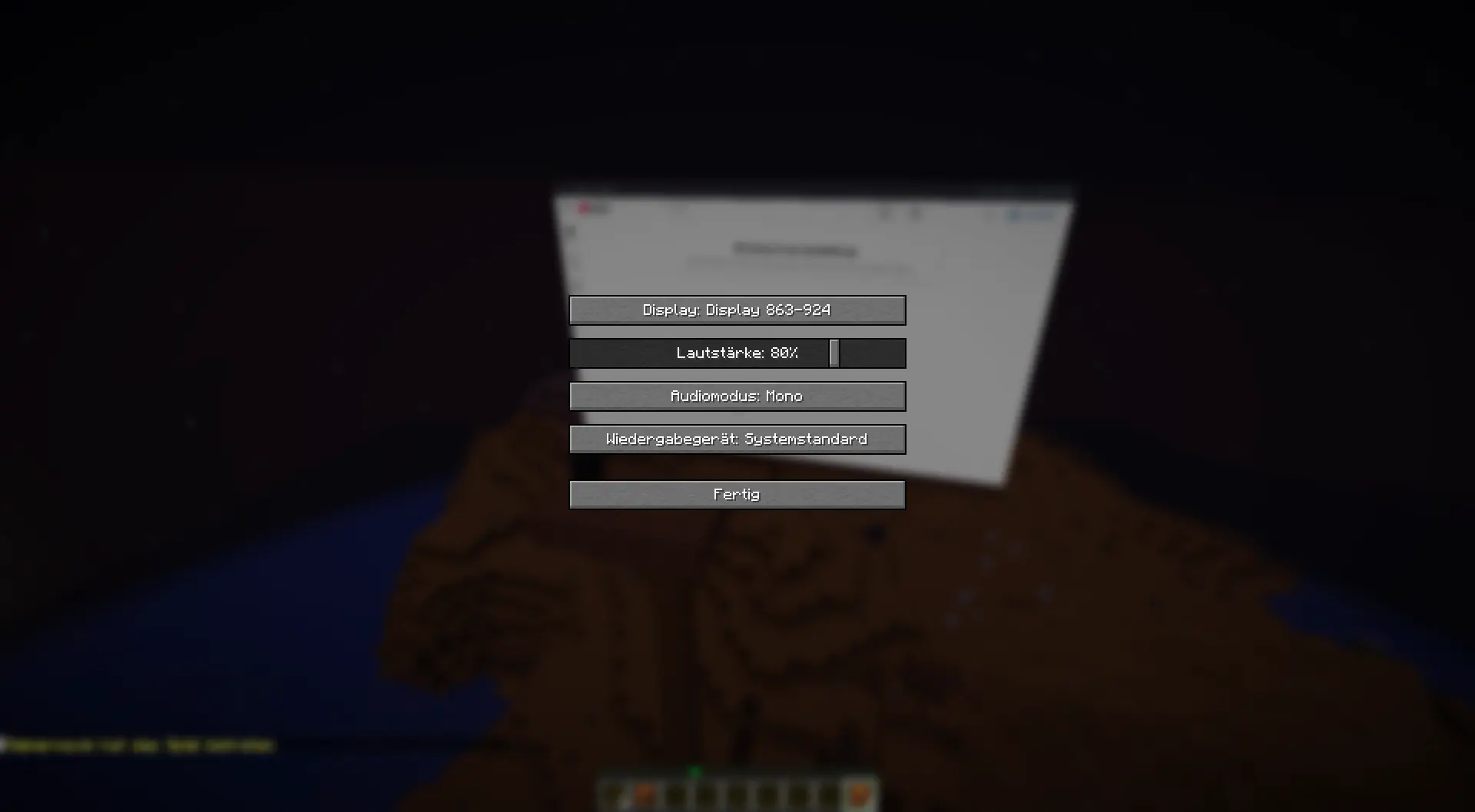
Audio

  • Audio streaming

  • Volume control

  • Audio device selection

  • Audio modes:

    • Mono
    • Stereo
    • Off

Server Features

  • Permission system
  • Session system
  • Owner, controller, and control request system
  • Website blacklist for blocked domains
  • Automatic runtime installation
  • Checksum verification for downloaded runtimes

Requirements

Client

  • Minecraft 1.21.11
  • Java 21
  • Fabric Loader 0.19.3 or newer
  • Fabric API
  • Mainbrows Online Fabric mod

Server Displays

For shared server displays, the server owner also needs:

  • Paper server for Minecraft 1.21.11
  • Mainbrows Online Paper plugin
  • Mainbrows Online Fabric mod installed on every client

First Start

Internet access is required on the first browser start to download the required runtimes.


Getting Started

1. Install the mod

Install:

  • Fabric Loader
  • Fabric API
  • Mainbrows Online Fabric mod

2. Start Minecraft

Start Minecraft with the Fabric profile.

3. Create a display

Use these commands:

/display wand
/display create <Name>

4. Open a website

/display open <http(s)://URL>

5. Shared server displays

For shared displays, the server owner must also install the Paper plugin.


Important Commands

CommandDescription
/display wandGives you the display selection tool
/display create <Name>Creates a new display
/display connect <Code>Connects to a server display
/display open <http(s)://URL>Opens a website
/display quality <360p|HD|FullHD|WidthxHeight>Changes display quality
/display fps <15|30|60>Changes display FPS
/display range <2-128>Changes viewer range
/display buffer <on seconds|off>Enables or disables buffering
/display keyboardOpens keyboard input
/display browserstatusShows browser status
/display runtime retryRetries runtime installation
/display session clearClears the current session

Videos

Video 1: Creating a display and opening a website

(Only in German, but I will make an English version too.)

Example: A short clip showing how a display is created and a website is opened.

(Coming soon)

Video 2: Server display with multiple players

(Coming soon)

Example: A short clip showing multiple players viewing and using the same display together.


Images

Singleplayer Display
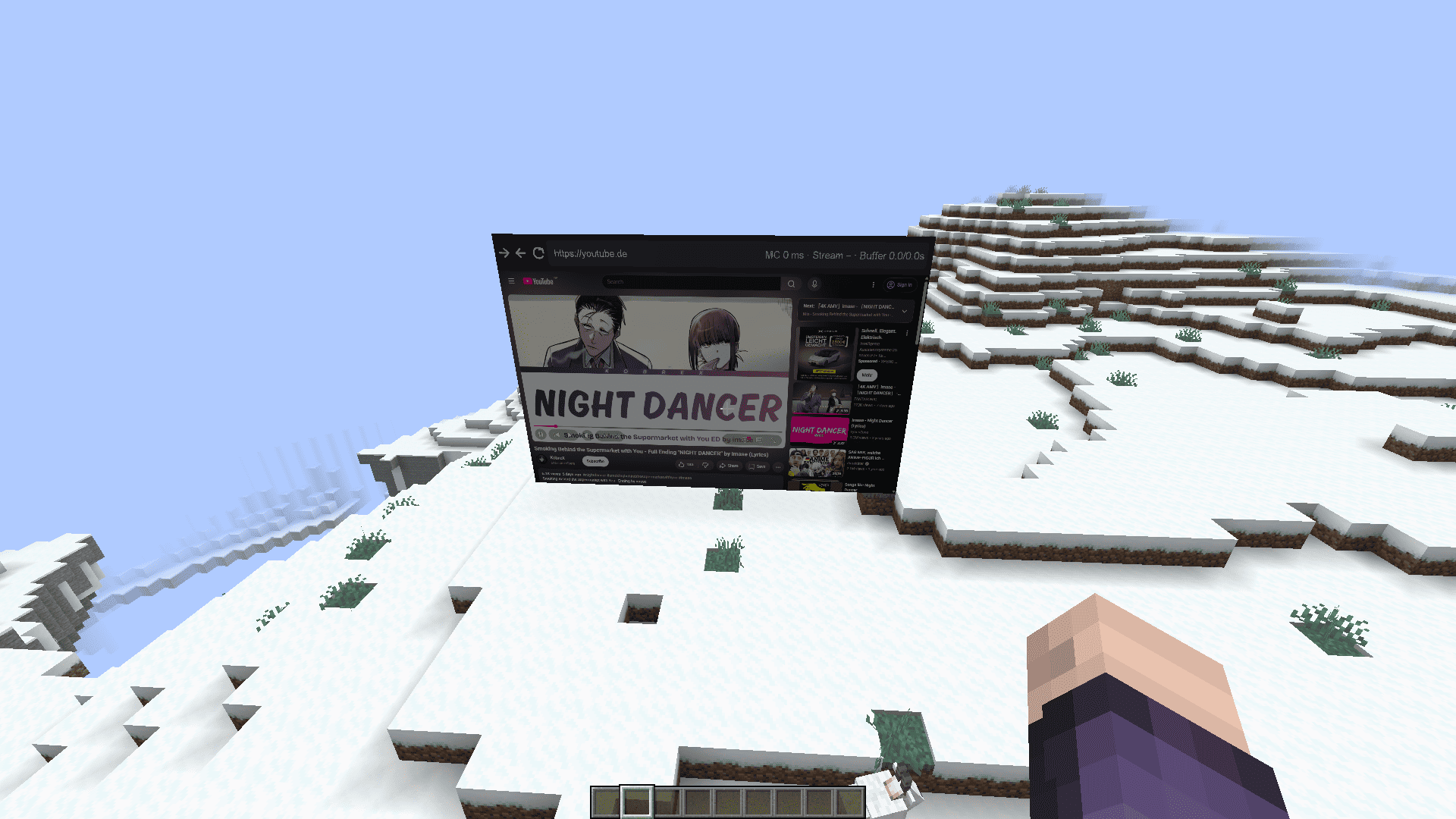
Singleplayer image

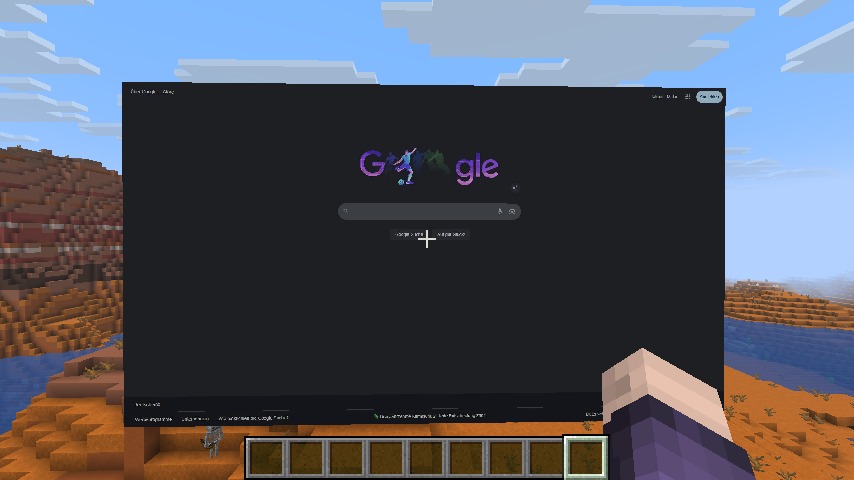
Website Display

Google

Audio Settings

Audio settings


Security and Privacy

All viewers of a server display see the same browser content and hear the same audio.

Because of this, you should not open the following on public server displays:

  • Personal accounts
  • Private messages
  • Passwords
  • Admin panels
  • Sensitive data
  • Private websites

For security reasons, these features are disabled in the shared server browser:

  • Downloads
  • File uploads
  • Camera access
  • Microphone access

Server admins can block websites through this file:

plugins/Mainbrows/blocked-websites.json

In local singleplayer mode, browser data does not leave your own computer.


Limitations

Mainbrows Online is still alpha software. Some websites or systems may work better than others.

The following features are currently best effort:

  • DRM / Widevine
  • Captchas
  • WebGL websites
  • Very high resolutions
  • Multiple displays at the same time
  • 60 FPS on weaker systems

These features may require more CPU, RAM, and bandwidth:

  • High resolution
  • 60 FPS
  • Multiple displays
  • Fallback codecs
  • Audio streaming

Help and Bug Reports

When reporting bugs, please include:

  • Mainbrows Online version
  • Minecraft version
  • Whether Fabric, Paper, or both are being used
  • A short description of what happened
  • The last steps before the issue occurred
  • logs/latest.log

Before sending logs or screenshots, please remove:

  • Login data
  • Tokens
  • Private browser content
  • Personal information

License

Mainbrows Online is licensed as:

All rights reserved.

Последние версии

Все версии →
alpha

BrowsMainer Online 0.6.0-alpha

0.6.0-alpha
31 июл. 2026 г.176Minecraft: 1.21.11paper
Скачать
Что нового
Mainbrows Paper 0.6.0-alpha Changelog Release date: July 31, 2026 ## Automatic Browser Runtime - The Paper plugin now prepares and owns its browser worker automatically. A separately installed Mainbrows sidecar is no longer required for the standard server setup. - Automatically downloads the configured Node.js runtime when it is not already available. - Installs the bundled worker dependencies, Playwright Chromium, and the matching FFmpeg package inside `plugins/Mainbrows/runtime`. - Verifies downloaded Node.js archives using their official SHA-256 checksums. - Prevents platform-specific `node_modules` files from being reused after moving a server between Windows, Linux, x64, and ARM64 systems. - Performs startup self-tests for Node.js, Chromium, and FFmpeg before reporting the runtime as ready. - Uses the full Playwright Chromium build and disables the Chromium sandbox for compatibility with managed game-server containers. - Added `/display runtime retry` to restart runtime preparation after correcting a configuration or container problem. ## Linux and AMP Support - Added runtime detection for Linux x64 and Linux ARM64 servers. - On supported root-managed Debian/Ubuntu systems, the plugin can install required Chromium system libraries automatically through Playwright. - Detects AMP installations and avoids running an unavailable or blocked `apt-get` installation inside the AMP instance. - Detects whether the Paper process has root privileges before attempting system package installation. - Checks Chromium with `ldd` and reports the exact missing Linux libraries when possible. - Runtime failures now explain whether installation was prevented by AMP, missing root privileges, a missing `apt-get`, or disabled automatic dependency installation. - AMP error messages direct administrators to add the required Debian packages through the instance's **Container Packages** configuration and restart the instance. ## Download and Setup Reporting - Download progress is written to the server console once per second. - Direct downloads report transferred size, total size, percentage, and transfer speed. - Long-running npm and Playwright commands report their elapsed time and detected percentage when available. - Timeouts now include the last relevant process output instead of only displaying a generic timeout message. - Timed-out setup processes and their child processes are terminated cleanly. - Runtime status reports the active Node.js, Chromium, and FFmpeg state. ## Networking and Port Handling - The privileged internal control API is restricted to `127.0.0.1`. - The client-facing media stream uses WSS with a generated certificate and exact SHA-256 certificate pinning. - `runtime.public-host: auto` allows Fabric clients to use the Minecraft server address automatically. - Internal and stream ports are validated before the worker starts and may no longer use the same value. - Port conflicts now identify whether `runtime.internal-port` or `runtime.stream-port` is occupied. - Startup errors provide the relevant configuration key and distinguish an occupied port from a permission or firewall failure. - If startup fails after opening one listener, the already-open listener is closed cleanly instead of remaining active. - Health checks report success only after both the internal API and secure stream listener are ready. ## Browser Sessions and Streaming - Multiple viewers of one display share the same server-side Chromium session. - Added synchronized playback preparation and start messages for buffered viewers. - Late viewers can join an existing synchronized playback group. - A buffer underflow rebuilds only the affected viewer's buffer instead of interrupting every connected viewer. - Supports buffer durations from 1 to 30 seconds through `/display buffer start [seconds]` and `/display buffer stop`. - Image and audio playback use a shared presentation timeline. - Media packets include the display ID, worker generation, sequence number, presentation timestamp, and keyframe marker. - H.264/Opus streaming includes JPEG/PCM fallback packets for compatible Fabric clients. - The number of simultaneously active browser displays is configurable and defaults to four. ## Navigation and Browser Controls - The worker broadcasts committed page navigations to connected Fabric clients. - Periodic synchronization checks the actual Playwright page URL and repairs a stale client toolbar URL. - Reload, history navigation, direct URL navigation, keyboard, pointer, and scroll commands are forwarded to the shared browser session. - Popup navigation is handled inside the existing display session when the destination is allowed. - Navigation failures and blocked targets now provide more useful server log entries. ## Security and Administration - Stream connections use scoped, signed, expiring access tokens. - Tampered and expired stream tokens are rejected. - Browser downloads are disabled and download attempts are cancelled. - Website blocking supports exact domains and wildcard subdomains. - The blocked website configuration can be reloaded without restarting the server. - Browser profiles remain separated by display ID. ## Media Compatibility - Added browser audio capture and server-side PCM/Opus processing. - Added TikTok codec probing, detailed media error reporting, and a temporary WebM fallback path. - Improved Chromium launch diagnostics for missing libraries and container sandbox restrictions. ## Known Limitations - Widevine/DRM is not included. DRM-protected services such as Crunchyroll may still fail with errors such as `KAT-6005`. - TikTok may reject fallback media requests with CDN `HTTP 403`; affected videos cannot be converted when this occurs. - AMP does not allow the plugin to install system packages inside the running instance. Missing Chromium libraries must be configured under **Container Packages**, followed by an instance restart. - The initial runtime setup requires outbound internet access and sufficient storage for Node.js, npm dependencies, Chromium, and FFmpeg. - `runtime.stream-port` must be reachable by players and must not already be used by another process or an old manually started sidecar. ## Compatibility - Paper 1.21.11 - Java 21 or newer - Windows x64 - Linux x64 - Linux ARM64 - Matching Mainbrows Fabric mod required for in-world browser rendering and interaction
alpha

BrowsMainer Online 0.6.0-alpha

0.6.0-alpha
31 июл. 2026 г.218Minecraft: 1.21.11fabric
Скачать
Что нового
Mainbrows Fabric 0.6.0-alpha Changelog Release date: July 31, 2026 ## Controls - Corrected browser scrolling so that it now follows the mouse wheel direction. - Leaving browser control mode now requires holding `ESC` for two seconds. - While `ESC` is held, the action bar displays the remaining time before browser control mode is closed. - A short `ESC` press is still forwarded to the website, for example to exit a fullscreen video. - Right-clicking a display now connects the player to its local browser session in single-player worlds. - A clear chat message confirms when the player connects to a display. ## Browser Toolbar - The toolbar height now adapts to the display size and aspect ratio. - Small displays no longer receive an unnecessarily one-block-high toolbar. - Back, forward, and reload buttons scale together with the toolbar. - Fixed the broken reload button. - The displayed URL now updates automatically after navigation within a website. - Periodic URL synchronization corrects the toolbar if a navigation event is missed. - Minecraft latency, stream latency, and buffer status are displayed compactly in the toolbar. ## Audio - Completely redesigned the audio settings interface. - Each display has its own card with display selection, volume control, and audio mode. - Available audio modes: Stereo, Mono, and Off. - The playback device can be selected separately for each display. - The status indicates whether the selected display is connected and whether stream audio is being received. - Long display lists can be navigated using the mouse wheel or scrollbar. - During buffered playback, audio packets are queued ahead of time and continuously supplied to JavaSound instead of being submitted at the last moment. - Audio output now pauses correctly while playback is paused or the buffer is being rebuilt. ## Buffering and Playback - The client now calculates the actual remaining buffered media time from the playback timeline. - Short network interruptions consume only the corresponding amount of buffered time instead of triggering an underflow after a fixed 500 milliseconds. - Rebuffering begins only when playback actually reaches the safety margin. - Audio packets older than the agreed playback start position are discarded. - Buffered playback uses consistently timestamped JPEG and PCM packets, preventing irregular FFmpeg output chunks from causing brief stutters. - The buffer indicator and playback clock continue to update during playback. - Added three regression tests covering buffer consumption, the underflow threshold, and loading progress. ## Media Compatibility - Improved TikTok codec detection and media error diagnostics. - Added a temporary WebM fallback for TikTok media that cannot be played directly. - H.264/Opus and JPEG/PCM transport paths are selected according to the playback mode. ## Known Limitations - Widevine/DRM is not included in this release. DRM-protected services such as Crunchyroll may therefore still fail with errors such as `KAT-6005`. - TikTok may block the WebM fallback with a CDN `HTTP 403` response. Affected videos still cannot be played when this happens. - Enabling a playback buffer intentionally delays visible input responses and media playback by the configured buffer duration. ## Compatibility - Minecraft 1.21.11 - Java 21 or newer - Fabric Loader 0.19.3 or newer - Fabric API required - Paper servers require the matching Mainbrows Paper plugin.
alpha

BrowsMainer Online 0.5.0-alpha

Fabric-0.5.0-alpha
29 июн. 2026 г.77Minecraft: 1.21.11fabric
Скачать
Что нового
### Erster Upload von Fabric Mod
alpha

BrowsMainer Online 0.5.0-alpha

Paper-0.5.0-alpha
29 июн. 2026 г.27Minecraft: 1.21.11paper
Скачать
Что нового
### Erster Upload von dem Plugin