

Island Border
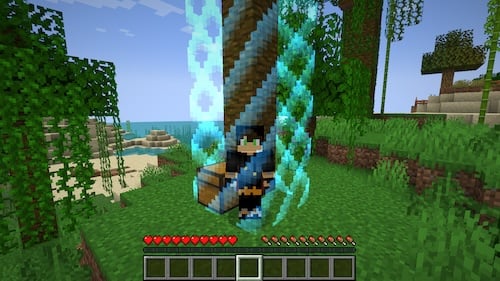
Visible island boundaries that players can see and respect. Prevents wandering and protects neighboring islands.
2,4 тыс.11обновлён 1 авг. 2026 г.
Механики игры
Описание
🔲 Island Border — See Your Boundaries
Adds a visible world border around each player's island. Players can see exactly where their island ends, preventing accidental wandering and protecting neighboring islands.
Features
- Visual border — players see the boundary as they approach the edge
- Configurable appearance — wall style, particles, or vanilla world border effect
- Per-island sizing — borders match each island's actual protection range
- Performance friendly — minimal server impact
- Works with all BentoBox game modes
📦 Requires BentoBox + a game mode addon.
Галерея
Последние версии
Все версии →release
Release 4.8.5
4.8.51 авг. 2026 г.630Minecraft: 1.21.5, 1.21.6, 1.21.7, 1.21.8, 1.21.9, 1.21.10, 1.21.11, 26.1, 26.1.1, 26.1.2paper, spigot
Что нового
## Summary
Border 4.8.5 is a compatibility and permissions patch.
The headline fix restores compatibility with **DeathChest, grave plugins, and other death-drop handlers**, which Border has silently been breaking since 4.7.0. The second fix makes the border colour and type commands actually usable by players again — the permissions they check were never declared, so they quietly fell back to op-only.
### Compatibility
✔️ BentoBox API 3.12.0+
✔️ Minecraft 1.21.5 – 1.21.11, 26.1.x
✔️ Java 21
### Upgrading
1. Stop the server.
2. Replace `Border-4.8.4.jar` in `plugins/BentoBox/addons/` with `Border-4.8.5.jar`.
3. Start the server. No config or locale changes required.
> 🔺 **Permission rename:** the declared node `[gamemode].bordertype` has been renamed to `[gamemode].border.bordertype`. If you granted or denied `[gamemode].bordertype` in LuckPerms (or similar), update it to the new node. The old node was never actually checked by the command, so it had no effect either way — but any rule referencing it is now dead weight.
> 🔺 **Colour commands are usable again:** `[gamemode].border.color` now defaults to `true`, so ordinary players can run the colour command as documented. The individual colours (`.red`, `.green`, `.blue`) remain `op` by default. If you were granting these explicitly to work around the bug, you can leave those grants in place — they still work.
### Legend
- 🔺 special attention needed.
---
## Bug Fixes
### Death drops no longer hijacked from other plugins
[[PR #182](https://github.com/BentoBoxWorld/Border/pull/182)]
The death-drop protection added in 4.7.0 handled `PlayerDeathEvent` at NORMAL priority by pulling every item out of `event.getDrops()`, spawning them by hand, and clearing the list. Any plugin that stores death drops — DeathChest, grave plugins, keep-inventory features — runs at a later priority and saw an empty event, while the items were already lying on the ground. With the default `bounce-back: true`, that silently broke all of them; it was tracked down on a live server where DeathChest chests were always coming up empty.
Border now leaves the event's drops untouched. `onPlayerDeath` runs at MONITOR — after every other plugin has decided what happens to the items — and only records the death spot and island for one tick. A new `ItemSpawnEvent` handler applies the same bounce-back to items the server spawns that tick near a recorded death spot. If another plugin takes the drops, nothing spawns and nothing is tracked; if the drops survive, they bounce back inside the border exactly as before. Vanilla drop behaviour (velocities, despawn timers) is preserved too, since the server spawns the items itself.
### 🔺 Border colour and type permissions were never declared
[[PR #180](https://github.com/BentoBoxWorld/Border/pull/180)] Found while investigating [#179](https://github.com/BentoBoxWorld/Border/issues/179)
`addon.yml` did not declare the permissions the commands actually check:
- `[gamemode].border.color` — checked by `BorderColorCommand` (both `/[gamemode] border color` and `/[gamemode] bordercolor`). Undeclared, so it had no default and fell back to op only, contradicting the documentation and stopping players from using the command at all. Now declared `true`.
- `[gamemode].border.color.red|green|blue` — checked in `BorderColorCommand`, documented as op. Now declared with an `op` default.
- `[gamemode].bordertype` was declared but never checked — `BorderTypeCommand` asks for `[gamemode].border.bordertype`. The declaration has been renamed to the permission that is really used, keeping its `false` default.
Note that this was not the cause of the exception reported in [#179](https://github.com/BentoBoxWorld/Border/issues/179) — that is [BentoBox#3042](https://github.com/BentoBoxWorld/BentoBox/issues/3042) — but it is why the colour command was unusable for the reporting player in the first place.
---
## Other Improvements
- **CurseForge and Hangar publishing.** Releases now publish the attached jar to CurseForge and Hangar automatically, alongside the existing Modrinth workflow. [[PR #176](https://github.com/BentoBoxWorld/Border/pull/176)]
- **Modrinth game versions brought up to date.** The listing now covers 1.21.5 – 1.21.11 and 26.1.x instead of stopping at 1.21.4. [[PR #175](https://github.com/BentoBoxWorld/Border/pull/175)]
- **MockBukkit pinned to Maven Central 4.110.0** instead of a jitpack snapshot, so test builds are reproducible.
## What's Changed
* Stop death bounce-back from hijacking the drops by @tastybento in https://github.com/BentoBoxWorld/Border/pull/182
* 🔺 Declare the border colour and bordertype permissions by @tastybento in https://github.com/BentoBoxWorld/Border/pull/180
* ci: bump publish-platforms pin to the multipart-JSON fix by @tastybento in https://github.com/BentoBoxWorld/Border/pull/181
* ci: bump pinned publish-platforms.yml to ca2dcd1 by @tastybento in https://github.com/BentoBoxWorld/Border/pull/178
* ci: bump pinned reusable workflow to fe4b1f0 by @tastybento in https://github.com/BentoBoxWorld/Border/pull/177
* Add CurseForge publish workflow (publishes the release asset) by @tastybento in https://github.com/BentoBoxWorld/Border/pull/176
* Update Modrinth game-versions to current MC range by @tastybento in https://github.com/BentoBoxWorld/Border/pull/175
* Pin MockBukkit to Maven Central 4.110.0 instead of jitpack snapshot by @tastybento
**Full Changelog**: https://github.com/BentoBoxWorld/Border/compare/4.8.4...4.8.5
release
Island Border 4.8.3
4.8.316 апр. 2026 г.309Minecraft: 1.21.5, 1.21.6, 1.21.7, 1.21.8, 1.21.9, 1.21.10, 1.21.11, 26.1, 26.1.1, 26.1.2paper, purpur
Что нового
## New in this release
* 🔡 All locale files converted from legacy `&`-colour codes to MiniMessage format
* 🔡 Missing `set-color` keys added to every non-English locale
* 🔡 Fixed `[typ]` → `[type]` placeholder in `pl.yml` so the Polish `bordertype` message substitutes correctly
* 🔡 Fixed MiniMessage tag positioning in `uk.yml` so the whole Ukrainian `set-type` phrase is coloured
* 🔡 Removed duplicate `zh_CN.yml` in favour of the canonical `zh-CN.yml`
* 🔺 Bumped minimum BentoBox API to **3.12.0**
* Build: enabled PaperMC snapshot repository
## Compatibility
✔️ BentoBox API 3.12.0
✔️ Minecraft 1.21.3+
✔️ Java 21
## Installation
1. Download this jar and put it in your addons folder
2. Restart the server
3. Look at config.yml and edit it if required. If you do, restart the server.
4. If you want players to be able to access the toggle command, give them the `[gamemode].border.toggle` permission where `[gamemode]` is bskyblock, aoneblock, etc.
5. If you want players to have permission to access the color command, give them `[gamemode].color.*` permission, or replace `*` with red/green/blue.
6. You should be good to go!
## Upgrading
1. Take backups of your server, for safety
2. Update BentoBox to **3.12.0** or later
3. Download this jar and put it in your addons folder - delete the old one
4. If you maintain custom locale overrides under `plugins/BentoBox/addons/Border/locales/`, migrate them from `&`-codes to MiniMessage tags
5. Restart the server
6. You should be good to go!
## Legend
* 🔡 Locale files updated — review any custom locale overrides
* 🔺 Breaking/required change — minimum dependency bumped
## What's Changed
* 🔡 Update Russian locale to MiniMessage format by @Copilot in https://github.com/BentoBoxWorld/Border/pull/171
* 🔡 🔺 Convert all locale files to MiniMessage format and bump BentoBox requirement to 3.12.0 by @Copilot in https://github.com/BentoBoxWorld/Border/pull/173
* Release 4.8.3 by @tastybento in https://github.com/BentoBoxWorld/Border/pull/172
**Full Changelog**: https://github.com/BentoBoxWorld/Border/compare/4.8.2...4.8.3
release
Island Border 4.8.2
4.8.24 апр. 2026 г.110Minecraft: 1.21, 1.21.1, 1.21.2, 1.21.3, 1.21.4, 1.21.5, 1.21.6, 1.21.7, 1.21.8, 1.21.9, 1.21.10, 1.21.11, 26.1, 26.1.1paper, purpur
Что нового
## New in this release
* Bug fixes - remove debug
## Compatibility
✔️ BentoBox API 3.10.0
✔️ Minecraft 1.21.3+
✔️ Java 21
## Installation
1. Download this jar and put it in your addons folder
2. Restart the server
3. Look at config.yml and edit it if required. If you do, restart the server.
4. If you want players to be able to access the toggle command, give them the `[gamemode].border.toggle` permission where `[gamemode]` is bskyblock, aoneblock, etc.
5. If you want players to have permission to access the color command, give them `[gamemode].color.*` permission, or replace `*` with red/green/blue.
6. You should be good to go!
## Upgrading
1. Take backups of your server, for safety
2. Download this jar and put it in your addons folder - delete the old one
3. Restart the server
4. You should be good to go!
## What's Changed
* Release 4.8.2 by @tastybento in https://github.com/BentoBoxWorld/Border/pull/169
**Full Changelog**: https://github.com/BentoBoxWorld/Border/compare/4.8.1...4.8.2
release
Border 4.8.1
4.8.18 мар. 2026 г.96Minecraft: 1.21.3, 1.21.4, 1.21.5, 1.21.6, 1.21.7, 1.21.8, 1.21.9, 1.21.10, 1.21.11paper, purpur
Что нового
## New in this release
* Bug fixes
## Compatibility
✔️ BentoBox API 3.10.0
✔️ Minecraft 1.21.3+
✔️ Java 21
## Installation
1. Download this jar and put it in your addons folder
2. Restart the server
3. Look at config.yml and edit it if required. If you do, restart the server.
4. If you want players to be able to access the toggle command, give them the `[gamemode].border.toggle` permission where `[gamemode]` is bskyblock, aoneblock, etc.
5. If you want players to have permission to access the color command, give them `[gamemode].color.*` permission, or replace `*` with red/green/blue.
6. You should be good to go!
## Upgrading
1. Take backups of your server, for safety
2. Download this jar and put it in your addons folder - delete the old one
3. Restart the server
4. You should be good to go!
## What's Changed
* Fixed vanilla world border not resetting when a player teleports between islands. This was causing Bedrock/Geyser players to enter a restricted state (unable to break blocks) until they died or relogged. This has not been able to be tested yet directly, but I'm releasing it as it shouldn't do any harm.
* Fixed `%Border_color%` placeholder throwing a null error in some configurations.
* Fixed border incorrectly activating in vanilla (non-island) nether and end worlds by @tastybento in https://github.com/BentoBoxWorld/Border/pull/165
**Full Changelog**: https://github.com/BentoBoxWorld/Border/compare/4.8.0...4.8.1
release
Border 4.8.0
4.8.020 февр. 2026 г.52Minecraft: 1.21.3, 1.21.4, 1.21.5, 1.21.6, 1.21.7, 1.21.8, 1.21.9, 1.21.10, 1.21.11paper, purpur
Что нового
## New in this release
* Vanilla world border users can select the color of the border - red, green, or blue
* Bug fixes
## Compatibility
✔️ BentoBox API 3.10.0
✔️ Minecraft 1.21.3+
✔️ Java 21
## Installation
1. Download this jar and put it in your addons folder
2. Restart the server
3. Look at config.yml and edit it if required. If you do, restart the server.
4. If you want players to be able to access the toggle command, give them the '[gamemode].border.toggle' permission where `[gamemode]` is bskyblock, aoneblock, etc.
5. If you want players to have permission to access the color command, give them `[gamemode].color.*` permission, or replace * with red/green/blue.
6. You should be good to go!
## Upgrading
1. Take backups of your server, for safety
2. Download this jar and put it in your addons folder - delete the old one
3. Restart the server
4. You should be good to go!
## What's Changed
* Add per-player border color command by @tastybento in https://github.com/BentoBoxWorld/Border/pull/161
* Added placeholder for color: `%Border_color%` will return red/green/blue.
* Release 4.8.0 by @tastybento in https://github.com/BentoBoxWorld/Border/pull/162
**Full Changelog**: https://github.com/BentoBoxWorld/Border/compare/4.7.0...4.8.0
release
Border 4.7.0
4.7.016 февр. 2026 г.30Minecraft: 1.21.3, 1.21.4, 1.21.5, 1.21.6, 1.21.7, 1.21.8, 1.21.9, 1.21.10, 1.21.11paper, purpur
Что нового
## New in this release
* Vanilla world border users can select the color of the border - red, green, or blue
* Bug fixes
## Compatibility
✔️ BentoBox API 2.7.1 or later
✔️ Minecraft 1.21.3+
✔️ Java 21
## Installation
1. Download this jar and put it in your addons folder
2. Restart the server
3. Look at config.yml and edit it if required. If you do, restart the server.
4. If you want players to be able to access the toggle command, give them the '[gamemode].border.toggle' permission where [gamemode] is bskyblock, aoneblock, etc.
5. You should be good to go!
## Upgrading
1. Take backups of your server, for safety
2. Download this jar and put it in your addons folder - delete the old one
3. Restart the server
4. You should be good to go!
## What's Changed
* Add test coverage for nether world border filtering by @Copilot in https://github.com/BentoBoxWorld/Border/pull/152
* Fix MockedStatic resource leak in PlayerListenerTest by @Copilot in https://github.com/BentoBoxWorld/Border/pull/154
* Fix MockedStatic<User> resource leak in ShowBarrierTest by @Copilot in https://github.com/BentoBoxWorld/Border/pull/153
* Fix border teleportation bypass when player is outside all island spaces by @Copilot in https://github.com/BentoBoxWorld/Border/pull/157
* World border color by @tastybento in https://github.com/BentoBoxWorld/Border/pull/158
* Release 4.7.0 by @tastybento in https://github.com/BentoBoxWorld/Border/pull/159
## New Contributors
* @Copilot made their first contribution in https://github.com/BentoBoxWorld/Border/pull/152
**Full Changelog**: https://github.com/BentoBoxWorld/Border/compare/4.6.0...4.7.0
release
Border 4.6.0
4.6.016 дек. 2025 г.207Minecraft: 1.21.3, 1.21.4, 1.21.5, 1.21.6, 1.21.7, 1.21.8, 1.21.9, 1.21.10, 1.21.11paper, purpur
Что нового
Bug fix to address issue where players couldn't do anything in the Nether.
## Compatibility
✔️ BentoBox API 2.7.1 or later
✔️ Minecraft 1.21.3+
✔️ Java 21
## Installation
1. Download this jar and put it in your addons folder
2. Restart the server
3. Look at config.yml and edit it if required. If you do, restart the server.
4. If you want players to be able to access the toggle command, give them the '[gamemode].border.toggle' permission where [gamemode] is bskyblock, aoneblock, etc.
5. You should be good to go!
## Upgrading
1. Take backups of your server, for safety
2. Download this jar and put it in your addons folder - delete the old one
3. Restart the server
4. You should be good to go!
## What's Changed
* Defensive code to prevent nether border if it doesn't need one. by @tastybento in https://github.com/BentoBoxWorld/Border/pull/149
* Fix Nether WorldBorder by @Techirion in https://github.com/BentoBoxWorld/Border/pull/150
* Release 4.6.0 by @tastybento in https://github.com/BentoBoxWorld/Border/pull/151
## New Contributors
* @Techirion made their first contribution in https://github.com/BentoBoxWorld/Border/pull/150
**Full Changelog**: https://github.com/BentoBoxWorld/Border/compare/4.5.1...4.6.0
release
Border 4.5.1
4.5.125 мая 2025 г.374Minecraft: 1.21, 1.21.1, 1.21.2, 1.21.3, 1.21.4, 1.21.5paper
Что нового
Bug fix to keep players in boats or other vehicles if they exit the border and `return-teleport: false`. Previously, players were ejected. This enables borders to be just for visual identification, e.g., in the case of AcidIsland.
## Compatibility
✔️ BentoBox API 2.7.1 or later
✔️ Minecraft 1.21.3+
✔️ Java 17
## Installation
1. Download this jar and put it in your addons folder
2. Restart the server
3. Look at config.yml and edit it if required. If you do, restart the server.
4. If you want players to be able to access the toggle command, give them the '[gamemode].border.toggle' permission where [gamemode] is bskyblock, aoneblock, etc.
5. You should be good to go!
## Upgrading
1. Take backups of your server, for safety
2. Download this jar and put it in your addons folder - delete the old one
3. Restart the server
4. You should be good to go!
## What's Changed
* Fix for #146 keep in boats by @tastybento in https://github.com/BentoBoxWorld/Border/pull/147
* Version 4.5.1 by @tastybento in https://github.com/BentoBoxWorld/Border/pull/148
**Full Changelog**: https://github.com/BentoBoxWorld/Border/compare/4.5.0...4.5.1
release
Border 4.5.0
4.5.014 апр. 2025 г.127Minecraft: 1.21.3, 1.21.4, 1.21.5paper
Что нового
## Compatibility
✔️ BentoBox API 2.7.1 or later
✔️ Minecraft 1.21.3+
✔️ Java 17
## Installation
1. Download this jar and put it in your addons folder
2. Restart the server
3. Look at config.yml and edit it if required. If you do, restart the server.
4. If you want players to be able to access the toggle command, give them the '[gamemode].border.toggle' permission where [gamemode] is bskyblock, aoneblock, etc.
5. You should be good to go!
## Upgrading
1. Take backups of your server, for safety
2. Download this jar and put it in your addons folder - delete the old one
3. Restart the server
4. You should be good to go!
## What's Changed
* Fixes #142 when players can die from falling into barrier by @tastybento in https://github.com/BentoBoxWorld/Border/pull/143
* Version 4.5.0 by @tastybento in https://github.com/BentoBoxWorld/Border/pull/145
**Full Changelog**: https://github.com/BentoBoxWorld/Border/compare/4.42...4.5.0
release
Border for BentoBox 4.2.1
4.2.15 февр. 2024 г.507Minecraft: 1.20, 1.20.1, 1.20.2, 1.20.3, 1.20.4paper, spigot
Что нового
# Compatibility
- ✔️ BentoBox API 2.0.0
- ✔️ Minecraft 1.20.x
- ✔️ Java 17
# Installation
- Download this jar and put it in your addons folder
- Restart the server
- Look at config.yml and edit it if required. If you do, restart the server.
- If you want players to be able to access the toggle command, give them the '[gamemode].border.toggle' permission where [gamemode] is bskyblock, aoneblock, etc.
- You should be good to go!
# Upgrading
- Take backups of your server, for safety
- Download this jar and put it in your addons folder - delete the old one
- Restart the server
- You should be good to go!
# What's Changed
- Add Chinese Translation by @hutuY in #63
- Rename zh_CN.json to zh_CN.yml by @hutuY in #64
- Add a clearer message when WBAPI is not found by @arphox in #65
- Remove hooked field (refactor) by @arphox in #66
- Unify wording of WBAPI-excluded configs by @arphox in #67
- Implement per-player border type by @arphox in #69
- Cleanup documentation by @arphox in #70
- Indonesian translation by @gitlocalize-app in #71
- Hungarian translation by @gitlocalize-app in #72
- Taiwan translation by @gitlocalize-app in #73
- korean translation by @gitlocalize-app in #74
- Polish translation by @gitlocalize-app in #75
- Switch to use new Bukkit / Paper WorldBorder API by @tastybento in #78
- fix nether vanilla border by @emmanuelvlad in #80
- disabled enderpearls and chorus fruits + fix by @emmanuelvlad in #82
- run show task ; teleport visitors back in boundaries, bypass spectators by @emmanuelvlad in #83
- Update Russian translation by @gitlocalize-app in #93
- Update Polish translation by @gitlocalize-app in #92
- Update French translation by @gitlocalize-app in #91
- Update German translation by @gitlocalize-app in #89
- Update Spanish translation by @gitlocalize-app in #90
- Use default settings in config if player does not have permissions. by @tastybento in #98
- Config types by @tastybento in #99
- support < 0 in coloured virtual border by @456dev in #103
- Vietnamese translation by @gitlocalize-app in #104
- Japanese translation by @gitlocalize-app in #105
- Czech translation by @gitlocalize-app in #106
- Croatian translation by @gitlocalize-app in #107
- Korean translation by @gitlocalize-app in #109
- Italian translation by @gitlocalize-app in #108
- Dutch translation by @gitlocalize-app in #110
- Portuguese translation by @gitlocalize-app in #111
- Romanian translation by @gitlocalize-app in #112
- Turkish translation by @gitlocalize-app in #113
- Chinese translation by @gitlocalize-app in #114
- Trad Chinese translation by @gitlocalize-app in #115
- Add Ukrainian locale by @gitlocalize-app in #117
- Adds option to not give a safety block. Fixes #118 (commit: cb1496d)
- Do not place block if player is flying. #118 (commit: 94a1c16)
# New Contributors
- @hutuY made their first contribution in #63
- @arphox made their first contribution in #65
- @emmanuelvlad made their first contribution in #80
- @456dev made their first contribution in #103