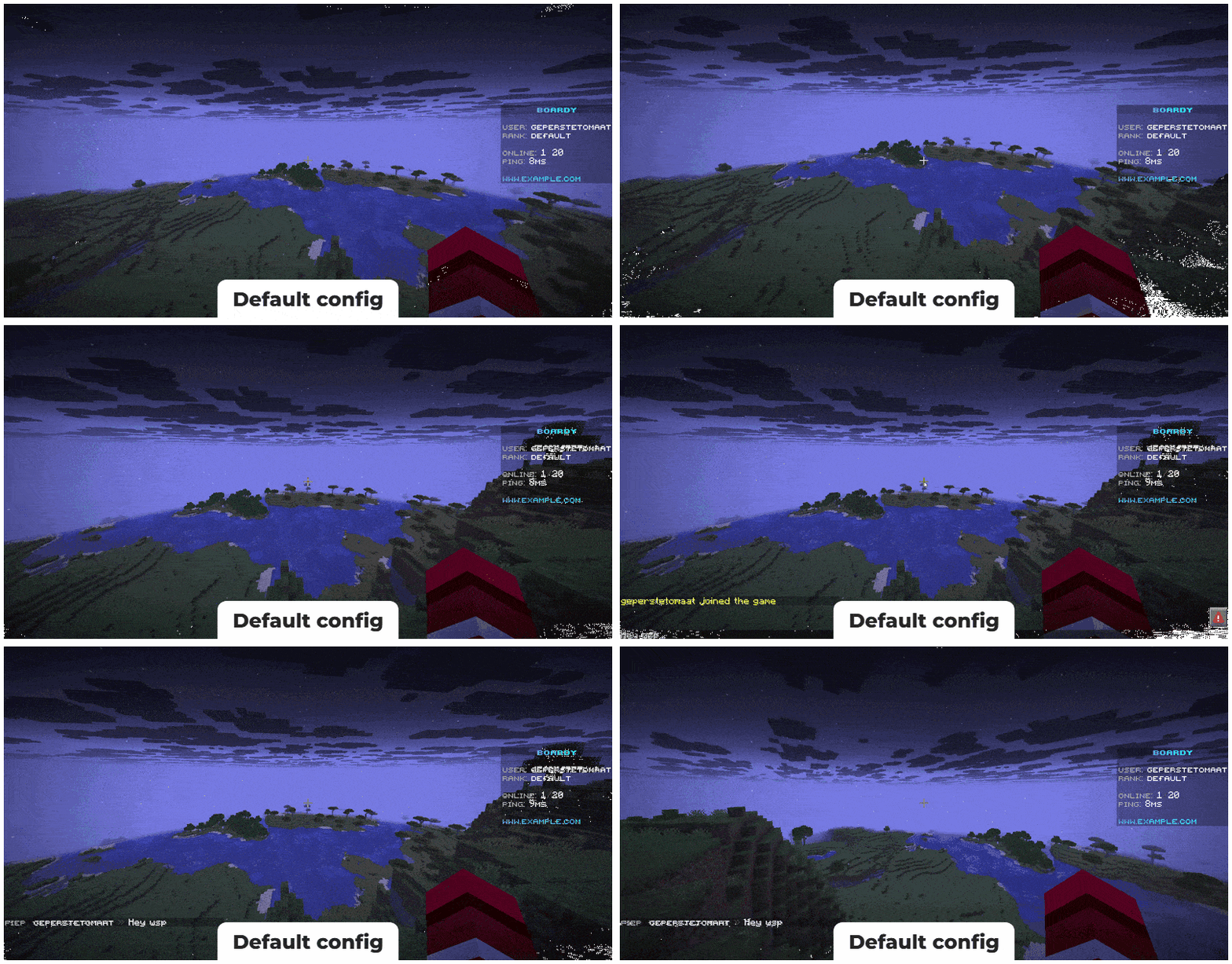
Boardy
All-in-one plugin for managing your scoreboard, tab list, and chat formatting.
Описание

Boardy
Boardy is an ultra-lightweight, fully customizable scoreboard, tablist, and chat plugin for your Minecraft server built to deliver maximum performance with almost zero impact on TPS or memory usage.
Designed to stay insanely fast, clean, and smooth even on large servers.
Supports MiniMessage formatting throughout.
⚡ Cloud Database Sync
Boardy features instant cloud database synchronization powered by mc.drafterplus.nl. Manage all your scoreboard, tab, and chat configurations directly from a premium web dashboard.
- Real-time Sync: Any changes made on the web dashboard are instantly pushed and applied to your Minecraft server in real-time.
- Dual-mode Support: Easily toggle between local file loading and cloud synchronization.
- Instant Connection: Bind your Minecraft server to the cloud with a single secure token command.
Dependencies
| Plugin | Required | Link |
|---|---|---|
| PlaceholderAPI | Recommended | Download |
| Vault | Optional | Download |
| LuckPerms | Optional | Download |
PlaceholderAPI is strongly recommended. Without it, placeholders like
%player_name%and%server_online%will not work.
Scoreboard
A clean, always-visible sidebar showing player info, server stats and your branding. Fully configurable lines, title and update interval.
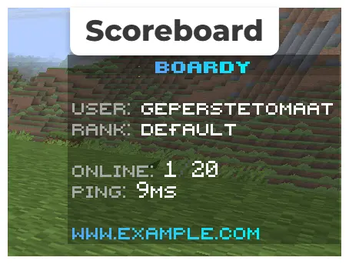
scoreboard.yml
# Use MiniMessage for formatting: https://docs.advntr.dev/minimessage/format.html

title: "<gradient:#4facfe:#00f2fe><bold>ʙᴏᴀʀᴅʏ</bold></gradient>"
lines:
  - ""
  - "<gray>ᴜsᴇʀ: <white>%player_name%"
  - "<gray>ʀᴀɴᴋ: <white>%luckperms_primary_group_name%"
  - ""
  - "<gray>ᴏɴʟɪɴᴇ: <white>%server_online%<dark_gray>/<white>%server_max_players%"
  - "<gray>ᴘɪɴɢ: <white>%player_ping%ᴍs"
  - ""
  - "<gradient:#4facfe:#00f2fe>ᴡᴡᴡ.ᴇxᴀᴍᴘʟᴇ.ᴄᴏᴍ</gradient>"
Chat Formatting
Style your chat with rank prefixes, custom colors and PlaceholderAPI support. Private messaging (/msg, /reply) is included out of the box.
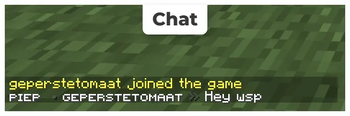
messages.yml
# Use MiniMessage for formatting: https://docs.advntr.dev/minimessage/format.html
# Use %prefix% to insert the plugin prefix.

prefix: "<gradient:#4facfe:#00f2fe><bold>ʙᴏᴀʀᴅʏ</bold></gradient> <dark_gray>» </dark_gray>"

# --- General Messages ---
general:
  reload: "%prefix%<white>ᴄᴏɴғɪɢᴜʀᴀᴛɪᴏɴ ʀᴇʟᴏᴀᴅᴇᴅ sᴜᴄᴄᴇssғᴜʟʟʏ!</white>"
  no-permission: "%prefix%<red>ʏᴏᴜ ᴅᴏɴ'ᴛ ʜᴀᴠᴇ ᴘᴇʀᴍɪssɪᴏɴ!</red>"
  toggle-numbers: "%prefix%sᴄᴏʀᴇʙᴏᴀʀᴅ ɴᴜᴍʙᴇʀs ᴀʀᴇ ɴᴏᴡ %state%<gray>."
  player-only: "<red>ᴛʜɪs ᴄᴏᴍᴍᴀɴᴅ ᴄᴀɴ ᴏɴʟʏ ʙᴇ ʀᴜɴ ʙʏ ᴀ ᴘʟᴀʏᴇʀ!</red>"
  usage: "%prefix%<gray>ᴜsᴀɢᴇ: <white>/boardy %usage%"
  invalid-args: "%prefix%<red>ɪɴᴠᴀʟɪᴅ ᴀʀɢᴜᴍᴇɴᴛs! ᴜsᴇ <white>/boardy help <red>ғᴏʀ ᴀssɪsᴛᴀɴᴄᴇ.</red>"
  settings-updated: "%prefix%<white>%setting% <gray>ʜᴀs ʙᴇᴇɴ sᴇᴛ ᴛᴏ %state%<gray>."
  version-checking: "%prefix%<gray>ᴄʜᴇᴄᴋɪɴɢ ғᴏʀ ᴜᴘᴅᴀᴛᴇs..."
  version-latest: "%prefix%<green>ʏᴏᴜ ᴀʀᴇ ʀᴜɴɴɪɴɢ ᴛʜᴇ ʟᴀᴛᴇsᴛ ᴠᴇʀsɪᴏɴ! <gray>(%version%)"
  version-new: "%prefix%<yellow>ᴀ ɴᴇᴡ ᴠᴇʀsɪᴏɴ ɪs ᴀᴠᴀɪʟᴀʙʟᴇ: <white>%latest% <gray>(ᴄᴜʀʀᴇɴᴛ: %version%)"
  version-error: "%prefix%<red>ᴄᴏᴜʟᴅ ɴᴏᴛ ᴄʜᴇᴄᴋ ғᴏʀ ᴜᴘᴅᴀᴛᴇs."
  version-info:
    - ""
    - "<gradient:#4facfe:#00f2fe><bold>ʙᴏᴀʀᴅʏ</bold></gradient> <dark_gray>| <gray>ᴠᴇʀsɪᴏɴ ɪɴғᴏʀᴍᴀᴛɪᴏɴ"
    - ""
    - "<dark_gray>» <gray>ᴄᴜʀʀᴇɴᴛ: <white>%version%"
    - "<dark_gray>» <gray>sᴜᴘᴘᴏʀᴛᴇᴅ: <white>1.20 - 1.21.x"
    - "<dark_gray>» <gray>ᴀᴜᴛʜᴏʀ: <white>ᴅʀᴀғᴛᴇʀᴘʟᴜs"
    - ""

# --- Chat Formatting ---
chat:
  # Placeholders: %player_name%, %message%, and all PAPI placeholders
  format: "<white>%luckperms_prefix% <dark_gray>• <white>%player_name% <dark_gray>» <white>%message%"

# --- Private Messaging ---
messaging:
  # Formatting for private messages (%player_name%, %message%)
  sent: "<gradient:#4facfe:#00f2fe>ᴍsɢ ᴛᴏ %player_name%</gradient> <dark_gray>» <white>%message%"
  received: "<gradient:#4facfe:#00f2fe>ᴍsɢ ғʀᴏᴍ %player_name%</gradient> <dark_gray>» <white>%message%"

  # Messaging errors
  player-not-found: "%prefix%<red>ᴘʟᴀʏᴇʀ ɴᴏᴛ ғᴏᴜɴᴅ."
  cannot-msg-self: "%prefix%<red>ʏᴏᴜ ᴄᴀɴɴᴏᴛ ᴍᴇssᴀɢᴇ ʏᴏᴜʀsᴇʟғ."
  no-reply: "%prefix%<red>ʏᴏᴜ ʜᴀᴠᴇ ɴᴏ ᴏɴᴇ ᴛᴏ ʀᴇᴘʟʏ ᴛᴏ."
Tab List
Customizable header, footer and automatic sorting by LuckPerms weight. Falls back to manual group weights if LuckPerms is not installed.
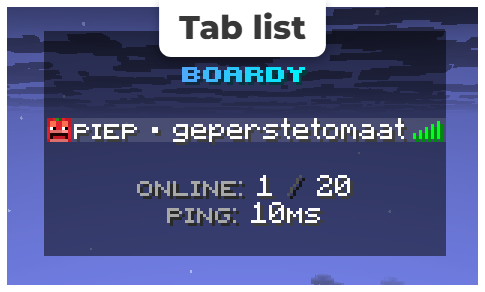
tab.yml
# Minecraft sorts by Team Name (alphabetically).
# Sorting is automatic based on LuckPerms weight if installed.
# Higher weight = higher in tab.
sorting:
  enabled: true
  # Fallback groups if LuckPerms is missing (using weights)
  groups:
    admin: "100"
    mod: "50"
    default: "0"

header:
  - ""
  - "<gradient:#4facfe:#00f2fe><bold>ʙᴏᴀʀᴅʏ</bold></gradient>"
  - ""

footer:
  - ""
  - "<gray>ᴏɴʟɪɴᴇ: <white>%server_online% <dark_gray>/ <white>%server_max_players%"
  - "<gray>ᴘɪɴɢ: <white>%player_ping%ᴍs"
  - ""
Getting Started
- Download the latest
.jarfrom the files tab - Drop it into your
/pluginsfolder - Restart your server
- Link to the cloud database (Optional):
- Go to mc.drafterplus.nl and log in.
- Copy your unique console command under the Database Access tab.
- Run the command in your server console:
/board database login <token> - Your server will output:
ʙᴏᴀʀᴅʏ » Synced files from https://mc.drafterplus.nl/
- Edit the configs locally or directly via the web panel!
- Run
/boardy reload
Compatibility
| Platform | Supported |
|---|---|
| Bukkit | Yes |
| Spigot | Yes |
| Paper | Yes |
Minecraft versions: 1.20.x · 1.21.x
Commands
| Command | Aliases | Description |
|---|---|---|
/boardy help | /board help | Show all available commands |
/boardy reload | /board reload | Reload all config files |
/boardy settings | /board settings | Toggle features in-game |
/board database login <token> | Connect your server to the cloud database | |
/board database toggle | Toggle between local configurations and cloud sync | |
/msg <player> <message> | /w, /whisper, /tell, /m | Send a private message to a player |
/reply <message> | /r | Reply to the last player who messaged you |
Permissions
| Permission | Description | Default |
|---|---|---|
boardy.use | Access to the main /boardy command | OP |
boardy.reload | Reload the plugin configs | OP |
boardy.settings | Access to in-game settings | OP |
boardy.database | Access to cloud database database setup/toggle commands | OP |
Made by Drafterplus
Галерея