Blocky's Fixes
A plugin with a few fixes for your server! Like a completely custom Timeout Function and a Maintendance Mode!
Описание
This Plugin adds a suite of features you could maybe use on your Server.
✅ Features
Attention: Please notice that currently none of the features are enabled by default. Everything is opt in and can be configured using the config file and for some options using the plugins commands. See below.
⏰ Timeout
The Plugin contains a custom Timeout function. Moderators will be able to timeout Players meaning limiting their ability to participate on the server while not kicking them from the server.
Players will be prevented from doing the following actions (depending on config):
- Move around
- Place/Break Blocks
- Send chat messages
- Run command
The strictness of those blockings can be personalized. For example allowing specific commands or resticting the area to move within.
🔧 Maintenance mode
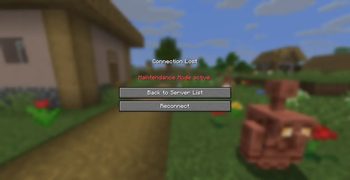
The maintenance leaves players of the server with a customizable message. This feature is useful for test on whitelist server to keep the playes out and the admins in.
🔨 Fixed anvil costs
A way to fix the max anvil costs to a specific value. This feature is purely configured in the plugins configuration file.
❓ Usage
Generally interaction with this plugin is done via. commands and the plugins config folder. The Settings or configuration commands will also modify the conofig. So the config it the main point of configuration of this project.
⏰ Timeout Commands
The /timeout commands requires the player to have the blockysfixes.timeout permission.
/timeout <player> <seconds> Timeouts the selected player for the selected amount of seconds.
If 0 seconds are specified, the timeout is being cleared.
If -1 seconds are specified, the timeout time is infinite.
The /timeoutarea commands requires the player to have the blockysfixes.timeoutarea permission.
/timeoutarea <option> Adjust the settings of the Timeoutarea.
/timeoutarea toggle Toggles the Timeoutarea.
/timeoutarea pos1 <x> <y> <z> Set the first edge of the timeout area. If no position is specified it uses the current player position.
/timeoutarea pos2 <x> <y> <z> Set the second edge of the timeout area. If no position is specified it uses the current player position.
/timeoutarea togglespawn Toggles the automatic teleport to the timeout area.
/timeoutarea setspawn <x> <y> <z> Set the position of the timeout area spawn. If no position is specified it uses the current player position. The spawn needs to be inside the timeout area.
🔧 Maintenance commands
The /maintenance commands requires the player to have the blockysfixes.maintenance permission.
/maintenance prints the current maintenance status
/maintenance on turns on maintenance mode (kicking not whitelisted players off the server.
/maintenance off turns off maintendance mode.
The whitelist
The whitelist can be edited like the minecraft whitelist command:
/maintenance whitelist list lists the currently whitelisted players.
/maintenance whitelist add <player> adds the specified player to the whitelist.
/maintenance whitelist remove <player> removes the specified player from the whitelist.
Additionally there is a permission to whitelist players using blockysfixes.maintenance.bypass
Attention: in order for this permission to work you need to have it set using the LuckPerms plugin. Currently no other way is supported but feel free to request somethign.
Maintenance modes
There are multiple modes how the maintenance can be activated. All of them can be activated by attaching the specific mode to the end of the maintenance command for example. /maintenance on normal
normal
will kick players not whitelisted and notify everybody whitelisted that the maintenance mode has beed activated.
silent
will kick player not whitelisted. No notification of other players.
no_kick
will not kick players and notify everybody whitelisted that the maintenance mode has beed activated.
keep_online_players
will not kick players and notify everybody whitelisted that the maintenance mode has beed activated. Additionally it will allow players online at the time of activation to rejoin even if they lost connection. But not anymore if the server restarts.
Maintenance motd
You can also change the servers motd while the maintenance mode is active to let players know before they try to connect. Please take a look at the config example for information how to configure it.
Default Config:
Here a default Config with some descriptions:
timeout:
  allow-commands: false
  allowed-commands: # Only works is allow_commands = false
  #  - "/help"
  area:
    enabled: false
    spawn:
      enabled: false
      x: 0
      y: 0
      z: 0
    world: world
    pos1:
      x: 0
      y: 0
      z: 0
    pos2:
      x: 0
      y: 0
      z: 0
maintenance:
  enabled: false
  # Kick message in mini message Format. This message is show to the player as when they try to join the server.
  message: "<red>Maintenance Mode active.</red>"
  # Custom modt that is shown while the maintenance mode is active. You can format it in the Minimessage format.
  custom_motd_active: false
  custom_motd: "<red>Maintenance mode is active.</red> <white>Please try again later.</white>"

anvil-repair-cost:
  enabled: false
  max-cost: 10 # Maximum amount of xplevels repairing an item will cost
  blacklist: # Items excluded from the costlimit
    #- 'ELYTRA'
Галерея