
Block'oMorphСкачатьСкачатьСкачатьСкачатьСкачатьСкачатьСкачатьСкачатьСкачатьСкачатьСкачатьСкачатьСкачатьСкачатьСкачатьСкачатьСкачатьСкачатьСкачатьСкачатьСкачатьСкачатьСкачатьСкачатьСкачатьСкачатьСкачатьСкачатьСкачатьСкачатьСкачатьСкачатьСкачатьСкачатьСкачатьСкачатьСкачатьСкачатьСкачатьСкачатьСкачатьСкачатьСкачатьСкачатьСкачатьСкачатьСкачатьСкачатьСкачатьСкачатьСкачатьСкачатьСкачатьСкачатьСкачатьСкачатьСкачатьСкачатьСкачатьСкачатьСкачатьСкачатьСкачатьСкачатьСкачатьСкачатьСкачатьСкачатьСкачатьСкачатьСкачатьСкачатьСкачатьСкачатьСкачатьСкачатьСкачатьСкачатьСкачатьСкачатьСкачатьСкачатьСкачатьСкачатьСкачатьСкачатьСкачатьСкачатьСкачатьСкачатьСкачатьСкачатьСкачатьСкачатьСкачатьСкачатьСкачатьСкачатьСкачатьСкачатьСкачатьСкачатьСкачатьСкачатьСкачатьСкачатьСкачатьСкачатьСкачатьСкачатьСкачатьСкачатьСкачатьСкачатьСкачатьСкачатьСкачатьСкачатьСкачатьСкачатьСкачатьСкачатьСкачатьСкачатьСкачатьСкачатьСкачать
ВЕРСИИ (127)
release
Block'oMorph 11.0.0-Fabric
11.0.011 июн. 2026 г.8,3 тыс.Minecraft: 26.1.2fabric
Что нового
Port to 26.1.2
release
Block'oMorph 11.0.0
11.0.011 июн. 2026 г.1,4 тыс.Minecraft: 26.1.2neoforge
Что нового
Port to 26.1.2
release
Block'oMorph 10.0.1
10.0.19 мар. 2026 г.21,7 тыс.Minecraft: 1.21.11fabric
Что нового
### HotFix: Fixed a bug with changing lists in the config using the command
## Bug fixes
* Added **compatibility with Sodium and Lithium**
* The GUI for block selection has been optimized
* The **tick system** has been improved and missing internal components have been added, pistons now work on transformed players:

* A **vibration system** has been integrated. A player transformed into a skulk sensor now receives vibrations, and a skulk screamer can summon a warden in the presence of skulk sensors:
* 
release
Block'oMorph 10.0.1
10.0.19 мар. 2026 г.2,1 тыс.Minecraft: 1.21.11neoforge
Что нового
### HotFix: Fixed a bug with changing lists in the config using the command
## Bug fixes
* Added **compatibility with Sodium and Lithium**
* The GUI for block selection has been optimized
* The **tick system** has been improved and missing internal components have been added, pistons now work on transformed players:

* A **vibration system** has been integrated. A player transformed into a skulk sensor now receives vibrations, and a skulk screamer can summon a warden in the presence of skulk sensors:
* 
release
Block'oMorph 9.0.2
9.0.29 мар. 2026 г.1,4 тыс.Minecraft: 1.21.10fabric
Что нового
### HotFix: Fixed a bug with changing lists in the config using the command
## Bug fixes
* Added **compatibility with Sodium and Lithium**
* The GUI for block selection has been optimized
* The **tick system** has been improved and missing internal components have been added, pistons now work on transformed players:

* A **vibration system** has been integrated. A player transformed into a skulk sensor now receives vibrations, and a skulk screamer can summon a warden in the presence of skulk sensors:
* 
release
Block'oMorph 9.0.2
9.0.29 мар. 2026 г.203Minecraft: 1.21.10neoforge
Что нового
### HotFix: Fixed a bug with changing lists in the config using the command
## Bug fixes
* Added **compatibility with Sodium and Lithium**
* The GUI for block selection has been optimized
* The **tick system** has been improved and missing internal components have been added, pistons now work on transformed players:

* A **vibration system** has been integrated. A player transformed into a skulk sensor now receives vibrations, and a skulk screamer can summon a warden in the presence of skulk sensors:
* 
release
Block'oMorph 8.0.3
8.0.39 мар. 2026 г.1,8 тыс.Minecraft: 1.21.8fabric
Что нового
### HotFix: Fixed a bug with changing lists in the config using the command
## Bug fixes
* Added **compatibility with Sodium and Lithium**
* The GUI for block selection has been optimized
* The **tick system** has been improved and missing internal components have been added, pistons now work on transformed players:

* A **vibration system** has been integrated. A player transformed into a skulk sensor now receives vibrations, and a skulk screamer can summon a warden in the presence of skulk sensors:
* 
release
Block'oMorph 8.0.3
8.0.39 мар. 2026 г.289Minecraft: 1.21.8neoforge
Что нового
### HotFix: Fixed a bug with changing lists in the config using the command
## Bug fixes
* Added **compatibility with Sodium and Lithium**
* The GUI for block selection has been optimized
* The **tick system** has been improved and missing internal components have been added, pistons now work on transformed players:

* A **vibration system** has been integrated. A player transformed into a skulk sensor now receives vibrations, and a skulk screamer can summon a warden in the presence of skulk sensors:
* 
release
Block'oMorph 7.0.4
7.0.49 мар. 2026 г.176Minecraft: 1.21.7fabric
Что нового
### HotFix: Fixed a bug with changing lists in the config using the command
## Bug fixes
* Added **compatibility with Sodium and Lithium**
* The GUI for block selection has been optimized
* The **tick system** has been improved and missing internal components have been added, pistons now work on transformed players:

* A **vibration system** has been integrated. A player transformed into a skulk sensor now receives vibrations, and a skulk screamer can summon a warden in the presence of skulk sensors:
* 
release
Block'oMorph 7.0.4
7.0.49 мар. 2026 г.74Minecraft: 1.21.7neoforge
Что нового
### HotFix: Fixed a bug with changing lists in the config using the command
## Bug fixes
* Added **compatibility with Sodium and Lithium**
* The GUI for block selection has been optimized
* The **tick system** has been improved and missing internal components have been added, pistons now work on transformed players:

* A **vibration system** has been integrated. A player transformed into a skulk sensor now receives vibrations, and a skulk screamer can summon a warden in the presence of skulk sensors:
* 
release
Block'oMorph 6.0.5
6.0.59 мар. 2026 г.511Minecraft: 1.21.5fabric
Что нового
### HotFix: Fixed a bug with changing lists in the config using the command
## Bug fixes
* Added **compatibility with Sodium and Lithium**
* The GUI for block selection has been optimized
* The **tick system** has been improved and missing internal components have been added, pistons now work on transformed players:

* A **vibration system** has been integrated. A player transformed into a skulk sensor now receives vibrations, and a skulk screamer can summon a warden in the presence of skulk sensors:
* 
release
Block'oMorph 6.0.5
6.0.59 мар. 2026 г.219Minecraft: 1.21.5neoforge
Что нового
### HotFix: Fixed a bug with changing lists in the config using the command
## Bug fixes
* Added **compatibility with Sodium and Lithium**
* The GUI for block selection has been optimized
* The **tick system** has been improved and missing internal components have been added, pistons now work on transformed players:

* A **vibration system** has been integrated. A player transformed into a skulk sensor now receives vibrations, and a skulk screamer can summon a warden in the presence of skulk sensors:
* 
release
Block'oMorph 5.0.8
5.0.89 мар. 2026 г.1,3 тыс.Minecraft: 1.21.4fabric
Что нового
### HotFix: Fixed a bug with changing lists in the config using the command
## Bug fixes
* Added **compatibility with Sodium and Lithium**
* The GUI for block selection has been optimized
* The **tick system** has been improved and missing internal components have been added, pistons now work on transformed players:

* A **vibration system** has been integrated. A player transformed into a skulk sensor now receives vibrations, and a skulk screamer can summon a warden in the presence of skulk sensors:
* 
release
Block'oMorph 5.0.8
5.0.89 мар. 2026 г.153Minecraft: 1.21.4neoforge
Что нового
### HotFix: Fixed a bug with changing lists in the config using the command
## Bug fixes
* Added **compatibility with Sodium and Lithium**
* The GUI for block selection has been optimized
* The **tick system** has been improved and missing internal components have been added, pistons now work on transformed players:

* A **vibration system** has been integrated. A player transformed into a skulk sensor now receives vibrations, and a skulk screamer can summon a warden in the presence of skulk sensors:
* 
release
Block'oMorph 3.0.14
3.0.149 мар. 2026 г.21,7 тыс.Minecraft: 1.21.1fabric
Что нового
### HotFix: Fixed a bug with changing lists in the config using the command
## Bug fixes
* Added **compatibility with Sodium and Lithium**
* The GUI for block selection has been optimized
* The **tick system** has been improved and missing internal components have been added, pistons now work on transformed players:

* A **vibration system** has been integrated. A player transformed into a skulk sensor now receives vibrations, and a skulk screamer can summon a warden in the presence of skulk sensors:
* 
release
Block'oMorph 3.0.14
3.0.149 мар. 2026 г.2,6 тыс.Minecraft: 1.21.1neoforge
Что нового
### HotFix: Fixed a bug with changing lists in the config using the command
## Bug fixes
* Added **compatibility with Sodium and Lithium**
* The GUI for block selection has been optimized
* The **tick system** has been improved and missing internal components have been added, pistons now work on transformed players:

* A **vibration system** has been integrated. A player transformed into a skulk sensor now receives vibrations, and a skulk screamer can summon a warden in the presence of skulk sensors:
* 
release
Block'oMorph 10.0.0
10.0.09 мар. 2026 г.203Minecraft: 1.21.11fabric
Что нового
## Bug fixes
* Added **compatibility with Sodium and Lithium**
* The GUI for block selection has been optimized
* The **tick system** has been improved and missing internal components have been added, pistons now work on transformed players:

* A **vibration system** has been integrated. A player transformed into a skulk sensor now receives vibrations, and a skulk screamer can summon a warden in the presence of skulk sensors:
* 
release
Block'oMorph 10.0.0
10.0.09 мар. 2026 г.37Minecraft: 1.21.11neoforge
Что нового
## Bug fixes
* Added **compatibility with Sodium and Lithium**
* The GUI for block selection has been optimized
* The **tick system** has been improved and missing internal components have been added, pistons now work on transformed players:

* A **vibration system** has been integrated. A player transformed into a skulk sensor now receives vibrations, and a skulk screamer can summon a warden in the presence of skulk sensors:
* 
release
Block'oMorph 9.0.1
9.0.19 мар. 2026 г.58Minecraft: 1.21.10fabric
Что нового
## Bug fixes
* Added **compatibility with Sodium and Lithium**
* The GUI for block selection has been optimized
* The **tick system** has been improved and missing internal components have been added, pistons now work on transformed players:

* A **vibration system** has been integrated. A player transformed into a skulk sensor now receives vibrations, and a skulk screamer can summon a warden in the presence of skulk sensors:
* 
release
Block'oMorph 9.0.1
9.0.19 мар. 2026 г.21Minecraft: 1.21.10neoforge
Что нового
## Bug fixes
* Added **compatibility with Sodium and Lithium**
* The GUI for block selection has been optimized
* The **tick system** has been improved and missing internal components have been added, pistons now work on transformed players:

* A **vibration system** has been integrated. A player transformed into a skulk sensor now receives vibrations, and a skulk screamer can summon a warden in the presence of skulk sensors:
* 
release
Block'oMorph 8.0.2
8.0.29 мар. 2026 г.37Minecraft: 1.21.8fabric
Что нового
## Bug fixes
* Added **compatibility with Sodium and Lithium**
* The GUI for block selection has been optimized
* The **tick system** has been improved and missing internal components have been added, pistons now work on transformed players:

* A **vibration system** has been integrated. A player transformed into a skulk sensor now receives vibrations, and a skulk screamer can summon a warden in the presence of skulk sensors:
* 
release
Block'oMorph 8.0.2
8.0.29 мар. 2026 г.18Minecraft: 1.21.8neoforge
Что нового
## Bug fixes
* Added **compatibility with Sodium and Lithium**
* The GUI for block selection has been optimized
* The **tick system** has been improved and missing internal components have been added, pistons now work on transformed players:

* A **vibration system** has been integrated. A player transformed into a skulk sensor now receives vibrations, and a skulk screamer can summon a warden in the presence of skulk sensors:
* 
release
Block'oMorph 7.0.3
7.0.39 мар. 2026 г.13Minecraft: 1.21.7fabric
Что нового
## Bug fixes
* Added **compatibility with Sodium and Lithium**
* The GUI for block selection has been optimized
* The **tick system** has been improved and missing internal components have been added, pistons now work on transformed players:

* A **vibration system** has been integrated. A player transformed into a skulk sensor now receives vibrations, and a skulk screamer can summon a warden in the presence of skulk sensors:
* 
release
Block'oMorph 7.0.3
7.0.39 мар. 2026 г.7Minecraft: 1.21.7neoforge
Что нового
## Bug fixes
* Added **compatibility with Sodium and Lithium**
* The GUI for block selection has been optimized
* The **tick system** has been improved and missing internal components have been added, pistons now work on transformed players:

* A **vibration system** has been integrated. A player transformed into a skulk sensor now receives vibrations, and a skulk screamer can summon a warden in the presence of skulk sensors:
* 
release
Block'oMorph 6.0.4
6.0.49 мар. 2026 г.12Minecraft: 1.21.5fabric
Что нового
## Bug fixes
* Added **compatibility with Sodium and Lithium**
* The GUI for block selection has been optimized
* The **tick system** has been improved and missing internal components have been added, pistons now work on transformed players:

* A **vibration system** has been integrated. A player transformed into a skulk sensor now receives vibrations, and a skulk screamer can summon a warden in the presence of skulk sensors:
* 
release
Block'oMorph 6.0.4
6.0.49 мар. 2026 г.11Minecraft: 1.21.5neoforge
Что нового
## Bug fixes
* Added **compatibility with Sodium and Lithium**
* The GUI for block selection has been optimized
* The **tick system** has been improved and missing internal components have been added, pistons now work on transformed players:

* A **vibration system** has been integrated. A player transformed into a skulk sensor now receives vibrations, and a skulk screamer can summon a warden in the presence of skulk sensors:
* 
release
Block'oMorph 5.0.7
5.0.79 мар. 2026 г.12Minecraft: 1.21.4fabric
Что нового
## Bug fixes
* Added **compatibility with Sodium and Lithium**
* The GUI for block selection has been optimized
* The **tick system** has been improved and missing internal components have been added, pistons now work on transformed players:

* A **vibration system** has been integrated. A player transformed into a skulk sensor now receives vibrations, and a skulk screamer can summon a warden in the presence of skulk sensors:
* 
release
Block'oMorph 5.0.7
5.0.79 мар. 2026 г.9Minecraft: 1.21.4neoforge
Что нового
## Bug fixes
* Added **compatibility with Sodium and Lithium**
* The GUI for block selection has been optimized
* The **tick system** has been improved and missing internal components have been added, pistons now work on transformed players:

* A **vibration system** has been integrated. A player transformed into a skulk sensor now receives vibrations, and a skulk screamer can summon a warden in the presence of skulk sensors:
* 
release
Block'oMorph 3.0.13
3.0.139 мар. 2026 г.50Minecraft: 1.21.1fabric
Что нового
## Bug fixes
* Added **compatibility with Sodium and Lithium**
* The GUI for block selection has been optimized
* The **tick system** has been improved and missing internal components have been added, pistons now work on transformed players:

* A **vibration system** has been integrated. A player transformed into a skulk sensor now receives vibrations, and a skulk screamer can summon a warden in the presence of skulk sensors:
* 
release
Block'oMorph 3.0.13
3.0.139 мар. 2026 г.35Minecraft: 1.21.1neoforge
Что нового
## Bug fixes
* Added **compatibility with Sodium and Lithium**
* The GUI for block selection has been optimized
* The **tick system** has been improved and missing internal components have been added, pistons now work on transformed players:

* A **vibration system** has been integrated. A player transformed into a skulk sensor now receives vibrations, and a skulk screamer can summon a warden in the presence of skulk sensors:
* 
release
Block'oMorph 1.0.11
1.0.119 мар. 2026 г.5,1 тыс.Minecraft: 1.20.1fabric
Что нового
## Bug fixes
* Added **compatibility with Sodium and Lithium**
* The GUI for block selection has been optimized
* The **tick system** has been improved and missing internal components have been added, pistons now work on transformed players:

* A **vibration system** has been integrated. A player transformed into a skulk sensor now receives vibrations, and a skulk screamer can summon a warden in the presence of skulk sensors:
* 
release
Block'oMorph 1.0.11
1.0.119 мар. 2026 г.11,2 тыс.Minecraft: 1.20.1forge
Что нового
## Bug fixes
* Added **compatibility with Sodium and Lithium**
* The GUI for block selection has been optimized
* The **tick system** has been improved and missing internal components have been added, pistons now work on transformed players:

* A **vibration system** has been integrated. A player transformed into a skulk sensor now receives vibrations, and a skulk screamer can summon a warden in the presence of skulk sensors:
* 
release
Block'oMorph 9.0.0-Fabric
9.0.0-fabric1 нояб. 2025 г.5,2 тыс.Minecraft: 1.21.10fabric, quilt
Что нового
## New features
### Transformation into liquid
* Now you can transform into liquid blocks with all their functions:

* A player transformed into a liquid will automatically float in liquid if their liquid matches the liquid they are submerged in. For example, if a player becomes water, they will float in real water blocks.
* By default, the flooded part of the blocks will be disabled in the "liquidsInBlocks" parameter in the config.
* The color of the center pixel on the liquid texture will be used to calculate the liquid fog.(The fog you see when you're submerged in liquid is hardcoded into the game, so every mod that adds a new liquid adds fog in its own non-standard way, and directly reading the fog data for liquids is impossible.)
### Reaction to a player's hit
A new parameter has been added to the config: "hitReaction"
* BRAKING - the normal breaking of a block, for example with a pickaxe, just like other blocks are broken
* DISABLE - any damage will be deflected, when hitting the block the hand will bounce, like in adventure mode
* MELEE - **the vanilla damage/PvP system will work**, when a player is hit, he will take damage, any melee weapon will be a priority in this mode, each block in the player will have cracks equal to the percentage of the number of available lives to the total number of lives
* PROJECTILES - The block can be damaged by a projectile, but cannot be damaged by melee/hand attacks
* FULL_PVP - a combination of PROJECTILES and MELEE modes.
In PvP modes, square shards will be replaced with hearts with a block texture:

### Support for effects applied to an entity when entering a block
Blocks such as portals, webs, fire and the like will work, for example:

## Changes
### Command
In addition to the <blockstate> argument, the **/blockmorph** command now also **accepts a <blockpos> argument**. This allows you to copy a real-world block to the player. For example, the command
/blockmorph ~ ~-1 ~ will turn you into a block standing under your feet.
### Config
The configuration was divided into two sections:
- Access
- Block functions
1) In the first one you will find all the functions related to limiting the range of blocks available for transformation
2) In the second one, all the functions related to the behavior of blocks(New - "blockClientParticles": This parameter controls whether blocks should project randomly generated particles to blocks, such as portal particles.)
## Bug Fixes
* The vanilla SynchedEntityData system with numeric IDs was replaced with a custom AutoSyncedEntityData system that uses namespaces to avoid collisions. The old system's bugs included:
1) At an unspecified point in time, all vanilla entities could lose their client data, such as a pig variant, a dropped item's texture, a Display entity, and the like.
2) The game could suddenly crash.
3) The dynamite and seat functionality in my mod stopped working.
* Version 1.20.1 could not start the server, and the client could also crash when entering the server.
* On version 1.21.7 fabric the seats did not work
release
Block'oMorph 9.0.0
9.0.01 нояб. 2025 г.546Minecraft: 1.21.10neoforge
Что нового
## New features
### Transformation into liquid
* Now you can transform into liquid blocks with all their functions:

* A player transformed into a liquid will automatically float in liquid if their liquid matches the liquid they are submerged in. For example, if a player becomes water, they will float in real water blocks.
* By default, the flooded part of the blocks will be disabled in the "liquidsInBlocks" parameter in the config.
* The color of the center pixel on the liquid texture will be used to calculate the liquid fog.(The fog you see when you're submerged in liquid is hardcoded into the game, so every mod that adds a new liquid adds fog in its own non-standard way, and directly reading the fog data for liquids is impossible.)
### Reaction to a player's hit
A new parameter has been added to the config: "hitReaction"
* BRAKING - the normal breaking of a block, for example with a pickaxe, just like other blocks are broken
* DISABLE - any damage will be deflected, when hitting the block the hand will bounce, like in adventure mode
* MELEE - **the vanilla damage/PvP system will work**, when a player is hit, he will take damage, any melee weapon will be a priority in this mode, each block in the player will have cracks equal to the percentage of the number of available lives to the total number of lives
* PROJECTILES - The block can be damaged by a projectile, but cannot be damaged by melee/hand attacks
* FULL_PVP - a combination of PROJECTILES and MELEE modes.
In PvP modes, square shards will be replaced with hearts with a block texture:

### Support for effects applied to an entity when entering a block
Blocks such as portals, webs, fire and the like will work, for example:

## Changes
### Command
In addition to the <blockstate> argument, the **/blockmorph** command now also **accepts a <blockpos> argument**. This allows you to copy a real-world block to the player. For example, the command
/blockmorph ~ ~-1 ~ will turn you into a block standing under your feet.
### Config
The configuration was divided into two sections:
- Access
- Block functions
1) In the first one you will find all the functions related to limiting the range of blocks available for transformation
2) In the second one, all the functions related to the behavior of blocks(New - "blockClientParticles": This parameter controls whether blocks should project randomly generated particles to blocks, such as portal particles.)
## Bug Fixes
* The vanilla SynchedEntityData system with numeric IDs was replaced with a custom AutoSyncedEntityData system that uses namespaces to avoid collisions. The old system's bugs included:
1) At an unspecified point in time, all vanilla entities could lose their client data, such as a pig variant, a dropped item's texture, a Display entity, and the like.
2) The game could suddenly crash.
3) The dynamite and seat functionality in my mod stopped working.
* Version 1.20.1 could not start the server, and the client could also crash when entering the server.
* On version 1.21.7 fabric the seats did not work
release
Block'oMorph 8.0.1-Fabric
8.0.1-fabric1 нояб. 2025 г.1,4 тыс.Minecraft: 1.21.8fabric, quilt
Что нового
## New features
### Transformation into liquid
* Now you can transform into liquid blocks with all their functions:

* A player transformed into a liquid will automatically float in liquid if their liquid matches the liquid they are submerged in. For example, if a player becomes water, they will float in real water blocks.
* By default, the flooded part of the blocks will be disabled in the "liquidsInBlocks" parameter in the config.
* The color of the center pixel on the liquid texture will be used to calculate the liquid fog.(The fog you see when you're submerged in liquid is hardcoded into the game, so every mod that adds a new liquid adds fog in its own non-standard way, and directly reading the fog data for liquids is impossible.)
### Reaction to a player's hit
A new parameter has been added to the config: "hitReaction"
* BRAKING - the normal breaking of a block, for example with a pickaxe, just like other blocks are broken
* DISABLE - any damage will be deflected, when hitting the block the hand will bounce, like in adventure mode
* MELEE - **the vanilla damage/PvP system will work**, when a player is hit, he will take damage, any melee weapon will be a priority in this mode, each block in the player will have cracks equal to the percentage of the number of available lives to the total number of lives
* PROJECTILES - The block can be damaged by a projectile, but cannot be damaged by melee/hand attacks
* FULL_PVP - a combination of PROJECTILES and MELEE modes.
In PvP modes, square shards will be replaced with hearts with a block texture:

### Support for effects applied to an entity when entering a block
Blocks such as portals, webs, fire and the like will work, for example:

## Changes
### Command
In addition to the <blockstate> argument, the **/blockmorph** command now also **accepts a <blockpos> argument**. This allows you to copy a real-world block to the player. For example, the command
/blockmorph ~ ~-1 ~ will turn you into a block standing under your feet.
### Config
The configuration was divided into two sections:
- Access
- Block functions
1) In the first one you will find all the functions related to limiting the range of blocks available for transformation
2) In the second one, all the functions related to the behavior of blocks(New - "blockClientParticles": This parameter controls whether blocks should project randomly generated particles to blocks, such as portal particles.)
## Bug Fixes
* The vanilla SynchedEntityData system with numeric IDs was replaced with a custom AutoSyncedEntityData system that uses namespaces to avoid collisions. The old system's bugs included:
1) At an unspecified point in time, all vanilla entities could lose their client data, such as a pig variant, a dropped item's texture, a Display entity, and the like.
2) The game could suddenly crash.
3) The dynamite and seat functionality in my mod stopped working.
* Version 1.20.1 could not start the server, and the client could also crash when entering the server.
* On version 1.21.7 fabric the seats did not work
release
Block'oMorph 8.0.1
8.0.11 нояб. 2025 г.164Minecraft: 1.21.8neoforge
Что нового
## New features
### Transformation into liquid
* Now you can transform into liquid blocks with all their functions:

* A player transformed into a liquid will automatically float in liquid if their liquid matches the liquid they are submerged in. For example, if a player becomes water, they will float in real water blocks.
* By default, the flooded part of the blocks will be disabled in the "liquidsInBlocks" parameter in the config.
* The color of the center pixel on the liquid texture will be used to calculate the liquid fog.(The fog you see when you're submerged in liquid is hardcoded into the game, so every mod that adds a new liquid adds fog in its own non-standard way, and directly reading the fog data for liquids is impossible.)
### Reaction to a player's hit
A new parameter has been added to the config: "hitReaction"
* BRAKING - the normal breaking of a block, for example with a pickaxe, just like other blocks are broken
* DISABLE - any damage will be deflected, when hitting the block the hand will bounce, like in adventure mode
* MELEE - **the vanilla damage/PvP system will work**, when a player is hit, he will take damage, any melee weapon will be a priority in this mode, each block in the player will have cracks equal to the percentage of the number of available lives to the total number of lives
* PROJECTILES - The block can be damaged by a projectile, but cannot be damaged by melee/hand attacks
* FULL_PVP - a combination of PROJECTILES and MELEE modes.
In PvP modes, square shards will be replaced with hearts with a block texture:

### Support for effects applied to an entity when entering a block
Blocks such as portals, webs, fire and the like will work, for example:

## Changes
### Command
In addition to the <blockstate> argument, the **/blockmorph** command now also **accepts a <blockpos> argument**. This allows you to copy a real-world block to the player. For example, the command
/blockmorph ~ ~-1 ~ will turn you into a block standing under your feet.
### Config
The configuration was divided into two sections:
- Access
- Block functions
1) In the first one you will find all the functions related to limiting the range of blocks available for transformation
2) In the second one, all the functions related to the behavior of blocks(New - "blockClientParticles": This parameter controls whether blocks should project randomly generated particles to blocks, such as portal particles.)
## Bug Fixes
* The vanilla SynchedEntityData system with numeric IDs was replaced with a custom AutoSyncedEntityData system that uses namespaces to avoid collisions. The old system's bugs included:
1) At an unspecified point in time, all vanilla entities could lose their client data, such as a pig variant, a dropped item's texture, a Display entity, and the like.
2) The game could suddenly crash.
3) The dynamite and seat functionality in my mod stopped working.
* Version 1.20.1 could not start the server, and the client could also crash when entering the server.
* On version 1.21.7 fabric the seats did not work
release
Block'oMorph 7.0.2-Fabric
7.0.2-fabric1 нояб. 2025 г.167Minecraft: 1.21.7fabric, quilt
Что нового
## New features
### Transformation into liquid
* Now you can transform into liquid blocks with all their functions:

* A player transformed into a liquid will automatically float in liquid if their liquid matches the liquid they are submerged in. For example, if a player becomes water, they will float in real water blocks.
* By default, the flooded part of the blocks will be disabled in the "liquidsInBlocks" parameter in the config.
* The color of the center pixel on the liquid texture will be used to calculate the liquid fog.(The fog you see when you're submerged in liquid is hardcoded into the game, so every mod that adds a new liquid adds fog in its own non-standard way, and directly reading the fog data for liquids is impossible.)
### Reaction to a player's hit
A new parameter has been added to the config: "hitReaction"
* BRAKING - the normal breaking of a block, for example with a pickaxe, just like other blocks are broken
* DISABLE - any damage will be deflected, when hitting the block the hand will bounce, like in adventure mode
* MELEE - **the vanilla damage/PvP system will work**, when a player is hit, he will take damage, any melee weapon will be a priority in this mode, each block in the player will have cracks equal to the percentage of the number of available lives to the total number of lives
* PROJECTILES - The block can be damaged by a projectile, but cannot be damaged by melee/hand attacks
* FULL_PVP - a combination of PROJECTILES and MELEE modes.
In PvP modes, square shards will be replaced with hearts with a block texture:

### Support for effects applied to an entity when entering a block
Blocks such as portals, webs, fire and the like will work, for example:

## Changes
### Command
In addition to the <blockstate> argument, the **/blockmorph** command now also **accepts a <blockpos> argument**. This allows you to copy a real-world block to the player. For example, the command
/blockmorph ~ ~-1 ~ will turn you into a block standing under your feet.
### Config
The configuration was divided into two sections:
- Access
- Block functions
1) In the first one you will find all the functions related to limiting the range of blocks available for transformation
2) In the second one, all the functions related to the behavior of blocks(New - "blockClientParticles": This parameter controls whether blocks should project randomly generated particles to blocks, such as portal particles.)
## Bug Fixes
* The vanilla SynchedEntityData system with numeric IDs was replaced with a custom AutoSyncedEntityData system that uses namespaces to avoid collisions. The old system's bugs included:
1) At an unspecified point in time, all vanilla entities could lose their client data, such as a pig variant, a dropped item's texture, a Display entity, and the like.
2) The game could suddenly crash.
3) The dynamite and seat functionality in my mod stopped working.
* Version 1.20.1 could not start the server, and the client could also crash when entering the server.
* On version 1.21.7 fabric the seats did not work
release
Block'oMorph 7.0.2
7.0.21 нояб. 2025 г.54Minecraft: 1.21.7neoforge
Что нового
## New features
### Transformation into liquid
* Now you can transform into liquid blocks with all their functions:

* A player transformed into a liquid will automatically float in liquid if their liquid matches the liquid they are submerged in. For example, if a player becomes water, they will float in real water blocks.
* By default, the flooded part of the blocks will be disabled in the "liquidsInBlocks" parameter in the config.
* The color of the center pixel on the liquid texture will be used to calculate the liquid fog.(The fog you see when you're submerged in liquid is hardcoded into the game, so every mod that adds a new liquid adds fog in its own non-standard way, and directly reading the fog data for liquids is impossible.)
### Reaction to a player's hit
A new parameter has been added to the config: "hitReaction"
* BRAKING - the normal breaking of a block, for example with a pickaxe, just like other blocks are broken
* DISABLE - any damage will be deflected, when hitting the block the hand will bounce, like in adventure mode
* MELEE - **the vanilla damage/PvP system will work**, when a player is hit, he will take damage, any melee weapon will be a priority in this mode, each block in the player will have cracks equal to the percentage of the number of available lives to the total number of lives
* PROJECTILES - The block can be damaged by a projectile, but cannot be damaged by melee/hand attacks
* FULL_PVP - a combination of PROJECTILES and MELEE modes.
In PvP modes, square shards will be replaced with hearts with a block texture:

### Support for effects applied to an entity when entering a block
Blocks such as portals, webs, fire and the like will work, for example:

## Changes
### Command
In addition to the <blockstate> argument, the **/blockmorph** command now also **accepts a <blockpos> argument**. This allows you to copy a real-world block to the player. For example, the command
/blockmorph ~ ~-1 ~ will turn you into a block standing under your feet.
### Config
The configuration was divided into two sections:
- Access
- Block functions
1) In the first one you will find all the functions related to limiting the range of blocks available for transformation
2) In the second one, all the functions related to the behavior of blocks(New - "blockClientParticles": This parameter controls whether blocks should project randomly generated particles to blocks, such as portal particles.)
## Bug Fixes
* The vanilla SynchedEntityData system with numeric IDs was replaced with a custom AutoSyncedEntityData system that uses namespaces to avoid collisions. The old system's bugs included:
1) At an unspecified point in time, all vanilla entities could lose their client data, such as a pig variant, a dropped item's texture, a Display entity, and the like.
2) The game could suddenly crash.
3) The dynamite and seat functionality in my mod stopped working.
* Version 1.20.1 could not start the server, and the client could also crash when entering the server.
* On version 1.21.7 fabric the seats did not work
release
Block'oMorph 6.0.3-Fabric
6.0.3-fabric1 нояб. 2025 г.518Minecraft: 1.21.5fabric, quilt
Что нового
## New features
### Transformation into liquid
* Now you can transform into liquid blocks with all their functions:

* A player transformed into a liquid will automatically float in liquid if their liquid matches the liquid they are submerged in. For example, if a player becomes water, they will float in real water blocks.
* By default, the flooded part of the blocks will be disabled in the "liquidsInBlocks" parameter in the config.
* The color of the center pixel on the liquid texture will be used to calculate the liquid fog.(The fog you see when you're submerged in liquid is hardcoded into the game, so every mod that adds a new liquid adds fog in its own non-standard way, and directly reading the fog data for liquids is impossible.)
### Reaction to a player's hit
A new parameter has been added to the config: "hitReaction"
* BRAKING - the normal breaking of a block, for example with a pickaxe, just like other blocks are broken
* DISABLE - any damage will be deflected, when hitting the block the hand will bounce, like in adventure mode
* MELEE - **the vanilla damage/PvP system will work**, when a player is hit, he will take damage, any melee weapon will be a priority in this mode, each block in the player will have cracks equal to the percentage of the number of available lives to the total number of lives
* PROJECTILES - The block can be damaged by a projectile, but cannot be damaged by melee/hand attacks
* FULL_PVP - a combination of PROJECTILES and MELEE modes.
In PvP modes, square shards will be replaced with hearts with a block texture:

### Support for effects applied to an entity when entering a block
Blocks such as portals, webs, fire and the like will work, for example:

## Changes
### Command
In addition to the <blockstate> argument, the **/blockmorph** command now also **accepts a <blockpos> argument**. This allows you to copy a real-world block to the player. For example, the command
/blockmorph ~ ~-1 ~ will turn you into a block standing under your feet.
### Config
The configuration was divided into two sections:
- Access
- Block functions
1) In the first one you will find all the functions related to limiting the range of blocks available for transformation
2) In the second one, all the functions related to the behavior of blocks(New - "blockClientParticles": This parameter controls whether blocks should project randomly generated particles to blocks, such as portal particles.)
## Bug Fixes
* The vanilla SynchedEntityData system with numeric IDs was replaced with a custom AutoSyncedEntityData system that uses namespaces to avoid collisions. The old system's bugs included:
1) At an unspecified point in time, all vanilla entities could lose their client data, such as a pig variant, a dropped item's texture, a Display entity, and the like.
2) The game could suddenly crash.
3) The dynamite and seat functionality in my mod stopped working.
* Version 1.20.1 could not start the server, and the client could also crash when entering the server.
* On version 1.21.7 fabric the seats did not work
release
Block'oMorph 6.0.3
6.0.31 нояб. 2025 г.58Minecraft: 1.21.5neoforge
Что нового
## New features
### Transformation into liquid
* Now you can transform into liquid blocks with all their functions:

* A player transformed into a liquid will automatically float in liquid if their liquid matches the liquid they are submerged in. For example, if a player becomes water, they will float in real water blocks.
* By default, the flooded part of the blocks will be disabled in the "liquidsInBlocks" parameter in the config.
* The color of the center pixel on the liquid texture will be used to calculate the liquid fog.(The fog you see when you're submerged in liquid is hardcoded into the game, so every mod that adds a new liquid adds fog in its own non-standard way, and directly reading the fog data for liquids is impossible.)
### Reaction to a player's hit
A new parameter has been added to the config: "hitReaction"
* BRAKING - the normal breaking of a block, for example with a pickaxe, just like other blocks are broken
* DISABLE - any damage will be deflected, when hitting the block the hand will bounce, like in adventure mode
* MELEE - **the vanilla damage/PvP system will work**, when a player is hit, he will take damage, any melee weapon will be a priority in this mode, each block in the player will have cracks equal to the percentage of the number of available lives to the total number of lives
* PROJECTILES - The block can be damaged by a projectile, but cannot be damaged by melee/hand attacks
* FULL_PVP - a combination of PROJECTILES and MELEE modes.
In PvP modes, square shards will be replaced with hearts with a block texture:

### Support for effects applied to an entity when entering a block
Blocks such as portals, webs, fire and the like will work, for example:

## Changes
### Command
In addition to the <blockstate> argument, the **/blockmorph** command now also **accepts a <blockpos> argument**. This allows you to copy a real-world block to the player. For example, the command
/blockmorph ~ ~-1 ~ will turn you into a block standing under your feet.
### Config
The configuration was divided into two sections:
- Access
- Block functions
1) In the first one you will find all the functions related to limiting the range of blocks available for transformation
2) In the second one, all the functions related to the behavior of blocks(New - "blockClientParticles": This parameter controls whether blocks should project randomly generated particles to blocks, such as portal particles.)
## Bug Fixes
* The vanilla SynchedEntityData system with numeric IDs was replaced with a custom AutoSyncedEntityData system that uses namespaces to avoid collisions. The old system's bugs included:
1) At an unspecified point in time, all vanilla entities could lose their client data, such as a pig variant, a dropped item's texture, a Display entity, and the like.
2) The game could suddenly crash.
3) The dynamite and seat functionality in my mod stopped working.
* Version 1.20.1 could not start the server, and the client could also crash when entering the server.
* On version 1.21.7 fabric the seats did not work
release
Block'oMorph 5.0.6-Fabric
5.0.6-fabric1 нояб. 2025 г.593Minecraft: 1.21.4fabric, quilt
Что нового
## New features
### Transformation into liquid
* Now you can transform into liquid blocks with all their functions:

* A player transformed into a liquid will automatically float in liquid if their liquid matches the liquid they are submerged in. For example, if a player becomes water, they will float in real water blocks.
* By default, the flooded part of the blocks will be disabled in the "liquidsInBlocks" parameter in the config.
* The color of the center pixel on the liquid texture will be used to calculate the liquid fog.(The fog you see when you're submerged in liquid is hardcoded into the game, so every mod that adds a new liquid adds fog in its own non-standard way, and directly reading the fog data for liquids is impossible.)
### Reaction to a player's hit
A new parameter has been added to the config: "hitReaction"
* BRAKING - the normal breaking of a block, for example with a pickaxe, just like other blocks are broken
* DISABLE - any damage will be deflected, when hitting the block the hand will bounce, like in adventure mode
* MELEE - **the vanilla damage/PvP system will work**, when a player is hit, he will take damage, any melee weapon will be a priority in this mode, each block in the player will have cracks equal to the percentage of the number of available lives to the total number of lives
* PROJECTILES - The block can be damaged by a projectile, but cannot be damaged by melee/hand attacks
* FULL_PVP - a combination of PROJECTILES and MELEE modes.
In PvP modes, square shards will be replaced with hearts with a block texture:

### Support for effects applied to an entity when entering a block
Blocks such as portals, webs, fire and the like will work, for example:

## Changes
### Command
In addition to the <blockstate> argument, the **/blockmorph** command now also **accepts a <blockpos> argument**. This allows you to copy a real-world block to the player. For example, the command
/blockmorph ~ ~-1 ~ will turn you into a block standing under your feet.
### Config
The configuration was divided into two sections:
- Access
- Block functions
1) In the first one you will find all the functions related to limiting the range of blocks available for transformation
2) In the second one, all the functions related to the behavior of blocks(New - "blockClientParticles": This parameter controls whether blocks should project randomly generated particles to blocks, such as portal particles.)
## Bug Fixes
* The vanilla SynchedEntityData system with numeric IDs was replaced with a custom AutoSyncedEntityData system that uses namespaces to avoid collisions. The old system's bugs included:
1) At an unspecified point in time, all vanilla entities could lose their client data, such as a pig variant, a dropped item's texture, a Display entity, and the like.
2) The game could suddenly crash.
3) The dynamite and seat functionality in my mod stopped working.
* Version 1.20.1 could not start the server, and the client could also crash when entering the server.
* On version 1.21.7 fabric the seats did not work
release
Block'oMorph 5.0.6
5.0.61 нояб. 2025 г.124Minecraft: 1.21.4neoforge
Что нового
## New features
### Transformation into liquid
* Now you can transform into liquid blocks with all their functions:

* A player transformed into a liquid will automatically float in liquid if their liquid matches the liquid they are submerged in. For example, if a player becomes water, they will float in real water blocks.
* By default, the flooded part of the blocks will be disabled in the "liquidsInBlocks" parameter in the config.
* The color of the center pixel on the liquid texture will be used to calculate the liquid fog.(The fog you see when you're submerged in liquid is hardcoded into the game, so every mod that adds a new liquid adds fog in its own non-standard way, and directly reading the fog data for liquids is impossible.)
### Reaction to a player's hit
A new parameter has been added to the config: "hitReaction"
* BRAKING - the normal breaking of a block, for example with a pickaxe, just like other blocks are broken
* DISABLE - any damage will be deflected, when hitting the block the hand will bounce, like in adventure mode
* MELEE - **the vanilla damage/PvP system will work**, when a player is hit, he will take damage, any melee weapon will be a priority in this mode, each block in the player will have cracks equal to the percentage of the number of available lives to the total number of lives
* PROJECTILES - The block can be damaged by a projectile, but cannot be damaged by melee/hand attacks
* FULL_PVP - a combination of PROJECTILES and MELEE modes.
In PvP modes, square shards will be replaced with hearts with a block texture:

### Support for effects applied to an entity when entering a block
Blocks such as portals, webs, fire and the like will work, for example:

## Changes
### Command
In addition to the <blockstate> argument, the **/blockmorph** command now also **accepts a <blockpos> argument**. This allows you to copy a real-world block to the player. For example, the command
/blockmorph ~ ~-1 ~ will turn you into a block standing under your feet.
### Config
The configuration was divided into two sections:
- Access
- Block functions
1) In the first one you will find all the functions related to limiting the range of blocks available for transformation
2) In the second one, all the functions related to the behavior of blocks(New - "blockClientParticles": This parameter controls whether blocks should project randomly generated particles to blocks, such as portal particles.)
## Bug Fixes
* The vanilla SynchedEntityData system with numeric IDs was replaced with a custom AutoSyncedEntityData system that uses namespaces to avoid collisions. The old system's bugs included:
1) At an unspecified point in time, all vanilla entities could lose their client data, such as a pig variant, a dropped item's texture, a Display entity, and the like.
2) The game could suddenly crash.
3) The dynamite and seat functionality in my mod stopped working.
* Version 1.20.1 could not start the server, and the client could also crash when entering the server.
* On version 1.21.7 fabric the seats did not work
release
Block'oMorph 3.0.12-Fabric
3.0.12-fabric1 нояб. 2025 г.1,4 тыс.Minecraft: 1.21.1fabric, quilt
Что нового
## New features
### Transformation into liquid
* Now you can transform into liquid blocks with all their functions:

* A player transformed into a liquid will automatically float in liquid if their liquid matches the liquid they are submerged in. For example, if a player becomes water, they will float in real water blocks.
* By default, the flooded part of the blocks will be disabled in the "liquidsInBlocks" parameter in the config.
* The color of the center pixel on the liquid texture will be used to calculate the liquid fog.(The fog you see when you're submerged in liquid is hardcoded into the game, so every mod that adds a new liquid adds fog in its own non-standard way, and directly reading the fog data for liquids is impossible.)
### Reaction to a player's hit
A new parameter has been added to the config: "hitReaction"
* BRAKING - the normal breaking of a block, for example with a pickaxe, just like other blocks are broken
* DISABLE - any damage will be deflected, when hitting the block the hand will bounce, like in adventure mode
* MELEE - **the vanilla damage/PvP system will work**, when a player is hit, he will take damage, any melee weapon will be a priority in this mode, each block in the player will have cracks equal to the percentage of the number of available lives to the total number of lives
* PROJECTILES - The block can be damaged by a projectile, but cannot be damaged by melee/hand attacks
* FULL_PVP - a combination of PROJECTILES and MELEE modes.
In PvP modes, square shards will be replaced with hearts with a block texture:

### Support for effects applied to an entity when entering a block
Blocks such as portals, webs, fire and the like will work, for example:

## Changes
### Command
In addition to the <blockstate> argument, the **/blockmorph** command now also **accepts a <blockpos> argument**. This allows you to copy a real-world block to the player. For example, the command
/blockmorph ~ ~-1 ~ will turn you into a block standing under your feet.
### Config
The configuration was divided into two sections:
- Access
- Block functions
1) In the first one you will find all the functions related to limiting the range of blocks available for transformation
2) In the second one, all the functions related to the behavior of blocks(New - "blockClientParticles": This parameter controls whether blocks should project randomly generated particles to blocks, such as portal particles.)
## Bug Fixes
* The vanilla SynchedEntityData system with numeric IDs was replaced with a custom AutoSyncedEntityData system that uses namespaces to avoid collisions. The old system's bugs included:
1) At an unspecified point in time, all vanilla entities could lose their client data, such as a pig variant, a dropped item's texture, a Display entity, and the like.
2) The game could suddenly crash.
3) The dynamite and seat functionality in my mod stopped working.
* Version 1.20.1 could not start the server, and the client could also crash when entering the server.
* On version 1.21.7 fabric the seats did not work
release
Block'oMorph 3.0.12
3.0.121 нояб. 2025 г.574Minecraft: 1.21.1neoforge
Что нового
## New features
### Transformation into liquid
* Now you can transform into liquid blocks with all their functions:

* A player transformed into a liquid will automatically float in liquid if their liquid matches the liquid they are submerged in. For example, if a player becomes water, they will float in real water blocks.
* By default, the flooded part of the blocks will be disabled in the "liquidsInBlocks" parameter in the config.
* The color of the center pixel on the liquid texture will be used to calculate the liquid fog.(The fog you see when you're submerged in liquid is hardcoded into the game, so every mod that adds a new liquid adds fog in its own non-standard way, and directly reading the fog data for liquids is impossible.)
### Reaction to a player's hit
A new parameter has been added to the config: "hitReaction"
* BRAKING - the normal breaking of a block, for example with a pickaxe, just like other blocks are broken
* DISABLE - any damage will be deflected, when hitting the block the hand will bounce, like in adventure mode
* MELEE - **the vanilla damage/PvP system will work**, when a player is hit, he will take damage, any melee weapon will be a priority in this mode, each block in the player will have cracks equal to the percentage of the number of available lives to the total number of lives
* PROJECTILES - The block can be damaged by a projectile, but cannot be damaged by melee/hand attacks
* FULL_PVP - a combination of PROJECTILES and MELEE modes.
In PvP modes, square shards will be replaced with hearts with a block texture:

### Support for effects applied to an entity when entering a block
Blocks such as portals, webs, fire and the like will work, for example:

## Changes
### Command
In addition to the <blockstate> argument, the **/blockmorph** command now also **accepts a <blockpos> argument**. This allows you to copy a real-world block to the player. For example, the command
/blockmorph ~ ~-1 ~ will turn you into a block standing under your feet.
### Config
The configuration was divided into two sections:
- Access
- Block functions
1) In the first one you will find all the functions related to limiting the range of blocks available for transformation
2) In the second one, all the functions related to the behavior of blocks(New - "blockClientParticles": This parameter controls whether blocks should project randomly generated particles to blocks, such as portal particles.)
## Bug Fixes
* The vanilla SynchedEntityData system with numeric IDs was replaced with a custom AutoSyncedEntityData system that uses namespaces to avoid collisions. The old system's bugs included:
1) At an unspecified point in time, all vanilla entities could lose their client data, such as a pig variant, a dropped item's texture, a Display entity, and the like.
2) The game could suddenly crash.
3) The dynamite and seat functionality in my mod stopped working.
* Version 1.20.1 could not start the server, and the client could also crash when entering the server.
* On version 1.21.7 fabric the seats did not work
release
Block'oMorph 1.0.10-Fabric
1.0.10-fabric1 нояб. 2025 г.1,8 тыс.Minecraft: 1.20.1fabric, quilt
Что нового
## New features
### Transformation into liquid
* Now you can transform into liquid blocks with all their functions:

* A player transformed into a liquid will automatically float in liquid if their liquid matches the liquid they are submerged in. For example, if a player becomes water, they will float in real water blocks.
* By default, the flooded part of the blocks will be disabled in the "liquidsInBlocks" parameter in the config.
* The color of the center pixel on the liquid texture will be used to calculate the liquid fog.(The fog you see when you're submerged in liquid is hardcoded into the game, so every mod that adds a new liquid adds fog in its own non-standard way, and directly reading the fog data for liquids is impossible.)
### Reaction to a player's hit
A new parameter has been added to the config: "hitReaction"
* BRAKING - the normal breaking of a block, for example with a pickaxe, just like other blocks are broken
* DISABLE - any damage will be deflected, when hitting the block the hand will bounce, like in adventure mode
* MELEE - **the vanilla damage/PvP system will work**, when a player is hit, he will take damage, any melee weapon will be a priority in this mode, each block in the player will have cracks equal to the percentage of the number of available lives to the total number of lives
* PROJECTILES - The block can be damaged by a projectile, but cannot be damaged by melee/hand attacks
* FULL_PVP - a combination of PROJECTILES and MELEE modes.
In PvP modes, square shards will be replaced with hearts with a block texture:

### Support for effects applied to an entity when entering a block
Blocks such as portals, webs, fire and the like will work, for example:

## Changes
### Command
In addition to the <blockstate> argument, the **/blockmorph** command now also **accepts a <blockpos> argument**. This allows you to copy a real-world block to the player. For example, the command
/blockmorph ~ ~-1 ~ will turn you into a block standing under your feet.
### Config
The configuration was divided into two sections:
- Access
- Block functions
1) In the first one you will find all the functions related to limiting the range of blocks available for transformation
2) In the second one, all the functions related to the behavior of blocks(New - "blockClientParticles": This parameter controls whether blocks should project randomly generated particles to blocks, such as portal particles.)
## Bug Fixes
* The vanilla SynchedEntityData system with numeric IDs was replaced with a custom AutoSyncedEntityData system that uses namespaces to avoid collisions. The old system's bugs included:
1) At an unspecified point in time, all vanilla entities could lose their client data, such as a pig variant, a dropped item's texture, a Display entity, and the like.
2) The game could suddenly crash.
3) The dynamite and seat functionality in my mod stopped working.
* Version 1.20.1 could not start the server, and the client could also crash when entering the server.
* On version 1.21.7 fabric the seats did not work
release
Block'oMorph 1.0.10
1.0.101 нояб. 2025 г.4,5 тыс.Minecraft: 1.20.1forge
Что нового
## New features
### Transformation into liquid
* Now you can transform into liquid blocks with all their functions:

* A player transformed into a liquid will automatically float in liquid if their liquid matches the liquid they are submerged in. For example, if a player becomes water, they will float in real water blocks.
* By default, the flooded part of the blocks will be disabled in the "liquidsInBlocks" parameter in the config.
* The color of the center pixel on the liquid texture will be used to calculate the liquid fog.(The fog you see when you're submerged in liquid is hardcoded into the game, so every mod that adds a new liquid adds fog in its own non-standard way, and directly reading the fog data for liquids is impossible.)
### Reaction to a player's hit
A new parameter has been added to the config: "hitReaction"
* BRAKING - the normal breaking of a block, for example with a pickaxe, just like other blocks are broken
* DISABLE - any damage will be deflected, when hitting the block the hand will bounce, like in adventure mode
* MELEE - **the vanilla damage/PvP system will work**, when a player is hit, he will take damage, any melee weapon will be a priority in this mode, each block in the player will have cracks equal to the percentage of the number of available lives to the total number of lives
* PROJECTILES - The block can be damaged by a projectile, but cannot be damaged by melee/hand attacks
* FULL_PVP - a combination of PROJECTILES and MELEE modes.
In PvP modes, square shards will be replaced with hearts with a block texture:

### Support for effects applied to an entity when entering a block
Blocks such as portals, webs, fire and the like will work, for example:

## Changes
### Command
In addition to the <blockstate> argument, the **/blockmorph** command now also **accepts a <blockpos> argument**. This allows you to copy a real-world block to the player. For example, the command
/blockmorph ~ ~-1 ~ will turn you into a block standing under your feet.
### Config
The configuration was divided into two sections:
- Access
- Block functions
1) In the first one you will find all the functions related to limiting the range of blocks available for transformation
2) In the second one, all the functions related to the behavior of blocks(New - "blockClientParticles": This parameter controls whether blocks should project randomly generated particles to blocks, such as portal particles.)
## Bug Fixes
* The vanilla SynchedEntityData system with numeric IDs was replaced with a custom AutoSyncedEntityData system that uses namespaces to avoid collisions. The old system's bugs included:
1) At an unspecified point in time, all vanilla entities could lose their client data, such as a pig variant, a dropped item's texture, a Display entity, and the like.
2) The game could suddenly crash.
3) The dynamite and seat functionality in my mod stopped working.
* Version 1.20.1 could not start the server, and the client could also crash when entering the server.
* On version 1.21.7 fabric the seats did not work
release
Block'oMorph 8.0.0-Fabric
8.0.0-fabric14 авг. 2025 г.1,6 тыс.Minecraft: 1.21.8fabric, quilt
Что нового
# GUI update
This update fixes some visible bugs in the graphical interfaces and also adds new features.
## Graphic NBT editor (editor for additional block data)
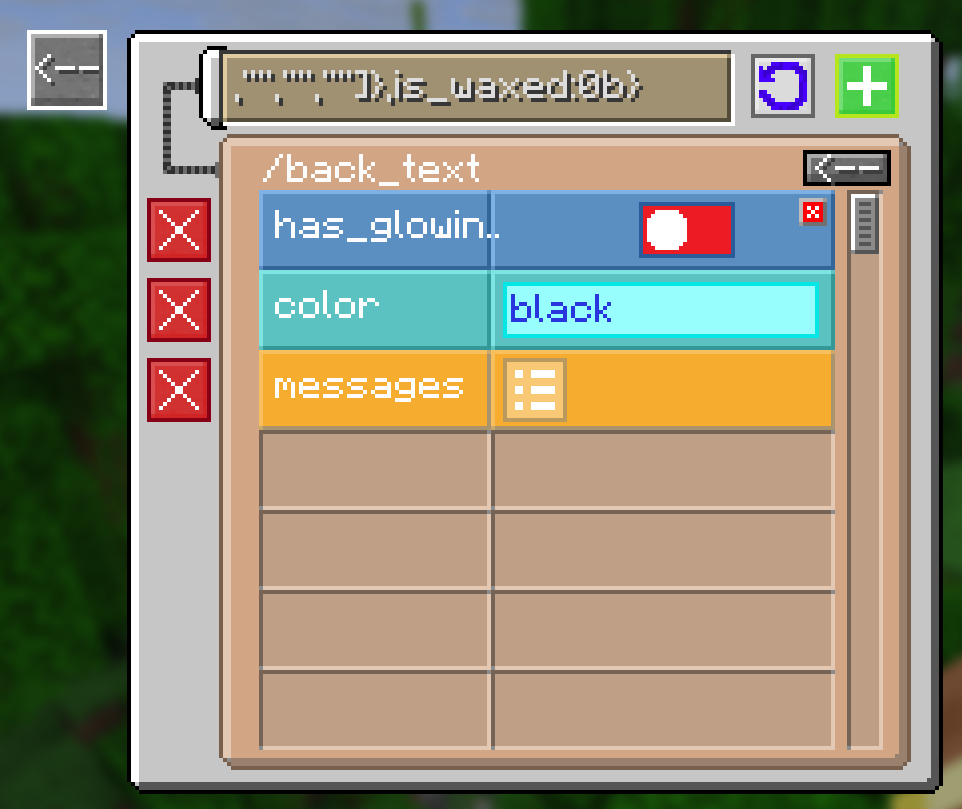
- In this version, the NBT field in the block settings has been moved to a separate GUI, which allows you to edit it as a set of "tiles" with settings and separate "folders", as if you were using NBTEditor, but only inside the game, for convenience, some tags will be shown in a more appropriate form, for example, ByteTag in the context of a logical value.
- The new system automatically draws an error on the screen if a tag in a block has not been loaded (when the tag is not appropriate for the block), so you will always know whether the NBT changes have been applied to the block from the editor.
## New options for config
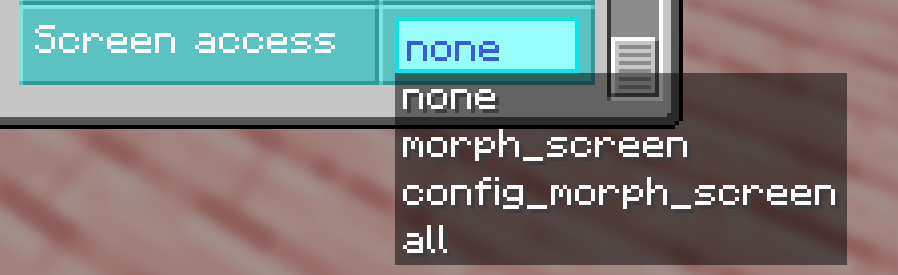
- "ScreenAccess" allows you to set the level of access to interfaces for players without operator rights, you can disable the block setup menu for players, as well as the menu for selecting new blocks, or you can completely disable the GUI and use the command.
- The "offUnbreakableBlocks" option allows you to block the transformation into unbreakable blocks, such as bedrock, barrier, command block, portal block, and the like.
## Icons for invisible blocks
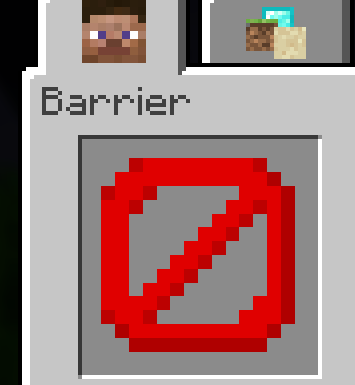
- For blocks that are not visible as a block but are visible as an item, such as a barrier, light, empty block, etc., large icons will be displayed.
## Bug fixes
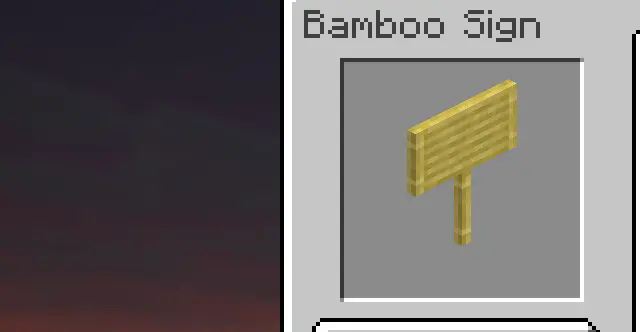
- Now the lighting level of the blocks in the GUI will not depend on the time of day
- The blocks in the GUI will be sorted according to the order of the creative inventory. _Unsortable and technical blocks (for example, portal blocks) will still be in the operator tab at the bottom._
- The light will be evenly distributed across the blocks, making the block entities slightly lighter.
- NBT tag is no longer reset when changing block properties.
- On some versions (especially fabric), fire overlay rendering would not be disabled when the player was ignited while morphing was enabled.
- The overlay of cracks when a player's block is destroyed is now determined by the broken block itself, and not the main one (previously, for example, when breaking the upper half of a door, you did not see cracks on the screen)
release
Block'oMorph 8.0.0
8.0.014 авг. 2025 г.204Minecraft: 1.21.8neoforge
Что нового
# GUI update
This update fixes some visible bugs in the graphical interfaces and also adds new features.
## Graphic NBT editor (editor for additional block data)

- In this version, the NBT field in the block settings has been moved to a separate GUI, which allows you to edit it as a set of "tiles" with settings and separate "folders", as if you were using NBTEditor, but only inside the game, for convenience, some tags will be shown in a more appropriate form, for example, ByteTag in the context of a logical value.
- The new system automatically draws an error on the screen if a tag in a block has not been loaded (when the tag is not appropriate for the block), so you will always know whether the NBT changes have been applied to the block from the editor.
## New options for config

- "ScreenAccess" allows you to set the level of access to interfaces for players without operator rights, you can disable the block setup menu for players, as well as the menu for selecting new blocks, or you can completely disable the GUI and use the command.
- The "offUnbreakableBlocks" option allows you to block the transformation into unbreakable blocks, such as bedrock, barrier, command block, portal block, and the like.
## Icons for invisible blocks

- For blocks that are not visible as a block but are visible as an item, such as a barrier, light, empty block, etc., large icons will be displayed.
## Bug fixes

- Now the lighting level of the blocks in the GUI will not depend on the time of day
- The blocks in the GUI will be sorted according to the order of the creative inventory. _Unsortable and technical blocks (for example, portal blocks) will still be in the operator tab at the bottom._
- The light will be evenly distributed across the blocks, making the block entities slightly lighter.
- NBT tag is no longer reset when changing block properties.
- On some versions (especially fabric), fire overlay rendering would not be disabled when the player was ignited while morphing was enabled.
- The overlay of cracks when a player's block is destroyed is now determined by the broken block itself, and not the main one (previously, for example, when breaking the upper half of a door, you did not see cracks on the screen)
release
Block'oMorph 7.0.1-Fabric
7.0.1-fabric14 авг. 2025 г.174Minecraft: 1.21.7fabric, quilt
Что нового
# GUI update
This update fixes some visible bugs in the graphical interfaces and also adds new features.
## Graphic NBT editor (editor for additional block data)

- In this version, the NBT field in the block settings has been moved to a separate GUI, which allows you to edit it as a set of "tiles" with settings and separate "folders", as if you were using NBTEditor, but only inside the game, for convenience, some tags will be shown in a more appropriate form, for example, ByteTag in the context of a logical value.
- The new system automatically draws an error on the screen if a tag in a block has not been loaded (when the tag is not appropriate for the block), so you will always know whether the NBT changes have been applied to the block from the editor.
## New options for config

- "ScreenAccess" allows you to set the level of access to interfaces for players without operator rights, you can disable the block setup menu for players, as well as the menu for selecting new blocks, or you can completely disable the GUI and use the command.
- The "offUnbreakableBlocks" option allows you to block the transformation into unbreakable blocks, such as bedrock, barrier, command block, portal block, and the like.
## Icons for invisible blocks

- For blocks that are not visible as a block but are visible as an item, such as a barrier, light, empty block, etc., large icons will be displayed.
## Bug fixes

- Now the lighting level of the blocks in the GUI will not depend on the time of day
- The blocks in the GUI will be sorted according to the order of the creative inventory. _Unsortable and technical blocks (for example, portal blocks) will still be in the operator tab at the bottom._
- The light will be evenly distributed across the blocks, making the block entities slightly lighter.
- NBT tag is no longer reset when changing block properties.
- On some versions (especially fabric), fire overlay rendering would not be disabled when the player was ignited while morphing was enabled.
- The overlay of cracks when a player's block is destroyed is now determined by the broken block itself, and not the main one (previously, for example, when breaking the upper half of a door, you did not see cracks on the screen)
release
Block'oMorph 7.0.1
7.0.114 авг. 2025 г.54Minecraft: 1.21.7neoforge
Что нового
# GUI update
This update fixes some visible bugs in the graphical interfaces and also adds new features.
## Graphic NBT editor (editor for additional block data)

- In this version, the NBT field in the block settings has been moved to a separate GUI, which allows you to edit it as a set of "tiles" with settings and separate "folders", as if you were using NBTEditor, but only inside the game, for convenience, some tags will be shown in a more appropriate form, for example, ByteTag in the context of a logical value.
- The new system automatically draws an error on the screen if a tag in a block has not been loaded (when the tag is not appropriate for the block), so you will always know whether the NBT changes have been applied to the block from the editor.
## New options for config

- "ScreenAccess" allows you to set the level of access to interfaces for players without operator rights, you can disable the block setup menu for players, as well as the menu for selecting new blocks, or you can completely disable the GUI and use the command.
- The "offUnbreakableBlocks" option allows you to block the transformation into unbreakable blocks, such as bedrock, barrier, command block, portal block, and the like.
## Icons for invisible blocks

- For blocks that are not visible as a block but are visible as an item, such as a barrier, light, empty block, etc., large icons will be displayed.
## Bug fixes

- Now the lighting level of the blocks in the GUI will not depend on the time of day
- The blocks in the GUI will be sorted according to the order of the creative inventory. _Unsortable and technical blocks (for example, portal blocks) will still be in the operator tab at the bottom._
- The light will be evenly distributed across the blocks, making the block entities slightly lighter.
- NBT tag is no longer reset when changing block properties.
- On some versions (especially fabric), fire overlay rendering would not be disabled when the player was ignited while morphing was enabled.
- The overlay of cracks when a player's block is destroyed is now determined by the broken block itself, and not the main one (previously, for example, when breaking the upper half of a door, you did not see cracks on the screen)
release
Block'oMorph 6.0.2-Fabric
6.0.2-fabric14 авг. 2025 г.304Minecraft: 1.21.5fabric, quilt
Что нового
# GUI update
This update fixes some visible bugs in the graphical interfaces and also adds new features.
## Graphic NBT editor (editor for additional block data)

- In this version, the NBT field in the block settings has been moved to a separate GUI, which allows you to edit it as a set of "tiles" with settings and separate "folders", as if you were using NBTEditor, but only inside the game, for convenience, some tags will be shown in a more appropriate form, for example, ByteTag in the context of a logical value.
- The new system automatically draws an error on the screen if a tag in a block has not been loaded (when the tag is not appropriate for the block), so you will always know whether the NBT changes have been applied to the block from the editor.
## New options for config

- "ScreenAccess" allows you to set the level of access to interfaces for players without operator rights, you can disable the block setup menu for players, as well as the menu for selecting new blocks, or you can completely disable the GUI and use the command.
- The "offUnbreakableBlocks" option allows you to block the transformation into unbreakable blocks, such as bedrock, barrier, command block, portal block, and the like.
## Icons for invisible blocks

- For blocks that are not visible as a block but are visible as an item, such as a barrier, light, empty block, etc., large icons will be displayed.
## Bug fixes

- Now the lighting level of the blocks in the GUI will not depend on the time of day
- The blocks in the GUI will be sorted according to the order of the creative inventory. _Unsortable and technical blocks (for example, portal blocks) will still be in the operator tab at the bottom._
- The light will be evenly distributed across the blocks, making the block entities slightly lighter.
- NBT tag is no longer reset when changing block properties.
- On some versions (especially fabric), fire overlay rendering would not be disabled when the player was ignited while morphing was enabled.
- The overlay of cracks when a player's block is destroyed is now determined by the broken block itself, and not the main one (previously, for example, when breaking the upper half of a door, you did not see cracks on the screen)
release
Block'oMorph 6.0.2
6.0.214 авг. 2025 г.50Minecraft: 1.21.5neoforge
Что нового
# GUI update
This update fixes some visible bugs in the graphical interfaces and also adds new features.
## Graphic NBT editor (editor for additional block data)

- In this version, the NBT field in the block settings has been moved to a separate GUI, which allows you to edit it as a set of "tiles" with settings and separate "folders", as if you were using NBTEditor, but only inside the game, for convenience, some tags will be shown in a more appropriate form, for example, ByteTag in the context of a logical value.
- The new system automatically draws an error on the screen if a tag in a block has not been loaded (when the tag is not appropriate for the block), so you will always know whether the NBT changes have been applied to the block from the editor.
## New options for config

- "ScreenAccess" allows you to set the level of access to interfaces for players without operator rights, you can disable the block setup menu for players, as well as the menu for selecting new blocks, or you can completely disable the GUI and use the command.
- The "offUnbreakableBlocks" option allows you to block the transformation into unbreakable blocks, such as bedrock, barrier, command block, portal block, and the like.
## Icons for invisible blocks

- For blocks that are not visible as a block but are visible as an item, such as a barrier, light, empty block, etc., large icons will be displayed.
## Bug fixes

- Now the lighting level of the blocks in the GUI will not depend on the time of day
- The blocks in the GUI will be sorted according to the order of the creative inventory. _Unsortable and technical blocks (for example, portal blocks) will still be in the operator tab at the bottom._
- The light will be evenly distributed across the blocks, making the block entities slightly lighter.
- NBT tag is no longer reset when changing block properties.
- On some versions (especially fabric), fire overlay rendering would not be disabled when the player was ignited while morphing was enabled.
- The overlay of cracks when a player's block is destroyed is now determined by the broken block itself, and not the main one (previously, for example, when breaking the upper half of a door, you did not see cracks on the screen)
release
Block'oMorph 5.0.5-Fabric
5.0.5-fabric14 авг. 2025 г.325Minecraft: 1.21.4fabric, quilt
Что нового
# GUI update
This update fixes some visible bugs in the graphical interfaces and also adds new features.
## Graphic NBT editor (editor for additional block data)

- In this version, the NBT field in the block settings has been moved to a separate GUI, which allows you to edit it as a set of "tiles" with settings and separate "folders", as if you were using NBTEditor, but only inside the game, for convenience, some tags will be shown in a more appropriate form, for example, ByteTag in the context of a logical value.
- The new system automatically draws an error on the screen if a tag in a block has not been loaded (when the tag is not appropriate for the block), so you will always know whether the NBT changes have been applied to the block from the editor.
## New options for config

- "ScreenAccess" allows you to set the level of access to interfaces for players without operator rights, you can disable the block setup menu for players, as well as the menu for selecting new blocks, or you can completely disable the GUI and use the command.
- The "offUnbreakableBlocks" option allows you to block the transformation into unbreakable blocks, such as bedrock, barrier, command block, portal block, and the like.
## Icons for invisible blocks

- For blocks that are not visible as a block but are visible as an item, such as a barrier, light, empty block, etc., large icons will be displayed.
## Bug fixes

- Now the lighting level of the blocks in the GUI will not depend on the time of day
- The blocks in the GUI will be sorted according to the order of the creative inventory. _Unsortable and technical blocks (for example, portal blocks) will still be in the operator tab at the bottom._
- The light will be evenly distributed across the blocks, making the block entities slightly lighter.
- NBT tag is no longer reset when changing block properties.
- On some versions (especially fabric), fire overlay rendering would not be disabled when the player was ignited while morphing was enabled.
- The overlay of cracks when a player's block is destroyed is now determined by the broken block itself, and not the main one (previously, for example, when breaking the upper half of a door, you did not see cracks on the screen)
release
Block'oMorph 5.0.5
5.0.514 авг. 2025 г.62Minecraft: 1.21.4neoforge
Что нового
# GUI update
This update fixes some visible bugs in the graphical interfaces and also adds new features.
## Graphic NBT editor (editor for additional block data)

- In this version, the NBT field in the block settings has been moved to a separate GUI, which allows you to edit it as a set of "tiles" with settings and separate "folders", as if you were using NBTEditor, but only inside the game, for convenience, some tags will be shown in a more appropriate form, for example, ByteTag in the context of a logical value.
- The new system automatically draws an error on the screen if a tag in a block has not been loaded (when the tag is not appropriate for the block), so you will always know whether the NBT changes have been applied to the block from the editor.
## New options for config

- "ScreenAccess" allows you to set the level of access to interfaces for players without operator rights, you can disable the block setup menu for players, as well as the menu for selecting new blocks, or you can completely disable the GUI and use the command.
- The "offUnbreakableBlocks" option allows you to block the transformation into unbreakable blocks, such as bedrock, barrier, command block, portal block, and the like.
## Icons for invisible blocks

- For blocks that are not visible as a block but are visible as an item, such as a barrier, light, empty block, etc., large icons will be displayed.
## Bug fixes

- Now the lighting level of the blocks in the GUI will not depend on the time of day
- The blocks in the GUI will be sorted according to the order of the creative inventory. _Unsortable and technical blocks (for example, portal blocks) will still be in the operator tab at the bottom._
- The light will be evenly distributed across the blocks, making the block entities slightly lighter.
- NBT tag is no longer reset when changing block properties.
- On some versions (especially fabric), fire overlay rendering would not be disabled when the player was ignited while morphing was enabled.
- The overlay of cracks when a player's block is destroyed is now determined by the broken block itself, and not the main one (previously, for example, when breaking the upper half of a door, you did not see cracks on the screen)
release
Block'oMorph 3.0.11-Fabric
3.0.11-fabric14 авг. 2025 г.662Minecraft: 1.21.1fabric, quilt
Что нового
# GUI update
This update fixes some visible bugs in the graphical interfaces and also adds new features.
## Graphic NBT editor (editor for additional block data)

- In this version, the NBT field in the block settings has been moved to a separate GUI, which allows you to edit it as a set of "tiles" with settings and separate "folders", as if you were using NBTEditor, but only inside the game, for convenience, some tags will be shown in a more appropriate form, for example, ByteTag in the context of a logical value.
- The new system automatically draws an error on the screen if a tag in a block has not been loaded (when the tag is not appropriate for the block), so you will always know whether the NBT changes have been applied to the block from the editor.
## New options for config

- "ScreenAccess" allows you to set the level of access to interfaces for players without operator rights, you can disable the block setup menu for players, as well as the menu for selecting new blocks, or you can completely disable the GUI and use the command.
- The "offUnbreakableBlocks" option allows you to block the transformation into unbreakable blocks, such as bedrock, barrier, command block, portal block, and the like.
## Icons for invisible blocks

- For blocks that are not visible as a block but are visible as an item, such as a barrier, light, empty block, etc., large icons will be displayed.
## Bug fixes

- Now the lighting level of the blocks in the GUI will not depend on the time of day
- The blocks in the GUI will be sorted according to the order of the creative inventory. _Unsortable and technical blocks (for example, portal blocks) will still be in the operator tab at the bottom._
- The light will be evenly distributed across the blocks, making the block entities slightly lighter.
- NBT tag is no longer reset when changing block properties.
- On some versions (especially fabric), fire overlay rendering would not be disabled when the player was ignited while morphing was enabled.
- The overlay of cracks when a player's block is destroyed is now determined by the broken block itself, and not the main one (previously, for example, when breaking the upper half of a door, you did not see cracks on the screen)
release
Block'oMorph 3.0.11
3.0.1114 авг. 2025 г.280Minecraft: 1.21.1neoforge
Что нового
# GUI update
This update fixes some visible bugs in the graphical interfaces and also adds new features.
## Graphic NBT editor (editor for additional block data)

- In this version, the NBT field in the block settings has been moved to a separate GUI, which allows you to edit it as a set of "tiles" with settings and separate "folders", as if you were using NBTEditor, but only inside the game, for convenience, some tags will be shown in a more appropriate form, for example, ByteTag in the context of a logical value.
- The new system automatically draws an error on the screen if a tag in a block has not been loaded (when the tag is not appropriate for the block), so you will always know whether the NBT changes have been applied to the block from the editor.
## New options for config

- "ScreenAccess" allows you to set the level of access to interfaces for players without operator rights, you can disable the block setup menu for players, as well as the menu for selecting new blocks, or you can completely disable the GUI and use the command.
- The "offUnbreakableBlocks" option allows you to block the transformation into unbreakable blocks, such as bedrock, barrier, command block, portal block, and the like.
## Icons for invisible blocks

- For blocks that are not visible as a block but are visible as an item, such as a barrier, light, empty block, etc., large icons will be displayed.
## Bug fixes

- Now the lighting level of the blocks in the GUI will not depend on the time of day
- The blocks in the GUI will be sorted according to the order of the creative inventory. _Unsortable and technical blocks (for example, portal blocks) will still be in the operator tab at the bottom._
- The light will be evenly distributed across the blocks, making the block entities slightly lighter.
- NBT tag is no longer reset when changing block properties.
- On some versions (especially fabric), fire overlay rendering would not be disabled when the player was ignited while morphing was enabled.
- The overlay of cracks when a player's block is destroyed is now determined by the broken block itself, and not the main one (previously, for example, when breaking the upper half of a door, you did not see cracks on the screen)
release
Block'oMorph 1.0.9-Fabric
1.0.9-fabric14 авг. 2025 г.725Minecraft: 1.20.1fabric, quilt
Что нового
# GUI update
This update fixes some visible bugs in the graphical interfaces and also adds new features.
## Graphic NBT editor (editor for additional block data)

- In this version, the NBT field in the block settings has been moved to a separate GUI, which allows you to edit it as a set of "tiles" with settings and separate "folders", as if you were using NBTEditor, but only inside the game, for convenience, some tags will be shown in a more appropriate form, for example, ByteTag in the context of a logical value.
- The new system automatically draws an error on the screen if a tag in a block has not been loaded (when the tag is not appropriate for the block), so you will always know whether the NBT changes have been applied to the block from the editor.
## New options for config

- "ScreenAccess" allows you to set the level of access to interfaces for players without operator rights, you can disable the block setup menu for players, as well as the menu for selecting new blocks, or you can completely disable the GUI and use the command.
- The "offUnbreakableBlocks" option allows you to block the transformation into unbreakable blocks, such as bedrock, barrier, command block, portal block, and the like.
## Icons for invisible blocks

- For blocks that are not visible as a block but are visible as an item, such as a barrier, light, empty block, etc., large icons will be displayed.
## Bug fixes

- Now the lighting level of the blocks in the GUI will not depend on the time of day
- The blocks in the GUI will be sorted according to the order of the creative inventory. _Unsortable and technical blocks (for example, portal blocks) will still be in the operator tab at the bottom._
- The light will be evenly distributed across the blocks, making the block entities slightly lighter.
- NBT tag is no longer reset when changing block properties.
- On some versions (especially fabric), fire overlay rendering would not be disabled when the player was ignited while morphing was enabled.
- The overlay of cracks when a player's block is destroyed is now determined by the broken block itself, and not the main one (previously, for example, when breaking the upper half of a door, you did not see cracks on the screen)
release
Block'oMorph 1.0.9
1.0.914 авг. 2025 г.1,6 тыс.Minecraft: 1.20.1forge
Что нового
# GUI update
This update fixes some visible bugs in the graphical interfaces and also adds new features.
## Graphic NBT editor (editor for additional block data)

- In this version, the NBT field in the block settings has been moved to a separate GUI, which allows you to edit it as a set of "tiles" with settings and separate "folders", as if you were using NBTEditor, but only inside the game, for convenience, some tags will be shown in a more appropriate form, for example, ByteTag in the context of a logical value.
- The new system automatically draws an error on the screen if a tag in a block has not been loaded (when the tag is not appropriate for the block), so you will always know whether the NBT changes have been applied to the block from the editor.
## New options for config

- "ScreenAccess" allows you to set the level of access to interfaces for players without operator rights, you can disable the block setup menu for players, as well as the menu for selecting new blocks, or you can completely disable the GUI and use the command.
- The "offUnbreakableBlocks" option allows you to block the transformation into unbreakable blocks, such as bedrock, barrier, command block, portal block, and the like.
## Icons for invisible blocks

- For blocks that are not visible as a block but are visible as an item, such as a barrier, light, empty block, etc., large icons will be displayed.
## Bug fixes

- Now the lighting level of the blocks in the GUI will not depend on the time of day
- The blocks in the GUI will be sorted according to the order of the creative inventory. _Unsortable and technical blocks (for example, portal blocks) will still be in the operator tab at the bottom._
- The light will be evenly distributed across the blocks, making the block entities slightly lighter.
- NBT tag is no longer reset when changing block properties.
- On some versions (especially fabric), fire overlay rendering would not be disabled when the player was ignited while morphing was enabled.
- The overlay of cracks when a player's block is destroyed is now determined by the broken block itself, and not the main one (previously, for example, when breaking the upper half of a door, you did not see cracks on the screen)
release
Block'oMorph 7.0.0-Fabric
7.0.0-fabric11 июл. 2025 г.507Minecraft: 1.21.7fabric, quilt
Что нового
- Updated to 1.21.7
release
Block'oMorph 7.0.0
7.0.011 июл. 2025 г.78Minecraft: 1.21.7neoforge
Что нового
- Updated to 1.21.7
release
Block'oMorph 6.0.1-Fabric
6.0.1-fabric5 июл. 2025 г.341Minecraft: 1.21.5fabric, quilt
Что нового
### Functional update:
- Now you **can interact with blocks** by right-clicking, as it happens with vanilla blocks. The mod will support the functionality of most mod blocks, not just vanilla ones. Also, the blocks **support tick**, due to which the functionality of such blocks as: furnace, potion brewer, campfire (cooking food) and the like will also work.
- If this function is inconvenient, you can disable it in the configuration, there are 3 modes:
1. DISABLED - interaction with blocks does not work
2. VANILLA - only vanilla blocks work
3. ALL - all blocks work, including those from other mods
- You can also set the placement mode on transformed players:
1. DISABLED - nothing can be placed on the player
2. OUT - when clicking on a transformed player with a block, the block will be placed in the world at the closest position from the click location, if any
3. IN - the block will be placed in the player's internal coordinate system, this allows the creation of buildings on transformed players from more than 1 block, from the central block of the player there is space of 15 blocks in XZ, as well as 31 blocks up in Y, nothing can be placed below the transformed player.(parameter under development, may contain bugs, especially when placing many blocks, or when working with functional blocks close to the edge of the 15x31x15 area of the internal coordinate system)
### Bug fixes:
- Hitting a player who was turned into a block with a projectile could cause crashes or graphical errors.
- The block destruction system should work more reliably (especially the destruction animation, swing hand), since it now works using the vanilla system, and not the custom one.
### Changes:
- Now the "multiblock" function has been removed, it is always enabled by default, and when turning into a multiblock (e.g. door, bed), the second half will be loaded automatically
release
Block'oMorph 6.0.1
6.0.15 июл. 2025 г.80Minecraft: 1.21.5neoforge
Что нового
### Functional update:
- Now you **can interact with blocks** by right-clicking, as it happens with vanilla blocks. The mod will support the functionality of most mod blocks, not just vanilla ones. Also, the blocks **support tick**, due to which the functionality of such blocks as: furnace, potion brewer, campfire (cooking food) and the like will also work.


- If this function is inconvenient, you can disable it in the configuration, there are 3 modes:
1. DISABLED - interaction with blocks does not work
2. VANILLA - only vanilla blocks work
3. ALL - all blocks work, including those from other mods
- You can also set the placement mode on transformed players:
1. DISABLED - nothing can be placed on the player
2. OUT - when clicking on a transformed player with a block, the block will be placed in the world at the closest position from the click location, if any
3. IN - the block will be placed in the player's internal coordinate system, this allows the creation of buildings on transformed players from more than 1 block, from the central block of the player there is space of 15 blocks in XZ, as well as 31 blocks up in Y, nothing can be placed below the transformed player.(parameter under development, may contain bugs, especially when placing many blocks, or when working with functional blocks close to the edge of the 15x31x15 area of the internal coordinate system)
### Bug fixes:
- Hitting a player who was turned into a block with a projectile could cause crashes or graphical errors.
- The block destruction system should work more reliably (especially the destruction animation, swing hand), since it now works using the vanilla system, and not the custom one.
### Changes:
- Now the "multiblock" function has been removed, it is always enabled by default, and when turning into a multiblock (e.g. door, bed), the second half will be loaded automatically
release
Block'oMorph 5.0.4-Fabric
5.0.4-fabric5 июл. 2025 г.187Minecraft: 1.21.4fabric, quilt
Что нового
### Functional update:
- Now you **can interact with blocks** by right-clicking, as it happens with vanilla blocks. The mod will support the functionality of most mod blocks, not just vanilla ones. Also, the blocks **support tick**, due to which the functionality of such blocks as: furnace, potion brewer, campfire (cooking food) and the like will also work.


- If this function is inconvenient, you can disable it in the configuration, there are 3 modes:
1. DISABLED - interaction with blocks does not work
2. VANILLA - only vanilla blocks work
3. ALL - all blocks work, including those from other mods
- You can also set the placement mode on transformed players:
1. DISABLED - nothing can be placed on the player
2. OUT - when clicking on a transformed player with a block, the block will be placed in the world at the closest position from the click location, if any
3. IN - the block will be placed in the player's internal coordinate system, this allows the creation of buildings on transformed players from more than 1 block, from the central block of the player there is space of 15 blocks in XZ, as well as 31 blocks up in Y, nothing can be placed below the transformed player.(parameter under development, may contain bugs, especially when placing many blocks, or when working with functional blocks close to the edge of the 15x31x15 area of the internal coordinate system)
### Bug fixes:
- Hitting a player who was turned into a block with a projectile could cause crashes or graphical errors.
- The block destruction system should work more reliably (especially the destruction animation, swing hand), since it now works using the vanilla system, and not the custom one.
### Changes:
- Now the "multiblock" function has been removed, it is always enabled by default, and when turning into a multiblock (e.g. door, bed), the second half will be loaded automatically
release
Block'oMorph 5.0.4
5.0.45 июл. 2025 г.57Minecraft: 1.21.4neoforge
Что нового
### Functional update:
- Now you **can interact with blocks** by right-clicking, as it happens with vanilla blocks. The mod will support the functionality of most mod blocks, not just vanilla ones. Also, the blocks **support tick**, due to which the functionality of such blocks as: furnace, potion brewer, campfire (cooking food) and the like will also work.


- If this function is inconvenient, you can disable it in the configuration, there are 3 modes:
1. DISABLED - interaction with blocks does not work
2. VANILLA - only vanilla blocks work
3. ALL - all blocks work, including those from other mods
- You can also set the placement mode on transformed players:
1. DISABLED - nothing can be placed on the player
2. OUT - when clicking on a transformed player with a block, the block will be placed in the world at the closest position from the click location, if any
3. IN - the block will be placed in the player's internal coordinate system, this allows the creation of buildings on transformed players from more than 1 block, from the central block of the player there is space of 15 blocks in XZ, as well as 31 blocks up in Y, nothing can be placed below the transformed player.(parameter under development, may contain bugs, especially when placing many blocks, or when working with functional blocks close to the edge of the 15x31x15 area of the internal coordinate system)
### Bug fixes:
- Hitting a player who was turned into a block with a projectile could cause crashes or graphical errors.
- The block destruction system should work more reliably (especially the destruction animation, swing hand), since it now works using the vanilla system, and not the custom one.
### Changes:
- Now the "multiblock" function has been removed, it is always enabled by default, and when turning into a multiblock (e.g. door, bed), the second half will be loaded automatically
release
Block'oMorph 4.0.4-Fabric
4.0.4-fabric5 июл. 2025 г.298Minecraft: 1.21.3fabric, quilt
Что нового
### Functional update:
- Now you **can interact with blocks** by right-clicking, as it happens with vanilla blocks. The mod will support the functionality of most mod blocks, not just vanilla ones. Also, the blocks **support tick**, due to which the functionality of such blocks as: furnace, potion brewer, campfire (cooking food) and the like will also work.


- If this function is inconvenient, you can disable it in the configuration, there are 3 modes:
1. DISABLED - interaction with blocks does not work
2. VANILLA - only vanilla blocks work
3. ALL - all blocks work, including those from other mods
- You can also set the placement mode on transformed players:
1. DISABLED - nothing can be placed on the player
2. OUT - when clicking on a transformed player with a block, the block will be placed in the world at the closest position from the click location, if any
3. IN - the block will be placed in the player's internal coordinate system, this allows the creation of buildings on transformed players from more than 1 block, from the central block of the player there is space of 15 blocks in XZ, as well as 31 blocks up in Y, nothing can be placed below the transformed player.(parameter under development, may contain bugs, especially when placing many blocks, or when working with functional blocks close to the edge of the 15x31x15 area of the internal coordinate system)
### Bug fixes:
- Hitting a player who was turned into a block with a projectile could cause crashes or graphical errors.
- The block destruction system should work more reliably (especially the destruction animation, swing hand), since it now works using the vanilla system, and not the custom one.
### Changes:
- Now the "multiblock" function has been removed, it is always enabled by default, and when turning into a multiblock (e.g. door, bed), the second half will be loaded automatically
release
Block'oMorph 4.0.4
4.0.45 июл. 2025 г.110Minecraft: 1.21.3neoforge
Что нового
### Functional update:
- Now you **can interact with blocks** by right-clicking, as it happens with vanilla blocks. The mod will support the functionality of most mod blocks, not just vanilla ones. Also, the blocks **support tick**, due to which the functionality of such blocks as: furnace, potion brewer, campfire (cooking food) and the like will also work.


- If this function is inconvenient, you can disable it in the configuration, there are 3 modes:
1. DISABLED - interaction with blocks does not work
2. VANILLA - only vanilla blocks work
3. ALL - all blocks work, including those from other mods
- You can also set the placement mode on transformed players:
1. DISABLED - nothing can be placed on the player
2. OUT - when clicking on a transformed player with a block, the block will be placed in the world at the closest position from the click location, if any
3. IN - the block will be placed in the player's internal coordinate system, this allows the creation of buildings on transformed players from more than 1 block, from the central block of the player there is space of 15 blocks in XZ, as well as 31 blocks up in Y, nothing can be placed below the transformed player.(parameter under development, may contain bugs, especially when placing many blocks, or when working with functional blocks close to the edge of the 15x31x15 area of the internal coordinate system)
### Bug fixes:
- Hitting a player who was turned into a block with a projectile could cause crashes or graphical errors.
- The block destruction system should work more reliably (especially the destruction animation, swing hand), since it now works using the vanilla system, and not the custom one.
### Changes:
- Now the "multiblock" function has been removed, it is always enabled by default, and when turning into a multiblock (e.g. door, bed), the second half will be loaded automatically
release
Block'oMorph 3.0.10-Fabric
3.0.10-fabric5 июл. 2025 г.335Minecraft: 1.21.1fabric, quilt
Что нового
### Functional update:
- Now you **can interact with blocks** by right-clicking, as it happens with vanilla blocks. The mod will support the functionality of most mod blocks, not just vanilla ones. Also, the blocks **support tick**, due to which the functionality of such blocks as: furnace, potion brewer, campfire (cooking food) and the like will also work.


- If this function is inconvenient, you can disable it in the configuration, there are 3 modes:
1. DISABLED - interaction with blocks does not work
2. VANILLA - only vanilla blocks work
3. ALL - all blocks work, including those from other mods
- You can also set the placement mode on transformed players:
1. DISABLED - nothing can be placed on the player
2. OUT - when clicking on a transformed player with a block, the block will be placed in the world at the closest position from the click location, if any
3. IN - the block will be placed in the player's internal coordinate system, this allows the creation of buildings on transformed players from more than 1 block, from the central block of the player there is space of 15 blocks in XZ, as well as 31 blocks up in Y, nothing can be placed below the transformed player.(parameter under development, may contain bugs, especially when placing many blocks, or when working with functional blocks close to the edge of the 15x31x15 area of the internal coordinate system)
### Bug fixes:
- Hitting a player who was turned into a block with a projectile could cause crashes or graphical errors.
- The block destruction system should work more reliably (especially the destruction animation, swing hand), since it now works using the vanilla system, and not the custom one.
### Changes:
- Now the "multiblock" function has been removed, it is always enabled by default, and when turning into a multiblock (e.g. door, bed), the second half will be loaded automatically
release
Block'oMorph 3.0.10
3.0.105 июл. 2025 г.136Minecraft: 1.21.1neoforge
Что нового
### Functional update:
- Now you **can interact with blocks** by right-clicking, as it happens with vanilla blocks. The mod will support the functionality of most mod blocks, not just vanilla ones. Also, the blocks **support tick**, due to which the functionality of such blocks as: furnace, potion brewer, campfire (cooking food) and the like will also work.


- If this function is inconvenient, you can disable it in the configuration, there are 3 modes:
1. DISABLED - interaction with blocks does not work
2. VANILLA - only vanilla blocks work
3. ALL - all blocks work, including those from other mods
- You can also set the placement mode on transformed players:
1. DISABLED - nothing can be placed on the player
2. OUT - when clicking on a transformed player with a block, the block will be placed in the world at the closest position from the click location, if any
3. IN - the block will be placed in the player's internal coordinate system, this allows the creation of buildings on transformed players from more than 1 block, from the central block of the player there is space of 15 blocks in XZ, as well as 31 blocks up in Y, nothing can be placed below the transformed player.(parameter under development, may contain bugs, especially when placing many blocks, or when working with functional blocks close to the edge of the 15x31x15 area of the internal coordinate system)
### Bug fixes:
- Hitting a player who was turned into a block with a projectile could cause crashes or graphical errors.
- The block destruction system should work more reliably (especially the destruction animation, swing hand), since it now works using the vanilla system, and not the custom one.
### Changes:
- Now the "multiblock" function has been removed, it is always enabled by default, and when turning into a multiblock (e.g. door, bed), the second half will be loaded automatically
release
Block'oMorph 1.0.8-Fabric
1.0.8-fabric5 июл. 2025 г.385Minecraft: 1.20.1fabric, quilt
Что нового
### Functional update:
- Now you **can interact with blocks** by right-clicking, as it happens with vanilla blocks. The mod will support the functionality of most mod blocks, not just vanilla ones. Also, the blocks **support tick**, due to which the functionality of such blocks as: furnace, potion brewer, campfire (cooking food) and the like will also work.


- If this function is inconvenient, you can disable it in the configuration, there are 3 modes:
1. DISABLED - interaction with blocks does not work
2. VANILLA - only vanilla blocks work
3. ALL - all blocks work, including those from other mods
- You can also set the placement mode on transformed players:
1. DISABLED - nothing can be placed on the player
2. OUT - when clicking on a transformed player with a block, the block will be placed in the world at the closest position from the click location, if any
3. IN - the block will be placed in the player's internal coordinate system, this allows the creation of buildings on transformed players from more than 1 block, from the central block of the player there is space of 15 blocks in XZ, as well as 31 blocks up in Y, nothing can be placed below the transformed player.(parameter under development, may contain bugs, especially when placing many blocks, or when working with functional blocks close to the edge of the 15x31x15 area of the internal coordinate system)
### Bug fixes:
- Hitting a player who was turned into a block with a projectile could cause crashes or graphical errors.
- The block destruction system should work more reliably (especially the destruction animation, swing hand), since it now works using the vanilla system, and not the custom one.
### Changes:
- Now the "multiblock" function has been removed, it is always enabled by default, and when turning into a multiblock (e.g. door, bed), the second half will be loaded automatically
release
Block'oMorph 1.0.8
1.0.85 июл. 2025 г.1,1 тыс.Minecraft: 1.20.1forge
Что нового
### Functional update:
- Now you **can interact with blocks** by right-clicking, as it happens with vanilla blocks. The mod will support the functionality of most mod blocks, not just vanilla ones. Also, the blocks **support tick**, due to which the functionality of such blocks as: furnace, potion brewer, campfire (cooking food) and the like will also work.


- If this function is inconvenient, you can disable it in the configuration, there are 3 modes:
1. DISABLED - interaction with blocks does not work
2. VANILLA - only vanilla blocks work
3. ALL - all blocks work, including those from other mods
- You can also set the placement mode on transformed players:
1. DISABLED - nothing can be placed on the player
2. OUT - when clicking on a transformed player with a block, the block will be placed in the world at the closest position from the click location, if any
3. IN - the block will be placed in the player's internal coordinate system, this allows the creation of buildings on transformed players from more than 1 block, from the central block of the player there is space of 15 blocks in XZ, as well as 31 blocks up in Y, nothing can be placed below the transformed player.(parameter under development, may contain bugs, especially when placing many blocks, or when working with functional blocks close to the edge of the 15x31x15 area of the internal coordinate system)
### Bug fixes:
- Hitting a player who was turned into a block with a projectile could cause crashes or graphical errors.
- The block destruction system should work more reliably (especially the destruction animation, swing hand), since it now works using the vanilla system, and not the custom one.
### Changes:
- Now the "multiblock" function has been removed, it is always enabled by default, and when turning into a multiblock (e.g. door, bed), the second half will be loaded automatically
release
Block'oMorph 6.0.0-Fabric
6.0.0-fabric6 апр. 2025 г.1,9 тыс.Minecraft: 1.21.5fabric, quilt
Что нового
- Porting to 1.21.5 neoforge
release
Block'oMorph 6.0.0
6.0.06 апр. 2025 г.230Minecraft: 1.21.5neoforge
Что нового
- Porting to 1.21.5 neoforge
release
Block'oMorph 5.0.3-Fabric
5.0.3-fabric16 мар. 2025 г.1,3 тыс.Minecraft: 1.21.4fabric, quilt
Что нового
Bug fixes:
1. Now you can enter 1x1 cracks without having to aim for a long time, to do this you need to look at the crack and hold down the "Forward" button, the code will try to align the coordinate to an even value if possible.([https://github.com/151chit/BlockoMorph/issues/5](https://github.com/151chit/BlockoMorph/issues/5))


2. Fixed a vulnerability in the network packet system.
3. Minor fixes.
Release Note:
- From the next update, the ability to disable the Multiblock feature will be removed and this feature will be enabled by default.
release
Block'oMorph 5.0.3
5.0.316 мар. 2025 г.139Minecraft: 1.21.4neoforge
Что нового
Bug fixes:
1. Now you can enter 1x1 cracks without having to aim for a long time, to do this you need to look at the crack and hold down the "Forward" button, the code will try to align the coordinate to an even value if possible.([https://github.com/151chit/BlockoMorph/issues/5](https://github.com/151chit/BlockoMorph/issues/5))


2. Fixed a vulnerability in the network packet system.
3. Minor fixes.
Release Note:
- From the next update, the ability to disable the Multiblock feature will be removed and this feature will be enabled by default.
release
Block'oMorph 4.0.3-Fabric
4.0.3-fabric16 мар. 2025 г.112Minecraft: 1.21.3fabric, quilt
Что нового
Bug fixes:
1. Now you can enter 1x1 cracks without having to aim for a long time, to do this you need to look at the crack and hold down the "Forward" button, the code will try to align the coordinate to an even value if possible.([https://github.com/151chit/BlockoMorph/issues/5](https://github.com/151chit/BlockoMorph/issues/5))


2. Fixed a vulnerability in the network packet system.
3. Minor fixes.
Release Note:
- From the next update, the ability to disable the Multiblock feature will be removed and this feature will be enabled by default.
release
Block'oMorph 4.0.3
4.0.316 мар. 2025 г.46Minecraft: 1.21.3neoforge
Что нового
Bug fixes:
1. Now you can enter 1x1 cracks without having to aim for a long time, to do this you need to look at the crack and hold down the "Forward" button, the code will try to align the coordinate to an even value if possible.([https://github.com/151chit/BlockoMorph/issues/5](https://github.com/151chit/BlockoMorph/issues/5))


2. Fixed a vulnerability in the network packet system.
3. Minor fixes.
Release Note:
- From the next update, the ability to disable the Multiblock feature will be removed and this feature will be enabled by default.
release
Block'oMorph 3.0.9-Fabric
3.0.9-fabric16 мар. 2025 г.753Minecraft: 1.21.1fabric, quilt
Что нового
Bug fixes:
1. Now you can enter 1x1 cracks without having to aim for a long time, to do this you need to look at the crack and hold down the "Forward" button, the code will try to align the coordinate to an even value if possible.([https://github.com/151chit/BlockoMorph/issues/5](https://github.com/151chit/BlockoMorph/issues/5))


2. Fixed a vulnerability in the network packet system.
3. Minor fixes.
Release Note:
- From the next update, the ability to disable the Multiblock feature will be removed and this feature will be enabled by default.
release
Block'oMorph 3.0.9
3.0.916 мар. 2025 г.546Minecraft: 1.21.1neoforge
Что нового
Bug fixes:
1. Now you can enter 1x1 cracks without having to aim for a long time, to do this you need to look at the crack and hold down the "Forward" button, the code will try to align the coordinate to an even value if possible.([https://github.com/151chit/BlockoMorph/issues/5](https://github.com/151chit/BlockoMorph/issues/5))


2. Fixed a vulnerability in the network packet system.
3. Minor fixes.
Release Note:
- From the next update, the ability to disable the Multiblock feature will be removed and this feature will be enabled by default.
release
Block'oMorph 1.0.7-Fabric
1.0.7-fabric16 мар. 2025 г.1,5 тыс.Minecraft: 1.20.1fabric, quilt
Что нового
Bug fixes:
1. Now you can enter 1x1 cracks without having to aim for a long time, to do this you need to look at the crack and hold down the "Forward" button, the code will try to align the coordinate to an even value if possible.([https://github.com/151chit/BlockoMorph/issues/5](https://github.com/151chit/BlockoMorph/issues/5))


2. Fixed a vulnerability in the network packet system.
3. Minor fixes.
Release Note:
- From the next update, the ability to disable the Multiblock feature will be removed and this feature will be enabled by default.
beta
Block'oMorph 1.0.7
1.0.716 мар. 2025 г.1,8 тыс.Minecraft: 1.20.1forge
Что нового
Bug fixes:
1. Now you can enter 1x1 cracks without having to aim for a long time, to do this you need to look at the crack and hold down the "Forward" button, the code will try to align the coordinate to an even value if possible.([https://github.com/151chit/BlockoMorph/issues/5](https://github.com/151chit/BlockoMorph/issues/5))


2. Fixed a vulnerability in the network packet system.
3. Minor fixes.
Release Note:
- From the next update, the ability to disable the Multiblock feature will be removed and this feature will be enabled by default.
release
Block'oMorph 5.0.2-Fabric
5.0.2-fabric20 февр. 2025 г.701Minecraft: 1.21.4fabric, quilt
Что нового
Functional update:
- Now when you transform into TNT, you have full TNT functionality.
- You can catch fire if:
1. You catch fire naturally (step into lava, fire, etc.).
2. A player with a flint or fire charge clicks on you.
3. Click on the button with the image of a TNT fuse in the transformation menu (it will appear to the left of the unmasking button when you are TNT)

- When you catch fire, you won't be able to transform into anything until you explode. You can get around this by typing /blockmorph
- You can also transform into and get TNT functionality
from other mods, such as:

*TNT from another mod should have vanilla mechanics for this, i.e. when ignited it should summon a flashing entity primed TNT (TNT that explodes immediately when clicked will not work)
release
Block'oMorph 5.0.2
5.0.220 февр. 2025 г.89Minecraft: 1.21.4neoforge
Что нового
Functional update:
- Now when you transform into TNT, you have full TNT functionality.
- You can catch fire if:
1. You catch fire naturally (step into lava, fire, etc.).
2. A player with a flint or fire charge clicks on you.
3. Click on the button with the image of a TNT fuse in the transformation menu (it will appear to the left of the unmasking button when you are TNT)

- When you catch fire, you won't be able to transform into anything until you explode. You can get around this by typing /blockmorph
- You can also transform into and get TNT functionality
from other mods, such as:

*TNT from another mod should have vanilla mechanics for this, i.e. when ignited it should summon a flashing entity primed TNT (TNT that explodes immediately when clicked will not work)
release
Block'oMorph 4.0.2-Fabric
4.0.2-fabric20 февр. 2025 г.41Minecraft: 1.21.3fabric, quilt
Что нового
Functional update:
- Now when you transform into TNT, you have full TNT functionality.
- You can catch fire if:
1. You catch fire naturally (step into lava, fire, etc.).
2. A player with a flint or fire charge clicks on you.
3. Click on the button with the image of a TNT fuse in the transformation menu (it will appear to the left of the unmasking button when you are TNT)

- When you catch fire, you won't be able to transform into anything until you explode. You can get around this by typing /blockmorph
- You can also transform into and get TNT functionality
from other mods, such as:

*TNT from another mod should have vanilla mechanics for this, i.e. when ignited it should summon a flashing entity primed TNT (TNT that explodes immediately when clicked will not work)
release
Block'oMorph 4.0.2
4.0.220 февр. 2025 г.33Minecraft: 1.21.3neoforge
Что нового
Functional update:
- Now when you transform into TNT, you have full TNT functionality.
- You can catch fire if:
1. You catch fire naturally (step into lava, fire, etc.).
2. A player with a flint or fire charge clicks on you.
3. Click on the button with the image of a TNT fuse in the transformation menu (it will appear to the left of the unmasking button when you are TNT)

- When you catch fire, you won't be able to transform into anything until you explode. You can get around this by typing /blockmorph
- You can also transform into and get TNT functionality
from other mods, such as:

*TNT from another mod should have vanilla mechanics for this, i.e. when ignited it should summon a flashing entity primed TNT (TNT that explodes immediately when clicked will not work)
release
Block'oMorph 3.0.8-Fabric
3.0.8-fabric20 февр. 2025 г.258Minecraft: 1.21.1fabric, quilt
Что нового
Functional update:
- Now when you transform into TNT, you have full TNT functionality.
- You can catch fire if:
1. You catch fire naturally (step into lava, fire, etc.).
2. A player with a flint or fire charge clicks on you.
3. Click on the button with the image of a TNT fuse in the transformation menu (it will appear to the left of the unmasking button when you are TNT)

- When you catch fire, you won't be able to transform into anything until you explode. You can get around this by typing /blockmorph
- You can also transform into and get TNT functionality
from other mods, such as:

*TNT from another mod should have vanilla mechanics for this, i.e. when ignited it should summon a flashing entity primed TNT (TNT that explodes immediately when clicked will not work)
release
Block'oMorph 3.0.8
3.0.820 февр. 2025 г.70Minecraft: 1.21.1neoforge
Что нового
Functional update:
- Now when you transform into TNT, you have full TNT functionality.
- You can catch fire if:
1. You catch fire naturally (step into lava, fire, etc.).
2. A player with a flint or fire charge clicks on you.
3. Click on the button with the image of a TNT fuse in the transformation menu (it will appear to the left of the unmasking button when you are TNT)

- When you catch fire, you won't be able to transform into anything until you explode. You can get around this by typing /blockmorph
- You can also transform into and get TNT functionality
from other mods, such as:

*TNT from another mod should have vanilla mechanics for this, i.e. when ignited it should summon a flashing entity primed TNT (TNT that explodes immediately when clicked will not work)
release
Block'oMorph 1.0.6-Fabric
1.0.6-fabric20 февр. 2025 г.265Minecraft: 1.20.1fabric, quilt
Что нового
Functional update:
- Now when you transform into TNT, you have full TNT functionality.
- You can catch fire if:
1. You catch fire naturally (step into lava, fire, etc.).
2. A player with a flint or fire charge clicks on you.
3. Click on the button with the image of a TNT fuse in the transformation menu (it will appear to the left of the unmasking button when you are TNT)

- When you catch fire, you won't be able to transform into anything until you explode. You can get around this by typing /blockmorph
- You can also transform into and get TNT functionality
from other mods, such as:

*TNT from another mod should have vanilla mechanics for this, i.e. when ignited it should summon a flashing entity primed TNT (TNT that explodes immediately when clicked will not work)
release
Block'oMorph 1.0.6
1.0.620 февр. 2025 г.1,2 тыс.Minecraft: 1.20.1forge
Что нового
Functional update:
- Now when you transform into TNT, you have full TNT functionality.
- You can catch fire if:
1. You catch fire naturally (step into lava, fire, etc.).
2. A player with a flint or fire charge clicks on you.
3. Click on the button with the image of a TNT fuse in the transformation menu (it will appear to the left of the unmasking button when you are TNT)

- When you catch fire, you won't be able to transform into anything until you explode. You can get around this by typing /blockmorph
- You can also transform into and get TNT functionality
from other mods, such as:

*TNT from another mod should have vanilla mechanics for this, i.e. when ignited it should summon a flashing entity primed TNT (TNT that explodes immediately when clicked will not work)
beta
Block'oMorph 5.0.1-Fabric
5.0.1-fabric9 янв. 2025 г.883Minecraft: 1.21.4fabric, quilt
Что нового
- Functional update:
1) You can now turn into multi-blocks such as doors, beds, 2 block plants and other blocks that place extra blocks after placement.


The mod supports multiblocks even more than 2 blocks, for example:


You can enable multiblock mode **by clicking on the red button** in the **block configuration screen** if it is available or by typing the command **/blockmorph <blockstate> <player> true**.
This function can be disabled in the mod parameters, _parameter - advancedMode_
2) Now when you transform into an anvil you can deal damage to mobs when you fall:

- Bug fixes:
1) When opening the GUI of transformations immediately after entering the server, without opening the GUI of creative mode, the search in creative mode stopped working from version 1.20.1 and later
2) Blocks with a voxelShape larger than 1x1x1, such as a fence, were not visible to the player collision system, which is why you could fall into the player block by standing on the top edge of a fence, gate, or other similar blocks.
3) Other minor fixes.
beta
Block'oMorph 5.0.1
5.0.19 янв. 2025 г.86Minecraft: 1.21.4neoforge
Что нового
- Functional update:
1) You can now turn into multi-blocks such as doors, beds, 2 block plants and other blocks that place extra blocks after placement.


The mod supports multiblocks even more than 2 blocks, for example:


You can enable multiblock mode **by clicking on the red button** in the **block configuration screen** if it is available or by typing the command **/blockmorph <blockstate> <player> true**.
This function can be disabled in the mod parameters, _parameter - advancedMode_
2) Now when you transform into an anvil you can deal damage to mobs when you fall:

- Bug fixes:
1) When opening the GUI of transformations immediately after entering the server, without opening the GUI of creative mode, the search in creative mode stopped working from version 1.20.1 and later
2) Blocks with a voxelShape larger than 1x1x1, such as a fence, were not visible to the player collision system, which is why you could fall into the player block by standing on the top edge of a fence, gate, or other similar blocks.
3) Other minor fixes.
beta
Block'oMorph 4.0.1-Fabric
4.0.1-fabric9 янв. 2025 г.141Minecraft: 1.21.3fabric, quilt
Что нового
- Functional update:
1) You can now turn into multi-blocks such as doors, beds, 2 block plants and other blocks that place extra blocks after placement.


The mod supports multiblocks even more than 2 blocks, for example:


You can enable multiblock mode **by clicking on the red button** in the **block configuration screen** if it is available or by typing the command **/blockmorph <blockstate> <player> true**.
This function can be disabled in the mod parameters, _parameter - advancedMode_
2) Now when you transform into an anvil you can deal damage to mobs when you fall:

- Bug fixes:
1) When opening the GUI of transformations immediately after entering the server, without opening the GUI of creative mode, the search in creative mode stopped working from version 1.20.1 and later
2) Blocks with a voxelShape larger than 1x1x1, such as a fence, were not visible to the player collision system, which is why you could fall into the player block by standing on the top edge of a fence, gate, or other similar blocks.
3) Other minor fixes.
beta
Block'oMorph 4.0.1
4.0.19 янв. 2025 г.43Minecraft: 1.21.3neoforge
Что нового
- Functional update:
1) You can now turn into multi-blocks such as doors, beds, 2 block plants and other blocks that place extra blocks after placement.


The mod supports multiblocks even more than 2 blocks, for example:


You can enable multiblock mode **by clicking on the red button** in the **block configuration screen** if it is available or by typing the command **/blockmorph <blockstate> <player> true**.
This function can be disabled in the mod parameters, _parameter - advancedMode_
2) Now when you transform into an anvil you can deal damage to mobs when you fall:

- Bug fixes:
1) When opening the GUI of transformations immediately after entering the server, without opening the GUI of creative mode, the search in creative mode stopped working from version 1.20.1 and later
2) Blocks with a voxelShape larger than 1x1x1, such as a fence, were not visible to the player collision system, which is why you could fall into the player block by standing on the top edge of a fence, gate, or other similar blocks.
3) Other minor fixes.
beta
Block'oMorph 3.0.7-Fabric
3.0.7-fabric9 янв. 2025 г.282Minecraft: 1.21.1fabric, quilt
Что нового
- Functional update:
1) You can now turn into multi-blocks such as doors, beds, 2 block plants and other blocks that place extra blocks after placement.


The mod supports multiblocks even more than 2 blocks, for example:


You can enable multiblock mode **by clicking on the red button** in the **block configuration screen** if it is available or by typing the command **/blockmorph <blockstate> <player> true**.
This function can be disabled in the mod parameters, _parameter - advancedMode_
2) Now when you transform into an anvil you can deal damage to mobs when you fall:

- Bug fixes:
1) When opening the GUI of transformations immediately after entering the server, without opening the GUI of creative mode, the search in creative mode stopped working from version 1.20.1 and later
2) Blocks with a voxelShape larger than 1x1x1, such as a fence, were not visible to the player collision system, which is why you could fall into the player block by standing on the top edge of a fence, gate, or other similar blocks.
3) Other minor fixes.
beta
Block'oMorph 3.0.7
3.0.79 янв. 2025 г.148Minecraft: 1.21.1neoforge
Что нового
- Functional update:
1) You can now turn into multi-blocks such as doors, beds, 2 block plants and other blocks that place extra blocks after placement.


The mod supports multiblocks even more than 2 blocks, for example:


You can enable multiblock mode **by clicking on the red button** in the **block configuration screen** if it is available or by typing the command **/blockmorph <blockstate> <player> true**.
This function can be disabled in the mod parameters, _parameter - advancedMode_
2) Now when you transform into an anvil you can deal damage to mobs when you fall:

- Bug fixes:
1) When opening the GUI of transformations immediately after entering the server, without opening the GUI of creative mode, the search in creative mode stopped working from version 1.20.1 and later
2) Blocks with a voxelShape larger than 1x1x1, such as a fence, were not visible to the player collision system, which is why you could fall into the player block by standing on the top edge of a fence, gate, or other similar blocks.
3) Other minor fixes.
beta
Block'oMorph 1.0.5-Fabric
1.0.5-fabric9 янв. 2025 г.341Minecraft: 1.20.1fabric, quilt
Что нового
- Functional update:
1) You can now turn into multi-blocks such as doors, beds, 2 block plants and other blocks that place extra blocks after placement.


The mod supports multiblocks even more than 2 blocks, for example:


You can enable multiblock mode **by clicking on the red button** in the **block configuration screen** if it is available or by typing the command **/blockmorph <blockstate> <player> true**.
This function can be disabled in the mod parameters, _parameter - advancedMode_
2) Now when you transform into an anvil you can deal damage to mobs when you fall:

- Bug fixes:
1) When opening the GUI of transformations immediately after entering the server, without opening the GUI of creative mode, the search in creative mode stopped working from version 1.20.1 and later
2) Blocks with a voxelShape larger than 1x1x1, such as a fence, were not visible to the player collision system, which is why you could fall into the player block by standing on the top edge of a fence, gate, or other similar blocks.
3) Other minor fixes.
beta
Block'oMorph 1.0.5
1.0.59 янв. 2025 г.561Minecraft: 1.20.1forge
Что нового
- Functional update:
1) You can now turn into multi-blocks such as doors, beds, 2 block plants and other blocks that place extra blocks after placement.


The mod supports multiblocks even more than 2 blocks, for example:


You can enable multiblock mode **by clicking on the red button** in the **block configuration screen** if it is available or by typing the command **/blockmorph <blockstate> <player> true**.
This function can be disabled in the mod parameters, _parameter - advancedMode_
2) Now when you transform into an anvil you can deal damage to mobs when you fall:

- Bug fixes:
1) When opening the GUI of transformations immediately after entering the server, without opening the GUI of creative mode, the search in creative mode stopped working from version 1.20.1 and later
2) Blocks with a voxelShape larger than 1x1x1, such as a fence, were not visible to the player collision system, which is why you could fall into the player block by standing on the top edge of a fence, gate, or other similar blocks.
3) Other minor fixes.
beta
Block'oMorph 5.0.0-Fabric
5.0.0-fabric22 дек. 2024 г.285Minecraft: 1.21.4fabric, quilt
Что нового
- Updated on 1.21.4
beta
Block'oMorph 5.0.0
5.0.0-Neoforge-BETA22 дек. 2024 г.41Minecraft: 1.21.4neoforge
Что нового
- Updated on 1.21.4 neoforge-beta
beta
Block'oMorph 4.0.0-Fabric
4.0.0-fabric10 дек. 2024 г.253Minecraft: 1.21.3fabric, quilt
Что нового
- Fixed an important bug: when a player loaded chunks with a transformed player or entered the server, in some cases he could see Steve instead of a block
- Updated on 1.21.3
beta
Block'oMorph 4.0.0
4.0.010 дек. 2024 г.79Minecraft: 1.21.3neoforge
Что нового
- Fixed an important bug: when a player loaded chunks with a transformed player or entered the server, in some cases he could see Steve instead of a block
- Updated on 1.21.3
beta
Block'oMorph 3.0.6-Fabric
3.0.6-fabric10 дек. 2024 г.222Minecraft: 1.21.1fabric, quilt
Что нового
- Fixed an important bug: when a player loaded chunks with a transformed player or entered the server, in some cases he could see Steve instead of a block
beta
Block'oMorph 3.0.6
3.0.610 дек. 2024 г.49Minecraft: 1.21.1neoforge
Что нового
- Fixed an important bug: when a player loaded chunks with a transformed player or entered the server, in some cases he could see Steve instead of a block
beta
Block'oMorph 2.2.1
2.2.110 дек. 2024 г.197Minecraft: 1.20.6neoforge
Что нового
- Fixed an important bug: when a player loaded chunks with a transformed player or entered the server, in some cases he could see Steve instead of a block
beta
Block'oMorph 2.1.1
2.1.110 дек. 2024 г.258Minecraft: 1.20.4neoforge
Что нового
- Fixed an important bug: when a player loaded chunks with a transformed player or entered the server, in some cases he could see Steve instead of a block
beta
Block'oMorph 1.0.4-Fabric
1.0.4-fabric10 дек. 2024 г.276Minecraft: 1.20.1fabric, quilt
Что нового
- Fixed an important bug: when a player loaded chunks with a transformed player or entered the server, in some cases he could see Steve instead of a block
beta
Block'oMorph 1.0.4
1.0.410 дек. 2024 г.441Minecraft: 1.20.1forge
Что нового
- Fixed an important bug: when a player loaded chunks with a transformed player or entered the server, in some cases he could see Steve instead of a block
beta
Block'oMorph 3.0.5-Fabric
3.0.5-fabric9 нояб. 2024 г.258Minecraft: 1.21.1fabric, quilt
Что нового
Hotfix: playerDieAfterDestroy parameter did not work and the player always died even with the parameter disabled
beta
Block'oMorph 3.0.5
3.0.59 нояб. 2024 г.73Minecraft: 1.21.1neoforge
Что нового
Hotfix: playerDieAfterDestroy parameter did not work and the player always died even with the parameter disabled
beta
Block'oMorph 2.2.0
2.2.09 нояб. 2024 г.34Minecraft: 1.20.6neoforge
Что нового
Functional update:
1] Now you can save your favorite block with nbt and
properties to the saved blocks tab, this can be done in the GUI "my block". This works like saved
tools, saved between worlds on the client in the nbt
file saved_blocks.bmdat
2] Server configuration:
- You can configure 6 parameters:
- solidBlocksOnly, if true, prohibits transformation into all
incomplete blocks
- listMode, has 3 values BLACKLIST, WHITELIST and HONE,
determines in which block access mode the
mod will work
- allowedBlocks and bannedBlocks: this is a white and black list of
block id for the listMode parameter
- playerDieAfterDestroy, if true, the player dies after
destruction, if false then unmorph
- canOperatorModifyConfig, determines whether operators can
change the config from the game while the server is running from the menu or
command
- The configuration can also be changed by the command
/blockmorphconfig <parameter> <value> <add
argument (for example in the list parameter)>
- The configuration is written to the Json file blockomorph.json in
config folder
- Configuration menu for operators is opened by the n button
3] The unmorph button is available in the main block selection menu, it has the face of steve
beta
Block'oMorph 2.1.0
2.1.09 нояб. 2024 г.53Minecraft: 1.20.4neoforge
Что нового
Functional update:
1] Now you can save your favorite block with nbt and
properties to the saved blocks tab, this can be done in the GUI "my block". This works like saved
tools, saved between worlds on the client in the nbt
file saved_blocks.bmdat
2] Server configuration:
- You can configure 6 parameters:
- solidBlocksOnly, if true, prohibits transformation into all
incomplete blocks
- listMode, has 3 values BLACKLIST, WHITELIST and HONE,
determines in which block access mode the
mod will work
- allowedBlocks and bannedBlocks: this is a white and black list of
block id for the listMode parameter
- playerDieAfterDestroy, if true, the player dies after
destruction, if false then unmorph
- canOperatorModifyConfig, determines whether operators can
change the config from the game while the server is running from the menu or
command
- The configuration can also be changed by the command
/blockmorphconfig <parameter> <value> <add
argument (for example in the list parameter)>
- The configuration is written to the Json file blockomorph.json in
config folder
- Configuration menu for operators is opened by the n button
3] The unmorph button is available in the main block selection menu, it has the face of steve
beta
Block'oMorph 3.0.4-Fabric
3.0.4-fabric8 нояб. 2024 г.55Minecraft: 1.21.1fabric, quilt
Что нового
Functional update:
1] Now you can save your favorite block with nbt and
properties to the saved blocks tab, this can be done in the GUI "my block". This works like saved
tools, saved between worlds on the client in the nbt
file saved_blocks.bmdat
2] Server configuration:
- You can configure 6 parameters:
- solidBlocksOnly, if true, prohibits transformation into all
incomplete blocks
- listMode, has 3 values BLACKLIST, WHITELIST and HONE,
determines in which block access mode the
mod will work
- allowedBlocks and bannedBlocks: this is a white and black list of
block id for the listMode parameter
- playerDieAfterDestroy, if true, the player dies after
destruction, if false then unmorph
- canOperatorModifyConfig, determines whether operators can
change the config from the game while the server is running from the menu or
command
- The configuration can also be changed by the command
/blockmorphconfig <parameter> <value> <add
argument (for example in the list parameter)>
- The configuration is written to the Json file blockomorph.json in
config folder
- Configuration menu for operators is opened by the n button
3] The unmorph button is available in the main block selection menu, it has the face of steve
beta
Block'oMorph 3.0.4
3.0.48 нояб. 2024 г.40Minecraft: 1.21.1neoforge
Что нового
Functional update:
1] Now you can save your favorite block with nbt and
properties to the saved blocks tab, this can be done in the GUI "my block". This works like saved
tools, saved between worlds on the client in the nbt
file saved_blocks.bmdat
2] Server configuration:
- You can configure 6 parameters:
- solidBlocksOnly, if true, prohibits transformation into all
incomplete blocks
- listMode, has 3 values BLACKLIST, WHITELIST and HONE,
determines in which block access mode the
mod will work
- allowedBlocks and bannedBlocks: this is a white and black list of
block id for the listMode parameter
- playerDieAfterDestroy, if true, the player dies after
destruction, if false then unmorph
- canOperatorModifyConfig, determines whether operators can
change the config from the game while the server is running from the menu or
command
- The configuration can also be changed by the command
/blockmorphconfig <parameter> <value> <add
argument (for example in the list parameter)>
- The configuration is written to the Json file blockomorph.json in
config folder
- Configuration menu for operators is opened by the n button
3] The unmorph button is available in the main block selection menu, it has the face of steve
beta
Block'oMorph 1.0.3-Fabric
1.0.3-fabric8 нояб. 2024 г.182Minecraft: 1.20.1fabric, quilt
Что нового
Functional update:
1] Now you can save your favorite block with nbt and
properties to the saved blocks tab, this can be done in the GUI "my block". This works like saved
tools, saved between worlds on the client in the nbt
file saved_blocks.bmdat
2] Server configuration:
- You can configure 6 parameters:
- solidBlocksOnly, if true, prohibits transformation into all
incomplete blocks
- listMode, has 3 values BLACKLIST, WHITELIST and HONE,
determines in which block access mode the
mod will work
- allowedBlocks and bannedBlocks: this is a white and black list of
block id for the listMode parameter
- playerDieAfterDestroy, if true, the player dies after
destruction, if false then unmorph
- canOperatorModifyConfig, determines whether operators can
change the config from the game while the server is running from the menu or
command
- The configuration can also be changed by the command
/blockmorphconfig <parameter> <value> <add
argument (for example in the list parameter)>
- The configuration is written to the Json file blockomorph.json in
config folder
- Configuration menu for operators is opened by the n button
3] The unmorph button is available in the main block selection menu, it has the face of steve
beta
Block'oMorph 1.0.3
1.0.38 нояб. 2024 г.221Minecraft: 1.20.1forge
Что нового
Functional update:
1] Now you can save your favorite block with nbt and
properties to the saved blocks tab, this can be done in the GUI "my block". This works like saved
tools, saved between worlds on the client in the nbt
file saved_blocks.bmdat
2] Server configuration:
- You can configure 6 parameters:
- solidBlocksOnly, if true, prohibits transformation into all
incomplete blocks
- listMode, has 3 values BLACKLIST, WHITELIST and HONE,
determines in which block access mode the
mod will work
- allowedBlocks and bannedBlocks: this is a white and black list of
block id for the listMode parameter
- playerDieAfterDestroy, if true, the player dies after
destruction, if false then unmorph
- canOperatorModifyConfig, determines whether operators can
change the config from the game while the server is running from the menu or
command
- The configuration can also be changed by the command
/blockmorphconfig <parameter> <value> <add
argument (for example in the list parameter)>
- The configuration is written to the Json file blockomorph.json in
config folder
- Configuration menu for operators is opened by the n button
3] The unmorph button is available in the main block selection menu, it has the face of steve
alpha
Block'oMorph 3.0.3
3.0.313 окт. 2024 г.74Minecraft: 1.21.1neoforge
Что нового
- Bug fix: when expanding a list with enum property values, if there were more than 7 values, they continued to render at the bottom of the screen until they went beyond its boundaries.
alpha
Block'oMorph 3.0.3-Fabric
3.0.3-fabric13 окт. 2024 г.178Minecraft: 1.21.1fabric, quilt
Что нового
- Bug fix: when expanding a list with enum property values, if there were more than 7 values, they continued to render at the bottom of the screen until they went beyond its boundaries.
alpha
Block'oMorph 2.0.2.2
2.0.2.213 окт. 2024 г.54Minecraft: 1.20.6neoforge
Что нового
- Bug fix: when expanding a list with enum property values, if there were more than 7 values, they continued to render at the bottom of the screen until they went beyond its boundaries.
alpha
Block'oMorph 2.0.1.2
2.0.1.213 окт. 2024 г.32Minecraft: 1.20.4neoforge
Что нового
- Bug fix: when expanding a list with enum property values, if there were more than 7 values, they continued to render at the bottom of the screen until they went beyond its boundaries.
alpha
Block'oMorph 1.0.2
1.0.213 окт. 2024 г.119Minecraft: 1.20.1forge
Что нового
- Bug fix: when expanding a list with enum property values, if there were more than 7 values, they continued to render at the bottom of the screen until they went beyond its boundaries.
alpha
Block'oMorph 1.0.2-Fabric
1.0.2-fabric13 окт. 2024 г.160Minecraft: 1.20.1fabric, quilt
Что нового
- Bug fix: when expanding a list with enum property values, if there were more than 7 values, they continued to render at the bottom of the screen until they went beyond its boundaries.
alpha
Block'oMorph 3.0.2-Fabric
3.0.2-fabric3 окт. 2024 г.131Minecraft: 1.21.1fabric, quilt
Что нового
- Updated to 1.21.1 fabric
alpha
Block'oMorph 3.0.2
3.0.23 окт. 2024 г.52Minecraft: 1.21.1neoforge
Что нового
- Bugfix: when aiming at a block player with the attack key held down, it did not start to break
alpha
Block'oMorph 1.0.1-Fabric
1.0.1-fabric30 сент. 2024 г.152Minecraft: 1.20.1fabric, quilt
Что нового
- Ported on Fabric
alpha
Block'oMorph 2.0.2
2.0.224 сент. 2024 г.78Minecraft: 1.20.6neoforge
Что нового
- Updated to 1.20.6 neoforge
alpha
Block'oMorph 3.0.1
3.0.119 сент. 2024 г.75Minecraft: 1.21.1neoforge
Что нового
- Updated on 1.21.1 neoforge
alpha
Block'oMorph 2.0.1
2.0.115 сент. 2024 г.66Minecraft: 1.20.4neoforge
Что нового
- Updated on 1.20.4 neoforge
alpha
Block'oMorph 1.0.1
1.0.114 сент. 2024 г.283Minecraft: 1.20.1forge
Что нового
- Added menu for selecting a block
- Changed java package structure (does not affect the mod's operation)