

BiomesTitle
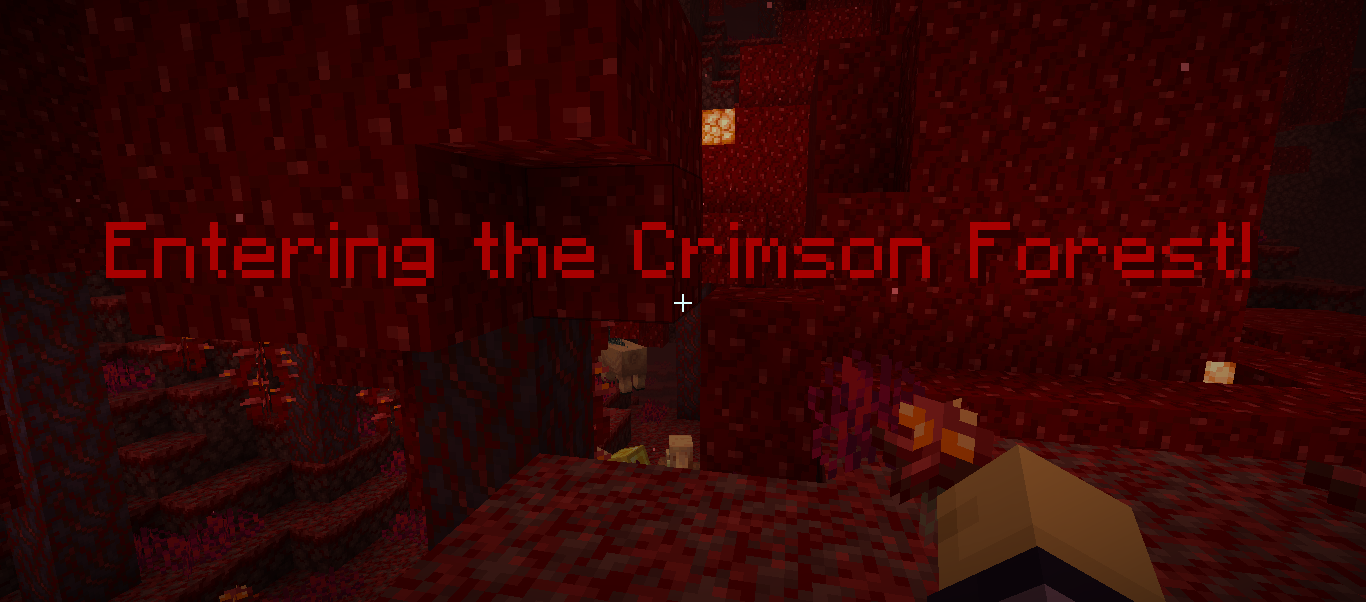
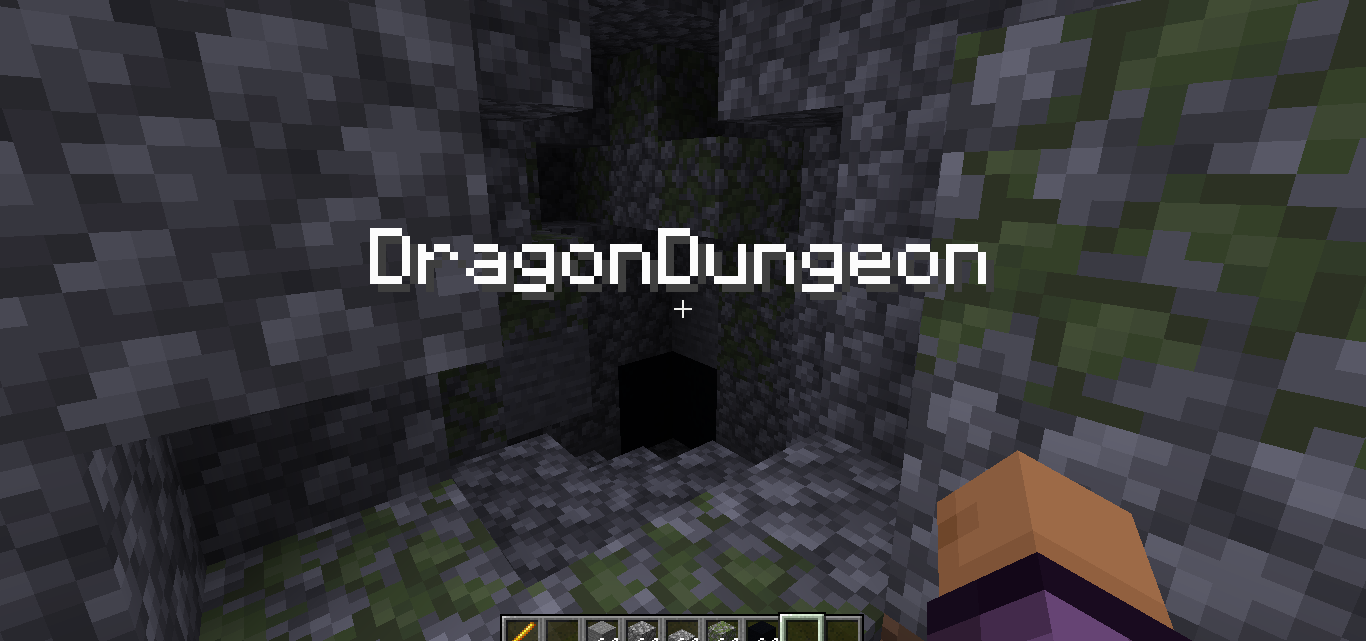
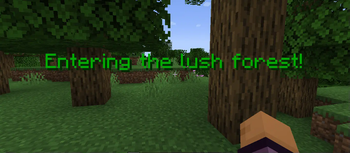
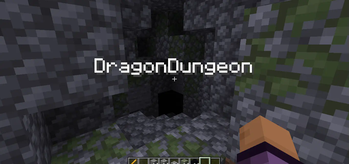
Display text once a player enter Biome/Area
Автор: Supramental9698обновлён 4 июн. 2025 г.
ПриключенияМеханики игры
Описание
Display message once a player enter Biome/Area
This plugin sadly wont receive any update anymore(ABANDONED)
Other feature
- Display message once a player step into biomes/area/Structure
- Display option
- title
- subtitle
- actionbar
- bossbar
- Create your own Area
- Display message in structures
- Particles(Spawn a particle once a player step into the biomes/area)
- Trails Particle (spawn a trails once a player step into the biomes/area)
- Execute command (Executed command for player once a player step into the biomes/area)
- Custom sounds (Play sound once a player step into the biomes/area)
- RGB support using
Commands
/biometitlewand (Use to get Area wand)
/biometitlesetarea(Use to set the area)
Permissions
biomestitle.command.wand
biomestitle.command.setarea
How to use Area Wand? check Github ,Also custom area will appear in Area.yml
Config.yml
# BiomesTitle Plugin
# Having an issue or suggestion? go to my github and create new issue nd label the issue
# with bug/request ,if i label it as Trying it means im working for it
# https://github.com/NotSabrina/BiomesTitle
disabled-worlds:
  - example_world
  - another_world

biomes:
  # if u use PlaceholderAPI Plugin you can display a image,custom font Ex:
  #PLAINS:
  #  message: "&aEntering the sunny plains! %image_placeholder%" <- PlaceholderAPI image
  #  display: "title"

  # display option
  # - title (the message will appear as title)
  # - actionbar (the message will appear as action bar)
  # - subtitle (the message will appearr as subtitle)
  # - bossbar (the message will appeear as bossbar permanently)

  # EXAMPLE_BIOME:
  #  message: "&aEntering the sunny plains!"
  #  display: "title"
  #  sound: "minecraft:entity.player.levelup" <-- Minecraft sound effect
  #  All minecraft sound effect : https://www.digminecraft.com/lists/sound_list_pc.php
  # Use sudo if you want the player to execute command
  # you cane use %player% without PlaceholderAPI
  #  commands:
  #    - "give %player% minecraft:diamond 1"
  #    - "say %player% has entered the plains."
  # particles:
  #  type: "FLAME" <-- Particles spawn once a player step into the biome
  # all minecraft particles : https://minecraft.wiki/w/Particles_%28Java_Edition%29
  # count: 10 <-- How many particles appear(you can adjust this if you get lag issue)
  #  offsetX: 0.5 <-- X cordinate
  #  offsetY: 0.5 <-- Y cordinate
  #  offsetZ: 0.5 <-- Z cordinate
  #  speed: 0.1 <-- The speed of particles
  # trail_particles:
  #  type: "VILLAGER_HAPPY" <-- Particles spawn as a trails that will follow player when in biome/area
  #  count: 5
  #  offsetX: 0.3
  # offsetY: 0.1
  #  offsetZ: 0.3

  # you can use <rgb> to make the message rgb example:
  # message : <rgb> this is rgb text</rgb>

  # Note:
  # if u want to display a message once a player step into a Structure u should
  # go to Area.yml and add it like
  #structures:
  #  Village:
  #    pos1:
  #     x: 100
  #      y: 64
  #      z: 100
  #    pos2:
  #     x: 200
  #      y: 80
  #      z: 200
  #    message: "Welcome to the Village!"
  #    displayType: "bossbar"

# Vanilla Biomes
world:
  DESERT:
    message: "&eEntering the hot desert!"
    display: "title"
    sound:
      - ""
    commands:
    - ""
    - ""
    particles:
      type: ""
      count: 10
      offsetX: 0.5
      offsetY: 0.5
      offsetZ: 0.5
      speed: 0.1
    trail_particles:
      type: ""
      count: 5
      offsetX: 0.5
      offsetY: 0.3
      offsetZ: 0.1

  FOREST:
    message: "&2Entering the lush forest!"
    display: "title"
    sound:
      - ""
    commands:
      - ""
      - ""
    particles:
      type: ""
      count: 10
      offsetX: 0.5
      offsetY: 0.5
      offsetZ: 0.5
      speed: 0.1
    trail_particles:
      type: ""
      count: 5
      offsetX: 0.3
      offsetY: 0.1
      offsetZ: 0.3

world_nether:
  NETHER_WASTES:
    message: "&cEntering the fiery Nether Wastes!"
    display: "title"
    sound:
      - ""
    commands:
      - ""
      - ""
    particles:
      type: ""
      count: 10
      offsetX: 0.5
      offsetY: 0.5
      offsetZ: 0.5
      speed: 0.1
    trail_particles:
      type: ""
      count: 5
      offsetX: 0.3
      offsetY: 0.1
      offsetZ: 0.3

  SOUL_SAND_VALLEY:
    message: "&7Entering the eerie Soul Sand Valley!"
    display: "title"
    sound:
      - ""
    commands:
      - ""
      - ""
    particles:
      type: ""
      count: 10
      offsetX: 0.5
      offsetY: 0.5
      offsetZ: 0.5
      speed: 0.1
    trail_particles:
      type: ""
      count: 5
      offsetX: 0.3
      offsetY: 0.1
      offsetZ: 0.3

  CRIMSON_FOREST:
    message: "&4Entering the Crimson Forest!"
    display: "title"
    sound:
      - ""
    commands:
      - ""
      - ""
    particles:
      type: ""
      count: 10
      offsetX: 0.5
      offsetY: 0.5
      offsetZ: 0.5
      speed: 0.1
    trail_particles:
      type: ""
      count: 5
      offsetX: 0.3
      offsetY: 0.1
      offsetZ: 0.3

  WARPED_FOREST:
    message: "&9Entering the Warped Forest!"
    display: "title"
    sound:
      - ""
    commands:
      - ""
      - ""
    particles:
      type: ""
      count: 10
      offsetX: 0.5
      offsetY: 0.5
      offsetZ: 0.5
      speed: 0.1
    trail_particles:
      type: ""
      count: 5
      offsetX: 0.3
      offsetY: 0.1
      offsetZ: 0.3

  BASALT_DELTAS:
    message: "&8Entering the Basalt Deltas!"
    display: "title"
    sound:
      - ""
    commands:
      - ""
      - ""
    particles:
      type: ""
      count: 10
      offsetX: 0.5
      offsetY: 0.5
      offsetZ: 0.5
      speed: 0.1
    trail_particles:
      type: ""
      count: 5
      offsetX: 0.3
      offsetY: 0.1
      offsetZ: 0.3

world_the_end:
  THE_END:
    message: "&5Entering The End!"
    display: "title"
    sound:
      - ""
    commands:
      - ""
      - ""
    particles:
      type: ""
      count: 10
      offsetX: 0.5
      offsetY: 0.5
      offsetZ: 0.5
      speed: 0.1
  END_HIGHLANDS:
    message: "&dEntering the End Highlands!"
    display: "title"
    sound:
      - ""
    commands:
      - ""
      - ""
    particles:
      type: ""
      count: 10
      offsetX: 0.5
      offsetY: 0.5
      offsetZ: 0.5
      speed: 0.1
    trail_particles:
      type: ""
      count: 5
      offsetX: 0.3
      offsetY: 0.1
      offsetZ: 0.3
  END_MIDLANDS:
    message: "&dEntering the End Midlands!"
    display: "title"
    sound:
      - ""
    commands:
      - ""
      - ""
    particles:
      type: ""
      count: 10
      offsetX: 0.5
      offsetY: 0.5
      offsetZ: 0.5
      speed: 0.1
    trail_particles:
      type: ""
      count: 5
      offsetX: 0.3
      offsetY: 0.1
      offsetZ: 0.3
  SMALL_END_ISLANDS:
    message: "&dEntering the Small End Islands!"
    display: "title"
    sound:
      - ""
    commands:
      - ""
      - ""
    particles:
      type: ""
      count: 10
      offsetX: 0.5
      offsetY: 0.5
      offsetZ: 0.5
      speed: 0.1
    trail_particles:
      type: ""
      count: 5
      offsetX: 0.3
      offsetY: 0.1
      offsetZ: 0.3
  END_BARRENS:
    message: "&dEntering the End Barrens!"
    display: "title"
    sound:
      - ""
    commands:
      - ""
      - ""
    particles:
      type: ""
      count: 10
      offsetX: 0.5
      offsetY: 0.5
      offsetZ: 0.5
      speed: 0.1
    trail_particles:
      type: ""
      count: 5
      offsetX: 0.3
      offsetY: 0.1
      offsetZ: 0.3
Галерея
Последние версии
Все версии →release
1.4
1.44 июн. 2025 г.337Minecraft: 1.21, 1.21.1, 1.21.2, 1.21.3, 1.21.4, 1.21.5bukkit, paper, purpur, spigot
Что нового
```
- Shorter command
- Add 1.21-1.21.5 support
```
release
1.3-C[Fix,Bossbar,Structure]
1.3-C21 июл. 2024 г.215Minecraft: 1.20, 1.20.1, 1.20.2, 1.20.3, 1.20.4, 1.20.5, 1.20.6bukkit, paper, purpur, spigot
Что нового
-Fix fatal error where plugin cannot load<br>
-Bossbar support<br>
-Structure support<br>
-Fix RGB<br>
release
BiomesTitle 1.3-B
1.3-B14 июл. 2024 г.53Minecraft: 1.20, 1.20.1, 1.20.2, 1.20.3, 1.20.4, 1.20.5, 1.20.6bukkit, paper, purpur, spigot
Что нового
-Subtitle displaytype added <br>
-Rgb color support<br>
release
BiomesTitle 1.3-A
1.3-A12 июл. 2024 г.43Minecraft: 1.20, 1.20.1, 1.20.2, 1.20.3, 1.20.4, 1.20.5, 1.20.6bukkit, paper, purpur, spigot
Что нового
-Fix version
release
1.3
1.311 июл. 2024 г.247Minecraft: 1.16, 1.16.1, 1.16.2, 1.16.3, 1.16.4, 1.16.5, 1.17, 1.17.1, 1.18, 1.18.1, 1.18.2, 1.19, 1.19.1, 1.19.2, 1.19.3, 1.19.4, 1.20, 1.20.1, 1.20.2, 1.20.3, 1.20.4, 1.20.5, 1.20.6, 1.21bukkit, paper, purpur, spigot
Что нового
-Particles added <br>
-Trails Particle added <br>
-Execute command added <br>
-Custom sounds added <br>
release
1.2
1.29 июл. 2024 г.74Minecraft: 1.16, 1.16.1, 1.16.2, 1.16.3, 1.16.4, 1.16.5, 1.17, 1.17.1, 1.18, 1.18.1, 1.18.2, 1.19, 1.19.1, 1.19.2, 1.19.3, 1.19.4, 1.20, 1.20.1, 1.20.2, 1.20.3, 1.20.4, 1.20.5, 1.20.6, 1.21bukkit, paper, purpur, spigot