

AxoHologram
AxoHologram is a modern hologram plugin for Paper servers that uses Display Entities
Автор: Axolotle8722обновлён 18 сент. 2026 г.
ДекорУтилиты
Описание
AxoHologram
AxoHologram is a modern hologram plugin for Paper servers that uses Display Entities, providing dynamic, interactive, and highly optimized holograms without relying on traditional entities.
It is designed to deliver high performance, flexibility, and an advanced per-player visual experience.
✨ Features
- 📝 Advanced text, item, and block holograms
- ⚡ Built using modern Minecraft Display Entities
- 🖼️ Image holograms with map-based rendering
- 🎬 Video holograms with playback controls
- ▶️ Play, pause, and stop video holograms
- 📐 Resize and scale image/video holograms with commands
- 🎯 Improved media centering based on image/video size
- 📖 Multi-page hologram system
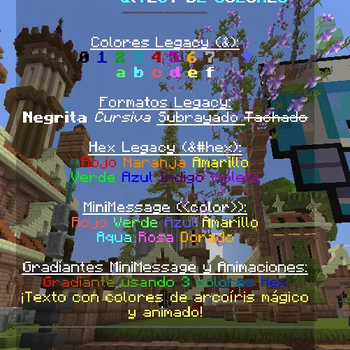
- 🎨 Full support for MiniMessage, HEX, RGB, gradients, and legacy colors
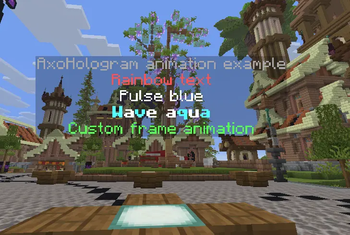
- ✨ Configurable text and display animations
- 👁️ Multiple visibility modes per hologram
- 🔒 Permission-based hologram visibility
- 🖱️ Clickable hologram actions and interactions
- 🧩 PlaceholderAPI and MiniPlaceholders support
- 🧠 Smart rendering optimizations for better performance
- 📥 Hologram import and conversion system
- 🔄 Support for importing FancyHolograms, DecentHolograms, and GHolo holograms
- 🤖 Optional NPC-linked holograms
- 💾 Backup system for hologram data and media
- 📦 Async media downloading, processing, caching, and thumbnail generation
- 🌍 Multi-language ready
- ⚙️ Fully configurable through YAML
📦 Requirements
- ☕ Java 25+
- 📄 Paper 1.21.4+ / API 26.1+
- 🌿 Folia compatible
🔌 Optional Plugins
- PlaceholderAPI
- MiniPlaceholders
- FancyNPCs
Галерея
Последние версии
Все версии →release
AxoHologram 3.2.5
3.2.518 сент. 2026 г.118Minecraft: 26.1, 26.1.1, 26.1.2, 26.2, 26.3folia, paper
Что нового
**Español**
Se realizó una reconstrucción total del código de **AxoHologram**, manteniendo su funcionamiento y formato original. Esto permite contar con una versión más limpia, estable, modular y preparada para seguir incorporando mejoras y nuevas funciones.
**English**
A complete rebuild of the **AxoHologram** codebase was carried out while preserving its original functionality and format. This provides a cleaner, more stable, modular version that is better prepared for future improvements and new features.
release
AxoHologram 3.1.3
3.1.313 сент. 2026 г.16Minecraft: 26.1, 26.1.1, 26.1.2, 26.2folia, paper
Что нового
## 🇪🇸 Español
## 🎨 1. Editor Web (`axostudio.xyz`)
* **URL del Editor:** `https://axostudio.xyz/editor`
* **¿Qué puedes hacer en la web?**
* Diseñar hologramas compuestos por bloques (`BLOCK`), ítems (`ITEM`) y textos (`TEXT`).
* Ajustar posiciones en los ejes (`X`, `Y`, `Z`).
* Configurar escalas (`SX`, `SY`, `SZ`).
* Seleccionar diferentes modos de rotación (`billboard`).
* Guardar el diseño y obtener un **código de importación único**, por ejemplo: `AXO-8941`.
---
## 💻 2. Comandos de Importación desde la Web
Puedes importar directamente al servidor de Minecraft cualquier modelo creado desde el editor web.
* **Importar un modelo mediante su código:**
```text
/holo import web AXO-8941
```
* **Importar un modelo asignándole una ID personalizada:**
```text
/holo import web AXO-8941 mi_modelo
```
---
## 🇺🇸 English
## 🎨 1. Web Editor (`axostudio.xyz`)
* **Editor URL:** `https://axostudio.xyz/editor`
* **What can you do on the website?**
* Design holograms composed of blocks (`BLOCK`), items (`ITEM`), and text (`TEXT`).
* Adjust positions on the (`X`, `Y`, `Z`) axes.
* Configure scaling (`SX`, `SY`, `SZ`).
* Select different rotation modes (`billboard`).
* Save your design and receive a **unique import code**, for example: `AXO-8941`.
---
## 💻 2. Web Import Commands
You can import any model created with the web editor directly into your Minecraft server.
* **Import a model using its code:**
```text
/holo import web AXO-8941
```
* **Import a model with a custom ID:**
```text
/holo import web AXO-8941 my_model
```
release
AxoHologram 3.1.1
3.1.14 сент. 2026 г.21Minecraft: 26.1, 26.1.1, 26.1.2, 26.2folia, paper
Что нового
Correciones en la creacion de hologramas de tipo bloque
release
AxoHologram 3.1.0
3.1.04 сент. 2026 г.21Minecraft: 26.1, 26.1.1, 26.1.2, 26.2folia, paper
Что нового
## 🇪🇸 Español
### 🗂️ Nuevo sistema de organización de hologramas
Se implementó un nuevo sistema que permite una **mejor organización de los hologramas**, especialmente en servidores que manejan una gran cantidad de ellos.
Ahora puedes crear **subcarpetas o grupos** para organizar los hologramas y moverlos fácilmente entre diferentes grupos.
### 📦 Mover múltiples hologramas a la vez
Puedes mover varios hologramas al mismo tiempo separando sus nombres por comas:
```bash
/holo group move holo1,holo2,holo3 spawn_group
```
También puedes mover varios hologramas nuevamente a la carpeta principal (`root`):
```bash
/holo group move holo1,holo2,holo3 root
```
### 🛡️ Borrado seguro de grupos
Si eliminas un grupo utilizando:
```bash
/holo group delete <grupo>
```
o:
```bash
/holo delete group <grupo>
```
**los hologramas nunca serán eliminados**.
Todos los hologramas pertenecientes a ese grupo serán trasladados automáticamente a la carpeta principal (`root`) y posteriormente la subcarpeta vacía será eliminada de forma segura.
### 🆕 Nuevos comandos
* `/holo group create <groupId>` o `/holo create group <groupId>`
Crea una nueva subcarpeta en `holograms/<groupId>/`.
* `/holo group move <holo1,holo2,...> <targetGroup|root>`
Permite mover uno o varios hologramas a otro grupo o a la carpeta principal.
* `/holo group delete <groupId>` o `/holo delete group <groupId>`
Elimina un grupo y mueve automáticamente todos sus hologramas a la raíz.
* `/holo group list`
Muestra todos los grupos existentes y la cantidad de hologramas almacenados en cada uno.
* `/holo group info <groupId>`
Muestra todos los hologramas almacenados dentro de un grupo.
---
## 🇬🇧 English
### 🗂️ New Hologram Organization System
A new system has been implemented to provide **better hologram organization**, especially for servers managing a large number of holograms.
You can now create **subfolders or groups** to keep holograms organized and easily move them between different groups.
### 📦 Move Multiple Holograms at Once
You can move multiple holograms at the same time by separating their names with commas:
```bash
/holo group move holo1,holo2,holo3 spawn_group
```
You can also move multiple holograms back to the main folder (`root`):
```bash
/holo group move holo1,holo2,holo3 root
```
### 🛡️ Safe Group Deletion
If you delete a group using:
```bash
/holo group delete <group>
```
or:
```bash
/holo delete group <group>
```
**the holograms will never be deleted**.
All holograms belonging to that group will automatically be moved back to the main folder (`root`), and the empty subfolder will then be safely removed.
### 🆕 New Commands
* `/holo group create <groupId>` or `/holo create group <groupId>`
Creates a new subfolder at `holograms/<groupId>/`.
* `/holo group move <holo1,holo2,...> <targetGroup|root>`
Moves one or multiple holograms to another group or back to the main folder.
* `/holo group delete <groupId>` or `/holo delete group <groupId>`
Deletes a group and automatically moves all of its holograms back to the root folder.
* `/holo group list`
Lists all existing groups and the number of holograms stored in each one.
* `/holo group info <groupId>`
Displays all holograms stored inside the selected group.
release
AxoHologram 3.0.7
3.0.719 авг. 2026 г.32Minecraft: 26.1, 26.1.1, 26.1.2, 26.2folia, paper
Что нового
**🇪🇸 Español:**
Se agregó que tanto `/holo movehere` como `/holo wand <ID>` conserven ciertos estados de la posición del bloque.
**🇺🇸 English:**
Added support for both `/holo movehere` and `/holo wand <ID>` to preserve certain block position states.
release
AxoHologram 3.0.5
3.0.514 авг. 2026 г.13Minecraft: 26.1, 26.1.1, 26.1.2, 26.2folia, paper
Что нового
**Español:**
Se añadió `/holo wand <ID>` para definir fácilmente el tamaño de los hologramas de tipo bloque. Además, ahora `/holo create block <ID>` permite copiar directamente el bloque al que estás apuntando.
**English:**
Added `/holo wand <ID>` to easily define the size of block-type holograms. In addition, `/holo create block <ID>` can now directly copy the block you are looking at.
release
AxoHologram 3.0.4
3.0.48 авг. 2026 г.16Minecraft: 26.1, 26.1.1, 26.1.2, 26.2folia, paper
Что нового
🇪🇸 **Español:**
Se corrigió un problema con la creación de hologramas.
🇺🇸 **English:**
Fixed an issue with hologram creation.
release
AxoHologram 3.0.3
3.0.317 июл. 2026 г.30Minecraft: 26.1, 26.1.1, 26.1.2, 26.2folia, paper
Что нового
Se actualizo a la 26.2
release
AxoHologram 3.0.2
3.0.29 июл. 2026 г.17Minecraft: 26.1, 26.1.1, 26.1.2folia, paper
Что нового
**Español:**
Se agregó la opción para poder colocar el ítem que se tiene en la mano en los hologramas.
Comando:
`/holograma line hand <id> <page> <line>`
Ejemplo:
`/holograma create item espada`
`/holograma line hand espada 1 1`
**English:**
Added the option to place the item held in your hand into holograms.
Command:
`/hologram line hand <id> <page> <line>`
Example:
`/hologram create item sword`
`/hologram line hand sword 1 1`
**Русский:**
Добавлена возможность помещать предмет, который находится в руке, в голограммы.
Команда:
`/holograma line hand <id> <page> <line>`
Пример:
`/holograma create item espada`
`/holograma line hand espada 1 1`
release
AxoHologram 3.0.1
3.0.114 июн. 2026 г.129Minecraft: 1.21.11, 26.1, 26.1.1, 26.1.2folia, paper
Что нового
🇪🇸 **Español**
• Se solucionó un retraso en el inicio del plugin.
🇺🇸 **English**
• Fixed a delay during the plugin startup.
🇷🇺 **Русский**
• Исправлена задержка при запуске плагина.