COWMODSКаталог модов

Auto HUD

A mod which dynamically hides parts of the user interface

Автор: Crendgrim1,7 млн1,1 тыс.обновлён 18 окт. 2026 г.
Утилиты

Описание

Auto HUD is a Minecraft mod which hides parts of the user interface (HUD) that are currently not interesting.

It is inspired by similar mods ("immersive hud") for other games. I personally really like the clean view of no visible HUD, but get frustrated by the limitations of using F1 mode.

This is an opinionated rewrite of Head-down Display that never got updated.

NOTE: From version 4 on, Cloth-Config has been dropped. Now YetAnotherConfigLib is needed for an ingame configuration screen, but the mod will work fine without.

Features

  • Toggle the whole HUD with a key binding.
  • Have parts of the HUD that haven't changed hide away.
  • Hide persistent, unchanging status effects, such as water breathing from the turtle helmet.
  • Show remaining time of status effects.
  • Highly configurable.

Visual differences to F1 mode

  • Player hand / equipped items remain visible
  • Player names remain visible
  • The vignette remains active
  • Incoming chat messages still pop up
  • Crosshair remains visible (see my other mod Dynamic Crosshair for that)
  • Configurable what elements are hidden

Dependencies

Fabric only

Mod Compatibility

This mod includes a modified version of magicus' Status Effect Timers, because I could not figure out how to dynamically insert my modifications into it. Since this mod allows for status effect icons to be hidden individually, the non-modified version will draw the timers in the wrong place.

Known to be compatible:

Known to be incompatible:

  • OptiFabric crashes due to mixin conflicts.
  • Any other mod that draws status effect timers should have that functionality disabled.
  • HUD elements created by other mods will most likely not be moved.
  • Bedrockify overwrites the status effect modifications. To get them working, disable the screenSafeArea mixin.
  • Running AutoHUD together with Exordium can cause visual issues

Галерея
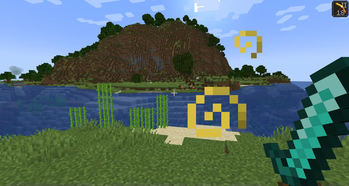
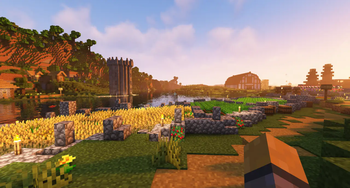
Basic exampleExample with shaders

Последние версии

Все версии →
release

[NeoForge 26.3] Auto HUD 9.3

9.3+26.3-neoforge
18 окт. 2026 г.138Minecraft: 26.3neoforge
Скачать
Что нового
9.3 - Re-implement reveal type - Reveal elements if their maximum value changes (for example, maximum health) - Add option to always link experience bar and level - Ensure the experience level remains fully on screen even if no elements below it are shown - Add option to hide chat and "leave bed" button when sleeping - Add global minimum/maximum fade limits - Fix elements overlapping when minimum fade was specified 9.2 - Fix: items on the HUD were always rendered at the hotbar's opacity rather than their containing element's - Add missing translation keys 9.0 - Massive rework, see previous changelog
release

[Forge 26.3] Auto HUD 9.3

9.3+26.3-forge
18 окт. 2026 г.66Minecraft: 26.3forge
Скачать
Что нового
9.3 - Re-implement reveal type - Reveal elements if their maximum value changes (for example, maximum health) - Add option to always link experience bar and level - Ensure the experience level remains fully on screen even if no elements below it are shown - Add option to hide chat and "leave bed" button when sleeping - Add global minimum/maximum fade limits - Fix elements overlapping when minimum fade was specified 9.2 - Fix: items on the HUD were always rendered at the hotbar's opacity rather than their containing element's - Add missing translation keys 9.0 - Massive rework, see previous changelog
release

[Fabric 26.2] Auto HUD 9.3

9.3+26.2-fabric
18 окт. 2026 г.1,7 тыс.Minecraft: 26.2fabric
Скачать
Что нового
9.3 - Re-implement reveal type - Reveal elements if their maximum value changes (for example, maximum health) - Add option to always link experience bar and level - Ensure the experience level remains fully on screen even if no elements below it are shown - Add option to hide chat and "leave bed" button when sleeping - Add global minimum/maximum fade limits - Fix elements overlapping when minimum fade was specified 9.2 - Fix: items on the HUD were always rendered at the hotbar's opacity rather than their containing element's - Add missing translation keys 9.0 - Massive rework, see previous changelog
release

[Forge 26.2] Auto HUD 9.3

9.3+26.2-forge
18 окт. 2026 г.23Minecraft: 26.2forge
Скачать
Что нового
9.3 - Re-implement reveal type - Reveal elements if their maximum value changes (for example, maximum health) - Add option to always link experience bar and level - Ensure the experience level remains fully on screen even if no elements below it are shown - Add option to hide chat and "leave bed" button when sleeping - Add global minimum/maximum fade limits - Fix elements overlapping when minimum fade was specified 9.2 - Fix: items on the HUD were always rendered at the hotbar's opacity rather than their containing element's - Add missing translation keys 9.0 - Massive rework, see previous changelog
release

[NeoForge 26.2] Auto HUD 9.3

9.3+26.2-neoforge
18 окт. 2026 г.32Minecraft: 26.2neoforge
Скачать
Что нового
9.3 - Re-implement reveal type - Reveal elements if their maximum value changes (for example, maximum health) - Add option to always link experience bar and level - Ensure the experience level remains fully on screen even if no elements below it are shown - Add option to hide chat and "leave bed" button when sleeping - Add global minimum/maximum fade limits - Fix elements overlapping when minimum fade was specified 9.2 - Fix: items on the HUD were always rendered at the hotbar's opacity rather than their containing element's - Add missing translation keys 9.0 - Massive rework, see previous changelog
release

[Fabric 26.1] Auto HUD 9.3

9.3+26.1-fabric
18 окт. 2026 г.407Minecraft: 26.1, 26.1.1, 26.1.2fabric
Скачать
Что нового
9.3 - Re-implement reveal type - Reveal elements if their maximum value changes (for example, maximum health) - Add option to always link experience bar and level - Ensure the experience level remains fully on screen even if no elements below it are shown - Add option to hide chat and "leave bed" button when sleeping - Add global minimum/maximum fade limits - Fix elements overlapping when minimum fade was specified 9.2 - Fix: items on the HUD were always rendered at the hotbar's opacity rather than their containing element's - Add missing translation keys 9.0 - Massive rework, see previous changelog
release

[Forge 26.1] Auto HUD 9.3

9.3+26.1-forge
18 окт. 2026 г.12Minecraft: 26.1, 26.1.1, 26.1.2forge
Скачать
Что нового
9.3 - Re-implement reveal type - Reveal elements if their maximum value changes (for example, maximum health) - Add option to always link experience bar and level - Ensure the experience level remains fully on screen even if no elements below it are shown - Add option to hide chat and "leave bed" button when sleeping - Add global minimum/maximum fade limits - Fix elements overlapping when minimum fade was specified 9.2 - Fix: items on the HUD were always rendered at the hotbar's opacity rather than their containing element's - Add missing translation keys 9.0 - Massive rework, see previous changelog
release

[NeoForge 26.1] Auto HUD 9.3

9.3+26.1-neoforge
18 окт. 2026 г.23Minecraft: 26.1, 26.1.1, 26.1.2neoforge
Скачать
Что нового
9.3 - Re-implement reveal type - Reveal elements if their maximum value changes (for example, maximum health) - Add option to always link experience bar and level - Ensure the experience level remains fully on screen even if no elements below it are shown - Add option to hide chat and "leave bed" button when sleeping - Add global minimum/maximum fade limits - Fix elements overlapping when minimum fade was specified 9.2 - Fix: items on the HUD were always rendered at the hotbar's opacity rather than their containing element's - Add missing translation keys 9.0 - Massive rework, see previous changelog
release

[Fabric 26.3] Auto HUD 9.3

9.3+26.3-fabric
18 окт. 2026 г.3,9 тыс.Minecraft: 26.3fabric
Скачать
Что нового
9.3 - Re-implement reveal type - Reveal elements if their maximum value changes (for example, maximum health) - Add option to always link experience bar and level - Ensure the experience level remains fully on screen even if no elements below it are shown - Add option to hide chat and "leave bed" button when sleeping - Add global minimum/maximum fade limits - Fix elements overlapping when minimum fade was specified 9.2 - Fix: items on the HUD were always rendered at the hotbar's opacity rather than their containing element's - Add missing translation keys 9.0 - Massive rework, see previous changelog
release

[Forge 1.20.1] Auto HUD 8.14

8.14+1.20.1-forge
7 окт. 2026 г.3,8 тыс.Minecraft: 1.20, 1.20.1forge
Скачать
Что нового
- Fix crash on forge-1.20.1