

Auto Craft Tom's Addon
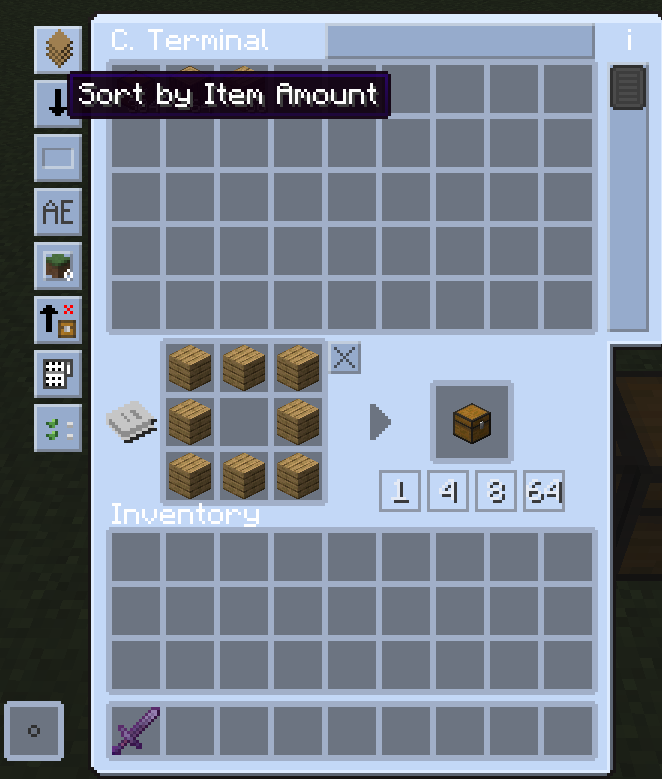
AutoCraftTomsAddon improves Tom’s Storage crafting with bulk craft buttons and a simple template system for saving and reloading recipes.
Автор: CallMeLoxy5343обновлён 29 мая 2026 г.
ХранениеТехнологииУтилиты
Описание
AutoCraftTomAddon adds practical improvements to Tom's Storage's crafting terminal to make crafting faster and more convenient.
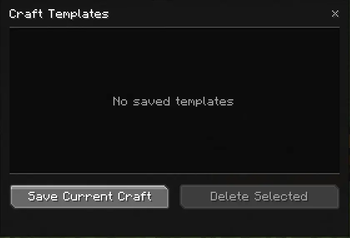
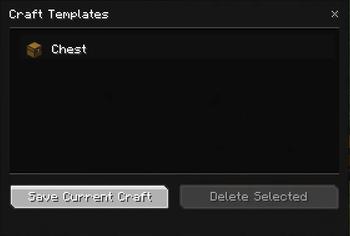
This version introduces a first crafting template system directly accessible from the terminal interface. You can save a craft, find it later in a dedicated list, and quickly load it again without having to place everything manually.
Features
- Bulk craft buttons directly below the terminal result slot.
- Save the current craft as a template.
- Template list accessible from a dedicated button.
- Quick template loading with a double-click.
- Template deletion with confirmation.
- Local client-side template storage.
Goal
The goal of this first version is simple: provide a clean, fast, and stable foundation without making the interface unnecessarily heavy.
Галерея
Последние версии
Все версии →release
Auto Craft Tom's Addon 1.7.2
1.7.229 мая 2026 г.260Minecraft: 1.21.1fabric
Что нового
Full English changelog available on GitHub. Full French changelog available on our Discord.
## Summary
This hotfix improves template loading reliability when a saved template cannot be fully loaded due to missing materials.
## Fixed
- Fixed an issue where loading a template with missing materials could leave a partially filled crafting grid
- Fixed failed template loads so they now properly roll back instead of keeping incomplete ingredients in the grid
- Fixed template loading behavior by relying on Tom’s Storage’s native fill logic instead of unstable custom material prechecks
## Improved
- Improved template loading reliability with Tom’s Storage
- Improved failure handling when a template cannot be loaded completely
- Improved consistency between the failure message and the actual crafting grid state
## Notes
- If enough materials are available, the template loads normally
- If not enough materials are available, the template fails cleanly and does not leave a partial grid
- This update does not change saved template data
release
Auto Craft Tom's Addon 1.7.1
1.7.124 мая 2026 г.28Minecraft: 1.21.1fabric
Что нового
Full English changelog available on GitHub. Full French changelog available on our Discord.
## Summary
This update improves the group dropdown and sorting behavior in the template screen.
## Fixed
- Fixed group dropdown scrolling when many groups are available
- Fixed the template list scrolling behind the group dropdown while the dropdown is open
- Fixed numeric sorting for groups and templates
## Improved
- Improved the group dropdown with internal scrolling
- Improved group sorting with natural order, so `1`, `2`, `3`, `10`, and `11` are displayed correctly
- Improved template sorting with natural order, so names like `Coffre (2)` now appear before `Coffre (16)`
- Improved custom group sorting so they stay cleanly ordered after `All` and `Ungrouped`
- Preserved the existing 1.7.0 template screen layout and behavior
## Notes
- This is a polish update for the 1.7.x template screen
- No template data format changes were made
- Existing groups and templates remain compatible
release
Auto Craft Tom's Addon 1.7.0
1.7.021 мая 2026 г.29Minecraft: 1.21.1fabric
Что нового
Full English changelog available on GitHub. Full French changelog available on our Discord.
## Summary
This update improves the template screen with a larger layout, better group navigation, an integrated recipe preview, selection shortcuts, and several UI polish improvements.
## Added
- Added a larger template screen layout
- Added an integrated recipe preview panel directly inside the template screen
- Added a larger and more readable recipe preview
- Added a small information button explaining template shortcuts
- Added `Ctrl + A` support to select all visible templates
- Added `Delete` / `Suppr` support to delete the current template selection
- Added a visible counter for templates and selected templates
## Changed
- Changed the group selector from a cycling button to a dropdown-style selector
- Changed the default open group to `Ungrouped`
- Changed the active group to be preserved when returning from Rename, Group, or Group Options screens
- Changed the recipe preview to be integrated into the main UI instead of floating outside the screen
## Improved
- Improved search bar and group selector placement
- Improved bottom button alignment by centering the action buttons
- Improved template row readability with taller rows
- Improved template icon and text alignment inside the list
- Improved group dropdown rendering and readability
- Improved `no templates found` message placement
- Improved shortcut help readability
## Notes
- `Ctrl + Click` still toggles multi-selection
- `Ctrl + A` selects all currently visible templates
- `Delete` / `Suppr` opens the delete confirmation for the current selection
- Double-click still loads a single template as before
- The regular delete button remains available for players who do not want to use keyboard shortcuts
release
Auto Craft Tom's Addon 1.6.0
1.6.018 мая 2026 г.31Minecraft: 1.21.1fabric
Что нового
Full English changelog available on GitHub. Full French changelog available on our Discord.
## Summary
This update adds multi-selection support for templates, allowing multiple templates to be deleted or assigned to a group at once.
## Added
- Added multi-selection for templates using `Ctrl + Click`
- Added support for deleting multiple selected templates at once
- Added support for assigning multiple selected templates to a group at once
- Added a dedicated **Group Options** button to open group management
- Added support for deleting empty custom groups from the group options screen
## Improved
- Improved the template screen button layout
- Improved button readability by separating template actions and group actions into two rows
- Improved group management access by making **Group Options** available even when no template is selected
- Improved the group name field placeholder behavior so it disappears as soon as text is entered
- Improved rename safety so templates can only be renamed when a single template is selected
## Notes
- `Ctrl + Click` is used for multi-selection in this version
- Double-click still loads a single template as before
- Rename is disabled when multiple templates are selected
- Group assignment now supports one or multiple selected templates
release
Auto Craft Tom's Addon 1.5.0
1.5.015 мая 2026 г.25Minecraft: 1.21.1fabric
Что нового
Full English changelog available on GitHub. Full French changelog available on our Discord.
## Summary
This update adds template groups, making it easier to organize saved crafting templates.
## Added
- Added template groups to the template screen
- Added a group filter with `All`, `Ungrouped`, and custom groups
- Added a group management screen
- Added support for creating, renaming, and deleting custom groups
- Added support for assigning a template to a group
- Added a clearer group name field placeholder
## Improved
- Improved template organization when many templates are saved
- Improved template filtering by allowing templates to be shown by group
- Improved group deletion behavior so templates from a deleted group are automatically moved back to `Ungrouped`
- Improved group persistence after closing and reopening the world
- Improved the group workflow without changing existing template save, load, rename, search, or preview behavior
## Notes
- Templates belong to one group at a time in this version
- Existing templates are treated as `Ungrouped` until assigned to a custom group
- Multi-selection and bulk deletion are not included in this version
release
Auto Craft Tom's Addon 1.4.0
1.4.012 мая 2026 г.22Minecraft: 1.21.1fabric
Что нового
Full English changelog available on GitHub. Full French changelog available on our Discord.
## Summary
This update improves template management with a search bar and a rename option for saved templates.
## Added
- Added a search bar to the template screen
- Added real-time filtering for saved templates
- Added a `Rename` button for selected templates
- Added a rename screen with a simple text field
- Added automatic duplicate-name handling when renaming templates
- Added translated messages for search, empty search results, and rename actions
## Improved
- Improved template management when many templates are saved
- Improved template readability by allowing custom template names
- Improved search behavior by matching template names and item-related data
- Improved the template screen workflow without changing the existing save, load, delete, or preview behavior
## Notes
- Template loading still works by double-clicking a saved template
- Template previews from 1.3.0 remain unchanged
- Multi-selection, bulk deletion, and template groups are not included in this version
release
Auto Craft Tom's Addon 1.3.0
1.3.09 мая 2026 г.25Minecraft: 1.21.1fabric
Что нового
Full English changelog available on GitHub. Full French changelog available on our Discord. ## Summary This update adds a recipe preview for saved templates, making it easier to check a template before loading it. ## Added - Added a visual recipe preview when hovering over a saved template - Added a fixed preview panel next to the template list - Added a 3x3 ingredient preview for saved crafting templates - Added a result item preview next to the ingredient grid ## Improved - Improved template readability before loading - Improved the template screen by showing recipe contents without requiring the template to be loaded first - Improved preview stability by keeping the preview panel fixed instead of following the mouse - Kept template loading behavior unchanged: double-click still loads the selected template ## Notes - The preview is display-only - Templates are not loaded until the player double-clicks them - Existing template saving, loading, deletion, and missing-ingredients feedback remain unchanged
release
Auto Craft Tom's Addon 1.2.0
1.2.03 мая 2026 г.53Minecraft: 1.21.1fabric
Что нового
Full English changelog available on GitHub. Full French changelog available on our Discord.
## Summary
This update adds optional EMI integration, allowing compatible crafting recipes to be saved directly as AutoCraftTomsAddon templates.
## Added
- Added optional EMI integration
- Added a `Save as Template` button to compatible EMI crafting recipes
- Added support for saving crafting recipes from EMI into the AutoCraftTomsAddon template list
- Added a clear success message when a template is loaded correctly
- Added a clear failure message when a template cannot be loaded because the required ingredients are missing
## Improved
- Improved template loading feedback
- Improved the template workflow by making it possible to save recipes before manually placing them in the terminal
- Kept the EMI integration limited to standard crafting recipes for better stability
## Notes
- The EMI button requires EMI recipe decorators to be enabled
- This integration currently targets EMI only
- JEI, REI, and machine recipes are not supported in this version
release
Auto Craft Tom's Addon 1.1.0
1.1.03 мая 2026 г.24Minecraft: 1.21.1fabric
Что нового
Full English changelog available on GitHub. Full French changelog available on our Discord.
## Summary
This update fixes bulk crafting so it stays strictly locked to the item currently selected in the crafting terminal.
## Fixed
- Fixed bulk crafting continuing into other items when the terminal result changed after the requested craft
- Fixed cases where `x64` could unintentionally craft follow-up items, such as vanilla chests or planks, after crafting a modded chest
- Fixed bulk craft buttons so they now stop as soon as the displayed result is no longer the same item
## Notes
- `x1`, `x4`, `x8`, and `x64` now only craft the currently selected result
- If the terminal result changes after crafting, the player must press the button again intentionally
release
Auto Craft Tom's Addon 1.0.0
1.0.012 апр. 2026 г.36Minecraft: 1.21.1fabric
Что нового
# AutoCraftTomAddon 1.0.0
## Summary
This update adds a first craft template system directly inside Tom's Storage's crafting terminal, with a simple and clean UI designed to stay stable.
## Added
- Added a dedicated button in the crafting terminal to open the template list
- Added a template screen showing saved crafts
- Added support for saving the current craft as a template
- Added template loading with double-click
- Added template deletion with confirmation
- Added client-side template persistence in JSON
## Improved
- Improved visual integration of the templates button in the terminal button column
- Improved template UI simplicity to prioritize stability and readability
- Improved focus on essential information with result icon + template name
- Improved screen closing flow with a discreet close button instead of a heavier visible button