
AuthHideСкачатьСкачатьСкачатьСкачатьСкачать
ВЕРСИИ (5)
release
AuthHide 1.2.2
1.2.223 окт. 2026 г.61Minecraft: 26.2, 26.3fabric
Что нового
AuthHide 1.2.2 (Minecraft 26.2)
Changes:
- Spaces are no longer turned into * when masking passwords. They stay visible by default.
- New command /authhide spaces toggles this behavior. Turn it off to mask spaces as well. The setting is saved in the config.
- The new feedback message is translated into all 6 languages (en, hu, de, fr, es, ru).
Includes the changes since 1.1.0:
- Ported to Minecraft 26.2 (new unobfuscated Minecraft: Mojang mappings and the new GUI render-state API).
- Requires Fabric Loader 0.19.5+, Fabric API and Java 25.
Source and older versions: https://github.com/zsombi11vok1/AuthHidemod
release
AuthHide 1.2.1
1.2.113 сент. 2026 г.79Minecraft: 26.2fabric
release
AuthHide 1.2.0
1.2.022 мая 2026 г.407Minecraft: 1.21.1, 1.21.2, 1.21.3, 1.21.4, 1.21.5, 1.21.6, 1.21.7, 1.21.8, 1.21.9, 1.21.10, 1.21.11fabric
Что нового
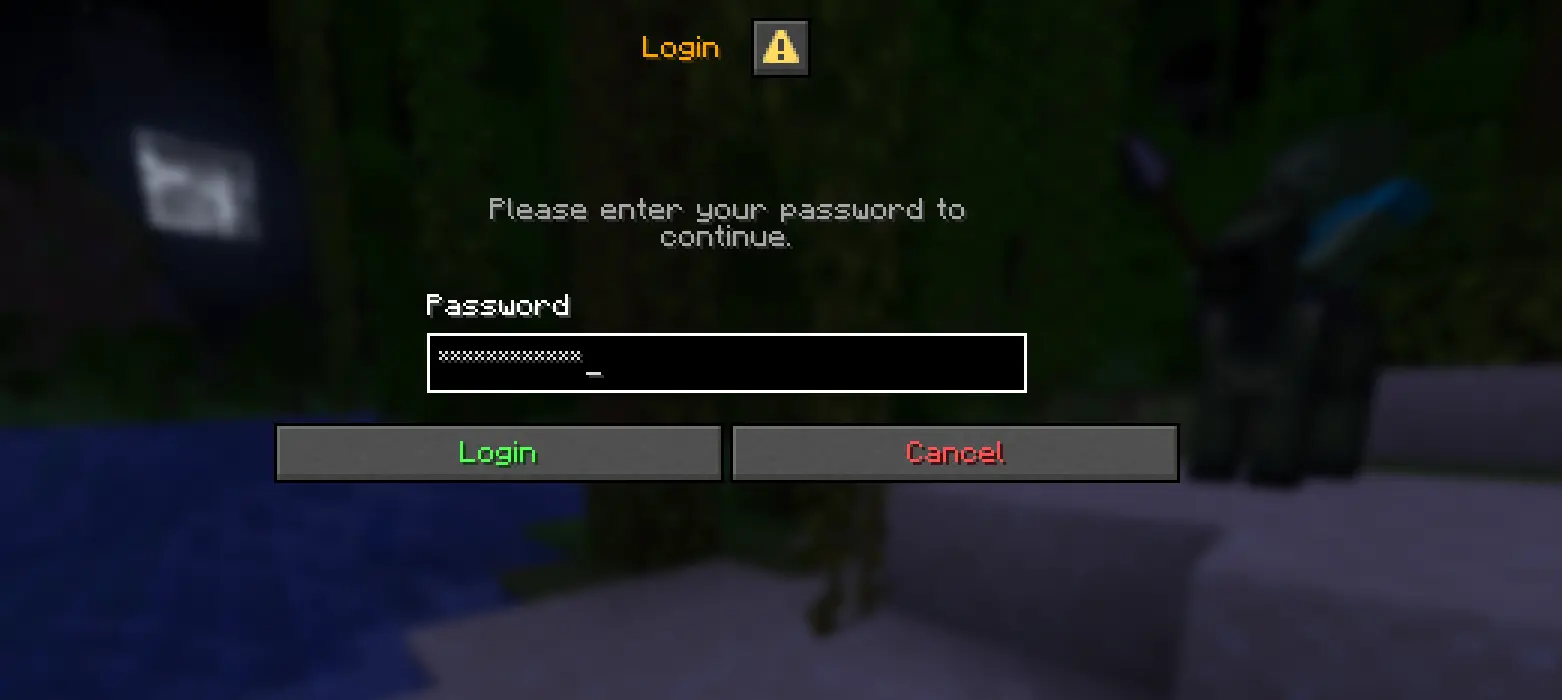Changelog (1.2.0)
- Added GUI password field masking — passwords typed into graphical login/auth screens (e.g. AuthMe's "Login" prompt) are now masked with * in real time, not just chat commands
- Auth screens are detected automatically via a multilingual keyword list (English, Hungarian, German, French, Spanish, Russian) matched against the screen title and the field's narration label
- The mod's own config screen and the chat input are explicitly excluded from full-field masking to avoid interfering with normal use
- Added a new config option maskGuiPasswordFields (default true) so GUI masking can be disabled in config/authhide.json if a false positive ever occurs
- The real password value is never altered — masking only affects what's drawn on screen, so the correct password is still submitted to the server
release
AuthHide 1.1.0
1.1.017 мая 2026 г.82Minecraft: 1.21.1, 1.21.2, 1.21.3, 1.21.4, 1.21.5, 1.21.6, 1.21.7, 1.21.8, 1.21.9, 1.21.10, 1.21.11fabric
Что нового
# Supported commands
The following commands are protected by default:
```
/login, /l, /register, /reg, /unregister, /unreg, /changepassword, /changepass, /cp, /email, /captcha, /2fa, /totp, /recovery, /setemail, /setpassword, /setpass
```
, and their shortcuts.
You can also add your own custom commands at runtime — perfect for non-standard auth plugins.
Usage
Install the mod and it works automatically. The password text in your chat input is masked with
```
*
```
characters in real time, and protected commands are excluded from chat history (up-arrow recall).
All controls live under a single command:
- /authhide — toggle the protection on/off
- /authhide command list — show your custom protected commands
- /authhide command add <command> — add a new command to protect (e.g. /authhide command add /myauth)
- /authhide command remove <command> — remove one (with tab-completion)
- /authhide command clear — wipe the custom list
A graphical settings screen is also available through Mod Menu.
Languages
Fully translated into English, Hungarian, German, French, Spanish, and Russian.
Compatibility
- ✅ Minecraft 1.21.1
- ✅ Fabric Loader 0.16.9+
- ✅ Java 21+
- ✅ Mod Menu (optional, for the config screen)
- ✅ Works with AuthMe, FastLogin, nLogin, and similar auth plugins
- ✅ Client-only — no server installation required
release
AuthHide 1.0.0
1.0.02 мая 2026 г.47Minecraft: 1.21.1, 1.21.2, 1.21.3, 1.21.4, 1.21.5, 1.21.6, 1.21.7, 1.21.8, 1.21.9, 1.21.10, 1.21.11fabric
Что нового
### Supported commands
The following commands are protected:
/login, /register, /unregister, /changepassword, /changepass, /email, /captcha, /2fa, /totp, /recovery, /setemail, /setpassword and their shortcuts.
### Usage
Simply install the mod and it will work automatically. Use /authhide to toggle the protection on or off.
### Compatibility
- ✅ Minecraft 1.21.1
- ✅ Fabric Loader 0.16.9+
- ✅ Works with AuthMe, FastLogin, and similar auth plugins