

Aura
The #1 alternative to Lunar, Badlion, and Feather. Insane FPS boosts, QOL features, and unique mods that outperform any other client.
Описание
⚡ Aura •ᴗ• - READ THE FULL DESCRIPTION
Not another "maximum FPS, zero bloat" pack.




This pack has two modes and one required setup step. Skip it and your game crashes. Read this before downloading.
⬇️ Download • ⚠️ Setup Warning • 💬 Discord • 💖 Donate
15 hearts (follows) on the modpack and i'll make a version 26 release!
🚨 Before You Launch
Aura ships with both Flashback and ViaFabricPlus. They do not work together. Pick your mode and disable the other before opening the game.
| 🎬 Creator Mode | 🌐 Server Mode | |
|---|---|---|
| Keep | Flashback | ViaFabricPlus |
| Disable | ViaFabricPlus | Flashback |
| Best for | Replays • Freecam • Cinematics • Screenshots | Hypixel • 1.8 PvP • Old Servers • Version Switching |
If your game crashes on launch, this is almost always why. You can switch modes any time.
So what actually is Aura?
Alright, honest talk.
Every optimization modpack says the same thing now. "Maximum FPS. Zero bloat. Best performance. Lightweight." Those words stopped meaning anything a while ago. Every serious Fabric pack already runs Sodium, Lithium, and FerriteCore. That is the engine now. That is the expected baseline. Having it is not a selling point.
The real question is what the pack does after the engine. And that is where most packs split into two camps that are both kind of frustrating.
Camp 1: Fast but empty. You install a barebones FPS pack, your frames go up, and then you spend an hour adding zoom, shulker previews, replay tools, chat fixes, server compatibility, and all the stuff you actually use. At that point you are building the client yourself anyway.
Camp 2: Feature-packed but messy. You install a bigger pack and half the mods are untouched, some of them overlap, a few are outdated, and the whole thing feels like someone dropped 150 JARs into a folder and called it a day.
Aura is neither of those.
The way Aura gets built is different. The pack gets compared against the biggest optimization and client-style packs on Modrinth, one by one. What are they doing better? What is Aura missing? What looks useful but does not actually improve anything? What is silently causing conflicts? Then the stack gets rebuilt around what actually passes that test.
If it runs on a 2012 MacBook Air, it will fly on your PC. But beyond raw frames, the goal is a setup that feels finished the second it opens. Fast, polished, and stacked with everything you would normally spend time hunting down yourself.
Every pack has the engine now. The difference is the whole client.
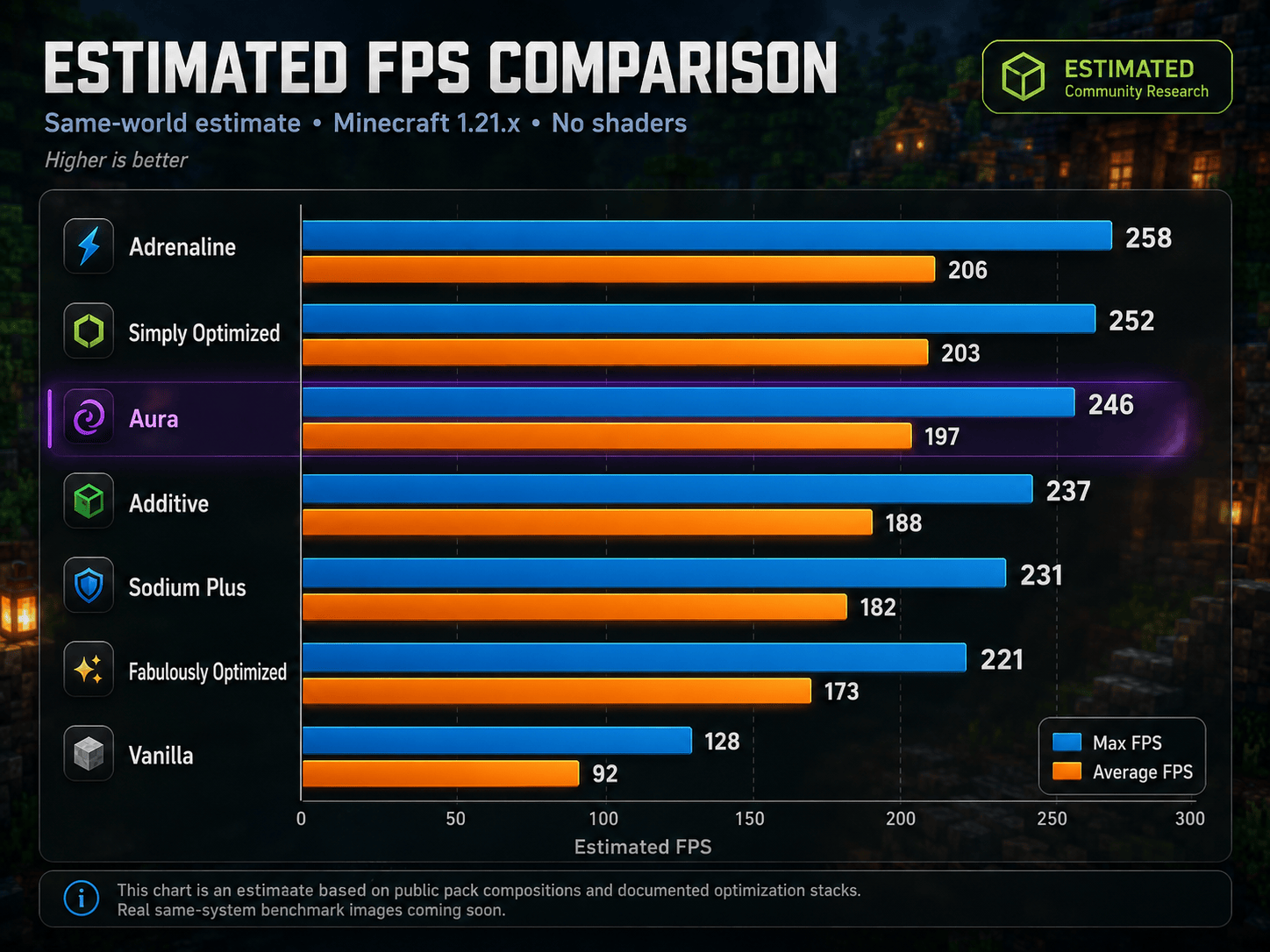
📊 Benchmarks (estimated)
What Aura is built around
| Area | What that means |
|---|---|
| Raw FPS | Better rendering, lower memory use, fewer wasted frames, smoother frame pacing |
| Loading | Faster startup, faster reloads, less waiting around |
| Visuals | Shaders, connected textures, better lighting, better entities, cleaner UI |
| Client feel | Zoom, better menus, better controls, better chat, useful HUD and inventory tools |
| Creator tools | Replays, Freecam, high resolution screenshots, voice chat, building tools |
| Multiplayer | Version switching, chat privacy, packet fixes, faster pings, server QoL |
How Aura fits
| You want... | Better fit... |
|---|---|
| Absolute minimum Sodium setup, nothing extra | Simply Optimized, Adrenaline |
| OptiFine replacement with shaders | Fabulously Optimized, Additive |
| A locked managed client | Lunar, Feather, Badlion |
| A fast, open, client-style setup that already feels complete | Aura |
Unlike locked clients, you can remove things, add things, and make it yours. Aura is the Fabric setup that tries to feel like a client without locking you into one.
What's Inside
⚡ Performance Core
You will not see most of these working. You will feel them.
Rendering
| Mod | What it does |
|---|---|
| Sodium | Complete rendering rewrite. The gold standard for FPS on Fabric. |
| ImmediatelyFast | Faster HUD, text, entity, and UI batch rendering. |
| Iris Shaders | Full shader support that does not destroy your framerate to enable. |
| Entity Culling | Stops rendering entities behind walls and out of view. |
| Ixeris | Aggressive multi-layer culling. The More Culling successor. |
| Cull Fewer Leaves | Reduces leaf rendering overhead without ruining the look. |
| Better Block Entities | Performance improvements for chests, signs, beds, and banners. |
| Particle Core | Optimized particle rendering, matters near portals and farms. |
Memory and Loading
| Mod | What it does |
|---|---|
| Lithium | Optimizes game logic, ticking, AI, and pathfinding. |
| FerriteCore | Cuts RAM usage significantly. |
| ModernFix | Fixes memory leaks, slashes startup time. |
| Dynamic FPS | Drops frame rate when tabbed out to save resources. |
| FastQuit | Saves and exits worlds instantly. |
| Remove Reloading Screen | Skips the resource reload overlay. |
| Clumps | Merges XP orbs to reduce entity lag near farms. |
World, Lighting and Network
| Mod | What it does |
|---|---|
| ScalableLux | Faster lighting engine replacing the vanilla one. |
| NoisiumForked | Faster worldgen noise calculations. |
| Fast Noise | Speeds up noise math across the engine. |
| ServerCore | Connection and tick performance improvements. |
| Packet Fixer | Prevents disconnects from oversized or malformed packets. |
| Debugify | Fixes a long list of confirmed vanilla bugs. |
| Crash Assistant | Better crash diagnostics and recovery info. |
🎨 Visuals and Resource Pack Support
Make Minecraft feel modern. But only as much as your PC can handle.
Shaders and Lighting
| Mod | What it does |
|---|---|
| Iris Shaders | Full OptiFine-compatible shader support on Fabric. |
| Complementary Shaders - Unbound | Included shader pack, ready to enable. |
| LambDynamicLights | Hold a torch and it lights the area around you. No placing needed. |
Resource Pack Parity
| Mod | What it does |
|---|---|
| Continuity | Connected textures and glass, the thing most people install OptiFine for. |
| BetterGrassify | OptiFine-style improved grass rendering. |
| Animatica | Animated texture support for resource packs. |
| Entity Model Features | Custom entity models through resource packs. |
| Entity Texture Features | Emissive, random, and layered entity textures. |
| Entity Sound Features | Custom entity sounds through resource packs. |
| OptiGUI | Custom container and GUI textures from resource packs. |
| Skyboxify | Custom skybox support. |
| Cape Provider | Cape support from all major providers. |
UI and Polish
| Mod | What it does |
|---|---|
| Chat Heads | Player face icons next to chat messages. |
| Chat Patches | Chat history improvements and small QoL fixes. |
| Clean Tooltips | Cleaner, modern item tooltip styling. |
| Natural Motion Blur | Subtle motion blur for a smoother feel. |
| BetterHandBobbing | Improved first-person hand movement. |
| Reese's Sodium Options | Better organized Sodium video settings screen. |
For max FPS: shaders are optional. Aura runs well without them.
🛠️ Quality of Life and Client Feel
This is the part that makes Aura feel like a real client instead of a pile of FPS mods.
HUD and Information
| Mod | What it does |
|---|---|
| AppleSkin | Real hunger and saturation display instead of guessing. |
| Held Item Info | Durability, enchantments, and item details on held items. |
| Pick Up Notifier | Corner popup showing what you just picked up. |
| Better Statistics Screen | Categorized stats with a cleaner interface. |
| Better Mount HUD | Cleaner HUD while riding horses, boats, and mounts. |
| Better Selection | Improved block selection highlight. |
| Ping View | Shows your actual ping number instead of colored bars. |
Controls and Camera
| Mod | What it does |
|---|---|
| Zoomify | Smooth scroll-to-zoom. Configurable. Better than OptiFine zoom. |
| Controlling | Searchable, filterable keybind manager. |
| BactroMod | Instant fullbright, low fire overlay, fog removal toggles. |
| MacOS Input Fixes | Input handling fixes for Mac users. |
| Smooth Scrolling | Smoother scrolling in all menus. |
Inventory and Management
| Mod | What it does |
|---|---|
| Item Scroller | Move entire stacks using the scroll wheel. |
| Mouse Tweaks | Better mouse drag and interaction in inventories. |
| Shulker Box Tooltip | Preview shulker contents without placing them. |
| Searchables | Search in creative menus and container screens. |
World and Game
| Mod | What it does |
|---|---|
| Cherished Worlds | Pin favorite worlds to the top of the list. |
| Cubes Without Borders | True borderless fullscreen window mode. |
| Auth Me | Re-authenticate without closing the game. |
| Stfu | Removes repetitive and unnecessary spam messages. |
| clientcommands | Useful client-side command additions. |
| Stendhal | Advanced book and sign editing with formatting support. |
Also includes: Mod Menu, Resourcify, quick pack, Paginated Advancements, CalcMod, Emoji Type, Client Tweaks, Language Reload, YOSBR, Title Fixer, Main Menu Credits
🎬 Creator Mode and 🌐 Server Mode
Two setups. Pick the one that fits how you play and disable the other before launching.
🎬 Creator Mode — Keep Flashback, Disable ViaFabricPlus
| Mod | What it does |
|---|---|
| Flashback | Cinema-quality in-game replay recorder. |
| Freecam | Detach your camera for cinematic shots and fly through walls. |
| Fabrishot | Screenshots at massive resolutions, way beyond vanilla. |
| Simple Voice Chat | Proximity voice for SMP content and group recording. |
| Axiom | Advanced in-game world editor and building toolkit. |
| Stendhal | Advanced book and sign editing with rich formatting. |
| BactroMod | Fullbright, low fire, fog removal for clean recordings. |
🌐 Server Mode — Keep ViaFabricPlus, Disable Flashback
| Mod | What it does |
|---|---|
| ViaFabricPlus | Join servers running any version from 1.8 through current. |
| NoChatReports | Removes signed chat reporting for privacy. |
| Gnetum | Network-level performance improvements. |
| Fast Server Pings | Server list loads faster. |
| Noxesium | Reduces lag spikes on large servers. |
| e4mc | Share your world to friends without port forwarding. |
| Auth Me | Re-authenticate when your session expires without restarting. |
| Packet Fixer | Prevents disconnects from packet issues. |
Aura is not a cheat client. No aim assist. No combat advantages. That said, some servers restrict features like Freecam or fullbright regardless of intent. Check the rules of whatever server you play on.
📚 Libraries and Dependencies
These run silently in the background and make everything else work.
Fabric API, Fabric Language Kotlin, Cloth Config API, YetAnotherConfigLib (YACL), Fzzy Config, Forge Config API Port, Balm, MaLiLib, MidnightLib, Puzzle, Puzzles Lib, TCDCommons API, Text Placeholder API, MixinTrace
⚡ Installation
1. Install the Modrinth App or Fabric Loader for Minecraft 1.21.11
2. Install Aura from Modrinth
3. Decide: Creator Mode or Server Mode?
4. Disable either Flashback or ViaFabricPlus (not both, not neither)
5. Launch Minecraft
6. Adjust shaders, dynamic lights, and render distance for your hardware
First launch takes longer while configs are built. After that it is fast.
For max FPS: turn shaders off first, set dynamic lights to Off or Simple, lower render distance before touching anything else, and do not over-allocate RAM. 4 to 6 GB is the sweet spot. More is not better.
❓ FAQ
Is Aura client-side only?
Yes. Works on any vanilla or modded Java Edition server. The server needs nothing installed.
Why do Flashback and ViaFabricPlus conflict?
They are built for completely different setups and do not coexist here. One is for replays. One is for version switching. Pick the one you need. You can swap any time.
Will I get banned on Hypixel or competitive servers?
Aura has no aim assist, no combat advantages, nothing like that. But some servers restrict features like Freecam or fullbright regardless of intent. Check the rules and disable anything that is not allowed.
Is this just another FPS pack?
No. If you only want the smallest Sodium setup, use a barebones pack. Aura is for players who want the FPS base and all the client tools they would normally spend time adding afterward, already included and already working.
Why are there so many mods?
A lot of the list is libraries, config APIs, and small fixes running in the background. The goal is not "more mods equals better." The goal is a setup that already feels complete.
My game crashes on launch.
Almost certainly both Flashback and ViaFabricPlus are enabled at the same time. Scroll to the top, pick your mode, disable the other one.
Can I add my own mods?
Yes. Aura is a foundation, not a locked system. Add what you want, test it, and remove anything that causes problems.
❤️ Support
Aura exists because the Minecraft modding community is genuinely incredible. Every mod in this pack comes from developers who put real work into making the game better. Aura just brings the best pieces together.
If it helped you, consider supporting continued development.

📜 Credits
Respect to the Fabric team, CaffeineMC (Sodium, Lithium, FerriteCore), Iris Shaders, and every mod developer whose work is in this pack. Aura is built on top of their work. Go support them too.
Every pack has the engine now. The difference is the whole client.
Built for players who want Minecraft to run better, feel cleaner, and not need rebuilding from scratch.
