COWMODSКаталог модов

Artistry Live

Draw your custom paintings solo or together with your friends in real time multiplayer!

Автор: Iliiasik6,3 тыс.39обновлён 23 сент. 2026 г.
ДекорМеханики игрыОбщение

Описание

Title

Overview

Craft

Copy

Posters and banners

Interface

Interface description

Interface description 2

Hotkeys

Images

Multiplayer

Config

Commands

Commands 2

Optimization

Text description

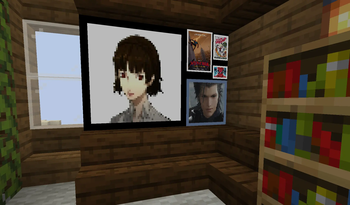
Artistry Live adds custom paintings to the game that you can create with your friends. You can paint on them using colors or blocks, and add and stylize images.

The idea behind the mod is to provide a simple way to decorate the world with your own paintings, without unnecessary blocks or complications.

The mod adds two items:

  • Poster
  • Banner

The difference is that a banner is 2x2, while a poster is 1x1.

Posters or banners can be copied by using a blank instance and an instance containing content; it makes no difference whether you copy from a poster to a banner or vice versa.

After copying, instead of an empty instance, you receive a copy of the instance that was used in the crafting process. The instance you copied does not disappear in the process.

You can use a content poster while crafting the banner to obtain a banner that already features that content.

Posters and banners have three states:

  • Empty
  • With content
  • Signed

Signed posters cannot be edited or copied.

To hang a poster or banner, you need to press Shift + Right-Click.

When you first use the poster or banner, you will need to select the canvas size. You can edit the poster or banner whether you are holding it or it is placed in the world. However, the canvas size is selected only once.

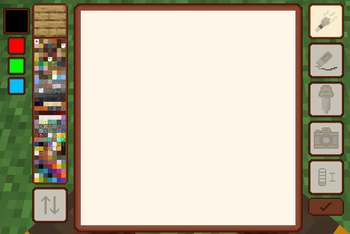
Two palettes are available: Blocks and Colors. In the set of colors or blocks, there is a large primary square for drawing with the left mouse button, and to its left, a small square for drawing with the right mouse button. Below the secondary color is a history of the last three colors or blocks used. You can click on an item in the history to select that block or color. Clicking on the secondary color or block swaps the primary and secondary ones. You can select the secondary block in the block palette by right-clicking (it will be outlined in orange), while left-clicking a block in the palette outlines it in white, designating it as the primary color. Only the left mouse button works for the color palette, but you can swap the primary and secondary colors later.

A full color palette is available, with the option to enter a HEX code.

The toolbar provides access to a brush, eraser, color picker, image insertion, tool size adjustment, and a button for signing the poster or banner.

After adding an image, you can click on it to enter image editing mode. In this mode, you can move, resize, or apply a pixelation filter to the image. To resize the image, click and hold one of its corners and drag; the minimum image size is 3x3. Clicking the "X" button deletes the image, while clicking the second button (with the grid icon) applies a pixelation filter, which can be toggled on and off. To exit image editing mode, simply click anywhere outside the image.

Left-clicking the tool size button increases the size by 1, while right-clicking decreases it by 1, sizes range from 1 to 5.

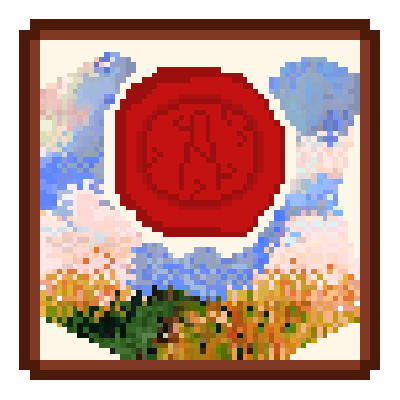
Signing a poster or banner locks it against any further editing and displays the nickname of the player who signed it.

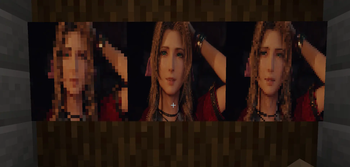
Images can be moved, collaged, stacked, resized and pixelized. The level of pixelation depends on the size of the image on the canvas and the size of the canvas itself. That is, if you make a small image, it will be more pixelated. The same applies to canvas dimensions: smaller sizes produce more pixelation.

You can draw together with friends on the same poster or banner! You can see other players' cursors and the images they are working on, however, if one player is working on an image, others cannot interfere. Your Ctrl+Z and Ctrl+Shift+Z actions do not break the shared canvas history or overwrite other players' strokes. Meanwhile, other players outside the poster or banner see the changes in real-time, everything you draw appears on the poster immediately. The display speed can be adjusted in the mod's configuration based on your world's optimization. When multiple people are working on a poster or banner, the system switches to multiplayer mode. It displays player cursors - each with a unique color - and outlines the image a player is currently interacting with using that same color. In multiplayer mode, while working on an image, you will see the other images as semi-transparent, this helps you understand which images are on the canvas and their current z-order (for instance, if another player adds a new image or selects an existing one, thereby bringing it to the foreground). When you are drawing, images being manipulated by other players become even more transparent, allowing you to clearly see what you are drawing behind them.

The mod provides a small configuration file focused primarily on optimization.

batchIntervalMs — how often a painting client sends its pixel changes to the server (ms) cursorIntervalMs — how often cursor position is sent to others in the room (ms) worldSyncIntervalMs — how often the poster updates for players watching it in the world without opening it (ms) imageBytesPerSecond — per-player image upload speed limit

posterViewDistance — how far away posters and banners keep rendering, in blocks (client-side only) Important! This setting may be overridden by settings from Sodium mods

The mod works with Mod Menu, Catalogue, and other similar mods. A settings screen is provided. In single-player mode, all settings are available. On a server, only client-side settings are accessible, server-side settings are defined directly in the configuration file.

The mod provides three commands, all of which are admin-only:
/artistry reload – hot-reloads the configuration settings.

/artistry images – displays the storage size of the Artistry Live images folder.

/artistry benchmark posters/banners/mixed/clear [] [] – generates a massive wall in front of the player with the specified parameters for performance testing; F6 toggles the profiler to run benchmarks. (60 FPS is maintained with two 1024x1024 walls featuring 32x32 posters and banners—using unique content and two images per element). This command is not available in the production JAR file; you must build it yourself directly from the GitHub project using the command: gradlew buildBenchmark

Галерея
ImagesPixelized postersInterface

Последние версии

Все версии →
release

Artistry Live 1.2.3+fabric.1.21.1

1.2.3+fabric.1.21.1
23 сент. 2026 г.124Minecraft: 1.21.1fabric
Скачать
Что нового
Artistry Live 1.2.3 is a small bug-fix update. Selecting an image that sat under another one now also reorders it on the poster in the world right away, instead of only after reopening. You can select an image again after reconnecting, even if the server still counted it as yours. On Fabric, an image no longer stays locked after the player editing it disconnects. The network protocol is unchanged, so 1.2.2 and 1.2.3 clients and servers work together.
release

Artistry Live 1.2.3+neoforge.1.21.1

1.2.3+neoforge.1.21.1
23 сент. 2026 г.405Minecraft: 1.21.1neoforge
Скачать
Что нового
Artistry Live 1.2.3 is a small bug-fix update. Selecting an image that sat under another one now also reorders it on the poster in the world right away, instead of only after reopening. You can select an image again after reconnecting, even if the server still counted it as yours. On Fabric, an image no longer stays locked after the player editing it disconnects. The network protocol is unchanged, so 1.2.2 and 1.2.3 clients and servers work together.
release

Artistry Live 1.2.3+fabric.1.20.1

1.2.3+fabric.1.20.1
23 сент. 2026 г.86Minecraft: 1.20.1fabric
Скачать
Что нового
Artistry Live 1.2.3 improves collaborative image editing and fixes a number of bugs. Each player in a poster now gets their own colour, and an image being held by another player is outlined in that player's colour instead of red. The badge of a player holding an image is hidden, so the outline alone shows who is working on it. While you hold an image with others in the poster, the rest of the images fade so yours stays clearly visible. Fixed images duplicating when the same file was uploaded twice, and the tool resetting to the brush after an upload. Also fixed the wrong image sometimes being removed when a fifth one was added, and the editor staying in image mode after its image was removed. Fixed two players being able to grab the same image at once, and small image moves made with the arrow keys being lost. An image no longer disappears from an open editor when the same file is removed from another poster, and selecting an image now updates the poster in the world right away. You can select an image again after reconnecting, and on Fabric, an image no longer stays locked after the player editing it disconnects. The server now refuses to move, delete or pixelize an image held by someone else. The network protocol has changed since 1.2.1, so clients and servers need to be on the same version
release

Artistry Live 1.2.3+forge.1.20.1

1.2.3+forge.1.20.1
23 сент. 2026 г.54Minecraft: 1.20.1forge
Скачать
Что нового
Artistry Live 1.2.3 improves collaborative image editing and fixes a number of bugs. Each player in a poster now gets their own colour, and an image being held by another player is outlined in that player's colour instead of red. The badge of a player holding an image is hidden, so the outline alone shows who is working on it. While you hold an image with others in the poster, the rest of the images fade so yours stays clearly visible. Fixed images duplicating when the same file was uploaded twice, and the tool resetting to the brush after an upload. Also fixed the wrong image sometimes being removed when a fifth one was added, and the editor staying in image mode after its image was removed. Fixed two players being able to grab the same image at once, and small image moves made with the arrow keys being lost. An image no longer disappears from an open editor when the same file is removed from another poster, and selecting an image now updates the poster in the world right away. You can select an image again after reconnecting, and on Fabric, an image no longer stays locked after the player editing it disconnects. The server now refuses to move, delete or pixelize an image held by someone else. The network protocol has changed since 1.2.1, so clients and servers need to be on the same version
release

Artistry Live 1.2.2+fabric.1.21.1

1.2.2+fabric.1.21.1
23 сент. 2026 г.30Minecraft: 1.21.1fabric
Скачать
Что нового
Artistry Live 1.2.2 for 1.21.1. It also includes everything from 1.2.1, which was only released for 1.20.1. Artistry Live now has an in-game settings screen, available from Mod Menu on Fabric and from the mod list on NeoForge, with a tooltip on every option. Server-side settings are shown only in singleplayer and take effect as soon as the screen closes. Signed posters show the author's head, name, signing date and a seal. Blocks that used to render with transparency in the palette are now replaced with solid ones, and brush sizes are shown as icons. Collaborative image editing got a lot of attention. Each player in a poster now gets their own colour, and an image being held by another player is outlined in that player's colour instead of red. While you hold an image with others in the poster, the rest of the images fade so yours stays clearly visible. The upload button is disabled while an upload is in progress, and after an upload you return to the tool you were using. Fixed images duplicating when the same file was uploaded twice, missing transparency on images held by other players, the wrong image sometimes being removed when a fifth one was added, and the editor staying in image mode after its image was removed. Also fixed two players being able to grab the same image at once, and small image moves made with the arrow keys being lost. The server now refuses to move, delete or pixelize an image held by someone else. The network protocol has changed, so clients and servers need to be on the same version
release

Artistry Live 1.2.2+neoforge.1.21.1

1.2.2+neoforge.1.21.1
23 сент. 2026 г.32Minecraft: 1.21.1neoforge
Скачать
Что нового
Artistry Live 1.2.2 for 1.21.1. It also includes everything from 1.2.1, which was only released for 1.20.1. Artistry Live now has an in-game settings screen, available from Mod Menu on Fabric and from the mod list on NeoForge, with a tooltip on every option. Server-side settings are shown only in singleplayer and take effect as soon as the screen closes. Signed posters show the author's head, name, signing date and a seal. Blocks that used to render with transparency in the palette are now replaced with solid ones, and brush sizes are shown as icons. Collaborative image editing got a lot of attention. Each player in a poster now gets their own colour, and an image being held by another player is outlined in that player's colour instead of red. While you hold an image with others in the poster, the rest of the images fade so yours stays clearly visible. The upload button is disabled while an upload is in progress, and after an upload you return to the tool you were using. Fixed images duplicating when the same file was uploaded twice, missing transparency on images held by other players, the wrong image sometimes being removed when a fifth one was added, and the editor staying in image mode after its image was removed. Also fixed two players being able to grab the same image at once, and small image moves made with the arrow keys being lost. The server now refuses to move, delete or pixelize an image held by someone else. The network protocol has changed, so clients and servers need to be on the same version
release

Artistry Live 1.2.1+fabric.1.20.1

1.2.1+fabric.1.20.1
20 сент. 2026 г.61Minecraft: 1.20.1fabric
Скачать
Что нового
Artistry Live 1.2.1 This update brings an in-game settings screen, reachable through Mod Menu on Fabric and the mod list on Forge and NeoForge. The poster signature has been reworked and now shows the author's head, name, signing date and a wax seal. Brush sizes are drawn as icons instead of plain numbers, all interface panels share the same scaling, and buttons fade smoothly instead of swapping textures. Transparent blocks in the palette were replaced with solid ones, and paintings in existing worlds are preserved. On the fixes side: the Alt pipette now returns to the brush like the regular one, two images sent back to back no longer break each other since the button stays locked until the upload finishes, uploaded images appear in the world right away without reopening the poster, the upload rate limit no longer cuts transfers short but simply limits how often you can upload, and images nudged with the arrow keys are finally saved on a poster held in hand
release

Artistry Live 1.2.1+forge.1.20.1

1.2.1+forge.1.20.1
20 сент. 2026 г.38Minecraft: 1.20.1forge
Скачать
Что нового
Artistry Live 1.2.1 This update brings an in-game settings screen, reachable through Mod Menu on Fabric and the mod list on Forge and NeoForge. The poster signature has been reworked and now shows the author's head, name, signing date and a wax seal. Brush sizes are drawn as icons instead of plain numbers, all interface panels share the same scaling, and buttons fade smoothly instead of swapping textures. Transparent blocks in the palette were replaced with solid ones, and paintings in existing worlds are preserved. On the fixes side: the Alt pipette now returns to the brush like the regular one, two images sent back to back no longer break each other since the button stays locked until the upload finishes, uploaded images appear in the world right away without reopening the poster, the upload rate limit no longer cuts transfers short but simply limits how often you can upload, and images nudged with the arrow keys are finally saved on a poster held in hand
release

Artistry Live 1.2+fabric.1.21.1

1.2+fabric.1.21.1
10 сент. 2026 г.65Minecraft: 1.21.1fabric
Скачать
Что нового
Major optimization improvements, addition of a new item (banner), UI changes, addition of hotkeys, and UX improvements
release

Artistry Live 1.2+neoforge.1.21.1

1.2+neoforge.1.21.1
10 сент. 2026 г.152Minecraft: 1.21.1neoforge
Скачать
Что нового
Major optimization improvements, addition of a new item (banner), UI changes, addition of hotkeys, and UX improvements