A modern rebuild of the classic Schematica. Save any build and load it back as a translucent ghost you can build inside, layer by layer or automatically with the Printer. Reads .schem, .litematic and .schematic, plus its own .archetect that saves entities.
Автор: CrypticalLife1,5 тыс.3обновлён 22 сент. 2026 г.
A modern rebuild of the classic Schematica, written from scratch for current Minecraft and Fabric.
Load a schematic and it shows up in your world as a translucent, movable blueprint. Build it yourself with layer-by-layer view, or turn on the Printer and let it place the blocks for you.
Features
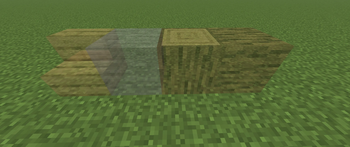
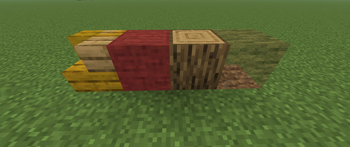
Ghost rendering — your schematic as a translucent hologram, placed anywhere you like
Move, rotate and flip it to line it up exactly where you want
Layer mode — step through the build one layer at a time
Materials list — what you still need, updated as you build
Printer — places blocks for you using the same interaction a real right-click sends
Selection tool — mark out a region and save your own builds
Formats — reads and writes .schem, .litematic and legacy .schematic, plus its own .archetect, the only one that keeps entities: paintings, item frames, armor stands, cushons and leads
Chunk cache — remembers chunks you've visited, so you can save a region bigger than what's loaded around you
In-game help — /archetect help for every command and keybind
Getting Started
Install Fabric API alongside Archetect
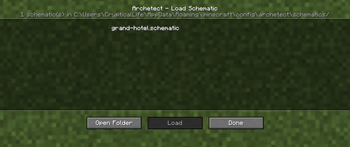
Drop schematic files into config/archetect/schematics/
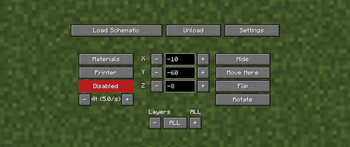
Press - to open the Control screen, then hit Load Schematic to pick a file
Move, rotate and flip it from that same screen, and press \ to start the Printer once it's lined up
Requirements
Minecraft 26.1.2, 26.2, 26.3
Java 25
Fabric Loader and Fabric API
Notes
The Printer performs real placement actions and does not bypass server validation, but server rules about automated building still apply. Check with admins before using it somewhere you don't own. (USE AT YOUR OWN RISK, IF THE SERVER CONCIDERS PRINTER AS CHEATING YOU CAN GET BANNED). Archetect is not liable for banned accounts if you dont follow the servers rules.
Archetect is an independent project written from scratch against current Fabric and Minecraft APIs. It is not affiliated with Schematica or Litematica, and shares no code with either.
# 3.0+26.3
Updated to Minecraft 26.3. The headline feature is a persistent chunk cache, so a build bigger than your render distance can be captured across as many play sessions as it takes. The Printer was also rebuilt to stop slowing down on large schematics.
## Added
- **Persistent chunk cache.** Archetect remembers block data for chunks after they unload instead of forgetting them the moment they leave render distance. Walk a build over as many sessions as you need, then save once the file is complete.
- **A real "unspecified" state**, distinct from air, for any position never actually captured. Without it an uncovered gap would have to be saved as air, and printing that file would start clearing blocks to match a hole that was never there. Unspecified positions are skipped by the Printer and left alone on paste.
- **Per-server budgets**, 1000 MB by default, with oldest-first eviction and a one-per-session warning as a server nears its limit.
- **Manage Chunk Cache screen** listing every server with cached data and its usage, with per-server budget control and a clear option.
- **Per-chunk coverage colouring** on the selection outline — green where covered, red where not, using outline weight and fill rather than colour alone so it reads for colourblind players.
- **Cached-chunk map** with full per-column detail, matching vanilla map fidelity, a controls legend, and middle-click drag to pan.
- **Temporary selection cache.** Wilderness inside an armed selection is held in memory while the selection tool is on, so it counts as covered without being written to disk.
- `/archetect cache coverage` — how much of the current selection is cached, the age spread, and a sample of what's still missing.
## Changed
- Updated to Minecraft 26.3, Fabric API 0.160.7+26.3, Fabric Loader 0.19.5, Java 25.
- Save formats reordered to `.archetect`, `.schem`, `.litematic`, `.schematic`, with `.archetect` the default.
- Version scheme is now `3.0+26.3` rather than `3.0-26.3`.
## Fixed
**Printer**
- Place Adjacent Only could freeze the Printer outright. The rule now compares each neighbouring block against the schematic and the world rather than against a bounding box and a cached set, so a build with an air margin at the bottom, or a layer above the first, can start.
- Large builds were far slower than small ones. The scan now walks the blocks within your reach instead of the whole schematic, so placement rate no longer falls away as the schematic grows.
- Removed a full-volume rescan that ran every few seconds and on every anchor nudge, rotate, flip and layer keypress — a visible hitch on large builds.
- Blocks with no placeable item (water, lava, fire, kelp, portals, piston heads) permanently consumed the per-tick placement budget, slowing any schematic containing a pool, moat or farm channel.
- Fixed a crash when the anchor was placed outside the world's build height.
- Fixed candidate positions that could be skipped indefinitely and never attempted.
- The Printer kept placing blocks while the game was paused in singleplayer. It now stops with the world, and the placement delay freezes rather than draining, so unpausing doesn't fire immediately.
- A Printer session never ended when leaving a world, and the Printer stayed armed into the next one — skipping the confirmation arming is meant to require. Leaving a world now ends the session and disarms.
- Lily pad and frogspawn placements weren't recorded as built.
**Rendering and memory**
- Fixed a native memory leak in ghost rebuilding.
- Fixed unbounded overlay memory growth under `/tick freeze`.
- The ghost now re-validates after a settings change instead of keeping stale build status.
- Ghost entities are released on disconnect.
- Blocks incorrectly showed as see-through in All Layers mode where the next layer should have hidden them.
- Rebuilt the ghost renderer's GPU draw path against 26.3's reworked rendering API, with no change to its design. One runtime-only regression came with it: 26.3 renders solid and translucent terrain in one continuous pass, so the hook ghost blocks drew from fired while that pass was still open. Rehooked to fire after the engine's main pass closes.
**Interface**
- Text and buttons now stay on screen and within bounds on the Save, Load, cache, settings and materials screens — including long file paths, the coverage list, and the Done buttons that could be pushed off-screen.
- The schematic name box shows a "Name File" hint while empty.
## Known limitation
A server's cache budget can't be set below 1 MB. A cache whose real content never reaches 1 MB won't show eviction no matter how far you drag the budget down — it's already under the floor, not broken.
Fixed: ghost blocks in All Layers mode showing missing/see-through top and bottom faces when another schematic block was stacked directly above or below them.
Archetect — Changelog (26.1.2 → 26.2, v2.0)
Fixed banners not using their real in-game model
Fixed shulker boxes not using their real in-game model
Fixed conduits not using their real in-game model
Fixed waiting-for-alignment highlight showing a wood-textured cube instead of the real block
Fixed waiting-for-alignment highlight color being hard to distinguish (now blue)
Fixed stairs never placing in the top half
Fixed Printer getting stuck in Creative when the hotbar was full
Fixed Printer refusing to place blocks (leaves, etc.) over a false "wrong facing" report
Fixed a door's second half showing no highlight at all
Fixed the waiting/wrong-block/wrong-state highlights flickering as the camera moved
Fixed a highlight fix that broke north-facing surfaces entirely (replaced with a proper depth-bias fix)
Fixed the wrong-facing highlight being yellow instead of orange
Fixed the blue waiting highlight disappearing entirely after the above fix
Fixed a correctly-placed conduit showing a false "wrong state" highlight
Fixed the conduit ghost rendering as an oversized broken cube
# Changelog
All notable changes to Archetect are documented here.
## [1.1] - 2026-07-29
### Added
- Settings menu (Ghost Opacity, Render Distance, Z-Fight Offset, Highlight Air, Place Adjacent Only), persisted to `config/archetect/settings.json`.
- Live build validation for the ghost preview: a position disappears once the real world matches it exactly, turns **red** if a different block occupies it, and turns **yellow** if the right block is there but facing the wrong way (or otherwise has the wrong blockstate).
- "Open Folder" button on the Load Schematic screen, opening `config/archetect/schematics/` in the system file browser.
- `/archetect help [page]` - a paginated, colored in-chat reference for keybinds, the selection tool, and the schematics folder. The same content is written to `config/archetect/README.md` on every launch, so the two can never drift apart.
- Best-effort recovery when loading legacy `.schematic` files that contain a block id with an unmapped metadata value (previously a hard failure): substitutes that block id's lowest known variant and logs the substitution, so one stray byte no longer blocks loading an otherwise-valid file.
- Custom mod icon.
### Changed
- All of Archetect's files now live under one root, `config/archetect/` (`schematics/`, `logs/`, `settings.json`, `README.md`), instead of being scattered across the game directory.
- Keybinds reordered in the Controls screen into a logical sequence (Open Schematic Controls, Open Load Panel, Open Save Panel, Open Settings, Move Here, Toggle Layer Mode, Layer Up, Layer Down, Toggle Printer), with sensible non-conflicting defaults instead of everything being unbound.
- Layers stepper row redesigned: label on the left, current value right-aligned on the same row.
- Consolidated duplicated GUI code (the coordinate-row builder shared by the Control and Save screens, and the centered/right-aligned label helpers used across three screens) into a single shared class.
### Fixed
- The selection tool's overlay (and its click handlers) were incorrectly active by default from the moment the game launched, rather than only after the Save screen had been opened at least once.
### Performance
- Rewrote ghost rendering to use persistent GPU buffers instead of rebuilding vertex data every frame - a schematic with millions of blocks on screen now holds full framerate instead of crashing or dropping to single-digit FPS.
- Added frustum and render-distance culling for the ghost preview.
- Schematic builds are now asynchronous and incremental (off-thread bucketing, budgeted per-frame GPU upload) - loading or rotating a very large schematic no longer freezes the game.
- Added hidden-face culling between adjacent ghost blocks - roughly 13-20x faster full rebuilds and dramatically higher steady-state FPS for dense structures.
### Removed
- Unused debug/example code left over from early development (a loader-verification harness, a raw NBT dumper, and two unmodified Fabric-template mixin stubs).
### Verified
- Compatibility with Sodium 0.9.1 and Iris 1.11.2 confirmed: clean launch, no mixin conflicts, correct ghost rendering, no measurable FPS regression.