

Aran's Discord Presence
A lightweight, customizable Discord Rich Presence mod for Fabric. Features a built-in settings menu to toggle Server IP, biomes, dimensions, and player heads on your Discord status.
Автор: buildaran3141обновлён 9 мар. 2026 г.
Механики игрыОбщениеУтилиты
Описание
VERY IMPORTANT! ⚠️
IF YOU HAVE MODRINTH OPEN, IT WILL OVERRIDE THE DISCORD ACTIVITY! REMEMBER TO CLOSE MODRINTH AFTER MINECRAFT LAUNCHED!
Intro!
This mod gives you multiple options to have your minecraft activity on your discord account!
Configs 🔨
- 3D Player Heads: Shows your actual skin as a 3D head icon.
- Server Icons: Automatically shows the icon of the server you're playing on.
- Singleplayer Info: Shows your biome and gamemode when playing alone.
- Settings Menu: Change everything in-game via the Options > Discord RPC button.
Activity 📷
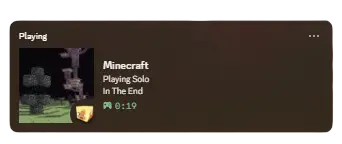
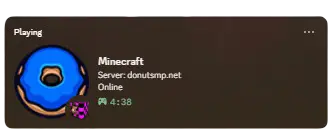
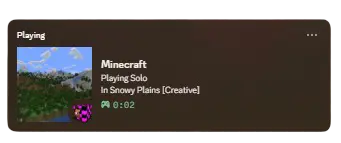
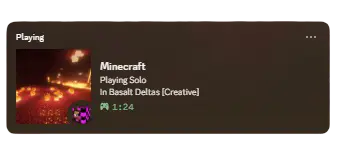
Utlites!
MUST HAVE
⚠️ You need to have installed fabric and the discord app.
Most RPC mods are "all or nothing." They either show everything (including private server IPs) or they look very basic. Aran's Discord Presence is designed to be lightweight so it doesn't drop your FPS, while giving you the best-looking profile status possible.
Последние версии
Все версии →beta
Aran's Discord Presence - v1.0 🎊
1.09 мар. 2026 г.314Minecraft: 1.21.11fabric
Что нового
# Version 1.0.0 - The Beginning 🥳
This is the first official release of **Aran's Discord Presence**! This mod was built to give you a clean, modern Discord status without the clutter of older RPC mods.
**What's New:**
- 3D Isometric Player Heads: Your Discord status now features a high-quality 3D render of your actual skin instead of a flat 2D face.
- Smart Server Icons: When you join a multiplayer server, the mod automatically fetches that server's icon for your profile.
- All-New Settings Menu: Added a custom config screen accessible directly from the Options > Discord RPC button.
- Privacy Toggles: You can now instantly toggle the following info on or off:
- Server IP/Address
- Current Biome
- Dimension Name
- Current Gamemode
- Responsive Layout: Fixed the settings menu so it looks perfect on all GUI scales (1x through 4x).
- Optimized Performance: Set the update interval to 5 seconds to keep your game running smoothly with zero FPS drops.
**Installation:**
**Make sure you have the Fabric API installed!**
_Note: You must have the Discord desktop app running for the status to update._