

AR1 Text Formatting
Mod that allows using standard Minecraft formatting codes "§" in absolutely every text field: chat, books, signs, item names, GUIs, action bars, titles, and more.
Автор: ar1emq1,4 тыс.5обновлён 19 сент. 2026 г.
Утилиты
Описание
AR1 Text Formatting is a lightweight Fabric mod that allows using standard Minecraft formatting codes (§) in absolutely every text field: chat, books, signs, item names, GUIs, action bars, titles, and more. No more restrictions – customize your text freely.
Key Features
- Full
§Support – the formatting symbol is allowed in all text inputs. - All Standard Colors & Styles – 16 colors (
§0–§f), bold (§l), italic (§o), obfuscated (§k), and reset (§r). - Works Everywhere – chat, books (writable and written), signs, anvil‑renamed items, GUI elements, action bar, titles, and even some modded screens that use vanilla rendering.
- No Configuration Needed – install and it works instantly.
- Lightweight & Fast – does not affect game performance.
How to Use
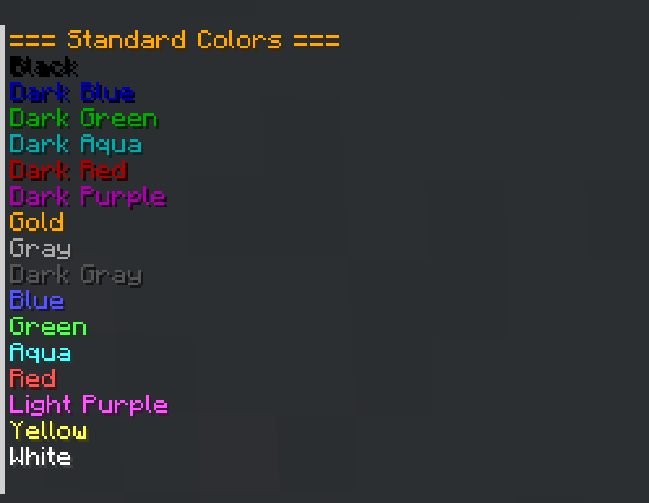
In any text field, type the § symbol followed by a formatting code. Below are all available codes and examples:
Colors
| Code | Name |
|---|---|
§0 | Black |
§1 | Dark Blue |
§2 | Dark Green |
§3 | Dark Aqua |
§4 | Dark Red |
§5 | Dark Purple |
§6 | Gold |
§7 | Gray |
§8 | Dark Gray |
§9 | Blue |
§a | Green |
§b | Aqua |
§c | Red |
§d | Light Purple |
§e | Yellow |
§f | White |
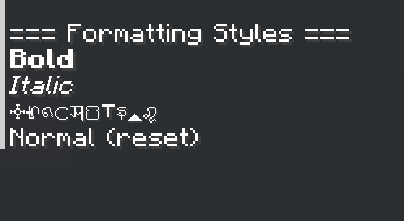
Formatting Styles
| Code | Style | Example | Result |
|---|---|---|---|
§l | Bold | §lBold text | Bold text |
§o | Italic | §oItalic text | Italic text |
§k | Obfuscated | §kRandom | s4@jun#"sf$&f0@/ |
§r | Reset | §rNormal | Resets all styles |
Combining Colors and Styles
You can combine multiple codes:
| Example | Result |
|---|---|
§c§lRed Bold | Red bold text |
§9§oBlue Italic | Blue italic text |
§6§l§oGold Bold Italic | Gold bold italic text |
§a§kGreen Obfuscated | Green s4@jun#"sf$&f0@/ text |
§rReset §6after | Normal text then gold |
Notes
- The
§symbol may require a special key combination (e.g., Alt+6 or Ctrl+Shift+6) depending on your keyboard layout. This mod removes the built‑in restriction, so once typed, it will work. - However, I recommend simply copying this symbol to the clipboard and pinning it there, that way, it will be easier to use. To open the clipboard in Windows, press [WIN+V].
Developed by ar1emq – a member of THEMIDNIGHTCORE
Галерея
Последние версии
Все версии →release
AR1 Text Formatting 1.0.3
1.0.319 сент. 2026 г.734Minecraft: 26.3fabric
Что нового
# **AR1 Text Formatting 1.0.3**
### Full support for version 26.3
> All functionality remains unchanged compared to version 1.0.3
release
AR1 Text Formatting 1.0.2
1.0.213 авг. 2026 г.572Minecraft: 26.2fabric
Что нового
# AR1 Text Formatting v1.0.2
## Localization Fixes
> - Added localization for the mod menu description.
> - Fixed mod description.
---
Developed by **ar1emq** – a member of **THEMIDNIGHTCORE**
release
AR1 Text Formatting 1.0.1
1.0.111 авг. 2026 г.18Minecraft: 26.2fabric
Что нового
### AR1 Text Formatting v1.0.1
> ### Full support for version 26.2
> All functionality remains unchanged compared to version 1.0.0.
release
AR1 Text Formatting 1.0.0
1.0.04 авг. 2026 г.109Minecraft: 26.1.2fabric
Что нового
# AR1 Text Formatting 1.0.0
### First release!
**AR1 Text Formatting** is a lightweight Fabric mod that allows using standard Minecraft formatting codes (`§`) in absolutely every text field: chat, books, signs, item names, GUIs, action bars, titles, and more. No more restrictions – customize your text freely.
---
## Key Features
> - **Full `§` Support** – the formatting symbol is allowed in all text inputs.
> - **All Standard Colors & Styles** – 16 colors (`§0`–`§f`), bold (`§l`), italic (`§o`), obfuscated (`§k`), and reset (`§r`).
> - **Works Everywhere** – chat, books (writable and written), signs, anvil‑renamed items, GUI elements, action bar, titles, and even some modded screens that use vanilla rendering.
> - **No Configuration Needed** – install and it works instantly.
> - **Lightweight & Fast** – does not affect game performance.
---
## How to Use
In any text field, type the `§` symbol followed by a formatting code. Below are all available codes and examples:
| Code | Name |
|------|---------------|
| `§0` | Black |
| `§1` | Dark Blue |
| `§2` | Dark Green |
| `§3` | Dark Aqua |
| `§4` | Dark Red |
| `§5` | Dark Purple |
| `§6` | Gold |
| `§7` | Gray |
| `§8` | Dark Gray |
| `§9` | Blue |
| `§a` | Green |
| `§b` | Aqua |
| `§c` | Red |
| `§d` | Light Purple |
| `§e` | Yellow |
| `§f` | White |
### Formatting Styles
| Code | Style |
|------|--------------|
| `§l` | Bold |
| `§o` | Italic |
| `§k` | Obfuscated |
| `§r` | Reset |
### Formatting Styles
| Code | Style | Example | Result |
|------|--------------|-----------------|-----------------------|
| `§l` | Bold | `§lBold text` | **Bold text** |
| `§o` | Italic | `§oItalic text` | *Italic text* |
| `§k` | Obfuscated | `§kRandom` | s4@jun#"sf$&f0@/ |
| `§r` | Reset | `§rNormal` | Resets all styles |
### Combining Colors and Styles
You can combine multiple codes:
| Example | Result |
|----------------------------------|-----------------------------------------|
| `§c§lRed Bold` | **Red bold text** |
| `§9§oBlue Italic` | *Blue italic text* |
| `§6§l§oGold Bold Italic` | ***Gold bold italic text*** |
| `§a§kGreen Obfuscated` | Green s4@jun#"sf$&f0@/ text |
| `§rReset §6after` | Normal text then gold |
2. Enjoy colorful and stylish text anywhere!
> **Note:** The `§` symbol may require a special key combination (e.g., Alt+6 or Ctrl+Shift+6) depending on your keyboard layout. This mod removes the built‑in restriction, so once typed, it will work.
> - **However, I recommend simply copying this symbol to the clipboard and pinning it there, that way, it will be easier to use.
> To open the clipboard in Windows, press [WIN+V].**
---
**Developed by ar1emq – a member of THEMIDNIGHTCORE**