

AR1 Coords Copy
A simple mod that copies the player's current coordinates to the clipboard when a key [leftAlt] is pressed.
Автор: ar1emq2480обновлён 19 сент. 2026 г.
Утилиты
Описание
AR1 Coords Copy is a lightweight Fabric mod that copies your current coordinates to the system clipboard with a single keypress. No more manual typing — just press a key and paste the coordinates directly into commands, chat, or external tools.
Key Features
- Instant Copy – press the assigned key (default: Left Alt) to copy your exact block coordinates.
- Clean Format – copies coordinates as whole numbers in the format
X Y Z, perfect for command blocks and/tpcommands. - Customizable Key – rebind the key in the Minecraft controls settings.
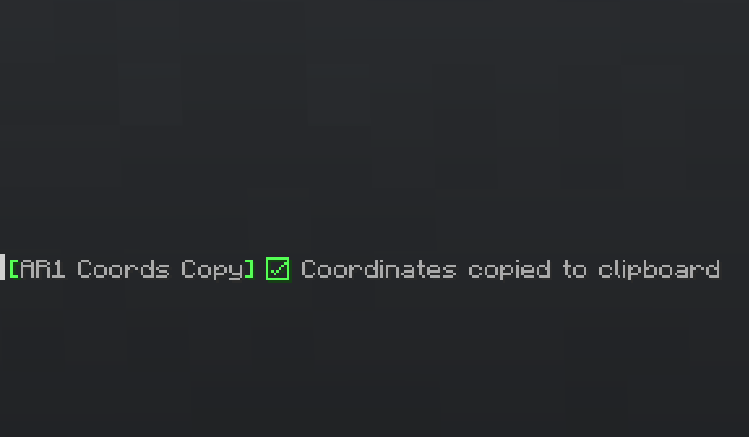
- Visual Feedback – displays a confirmation message (configurable to show in chat or action bar).
- Toggle Messages – enable or disable the notification entirely.
- Lightweight – no extra overhead, just what you need.
- ModMenu Integration – full configuration screen via ModMenu and Cloth Config.
Configuration
All settings are available through the graphical interface (ModMenu) or manually in config/ar1-coords-copy.toml:
- Show Chat Messages – enable/disable the notification after copying.
- Display Mode – choose between Chat or Action Bar (above the hotbar) for the message.
Controls
- Default Key: Left Alt [LeftALT]
- You can change the key binding in Minecraft's Controls settings under the category "Keybinds".
Localization
The mod is fully translated into 14 languages:
| Country | Language | Name | Code |
|---|---|---|---|
| 🇷🇺 | Russian | Русский | ru_ru |
| 🇺🇸 | English | English | en_us |
| 🇩🇪 | German | Deutsch | de_de |
| 🇪🇸 | Spanish | Español | es_es |
| 🇵🇱 | Polish | Polski | pl_pl |
| 🇺🇦 | Ukrainian | Українська | uk_ua |
| 🇧🇾 | Belarusian | Беларуская | be_by |
| 🇫🇷 | French | Français | fr_fr |
| 🇧🇬 | Bulgarian | Български | bg_bg |
| 🇨🇿 | Czech | Čeština | cs_cz |
| 🇯🇵 | Japanese | 日本語 | ja_jp |
| 🇰🇿 | Kazakh | Қазақша | kk_kz |
| 🇮🇳 | Hindi | हिन्दी | hi_in |
| 🇨🇳 | Chinese (Simplified) | 简体中文 | zh_cn |
Developed by ar1emq – a member of THEMIDNIGHTCORE
Галерея
Последние версии
Все версии →release
AR1 Coords Copy 1.0.3
1.0.319 сент. 2026 г.147Minecraft: 26.3fabric
Что нового
# **AR1 Coords Copy v1.0.3**
### Full support for version 26.3
> All functionality remains unchanged compared to version 1.0.2
release
AR1 Coords Copy 1.0.2
1.0.230 авг. 2026 г.48Minecraft: 26.2fabric
Что нового
**AR1 Coords Copy v1.0.2**
## Localization Fixes
- Added localization for the mod menu description.
- Fixed mod description.
- Fixed mod version in settings.
---
Developed by **ar1emq** – a member of **THEMIDNIGHTCORE**
release
AR1 Coords Copy 1.0.1
1.0.111 авг. 2026 г.15Minecraft: 26.2fabric
Что нового
AR1 Coords Copy v1.0.1
> ### Full support for version 26.2
> All functionality remains unchanged compared to version 1.0.0.
release
AR1 Coords Copy 1.0.0
1.0.04 авг. 2026 г.34Minecraft: 26.1.2fabric
Что нового
**AR1 Coords Copy v1.0.0** is a lightweight Fabric mod that copies your current coordinates to the system clipboard with a single keypress. No more manual typing — just press a key and paste the coordinates directly into commands, chat, or external tools. First release.
---
## Key Features
- **Instant Copy** – press the assigned key (default: Left Alt) to copy your exact block coordinates.
- **Clean Format** – copies coordinates as whole numbers in the format `X Y Z`, perfect for command blocks and `/tp` commands.
- **Customizable Key** – rebind the key in the Minecraft controls settings.
- **Visual Feedback** – displays a confirmation message (configurable to show in chat or action bar).
- **Toggle Messages** – enable or disable the notification entirely.
- **Lightweight** – no extra overhead, just what you need.
- **ModMenu Integration** – full configuration screen via ModMenu and Cloth Config.
---
## Configuration
All settings are available through the graphical interface (ModMenu) or manually in `config/ar1-coords-copy.toml`:
- **Show Chat Messages** – enable/disable the notification after copying.
- **Display Mode** – choose between **Chat** or **Action Bar** (above the hotbar) for the message.
---
## Controls
- **Default Key**: Left Alt [LeftALT]
- You can change the key binding in Minecraft's Controls settings under the category "Keybinds".
---
## Localization
The mod is fully translated into 14 languages:
| Country | Language | Name | Code |
|---------|----------|------|------|
| 🇷🇺 | Russian | Русский | `ru_ru` |
| 🇺🇸 | English | English | `en_us` |
| 🇩🇪 | German | Deutsch | `de_de` |
| 🇪🇸 | Spanish | Español | `es_es` |
| 🇵🇱 | Polish | Polski | `pl_pl` |
| 🇺🇦 | Ukrainian | Українська | `uk_ua` |
| 🇧🇾 | Belarusian | Беларуская | `be_by` |
| 🇫🇷 | French | Français | `fr_fr` |
| 🇧🇬 | Bulgarian | Български | `bg_bg` |
| 🇨🇿 | Czech | Čeština | `cs_cz` |
| 🇯🇵 | Japanese | 日本語 | `ja_jp` |
| 🇰🇿 | Kazakh | Қазақша | `kk_kz` |
| 🇮🇳 | Hindi | हिन्दी | `hi_in` |
| 🇨🇳 | Chinese (Simplified) | 简体中文 | `zh_cn` |
---
Developed by **ar1emq** – a member of **THEMIDNIGHTCORE**