

ApexShader
Advanced ray tracing(PT+SSRT,GI) shader with dynamic weather and post processing effects.Translation 高级光影包,支持光线追踪(PT路径追踪+SSGI)、动态天气、多层云和高级后期处理效果
Описание
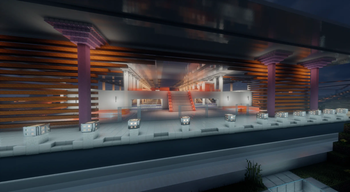
ApexshaderPT构建,面向 Minecraft 1.20.1 + Iris 1.7.6+(使用iris1.7.6以下的版本可能导致切换维度时游戏崩溃)。 包含 PBR 材质(针对EXTREAL材质包的特别优化)、路径追踪(PT)全局光照与备用完整SSRT+GI、多层体积云、整光影高度自定义化、晚霞染色与彩色透光阴影等内容
交流群QQ:1126929716
-环境要求 Minecraft 1.20.1+ Iris 1.7.6+ 特别的 支持iris fabric 1.20.0 +mc26.3 (iris vulkan版本) PBR 效果需要带 LabPBR 贴图的资源包;原版材质下只会看到普通反射 建议分配 8 GB 以上内存;默认关闭路径追踪,开 HIGH 以上预设启用PT路径追踪 -安装 把 zip 放进 shaderpacks,游戏里按 "O" 选择本包。 首次进入时配置文件显示“自定义”,菜单里的“配置文件”可以切换 11 个预设,右键点击切换
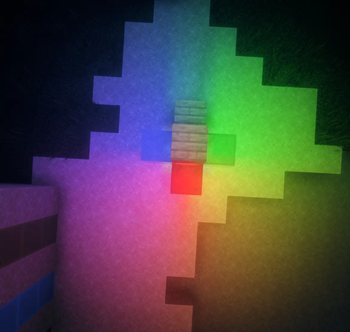
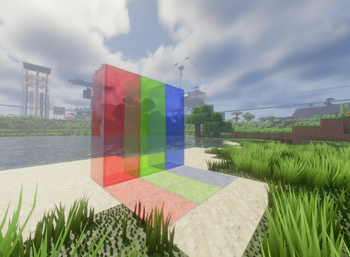
-功能 -材质与光照 PBR 材质:LabPBR 的 albedo / normal / specular / emission 解码,为EXTREAL材质特化处理 金属与磨砂金属:金属 F0 处理与磨砂微表面,APEX_METAL_SATIN 默认 0.65,可在菜单调整 完整的屏幕空间反射(SSR):地形、水面、玻璃等 路径追踪 GI:PT 缓存 + LPV + SSGI;默认关闭,HIGH 及以上预设开启 环境光遮蔽、次表面散射、自发光材质、彩色透光阴影 -天空、天气与云 多层体积云:积云、高层云、卷云、积雨云,覆盖度/密度/高度独立可调。 晚霞染色:APEX_SUNSET_MODE(每日随机 / 金色 / 粉色)、APEX_SUNSET_STRENGTH 每日天气、月相月光、月亮纹理与法线、极光、彩虹、雨雪 体积雾默认关闭,菜单可启用(PT噪点与性能下降警告); -后期与水体 TAA 时域升采样、HDR 色调映射、色彩分级、泛光、景深、Purkinje 效应 水波物理模组支持、波浪模拟、折射/色散、Snell 窗口、水下吸收、彩色玻璃透光 Distant Horizons / Voxy 的 LOD 集成、过度绘制预防 -实验性功能 掉落物 / 实体彩色光源(LPV_ENTITY_LIGHTS):默认关闭,菜单里标“实验性”。 开启后掉落物和实体会照亮周围,但光源随实体渲染状态收集,可见性变化时明暗会跳变。 着色器草(SHADER_GRASS_SETTING):默认关闭,使用原生草渲染。
-预设 11 档:POTATO、VERY_LOW、LOW、MEDIUM、ALTERNATE_MEDIUM、HIGH、ALTERNATE_HIGH、 HIGH_GRASS、ALTERNATE_HIGH_GRASS、VERY_HIGH、ULTRA。 预设参数沿用 ApexShaderPT 0.0.1 的档位,云采样在高档位下调
English ApexshaderPT build, for Minecraft 1.20.1 + Iris 1.7.6+ (using versions below Iris 1.7.6 may cause the game to crash when switching dimensions). Includes PBR materials (specially optimized for the EXTREAL resource pack), path-traced (PT) global illumination with a fallback full SSRT+GI, multi-layer volumetric clouds, highly customizable shader settings, sunset tinting, and colored translucent shadows, among other features.
Requirements Minecraft 1.20.1+ Iris 1.7.6+ PBR effects require a resource pack with LabPBR textures; with vanilla textures you will only see regular reflections 8 GB+ of RAM is recommended; path tracing is disabled by default, and enabling the HIGH preset or above enables PT path tracing
Installation Put the zip into shaderpacks, then press "O" in-game to select this pack. On first launch the config file shows "Custom"; the "Profiles" option in the menu lets you switch between 11 presets, right-click to switch
Features
Materials and Lighting PBR materials: LabPBR albedo / normal / specular / emission decoding, specially tuned for EXTREAL materials Metals and satin metals: metal F0 handling and satin microsurface, APEX_METAL_SATIN defaults to 0.65, adjustable in the menu Full screen-space reflections (SSR): terrain, water, glass, etc. Path-traced GI: PT cache + LPV + SSGI; disabled by default, enabled on HIGH preset and above Ambient occlusion, subsurface scattering, emissive materials, colored translucent shadows
Sky, Weather, and Clouds Multi-layer volumetric clouds: cumulus, altostratus, cirrus, cumulonimbus, with independently adjustable coverage/density/height. Sunset tinting: APEX_SUNSET_MODE (daily random / golden / pink), APEX_SUNSET_STRENGTH Daily weather, moon phases and moonlight, moon texture and normals, auroras, rainbows, rain and snow Volumetric fog is disabled by default; can be enabled in the menu (warning: PT noise and performance drop);
Post-processing and Water TAA temporal upscaling, HDR tone mapping, color grading, bloom, depth of field, Purkinje effect Water wave physics mod support, wave simulation, refraction/dispersion, Snell window, underwater absorption, colored glass translucency Distant Horizons / Voxy LOD integration, overdraw prevention
Experimental Features Dropped-item / entity colored lights (LPV_ENTITY_LIGHTS): disabled by default, marked "Experimental" in the menu. When enabled, dropped items and entities illuminate their surroundings, but light sources are collected based on entity render state, so brightness will pop when visibility changes. Shader grass (SHADER_GRASS_SETTING): disabled by default, uses vanilla grass rendering.
Presets 11 tiers: POTATO, VERY_LOW, LOW, MEDIUM, ALTERNATE_MEDIUM, HIGH, ALTERNATE_HIGH, HIGH_GRASS, ALTERNATE_HIGH_GRASS, VERY_HIGH, ULTRA. Preset parameters follow the tiers from ApexShaderPT 0.0.1, with cloud sampling reduced at higher tiers
Галерея

Последние версии
Все версии →Версии не найдены.